Introduction
If you’re a freelancer aiming to streamline your business performance tracking, our Freelance Business KPI Scorecard in Google Sheets is the perfect solution. This ready-to-use Scorecard template helps you visualize vital Key Performance Indicators (KPIs) effortlessly, enabling data-driven decisions to grow your freelance business.Freelance Business KPI Scorecard in Google Sheets
Key Features of Freelance Business KPI Scorecard in Google Sheets
- User-Friendly Interface: Easy to navigate with intuitive dropdown menus.
- Comprehensive KPI Overview: Monitor actual vs target values and track monthly and yearly progress.
- Visual Indicators: Color-coded statuses highlight performance at a glance.
- Multiple Worksheets: Dedicated tabs for scorecards, KPI trends, data input, and KPI definitions.
- Dynamic Trends & Charts: Visualize KPIs over time to identify patterns quickly.
- Customizable: Modify KPIs and data input as your freelance business evolves.
Dashboard Pages Explanation
1. Scorecard Sheet
 Freelance Business KPI Scorecard in Google Sheets
Click to Buy Freelance Business KPI Scorecard in Google Sheets
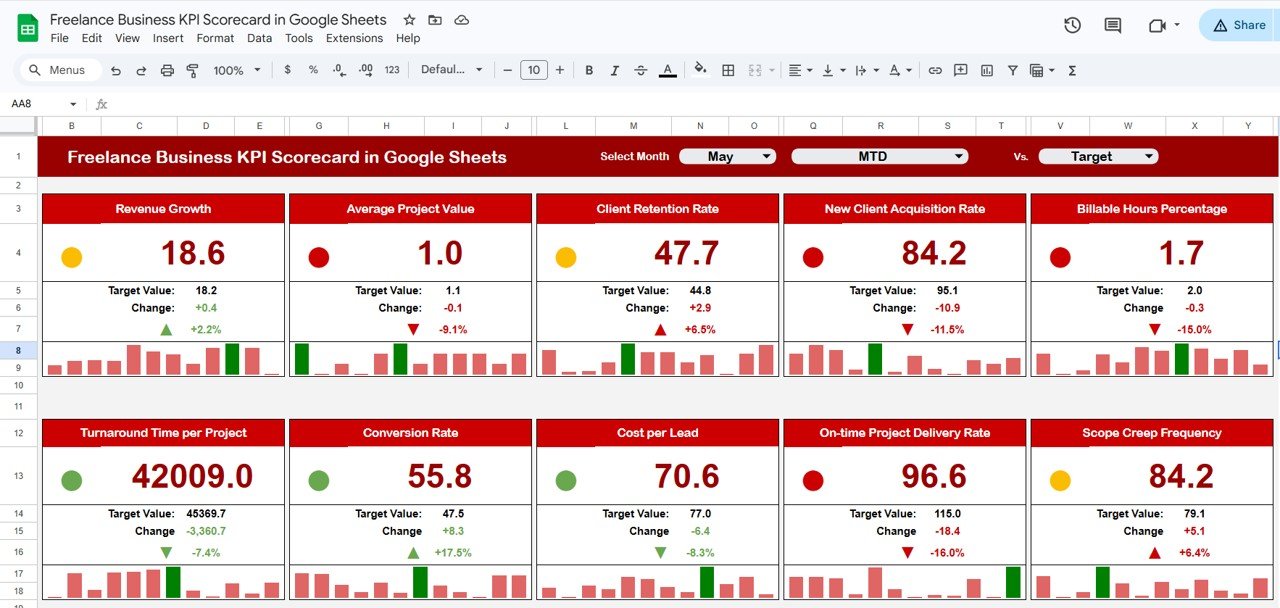
This is the main interface where you monitor your KPIs’ performance. Key features include:
- Dropdown Menus: Seamlessly select the month, MTD (Month-to-Date), or YTD (Year-to-Date) to analyze performance within different time frames.
- Actual vs Target Values: Quickly compare actual KPI values against your goals to understand where you stand.
- Visual Indicators: Color-coded highlights that instantly communicate if KPIs are on track, need attention, or falling behind.
- Comprehensive KPI Overview: View all critical KPIs together, along with MTD and YTD comparisons for a complete picture.
2. KPI Trend Sheet
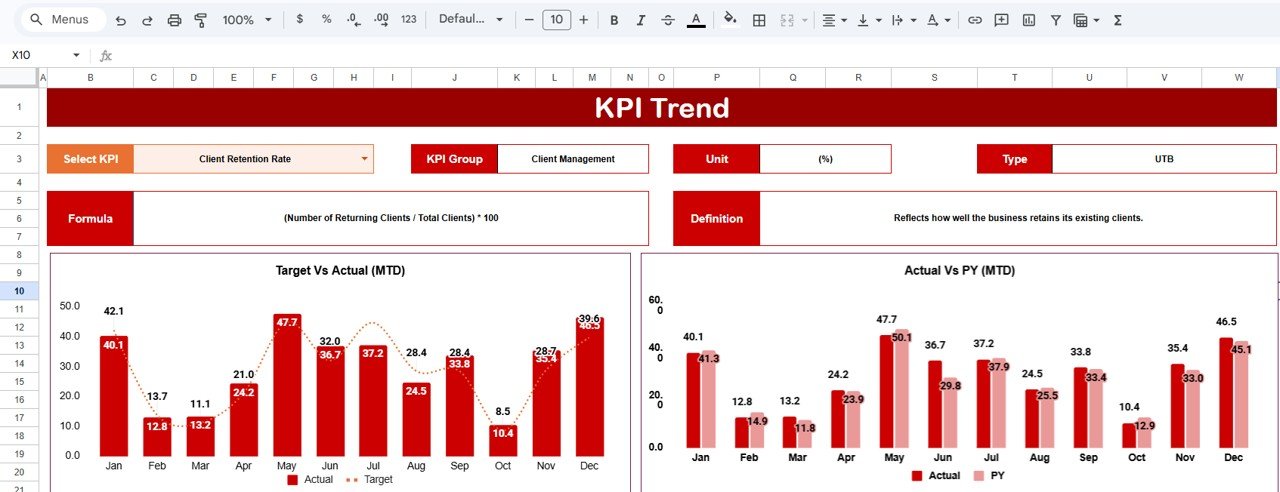 KPI Trend Sheet
Click to Buy Freelance Business KPI Scorecard in Google Sheets
This sheet helps you dig deeper into individual KPIs. Features include:
- KPI Selection Dropdown: Choose any KPI from range C3 to analyze.
- Detailed KPI Information: See KPI Group, unit of measurement, KPI type (whether lower is better or upper is better), the KPI formula, and its definition.
- Trend Visuals: Examine MTD and YTD trend charts showing Actual, Target, and Previous Year (PY) data to identify performance patterns over time.
3. Input Data Sheet
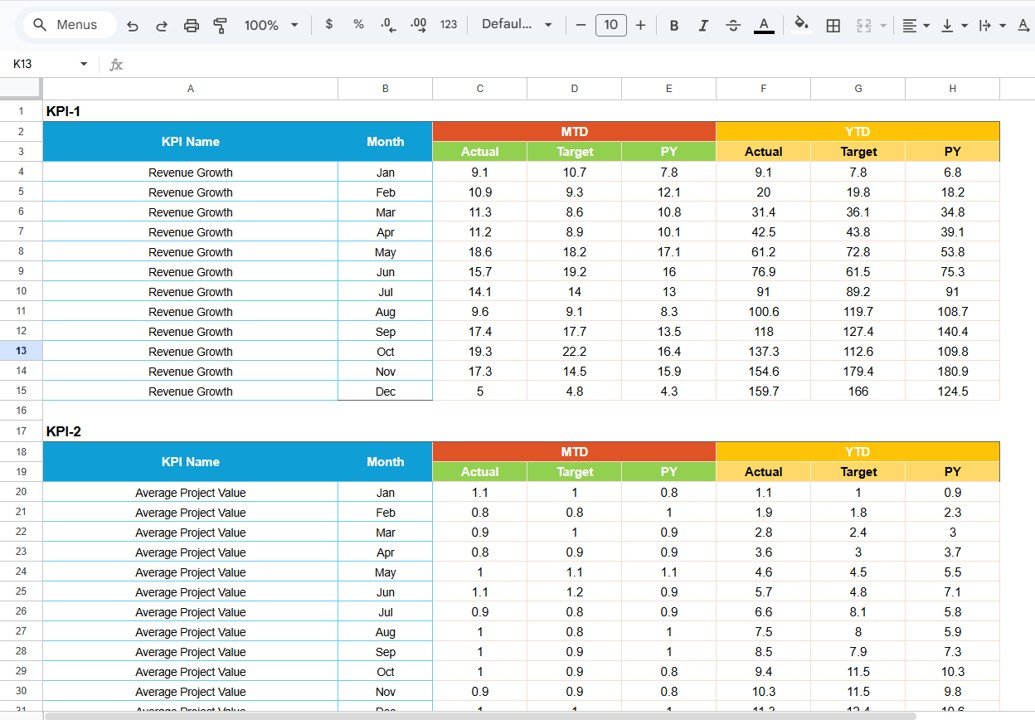 Input Data Sheet
Click to Buy Freelance Business KPI Scorecard in Google Sheets
This tab is your data entry hub. Here you:
- Record Actual Values: Input the actual KPI results you have achieved.
- Set Targets: Define your goals for each KPI to assess progress.
- Easily Update Data: Keeping your scorecard accurate and up-to-date is simple as you record new results.
4. KPI Definition Sheet Tab
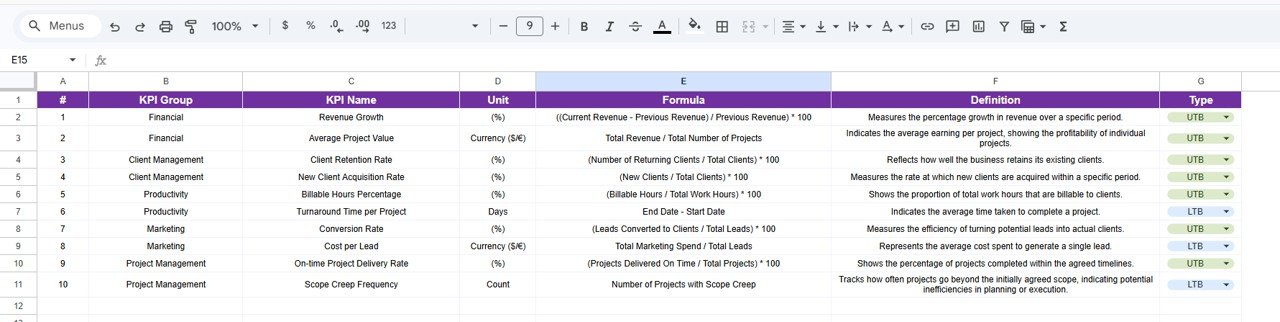 KPI Definition sheet tab
Click to Buy Freelance Business KPI Scorecard in Google Sheets
Use this worksheet to define your KPIs clearly. Enter the KPI Name, Group, Unit, Formula, and a detailed KPI Definition that explains what the metric measures and why it matters.
Advantages of Freelance Business KPI Scorecard in Google Sheets
- Cost-Effective: Avoid expensive software; Google Sheets is free and accessible anywhere.
- Collaboration-Friendly: Share and update your KPI data with clients or partners in real-time.
- Customizable & Scalable: Tailor KPIs and dashboards to fit your evolving freelance business needs.
- Visualization: Instant visual feedback helps you make quick decisions and plan improvements.
- Transparency: Clear KPI definitions and trends foster trust with clients and team members.
Opportunities for Improvement
Click to Buy Freelance Business KPI Scorecard in Google Sheets
- Automation Integration: Link your scorecard with invoicing or project management tools using Google Sheets add-ons for automatic data feeding.
- Mobile Optimization: Enhance mobile usability for checking KPIs on the go.
- Advanced Analytics: Incorporate predictive KPI analytics to forecast future performance.
- Notifications: Set up email or Slack alerts for KPI status changes.
Best Practices
- Regular Updates: Enter data consistently to keep your scorecard relevant and accurate.
- Focus on Relevant KPIs: Don’t overload your dashboard; prioritize metrics that drive decisions.
- Review Trends: Use the KPI Trend sheet regularly to identify growth opportunities and issues early.
- Use Visual Cues: Leverage conditional formatting and charts to simplify your data interpretation.
- Document Definitions: Maintain clear KPI definitions to avoid confusion and maintain consistency.
FAQs
Click to Buy Freelance Business KPI Scorecard in Google Sheets
Can I customize the KPIs in this Google Sheets template?
Yes, the template is fully customizable. You can add, remove, or modify KPIs to suit your freelance business objectives.
Is this template compatible with Microsoft Excel?
While the template is designed specifically for Google Sheets, you can open it in Excel. However, some features like dropdowns and charts may require adjustment.
How do I share the scorecard with my clients or team?
You can share the Google Sheets file via the share option within Google Drive, allowing different access levels such as view or edit.
Can I automate data entry in this scorecard?
You can use Google Sheets add-ons or Google Apps Script to automate data imports if your freelance platforms support data export APIs.
Conclusion
Click to Buy Freelance Business KPI Scorecard in Google Sheets
The Freelance Business KPI Scorecard in Google Sheets is an essential tool that empowers freelancers to monitor, analyze, and optimize their business performance efficiently. With an easy-to-navigate interface, dynamic visualizations, and comprehensive KPI tracking, this template supports smarter decision-making and sustainable growth. Ready to elevate your freelance business? Download and start using this scorecard today!
For more detailed tutorials and demos, visit our YouTube channel: Youtube.com/@NextGenTemplates.
For more about data analysis tools, you can check out Microsoft’s resource page on Excel dashboards here.
Click to Buy Freelance Business KPI Scorecard in Google Sheets