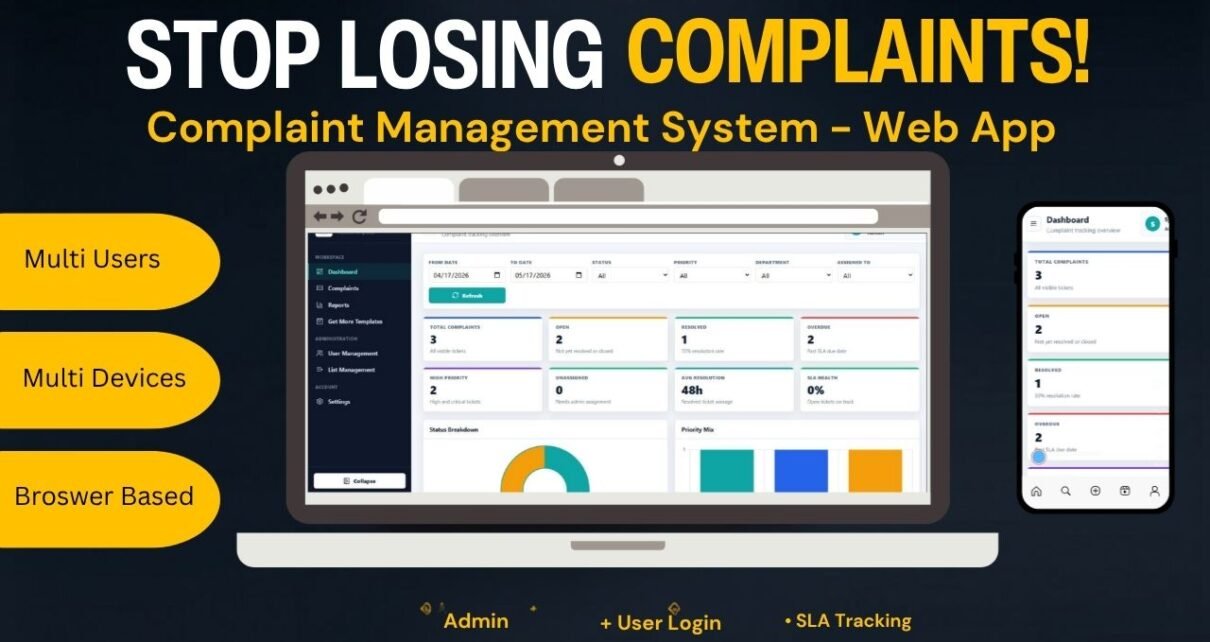
The Complaint Management System Web App Template gives customer service and operations teams a structured way to capture, assign, monitor, and report complaints without building a system from scratch. Instead of handling issues across email threads, chat messages, and scattered spreadsheets, this template organizes the full workflow into 10 connected pages, 8 KPI cards, 2 core dashboard charts, 4 trend and activity views, 8 report blocks, and a complaint tracker with 12 operational fields.
For teams that need role-based access, SLA visibility, user management, list management, and ticket-level reporting, the Complaint Management System Web App sits between a simple spreadsheet tracker and a full paid helpdesk platform. It is especially useful when you want a practical internal system with a one-time template cost, editable fields, and clear visibility into open, overdue, high-priority, and resolved complaints.
Click here to purchase the Complaint Management System: Web App Version on NextGenTemplates.
🚀 Try the Live Demo Before You Buy
We have deployed this web app in our own Google account so you can test every page, every role, and every feature — with real sample complaints, SLA tracking, and admin and user separation — before purchasing. No signup, no email required.
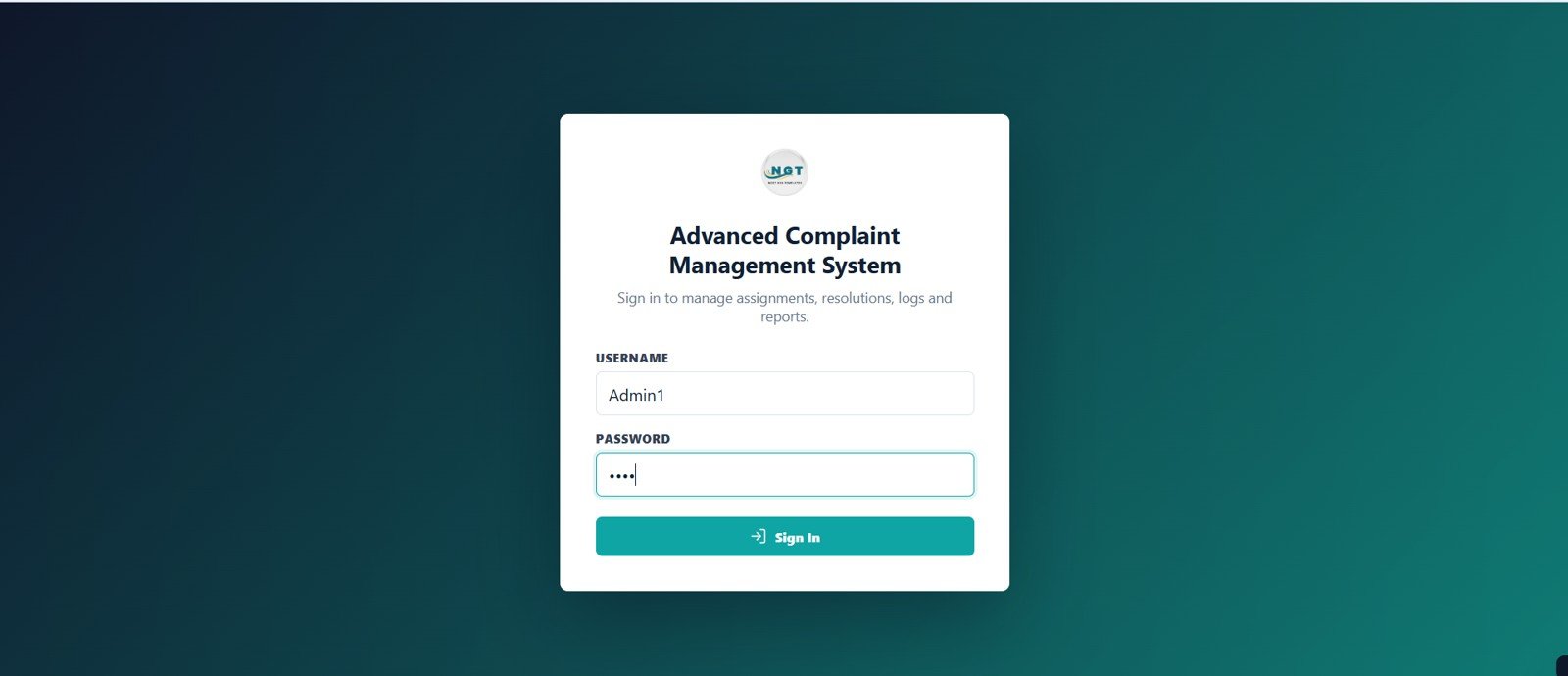
🔑 Test Login Credentials
Sign in as Admin1 to access the full admin workspace (dashboard, tracker, reports, user management, list management, settings) or as User1 to see the limited non-admin view that only shows complaints assigned to that user.
💡 What you get after purchase: The full source code (Code.gs + Index.html) plus a step-by-step deployment guide so you can deploy your own private instance in your own Google account in under 15 minutes.
Key Features of Complaint Management System: Web App Version
- Secure login page: users enter a username and password, then the correct admin or user dashboard opens based on role.
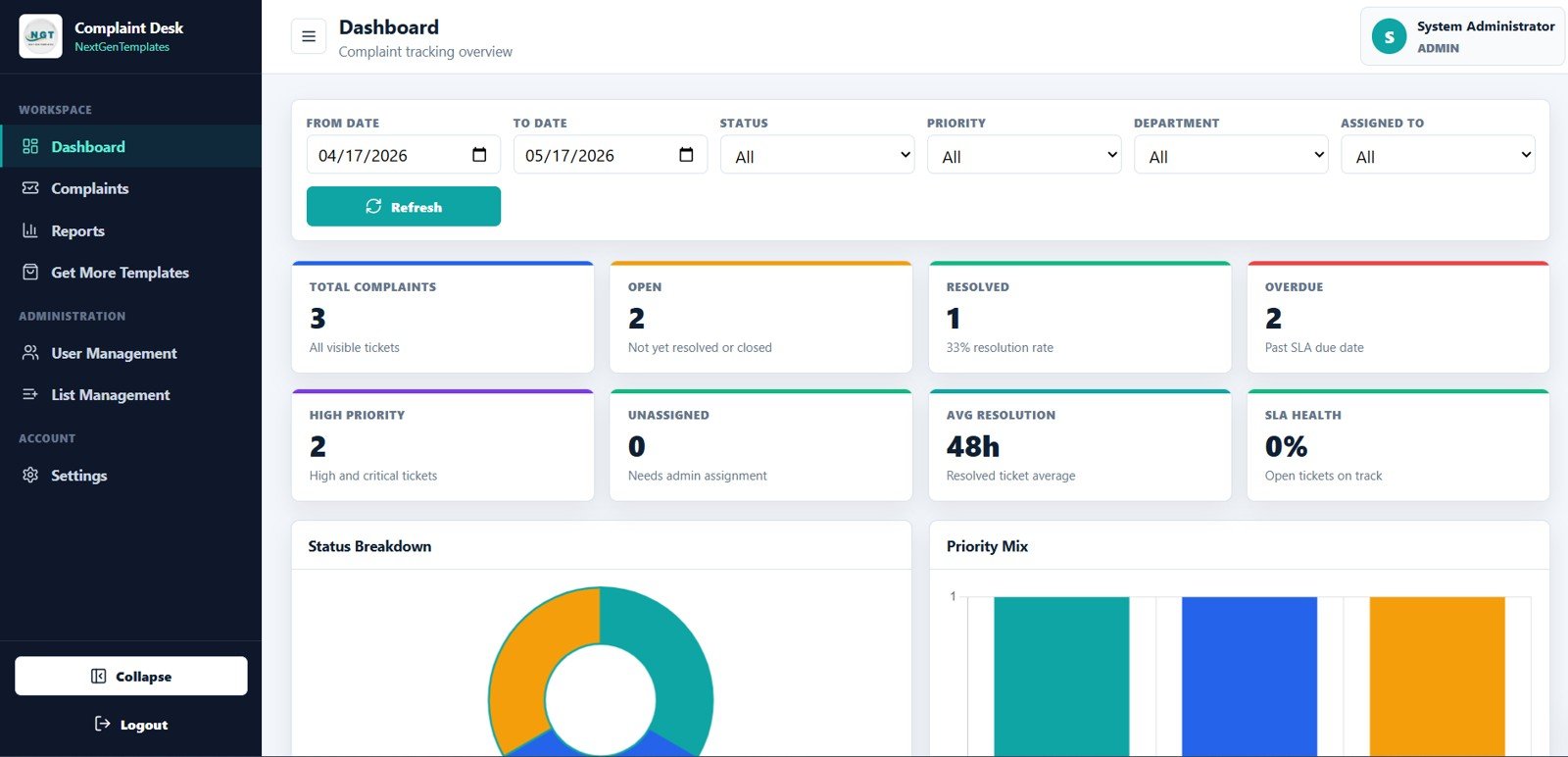
- Admin dashboard overview: managers see Total Complaints, Open, Resolved, Overdue, High Priority, Unassigned, Avg Resolution, and SLA Health.
- Status and priority charts: Complaint Count by Status shows workload by workflow stage, while Complaint Count by Priority highlights the tickets that need faster attention.
- Trends and activity analysis: monitor complaint volume, department count, recently updated tickets, and SLA attention tickets.
- Operational complaint tracker: create, search, filter, export, and update complaint records from a single table.
- Reports page: analyze complaint performance by period, status, priority, assignee, and ticket.
- User and list management: admins manage accounts, departments, dropdown values, priorities, statuses, locations, and active flags.
- Settings page: update password, business name, default SLA hours, tagline, logo URL, company email, phone, and address.
Dashboard Pages Explanation
The web app includes ten practical pages. Each one is designed for a different part of the complaint handling process, from sign in to management reporting.
1. Login Page
This is the secure sign in page of the Advanced Complaint Management System. Each user enters their username and password, and the system loads either the admin or the user workspace based on the assigned role.
2. Admin Dashboard Overview
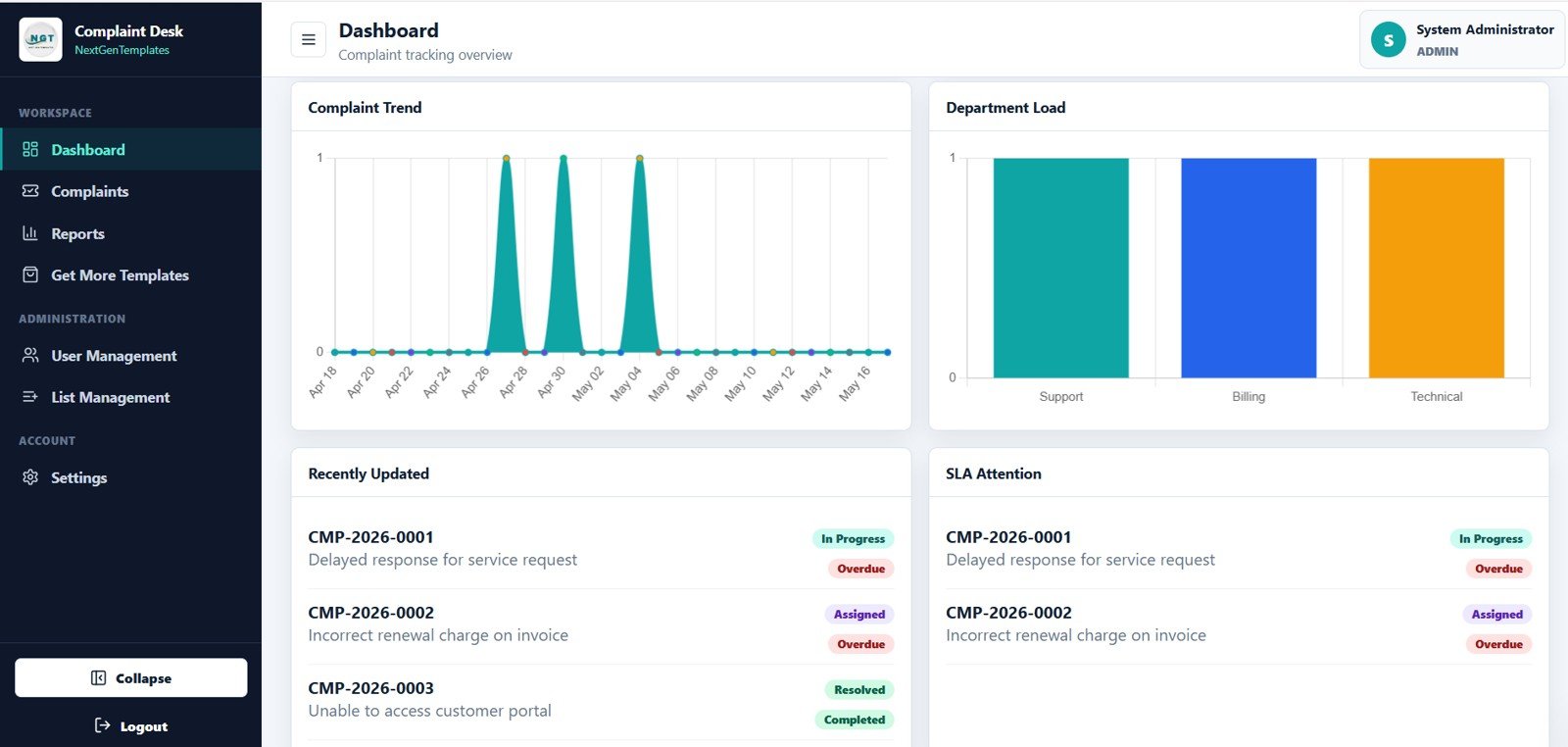
The Admin Dashboard Overview gives managers the high-level health of the complaint queue. The KPI cards show Total Complaints, Open, Resolved, Overdue, High Priority, Unassigned, Avg Resolution, and SLA Health.
Complaint Count by Status shows how tickets are distributed across open, resolved, overdue, and other workflow stages. This helps a manager see whether the complaint queue is improving or getting stuck.
Complaint Count by Priority shows how many complaints are high, medium, or low priority. This view helps teams focus first on issues that can damage customer experience or SLA performance.
3. Trends and Activity
This page adds time and activity analysis. Complaint Volume by Date shows workload movement, Complaint Count by Department highlights where issues originate, Recently Updated Complaints by Ticket shows current activity, and SLA Attention Complaints by Ticket helps teams act before deadlines are missed.
4. Complaint Tracker
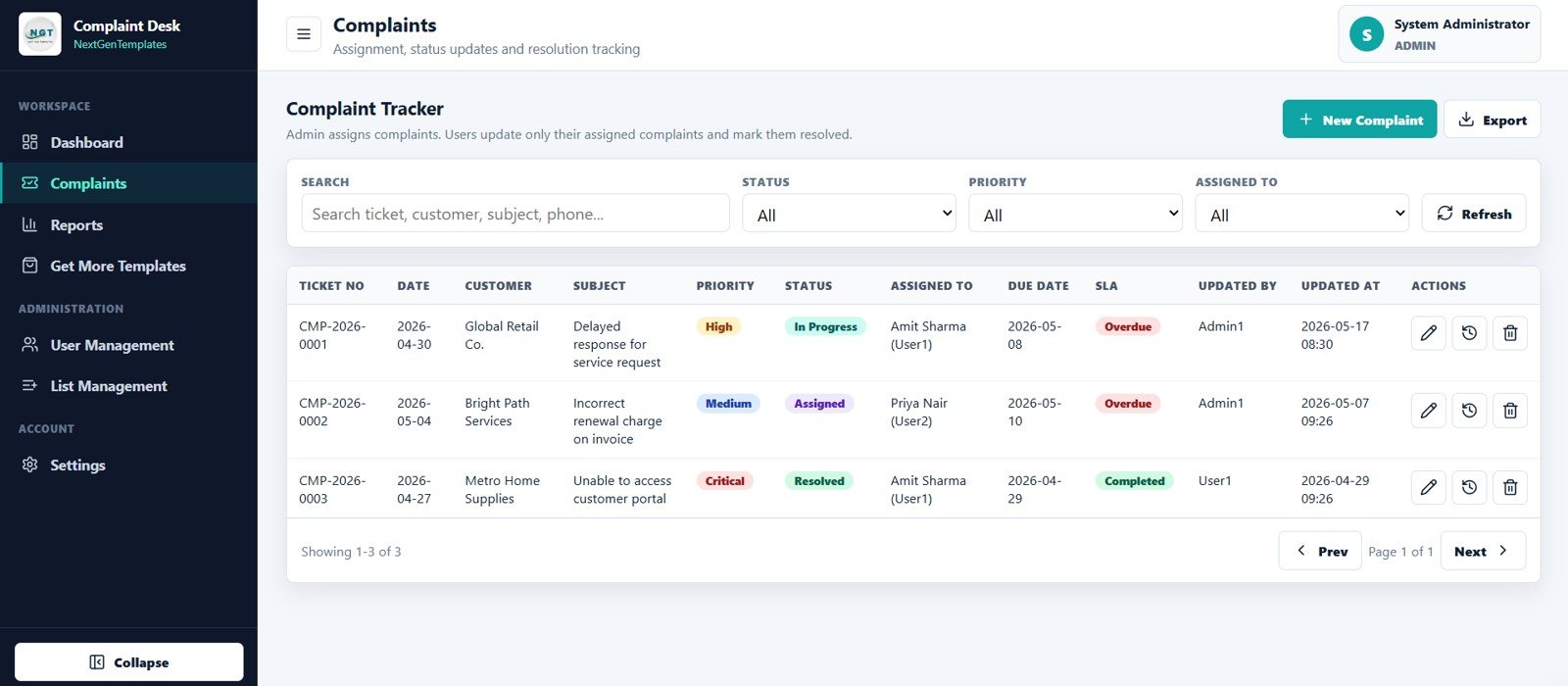
The Complaint Tracker is where admins create new complaints and users update assigned complaints. The table can be filtered, searched, and exported, and each row includes Ticket No, Date, Customer, Subject, Priority, Status, Assigned To, Due Date, SLA, Updated By, Updated At, and Actions.
5. Reports
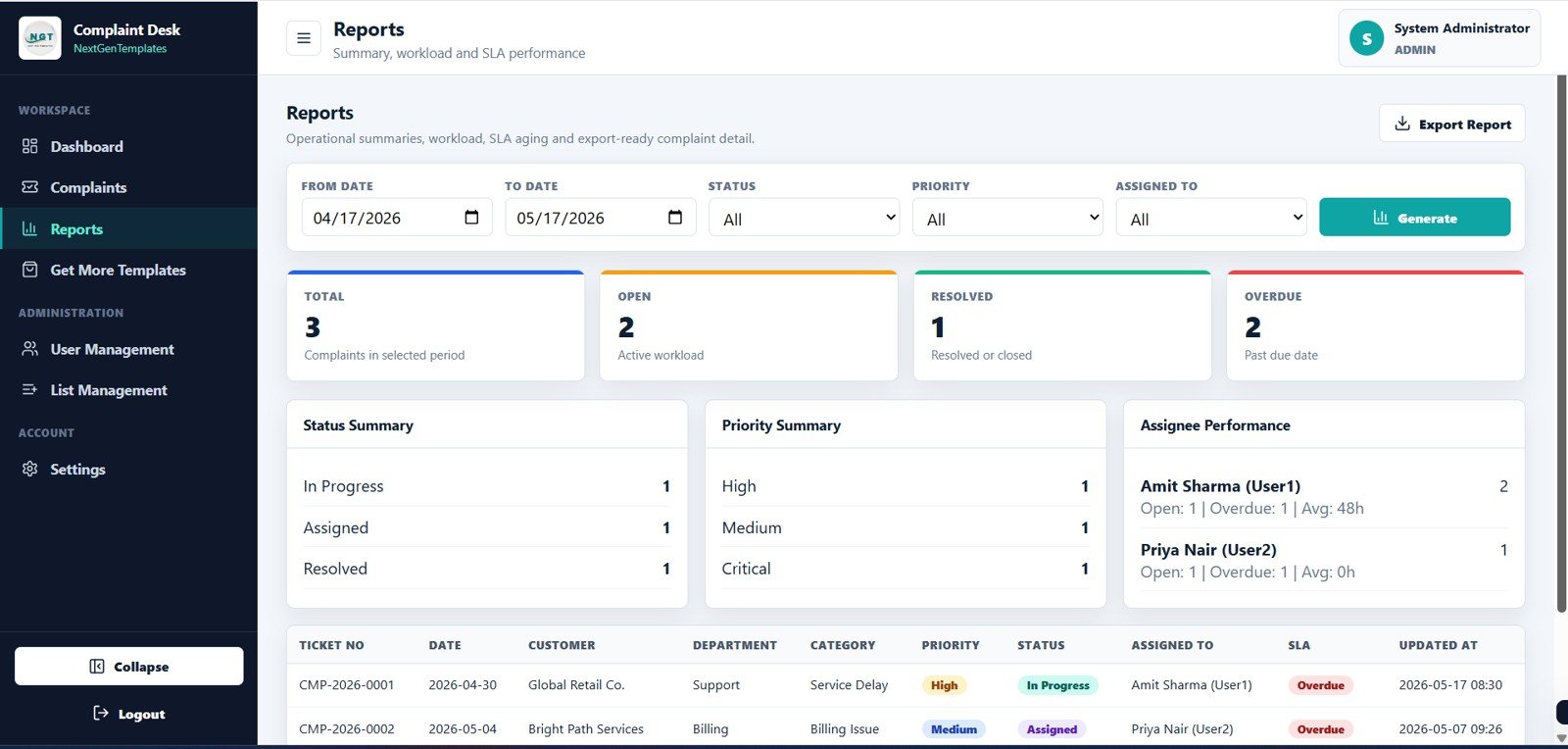
The Reports page summarizes Total Complaints by Period, Open Complaints by Period, Resolved Complaints by Period, Overdue Complaints by Period, Complaint Count by Status, Complaint Count by Priority, Open and Overdue and Avg Resolution by Assignee, and Complaint Detail by Ticket.
Purchase the Complaint Management System: Web App Version on NextGenTemplates.
6. Get More Templates
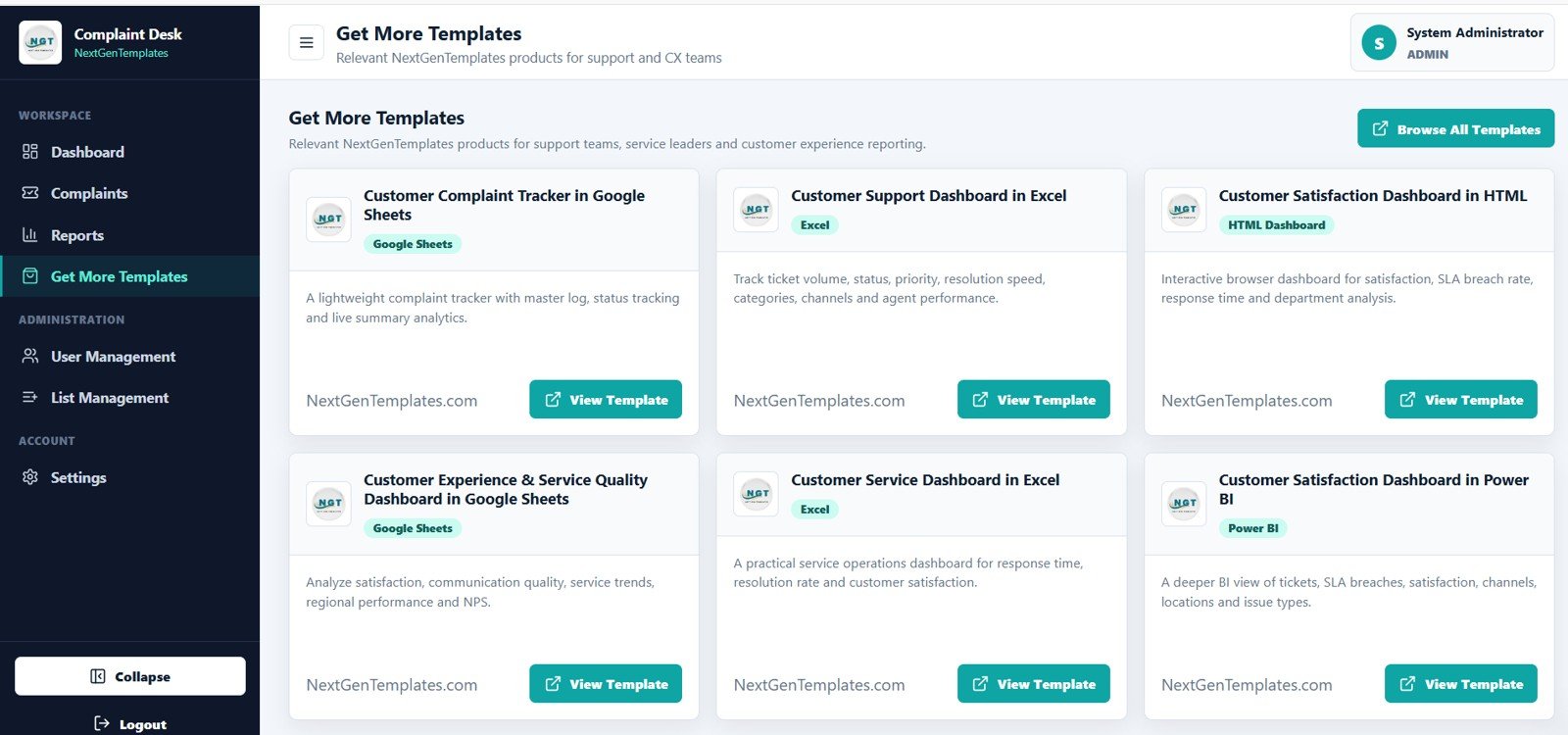
This page showcases related NextGenTemplates products for support, customer experience, and service leaders. It gives users a convenient way to discover other dashboards, trackers, and web app templates in one click.
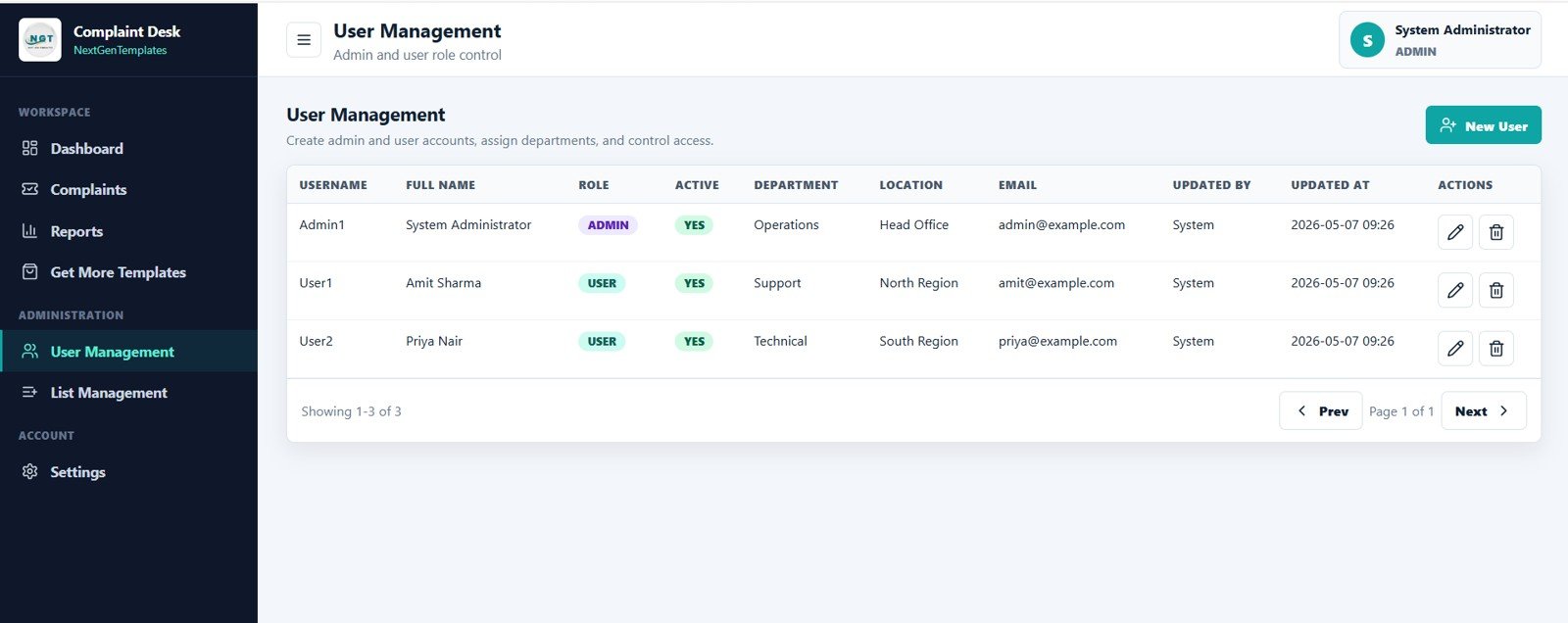
7. User Management
User Management lets admins create admin and user accounts, assign departments, and control access. Each row shows Username, Full Name, Role, Active, Department, Location, Email, Updated By, Updated At, and Actions.
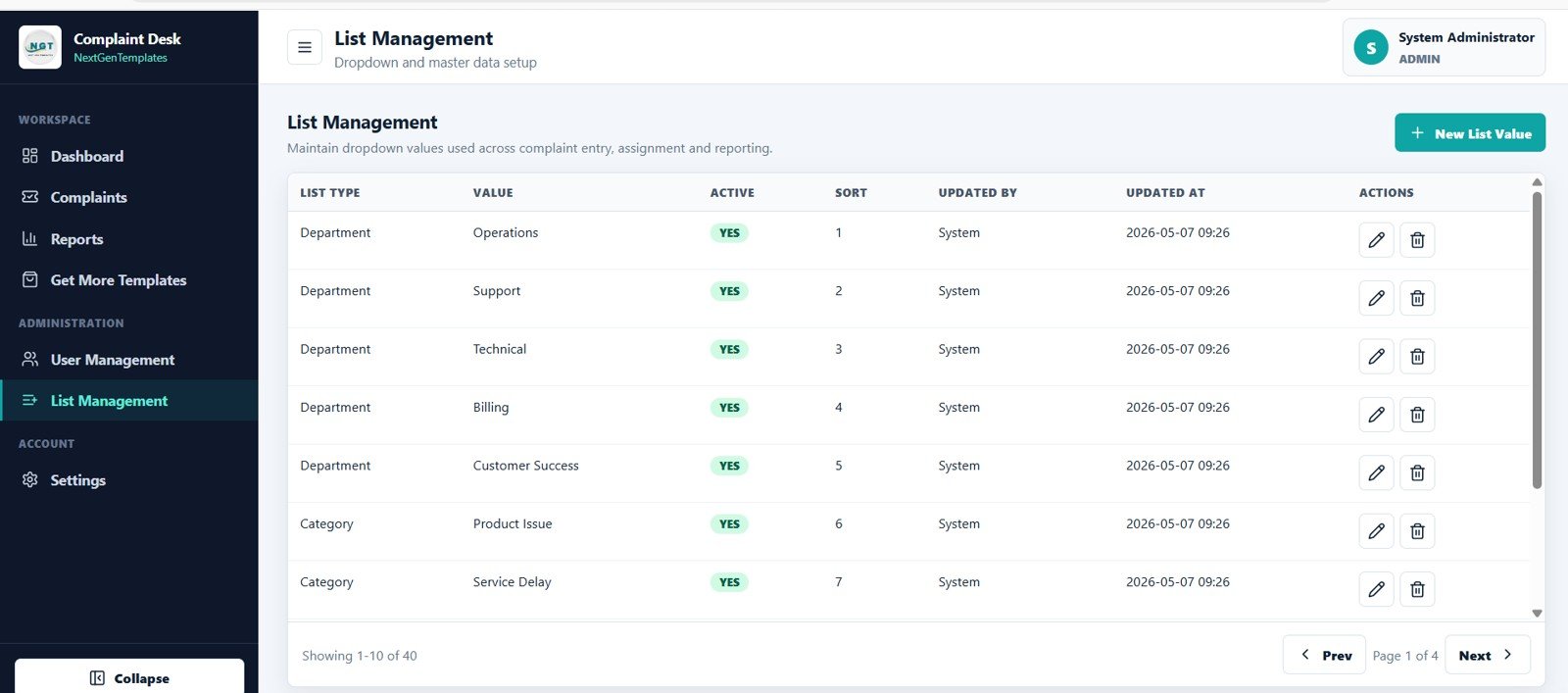
8. List Management
List Management is where admins maintain dropdown values used across complaint entry, assignment, and reporting. It covers list types such as Department, Category, Priority, and Status, with columns for List Type, Value, Active, Sort, Updated By, Updated At, and Actions.
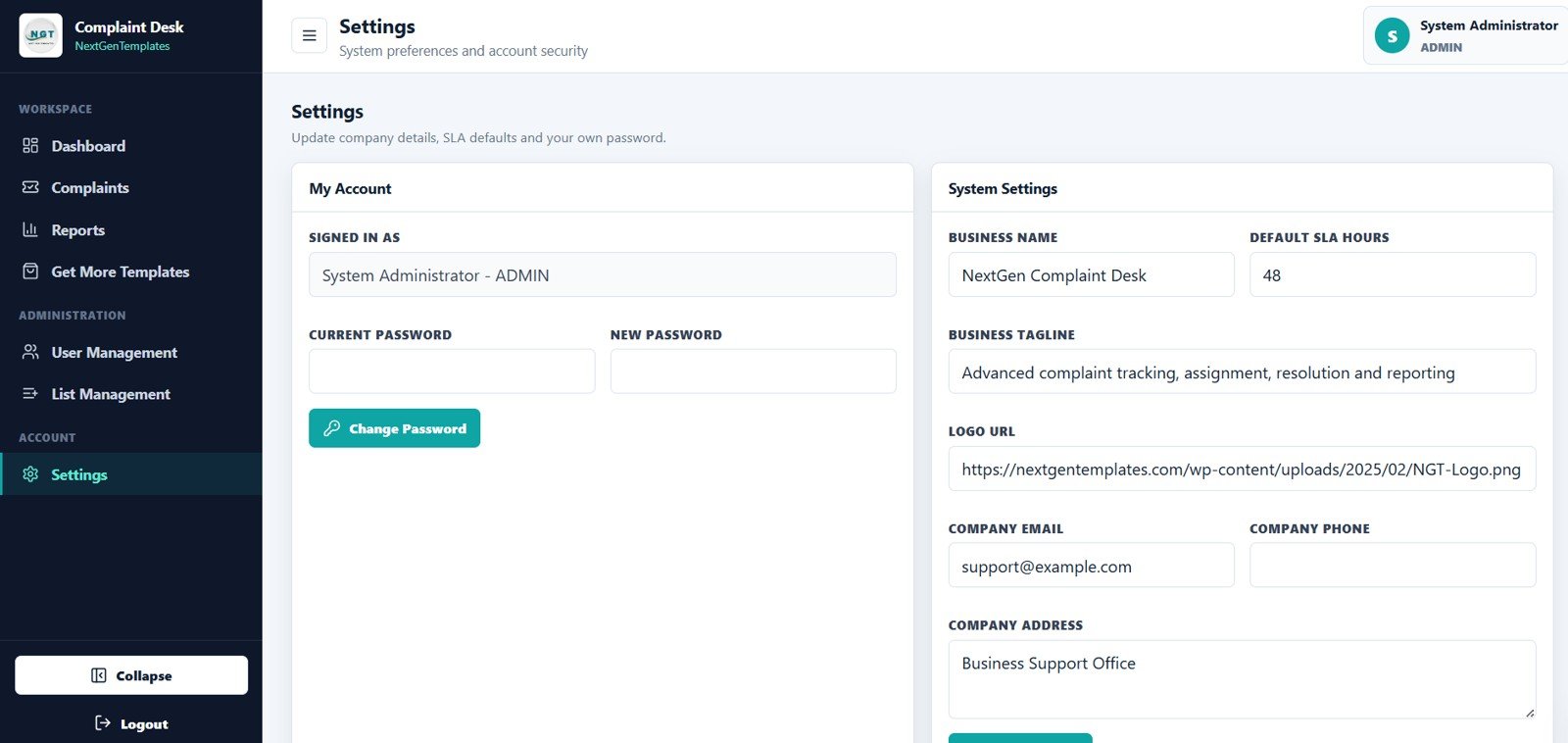
9. Settings
The Settings page includes My Account password controls for each user and admin-level system settings. Admins can update Business Name, Default SLA Hours, Business Tagline, Logo URL, Company Email, Company Phone, and Company Address.
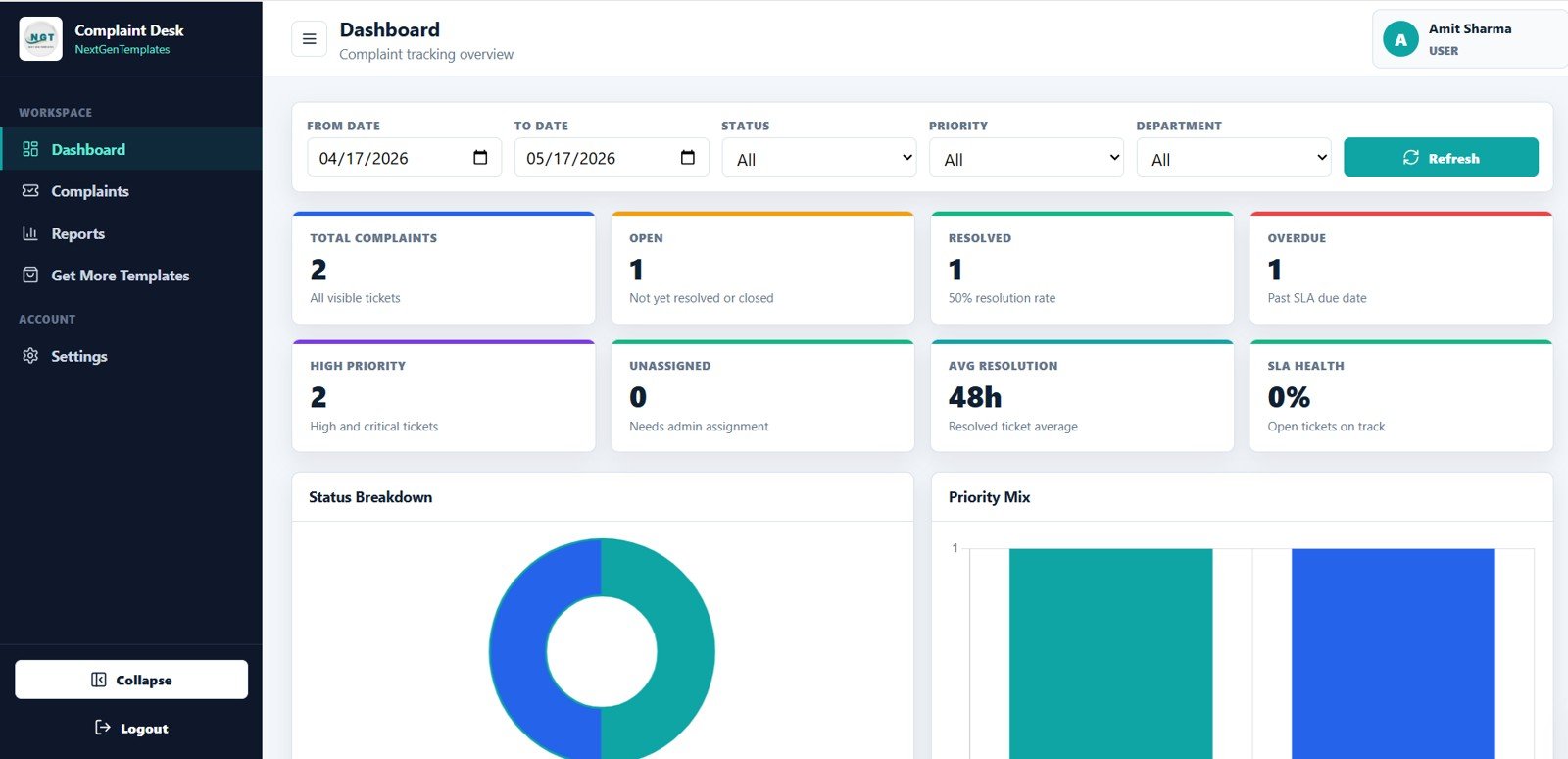
10. User Role Dashboard View
This is the limited dashboard that a non-admin user sees after sign in. The administration menu is hidden, but the user still gets KPIs and visuals for assigned complaints, including Total Complaints, Open, Resolved, Overdue, High Priority, Unassigned, Avg Resolution, SLA Health, Complaint Count by Status, and Complaint Count by Priority.
Complaint Management System: Web App Version vs. Spreadsheet Tracker vs. Paid CRM/SaaS – Feature Comparison
| Feature | This Web App Template | Spreadsheet Complaint Tracker | Paid CRM or Helpdesk SaaS |
|---|---|---|---|
| Cost | One-time template price | Low cost, more manual controls | Monthly seat or agent fees |
| Platform | Browser-based web app workflow | Excel or Google Sheets file | Vendor-hosted cloud software |
| Setup time | Deploy and customize from included files | Fast but mostly manual | Longer setup and admin configuration |
| Real-time team collaboration | Designed for admin and user roles | Depends on file-sharing setup | Usually included |
| Mobile access | Usable from a browser | Limited for heavy editing | Usually included |
| Customizable fields | Departments, categories, priority, status, SLA settings, and branding | Fully editable but easier to break | Configurable, plan-dependent |
| Share with link | Deployable web app URL | File or sheet link | Vendor app URL |
| Year-1 cost at 5 users | Template price only | Low, but manual maintenance | Often hundreds or thousands per year |
Teams that need native email ticket creation, live chat, phone integration, or enterprise compliance should still evaluate platforms such as Zendesk, Freshdesk, or Salesforce Service Cloud. Teams that mainly need internal complaint intake, assignment, SLA tracking, and reporting can often move faster with this template.
Who Should Use This Template
This template is a good fit for customer service teams, complaint officers, operations managers, quality assurance teams, call centers, retail support desks, service departments, and small businesses that need a repeatable complaint process.
It is also useful for consultants who build internal operating systems for clients. Because the template includes user roles, admin controls, list management, and settings, it can be adapted for different industries without starting from a blank page.
Real-World Use Cases
Customer service manager: A support manager reviews open, overdue, high-priority, and unassigned complaints each morning, then assigns work before the team begins follow-ups.
Operations head: An operations leader reviews complaints by department and period to identify repeated process issues and training needs.
Business owner: A small business owner replaces email-based complaint tracking with a dashboard where every complaint has a ticket number, assignee, due date, SLA status, and update history.
Advantages of Complaint Management System: Web App Version
- Centralized complaint records: every ticket is stored in one structured tracker.
- Clear accountability: Assigned To, Updated By, and Updated At fields show ownership and recent activity.
- SLA focus: Due Date, SLA, Overdue, and SLA Health help managers prioritize urgent work.
- Role-based workspace: admin tools are separated from the user dashboard.
- Faster reporting: charts and reports reduce manual summary work.
- Editable setup: lists, settings, users, departments, and company details can be adjusted.
Opportunities for Improvement
This template is intentionally lighter than a full enterprise helpdesk suite. Depending on your workflow, you may later want to add email-to-ticket automation, customer portal submission forms, approval workflows, notification emails, audit export logs, or deeper integrations with CRM and payment systems.
If you deploy it as a Google Apps Script web app, review the official Google Apps Script web app guide before changing deployment permissions or sharing the app with a wider team.
Purchase the Complaint Management System: Web App Version on NextGenTemplates.
Best Practices
- Define priority and status values before the team starts using the tracker.
- Assign every complaint to a named owner to avoid unclaimed tickets.
- Set a practical default SLA hour value in Settings.
- Review overdue and high-priority complaints daily.
- Keep department and category lists simple enough for users to choose correctly.
- Use the Reports page weekly to identify repeat complaint patterns.
- Deactivate users who leave the team rather than deleting historical records.
Explore Relevant Templates
- Complaint Management System: Web App Version
- Customer Service Dashboard in HTML
- Complaint Submission Management System V1.0
- Complaint Management System V1.0 in Excel
- Browse all Mini Web Apps
Frequently Asked Questions
What is the Complaint Management System Web App Template?
It is a ready-made web app template for logging complaints, assigning owners, tracking status and SLA, managing users and dropdown lists, and reporting complaint performance.
Does it include both admin and user dashboards?
Yes. Admin users can access management pages, while non-admin users see a limited dashboard focused on their assigned complaints.
Can I customize departments, categories, priorities, and statuses?
Yes. The List Management page is designed for maintaining those dropdown values.
Does the tracker include SLA and overdue monitoring?
Yes. The system includes Due Date, SLA, Overdue, SLA Health, and SLA Attention views.
Can I use it instead of Zendesk or Freshdesk?
Use it for internal complaint tracking and reporting. If you need email ingestion, live chat, call center routing, customer portal features, or enterprise compliance controls, a full helpdesk SaaS may be a better fit.
Does the template include a video tutorial?
Yes. You can watch the step-by-step demo here: Complaint Management System Web App demo video.
About the Author
Built by PK – Microsoft Certified Professional with 15+ years of Excel, Google Sheets, and Power BI experience. Founder of NextGenTemplates, reaching 300K+ subscribers across YouTube channels. Every template is hand-built and tested before release.
Conclusion
The Complaint Management System Web App Template helps teams move from scattered complaint handling to a structured, role-based workflow. With dashboards, tracker fields, reports, SLA visibility, user management, list management, and settings in one package, it gives customer service and operations teams a practical foundation for complaint control.
Purchase the Complaint Management System: Web App Version on NextGenTemplates.
Visit the NeoTechNavigators YouTube channel for step-by-step tutorials.