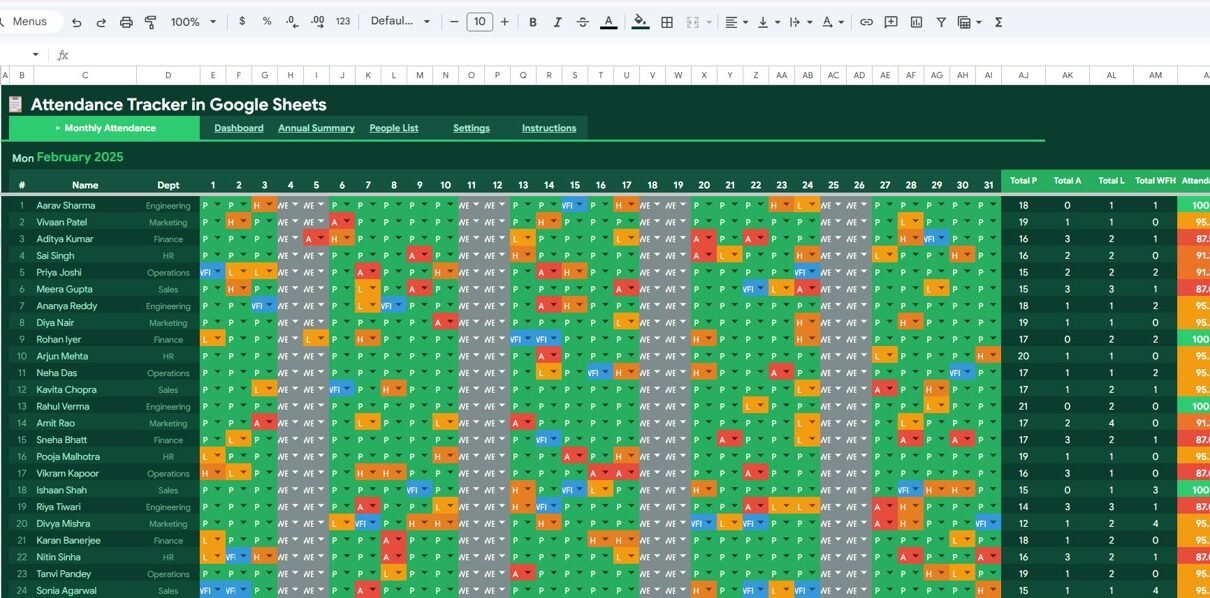
Attendance Tracker in Google Sheets is a comprehensive, cloud-based attendance management template designed for HR managers, school administrators, team leads, and business owners who want to simplify daily attendance tracking. This template includes 5 professionally designed sheet tabs — Monthly Attendance, Dashboard, Annual Summary, People List, and Settings — that work together to give you complete visibility into attendance patterns, absenteeism trends, and workforce availability.
Whether you’re tracking employee attendance at a company or student attendance at a school, this Google Sheets template provides color-coded data entry, automated calculations, interactive dashboard charts, and annual performance summaries — all without any add-ons or plugins. Simply open the template in Google Drive and start tracking attendance right away.
Key Features of Attendance Tracker in Google Sheets
Click here to Purchase the Attendance Tracker in Google Sheets
The Attendance Tracker in Google Sheets includes 5 dedicated sheets, each serving a specific purpose in your attendance management workflow. Here is a detailed breakdown of every page and what it offers:
1. Monthly Attendance Page
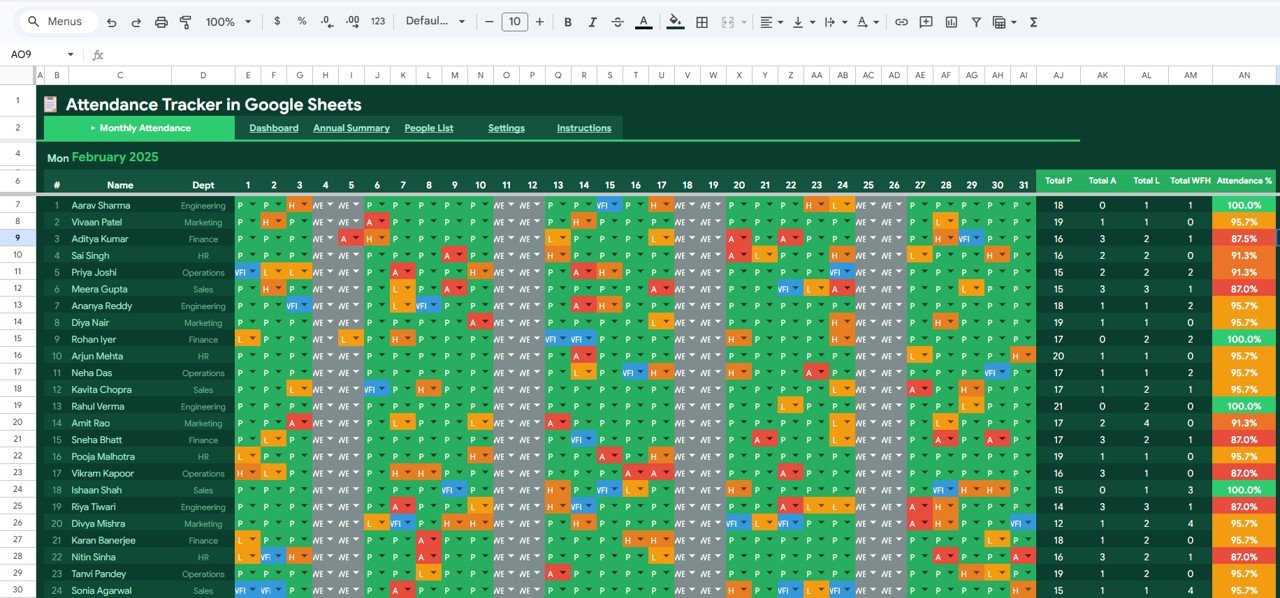
This is the main data entry sheet where daily attendance is recorded for each employee or student. Names are listed on the left and dates run across the top. Each cell is color coded using attendance codes such as Present, Absent, Late, Half Day, and WFH. Summary columns on the right automatically calculate totals for each person, giving you instant visibility into individual attendance counts for the month.
Attendance Tracker in Google Sheets2. Dashboard
The Dashboard sheet provides a high-level visual overview of your organization’s attendance health. It features 5 KPI cards at the top showing Overall Attendance Rate, Chronic Absenteeism, Punctuality Rate, WFH Percentage, and Active People count. Below the cards, 4 analytical charts help you dive deeper into the data:
- Present Count and Absent Count by Department — Compare attendance and absence numbers across different departments to identify which teams have higher absenteeism rates.
- Attendance Status Distribution by Category — See the overall breakdown of Present, Absent, Late, Half Day, and WFH status across the entire organization.
- Daily Attendance Trend by Day of Month — Track how attendance fluctuates throughout the month to spot patterns like end-of-month dips or mid-week peaks.
- Attendance Count by Day of Week — Identify which days of the week consistently show lower attendance, useful for scheduling and resource planning.
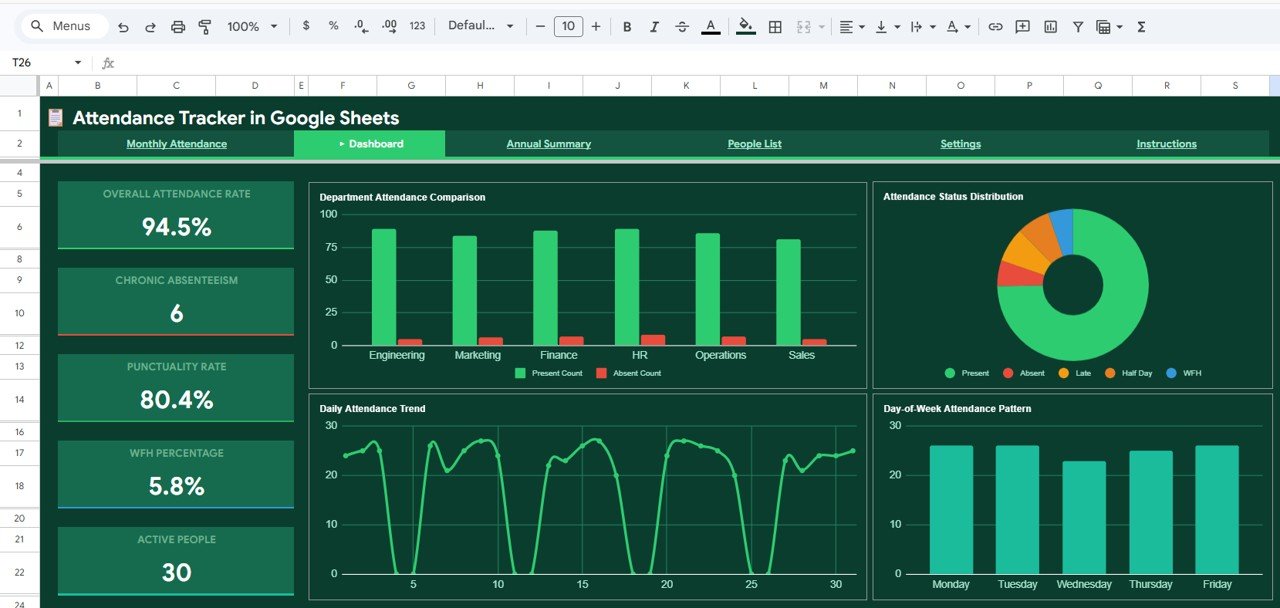 Attendance Tracker Dashboard
3. Annual Summary
The Annual Summary page provides a 12-month view of attendance performance for every employee or student. Key features of this page include annual attendance percentage by month for each person, color-coded cells that automatically highlight high and low attendance months, average attendance percentage per employee calculated across all months, and identification of the best and worst performing months for each individual. This sheet is invaluable for annual reviews, performance appraisals, and identifying chronic attendance issues over time.
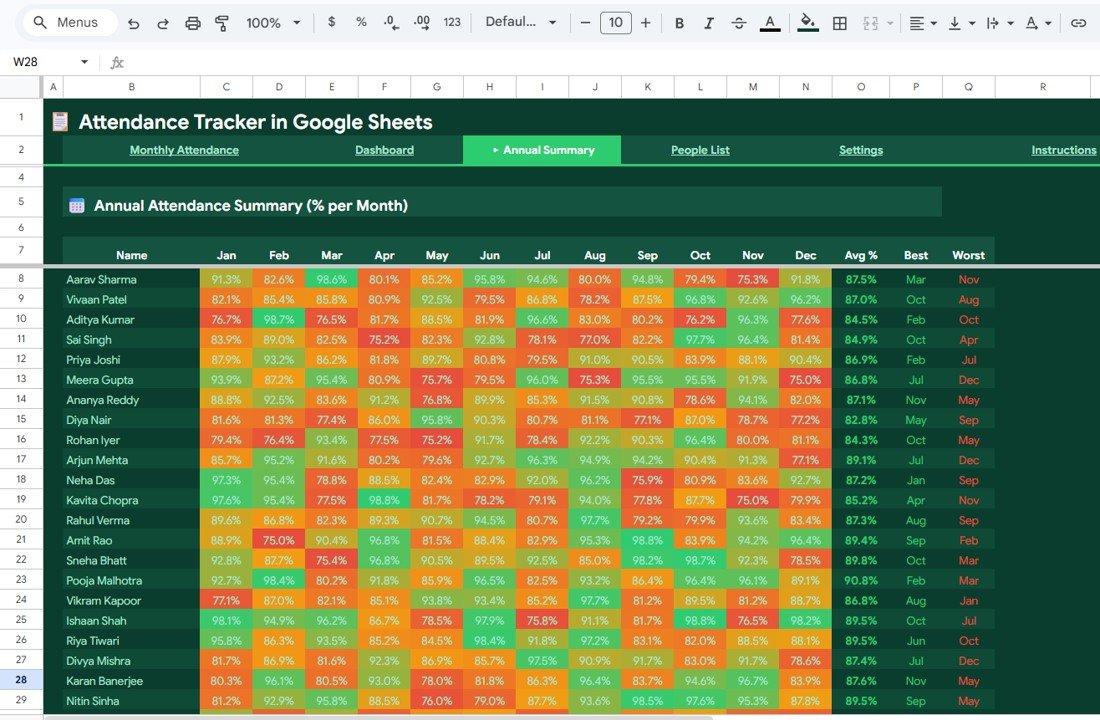 Annual Summary
4. People List
The People List sheet serves as your employee or student directory. It includes fields for Full Name, Department or Class assignment, Email Address, Phone Number, Join Date, and Active or Inactive Status. This centralized directory ensures that all attendance records are linked to the correct individuals and makes it easy to filter or search for specific people when needed.
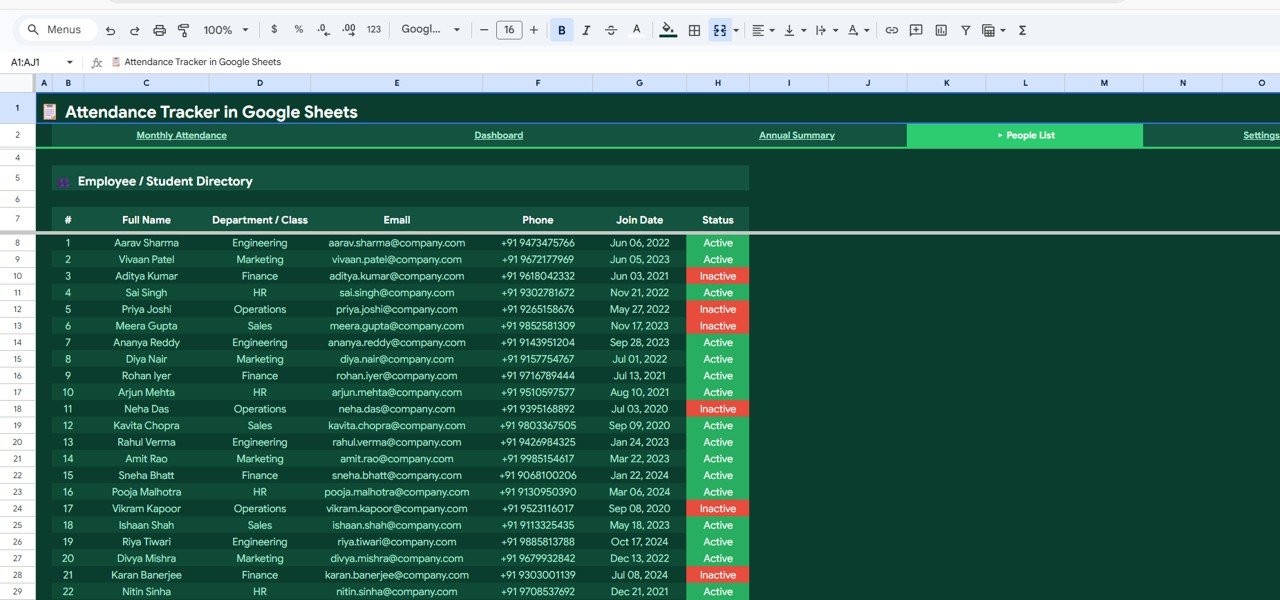 People List
5. Settings
The Settings page allows you to configure the tracker to match your organization’s specific requirements. Configuration options include Working Days Configuration with Days per Week and Start and End Days, Acceptable Absence Threshold Percentage for flagging chronic absenteeism, Current Year and Month Selection for dynamic reporting, a Holiday List with Holiday Name, Date, and Day for automatic exclusion from attendance calculations, and an Attendance Code Legend with color definitions for each status type.
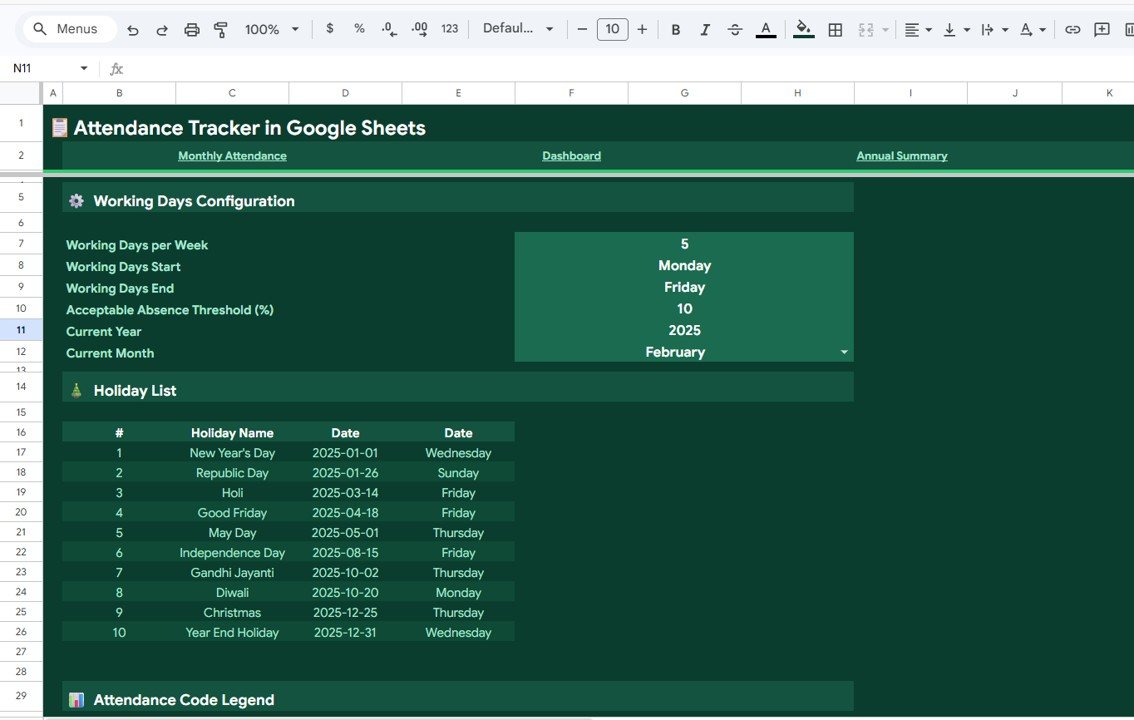 Settings
Advantages of Attendance Tracker in Google Sheets
This template offers several advantages over traditional attendance tracking methods. It eliminates manual calculations by automatically computing totals, percentages, and averages. The color-coded visual system makes it easy to spot attendance issues at a glance without reading through rows of data. Being cloud-based, it enables real-time collaboration between HR teams, managers, and administrators — everyone works on the same live document. The template requires no additional software, plugins, or technical knowledge to operate, making it accessible to users of all skill levels. It works equally well for both employee and student attendance tracking scenarios.
Opportunities for Improvement
While the template covers most attendance tracking needs out of the box, there are some areas where you could extend its functionality. Adding Google Apps Script automation could enable automatic email notifications when an employee’s absence count exceeds the threshold. Integration with Google Forms could allow employees to self-report absences directly into the tracker. Adding a Leave Balance sheet that connects to the People List could provide a more complete HR attendance management solution. The dashboard could also be extended with additional charts for quarter-over-quarter comparisons.
Best Practices for Using This Attendance Tracker
To get the most out of this template, update attendance data daily rather than in bulk at the end of the week. Configure the Settings page first before entering any attendance data, especially the holiday list and working days. Use the Dashboard regularly in team meetings to discuss attendance patterns and address chronic absenteeism proactively. Review the Annual Summary during quarterly reviews and performance appraisals. Share the template with department heads using Google Sheets’ sharing permissions so they can enter data for their own teams while maintaining centralized oversight.
Explore Relevant Templates
If you’re looking for more attendance and HR management tools, explore these related templates from NextGenTemplates Google Sheets Dashboards:
- Weekly Attendance Sheet in Google Sheets — A simplified weekly attendance format perfect for smaller teams.
- Attendance and Overtime Dashboard in Excel — VBA-powered tracker with overtime analysis for Excel users.
- Employee Recognition Dashboard in Google Sheets — Track employee awards, recognitions, and engagement metrics.
- Team Management KPI Dashboard in Google Sheets — Monitor team-level KPIs including productivity, training, and attendance.
- HR & Workforce Analytics Bundle (10 Templates) — Complete HR analytics toolkit with 10 premium templates — save 47%.
Frequently Asked Questions
Click here to Purchase the Attendance Tracker in Google Sheets
What is the best Google Sheets template for tracking employee attendance?
The Attendance Tracker in Google Sheets from NextGenTemplates is one of the best options available. It includes 5 fully integrated sheets — a color-coded Monthly Attendance entry page, an interactive Dashboard with 5 KPI cards and 4 charts, an Annual Summary heatmap, a People List directory, and a configurable Settings page. It supports 5 attendance statuses (Present, Absent, Late, Half Day, WFH) and works for both employees and students.
Can this attendance tracker be used for schools and coaching centers?
Yes. The template is designed to work for any organization that needs to track attendance. Schools, colleges, coaching centers, and training institutes can use the People List to enter student names, class assignments, and contact details. The Dashboard and Annual Summary provide the same powerful analytics for student attendance patterns.
How many employees or students can this tracker handle?
The Attendance Tracker in Google Sheets can handle hundreds of employees or students. Google Sheets supports up to 10 million cells per spreadsheet, so you can easily scale the Monthly Attendance sheet to accommodate large teams. For organizations with more than 200 people, consider creating separate trackers per department for optimal performance.
Does the tracker support Work From Home and Half Day statuses?
Yes. The template supports 5 attendance codes — Present (P), Absent (A), Late (L), Half Day (HD), and Work From Home (WFH). Each code is color-coded for visual clarity and can be customized in the Settings page with your preferred colors and labels.
How do I customize the holiday list in this tracker?
Navigate to the Settings page and add your holidays in the Holiday List section. Each entry includes the Holiday Name, Date, and Day of the week. These holidays are automatically factored into attendance calculations across the tracker.
Is this tracker free or paid?
The Attendance Tracker in Google Sheets is available for purchase at $9.99 (regular price $14.99) from NextGenTemplates.com. It includes lifetime access, free updates, and a PDF guide with the Google Sheets copy link for instant setup.
Conclusion
The Attendance Tracker in Google Sheets is a complete attendance management solution that combines daily data entry, visual analytics, annual reporting, and customizable settings in one powerful template. With 5 KPI cards, 4 analytical charts, color-coded attendance codes, and an annual heatmap summary, it gives HR managers, school administrators, and team leads everything they need to monitor attendance effectively and make data-driven decisions.
Click here to Purchase the Attendance Tracker in Google Sheets
Visit our YouTube channel for step-by-step tutorials: Youtube.com/@NeoTechNavigators