Introduction
The Hospital Operations KPI Scorecard in Google Sheets is a powerful, ready-to-use template designed to help healthcare administrators and hospital management teams track and analyze key performance indicators (KPIs) efficiently. By leveraging this scorecard, hospitals can monitor operational efficiency, quality of care, and overall performance through an intuitive and dynamic dashboard.Hospital Operations KPI Scorecard in Google Sheets
Key Features of Hospital Operations KPI Scorecard in Google Sheets
- Four Distinct Worksheets: Each sheet is tailored for specific functions such as scorecard viewing, KPI trends, data input, and KPI definitions.
- Dropdown Menus: Easily select the month, MTD (Month-to-Date), or YTD (Year-to-Date) to analyze KPI performance based on your preferred timeline.Hospital Operations KPI Scorecard in Google Sheets
- Actual vs Target Comparison: Quickly assess if performance metrics are meeting or exceeding goals.
- Visual Indicators & Conditional Formatting: Color-coded highlights provide an at-a-glance status report of KPIs.
- Comprehensive KPI Details: View MTD and YTD data side-by-side for better decision-making.
- KPI Trend Analysis: Visual charts to compare current and historical performance, aiding in spotting trends.
- Flexibility & Ease of Use: Designed for easy data entry and updates to keep your performance insights current.
Click to Buy Hospital Operations KPI Scorecard in Google Sheets
Dashboard Pages Explanation
1. Scorecard Sheet
 Hospital Operations KPI Scorecard in Google Sheets
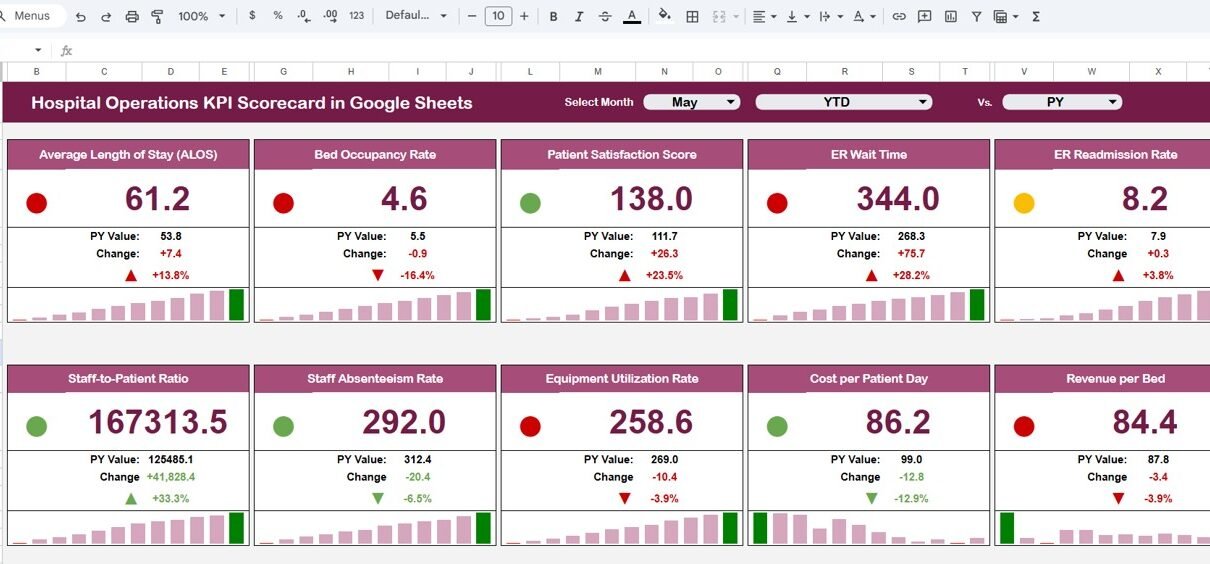
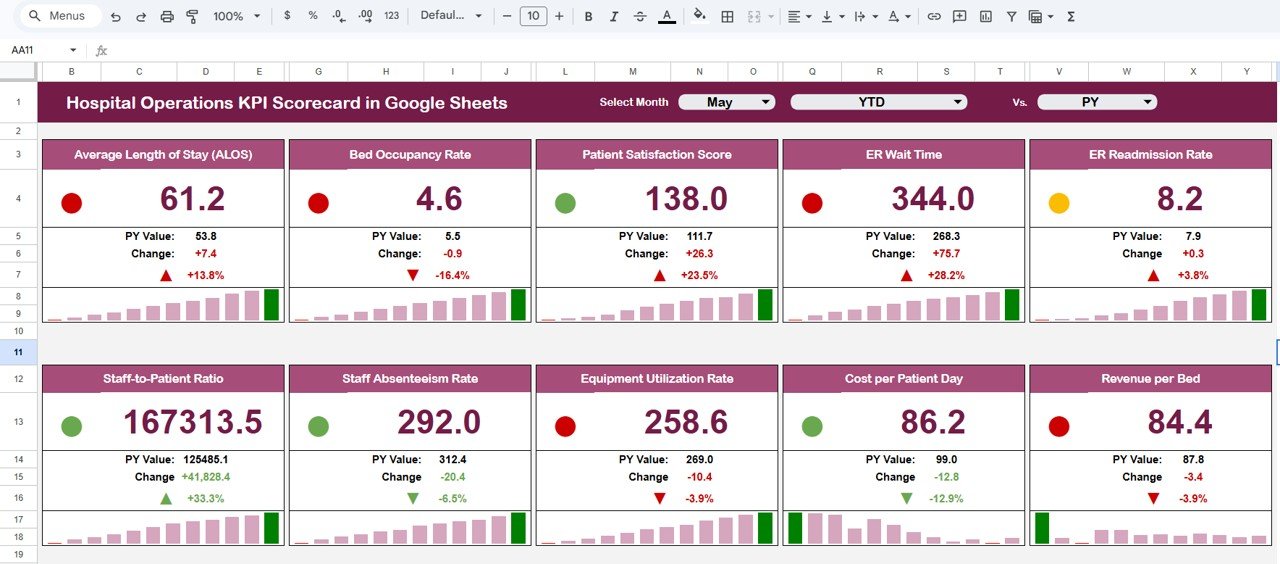
The Scorecard sheet is the main interface for monitoring hospital KPIs. Key features include:
- Dropdown Menus: Select the period (Month, MTD, YTD) to filter data.
- Actual vs Target Values: Enables quick performance comparison for each KPI.
- Visual Indicators: Conditional formatting highlights KPIs in green, yellow, or red to signal performance health.
- Comprehensive KPI Overview: Displays MTD and YTD values to provide a detailed performance snapshot.Hospital Operations KPI Scorecard in Google Sheets
2. KPI Trend Sheet
 KPI Trend Sheet
Click to Buy Hospital Operations KPI Scorecard in Google Sheets
This sheet allows you to select a specific KPI from the dropdown (cell C3) to view detailed information and trends.
- KPI Details: View KPI Group, unit of measurement, KPI type (whether lower or upper values are better), formula, and definition.
- Trend Charts: Visualize Month-to-Date (MTD) and Year-to-Date (YTD) trends for Actual, Target, and Previous Year (PY) values with interactive charts.
3. Input Data Sheet
 Input Data Sheet
Click to Buy Hospital Operations KPI Scorecard in Google Sheets
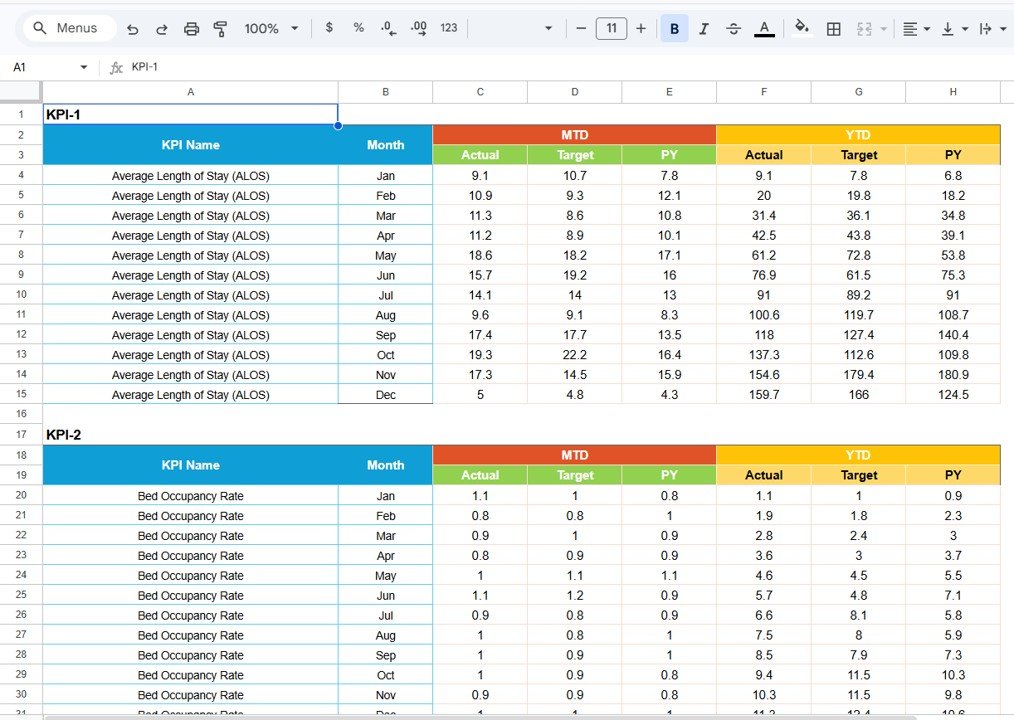
This sheet is the backbone of the scorecard where all KPI data is entered. Key attributes include:
- Data Entry: Input actual values, targets, and other key metrics for each KPI.
- Flexibility: Update data regularly as new results become available to ensure your scorecard reflects current performance metrics.
4. KPI Definition Sheet
 KPI Definition sheet tab
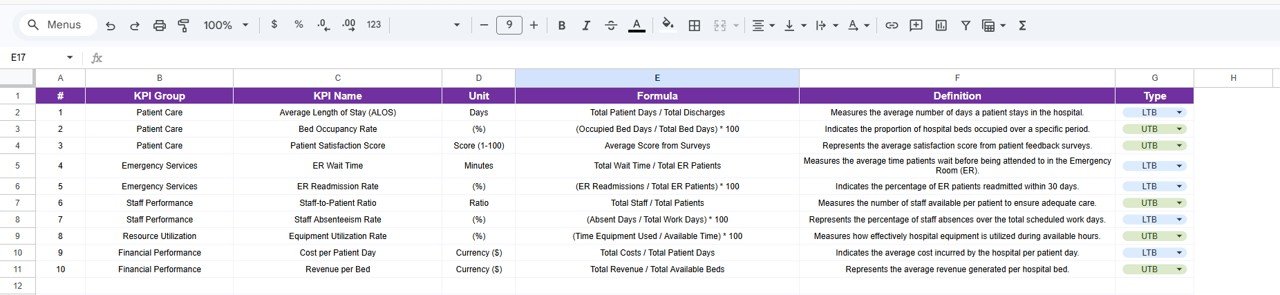
This sheet is where you add or update detailed information about each KPI including:
- KPI Name
- KPI Group
- Unit of measurement
- Formula
- Definition
Click to Buy Hospital Operations KPI Scorecard in Google Sheets
Advantages of Hospital Operations KPI Scorecard in Google Sheets
- User-Friendly Interface: Clear layout and dropdown menus make navigation simple for all users.
- Real-Time Data Management: Easily update inputs, making the scorecard dynamic and up-to-date.
- Customizable: Add or remove KPIs, adjust formulas, and tailor definitions to your hospital’s needs.
- Cloud-based Access: Google Sheets enables multiple users to collaborate simultaneously from any location.
- Visual Insights: Graphs and conditional formatting allow quick interpretation of results without complicated analysis.
Opportunities for Improvement
- Integrate advanced automation to fetch data from hospital management systems via APIs.
- Enhance mobile compatibility for on-the-go monitoring and updates.
- Include predictive analytics for forecasting KPI trends based on historical data.
- Add role-based access controls for data security and privacy compliance.
Best Practices
- Set clear and realistic KPI targets aligned with hospital strategic goals.
- Maintain regular data updates to ensure accuracy and relevance.
- Train staff on interpreting scorecard results and using the tool effectively.
- Conduct periodic reviews of KPIs to adjust for evolving health care priorities.
- Use visual indicators for quick decision-making during daily operational meetings.
FAQs
Click to Buy Hospital Operations KPI Scorecard in Google Sheets
Can this scorecard template be customized for individual hospital needs?
Yes, the Google Sheets format makes it easy to modify KPIs, formulas, and definitions to suit your hospital’s specific operational requirements.Hospital Operations KPI Scorecard in Google Sheets
Is prior expertise in Google Sheets needed to use this scorecard?
Basic familiarity helps, but the template is designed for ease of use with dropdowns and clear data entry cells to minimize complexity.Hospital Operations KPI Scorecard in Google Sheets
Can multiple users update the scorecard simultaneously?
Yes, since it’s in Google Sheets, real-time collaboration is supported, allowing several team members to work together efficiently.
How often should KPIs be updated in the Input Data sheet?
KPI updates depend on your reporting period but generally monthly or more frequently for timely performance tracking.
Conclusion
Click to Buy Hospital Operations KPI Scorecard in Google Sheets
The Hospital Operations KPI Scorecard in Google Sheets is an essential tool for healthcare leaders who want to streamline performance tracking and improve operational outcomes. Its intuitive design, comprehensive dashboards, and data visualization features make it easy to monitor vital KPIs and drive informed decisions. With regular use and customization, this scorecard can significantly enhance hospital efficiency and patient care quality.
To further elevate your hospital’s data management and reporting, consider exploring Microsoft’s official resources on Power BI for advanced analytics and visualization.
Visit our YouTube channel to watch the demo.
Click to Buy Hospital Operations KPI Scorecard in Google Sheets