Introduction
The Payroll Accuracy KPI Dashboard in Google Sheets is a powerful and easy-to-use template designed to help organizations monitor payroll performance effectively. Accurate payroll processing is vital for business success, and this dashboard ensures you stay on top of your key performance indicators (KPIs) with precision and in real time. Whether you are a payroll manager, HR professional, or business analyst, this ready-to-use Google Sheets template simplifies tracking and analysis of payroll accuracy metrics.Payroll Accuracy KPI Dashboard in Google Sheets
Key Features of Payroll Accuracy KPI Dashboard in Google Sheets
Click to Buy Payroll Accuracy KPI Dashboard in Google Sheets
- Intuitive dashboard with monthly selectable views.
- Comparison of Month-to-Date (MTD) Actuals, Targets, and Previous Year (PY) data.
- Year-to-Date (YTD) performance tracking with target vs actual and PY vs actual analyses.
- Conditional formatting with up/down arrows for quick visual insights.
- Trend analysis charts to review KPI performance over time.
- Multiple input sheets for Actual, Target, and Previous Year numbers.
- Detailed KPI definitions with formula and type settings for better clarity.
Dashboard Pages Explanation
1. Dashboard Sheet Tab
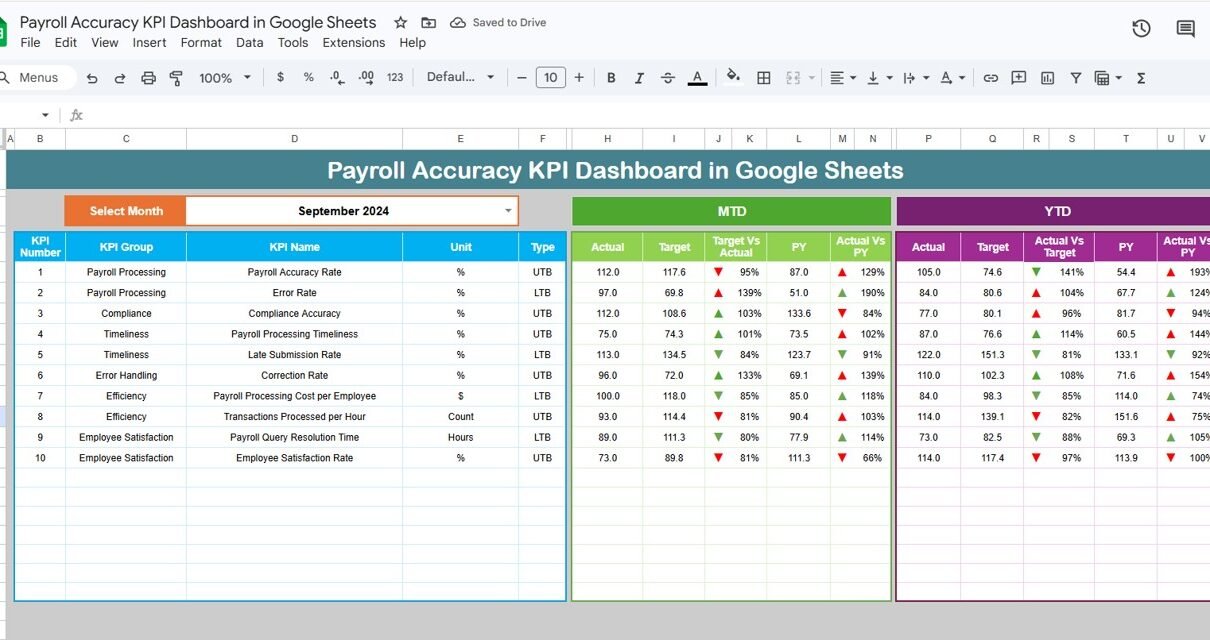
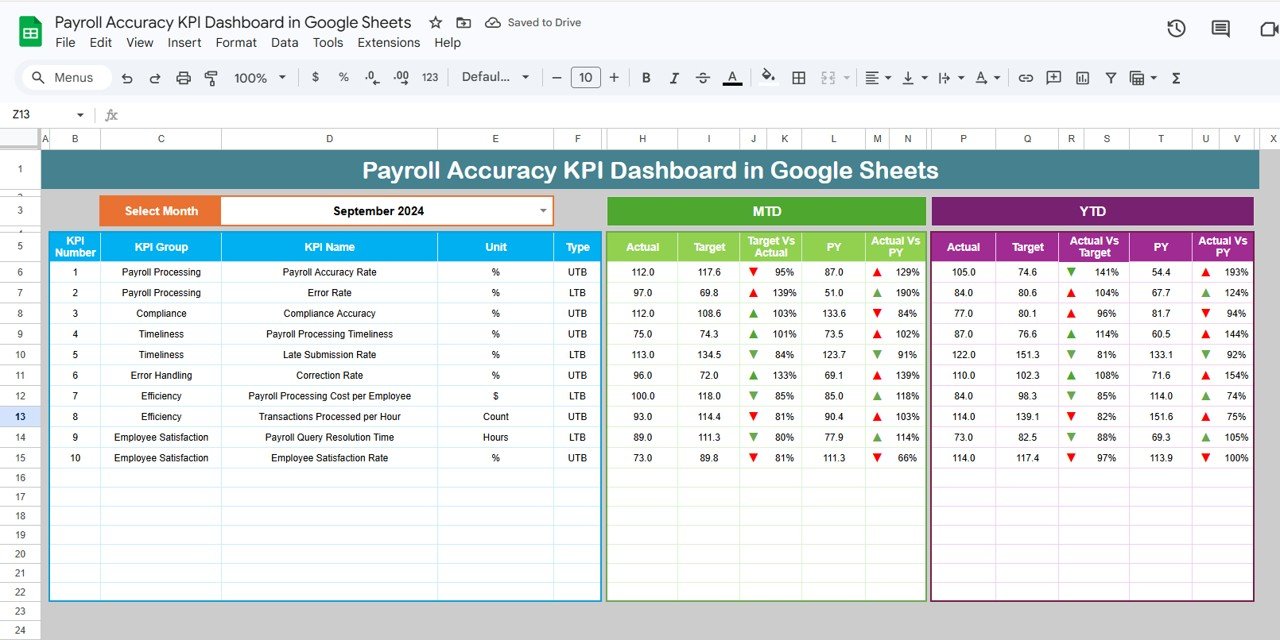
This is the main dashboard where all key payroll accuracy KPIs are displayed. You can select the desired month using a drop-down in cell D3, which dynamically updates all metrics.
- Displays MTD Actual, Target, and Previous Year data.
- Shows Target vs Actual and PY vs Actual comparisons enhanced with conditional formatting arrows.
- Includes Year-to-Date Actual, Target, and PY metrics using the same visual tools.
Payroll Accuracy KPI Dashboard in Google Sheets
Click to Buy Payroll Accuracy KPI Dashboard in Google Sheets
2. KPI Trend Sheet Tab
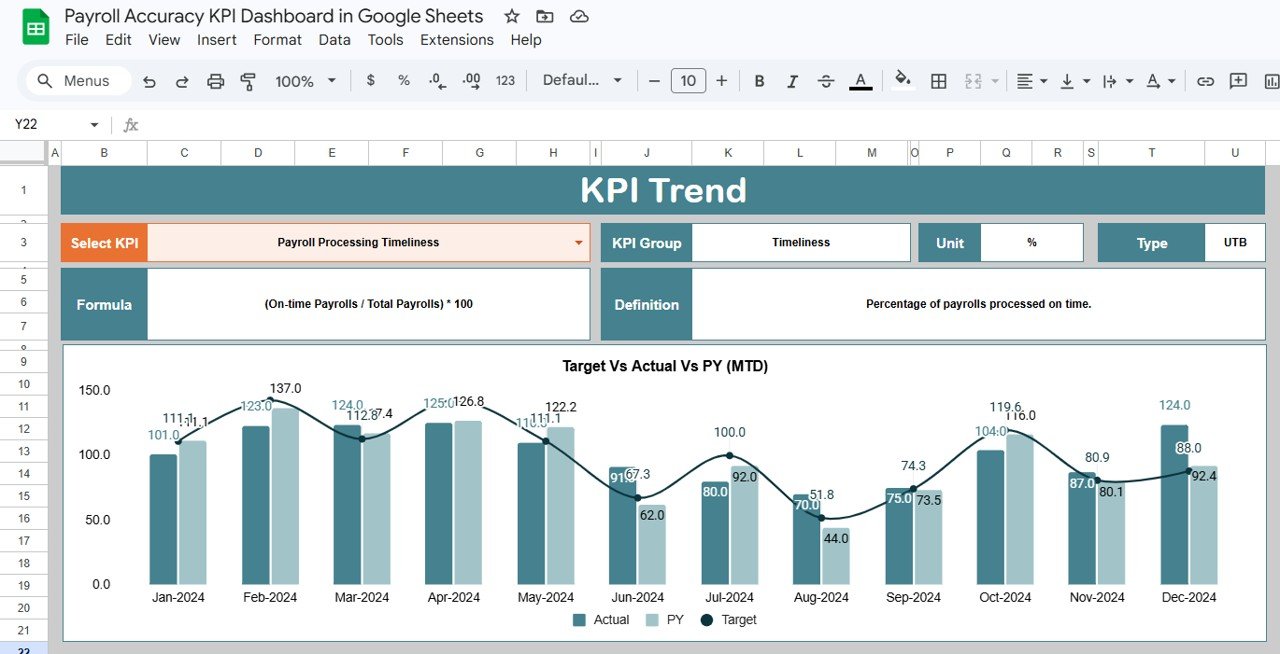
Allows you to select a specific KPI from the drop-down in cell C3. This page provides detailed information about the KPI including its group, unit, type (Lower the Better or Upper the Better), formula, and definition.Payroll Accuracy KPI Dashboard in Google Sheets
- Displays both MTD and YTD trend charts comparing Actual, Target, and Previous Year figures.
3. Actual Numbers Input Sheet
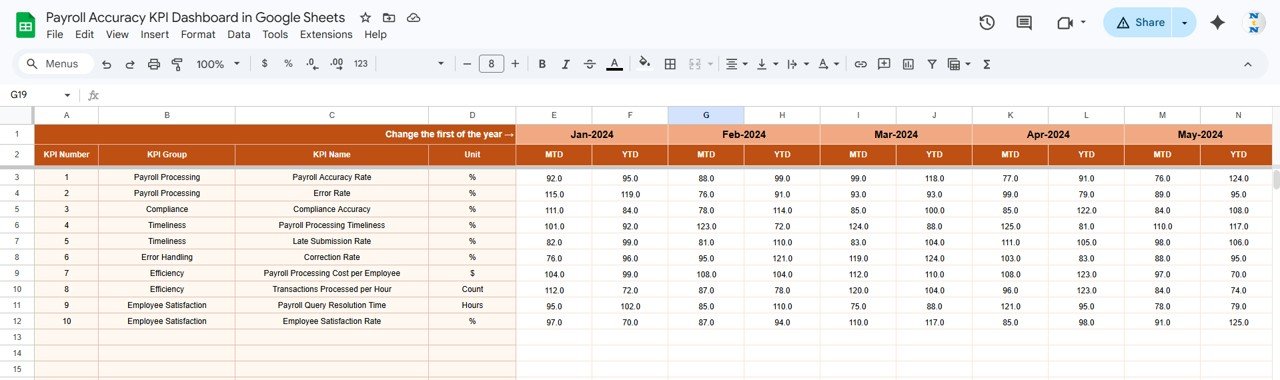
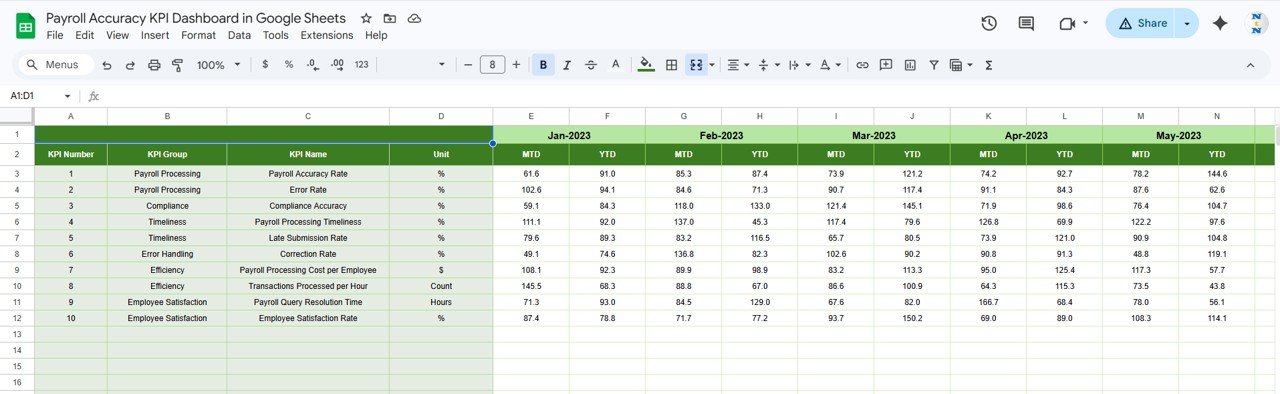
This sheet is where you input actual payroll numbers for both MTD and YTD metrics for specific months. To adjust the base month, change the value in cell E1 (typically the first month of the year).
4. Target Number Input Sheet
Enter the target values for each KPI monthly, including both MTD and YTD targets. This data drives the target comparisons across the dashboard.Payroll Accuracy KPI Dashboard in Google Sheets
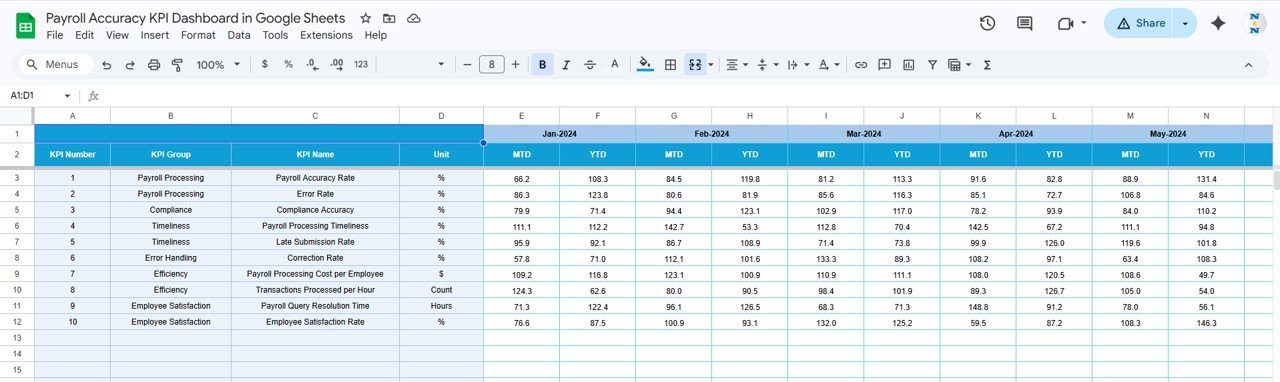
Target Number Input sheet
5. Previous Year Number Sheet Tab
Here, you should enter the payroll numbers for the previous year exactly as you do for the current year. This historical data helps in benchmarking current performance.
6. KPI Definition Sheet Tab
Defines each KPI clearly with its name, group, unit of measurement, the exact formula being used, and description. The KPI type is marked as either LTB (Lower the Better) or UTB (Upper the Better), guiding the conditional formatting logic.
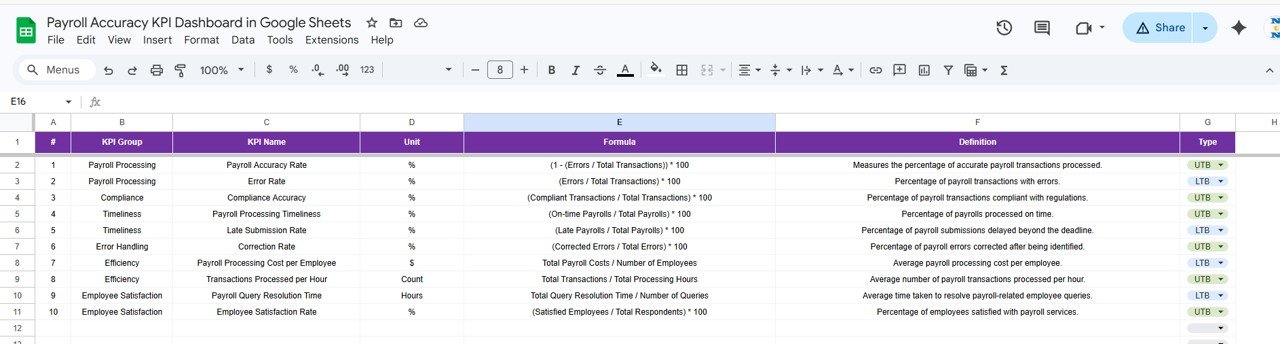
KPI Definition sheet
Advantages of Payroll Accuracy KPI Dashboard in Google Sheets
Click to Buy Payroll Accuracy KPI Dashboard in Google Sheets
- User-Friendly Interface: Simple navigation with dropdown month selectors and KPI filters.
- Real-Time Data Updates: Dynamic dashboards that adjust instantly when you edit inputs.
- Comprehensive KPI Tracking: Holistic view of payroll accuracy across MTD, YTD, and historical periods.
- Visual Analytics: Conditional formatting and charts help visualize performance easily.
- Cloud-Based Accessibility: Built on Google Sheets enabling multiple team members to collaborate and update simultaneously.
- Cost-Effective: No expensive software required; just a Google account.Payroll Accuracy KPI Dashboard in Google Sheets
Opportunities for Improvement
- Integrate automation scripts (Apps Script) for pulling payroll data automatically from HRMS or ERP systems.
- Add alert notifications for KPIs breaching threshold levels.
- Enhance dashboard with drill-down capabilities for department-wise payroll analysis.
- Incorporate comparative charts for regional or business unit comparisons.Payroll Accuracy KPI Dashboard in Google Sheets
Best Practices
Click to Buy Payroll Accuracy KPI Dashboard in Google Sheets
- Keep input data updated regularly to maintain dashboard accuracy.
- Define KPI thresholds clearly in the KPI Definition tab for consistent measurement.
- Train team members on how to interpret dashboard indicators and trends.
- Backup the Google Sheet periodically to prevent accidental data loss.
- Leverage Google Sheets sharing permissions to control data access.
FAQs
Can I customize the KPIs in this payroll dashboard?
Yes, all KPIs including their names, formulas, and definitions can be customized in the KPI Definition sheet tab.
Is this dashboard suitable for companies of all sizes?
Absolutely. Whether you are a small business or a large enterprise, this scalable dashboard can be adapted to your payroll monitoring needs.
Can this Google Sheets template integrate with payroll software?
While the template is manual by design, with Google Apps Script or third-party connectors, you can automate some data imports from payroll software.
Does the dashboard support multiple years of data?
Currently, it supports current and previous year data, but you can extend the sheets to include additional years if needed.
Conclusion
The Payroll Accuracy KPI Dashboard in Google Sheets is an efficient and versatile tool for tracking payroll performance metrics at a glance. With its easy-to-navigate layout, dynamic data filtering, and insightful visualizations, it provides payroll managers and business teams the power to ensure payroll processes are accurate and timely every period.
Get started with this dashboard today to drive payroll accuracy like never before!
For further learning and walkthroughs, visit our YouTube channel to watch the demo.
External Resources
- Microsoft Excel support – Useful guide if you want to transfer knowledge to Excel.
- Google Sheets documentation – Google’s official documentation on spreadsheets.
- SHRM Payroll Compliance – Best practices for payroll compliance and accuracy.
Click to Buy Payroll Accuracy KPI Dashboard in Google Sheets