Personal Monthly Budget Tracker in Google Sheets
Personal Monthly Budget Tracker in Google Sheets is a professionally designed, ready-to-use spreadsheet template that helps you take complete control of your personal finances. Whether you are tracking your monthly salary, managing household expenses, or working toward specific savings goals, this template provides everything you need in one organized, visually appealing Google Sheets file.
This template includes 4 powerful pages — a visual Dashboard, a Budget Setup sheet, a Monthly Tracking sheet, and an Annual Summary — giving you a complete 360-degree view of your personal finances throughout the year. Every chart, KPI, and summary updates automatically when you enter your data, so you never have to worry about formulas or manual calculations.
If you are managing personal finances and want a structured, automated way to track budgets, this is the template for you. Let us walk through each page and feature in detail.
Key Features of the Personal Monthly Budget Tracker in Google Sheets
Click here to Purchase the Personal Monthly Budget Tracker in Google Sheets
This Google Sheets budget tracker is packed with features designed to make personal finance management effortless and insightful. Here is what sets it apart:
- 4 Professionally Designed Pages — Dashboard, Budget Setup, Monthly Tracking, and Annual Summary work together as a complete personal finance system.
- 6 KPI Cards on the Dashboard — Total Income, Budgeted Expenses, Monthly Surplus, Savings Rate, YTD Total Spent, and a Savings Gauge give you instant financial awareness.
- 3 Interactive Dashboard Charts — Budget vs Avg Actual by Top Categories, Expense Breakdown by Category, and Monthly Spending vs Budget Trend by Month provide deep visual insights.
- Slicer Filters — Apply filters directly on the dashboard to instantly view data by category, month, or any dimension without modifying the underlying data.
- Automatic Percentage Calculations — The Budget Setup page automatically calculates each category’s percentage of total income.
- YTD Variance Analysis — The Monthly Tracking sheet shows YTD Actual and YTD Variance by Category so you can catch budget overruns early.
- Annual Spending Breakdown — The Annual Summary page shows totals, monthly averages, and variance analysis for the entire year.
- Fully Automated Formulas — All KPIs, charts, and calculations update automatically when you enter your data — zero manual work.
Looking for more personal finance tools? Explore the Personal Expense Tracker in Google Sheets for detailed daily expense logging, or the Personal Finance Dashboard in Google Sheets for a comprehensive financial overview.
Dashboard Pages Explanation
Click here to Purchase the Personal Monthly Budget Tracker in Google Sheets
The Personal Monthly Budget Tracker in Google Sheets contains 4 interconnected pages. Let us explore each one in detail.
1. Dashboard
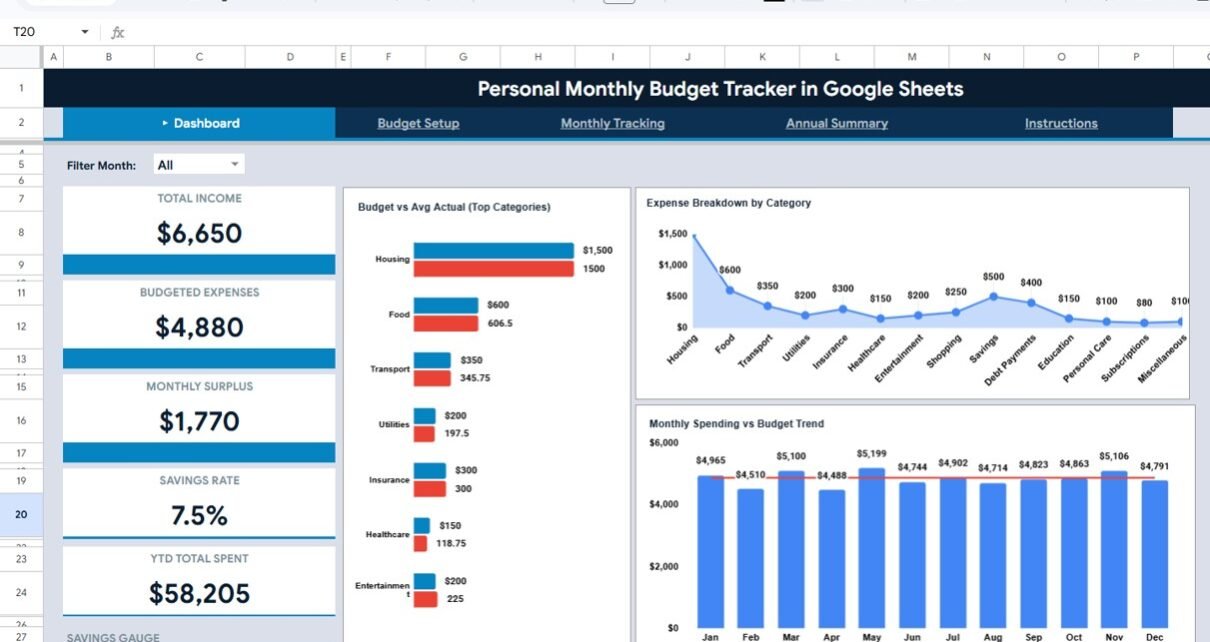
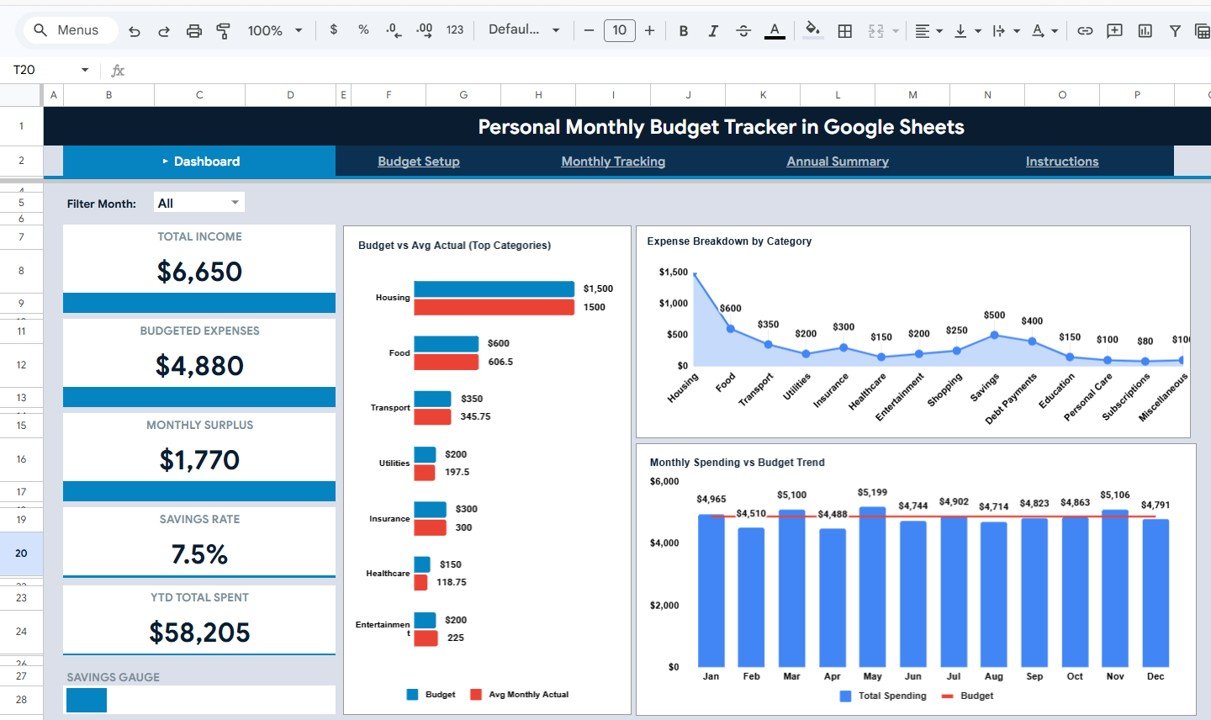
The Dashboard page serves as your financial command center. At the top, you will find 6 KPI cards that display the most critical numbers at a glance:
- Total Income — Shows your total monthly income from all defined sources, giving you a clear picture of how much money flows in each month.
- Budgeted Expenses — Displays the total amount you have budgeted across all expense categories, helping you see your planned outflow.
- Monthly Surplus — Calculates the difference between your total income and budgeted expenses, showing how much you plan to save or have left over each month.
- Savings Rate — Expresses your monthly surplus as a percentage of total income, a key indicator of financial health that financial advisors recommend tracking.
- YTD Total Spent — Shows your cumulative actual spending from January through the current month, keeping you aware of how much you have spent so far this year.
- Savings Gauge — A visual indicator that shows how your actual savings compare to your target, making it easy to see if you are on track.
Below the KPI cards, the dashboard features 3 interactive charts:
- Budget vs Avg Actual by Top Categories — Compares your budgeted amount against the average actual spending for your highest expense categories, instantly revealing where you overspend or underspend.
- Expense Breakdown by Category — Shows the proportional distribution of your spending across all categories, helping you understand where the largest share of your money goes.
- Monthly Spending vs Budget Trend by Month — Tracks your spending and budget lines across all 12 months, showing seasonal patterns and long-term trends in your financial behavior.
Multiple slicers on the dashboard let you filter all data instantly by category, month, or other dimensions without modifying any underlying data.
Personal Monthly Budget Tracker in Google Sheets
2. Budget Setup
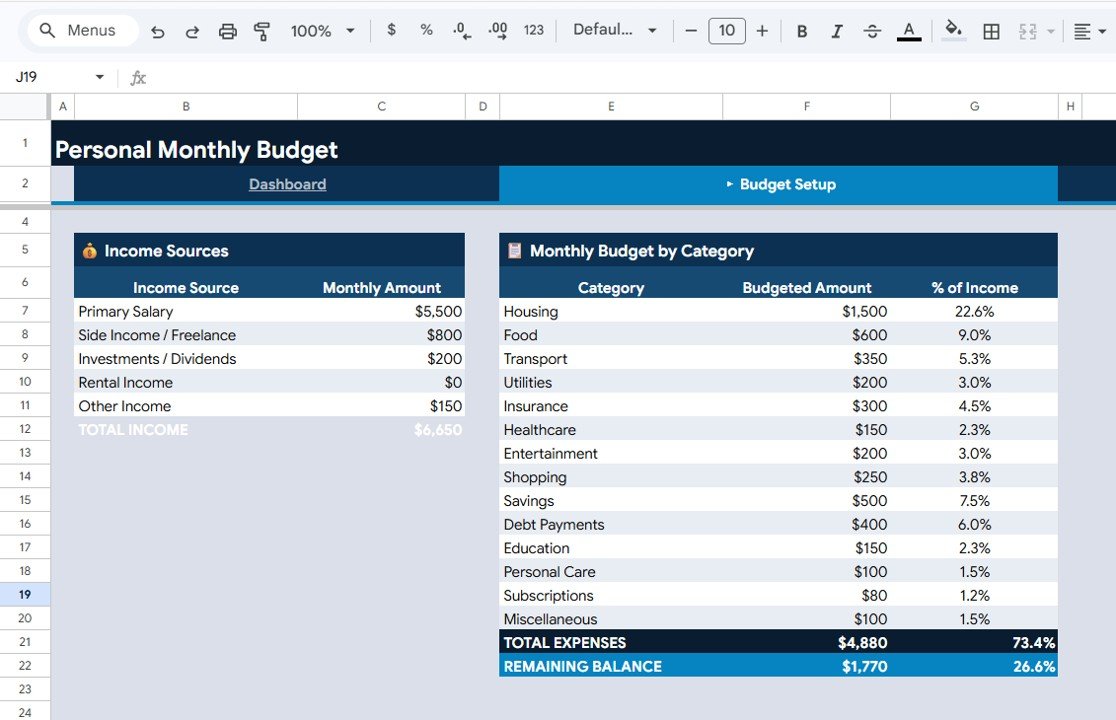
The Budget Setup page is where you define the foundation of your personal budget. This sheet contains two key sections:
- Income Sources by Monthly Amount — List all your income streams (salary, freelancing, rental income, investments, etc.) with their monthly amounts. The template totals everything automatically so you always know your total monthly inflow.
- Monthly Budget by Category with Percentage of Income — Define your expense categories (housing, groceries, transportation, entertainment, savings, etc.) and assign a monthly budget to each. The template automatically calculates what percentage of your total income each category represents, helping you maintain healthy spending ratios.
Budget Setup
3. Monthly Tracking
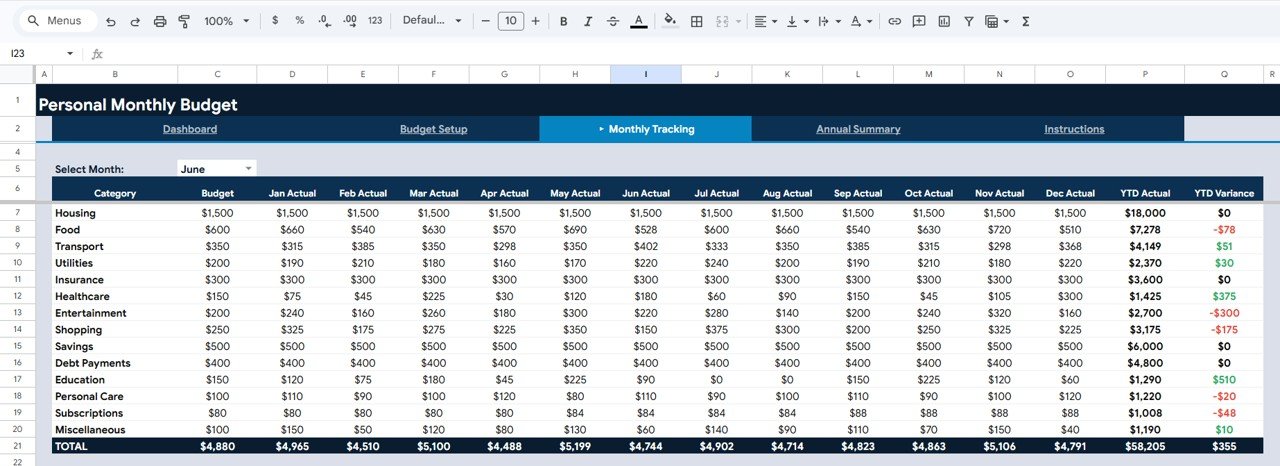
The Monthly Tracking page is where the real budgeting happens. Each month, you enter your actual spending by category, and the template does the rest:
- Monthly Actual Spending by Category — Enter what you actually spent in each category for each month. The template organizes this into a clean grid that is easy to fill and review.
- Budget vs Actual by Month — Automatically compares your planned budget against actual spending for each month, highlighting overages and savings in clear visual format.
- YTD Actual and YTD Variance by Category — Shows your cumulative spending and variance from budget for each category from January to the current month. This is critical for catching budget drift early before it becomes a major problem.
Monthly Tracking
4. Annual Summary
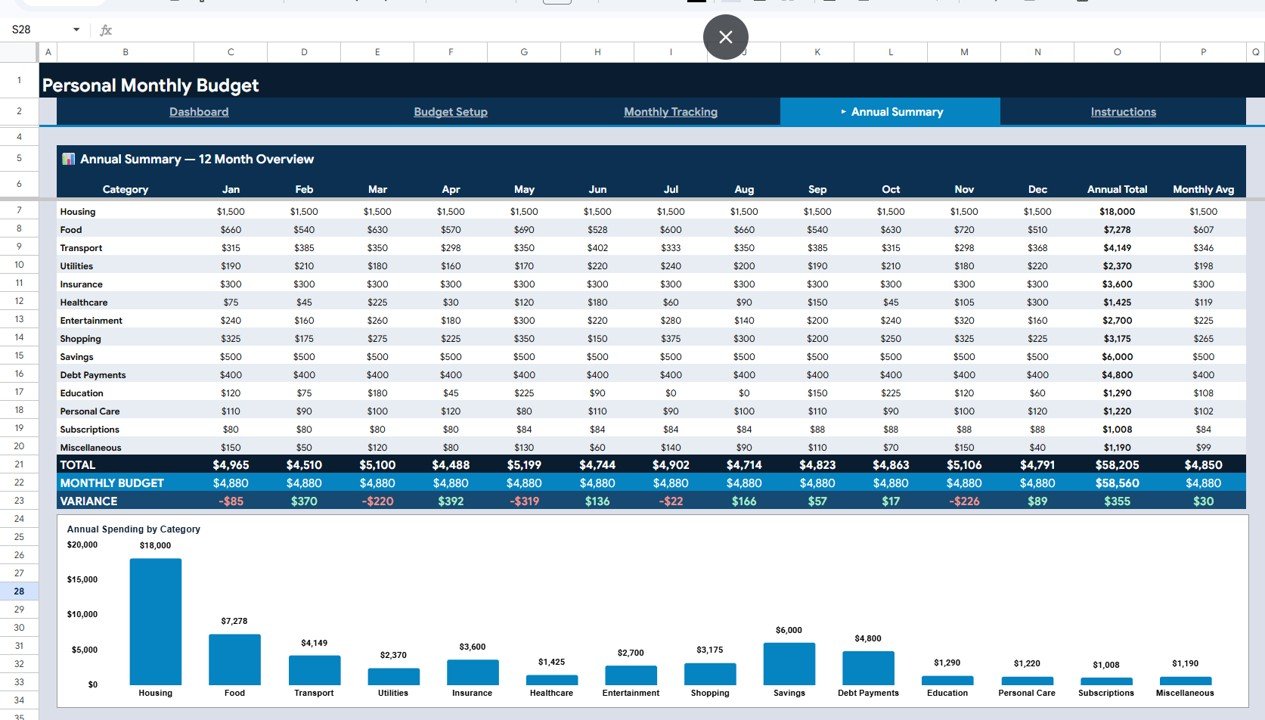
The Annual Summary page gives you the big picture of your entire year’s finances in one place:
- Annual Total and Monthly Avg by Category — See how much you spent in total for each category over the year, plus the monthly average. This helps you plan next year’s budget based on real data instead of guesses.
- Monthly Budget vs Variance by Month — A month-by-month comparison showing whether you were over or under budget each month, making it easy to identify problematic months or seasonal spending spikes.
- Annual Spending by Category — A comprehensive breakdown showing how your total annual spending was distributed across all categories, perfect for year-end financial reviews.
Annual Summary
Advantages of the Personal Monthly Budget Tracker
Click here to Purchase the Personal Monthly Budget Tracker in Google Sheets
- Complete Visibility — Four interconnected pages give you a holistic view from daily spending to annual trends, ensuring nothing falls through the cracks.
- Zero Setup Complexity — All formulas, charts, and KPIs are pre-built. Simply enter your income and expenses and everything calculates automatically.
- Cloud-Based Convenience — Being in Google Sheets means you can access your budget from any device — desktop, tablet, or phone — and share it with a partner or spouse easily.
- Budget vs Actual Accountability — The Monthly Tracking page keeps you honest by showing exactly where you overspent or saved, promoting disciplined financial habits.
- Year-End Planning Power — The Annual Summary gives you data-driven insights to create a better, more realistic budget for the following year.
- Slicer-Powered Analysis — Dashboard slicers let you explore your data dynamically without any technical skills.
Opportunities for Improvement
- Debt Tracking Integration — Adding a dedicated debt tracking section with payoff projections would make this template a more complete financial management tool. For now, you can pair it with the Debt Payoff Calculator Template in Google Sheets.
- Savings Goal Milestones — While the Savings Gauge is helpful, adding specific goal milestones with target dates would enhance motivation. Consider pairing with the Savings Goal Planner in Google Sheets.
- Multi-Currency Support — For users with income or expenses in multiple currencies, adding a currency conversion layer would expand the template’s utility.
- Automated Transaction Import — Integrating with bank statement CSV imports could speed up the monthly data entry process significantly.
Best Practices for Using This Budget Tracker
Click here to Purchase the Personal Monthly Budget Tracker in Google Sheets
- Set Up Once, Track Monthly — Invest 15 minutes setting up your income sources and budget categories on the Budget Setup page. Then spend just 10 minutes at the end of each month entering actual expenses.
- Review the Dashboard Weekly — Do not wait until month-end to check your budget. The dashboard slicers make it easy to do quick weekly check-ins.
- Use Realistic Budget Numbers — Base your budget allocations on the last 3 months of actual spending rather than aspirational numbers. You can gradually tighten budgets over time.
- Track the Savings Rate KPI — Financial experts recommend a savings rate of at least 20%. Use the Savings Rate card on the dashboard as your North Star metric.
- Do a Year-End Review — At the end of December, spend time on the Annual Summary page to understand your full-year patterns before setting up next year’s budget.
Explore Relevant Templates
If you found the Personal Monthly Budget Tracker useful, here are more templates from NextGenTemplates.com that complement your personal finance toolkit:
- Personal Expense Tracker in Google Sheets — Log daily expenses with automatic category-wise analysis and spending charts.
- Personal Finance Dashboard in Google Sheets — A comprehensive multi-page dashboard for net worth, investments, and overall financial health.
- Savings Goal Planner in Google Sheets — Set multiple savings goals and track progress with visual indicators.
- Monthly Budget Plan Template in Google Sheets — A complementary budget planning template focused on upfront allocation and forecasting.
- Finance & Accounting Command Center Bundle — 8 premium finance templates in one discounted bundle.
Click here to Purchase the Personal Monthly Budget Tracker in Google Sheets
Frequently Asked Questions
What is the best Google Sheets template for tracking a personal monthly budget?
The Personal Monthly Budget Tracker in Google Sheets from NextGenTemplates is one of the best options available. It includes 4 professional pages with a visual Dashboard, Budget Setup, Monthly Tracking, and Annual Summary. The template features 6 KPI cards, 3 interactive charts, slicer filters, and fully automated formulas that update when you enter your data.
How do I track my monthly budget vs actual spending in Google Sheets?
Using the Personal Monthly Budget Tracker, you set up your budget on the Budget Setup page and enter actual expenses on the Monthly Tracking page each month. The template automatically calculates Budget vs Actual by Month and YTD Variance by Category, showing you exactly where you are over or under budget.
Can I customize the income sources and expense categories in this tracker?
Yes. The Budget Setup page allows you to define your own income sources and expense categories. All linked charts, KPIs, and calculations on the Dashboard, Monthly Tracking, and Annual Summary pages will adjust automatically based on your custom categories.
Is this budget tracker free or paid?
The Personal Monthly Budget Tracker in Google Sheets is a premium template available at a sale price of $4.99 (regular price $9.99) on NextGenTemplates.com. It includes all 4 pages with pre-built formulas, charts, and KPIs ready to use immediately.
What KPIs does the Personal Monthly Budget Tracker display?
The Dashboard page displays 6 KPIs: Total Income, Budgeted Expenses, Monthly Surplus, Savings Rate, YTD Total Spent, and a Savings Gauge. These KPIs update automatically based on the data you enter in the Budget Setup and Monthly Tracking pages.
Can two people use this tracker together for household budgeting?
Yes. Since this template runs in Google Sheets, you can share it with a partner or spouse via Google Drive. Both users can view and edit the same file simultaneously, making it ideal for collaborative household budget management.
Conclusion
The Personal Monthly Budget Tracker in Google Sheets is a comprehensive, beautifully designed tool that transforms how you manage your personal finances. With 4 interconnected pages, 6 KPI cards, 3 interactive charts, and fully automated calculations, it eliminates the guesswork from budgeting and gives you clear, actionable insights every month.
Whether you are just starting your budgeting journey or looking for a more structured approach to tracking income and expenses, this template delivers immediate value. Download it today and take the first step toward smarter, data-driven personal finance management.
For more templates, tutorials, and financial tools, visit Youtube.com/@NeoTechNavigators for step-by-step video guides.
Watch the step-by-step video tutorial:
Click here to Purchase the Personal Monthly Budget Tracker in Google Sheets