Managing personal finances can feel overwhelming, especially when you have multiple savings goals. Whether you plan for an emergency fund, a vacation, a new car, or your child’s education, tracking progress manually becomes difficult over time.
So, how can you stay organized, track progress, and achieve your financial goals faster?
Savings Goal Planner in Google Sheets.
This powerful and easy-to-use planner helps you track multiple savings goals, calculate required monthly savings, and monitor your progress in real time. Moreover, it simplifies financial planning with automated calculations and visual insights.
What is a Savings Goal Planner in Google Sheets?
A Savings Goal Planner in Google Sheets is a smart financial tracking tool designed to help individuals manage and achieve their savings targets efficiently.
Instead of using multiple sheets or manual calculations, this planner allows you to:
- Track multiple savings goals in one place
- Calculate monthly savings required automatically
- Monitor progress with percentages
- Identify shortfalls or surplus
- Visualize savings progress with charts
Therefore, you can stay focused and achieve your financial goals faster.
Why Do You Need a Savings Goal Planner?
Click to Buy Savings Goal Planner in Google Sheets
Saving money without a proper plan often leads to missed targets and frustration. However, when you use a structured planner, everything becomes clear and manageable.
Key Reasons to Use This Planner:
- Helps you stay financially disciplined
- Tracks multiple goals simultaneously
- Provides clear progress visibility
- Eliminates manual calculations
- Improves financial decision-making
As a result, you gain control over your finances and achieve your goals efficiently.
Key Features of Savings Goal Planner in Google Sheets
This planner comes with powerful features that make financial tracking simple and effective.
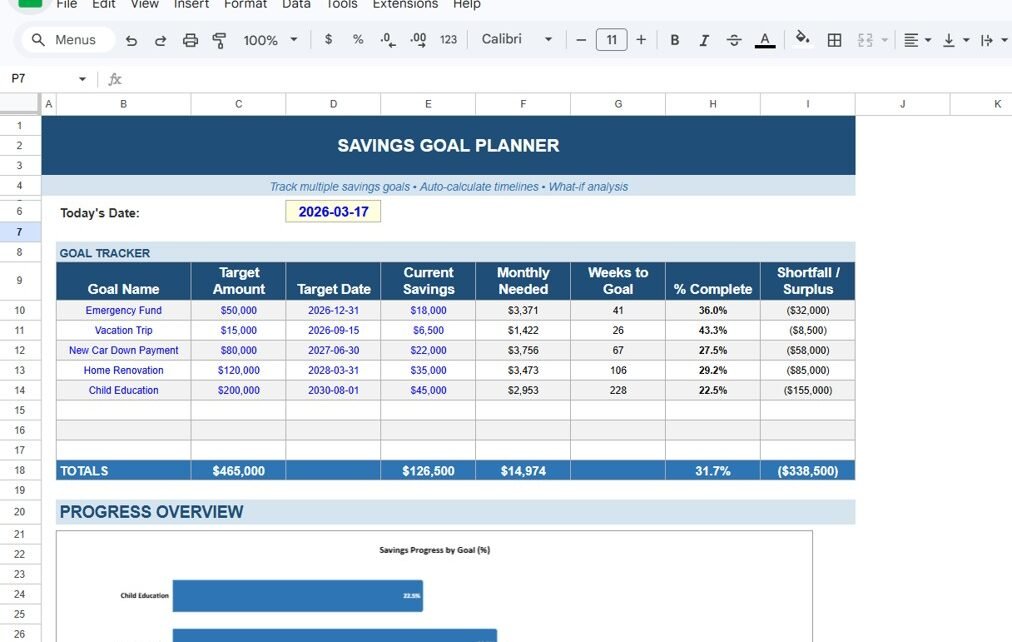
Goal Tracker – Manage All Your Savings Goals
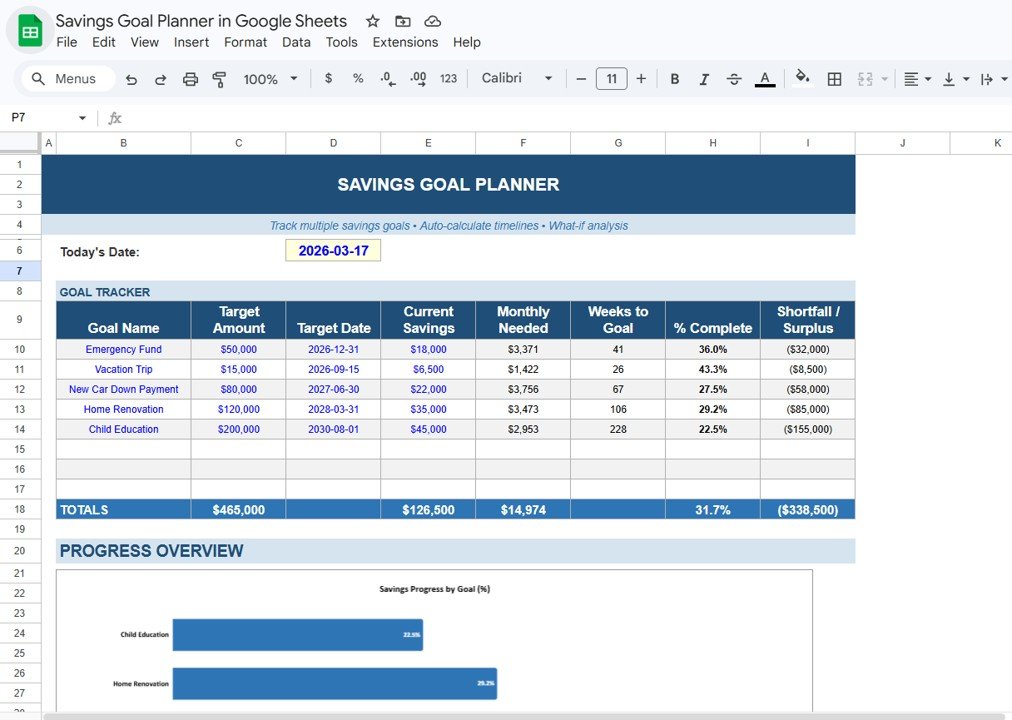
The Goal Tracker section allows you to manage multiple financial goals in one place.
🔹 Key Columns:
- Goal Name
- Target Amount
- Target Date
- Current Savings
- Monthly Needed
- Weeks to Goal
- % Complete
- Shortfall / Surplus
Click to Buy Savings Goal Planner in Google Sheets
Automated Calculations – Save Time and Effort
This planner automatically calculates:
- Monthly savings required
- Remaining weeks to achieve the goal
- Percentage completion
- Shortfall or surplus amount
Click to Buy Savings Goal Planner in Google Sheets
Progress Overview – Visualize Your Growth
The Progress Overview section includes charts that display:
- Savings progress by goal (%)
- Comparison between different goals
Click to Buy Savings Goal Planner in Google Sheets
Real-Time Updates – Stay Updated Always
Whenever you update your savings data:
- All calculations update automatically
- Charts refresh instantly
- Progress percentages adjust dynamically
Click to Buy Savings Goal Planner in Google Sheets
Simple and User-Friendly Design
The planner uses a clean and structured layout:
- Easy-to-understand format
- No technical knowledge required
- Works directly in Google Sheets
Click to Buy Savings Goal Planner in Google Sheets
Advantages of Savings Goal Planner in Google Sheets
Using this planner offers multiple benefits:
Better Financial Planning
- You set clear savings goals
- You create a structured plan
Improved Discipline
- You track progress regularly
- You stay committed to your goals
Time-Saving Automation
- You avoid manual calculations
- You reduce errors
Clear Progress Tracking
- You see percentage completion
- You identify shortfalls quickly
Goal Achievement Confidence
- You stay motivated
- You achieve goals faster
How Does This Planner Improve Your Financial Life?
Click to Buy Savings Goal Planner in Google Sheets
This planner does more than track numbers. It improves your financial habits.
Here’s how:
- It encourages consistent saving
- It highlights gaps in your plan
- It helps prioritize goals
- It improves financial awareness
- It supports better decision-making
As a result, you build a strong financial future.
Best Practices for the Savings Goal Planner in Google Sheets
To get the best results, follow these best practices:
Set Realistic Goals
- Avoid setting unrealistic targets
- Break large goals into smaller milestones
Update Regularly
- Enter your savings frequently
- Keep data accurate
Prioritize Important Goals
- Focus on high-priority goals first
- Allocate savings wisely
Review Progress Weekly
- Monitor your performance
- Adjust your plan if needed
Stay Consistent
- Save regularly
- Avoid skipping contributions
Opportunities for Improvement
Click to Buy Savings Goal Planner in Google Sheets
You can enhance this planner further:
🔹 Add Income Tracking
- Monitor income alongside savings
🔹 Include Expense Tracking
- Control spending better
🔹 Add Forecasting Features
- Predict future savings growth
🔹 Integrate with Bank Data
- Automate updates
Who Can Benefit from This Planner?
This planner is perfect for:
- Working professionals
- Students
- Families
- Financial planners
- Budget-conscious individuals
Click to Buy Savings Goal Planner in Google Sheets
How to Use the Savings Goal Planner?
Using this planner is very simple:
- Enter your savings goals
- Add target amount and date
- Input your current savings
- Review monthly required savings
- Track progress regularly
As a result, you can stay organized and achieve your goals efficiently.
Conclusion
The Savings Goal Planner in Google Sheets is a powerful tool for anyone who wants to take control of their finances. It simplifies savings tracking, improves discipline, and helps you achieve your financial goals faster.
Moreover, it provides clear insights into your progress, allowing you to make better financial decisions. Therefore, if you want to build a secure financial future, this planner is the perfect solution.
Visit our YouTube channel to learn step-by-step video tutorials