The Savings Goal Planner in Google Sheets helps you plan several savings goals at once, such as an emergency fund, a holiday, a car deposit or a child’s education, and shows how much you need to put aside each month to hit every target date. It is made for individuals, couples and families who want a clear plan without learning budgeting software.
You type each goal’s name, target amount, target date and current savings. The planner then works out the monthly amount needed, weeks left, percentage complete and shortfall or surplus for every goal, adds up the totals and draws a progress chart. Everything recalculates from today’s date, so the plan stays current each time you open it.
Why Use a Savings Goal Planner?
Saving for one thing is simple. Saving for four or five things at once is where most plans fall apart. Without a clear monthly number for each goal, money drifts to whichever goal feels most urgent, and the long-term ones, like education or a house renovation, quietly fall behind.
A planner fixes this by turning each goal into a monthly figure and a deadline. You can see straight away whether your total monthly savings are realistic, and which goals you might need to push back or scale down.
What Is Inside the Savings Goal Planner in Google Sheets
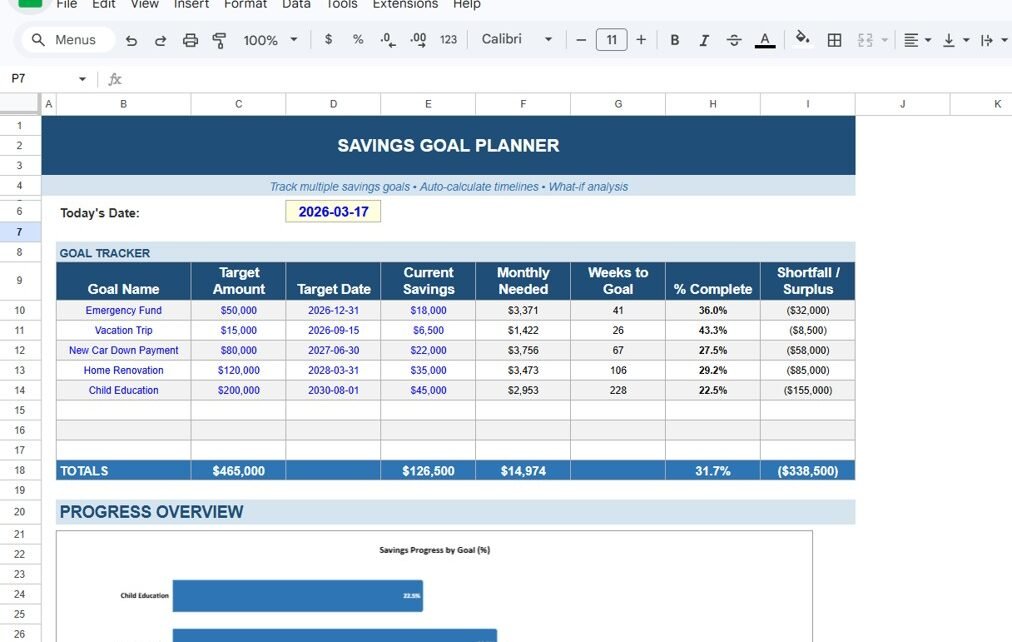
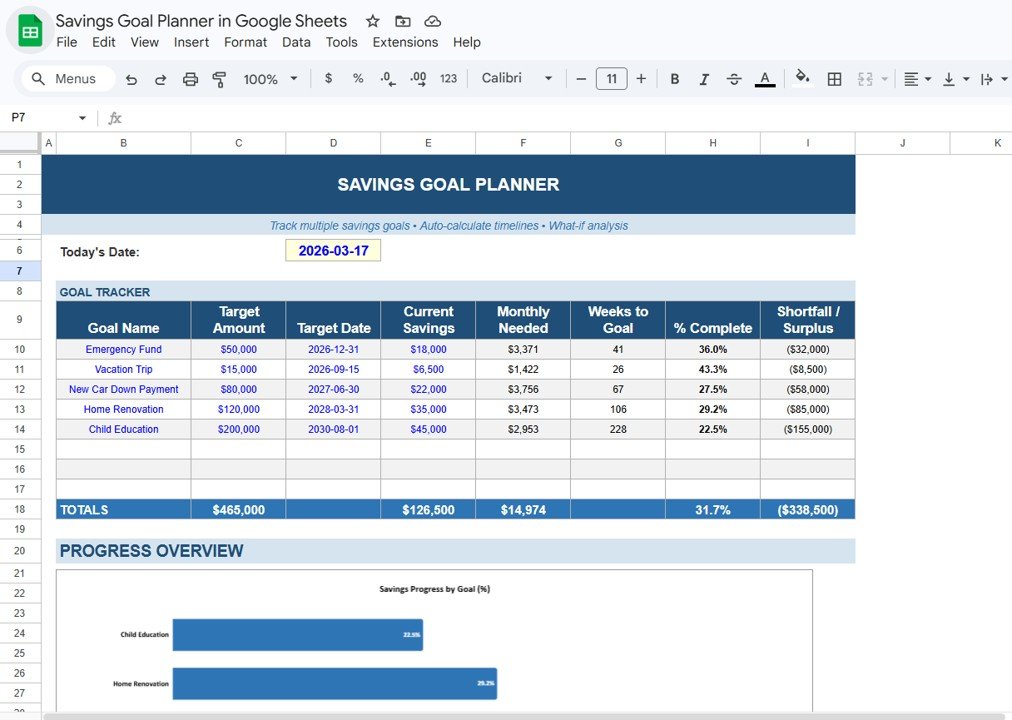
The planner sits on one clean sheet with three parts: a Today’s Date cell at the top, the Goal Tracker table and a Progress Overview chart. The banner describes it in three phrases: track multiple savings goals, auto-calculate timelines and what-if analysis.
Goal Tracker columns
| Column | You enter or it calculates | What it tells you |
|---|---|---|
| Goal Name | You enter | What you are saving for |
| Target Amount | You enter | The total you want to reach |
| Target Date | You enter | When you want to reach it |
| Current Savings | You enter | What you have saved so far |
| Monthly Needed | Calculated | How much to save each month from today to hit the target date |
| Weeks to Goal | Calculated | Weeks left between today and the target date |
| % Complete | Calculated | Current Savings as a share of Target Amount |
| Shortfall / Surplus | Calculated | Current Savings minus Target Amount; a gap shows in brackets |
The sample goals
The template ships with five example goals, with Today’s Date set to 2026-03-17:
| Goal | Target | Target Date | Saved | Monthly Needed | Weeks | % Complete |
|---|---|---|---|---|---|---|
| Emergency Fund | $50,000 | 2026-12-31 | $18,000 | $3,371 | 41 | 36.0% |
| Vacation Trip | $15,000 | 2026-09-15 | $6,500 | $1,422 | 26 | 43.3% |
| New Car Down Payment | $80,000 | 2027-06-30 | $22,000 | $3,756 | 67 | 27.5% |
| Home Renovation | $120,000 | 2028-03-31 | $35,000 | $3,473 | 106 | 29.2% |
| Child Education | $200,000 | 2030-08-01 | $45,000 | $2,953 | 228 | 22.5% |
The TOTALS row adds the targets ($465,000), current savings ($126,500), monthly amounts ($14,974) and the combined gap (($338,500)). The 31.7% in the totals row is the average of the five goals’ completion percentages.
Progress Overview
Below the table, the Savings Progress by Goal (%) bar chart shows each goal’s % Complete side by side, so the goal that is furthest behind stands out at once. In the sample it is Child Education at 22.5%.
Worked Example: How the Numbers Are Worked Out
Take the Vacation Trip goal. The sample numbers follow this logic:
Remaining amount   = Target Amount - Current Savings
                   = 15,000 - 6,500 = 8,500

Days left          = 2026-09-15 - 2026-03-17 = 182 days
Weeks to Goal      = 182 / 7 = 26 weeks
Months left        = 182 / 30.44 (average days per month) = about 5.98

Monthly Needed     = 8,500 / 5.98 = about $1,422
% Complete         = 6,500 / 15,000 = 43.3%
Shortfall/Surplus  = 6,500 - 15,000 = (8,500)
If you wanted to build the same idea yourself, with Target Amount in C, Target Date in D, Current Savings in E and Today’s Date in D6, the formulas would look like this:
Monthly Needed:  =(C10-E10)/((D10-$D$6)/30.44)
Weeks to Goal:   =INT((D10-$D$6)/7)
% Complete:      =E10/C10
Shortfall:       =E10-C10
The template already does all of this for you. The formulas are shown only so you understand what each figure means and can trust the result. If you want to get comfortable writing formulas like these, the learning paths on NextGenTemplates Academy are a good place for beginners to start.
How to Use the Planner with Your Own Goals
- Make your own copy with File > Make a copy.
- Check the Today’s Date cell at the top. All timelines are measured from it.
- Replace the sample rows in the Goal Tracker with your own goals: name, target amount, target date and what you have already saved. The table has spare rows below the five samples.
- Look at the Monthly Needed total. If it is more than you can save each month, push a target date back or reduce a target amount and watch the figure update. This is the simple what-if analysis the planner is built for.
- Each month, update Current Savings for every goal. % Complete, the gap and the chart refresh automatically.
- Use the Progress Overview chart to spot the goal that is falling behind and decide whether to move money to it.
Real-World Use Cases
- Young professional: building a three-month emergency fund while saving for a holiday, and checking that the two monthly amounts fit within take-home pay.
- Family planning big expenses: a car deposit in a year, a home renovation in two and a child’s education fund over several years, all visible on one screen.
- Freelancer with uneven income: updating current savings after each payment and using the shortfall column to decide which goal gets the next transfer.
Best Practices for Reaching Your Savings Goals
- Start with the emergency fund. It protects every other goal from being raided when something goes wrong.
- Be realistic about dates. If the total Monthly Needed is more than you can save, adjust dates now rather than missing them later.
- Update on payday. Tie the monthly update to the day money arrives, so it becomes a habit.
- Automate transfers. Set a standing order for each goal’s monthly amount from your bank. The planner then just confirms you are on track.
- Review every quarter. Goals change. Remove ones that no longer matter and add new ones as life moves on.
Limitations: Who This Planner Is Not For
This is a goal planner, not a full budget. It does not track income, everyday spending or bank transactions, and it does not connect to your bank. The monthly figure assumes you save a flat amount each month and does not add interest or investment returns, so for long-term goals invested in the market it gives a conservative, cash-only view. It is a planning tool and not financial advice. If you need to track every expense as well, pair it with a budget sheet such as our guide on how to make a budget tracker in Google Sheets.
Related Personal Finance Templates and Guides
To see your full money picture, try the Personal Finance KPI Dashboard in Google Sheets or the Income Expense Dashboard in Google Sheets. For regular check-ins, the Monthly Budget Checklist keeps you on schedule, and if your top goal is a trip, the Vacation Budget Checklist helps plan the spending side.
Related template: prefer Excel? There is also a Savings Goal Planner in Excel.
Frequently Asked Questions
How many savings goals can I track?
The sample has five goals and spare rows below them in the Goal Tracker. Fill the empty rows to add more goals.
How is the monthly savings amount calculated?
It divides what you still need (target minus current savings) by the number of months left between today’s date and the target date.
What does a number in brackets mean in Shortfall / Surplus?
Brackets show a shortfall: the amount you still need to save. A number without brackets would mean you have saved more than the target.
Does the planner include interest or investment growth?
No. It assumes flat monthly saving with no returns. If your savings earn interest, you will reach the goal a little sooner than the planner shows.
Can I use my own currency?
Yes. The sample uses dollar formatting, but you can change the number format to any currency in Google Sheets with Format > Number > Currency.
Can I share it with my partner?
Yes. Share the Google Sheets file with edit access and both of you can update current savings from your own phone or laptop.
Wrapping Up
The Savings Goal Planner in Google Sheets turns a vague wish list into a monthly plan with deadlines. Enter your goals, check that the total monthly amount fits your budget, adjust the dates if it does not, and update your savings each payday to watch the progress bars grow.
📅 Last updated: October 2026