Managing weekly meals, grocery shopping, nutrition goals, and food budgets can feel overwhelming — especially when you are juggling work, family, and fitness goals at the same time. The Meal Planner & Grocery List in Google Sheets solves this challenge by combining weekly meal planning, grocery list management, a recipe database, a detailed nutrition tracker, and a shopping history analyzer — all inside one powerful, automated Google Sheets template. Whether you are a health-conscious individual, a busy parent, or a fitness enthusiast, this template gives you everything you need to plan smarter, eat better, and spend less.
This ready-to-use template from NextGenTemplates features 5 professionally designed pages with interactive charts, KPI cards, and automated formulas that update in real time. You do not need any advanced Google Sheets skills — just enter your meals, groceries, and recipes, and the template handles the rest. Let us explore everything this template offers in detail.Meal Planner & Grocery List in Google Sheets
Get the Meal Planner & Grocery List in Google Sheets
Key Features of Meal Planner & Grocery List in Google Sheets
The Meal Planner & Grocery List in Google Sheets is packed with features designed to make meal planning and grocery management effortless:Meal Planner & Grocery List in Google Sheets
- 5 Professional Pages — Weekly Meal Plan, Grocery List, Recipe Database, Nutrition Tracker, and Shopping History work together as a complete meal management system.
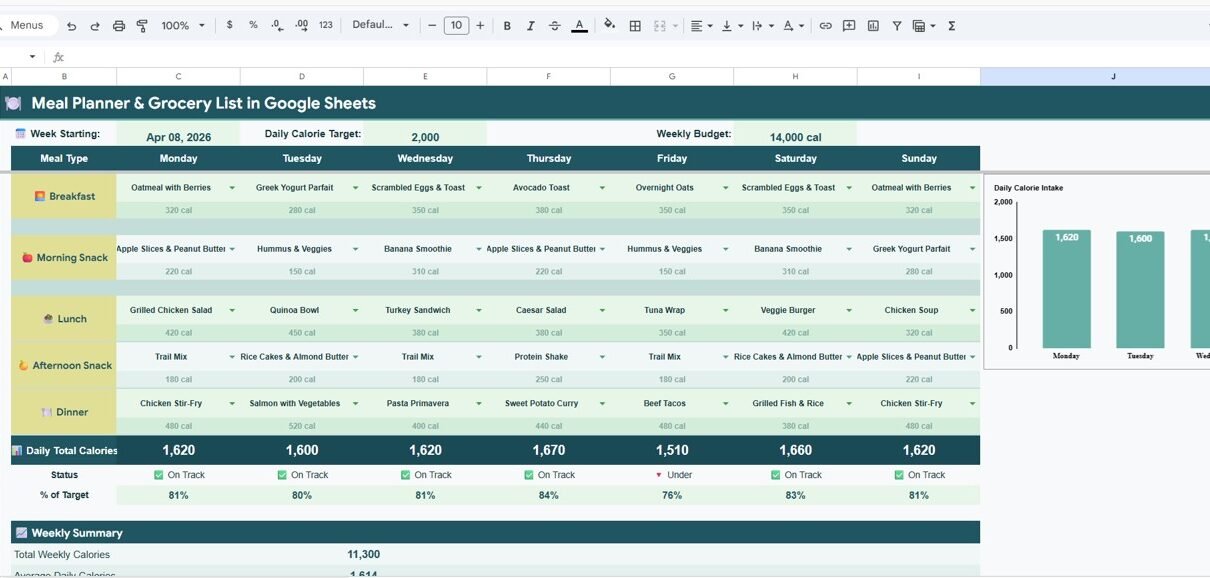
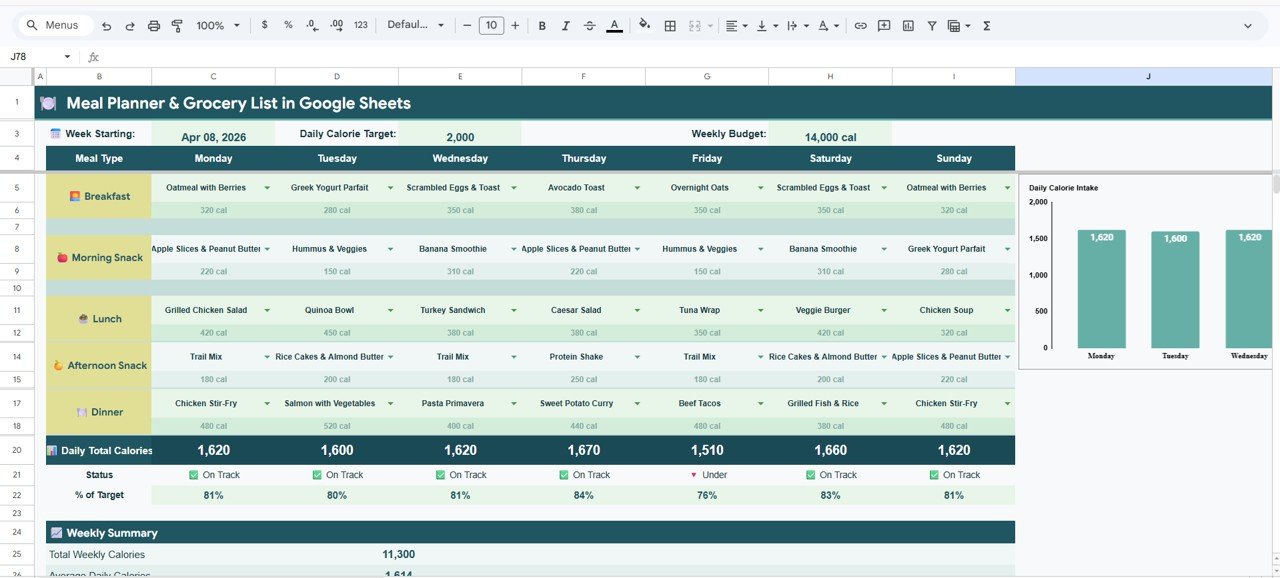
- 7 KPI Cards on Weekly Meal Plan — Track Week Starting Date, Daily Calorie Target, Weekly Budget, Daily Total Calories, Status (On Track / Off Track), % of Target, and Total Weekly Calories at a glance.
- 20+ Charts and Analyses — Visual breakdowns across all 5 pages covering calories, macronutrients, grocery costs, recipe nutrition, and weekly spending trends.
- Slicer Filters — Apply interactive filters on the Weekly Meal Plan dashboard to slice and view data by different criteria instantly.
- Fully Automated Formulas — All KPI cards, charts, and analytics update automatically when you enter or modify data — zero manual calculations.
- Budget vs Actual Tracking — Compare your planned grocery budget against actual spending every week with savings analysis.
- Macronutrient Monitoring — Track protein, carbs, fat, and water intake against daily targets with visual target vs actual comparisons.
- Professional Design — Clean, visually appealing layout with consistent color coding and intuitive navigation.Meal Planner & Grocery List in Google Sheets
Dashboard Pages Explanation
1. Weekly Meal Plan
The Weekly Meal Plan is the central dashboard of this template. At the top, you will find 7 high-level KPI cards displaying Week Starting Date, Daily Calorie Target, Weekly Budget, Daily Total Calories, Status (On Track or Off Track), % of Target, and Total Weekly Calories. These cards give you an instant snapshot of your meal planning performance for the week.
Below the KPI cards, an interactive chart shows Daily Calorie Intake by Day of Week, helping you visualize how your calorie consumption varies throughout the week. This is particularly useful for identifying days when you tend to overeat or undereat. Multiple slicer filters are available to quickly filter and view specific data segments on the dashboard.
Weekly Meal Plan
2. Grocery List
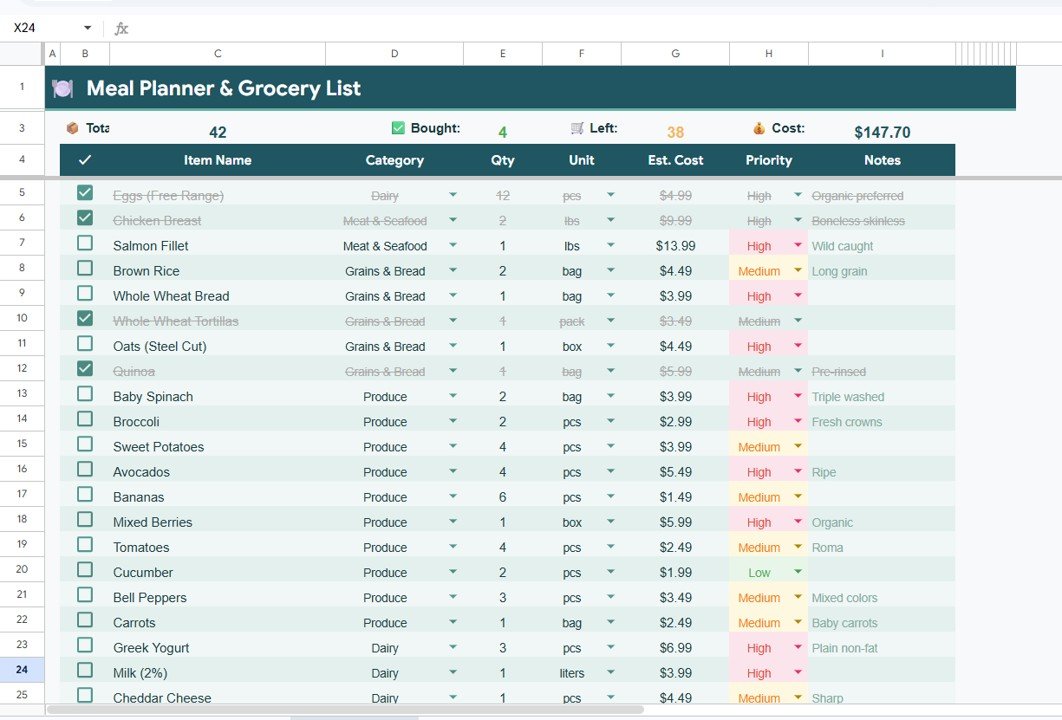
The Grocery List page transforms your shopping experience with organized, visual analysis. It includes Total Items by Category to see your shopping breakdown at a glance, Estimated Cost by Item for detailed budget planning before you step into the store, Items by Priority Level to help you prioritize essentials versus nice-to-haves, and a Bought vs Left Summary that tracks your real-time shopping progress so you never forget an item.
Grocery List
3. Recipe Database
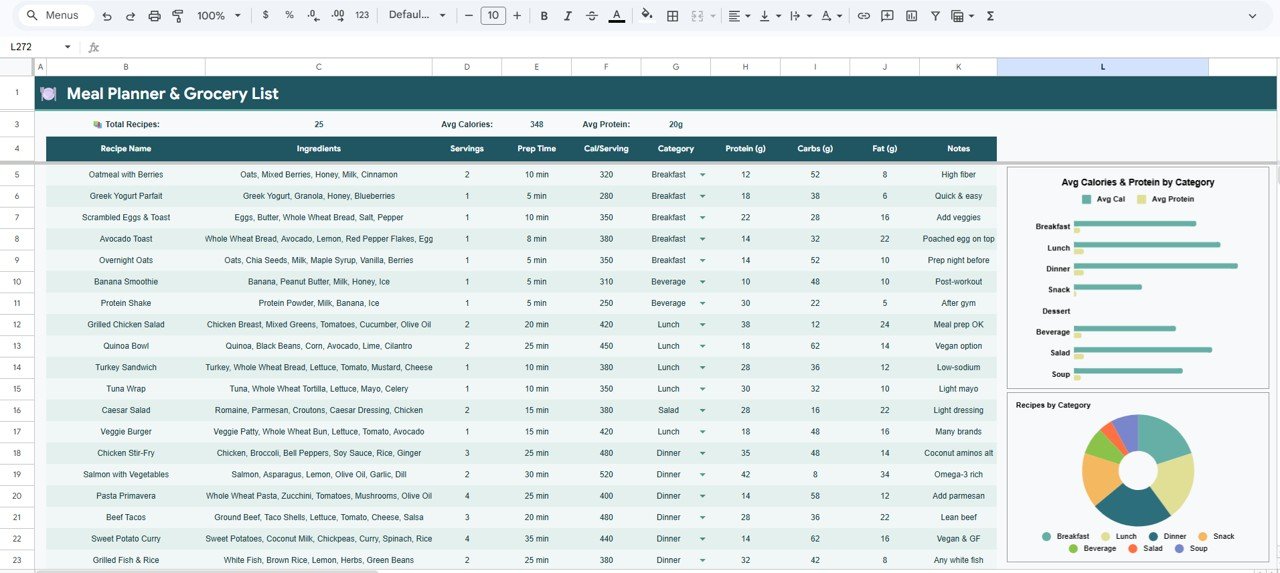
The Recipe Database page serves as your personal recipe collection with built-in nutrition analysis. It features Avg Calories and Protein by Category to compare nutritional value across recipe types, Recipes by Category for a clear inventory of your recipe collection, Calories per Serving by Recipe for precise portion control, and Macronutrient Breakdown by Recipe to understand the complete nutritional profile of each dish you prepare.Meal Planner & Grocery List in Google Sheets
Recipe Database
4. Nutrition Tracker
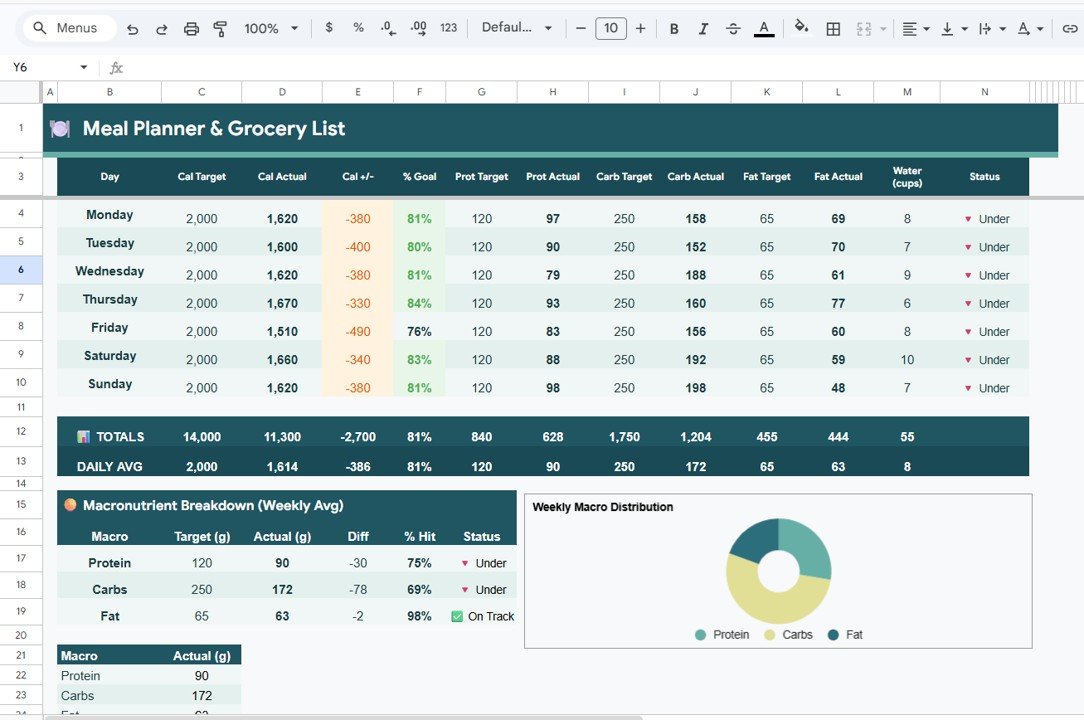
The Nutrition Tracker is the most comprehensive page in the template with 7 detailed analyses. It tracks Calorie Target vs Actual by Day, Protein Target vs Actual by Day, Carbs Target vs Actual by Day, and Fat Target vs Actual by Day — giving you a complete daily picture of how well you are meeting your nutritional goals. Additionally, it monitors Water Intake by Day to ensure proper hydration, shows Macronutrient Breakdown by Weekly Average for a high-level view, and displays Weekly Macro Distribution by Macro Type to understand your overall eating patterns.
Nutrition Tracker
5. Shopping History
The Shopping History page helps you analyze grocery spending patterns over time. It includes Total Spent by Week to see your spending trajectory, Actual Spent vs Budget by Week to identify weeks of overspending, Savings by Week to celebrate when you stay under budget, Percentage Used by Week for budget efficiency analysis, and Items Purchased by Store to understand which retailers you frequent most and where you spend the most money.
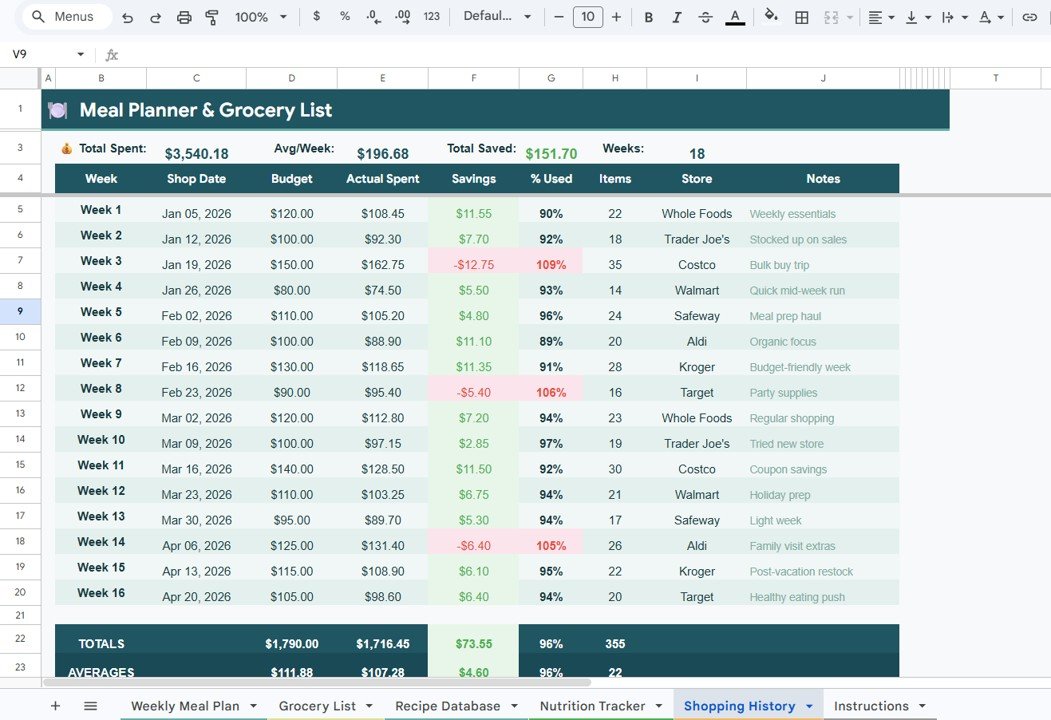
Shopping History
Advantages of Meal Planner & Grocery List in Google Sheets
- All-in-One Solution — Instead of using separate apps for meal planning, grocery lists, recipe storage, nutrition tracking, and budget management, this single template covers everything.
- Zero Learning Curve — No formulas to write, no complex setup. Just replace the sample data with your own information and start using it immediately.
- Cloud-Based Access — Being in Google Sheets, you can access your meal planner from any device — desktop, tablet, or smartphone — anywhere with an internet connection.
- Real-Time Budget Awareness — The Shopping History and Grocery List pages work together to give you constant visibility into grocery spending, helping you stay within budget.
- Nutrition Accountability — Daily target vs actual comparisons for calories, protein, carbs, fat, and water keep you honest about your nutritional intake.
- Shareable with Family — Share the Google Sheet with family members so everyone can contribute to meal planning and grocery tracking collaboratively.
Opportunities for Improvement
- Meal Auto-Suggestions — A future version could include automated meal suggestions based on calorie targets and available recipes in the database.
- Barcode/API Integration — Connecting to a nutrition API could auto-populate calorie and macro data for common food items, reducing manual entry.
- Multi-Week Meal Plan View — Expanding to a monthly view would help users plan further ahead and batch their grocery shopping more efficiently.
- Mobile-Optimized Layout — While Google Sheets works on mobile, a dedicated mobile-optimized view could improve the experience for on-the-go grocery tracking.Meal Planner & Grocery List in Google Sheets
Best Practices
- Plan Meals on Sunday — Set aside 15-20 minutes every Sunday to plan the upcoming week’s meals on the Weekly Meal Plan page. This saves time and reduces impulse food purchases.
- Update the Grocery List Before Shopping — Add all items from your planned meals to the Grocery List tab before heading to the store. Use the priority levels to ensure essentials come first.
- Build Your Recipe Database Gradually — Add 3-5 recipes per week to the Recipe Database. Over time, you will have a comprehensive personal cookbook with full nutrition data.
- Track Nutrition Daily — The Nutrition Tracker is most useful when updated daily. Spending 2 minutes each evening to log your intake creates powerful insights over time.
- Review Shopping History Weekly — Check the Shopping History page weekly to identify spending patterns. Look for opportunities to switch stores, buy in bulk, or reduce waste.
- Set Realistic Calorie Targets — Use the Daily Calorie Target KPI to set achievable goals. Adjust based on the % of Target metric to find a sustainable target.
Explore Relevant Templates
If you found the Meal Planner & Grocery List in Google Sheets useful, explore these related templates from NextGenTemplates.com:
- Weekly Meal Prep Checklist in Google Sheets — A structured checklist format for organizing weekly meal preparation tasks.
- Habit Tracker in Google Sheets — Build and monitor daily habits with 30-day and 90-day tracking, analytics, and heatmap visualizations.
- Personal Monthly Budget Tracker in Google Sheets — Track monthly income and expenses with automated charts and budget analysis.
- Personal Expense Tracker in Google Sheets — Monitor daily and monthly expenses with category breakdowns and trend analysis.
- Weekly Planner with Goals Tracker in Google Sheets — Plan your week and track goals with an integrated planner and tracker.
Get the Meal Planner & Grocery List in Google Sheets
Frequently Asked Questions
What is the best Google Sheets template for meal planning and grocery tracking?
The Meal Planner & Grocery List in Google Sheets by NextGenTemplates is one of the most comprehensive options available. It includes 5 pages covering weekly meal planning with 7 KPI cards, grocery list management, a recipe database with nutrition analysis, a detailed nutrition tracker with daily target vs actual comparisons, and a shopping history page with budget analysis.
How do I track calories and macros in Google Sheets?
The Nutrition Tracker page in this template lets you log daily intake and automatically compares your calories, protein, carbs, and fat against your targets. It also tracks water intake and shows weekly macro distribution charts — all with automated formulas that require no manual calculations.
Can I use this meal planner to manage my grocery budget?
Yes. The template includes both a Grocery List page with estimated costs and priority levels, and a Shopping History page that tracks actual spending vs budget by week, calculates savings, and shows which stores you purchase from most.
Do I need any special software to use this template?
No. You only need a free Google account. The template runs entirely in Google Sheets, which is accessible from any web browser on desktop, tablet, or mobile devices.
How many recipes can I store in the Recipe Database?
The Recipe Database has no hard limit — you can add as many recipes as you need. Each recipe includes fields for calories, protein, carbs, fat, serving size, and category, with automatic nutritional analysis charts.
Can I share this meal planner with my family?
Yes. Since it runs in Google Sheets, you can share the spreadsheet with family members using Google’s built-in sharing features. Multiple people can view and edit the meal plan, grocery list, and shopping history collaboratively.
Conclusion
The Meal Planner & Grocery List in Google Sheets is a complete meal management solution that brings together weekly meal planning, grocery list organization, recipe storage with nutrition analysis, daily macro tracking, and shopping budget monitoring — all in one beautifully designed, fully automated Google Sheets template. Whether you want to eat healthier, save money on groceries, or simply bring more structure to your weekly meals, this template gives you the tools and visual insights to make it happen.
If you enjoy building your own spreadsheet systems, the NextGenTemplates Academy learning paths offer a guided way to pick up those skills, with practice files along the way.