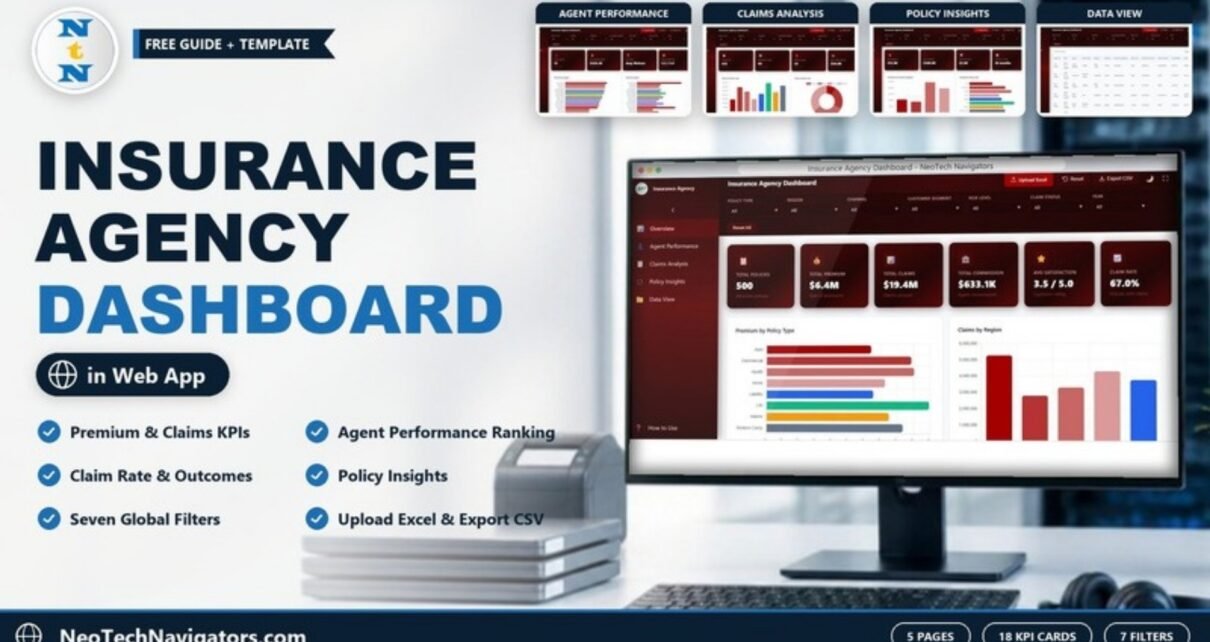
The Insurance Agency Dashboard in HTML turns a list of policies into a five-page report on premiums, claims, commissions, agents and customer satisfaction. It is built for agency owners, sales managers and operations leads who want one view of how the book of business is performing, without setting up a BI tool or a database.
The dashboard opens as an index.html file in any modern browser. It has five pages (Overview, Agent Performance, Claims Analysis, Policy Insights and Data View), 18 KPI cards, seven global filters and a searchable policy table. You load your own records with Upload Excel and take filtered data out with Export CSV.
🎥 Watch the Video Tutorial
Get the Insurance Agency Dashboard
Why an Insurance Agency Dashboard in HTML?
Agencies usually have the data they need. It sits in a policy admin system export or a shared spreadsheet with one row per policy. What is missing is a quick way to answer everyday questions: Which agents bring in the most premium? Which policy lines generate the most claims? How many claims were approved or denied this year? What does an average policy look like?
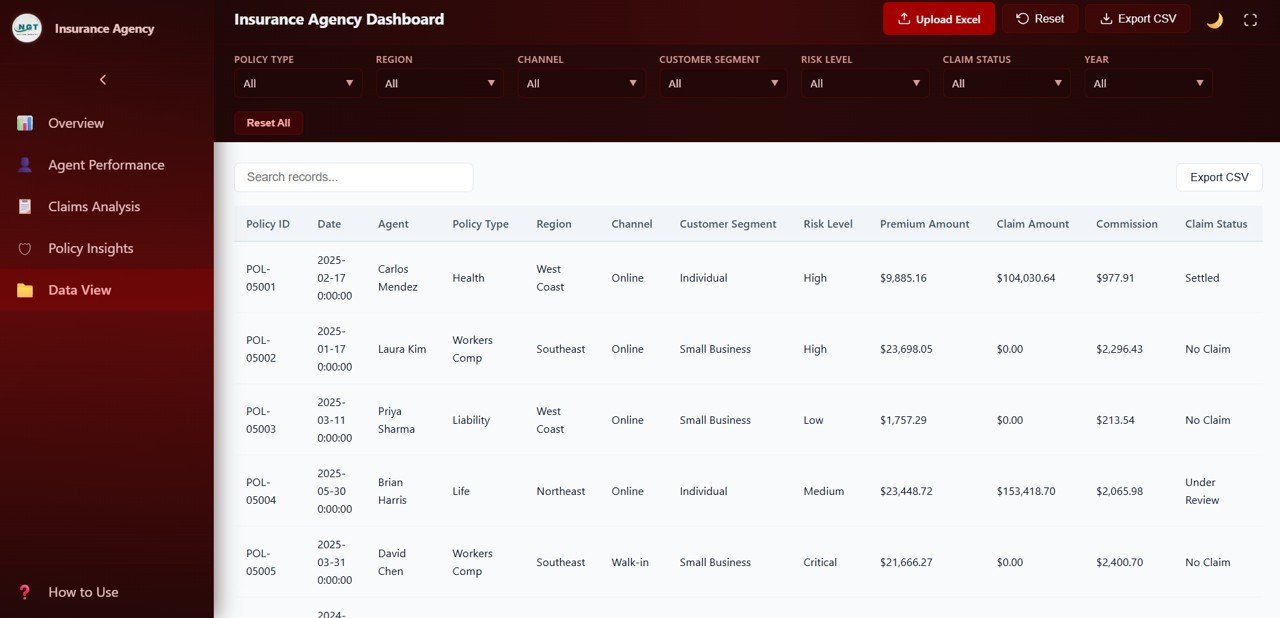
This template answers those questions from a single table. Each record holds a Policy ID, date, agent, policy type, region, channel, customer segment, risk level, premium amount, claim amount, commission and claim status. The dashboard summarises it into cards and charts, and every filter updates all pages together.
Filters and Toolbar
Seven dropdown filters run across the top: Policy Type, Region, Channel, Customer Segment, Risk Level, Claim Status and Year, with a Reset All button. The header holds Upload Excel, Reset, Export CSV, a light/dark theme toggle and full-screen mode. A How to Use link sits at the bottom of the sidebar.
KPI Cards and What They Mean
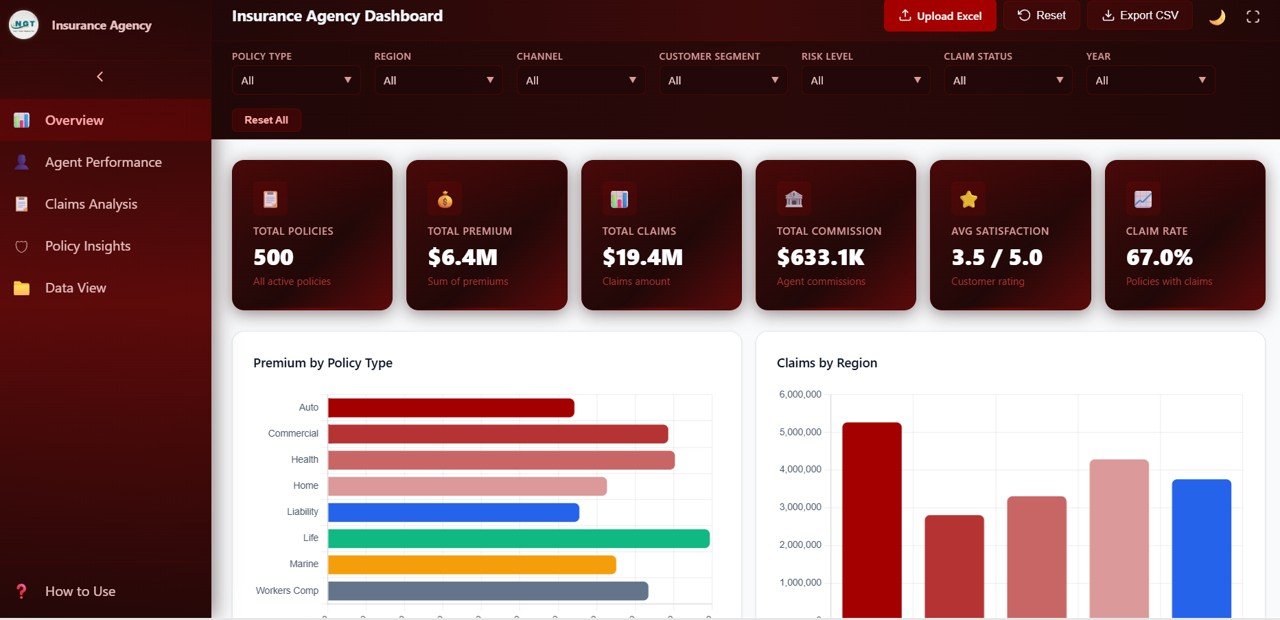
The sample data contains 500 policies handled by 15 agents. Values below are shown with no filters applied.
| Page | KPI card | Sample value | How to read it |
|---|---|---|---|
| Overview | Total Policies | 500 | Count of policies in view |
| Overview | Total Premium | $6.4M | Sum of premiums |
| Overview | Total Claims | $19.4M | Sum of claim amounts |
| Overview | Total Commission | $633.1K | Agent commissions earned |
| Overview | Avg Satisfaction | 3.5 / 5.0 | Average customer rating |
| Overview | Claim Rate | 67.0% | Share of policies with a claim (335 claims ÷ 500 policies) |
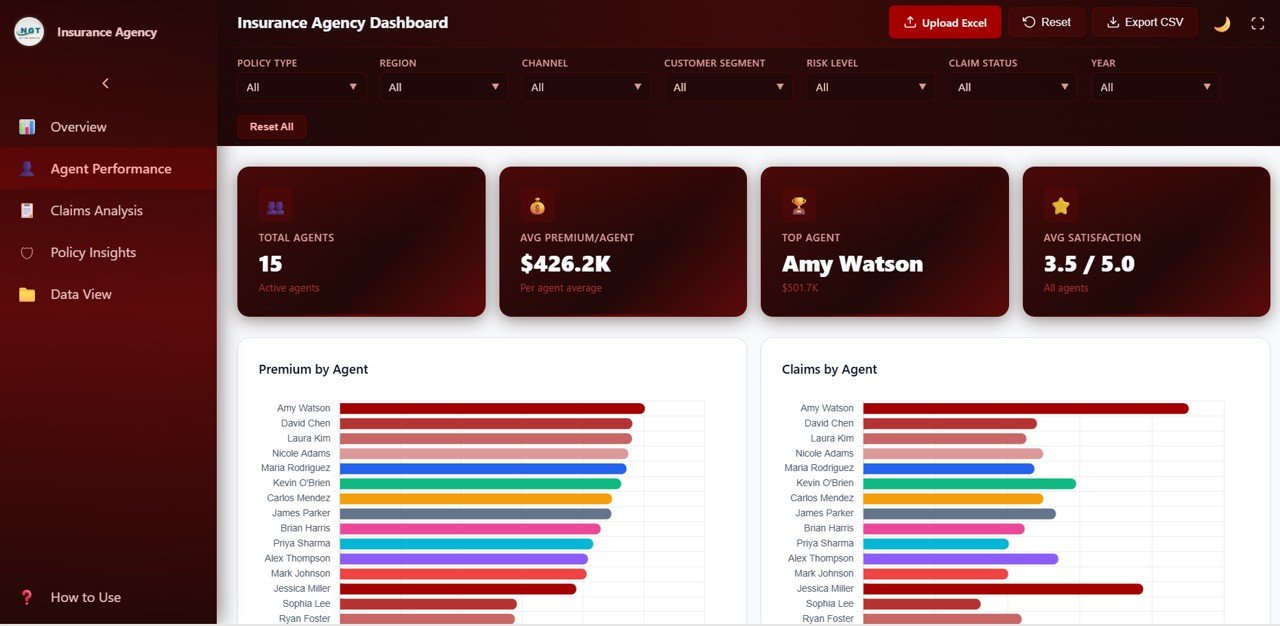
| Agent Performance | Total Agents / Avg Premium/Agent | 15 / $426.2K | Team size and average premium written per agent |
| Agent Performance | Top Agent | Amy Watson ($501.7K) | Agent with the highest premium |
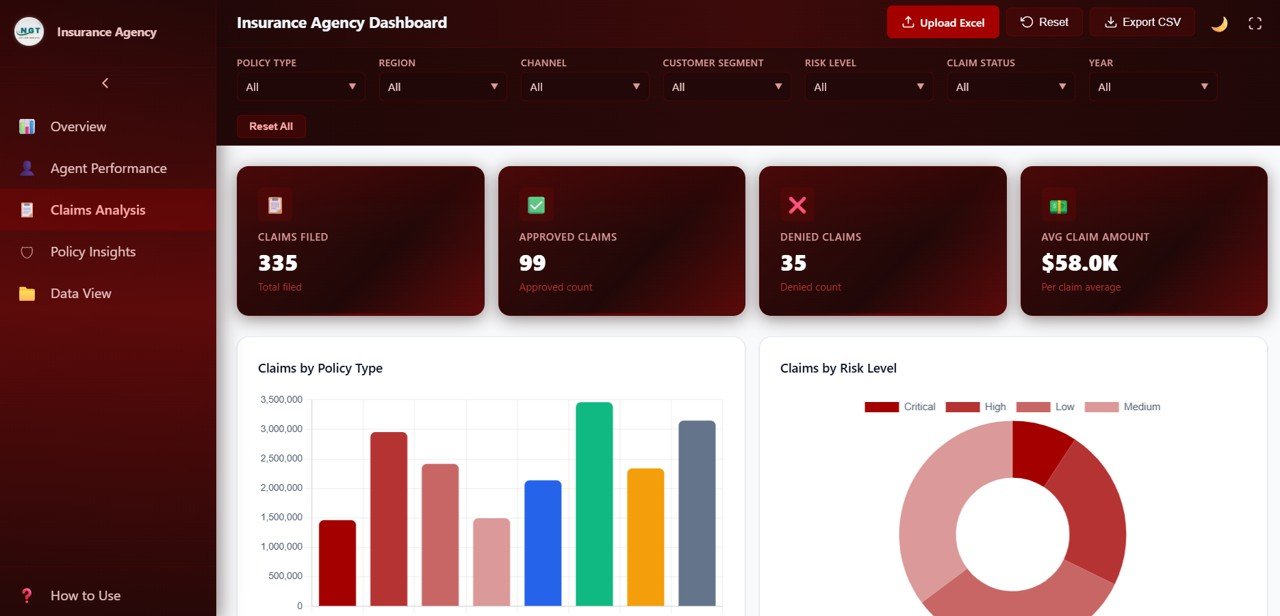
| Claims Analysis | Claims Filed / Approved / Denied | 335 / 99 / 35 | Claim volume and outcomes |
| Claims Analysis | Avg Claim Amount | $58.0K | Total claims ÷ claims filed ($19.4M ÷ 335) |
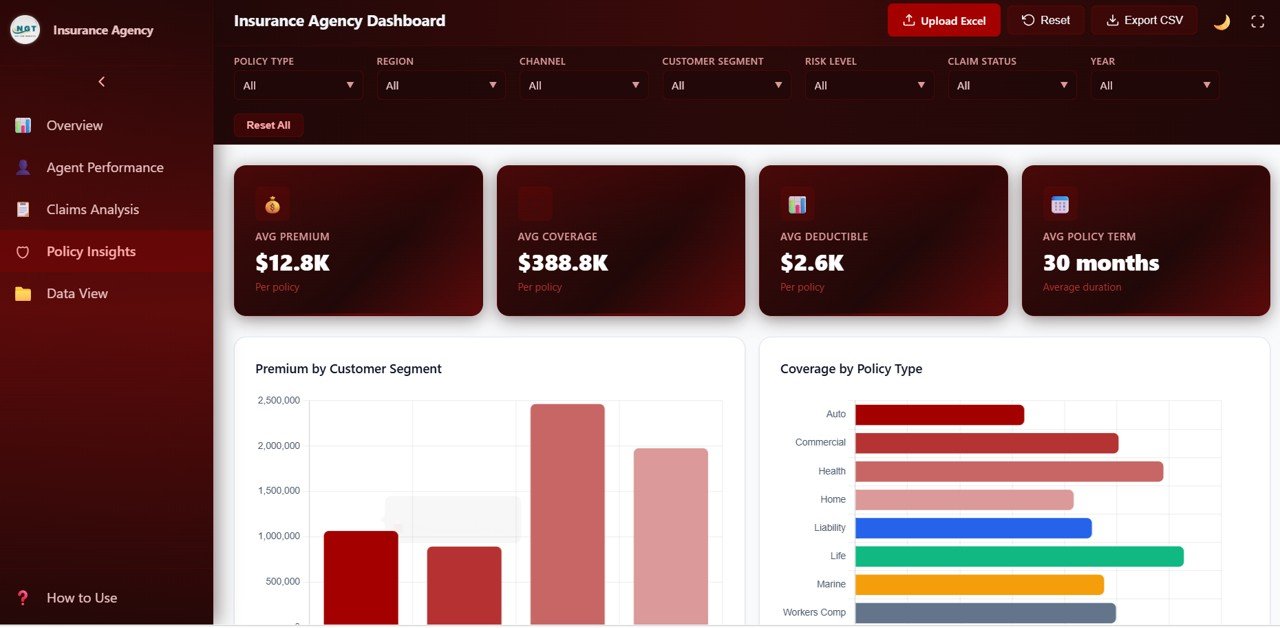
| Policy Insights | Avg Premium / Avg Coverage | $12.8K / $388.8K | Typical policy size and cover per policy |
| Policy Insights | Avg Deductible / Avg Policy Term | $2.6K / 30 months | Typical deductible and policy length |
These are demo figures. In the sample, total claims ($19.4M) are about three times total premium ($6.4M), which would signal heavy losses in a real agency. With your own data, Claim Rate and Avg Claim Amount become the cards to watch first.
Dashboard Pages Explained
1. Overview
Six headline cards sit above Premium by Policy Type, which compares Auto, Commercial, Health, Home, Liability, Life, Marine and Workers Comp, and Claims by Region. Further down are Policies by Channel, Claim Status Distribution and a Monthly Premium vs Claims Trend, so you can see whether claims are rising faster than premium in any period.
2. Agent Performance
This page ranks all 15 agents. Cards show Total Agents, Avg Premium/Agent, Top Agent and Avg Satisfaction. Premium by Agent and Claims by Agent list each agent side by side (Amy Watson, David Chen, Laura Kim and others in the sample), followed by Commission by Agent and Satisfaction Score by Agent. Comparing the premium and claims bars for the same person is a quick way to spot an agent whose book carries more claims than its size suggests.
3. Claims Analysis
Claims Analysis shows Claims Filed, Approved Claims, Denied Claims and Avg Claim Amount. Claims by Policy Type shows which lines drive claim cost, and Claims by Risk Level splits claims into Critical, High, Medium and Low. Claims by Customer Segment and Claim Amount by Region complete the page, which helps with underwriting reviews and with pricing discussions for high-risk segments.
4. Policy Insights
Policy Insights describes the portfolio itself. Cards show Avg Premium, Avg Coverage, Avg Deductible and Avg Policy Term. Charts include Premium by Customer Segment, Coverage by Policy Type, Policies by Payment Frequency and Premium by Region. Use it to see which segments and regions carry the most premium before planning a campaign or territory change.
5. Data View
The Data View lists every policy with search, sorting, pagination and its own Export CSV button. Columns are Policy ID, Date, Agent, Policy Type, Region, Channel, Customer Segment, Risk Level, Premium Amount, Claim Amount, Commission and Claim Status. Status values in the sample include Settled, No Claim and Under Review. It is the page to use when someone asks about one specific policy.
How to Use It With Your Own Data
- Unzip the download and open index.html in Chrome, Edge, Firefox or Safari.
- Open the Data View and note the column headings used by the sample data.
- Export your policies from your agency system or spreadsheet into an Excel file with the same headings, one row per policy.
- Click Upload Excel and choose the file. Cards, charts and the table refresh with your numbers.
- Use the filters to focus, for example Policy Type = Workers Comp and Risk Level = Critical.
- Export the filtered list with Export CSV for a meeting, then press Reset All.
Real-World Use Cases
- Monthly sales meeting. An agency manager opens Agent Performance, filters to the current Year and walks through premium, commission and satisfaction per agent.
- Claims review. An operations lead filters Claim Status to Under Review and exports the list to follow up with carriers.
- Portfolio planning. An owner uses Policy Insights to compare premium by region and customer segment before deciding where to hire the next agent.
Best Practices
- Refresh the data at least monthly so trends and agent rankings stay current.
- Keep agent names, regions and policy types spelled the same way in every export.
- Review Claim Rate and Avg Claim Amount together; a low rate with a very high average can hide large losses.
- Look at satisfaction alongside premium so you reward agents who keep customers happy, not only those who sell the most.
- Save a CSV export at each month end as a simple history.
Limitations: Who Should Not Use It
- It reports on data you upload. It is not a policy administration, quoting or claims handling system.
- There is no live connection to carrier portals or your agency management system.
- It does not track renewals, cancellations or retention as separate pages.
- Large carriers with millions of policies will need a database-backed BI tool instead.
Spreadsheet vs This Dashboard vs Agency Management Software
| Need | Spreadsheet | Insurance Agency Dashboard in HTML | Agency management system |
|---|---|---|---|
| Ready-made charts and KPIs | Build yourself | Yes, five pages and 18 cards | Varies |
| Agent comparison | Manual pivots | Built in | Usually |
| Issue policies, handle claims | No | No | Yes |
| Runs offline in a browser | Yes | Yes | Usually online only |
| Ongoing subscription | No | No (one-time purchase) | Usually yes |
Related Guides and Templates
For a broader insurer view, read about the Insurance Analytics Dashboard in HTML. If your team works in Google Sheets, compare the Insurance Brokers Dashboard in Google Sheets and the Insurance KPI Dashboard in Google Sheets. Claims teams may also like the Claim Settlement KPI Dashboard, and agencies that manage people across many accounts can look at the Staffing Agency Dashboard in HTML.
Related templates: the same report is also available as the Insurance Agency Dashboard in Excel and the Insurance Agency Dashboard in Power BI.
If you would like to build this kind of report yourself, the Excel Pivot Tables and Dashboards course on NextGenTemplates Academy covers the pivots and charts behind it.
Frequently Asked Questions
Do I need to install anything?
No. Open index.html in a modern browser. Excel or Google Sheets is only needed to prepare the file you upload.
How is the Claim Rate calculated?
It is the share of policies that have a claim. In the sample, 335 claims across 500 policies gives 67.0%.
Can I compare agents against each other?
Yes. The Agent Performance page shows premium, claims, commission and satisfaction for every agent, and you can narrow it with any of the seven filters.
Which policy types does it support?
The sample uses Auto, Commercial, Health, Home, Liability, Life, Marine and Workers Comp. The charts group by whatever values you put in the Policy Type column, so you can use your own lines of business.
Can I export filtered data?
Yes. Use Export CSV in the header or on the Data View page after applying your filters.
Can I use it on a tablet or phone?
It opens in mobile browsers, but the agent charts and the 12-column Data View are much easier to read on a laptop or desktop screen.
Wrapping Up
The Insurance Agency Dashboard in HTML gives agency leaders a clear view of premium, claims, commissions and agent performance in one browser tab. Load last quarter’s policy export, check Claim Rate and Top Agent, and use the filters to prepare your next sales or claims review.
Get the Insurance Agency Dashboard in HTML
📅 Last updated: October 2026