Google Sheets

Mastering the IF Function in Google Sheets with Real-Life Examples

The IF function in Google Sheets is one of the most versatile and commonly used functions. It’s incredibly useful for making decisions within your data, allowing you to return different values based on whether a condition is true or false. Whether you’re working with financial data, analyzing survey results, or building dynamic reports, mastering the […]

Google Sheets

10 Mind-Blowing Google Sheets Tricks You Didn’t Know Existed

Google Sheets is more than just a spreadsheet tool – it’s a powerful platform that can automate calculations, visualize data, and improve productivity. If you think you know Google Sheets tricks, think again! Here are 10 mind-blowing tricks that will change the way you use it forever. Use Google Translate Inside Google Sheets Did you […]

Google Sheets

Mastering Google Sheets Text Functions

Google Sheets offers a variety of text functions that make working with data a breeze. Whether you’re managing names, addresses, or product lists, these functions allow you to manipulate, extract, and format text quickly. If you’re looking to save time and increase efficiency, you’re in the right place! In this guide, we’ll go over five […]

Google Sheets

Calculate Date Differences in Google Sheets Using DATEDIF

Calculate Date Differences in Google Sheets between two dates is a common task in spreadsheets, whether you’re managing a project timeline, tracking an employee’s tenure, or calculating a customer’s subscription duration. Google Sheets provides the DATEDIF function, a powerful yet often underused tool, to perform these calculations seamlessly. Calculate Date Differences in Google Sheets In […]

Google Sheets

Google Sheets Formulas to Clean Your Data in Seconds

Cleaning data in Google Sheets can seem overwhelming Google Sheets Formulas to Clean Your Data, but with the right formulas, it becomes a breeze. Whether you’re dealing with messy text, duplicates, or inconsistent formats, Google Sheets offers powerful tools to make your data spotless. This guide will walk you through the most effective formulas and […]

Google Sheets

How to Rename a Google Sheets Tab

Rename a Google Sheets Tab is an incredibly useful tool for managing data, collaborating with teams, and organizing projects effectively. One essential feature of Google Sheets is the ability to rename tabs. Although it may seem like a small detail, renaming tabs can make a huge difference in keeping your spreadsheet organized and easy to […]

Google Sheets

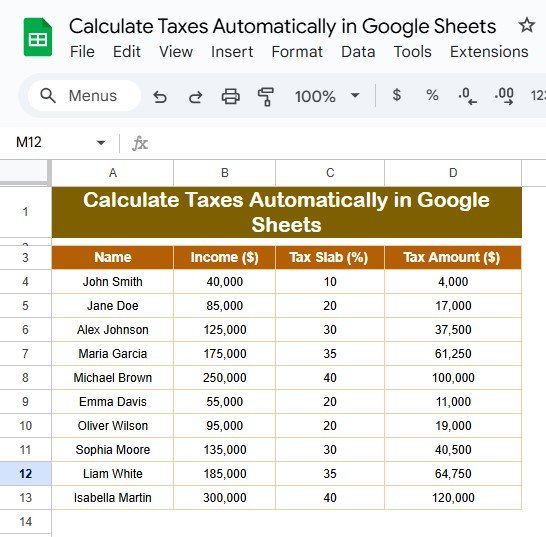
Calculate Taxes Automatically in Google Sheets

Calculate Taxes Automatically in Google Sheets are an essential but often tedious task, especially when working with multiple income records. However, Google Sheets simplifies this process by allowing you to calculate taxes automatically. Using structured formulas and predefined tax slabs, you can eliminate manual errors and save time. This guide explains everything you need to […]

Google Sheets

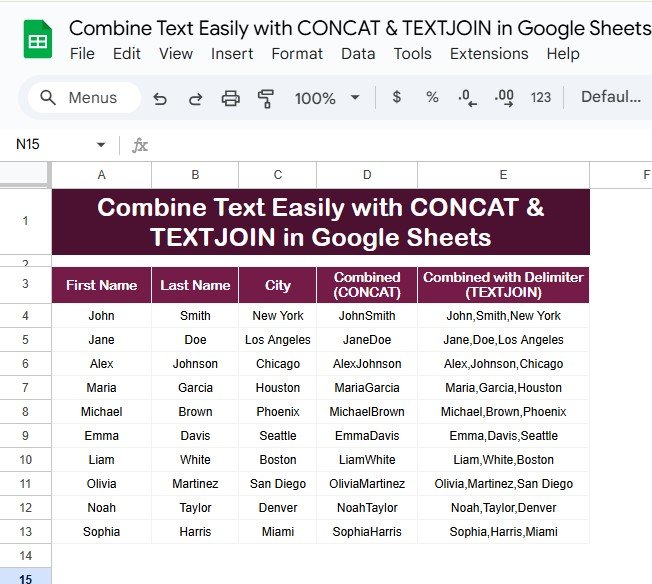
Combine Text Easily with CONCAT & TEXTJOIN in Google Sheets

Combining text from different cells is a common task when working with spreadsheets. Whether you’re creating full names, generating formatted addresses, or merging multiple fields for analysis, Google Sheets makes it easy with functions like CONCAT & TEXTJOIN in Google Sheets. These two tools are powerful yet simple ways to handle text in Google Sheets. […]

Google Sheets

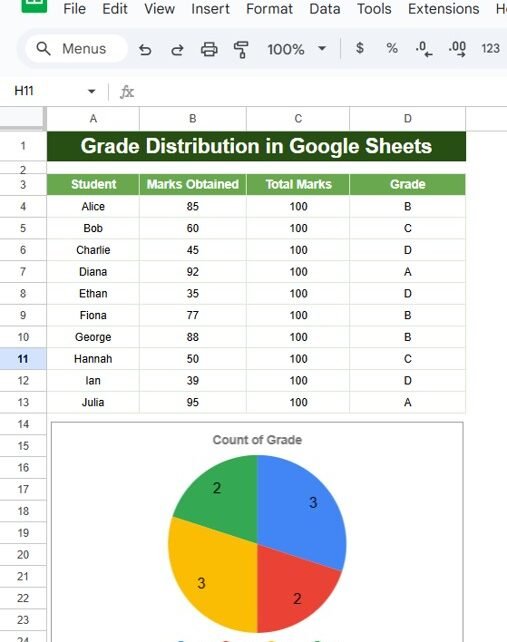
Grade Distribution in Google Sheets

Google Sheets is an incredibly powerful tool for data analysis, and one of its practical applications is automating grade distribution. Assigning grades based on scores can be tedious, but with the right formula, you can simplify the entire process. This article will walk you through Grade Distribution in Google Sheets, including step-by-step instructions, practical examples, […]

Google Sheets

Auto-Highlight Top 3 Students in Google Sheets

Auto-Highlight Top 3 Students in Google Sheets Recognizing top-performing students is an essential task for educators and administrators. Google Sheets makes this task seamless by automating the process of highlighting the top 3 students in a dataset. In this article, you will learn how to use Google Sheets to Auto-Highlight the Top 3 Students with […]