The Warranty Expiration Calendar in Google Sheets turns warranty follow-up into a 5-page operating calendar with 4 overview cards, 4 overview chart areas, a 12-month annual view, a monthly calendar, a daily date-range list, and a central Events sheet. Instead of tracking coverage dates across email, invoices, product folders, and memory, teams get one shared Google Sheet for warranty expiration dates, renewal windows, claim follow-up, locations, times, and notes. Built by PK, founder of NextGenTemplates with 300K+ YouTube subscribers, this is a low-cost $4.99 template for teams that want structure without buying a full asset management platform.Warranty Expiration Calendar in Google Sheets
Get the Warranty Expiration Calendar in Google Sheets
Key Features of Warranty Expiration Calendar in Google Sheets
- Overview Page: See the main navigation cards and quick analysis areas for annual, monthly, daily, and event-level warranty tracking.Warranty Expiration Calendar in Google Sheets
- Annual View: Review warranty expirations across the selected year and identify months with higher renewal or claim activity.
- Monthly View: Focus on one month at a time so near-term warranty deadlines are not buried in a long list.
- Daily View: Use a start date and end date to create a filtered warranty event list for follow-up meetings.
- Events Sheet: Maintain the source records for warranty dates, event names, times, locations, and descriptions.Warranty Expiration Calendar in Google Sheets
- Google Sheets collaboration: Share the file with operations, IT, customer support, service, or procurement teams.
- Editable structure: Adapt event names, locations, descriptions, and warranty categories to your own process.Warranty Expiration Calendar in Google Sheets
- One-time cost: Use the template without a monthly subscription or per-user charge from NextGenTemplates.
Dashboard Pages Explanation
1. Overview Page
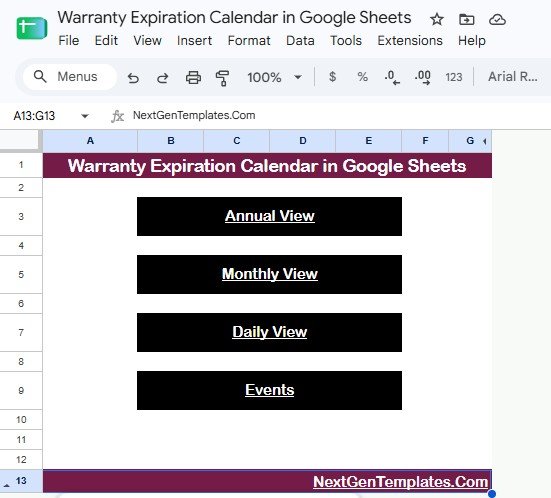
The Overview Page is the entry point for the warranty calendar. At the top, it uses four high-level cards: Annual View, Monthly View, Daily View, and Events. These cards make it simple for a manager or team member to jump to the right level of detail without searching through sheet tabs.Warranty Expiration Calendar in Google Sheets
Warranty Calendar by Annual View: This chart area shows how the warranty schedule looks at a yearly level.
Use it to spot months where several products, assets, or service contracts may expire together.
Warranty Calendar by Monthly View: This view narrows the calendar to a selected month.
It is useful for weekly planning, vendor follow-up, and checking which warranty dates are coming soon.
Warranty Event List by Daily View: This area supports date-range review for near-term work.
Use it before operations meetings to see exactly which warranty events need action today, this week, or this month.Warranty Expiration Calendar in Google Sheets
Warranty Event Records by Events Sheet: This links the dashboard back to the underlying event database.
It helps users understand that every calendar view is driven by the editable records in the Events sheet.Warranty Expiration Calendar in Google Sheets
Warranty Expiration Calendar in Google Sheets
2. Annual View
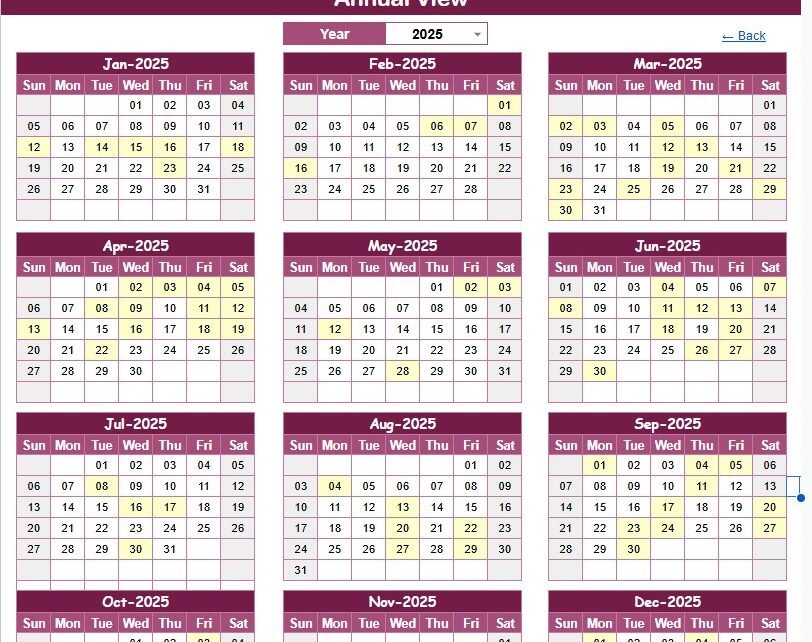
The Annual View is for long-range warranty planning. It helps you review the full year, identify heavy expiration months, and prepare renewal or replacement conversations before coverage runs out.
- Warranty Expiration Events by Month: Shows the spread of expiration events across the calendar year so crowded months are easy to notice.Warranty Expiration Calendar in Google Sheets
- Warranty Events by Calendar Date: Connects each warranty record to the exact date that needs attention.Warranty Expiration Calendar in Google Sheets
- Annual Calendar by Year: Gives a full-year layout for leadership review, procurement planning, and service coordination.Warranty Expiration Calendar in Google Sheets
- Highlighted Warranty Dates by Month: Makes important warranty dates easier to see inside each monthly block.Warranty Expiration Calendar in Google Sheets
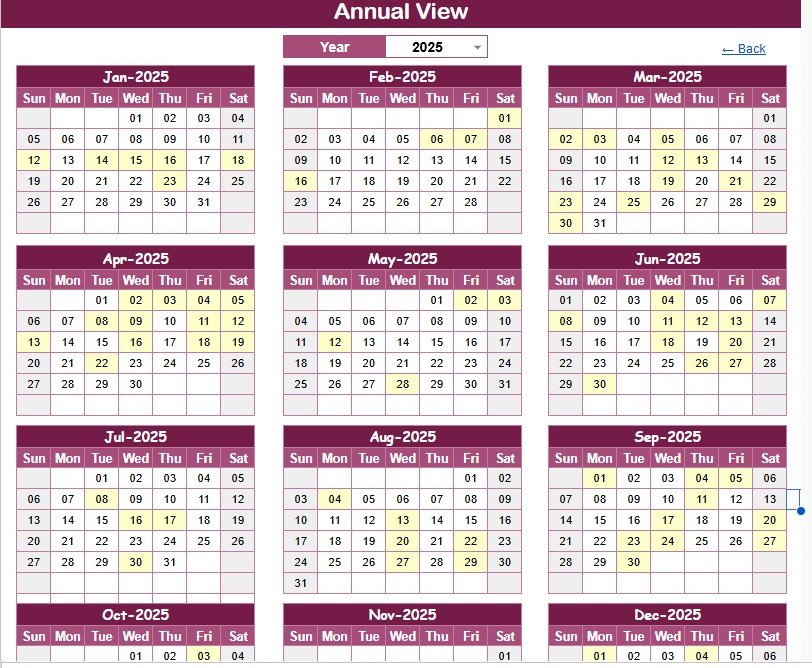
Annual View
3. Monthly View
The Monthly View is the practical short-term planning page. Choose the month and year, then use the calendar to see which warranty actions are approaching and where follow-up may be needed.
- Warranty Expiration Events by Day: Shows warranty activity at day level for the selected month.Warranty Expiration Calendar in Google Sheets
- Warranty Items by Calendar Date: Helps users connect products, equipment, or assets to their exact warranty date.Warranty Expiration Calendar in Google Sheets
- Monthly Calendar by Month: Provides a focused monthly calendar instead of a long table of dates.Warranty Expiration Calendar in Google Sheets
- Warranty Schedule by Year: Keeps the selected month connected to the larger yearly warranty plan.
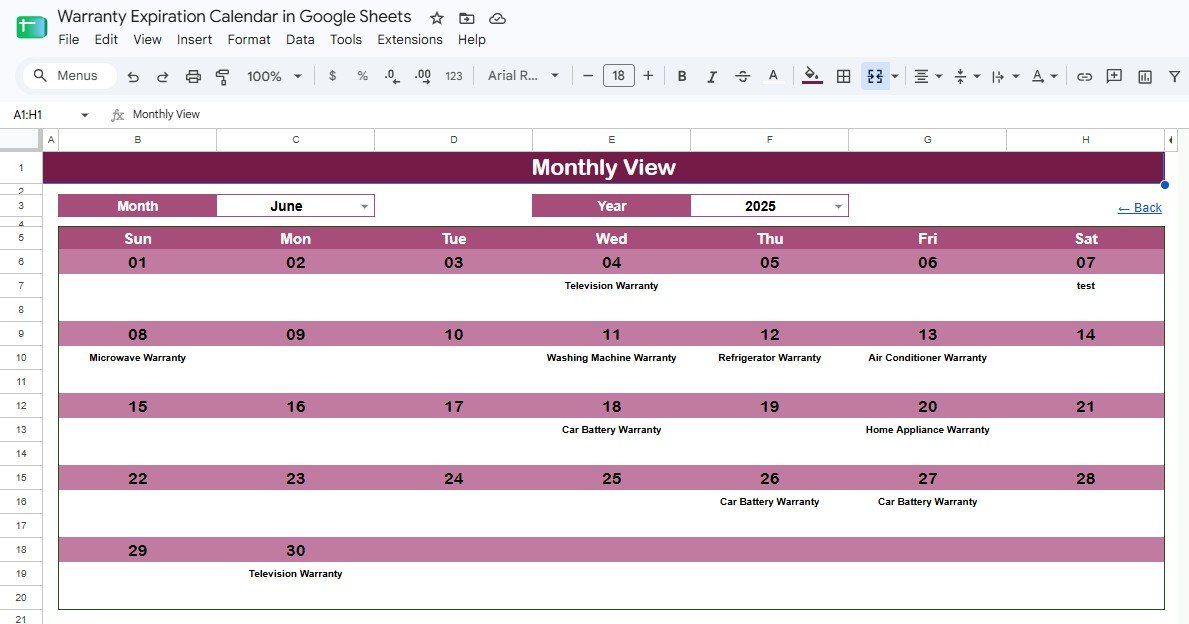
Monthly View
4. Daily View
The Daily View is built for action. Enter a start date and end date, then review the warranty events that fall within that window. This is useful for service teams, IT teams, and operations coordinators who need a simple list for daily or weekly follow-up.
- Warranty Events by Date: Lists warranty events according to the selected date range.
- Warranty Event Time by Event Name: Helps users see when specific warranty-related actions are scheduled.
- Warranty Event Location by Event Name: Shows where the warranty item, product, or asset is connected.
- Warranty Event Description by Event Name: Gives the context needed before contacting a vendor, customer, or internal owner.
- Warranty Events by Date Range: Turns the calendar into a working follow-up list for today, this week, or any chosen period.
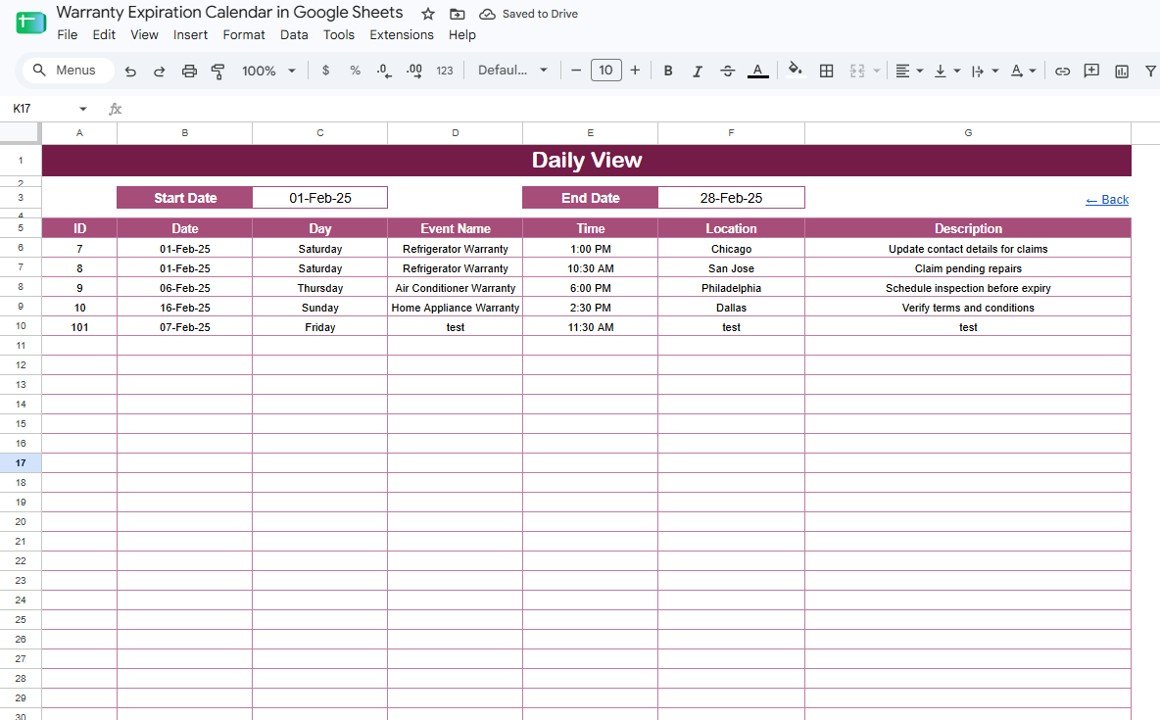
Daily View
5. Events Sheet
The Events Sheet is the source table for the template. This is where users add or update warranty records, including dates, event types, event names, times, locations, and descriptions. When the Events Sheet stays clean, the calendar views stay useful.
- Warranty Records by Date: Stores each warranty event against the date that matters.
- Warranty Event Type by Event Name: Separates expirations, renewals, claims, replacements, and service windows if you choose to use those event types.
- Warranty Time by Event Name: Captures follow-up timing for calls, inspections, renewals, or vendor meetings.
- Warranty Location by Event Name: Connects an event to a store, office, service center, asset location, or customer site.
- Warranty Description by Event Name: Keeps notes close to the calendar record so users do not have to hunt through email threads.
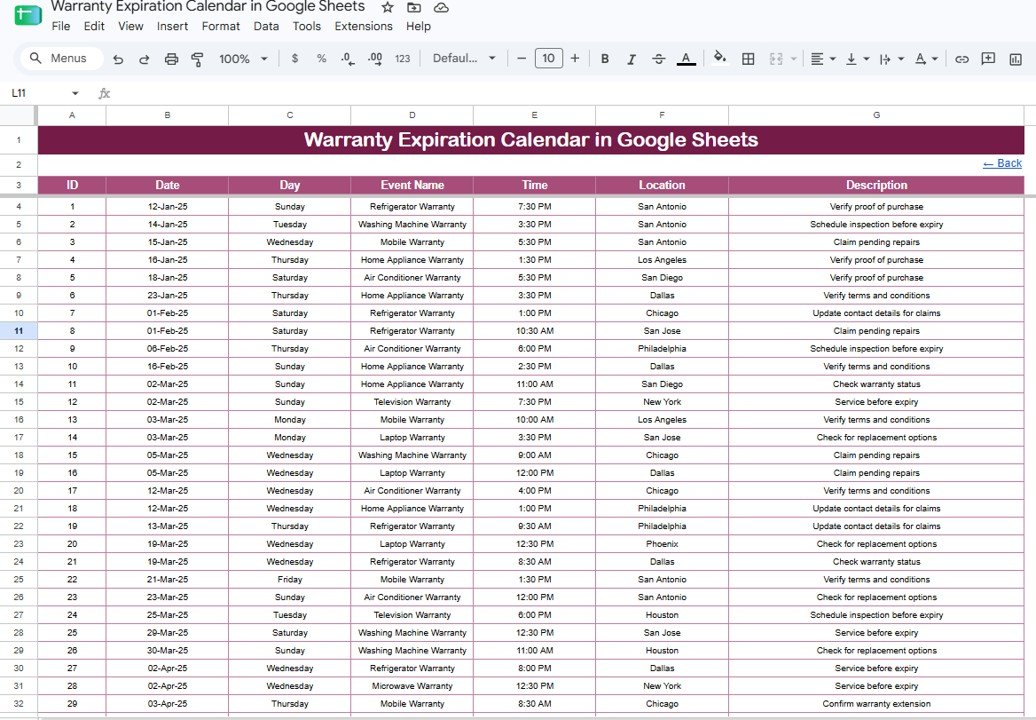
Events Sheet
Warranty Expiration Calendar in Google Sheets vs. Excel Calendar vs. Paid Asset Management SaaS – Feature Comparison
| Feature | This Google Sheets template | Microsoft Excel calendar | Paid asset management SaaS |
|---|---|---|---|
| Cost | $4.99 one-time | $4.99 to $9.99 one-time, plus Office if needed | Usually monthly or annual per user |
| Platform | Google Sheets in a browser | Excel desktop or web | Vendor cloud app |
| Setup time | Under 10 minutes | Under 10 minutes | Often needs account setup, fields, users, and training |
| Real-time team collaboration | Native Google Drive sharing | Depends on OneDrive or SharePoint setup | Usually included on paid plans |
| Mobile access | Google Sheets app or browser | Possible but less comfortable for calendar edits | Usually included |
| Customizable fields | Fully editable | Fully editable | Limited by vendor configuration |
| Share with link | Yes | Possible through cloud storage | Invite-based |
| Year-1 cost at 5 users | $4.99 total | $4.99 to $9.99 plus Office costs if required | Can become hundreds or thousands annually |
| Warranty-specific fit | Expiration dates, event lists, renewal notes, and shared follow-up | Offline warranty tracking | Full asset lifecycle, permissions, reminders, and workflows |
Who Should Use This Template
This template is a strong fit for small businesses, operations teams, IT asset coordinators, retail stores, warranty administrators, service centers, facilities teams, procurement teams, and customer support departments. It works well when the team needs visibility over warranty dates but does not need a full enterprise asset management system.
It is also useful for personal or family asset tracking: appliances, laptops, phones, tools, vehicles, insurance add-ons, and service contracts can all be logged in the same structure.
Real-World Use Cases
IT asset tracking: Dev manages 250 laptops, monitors, and network devices across two offices. He logs warranty dates in the Events Sheet and checks the Monthly View before deciding whether to repair, replace, or extend support.
Retail support follow-up: Nina runs a small electronics store. She records customer warranty windows, replacement deadlines, and vendor claim dates so the support team can follow up without searching invoices manually.
Facilities and equipment planning: Maria manages office equipment, HVAC units, and security devices. The Annual View helps her see when several warranties expire in the same quarter, so she can plan renewals before a service issue appears.
Advantages of Warranty Expiration Calendar in Google Sheets
- Low cost: The template is $4.99 once, which makes it easy to test before moving to heavier software.
- Fast setup: Copy the Google Sheet, add your warranty records, and start reviewing annual, monthly, and daily views.
- Clear ownership: Event names, locations, times, and descriptions keep follow-up information close to the warranty date.
- Flexible use: The same structure works for products, equipment, assets, service contracts, insurance add-ons, and replacement plans.
- Collaboration: Teams can use Google Drive permissions to share the calendar with the right people.
Opportunities for Improvement
This is a spreadsheet calendar, not an automated warranty management platform. It does not send reminders by itself, route claims, scan barcodes, attach invoices, or maintain a permissioned customer portal. Teams that need those features should consider dedicated asset management or warranty software.
Another limitation is data discipline. The template works best when event names and locations are entered consistently. If one person writes “Laptop warranty” and another writes “Notebook support expiry”, filtering becomes harder. A simple naming convention solves most of that.
Best Practices
- Add every warranty record as soon as the purchase is made, not when the deadline is close.
- Use consistent event types such as Expiration, Renewal, Claim, Replacement, and Service Window.
- Store supporting invoice or receipt links in a separate column if your team needs proof of purchase.
- Review the Monthly View at the start of each month and the Daily View during weekly follow-up meetings.
- Share the sheet with view-only access for people who only need visibility, and editor access for people who maintain records. Google explains Drive and Sheets sharing controls in its official file sharing guide.
- Keep an archived copy each year so old warranty history is preserved before the next planning cycle begins.
Explore Relevant Templates
If you manage warranty claims after expiration dates are identified, the Product Warranty Claim Tracker in Google Sheets gives you a more claim-focused workflow.
For preventive service planning, see the Maintenance Tasks Calendar in Google Sheets. If your team works in Excel, use the Warranty Expiration Calendar in Excel. You can also explore the Calendar & Planner Pack for a bundled set of scheduling templates.
Browse all Google Sheets Calendar templates or the full Google Sheets template library.
Want to build calendar and tracker skills step by step? The NextGenTemplates Academy learning paths on NextGenTemplates Academy walk you through it with practice files.
Get the Warranty Expiration Calendar in Google Sheets
Frequently Asked Questions
What is included in the Warranty Expiration Calendar in Google Sheets?
It includes 5 pages: Overview, Annual View, Monthly View, Daily View, and Events. Together, they support high-level navigation, yearly planning, monthly review, date-range follow-up, and source record management.
Can I track warranties for different product types?
Yes. You can use the template for electronics, tools, appliances, vehicles, IT assets, service contracts, equipment, customer products, or internal company assets.
Does the template work for teams?
Yes. Since it is built in Google Sheets, you can share your copy with team members and choose viewer, commenter, or editor permissions.
Does it include automatic reminders?
No. The template is a calendar and tracking file. You can pair it with Google Calendar, Apps Script, or another automation tool if you want email reminders.
How is this different from the Product Warranty Claim Tracker?
This calendar focuses on upcoming expiration dates, renewals, and scheduled warranty events. The Product Warranty Claim Tracker focuses on claim status, resolution, replacement, technician assignment, and service-center activity.
Is there a monthly subscription?
No. The template is a one-time purchase from NextGenTemplates. There is no monthly fee or per-user charge from us.
About the Author
Built by PK – Microsoft Certified Professional with 15+ years of Excel, Google Sheets, and Power BI experience. Founder of NextGenTemplates, reaching 300K+ subscribers across YouTube channels. Every template is hand-built and tested before release.
Conclusion
The Warranty Expiration Calendar in Google Sheets is a practical way to stop warranty dates from disappearing into inboxes, folders, receipts, and scattered notes. With annual, monthly, daily, and event-level views, it gives teams enough structure to act before coverage expires while keeping the file simple enough to customize.
✅ Instant download – One-time payment – No subscription – Editable Google Sheets template
Last updated: August 18, 2026