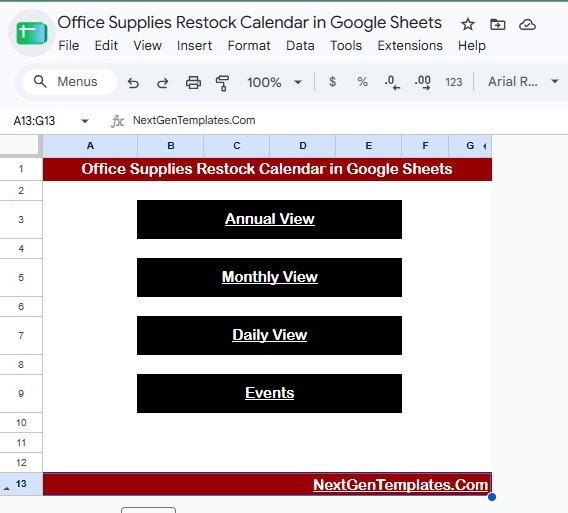
The Office Supplies Restock Calendar in Google Sheets gives admin teams a 5-page planning system with 4 high-level cards, 16 named analysis views, and slicers for quick filtering. Instead of chasing supply needs through messages, sticky notes, and separate order lists, your team can plan restock dates, office locations, event names, restock times, and item descriptions in one shared Google Sheet. The template costs $4.99 one time, which keeps the first-year cost at $4.99 for a 5-user team instead of adding another monthly inventory or procurement subscription.Office Supplies Restock Calendar in Google Sheets
Get the Office Supplies Restock Calendar in Google Sheets
Office supplies are small line items, but missed restocks create real friction: printer paper runs out before a proposal deadline, cleaning supplies are not ready before an audit, or meeting-room materials disappear before a client visit. A simple calendar makes those recurring restock jobs visible before they become interruptions.
Key Features of Office Supplies Restock Calendar in Google Sheets
The Office Supplies Restock Calendar in Google Sheets is built around five working tabs: Overview, Annual View, Monthly View, Daily View, and Events. Each page supports a different planning horizon, so office managers can move from yearly patterns to a same-day task list without creating separate files.Office Supplies Restock Calendar in Google Sheets
The Overview page includes four summary cards: Annual View, Monthly View, Daily View, and Events. These cards act as quick navigation and status signals, helping users understand how the template is organized before they start filtering or reviewing the charts.Office Supplies Restock Calendar in Google Sheets
Built-in slicers make the calendar easier to use during recurring reviews. You can filter restock activity by view type, calendar section, date range, event name, office location, or supply item, depending on the page being reviewed. Because it runs in Google Sheets, the file can also be shared with facilities, admin, procurement, and department coordinators through Google Drive.
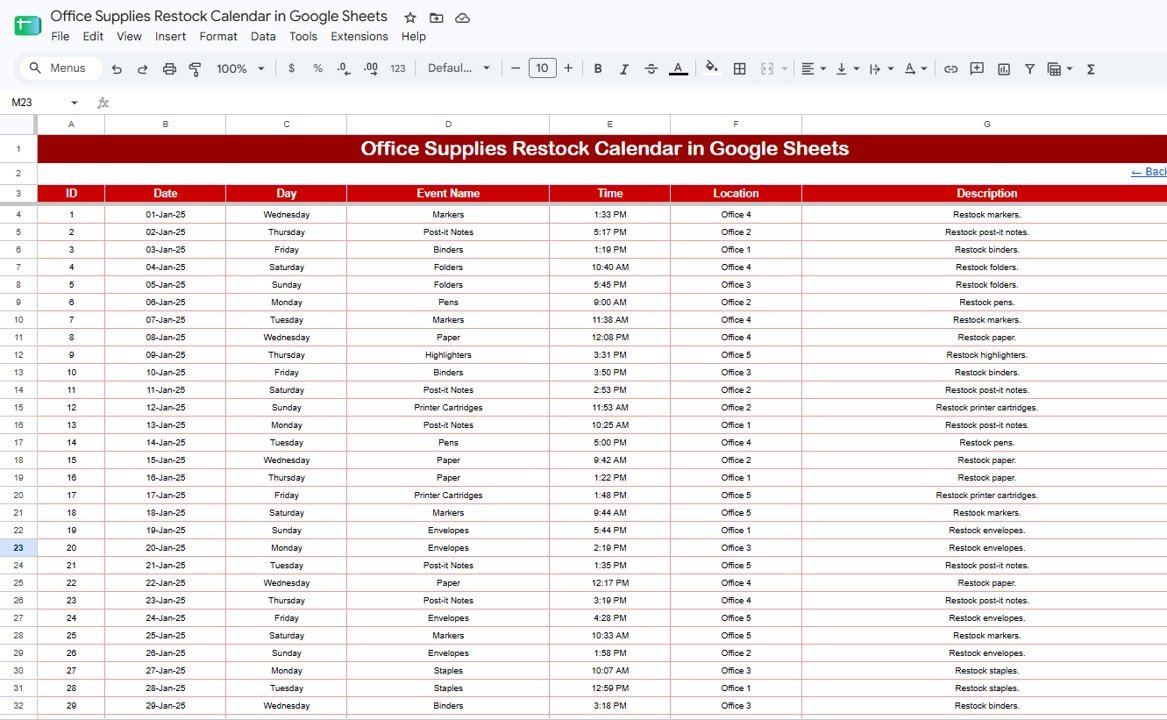
The Events sheet works as the source table. Users can enter or update restock records with dates, event names, times, locations, office supply items, and descriptions. The calendar views then give different ways to review those records.Office Supplies Restock Calendar in Google Sheets
Dashboard Pages Explanation
Overview Page
The Overview Page shows the high-level structure of the workbook with cards for Annual View, Monthly View, Daily View, and Events. It helps users quickly jump into the view that matches the planning question they are trying to answer.
Calendar Navigation by View Type: This chart explains how the template is organized across its major view types. It is useful when a new user wants to understand whether restock activity should be reviewed annually, monthly, daily, or through the Events table.Office Supplies Restock Calendar in Google Sheets
Restock Schedule by Calendar View: This chart compares restock scheduling across the calendar views. It helps managers spot whether too much activity is packed into one view or whether the schedule is balanced across planning levels.Office Supplies Restock Calendar in Google Sheets
Office Supplies Restock Calendar by Template Section: This chart breaks activity down by workbook section. It gives a quick quality check for whether records are landing in the right part of the calendar process.
Office Supplies Restock Calendar in Google Sheets
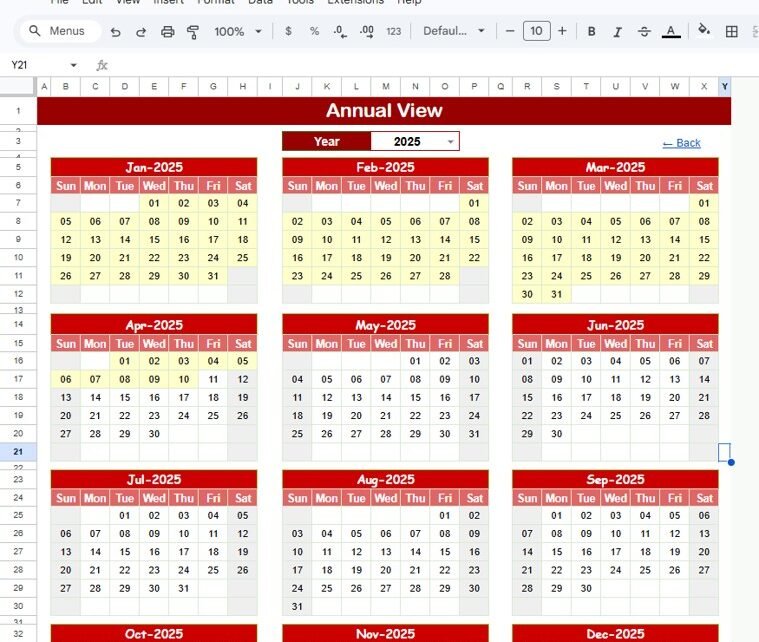
Annual View
The Annual View is designed for long-range planning. It helps office teams see which months, weekdays, and years carry the most restock activity.Office Supplies Restock Calendar in Google Sheets
Restock Calendar by Month: This chart shows how restock events are distributed across the months of the year. It helps identify seasonal or operational peaks, such as back-to-office periods, audit months, or school-year cycles.Office Supplies Restock Calendar in Google Sheets
Restock Dates by Weekday: This analysis shows which weekdays are most common for restock work. It helps teams choose practical ordering days and avoid crowding restock tasks onto already busy office days.Office Supplies Restock Calendar in Google Sheets
Calendar Schedule by Year: This chart supports year-level review. It helps confirm that recurring restock events have been planned for the full year rather than only for the current month.
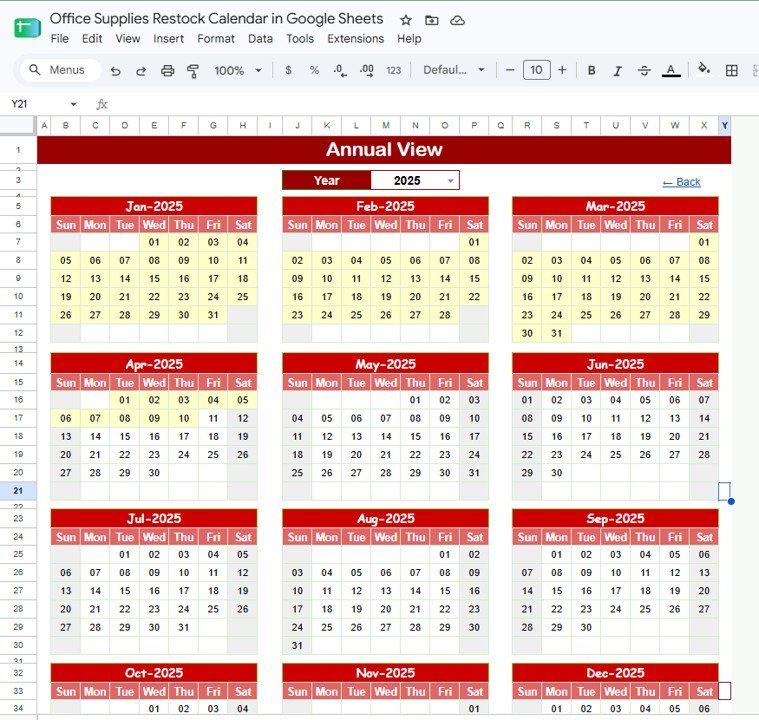
Annual View Sheet tab
Monthly View
The Monthly View is for active restock planning. Office managers can review the upcoming buying cycle, identify dates with multiple supply needs, and coordinate with the person responsible for ordering.
Restock Items by Date: This chart shows which office supplies are scheduled on specific dates. It helps prevent missed restocks by making each date’s item list visible.
Restock Schedule by Month: This chart summarizes the current month or selected month. It helps teams see whether restock activity is spread sensibly or crowded into one week.Office Supplies Restock Calendar in Google Sheets
Office Supplies by Calendar Day: This analysis shows the supply items assigned to each calendar day. It is useful for preparing purchase lists before daily or weekly admin check-ins.Office Supplies Restock Calendar in Google Sheets
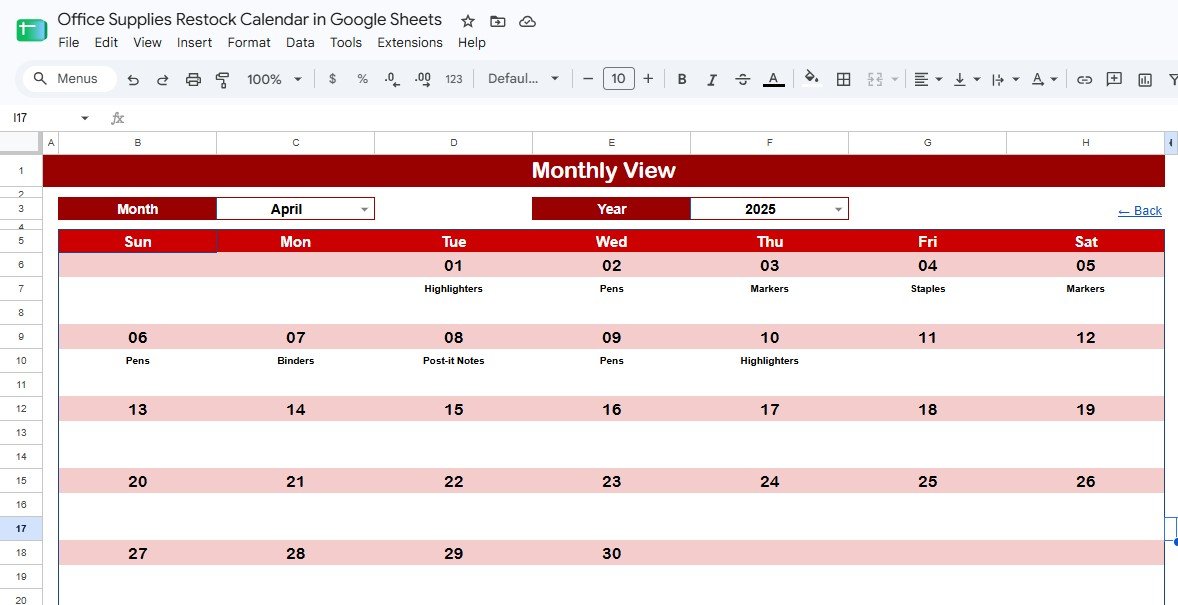
Monthly View Sheet tab
Daily View
The Daily View is the most operational tab. It is useful when an admin assistant, office coordinator, or facilities team member needs to know exactly what is due in a selected date range.
Restock Events by Date Range: This chart filters the calendar down to the selected dates. It gives a practical worklist for the day, week, or short period being reviewed.
Event Name by Date: This analysis connects each event name to its scheduled date. It helps users distinguish recurring events, special orders, department requests, and one-time restock tasks.
Restock Time by Event Name: This chart shows timing by event name. It helps teams avoid scheduling multiple supply pickups or deliveries at the same time.
Office Location by Restock Event: This analysis shows which office location is connected with each event. It is helpful for multi-floor offices, shared campuses, clinics, schools, and coworking spaces.
Restock Description by Event Name: This view connects each event name with its description. It gives staff enough context to complete the restock task without searching separate notes.
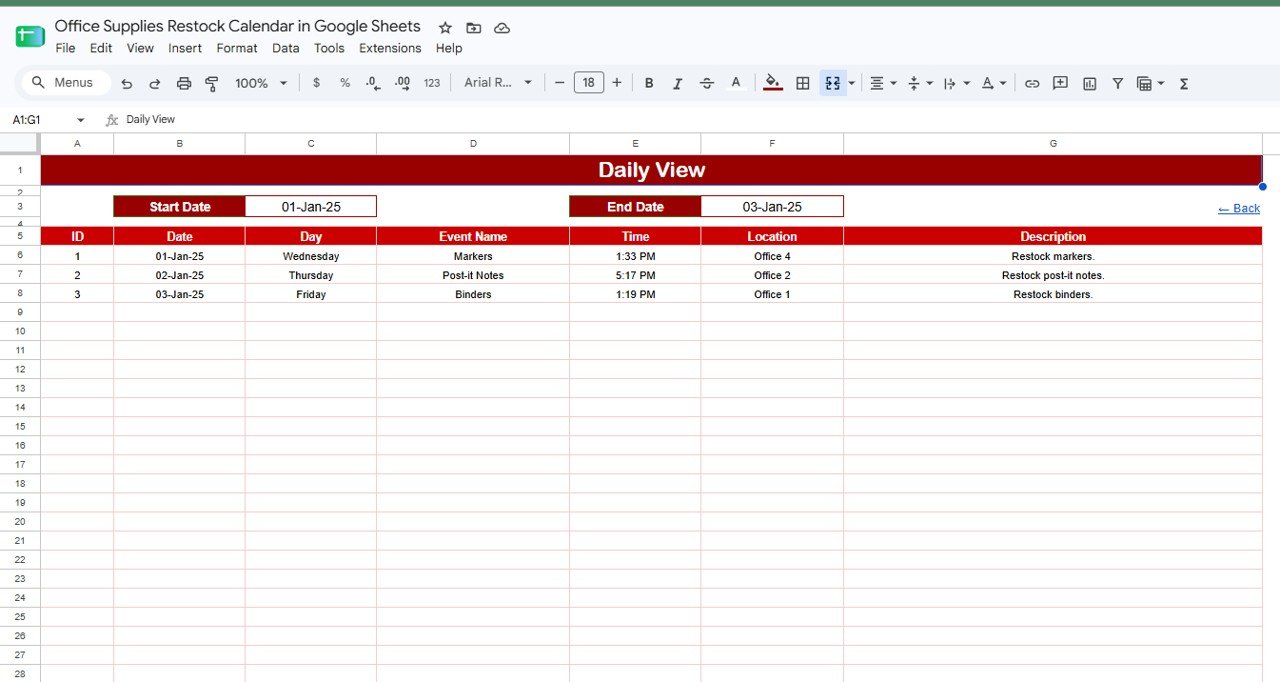
Daily View Sheet tab
Events
The Events sheet is the calendar database. It is where users can directly enter, edit, or review the records that power the annual, monthly, daily, and overview pages.
Restock Events by Date: This chart keeps the event list tied to calendar dates. It helps office teams audit upcoming tasks and past restock activity.
Event Name by Office Location: This analysis shows which locations are tied to each event. It supports better coordination when one person manages multiple departments, rooms, buildings, or branches.
Restock Time by Event Name: This view helps users check when each restock event should happen. It is especially useful for supply room checks, delivery windows, and scheduled vendor visits.
Restock Description by Office Supply Item: This analysis links item-level descriptions to the related office supply. It helps users understand quantity notes, brand preferences, special instructions, or recurring context.
Events Sheet tab
Office Supplies Restock Calendar in Google Sheets vs. Excel Calendar vs. Paid Inventory SaaS – Feature Comparison
| Feature | Office Supplies Restock Calendar in Google Sheets | Microsoft Excel calendar | Paid inventory or procurement SaaS |
|---|---|---|---|
| Cost | $4.99 one-time | $4.99 to $15 one-time | $25 to $100+ per month |
| Platform | Google Sheets in the browser | Excel desktop or OneDrive | Vendor-hosted web app |
| Setup time | Under 10 minutes | Under 15 minutes | Several hours to several days |
| Real-time team collaboration | Native Google Drive sharing | Depends on cloud setup | Usually included |
| Mobile access | Google Sheets app or browser | Limited Excel mobile experience | Usually included |
| Customizable fields | Fully editable | Fully editable | Limited by plan and permissions |
| Share with link | Yes | Only with cloud storage | Usually needs user invitations |
| Best for | Office restock calendar planning | Offline personal planning | Full purchasing and stock control |
| Year-1 cost at 5 users | $4.99 total | $4.99 to $15 total | $300 to $6,000+ |
Who Should Use This Template
This template is a strong fit for office managers, admin assistants, facilities coordinators, school office staff, clinic administrators, coworking space teams, procurement assistants, and small businesses that restock everyday supplies on a repeating schedule.
It is also useful for teams that already work in Google Workspace. Google explains how file sharing can be managed through Drive and Docs Editors settings, and that same sharing model makes a Google Sheets restock calendar easy to distribute to the right people: Google Docs Editors Help – share files from Google Drive.
This template is not meant to replace a full ERP, barcode inventory app, or purchasing approval system. If you need vendor integrations, purchase order routing, receipt capture, or real-time stock depletion by SKU, use this as a planning companion rather than the system of record.
Real-World Use Cases
Aisha, Office Manager at a design agency: Aisha manages paper, markers, sticky notes, printer toner, meeting room supplies, and pantry items for 60 employees. She uses the Monthly View every Friday to check the next two weeks and avoid last-minute ordering.
Ben, Facilities Coordinator for a shared office: Ben manages several office locations and supply closets. He uses the Daily View to see which floor or room needs attention, then updates the Events sheet after each restock is completed.
Priya, School Administrator: Priya coordinates exam stationery, classroom materials, staffroom supplies, and office stock. The Annual View helps her plan busy periods before the academic calendar becomes crowded.
Advantages of Office Supplies Restock Calendar in Google Sheets
The first advantage is visibility. Instead of relying on memory or scattered messages, the calendar gives a shared source for dates, events, locations, and item descriptions.
The second advantage is low cost. A $4.99 one-time Google Sheets template is easier to justify than a subscription when the problem is schedule coordination rather than enterprise purchasing.
The third advantage is flexibility. Users can rename supply categories, update locations, change event labels, and add more rows without asking a software vendor for a custom field.
The fourth advantage is team access. Google Sheets works in a browser, and managers can control whether people can view, comment, or edit the file.
Opportunities for Improvement
The template does not automatically place vendor orders. Users still need to create the purchase request, order through their supplier, or update their procurement system after reviewing the calendar.
It also does not include barcode scanning or stock-on-hand calculations. If your office needs live inventory balances, use a companion tracker such as the Inventory Tracker in Google Sheets or a dedicated inventory app.
Teams with strict approval workflows may want to add columns for requester, approver, budget owner, and approval status. Because the sheet is editable, these additions are practical for most Google Sheets users.
Best Practices
Standardize item names. Use one spelling for each supply item so filters and charts group records correctly.
Review the Monthly View weekly. A short review at the end of each week catches upcoming shortages before they interrupt work.
Use office locations consistently. If you manage multiple rooms, floors, departments, or branches, keep location names clean and predictable.
Limit edit access. Give editing rights to the people responsible for maintaining the Events sheet, and give view access to stakeholders who only need visibility.
Archive completed events periodically. If the file grows large, copy old event records to an archive tab so the active schedule stays easy to scan.
Explore Relevant Templates
Inventory Tracker in Google Sheets – track quantities, reorder levels, suppliers, and stock movement.
Office Stationery Request Tracker in Google Sheets – manage office stationery requests, approvals, and department costs.
Product Release Testing Calendar in Google Sheets – review another 5-page Google Sheets calendar layout.
Inventory Audit Calendar in Google Sheets – schedule physical count checks and inventory audit dates.
Browse more Google Sheets Calendar templates and Google Sheets templates from NextGenTemplates.
Planning to build more trackers and calendars of your own? The NextGenTemplates Academy learning paths lay out the spreadsheet skills in a sensible order, with practice files along the way.
Get the Office Supplies Restock Calendar in Google Sheets
Frequently Asked Questions
What is included in the Office Supplies Restock Calendar in Google Sheets?
The template includes Overview, Annual View, Monthly View, Daily View, and Events tabs. It also includes summary cards, charts, slicers, and editable restock event records.
Can I share this restock calendar with my team?
Yes. Since the file runs in Google Sheets, you can share it through Google Drive and manage viewer, commenter, or editor access.
Does this template track exact stock quantities?
No. It is a restock calendar and scheduling template. It can track supply items and event descriptions, but it is not a full stock quantity or barcode inventory system.
Can I customize office locations and supply categories?
Yes. The Google Sheet is editable, so you can rename office locations, adjust item categories, change event labels, and add your own columns.
Do I need Microsoft Excel to use it?
No. This version is designed for Google Sheets. You only need access to Google Sheets through a browser or the mobile app.
Is there a monthly subscription?
No. The template is sold as a one-time purchase for $4.99. There are no monthly subscription fees from NextGenTemplates.
About the Author
Built by PK – Microsoft Certified Professional with 15+ years of Excel, Google Sheets, and Power BI experience. Founder of NextGenTemplates, reaching 300K+ subscribers across YouTube channels. Every template is hand-built and tested before release.
Conclusion
The Office Supplies Restock Calendar in Google Sheets is a practical way to bring order to recurring office supply work. With annual, monthly, daily, and event-level views, teams can plan restock dates before small shortages turn into daily interruptions.