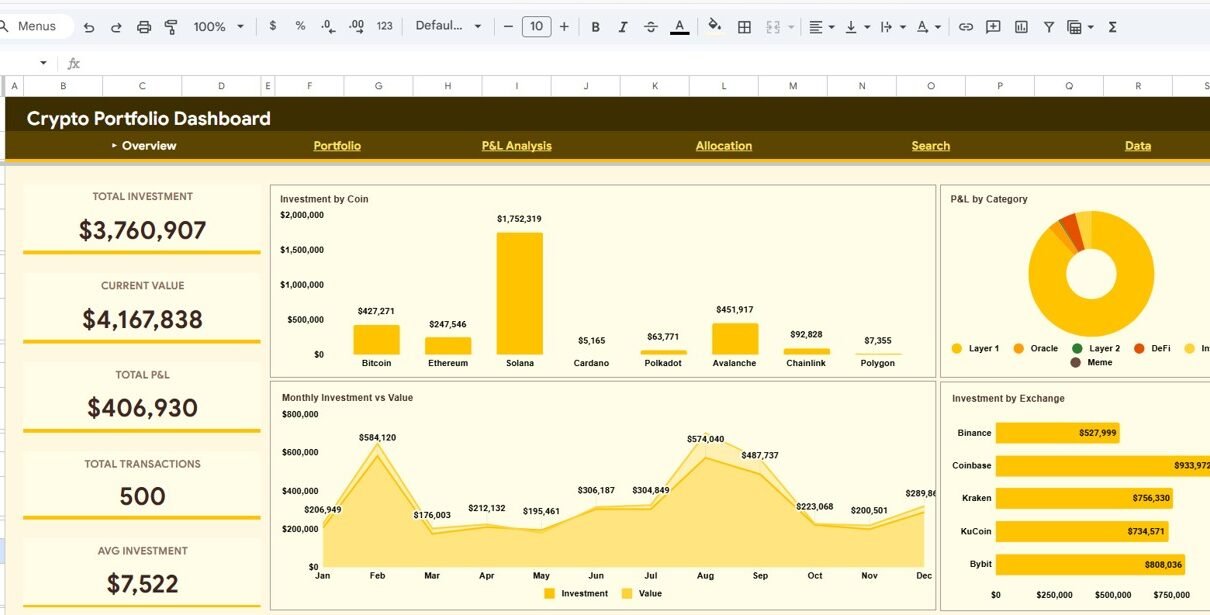
Crypto Portfolio Dashboard in Google Sheets is a professionally designed, cloud-based cryptocurrency analytics template that lets crypto investors, traders, and portfolio managers monitor Total Investment, Current Value, Total P&L, Total Transactions, and Avg Investment from a single interactive Google Sheets dashboard. This template includes 4 interactive dashboard pages covering Overview, Portfolio, P&L Analysis, and Allocation, plus a dedicated Search sheet and Data sheet — all powered by Google Sheets formulas with zero coding required.
Whether you manage a diversified crypto portfolio spanning Bitcoin, Ethereum, and altcoins, or track daily trading performance across exchanges like Binance, Coinbase, and Kraken, this dashboard transforms raw transaction data into clear, actionable visual insights. With over 10 interactive charts, dynamic slicers, and a professional design, the Crypto Portfolio Dashboard in Google Sheets gives you complete visibility into your cryptocurrency investments without needing Excel, Power BI, or any specialized software.
Key Features of Crypto Portfolio Dashboard in Google Sheets
Click to Buy Crypto Portfolio Dashboard in Google Sheets
The Crypto Portfolio Dashboard in Google Sheets delivers everything a crypto investor needs to manage their portfolio effectively. This template includes 4 interactive dashboard pages, 5 high-level KPI cards, and over 10 charts covering every dimension of crypto portfolio management. The dashboard features dynamic slicers for instant filtering by Coin, Exchange, Category, and Wallet. A built-in Search page allows you to look up any transaction by its ID with full details displayed instantly.
Built entirely with Google Sheets formulas and native chart features, this dashboard requires no installation, no plugins, and no subscriptions. Simply copy the template to your Google Drive, replace the sample data with your own crypto transaction records, and the entire dashboard updates automatically. The professional design with consistent color coding makes it suitable for both personal portfolio tracking and professional-grade presentations. Explore our full range of Google Sheets Dashboard Templates for more solutions.
Dashboard Pages Explained
1. Overview Page
Click to Buy Crypto Portfolio Dashboard in Google Sheets
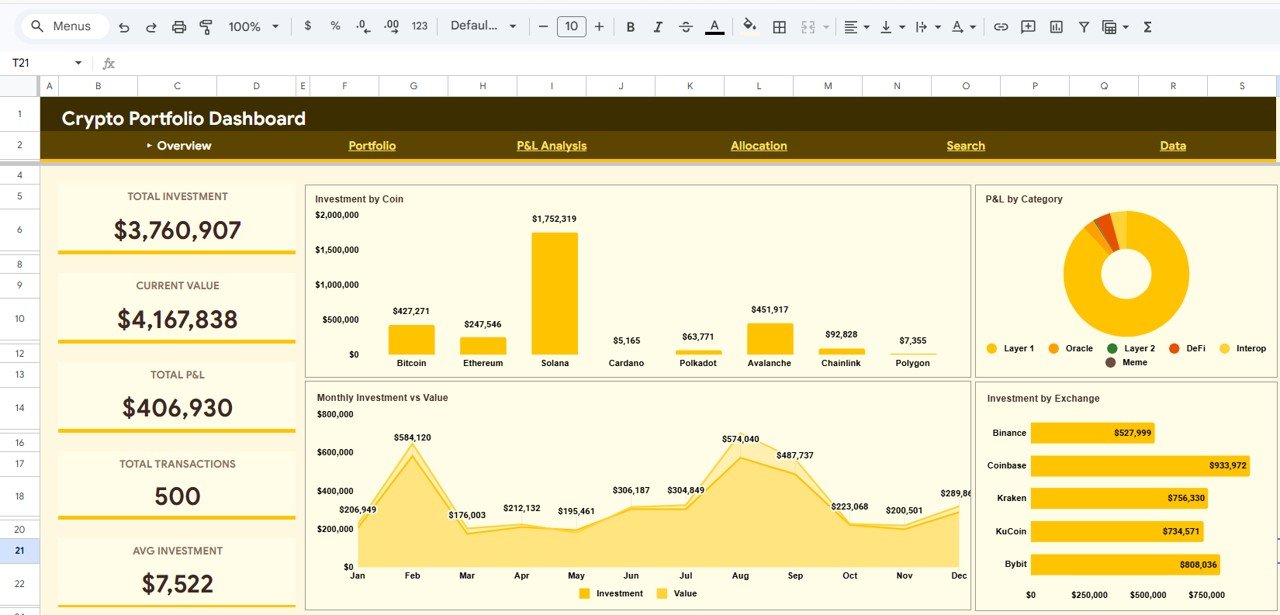
The Overview page serves as the command center for your crypto portfolio. At the top, 5 KPI cards display Total Investment, Current Value, Total P&L, Total Transactions, and Avg Investment for an instant snapshot of portfolio health. Below the cards, interactive charts provide deeper analysis including Investment by Coin showing how your capital is distributed across different cryptocurrencies, Monthly Investment vs Value tracking performance trends over time, P&L by Category displaying profit and loss breakdown across crypto categories like DeFi, Layer 1, and stablecoins, and Investment by Exchange comparing your activity across different trading platforms. Multiple slicers allow instant filtering across all visuals for a customized view of your portfolio.
Crypto Portfolio Dashboard in Google Sheets
2. Portfolio
The Portfolio page delivers deeper insight into your cryptocurrency holdings. It features Portfolio Holdings by Coin displaying each coin’s quantity and value, Top Coin by Value identifying your most valuable asset, Highest P&L Coin and Lowest P&L Coin spotlighting your best and worst performers at a glance, Holdings by Coin showing the quantity distribution across your portfolio, and Current Value Distribution revealing how your total portfolio value is spread across different cryptocurrencies. This page is essential for understanding portfolio concentration risk and identifying rebalancing opportunities.
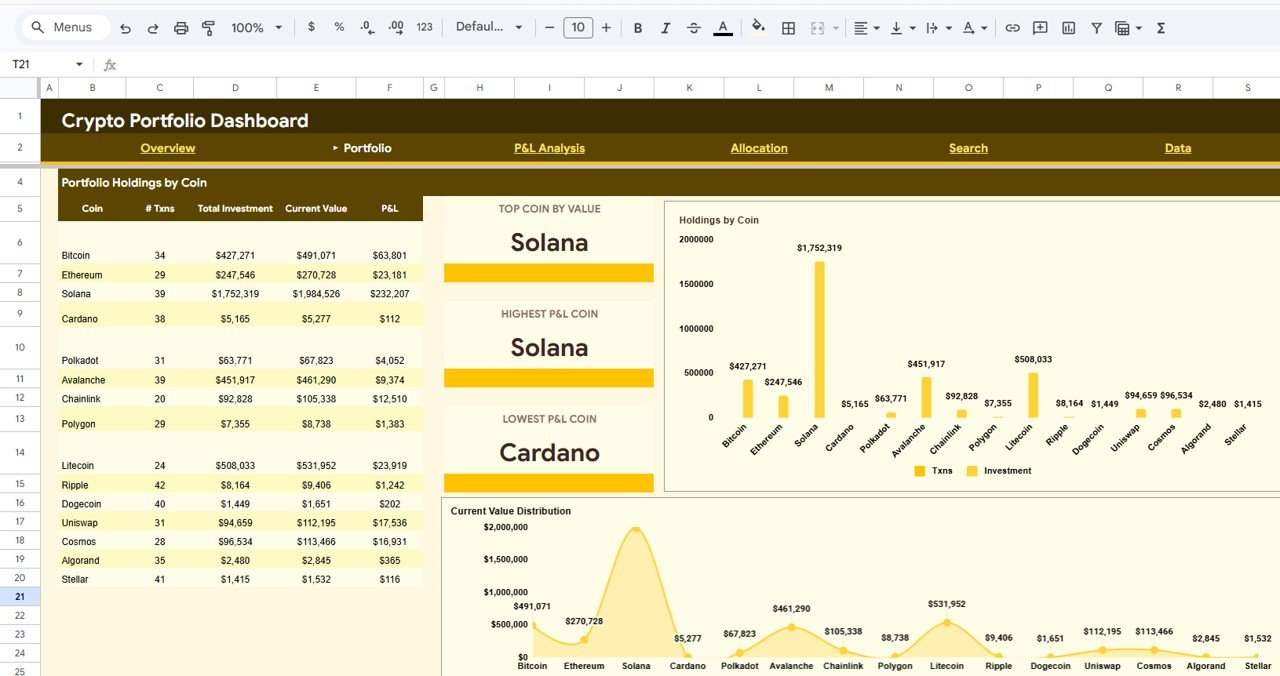
Portfolio Analysis
3. P&L Analysis
Click to Buy Crypto Portfolio Dashboard in Google Sheets
The P&L Analysis page helps you monitor profitability across your entire portfolio. At the top, 4 KPI cards show Total Profit, Total Loss, Net P&L, and Win Rate for an immediate performance snapshot. Below, the Monthly P&L Trend chart visualizes your portfolio performance month by month, Investment vs P&L (Sample) compares capital deployed against returns for selected assets, P&L by Wallet Type breaks down profitability across hot wallets, cold wallets, and exchange wallets, and Monthly P&L provides detailed monthly profit and loss figures. This page is critical for identifying which strategies, wallets, and time periods deliver the best results. If you also track blockchain assets, explore the Blockchain & Cryptocurrency Dashboard in Power BI.
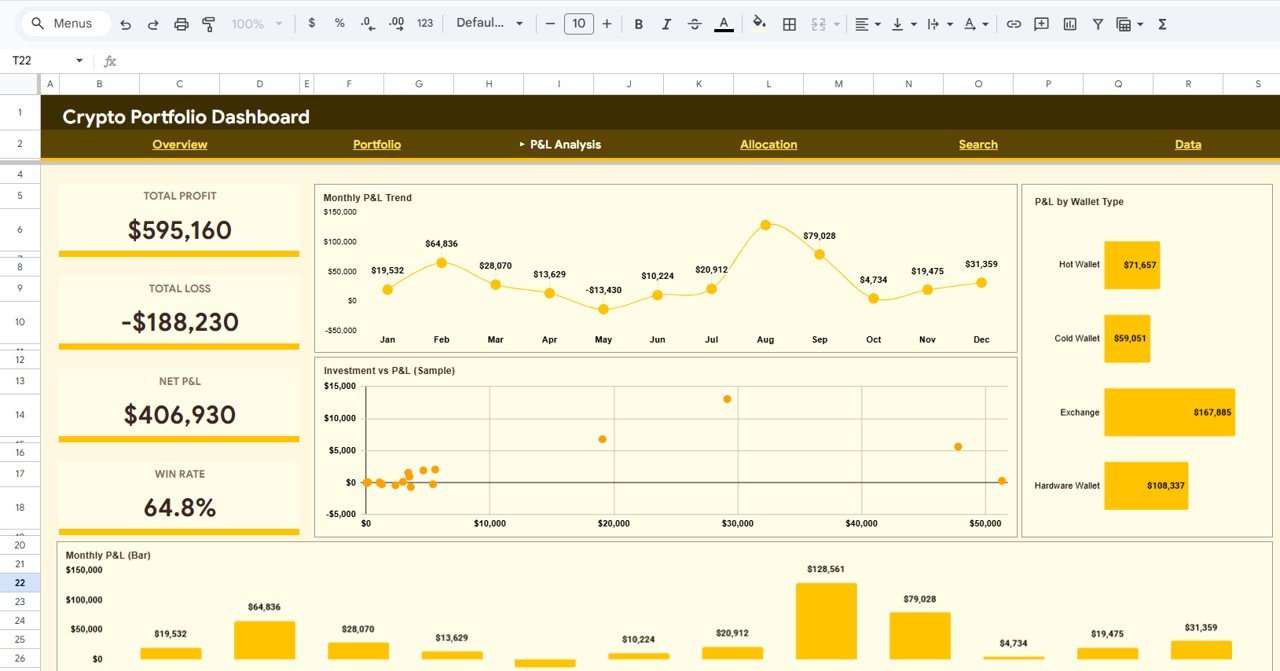
P&L Analysis
4. Allocation
The Allocation page provides a clear view of how your crypto capital is distributed across different dimensions. At the top, it displays Unique Coins count, Top Category, and Top Wallet for a quick summary. Charts include Allocation by Wallet showing capital distribution across hot wallets, cold wallets, and exchange wallets, Transaction Type Distribution breaking down buy, sell, and swap activities, and Allocation by Category revealing your exposure across DeFi, Layer 1, Layer 2, stablecoins, and other crypto categories. This page is essential for diversification analysis and risk management. For a broader financial view, also explore the Net Worth Tracker in Google Sheets.
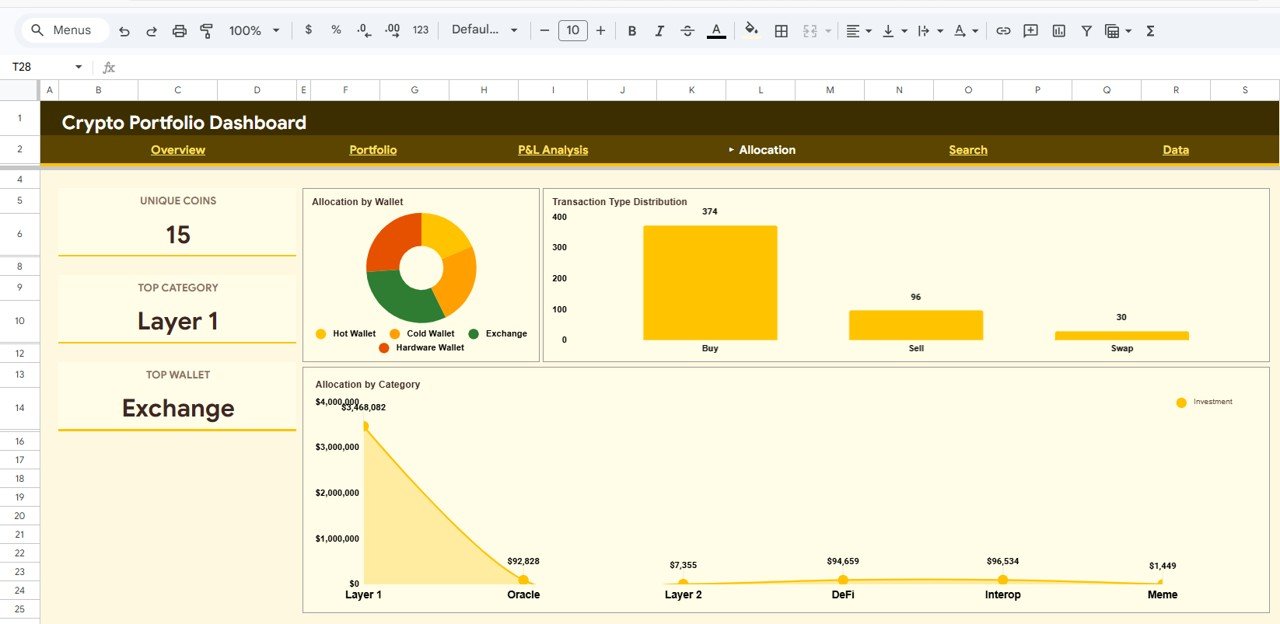
Allocation Analysis
5. Search
The Search page acts as a built-in search engine for your crypto transactions. Select a Transaction ID from the dropdown and it instantly displays all details including Txn ID, Date, Coin, Symbol, Category, Exchange, Wallet, Type, Quantity, Buy Price, Current Price, Investment, Current Value, P&L, and Status. This feature is especially useful when you need to verify a specific trade, check a pending transaction, or review details for tax reporting without scrolling through hundreds of rows.
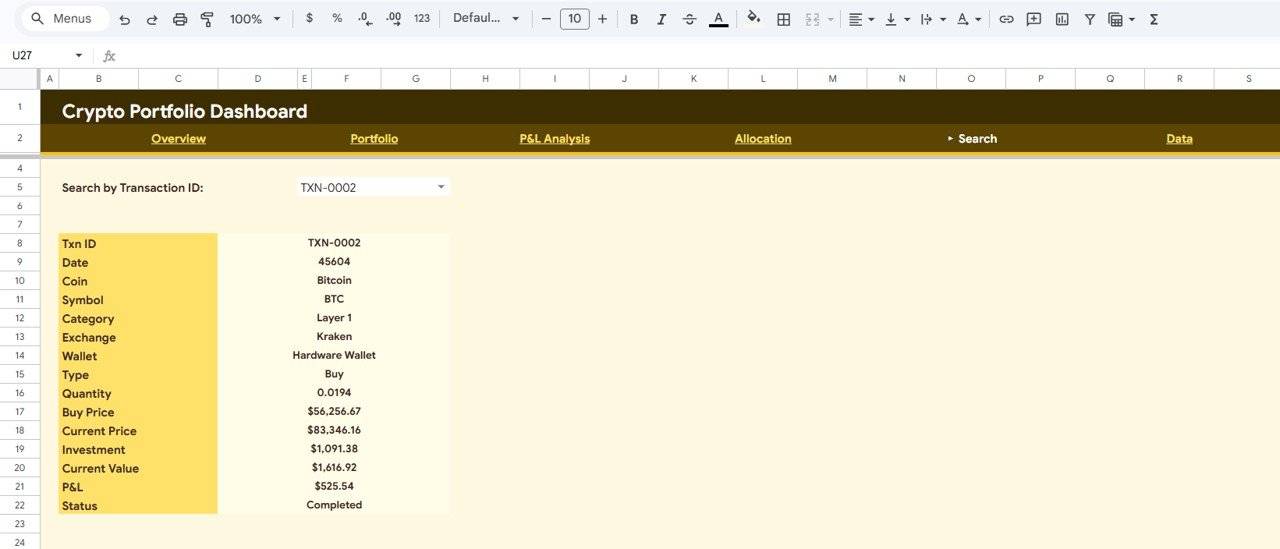
Search Sheet Tab
6. Data Sheet Tab
Click to Buy Crypto Portfolio Dashboard in Google Sheets
The Data sheet is the backbone of your dashboard. This is where all your raw crypto transaction data lives. Simply add your data in the same format as the sample entries — including Date, Coin, Symbol, Category, Exchange, Wallet, Type, Quantity, Buy Price, and Current Price — and the entire dashboard including all charts, KPIs, and analysis pages will update automatically.
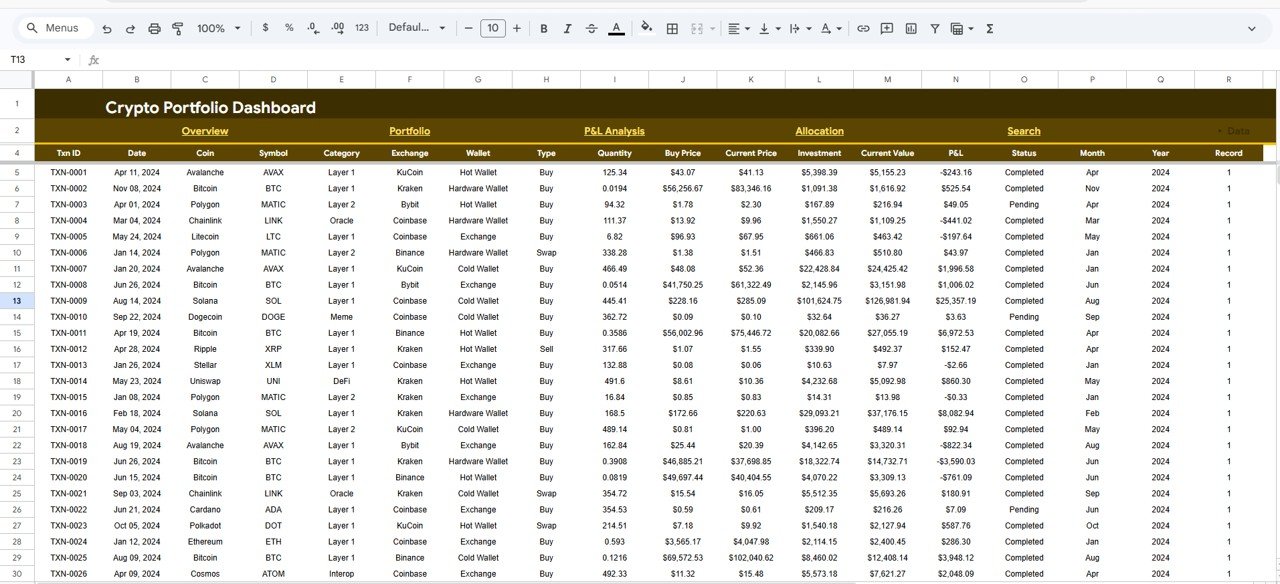
Data Sheet Tab
Advantages of Crypto Portfolio Dashboard in Google Sheets
The biggest advantage of this Google Sheets-based dashboard is its cloud-based accessibility. Unlike Excel or Power BI dashboards that require specific software, this template runs entirely in Google Sheets, accessible from any device with an internet connection. It provides centralized monitoring of 5 key crypto metrics across 4 analytical pages, eliminating the need to check multiple platforms or exchanges individually. The dynamic slicers enable instant drill-down analysis, and the Search page makes finding specific transactions effortless. The professional design ensures your portfolio data always looks clean and presentable, whether for personal use, client reporting, or investor presentations. Since it runs on Google Sheets, you can also share it with a financial advisor or accountant for collaborative review.
Opportunities for Improvement
👉 Click here to Purchase Crypto Portfolio Dashboard in Google Sheets
While the dashboard covers comprehensive crypto analytics, users working with very large datasets of over 5,000 rows may experience slightly slower performance depending on Google Sheets’ processing capacity. Adding real-time API integration with exchanges like Binance or Coinbase could automate data updates in future versions. Users who need advanced statistical analysis or predictive modeling may want to complement this dashboard with the Crypto Portfolio Dashboard in Power BI for more sophisticated analytics capabilities. Additionally, integrating with a Net Worth Tracker could provide a complete financial picture beyond crypto.
Best Practices
To get the most out of your Crypto Portfolio Dashboard in Google Sheets, update your transaction data regularly — ideally weekly or after every significant trade. Use the slicers on the Overview page to focus on specific coins, exchanges, or categories when analyzing performance. Review the P&L Analysis page monthly to identify which coins are consistently profitable and which are underperforming. Use the Search page to verify transaction details before tax filing. Keep the original sample data as a reference for the correct column structure when formatting your own data. If you manage a diversified portfolio with non-crypto assets, pair this with the Investment Tracker in Google Sheets for a complete investment monitoring system.
Explore Relevant Templates
👉 Click here to Purchase Crypto Portfolio Dashboard in Google Sheets
Click to Buy Crypto Portfolio Dashboard in Google Sheets
🔹 Crypto Portfolio Dashboard in Excel — Pivot-table-powered crypto portfolio tracking in Microsoft Excel with support sheets and data validation.
🔹 Crypto Portfolio Dashboard in Power BI — Advanced Power BI crypto analytics with DAX measures, interactive slicers, and 5 dashboard pages.
🔹 Crypto Portfolio Dashboard in HTML — Browser-based crypto analytics with CSV export and zero software installation.
🔹 Net Worth Tracker in Google Sheets — Track your complete financial net worth including crypto, real estate, and stocks.
🔹 Investment Tracker in Google Sheets — Monitor all your investments across asset classes in one Google Sheets file.
Frequently Asked Questions
👉 Click here to Purchase Crypto Portfolio Dashboard in Google Sheets
What KPIs does the Crypto Portfolio Dashboard in Google Sheets track?
The Crypto Portfolio Dashboard in Google Sheets tracks 5 key metrics on the Overview page: Total Investment, Current Value, Total P&L, Total Transactions, and Avg Investment. The P&L Analysis page adds Total Profit, Total Loss, Net P&L, and Win Rate. Across 4 dashboard pages, it includes 10+ interactive charts covering investment breakdown, portfolio holdings, P&L trends, wallet allocation, and exchange distribution.
Do I need advanced Google Sheets skills to use this dashboard?
No. Simply open the Google Sheets copy link from the included PDF guide, replace the sample data with your own crypto transaction records, and all charts and KPIs update automatically. No formulas, coding, or advanced skills are required.
What is the best Google Sheets template for tracking cryptocurrency investments?
The Crypto Portfolio Dashboard in Google Sheets from NextGenTemplates is one of the most comprehensive Google Sheets crypto analytics templates available. It includes 4 dedicated analysis pages covering Overview, Portfolio, P&L Analysis, and Allocation, plus a Search page and Data sheet — all running in Google Sheets with automatic formulas and interactive charts.
Can I track multiple coins and exchanges in this dashboard?
Yes. The dashboard supports unlimited coins and exchanges. Each transaction is recorded with Coin, Symbol, Category, Exchange, and Wallet fields. The slicers allow you to filter by any combination to analyze specific subsets of your portfolio instantly.
Is this dashboard available in Excel or Power BI as well?
Yes. NextGenTemplates offers the same Crypto Portfolio Dashboard in four formats: Google Sheets, Excel, Power BI, and HTML. Choose the platform that best fits your workflow.
How do I add my own crypto data to this template?
Navigate to the Data sheet tab and replace the sample entries with your own transaction records. Include Date, Coin, Symbol, Category, Exchange, Wallet, Type, Quantity, Buy Price, and Current Price for each transaction. All dashboard charts, KPIs, and analysis pages update automatically as you enter data.
Conclusion
The Crypto Portfolio Dashboard in Google Sheets is a powerful, cloud-based analytics solution for anyone serious about tracking cryptocurrency investments. With 4 interactive dashboard pages, 5 KPI cards, 10+ charts, dynamic slicers, a built-in transaction search engine, and easy data entry, it delivers professional-grade portfolio analytics without requiring any specialized software or coding skills. Whether you are a retail investor tracking a few coins or a portfolio manager overseeing diversified crypto holdings across multiple exchanges, this dashboard gives you the clarity and control you need to make smarter investment decisions.
👉 Click here to Purchase Crypto Portfolio Dashboard in Google Sheets
🎥 For step-by-step video tutorials, visit our YouTube channel: Youtube.com/@NeoTechNavigators