Etsy Seller Analytics Dashboard in Google Sheets is a powerful, ready-to-use analytics template designed specifically for Etsy shop owners, creative entrepreneurs, and e-commerce sellers who want to monitor revenue, orders, profits, product performance, traffic sources, and marketing effectiveness from one centralized Google Sheets workbook. Whether you manage a thriving handmade jewelry store, a vintage clothing boutique, or a digital download shop on Etsy, this dashboard provides actionable insights that help you grow your business faster.
This template includes 6 interactive sheet tabs — Overview, Sales Analysis, Product Performance, Traffic and Marketing, a Search Page, and a Data Sheet — giving you one of the most comprehensive Etsy analytics tools available in Google Sheets Dashboard format. Simply paste your Etsy order data and every chart, KPI card, and analysis page updates automatically.
Click here to Purchase Etsy Seller Analytics Dashboard in Google Sheets
Key Features of Etsy Seller Analytics Dashboard in Google Sheets
The Etsy Seller Analytics Dashboard in Google Sheets packs an impressive set of features designed to give Etsy sellers complete visibility into their shop performance. Here is what makes this template stand out:
- 4 Interactive Dashboard Pages — Overview, Sales Analysis, Product Performance, and Traffic & Marketing pages cover every angle of your Etsy business analytics.
- 15+ KPI Cards — Track Total Revenue, Total Orders, Net Profit, Avg Order Value, Conversion Rate, Total Shipping, Total Etsy Fees, Profit Margin, Coupon Orders, Total Items Sold, Total Favorites, Avg Processing Days, Total Views, Fav/View Ratio, and Etsy Ads Orders.
- Dynamic Slicers and Filters — Apply instant filters across all dashboard pages to drill down into specific categories, countries, traffic sources, and shop sections.
- Built-in Search Page — Look up any order instantly by Order ID with all 18 data fields displayed including product name, revenue, Etsy fees, net profit, and buyer country.
- Beginner-Friendly Setup — No formulas, macros, or scripts needed. Just paste your data and everything updates automatically.
- Works in Any Browser — Access your dashboard from any device through Google Sheets. No software installation required.
Dashboard Pages Explained
Overview Page
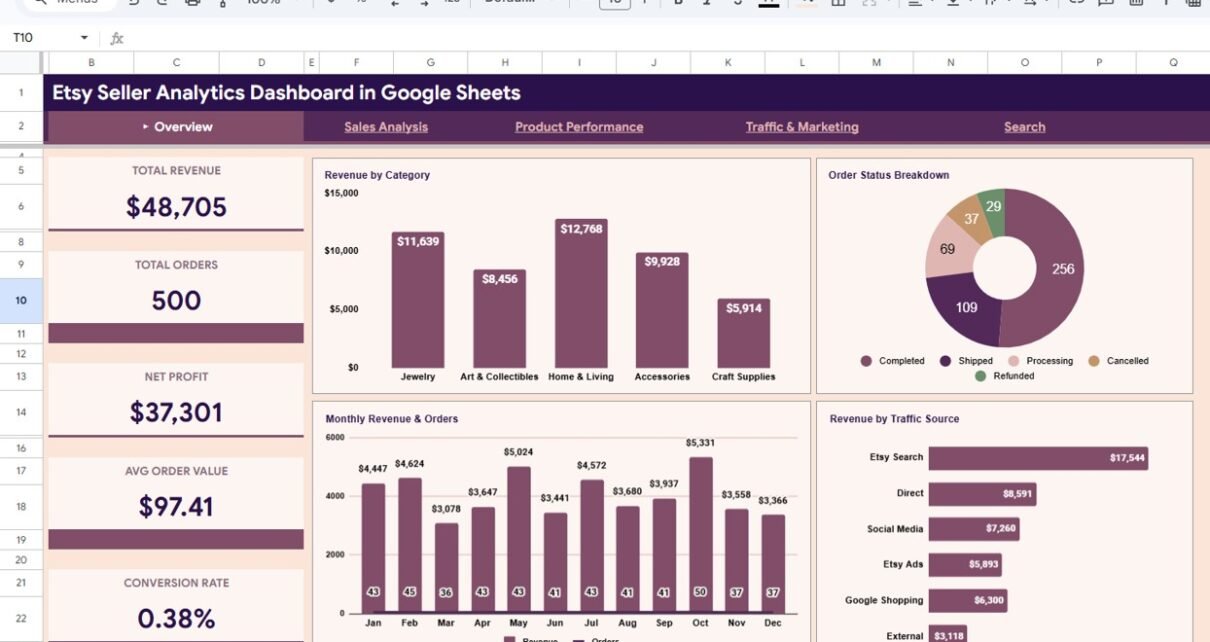
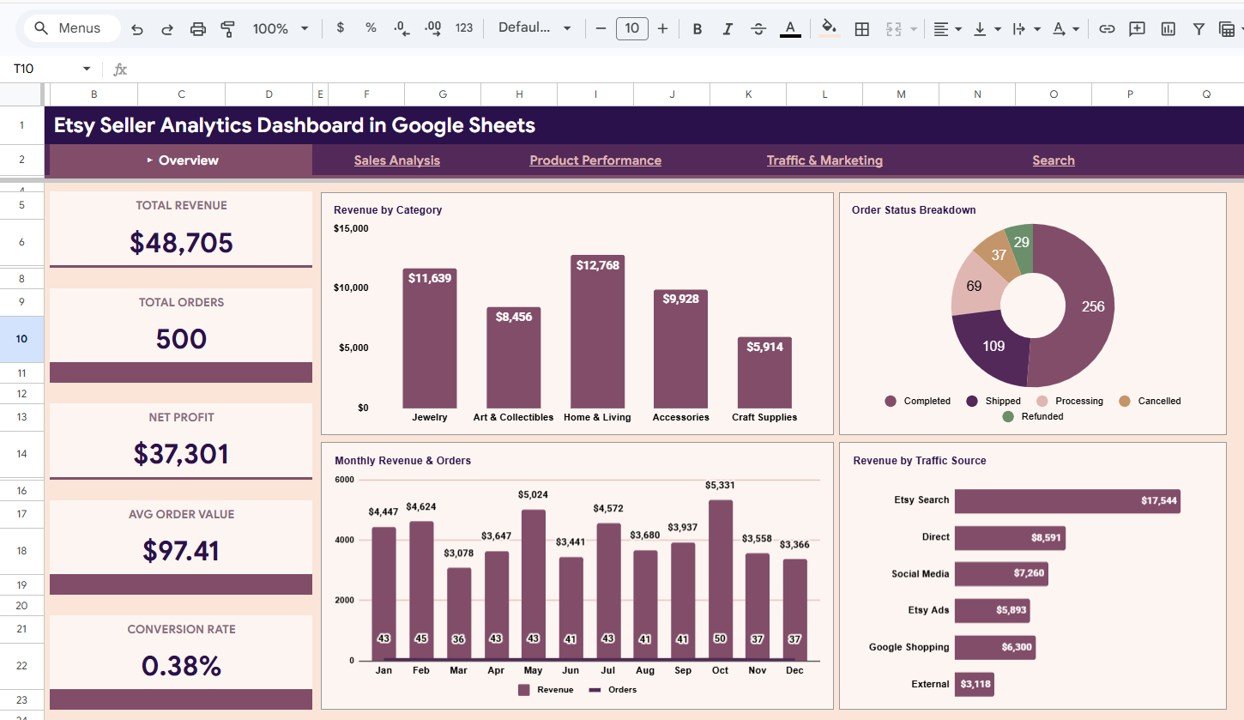
The Overview page serves as the main landing page of the Etsy Seller Analytics Dashboard in Google Sheets. It features 5 high-level KPI cards displaying Total Revenue, Total Orders, Net Profit, Avg Order Value, and Conversion Rate. Below the cards, four interactive charts provide instant visual insights: Revenue by Category breaks down income across product types, Order Status Breakdown shows fulfillment distribution, Monthly Revenue and Orders tracks trends over time, and Revenue by Traffic Source identifies which channels drive the most sales. Multiple slicers let you filter the entire dashboard instantly by date range, category, country, or traffic source.
Overview Page
Sales Analysis
The Sales Analysis page dives deep into your cost structure and profitability metrics. KPI cards display Total Shipping, Total Etsy Fees, Profit Margin, and Coupon Orders. The charts on this page include Revenue and Profit by Country for geographic performance analysis, Revenue by Shop Section to compare income across product sections, Monthly Fees and Shipping Costs for tracking operational expenses over time, and Shop Section Distribution showing the proportional breakdown of your shop. This is especially useful for identifying which countries and sections are most profitable after accounting for fees and shipping.
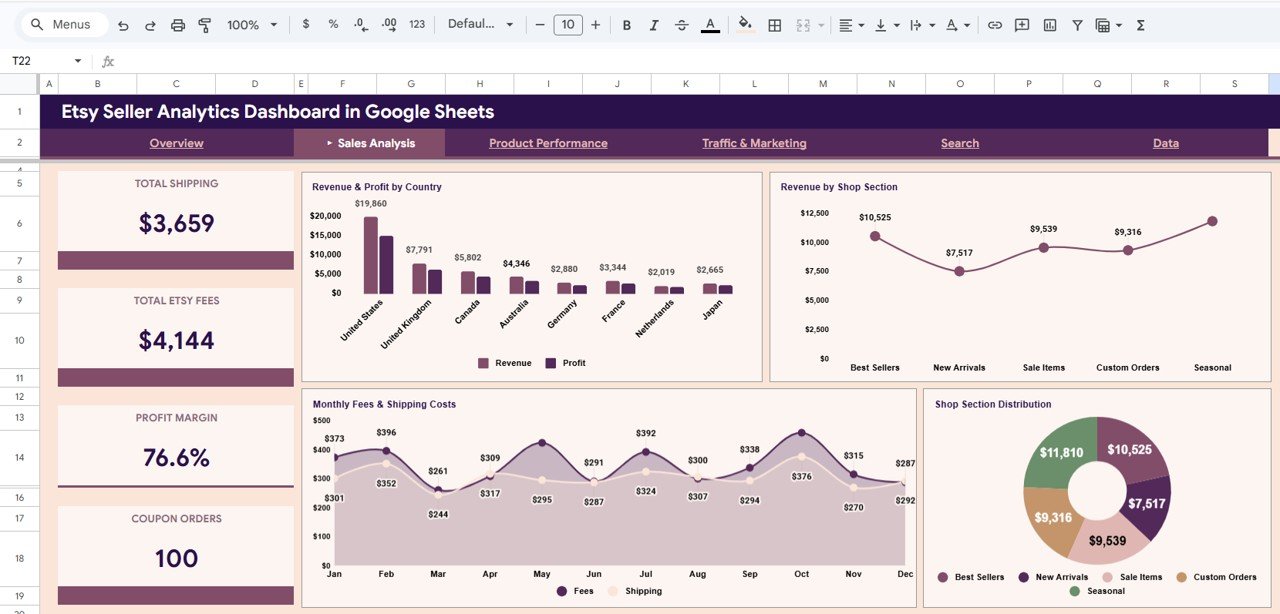
Sales Analysis
Product Performance
The Product Performance page helps you identify your best-selling and most-engaged products. It features KPI cards for Total Items Sold, Total Favorites, and Avg Processing Days. The charts display Top 10 Products by Revenue highlighting your highest-earning listings, Views vs Favorites Correlation revealing which products attract the most engagement relative to their visibility, and Revenue by Category and Shop Section providing a cross-dimensional analysis. Understanding which products drive the most revenue and engagement helps you optimize your Etsy listings and inventory decisions.
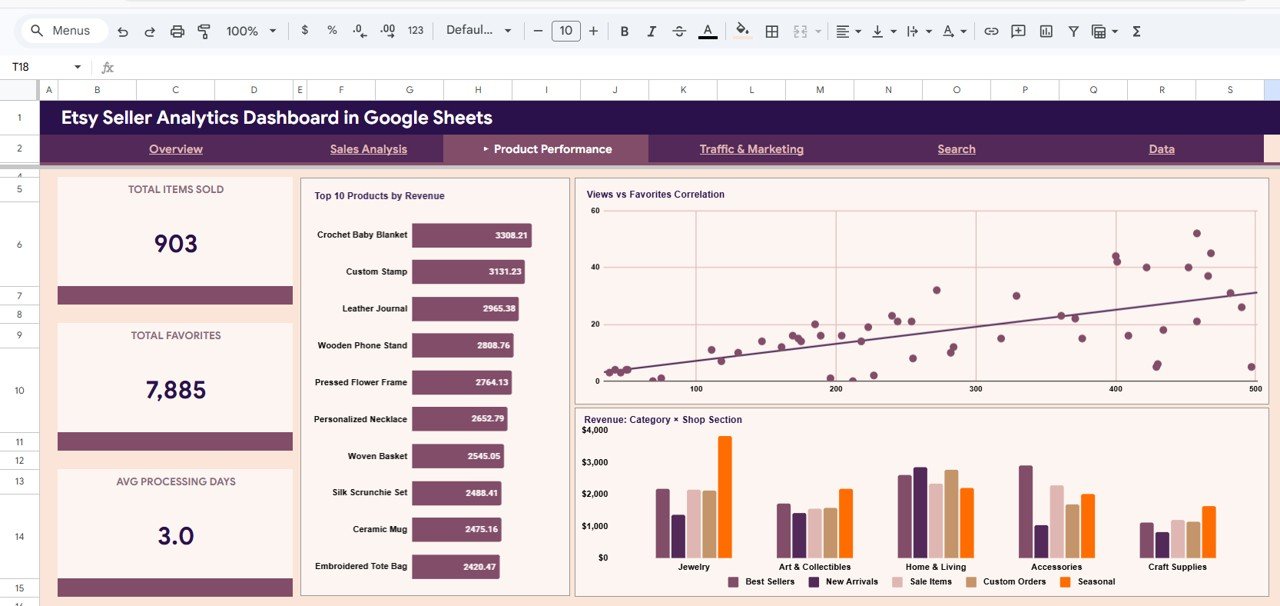
Product Performance
Traffic and Marketing
The Traffic and Marketing page monitors your traffic sources and advertising impact. KPI cards show Total Views, Total Favorites, Fav/View Ratio, and Etsy Ads Orders. Charts include Monthly Orders by Traffic Source tracking channel performance over time, Views by Traffic Source comparing visit volumes across channels, Views and Favorites by Source showing engagement patterns, and Coupon Impact: Orders and Avg Revenue measuring how promotions affect your sales. This page is essential for understanding which marketing channels deliver the best return on investment for your Etsy shop.
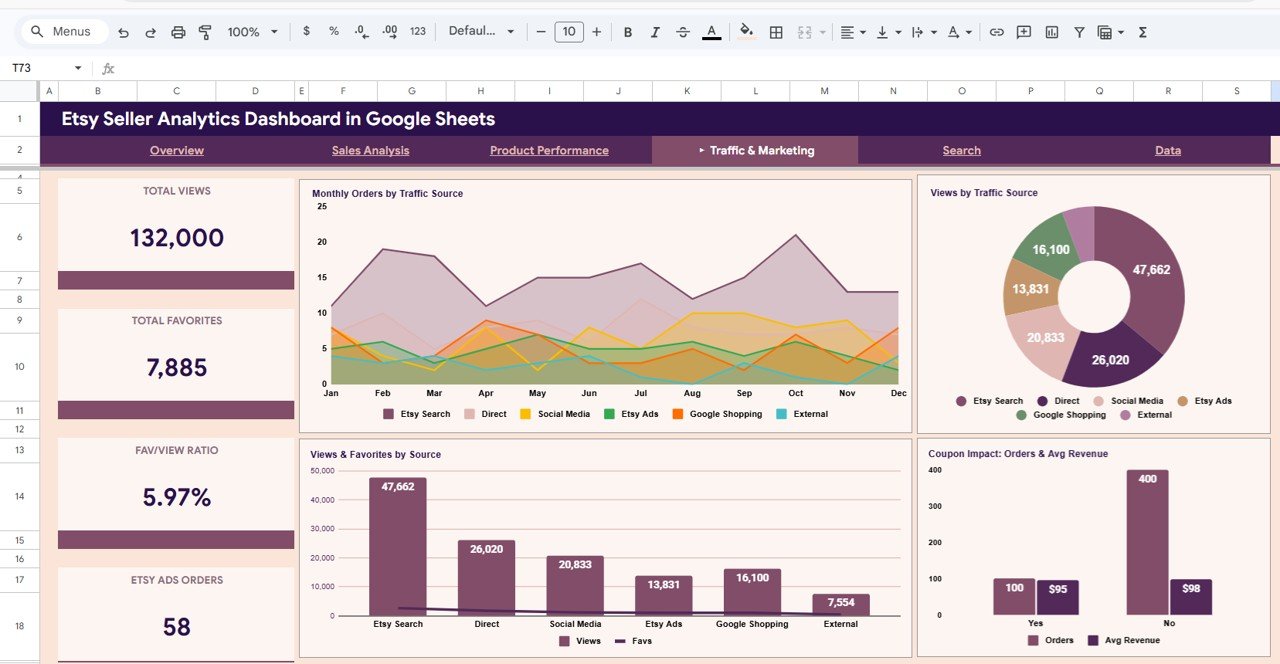
Traffic and Marketing
Search Page
The Search Page is a powerful lookup tool that lets you search for any specific order by selecting the Order ID from a dropdown. It instantly displays all details including Order ID, Date, Product Name, Category, Shop Section, Sale Price, Quantity, Revenue, Shipping Cost, Etsy Fees, Net Profit, Buyer Country, Traffic Source, Views, Favorites, Processing Days, Status, and Coupon Used. This feature is invaluable for customer service inquiries and order-level analysis.
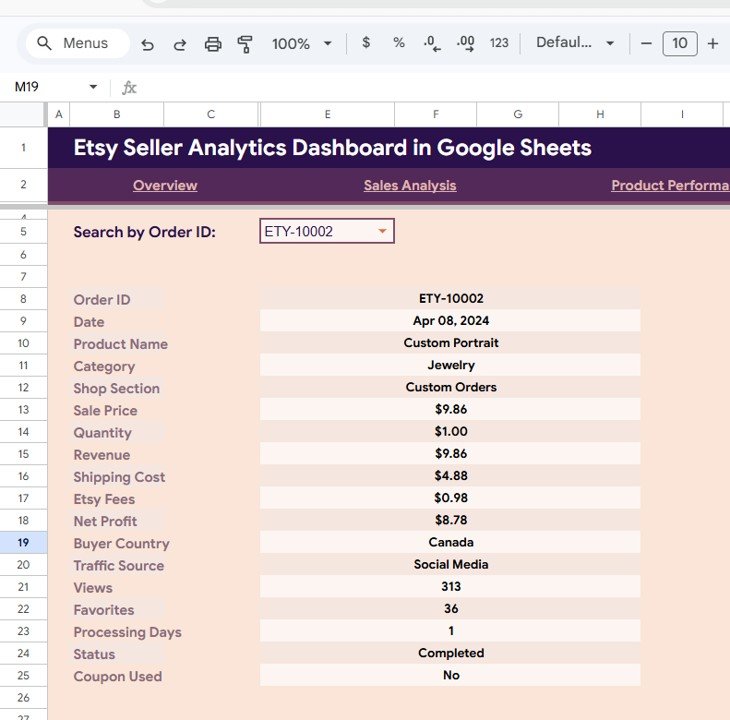
Search Sheet Tab
Data Sheet
The Data Sheet is where you enter your Etsy shop data. Simply paste your order data in the same format as the provided sample and all dashboard pages, KPI cards, and charts update automatically. The sheet supports fields for Order ID, Date, Product Name, Category, Shop Section, Sale Price, Quantity, Revenue, Shipping Cost, Etsy Fees, Net Profit, Buyer Country, Traffic Source, Views, Favorites, Processing Days, Status, and Coupon Used.
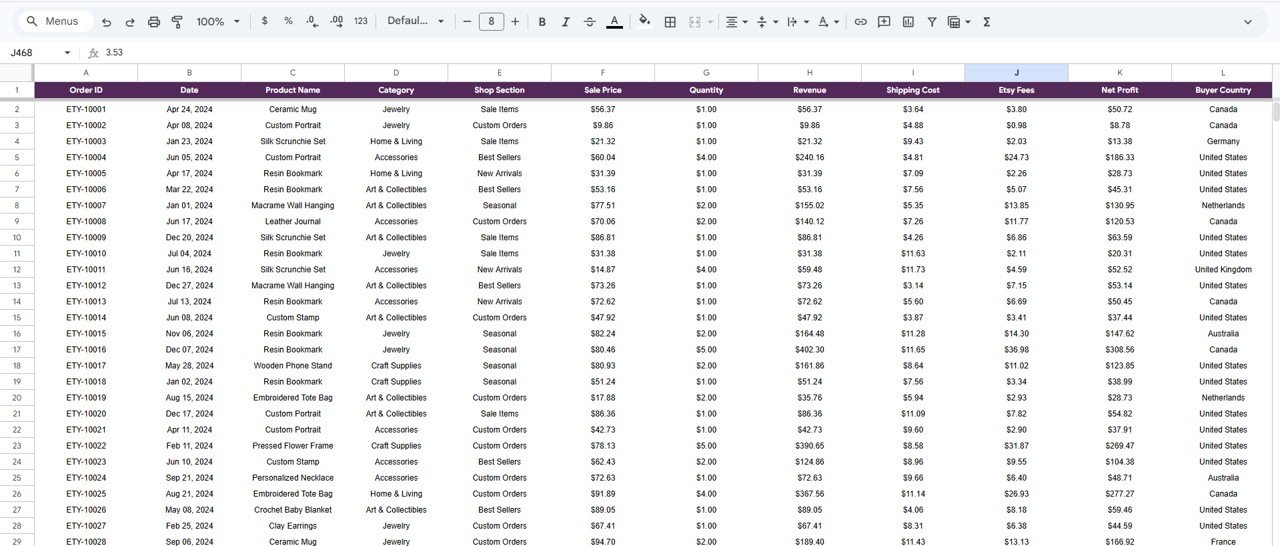
Data Sheet Tab
Advantages of Etsy Seller Analytics Dashboard in Google Sheets
This template offers several significant advantages over manual tracking or basic spreadsheet approaches:
- Centralized Analytics — All your Etsy metrics in one place instead of switching between Etsy’s built-in stats, payment pages, and advertising reports.
- Profitability Visibility — Unlike Etsy’s native dashboard, this template calculates Net Profit after accounting for Etsy fees, shipping costs, and coupon discounts.
- Traffic Source Attribution — Understand exactly which channels (Etsy search, direct, social media, Etsy Ads) bring the most valuable customers.
- Product-Level Intelligence — Identify your top 10 revenue generators and analyze views-to-favorites conversion patterns across your listings.
- Cloud-Based Access — Works entirely in Google Sheets, so you can access your analytics from any device with an internet connection.
- No Technical Setup — Zero formulas to write, no scripts to run, and no macros to enable. Just paste and analyze.
Opportunities for Improvement
Click here to Purchase Etsy Seller Analytics Dashboard in Google Sheets
While the dashboard covers extensive ground, here are some areas where it could be enhanced further:
- Adding a time-period comparison feature (e.g., this month vs last month) would help sellers quickly spot growth or decline trends.
- Including a profitability calculator per product would let sellers identify which items have the best margins after all fees.
- Integration with Etsy’s API for automatic data import could save manual data entry time for high-volume sellers.
- Adding inventory tracking alongside sales data would help sellers manage stock levels proactively.
Best Practices for Using This Dashboard
- Update Weekly — For the most actionable insights, export your Etsy order data weekly and paste it into the Data Sheet.
- Use Slicers Strategically — Filter by specific time periods to compare seasonal performance or by traffic source to evaluate marketing campaigns.
- Monitor Profit Margins — Pay close attention to the Sales Analysis page to ensure your Etsy fees and shipping costs are not eating into your profits.
- Track Traffic Sources — Use the Traffic and Marketing page to identify your most valuable customer acquisition channels and double down on what works.
- Review Top Products Monthly — The Product Performance page reveals which listings drive the most revenue, helping you prioritize optimization efforts.
Explore Relevant Templates
If you found the Etsy Seller Analytics Dashboard in Google Sheets useful, explore these related templates from NextGenTemplates:
- Etsy Seller Analytics Dashboard in Excel — The Excel version of this template with 5 interactive dashboard pages, pivot tables, and automatic refresh.
- Online Marketplaces KPI Scorecard in Excel — Track marketplace KPIs across Amazon, Flipkart, and Etsy with monthly performance scorecards.
- Ecommerce Conversion Rate KPI Dashboard in Excel — Monitor and optimize your ecommerce conversion rates with visual analytics.
Browse all Google Sheets Dashboard Templates for more interactive analytics solutions.
Frequently Asked Questions
Click here to Purchase Etsy Seller Analytics Dashboard in Google Sheets
What KPIs does the Etsy Seller Analytics Dashboard in Google Sheets track?
The Etsy Seller Analytics Dashboard in Google Sheets tracks 15+ key performance indicators including Total Revenue, Total Orders, Net Profit, Avg Order Value, Conversion Rate, Total Shipping, Total Etsy Fees, Profit Margin, Coupon Orders, Total Items Sold, Total Favorites, Avg Processing Days, Total Views, Fav/View Ratio, and Etsy Ads Orders across 4 interactive dashboard pages.
Do I need advanced Google Sheets skills to use this Etsy dashboard?
No. Simply paste your Etsy order data into the Data Sheet tab and all charts, KPI cards, and dashboard pages update automatically. No formulas, scripts, or advanced technical knowledge is required.
What is the best Google Sheets dashboard for tracking Etsy sales?
The Etsy Seller Analytics Dashboard in Google Sheets from NextGenTemplates is purpose-built for Etsy sellers. It includes 4 interactive dashboard pages covering sales overview, sales analysis, product performance, and traffic marketing, plus a search page and data sheet, making it one of the most comprehensive Etsy analytics tools available in Google Sheets format.
Can I track which traffic sources bring the most Etsy orders?
Yes. The Traffic and Marketing page shows Monthly Orders by Traffic Source, Views by Traffic Source, Views and Favorites by Source, and Coupon Impact analysis. This helps you identify exactly which channels like Etsy search, direct visits, social media, and Etsy Ads drive the most sales and engagement.
Is this Etsy dashboard template available in Excel too?
Yes. NextGenTemplates also offers the Etsy Seller Analytics Dashboard in Excel with 5 interactive pages, pivot tables, slicers, and automatic data refresh.
How do I get my Etsy data into this dashboard?
Export your Etsy order data from your Etsy shop manager, format it to match the sample columns in the Data Sheet, and paste it in. All dashboard pages, KPI cards, and charts update instantly without any manual editing.
Conclusion
The Etsy Seller Analytics Dashboard in Google Sheets is a must-have analytics tool for any serious Etsy seller who wants data-driven visibility into their shop performance. With 4 interactive dashboard pages tracking 15+ KPIs, revenue analysis by country and category, product performance insights, traffic source attribution, and a built-in order search feature, this template empowers you to make smarter decisions and grow your Etsy business faster.
Click here to Purchase Etsy Seller Analytics Dashboard in Google Sheets
For more Google Sheets templates and tutorials, visit our YouTube channel:
👉 Youtube.com/@NeoTechNavigators