Nonprofits and grant-dependent organizations miss an estimated 20–30% of funding opportunities annually due to missed submission deadlines and poor pipeline visibility — not because they lack qualified proposals, but because they lack a structured tracking system. The Grant Proposal Submission Calendar in Google Sheets centralizes every grant deadline across 5 organized worksheets — Annual View, Monthly View, Daily View, Events database, and a Home navigation hub — covering every submission date, event time, location, and description in one cloud-based file setup in under 5 minutes.Grant Proposal Submission Calendar in Google Sheets
If your organization manages multiple funders — federal agencies, private foundations, corporate grant programs, or state funding cycles — this Google Sheets calendar replaces scattered reminder emails and wall calendars with one shareable, auto-updating system that every team member can access on any device.
Get the Grant Proposal Submission Calendar in Google Sheets
Key Features of Grant Proposal Submission Calendar in Google Sheets
The Grant Proposal Submission Calendar in Google Sheets includes 5 dedicated sheet tabs — Home, Annual View, Monthly View, Daily View, and Events — each designed for a specific use case in grant management.
🔹 5-Sheet Architecture — Home navigation hub with 4 quick-jump buttons, Annual View showing all 12 months simultaneously, Monthly View with month/year dropdowns, Daily View with date-range filtering, and an Events database as the single source of truth.
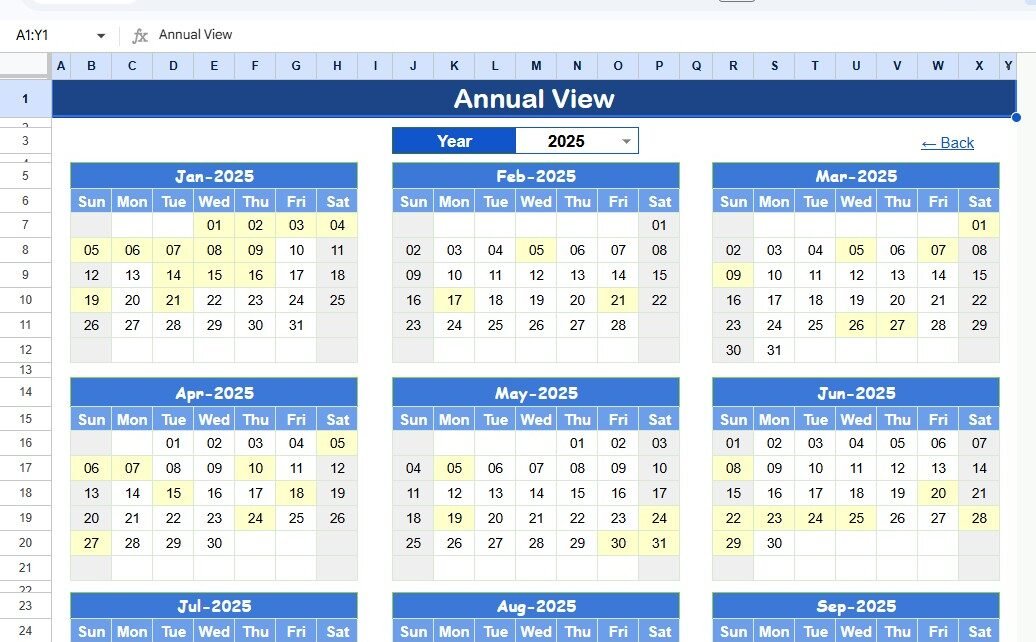
🔹 Annual View with 12-Month Layout — Grant deadlines entered in the Events sheet appear on the correct date cells across all 12 months. Development directors and program officers get a full-year snapshot to identify deadline clusters and plan workloads weeks ahead.
🔹 Dynamic Monthly View with Overflow Indicator — Select any Month and Year from the dropdowns at the top; the calendar recalculates instantly. Up to 1 event name appears directly on each date cell. If more than 1 event falls on the same date, the cell shows an overflow indicator so nothing gets buried.
🔹 Daily View with Built-In Date Picker — Enter a Start Date and End Date at the top of the Daily View sheet. Double-clicking a date cell opens an inline calendar picker — no manual typing required. The sheet lists every event in that window with Event Name, Time, Location, and Description.
🔹 Structured Events Database with 7 Fields — Each grant event stores: ID (auto-generated), Date, Day (auto-populated day name), Event Name, Time, Location, and Description. Adding a new grant deadline means typing in the next empty row — the ID auto-increments and Day auto-populates instantly.
Template Structure and Pages
The Grant Proposal Submission Calendar in Google Sheets contains 5 worksheets. Here is what each sheet delivers:
Home Sheet
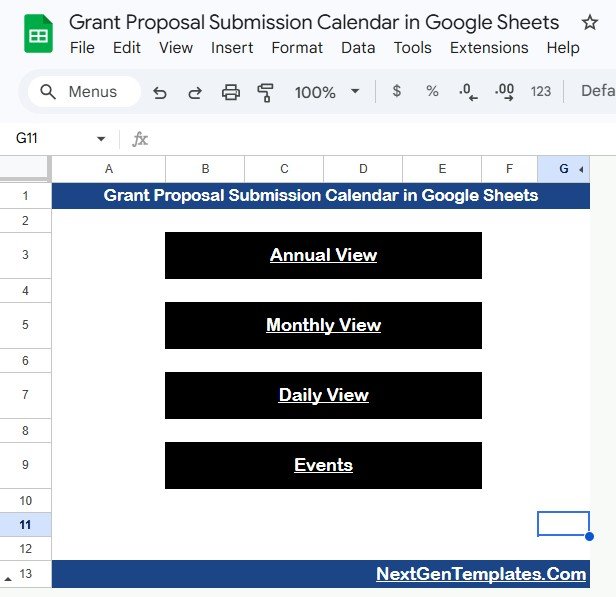
This is the index and navigation hub. Four clearly labeled buttons — Annual View, Monthly View, Daily View, and Events — let any team member jump to the correct sheet in one click. Ideal as the default landing view when sharing the file with your development team or executive director.Grant Proposal Submission Calendar in Google Sheets
Home Sheet — 4 navigation buttons
Annual View Sheet
Displays all 12 months of the calendar year in a grid layout. Grant submission deadlines entered in the Events sheet appear on the correct date cells, giving program managers and development directors a full-year timeline at a glance — the fastest way to spot proposal sprint clusters, funder overlap periods, and quiet windows for writing.
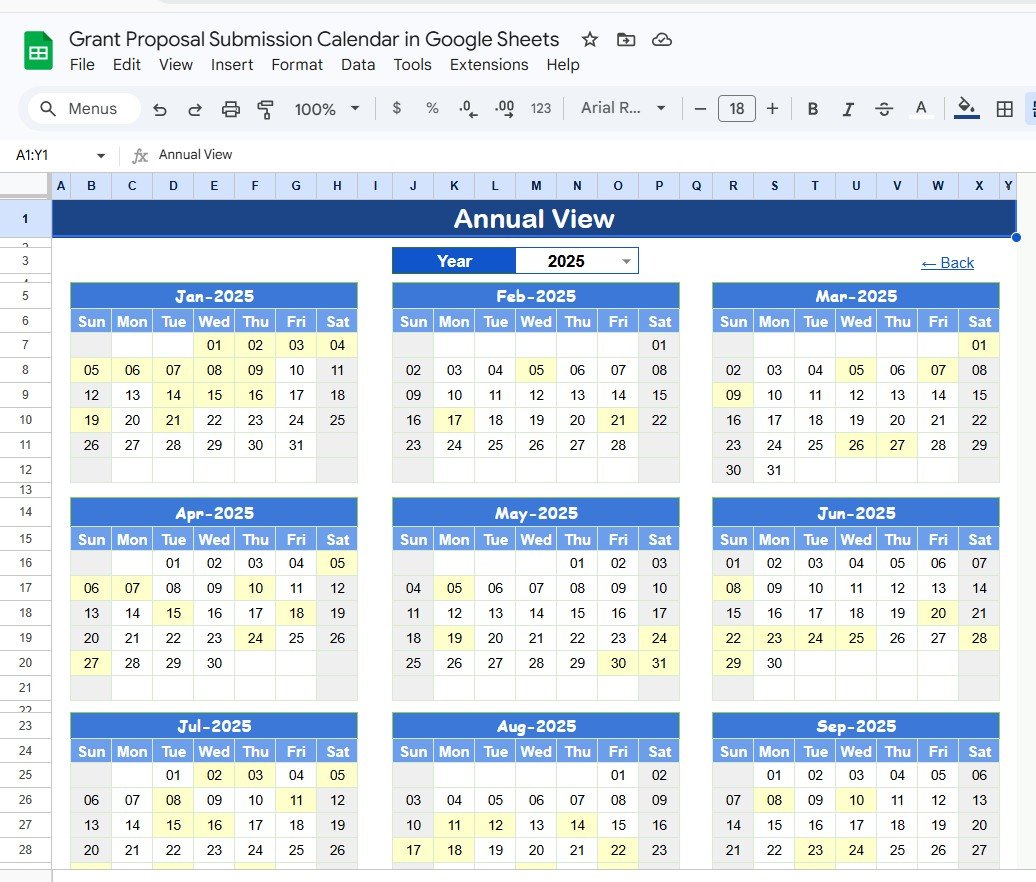
Annual View Sheet tab
Monthly View Sheet
A single-month calendar that updates based on the Month and Year you select from the dropdown menus at the top. It shows 1 event per date cell. If more than 1 event exists on a date, the cell shows an overflow indicator — use the Daily View to see the complete list for that date. Perfect for weekly grant planning standups and sharing a printable schedule with program staff.
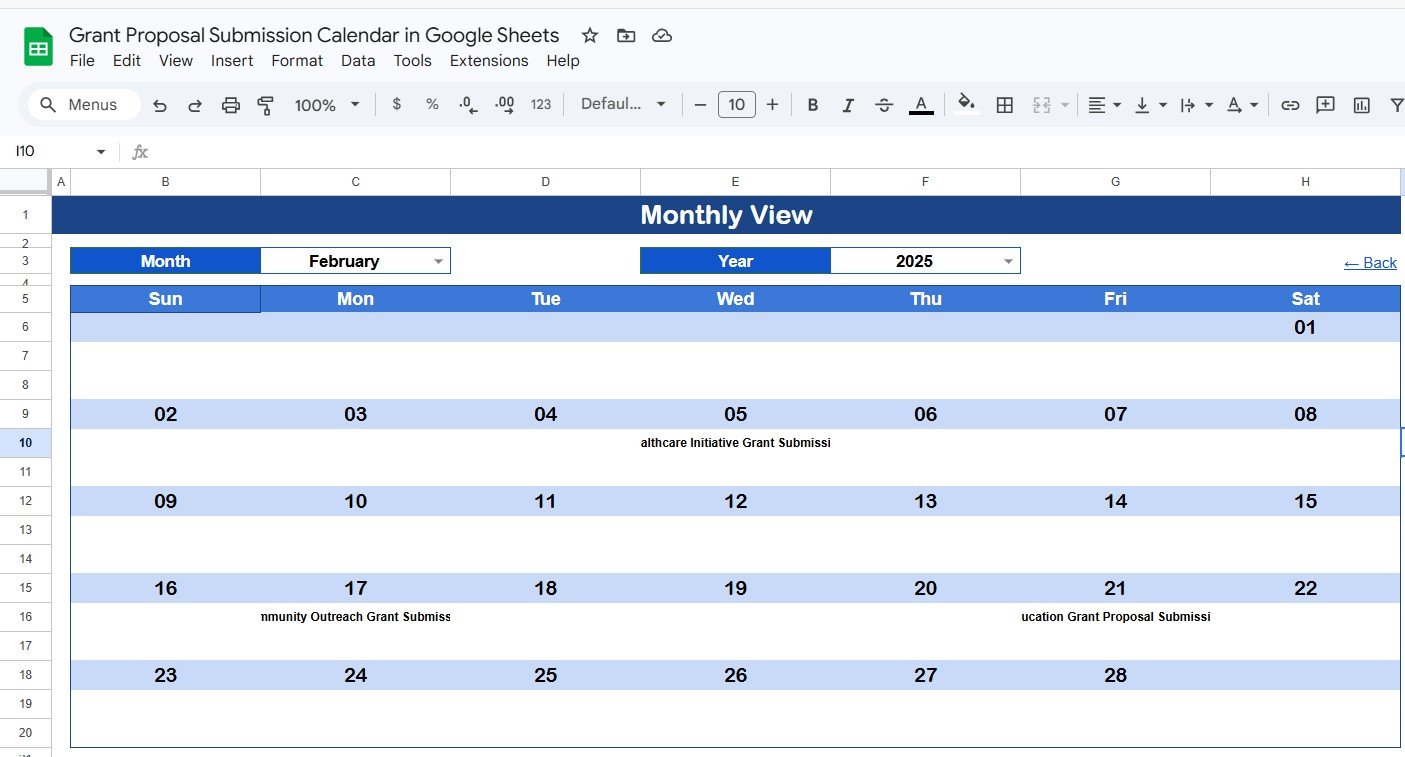
Monthly View Sheet tab
Daily View Sheet
Lists all grant submission events within a selected date range. Enter a Start Date and End Date at the top of the sheet — double-click the date cell to open the built-in date picker. The sheet displays every event in the chosen window with full details: Event Name, Time, Location, and Description. Use this view to generate pre-sprint checklists, prepare briefing packets for grant writers, or review upcoming submissions before a board meeting.
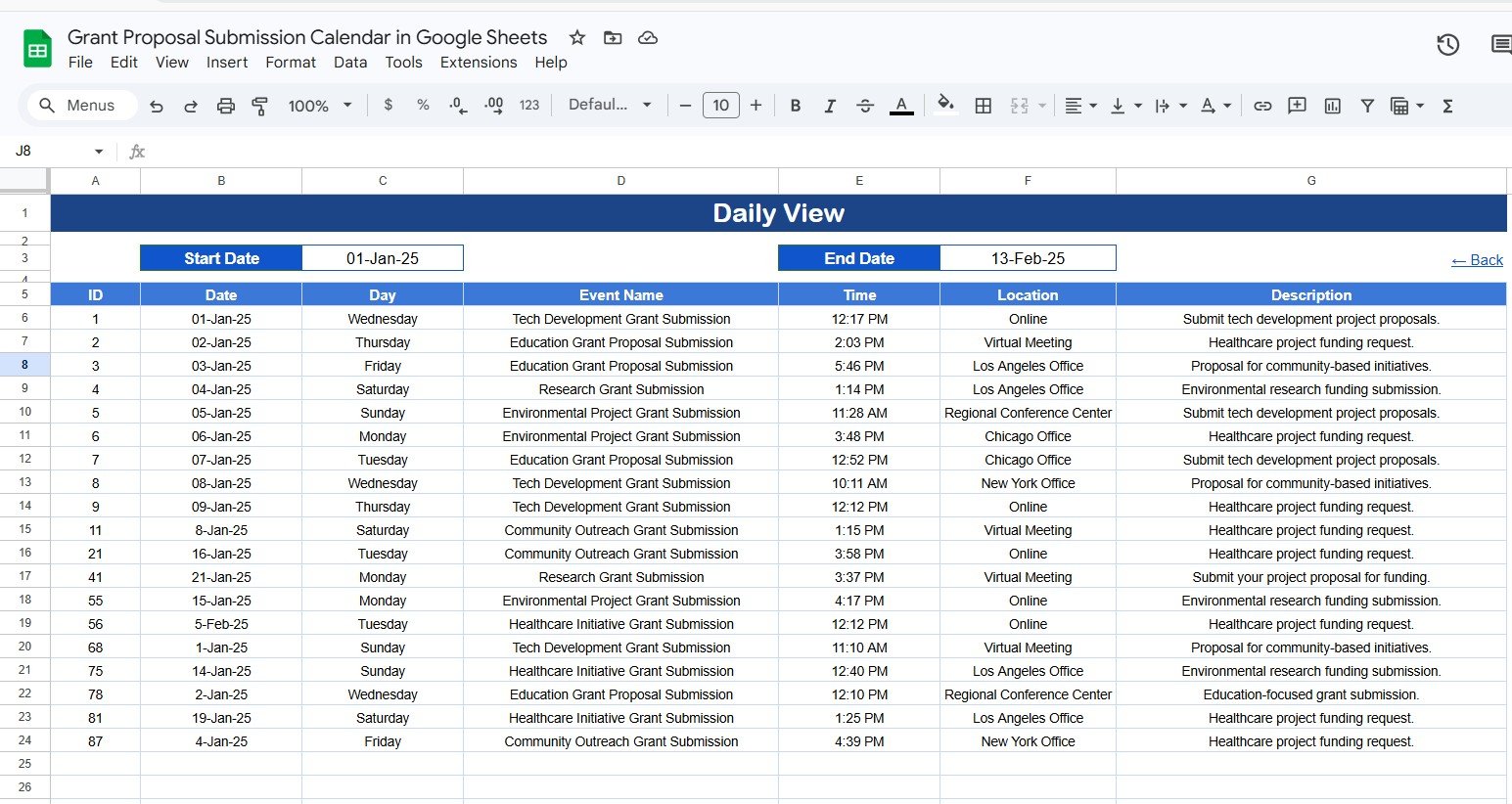
Daily View Sheet tab
Events Sheet
The central database where all grant submission event details are stored. Each row captures: ID (auto-generated sequential number), Date, Day (auto-calculated based on the date — Sunday, Monday, etc.), Event Name, Time, Location, and Description. You enter data manually to add a new grant event — type in the next empty row and every view sheet updates automatically. This is structurally identical to our popular Staff Training Completion Calendar in Google Sheets, which uses the same 5-sheet architecture for HR scheduling.
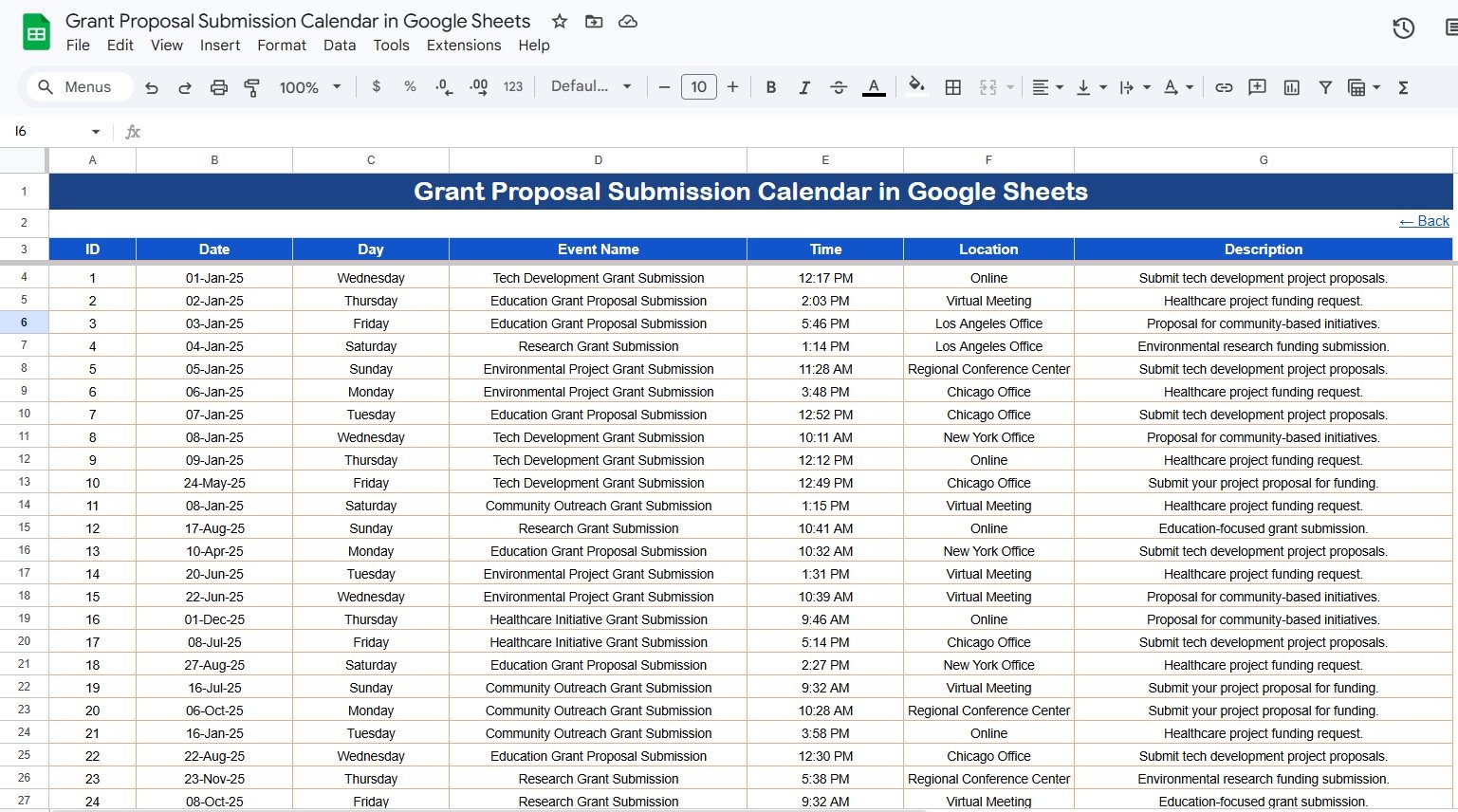
Events Sheet tab — 7 structured fields per grant event
Grant Proposal Submission Calendar in Google Sheets vs. Excel Calendar vs. Submittable — Feature Comparison
| Feature | Grant Proposal Submission Calendar (Google Sheets) | Excel Calendar Equivalent | Submittable / Fluxx (Paid SaaS) |
|---|---|---|---|
| Cost | $4.99 one-time ✅ | $4.99–$8.99 one-time | $500–$2,000+ per year |
| Platform | Google Sheets (browser) ✅ | Microsoft Excel (desktop) | Cloud SaaS (proprietary) |
| Setup time | Under 5 minutes ✅ | Under 5 minutes | Days to weeks onboarding |
| Real-time team collaboration | Built-in Google Drive sharing ✅ | Requires OneDrive/SharePoint | ✅ Multi-user platform |
| Annual + Monthly + Daily views | All 3 included ✅ | Varies by template | Custom reporting only |
| Mobile access | Google Sheets mobile app ✅ | Limited offline | ✅ Web app |
| Customizable event fields | Fully editable ✅ | Fully editable | Limited by plan tier |
| Share with link | Native Google Drive link ✅ | Via email or OneDrive | Per-user license required |
| Year-1 cost at 5 users | $4.99 total ✅ | $4.99–$8.99 total | $2,500–$10,000+ |
For nonprofits and grant-dependent organizations that need shared deadline tracking without a SaaS subscription, the Grant Proposal Submission Calendar in Google Sheets sits in the sweet spot.
Who Should Use This Template
Perfect for:
- Nonprofit development directors tracking 5–50 active grant deadlines annually across federal, foundation, and corporate funders
- Grant writers managing submission pipelines for multiple client organizations
- University research offices coordinating proposal submissions across multiple departments and PI teams
- Small nonprofits and community organizations replacing email reminder chains and wall calendars
- Consultants who deliver grant calendar templates to multiple clients via Google Drive
Not a fit if:
- You need applicant-facing grant portals or multi-stage workflow automation (consider Submittable or Fluxx instead)
- Your team requires automated email deadline reminders or CRM integration without manual setup
- You prefer Microsoft Excel — see the Grant Proposal Submission Calendar in Excel for an offline-first version of this same template
Real-World Use Cases
Rebecca is a grants manager at a 25-person environmental nonprofit. She tracks 40+ submission deadlines across federal agencies, state environmental funds, and private family foundations. Using the Monthly View, she runs a 10-minute team standup every Monday to confirm which proposals are due that week — without paying $800/year for a grants management SaaS platform. The Annual View shows her executive director the full-year funding pipeline during quarterly board meetings.
Naveen manages research grant proposals at a mid-size university’s research office. He uses the Annual View to show department heads a full-year timeline of NIH, NSF, and DARPA deadlines. The Daily View filtered to the next 45 days becomes the team’s pre-sprint checklist, confirming which proposals are in active writing, which are in budget review, and which need PI sign-off before submission.
A small community foundation’s development team of three shares one Google Sheet using this calendar. Each team member logs their assigned funder deadlines into the Events sheet, and the whole team reviews the Monthly View together during weekly planning meetings — replacing a shared Outlook calendar that couldn’t store location and description details per event. For organizations already using related tracking tools, pairing this with the Nonprofit Grant Dashboard in Excel gives them both a deadline calendar and a KPI tracking layer for awarded grants.
Advantages of Grant Proposal Submission Calendar in Google Sheets
The primary advantage is cost: $4.99 one-time versus $500–$2,000+ per year for grant management SaaS platforms. For organizations tracking deadlines — rather than running applicant intake workflows — this eliminates a recurring cost entirely.
Google Sheets’ built-in collaboration means every team member sees real-time updates when a deadline is added or changed. There is no software to install, no per-user license to manage, and no IT configuration. Share the file with a Google Drive link and grant writers, program officers, and the executive director all work from the same live calendar.
All data entry is centralized in the Events sheet, which eliminates duplicate entries across multiple files. The 4 views (Annual, Monthly, Daily, Events) cover every common use case: yearly planning, monthly scheduling, date-range reporting, and raw data management. Google’s official Google Sheets sharing and permissions guide explains how to control who can view or edit the file for your team’s specific access requirements.
Opportunities for Improvement
This template focuses on deadline scheduling and event tracking — it does not include automated email reminders, applicant intake forms, or award tracking analytics. Organizations needing those capabilities should look at full grant management platforms. The Monthly View shows only 1 event per date cell, so teams with heavy deadline overlap on specific dates need to check the Daily View or Events sheet for the complete list. There is no built-in notification system; for automated alerts, Google Apps Script or a third-party tool like Zapier can trigger reminder emails from the Events sheet data.
Best Practices
Enter all grant deadlines in the Events sheet first before using the calendar views. Use consistent naming conventions for Event Names (for example, “NIH R01 Submission — Program Area” rather than just “NIH”) so the Monthly and Annual views display clear, scannable entries. Use the Daily View with a 30- or 45-day window during active proposal sprints to prioritize the team’s writing workload. Share the Google Sheet with “Viewer” access for board members and program staff, and “Editor” access only for development staff who manage the Events database. Archive a year-end copy each January to preserve historical deadline records before starting a new year’s data.
Explore Relevant Templates
📌 Grant Proposal Submission Calendar in Excel — Same 5-sheet layout in Microsoft Excel format for teams working offline or without Google accounts.
📌 Nonprofit Grant Dashboard in Excel — Track 5 KPIs, 17 charts, and compliance reporting across all active awarded grants — the analytics companion to this calendar.
📌 Staff Training Completion Calendar in Google Sheets — Same 4-view architecture for HR teams tracking training sessions and certifications.
📌 Financial Audit Calendar in Google Sheets — Track audit milestones and compliance deadlines with the same calendar structure.
📌 Browse all Google Sheets Templates on NextGenTemplates for more cloud-ready tools.
If you would like to get faster with spreadsheet calendars and trackers, the NextGenTemplates Academy learning paths cover the skills behind templates like this one, with practice files to follow along.
Get the Grant Proposal Submission Calendar in Google Sheets
Frequently Asked Questions
What sheets does the Grant Proposal Submission Calendar in Google Sheets include?
The Grant Proposal Submission Calendar in Google Sheets includes 5 worksheets: a Home navigation sheet with 4 quick-jump buttons, an Annual View showing all 12 months, a Monthly View with month and year dropdowns, a Daily View with date-range filtering and an inline date picker, and an Events database sheet where all submission data is entered.
How do I add a new grant deadline to the calendar?
Go to the Events Sheet and type the grant event details in the next empty row. Fill in the Date, Event Name, Time, Location, and Description columns. The ID auto-generates and the Day column (Sunday, Monday, etc.) auto-populates based on the date. The Annual, Monthly, and Daily View sheets update immediately with the new entry.
How does the Monthly View handle multiple deadlines on the same date?
The Monthly View displays 1 event name directly on each date cell. If more than 1 grant submission event falls on the same date, the cell shows an overflow indicator. Switch to the Daily View sheet and filter to that specific date to see the full list of events with all details.
Can I share this calendar with my grant writing team?
Yes. Share the Google Sheets file link with team members via Google Drive and set them as Editors or Viewers. All team members see the same live data in real time without any additional cost or per-user fees from NextGenTemplates. Your $4.99 purchase covers unlimited internal users.
How does this compare to Submittable or Fluxx?
Submittable and Fluxx are full grant management platforms designed for applicant intake, grantee portals, and workflow automation — costing $500–$2,000+ per year. The Grant Proposal Submission Calendar in Google Sheets is a $4.99 deadline-tracking tool for the internal development team, focused on scheduling visibility without the applicant workflow layer.
Is this template compatible with Microsoft Excel?
This is a Google Sheets–native template. It is not designed for Microsoft Excel. If your team prefers Excel, the Grant Proposal Submission Calendar in Excel is available separately and provides the same core functionality in an offline Excel format.
Do I need a paid Google Workspace plan to use this template?
No. This template works with a free Google account (gmail.com). Google Sheets and Google Drive are free for personal and nonprofit organizational use. The only requirement is a Google account to make a copy of the template into your own Drive.
About the Author
Built by PK — Microsoft Certified Professional with 15+ years of Excel, Google Sheets, and Power BI experience. Founder of NextGenTemplates, reaching 300K+ subscribers across YouTube channels. Every template is hand-built and tested before release.
Conclusion
The Grant Proposal Submission Calendar in Google Sheets gives nonprofit development teams, grant writers, and university research offices a single, shareable calendar for tracking every submission deadline, funder event, and proposal sprint date. With 5 views (Home, Annual, Monthly, Daily, Events), 7 data fields per entry, and real-time Google Sheets collaboration, it replaces scattered email threads and expensive SaaS subscriptions for deadline-level grant management.
✅ Instant download · One-time payment · No subscription · Lifetime access
📅 Last updated: May 2026