Insurance companies operate in a highly competitive and regulated environment. Therefore, they must track performance indicators carefully. However, many insurance teams still rely on scattered spreadsheets and manual reports. As a result, leaders struggle to monitor claims performance, policy growth, profitability, and service quality in one place.
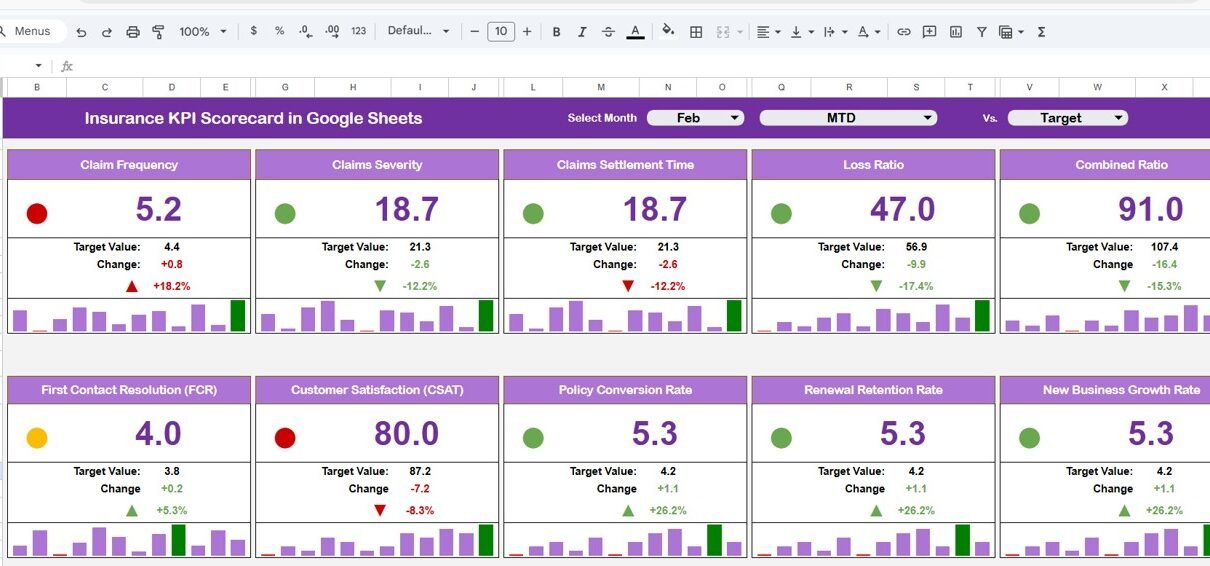
To solve this challenge, the Insurance KPI Scorecard in Google Sheets provides a ready-to-use, dynamic, and interactive performance management template. This scorecard tracks 10 critical insurance KPIs and automatically updates performance results based on the selected month.
Because it works in Google Sheets, teams collaborate in real time without version issues. Moreover, the scorecard displays traffic lights, percentage change arrows, and dynamic monthly or yearly views with just one click.
In this detailed guide, you will learn:
What Is an Insurance KPI Scorecard in Google Sheets?
An Insurance KPI Scorecard in Google Sheets is a structured performance tracking tool designed to monitor key operational, financial, and service-related KPIs for insurance companies.
Instead of checking multiple reports, managers view all KPIs in one centralized scorecard. Additionally, they can:
- Select any month from the dropdown
- Instantly view monthly performance (MTD)
- Switch to yearly performance (YTD)
- Monitor percentage changes
- See visual traffic light indicators
- Analyze trends easily
Because the template automates calculations, managers save time and improve decision-making accuracy.
Key Features of Insurance KPI Scorecard in Google Sheets
Click to Buy Insurance KPI Scorecard in Google Sheets
Worksheets Structure of Insurance KPI Scorecard
The template contains multiple structured worksheets for smooth workflow.
Main Scorecard Sheet
This is the central dashboard.
Features:
- Month dropdown at top
- MTD / YTD selection
- 10 KPI performance summary
- Actual vs Target comparison
- Previous period comparison
- Traffic lights
- Percentage change arrows
Because everything appears on one screen, leaders make faster decisions.

Click to Buy Insurance KPI Scorecard in Google Sheets
Trend Sheet Tab
This sheet provides detailed KPI trend analysis.
Key Highlights:
-
KPI selection dropdown in Cell C3
-
Displays:
-
KPI Group
-
KPI Unit
-
KPI Type (Lower the Better / Upper the Better)
-
KPI Formula
-
KPI Definition
-
-
Monthly performance trend chart
Therefore, managers analyze performance movement over time.

Click to Buy Insurance KPI Scorecard in Google Sheets
KPI Definition Sheet Tab
This sheet works as the KPI master database.
Fields Included:
-
KPI Name
-
KPI Group
-
Unit
-
Formula
-
KPI Definition
-
KPI Type (UTB / LTB)
Because of this structured sheet, users maintain clarity and consistency across reports.

Click to Buy Insurance KPI Scorecard in Google Sheets
Data Input Sheet Tab
This sheet captures raw performance data.
Here you:
-
Enter monthly actual values
-
Enter targets
-
Maintain previous period numbers
-
Update data regularly
Once you input data, the scorecard updates automatically.
Therefore, the workflow remains simple:
Input → Calculate → Visualize → Analyze

Click to Buy Insurance KPI Scorecard in Google Sheets
Colour Settings Sheet
This sheet controls visual formatting.
You can adjust:
-
Traffic light color codes
-
Arrow colors
-
Target achievement thresholds
Because color customization improves presentation, organizations align the scorecard with their branding.

Click to Buy Insurance KPI Scorecard in Google Sheets
Advantages of Insurance KPI Scorecard in Google Sheets
Using this scorecard offers several strategic benefits.
Real-Time Monitoring
Managers see updated performance instantly after data entry.
Visual Decision-Making
Traffic lights and arrows simplify analysis.
Monthly & Yearly Analysis
MTD and YTD views improve planning accuracy.
Improved Accountability
Defined KPIs ensure responsibility clarity.
Cloud-Based Collaboration
Teams access the scorecard from anywhere.
Cost-Effective Solution
No expensive BI tools required.
Customizable Framework
Users add more KPIs or modify formulas easily.
Best Practices for the Insurance KPI Scorecard
Click to Buy Insurance KPI Scorecard in Google Sheets
To maximize effectiveness, follow these guidelines.
1. Define KPIs Clearly
Always document formula and definition in the KPI Definition sheet.
2. Update Data Regularly
Enter monthly data consistently for accuracy.
3. Review LTB KPIs Closely
Monitor Loss Ratio, Expense Ratio, and Claim Processing Time carefully.
4. Set Realistic Targets
Align targets with business strategy.
5. Use Trend Analysis
Analyze performance patterns, not just monthly numbers.
6. Standardize Data Entry
Avoid manual formula changes in the scorecard.
7. Adjust Colour Settings Carefully
Maintain consistent performance thresholds.
How Does This Scorecard Improve Insurance Performance?
Click to Buy Insurance KPI Scorecard in Google Sheets
Insurance operations involve underwriting, claims, sales, and compliance. However, without structured tracking, performance gaps remain hidden.
This scorecard helps by:
- Identifying profitability risks early
- Monitoring claim efficiency
- Tracking customer growth
- Improving underwriting control
- Enhancing strategic planning
Consequently, leadership builds a stronger and more profitable insurance business.
Conclusion
The Insurance KPI Scorecard in Google Sheets provides a structured, dynamic, and ready-to-use performance monitoring solution. Because it integrates monthly selection, MTD/YTD views, traffic lights, and percentage indicators, it transforms raw insurance data into actionable insights.
Moreover, its simple structure ensures ease of use while maintaining professional reporting standards. Therefore, insurance companies that want better visibility, faster decisions, and improved profitability should adopt this KPI scorecard system.
Frequently Asked Questions (FAQs)
Click to Buy Insurance KPI Scorecard in Google Sheets
1. What is the purpose of an Insurance KPI Scorecard?
It tracks financial, operational, and service KPIs in one structured dashboard.
2. Can I customize the KPIs?
Yes, you can add or modify KPIs in the KPI Definition sheet.
3. What does UTB and LTB mean?
UTB means Upper the Better. LTB means Lower the Better.
4. Does the scorecard support monthly and yearly analysis?
Yes. You can switch between MTD and YTD views.
5. Can multiple users access it?
Yes. Google Sheets allows real-time collaboration.
6. Is it suitable for small insurance agencies?
Yes. It works well for both small agencies and large insurance companies.
Visit our YouTube channel to learn step-by-step video tutorials
Youtube.com/@NeotechNavigators