Personal Finance Dashboard in Google Sheets is a powerful, cloud-based financial management template that helps you organize, track, and analyze every aspect of your personal finances — all in one place. Whether you are a salaried professional, a freelancer juggling multiple income streams, a student building good financial habits, or an investor monitoring your portfolio — this dashboard makes managing money simple, visual, and effective.
Managing personal finances often means dealing with scattered data across bank apps, spreadsheets, and paper notes. This template solves that problem by consolidating your income, expenses, budgets, investments, and transactions into a single Google Sheets personal finance dashboard with interactive charts, KPI cards, dynamic slicers, and a built-in transaction search engine.
Key Features of the Personal Finance Dashboard in Google Sheets
Click to Buy Personal Finance Dashboard in Google Sheets
This dashboard template stands out because it combines financial tracking, budget analysis, investment monitoring, and transaction search capabilities into a single Google Sheets file. Here are the key features that make it a must-have tool for anyone serious about personal financial management:
- 6 Interactive Dashboard Pages – Overview, Transactions Analysis, Budget Analysis, Investments Analysis, Search Transactions, and Data Sheet
- 4 High-Level KPI Cards – This Month Income, Total Expenses, Net Savings, and Investments displayed on the Overview page
- Multiple Interactive Charts – Visual analytics across all pages including Account Balance by Account Name, Spending by Category, Budget vs Actual comparisons, Portfolio Allocation, and more
- Dynamic Slicers – Built-in slicer controls on the Overview page let you filter the entire dashboard by date, category, or account in seconds
- Transaction Search Engine – A dedicated Search Transactions page lets you find any transaction by Category, Type, and Status
- Budget vs Actual Tracking – Compare your planned budget against actual spending by category and by quarter
- Investment Portfolio Monitoring – Track asset class allocation, portfolio breakdown, and monthly contributions
- Cloud-Based Access – Work from any device, anywhere, using Google Sheets
- Easy Data Entry – Replace sample data in the Data Sheet and all charts update automatically
Dashboard Pages Explained
The Personal Finance Dashboard in Google Sheets is organized into 6 well-structured pages. Each page serves a specific purpose and together they provide a complete 360-degree view of your financial health.
1. Overview Page
Click to Buy Personal Finance Dashboard in Google Sheets
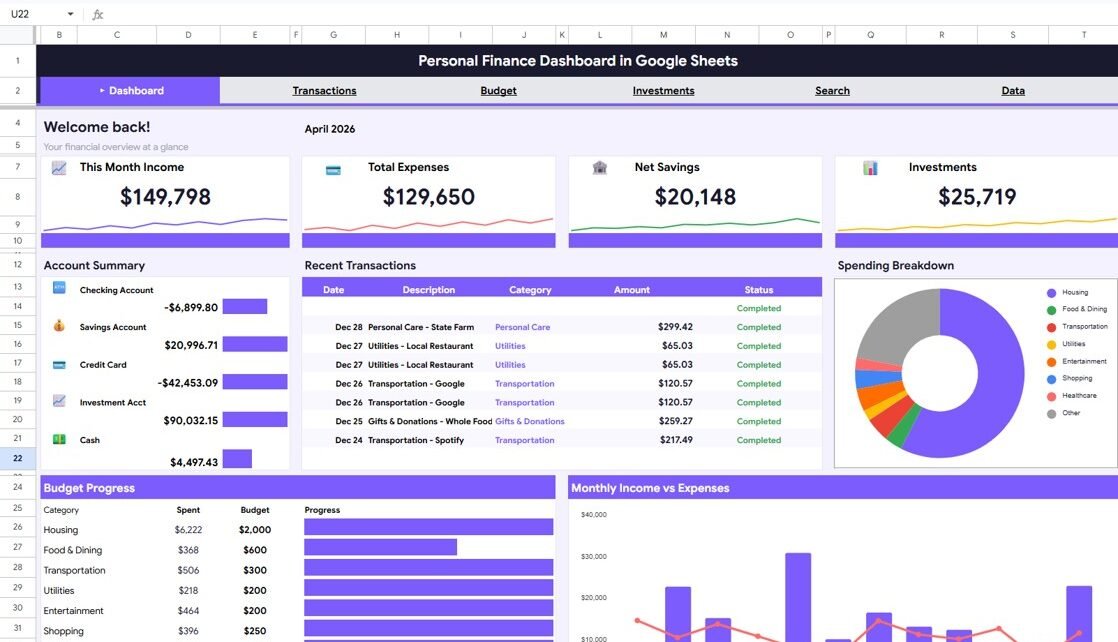
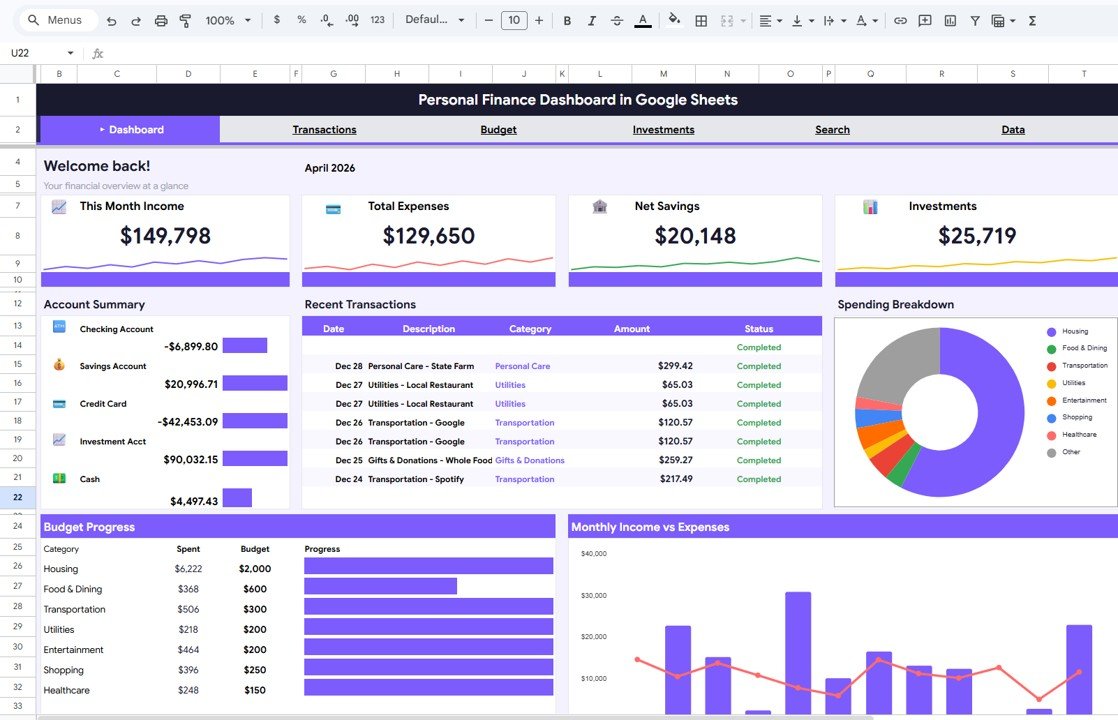
The Overview page is the first thing you see when you open the dashboard. At the top, you will find 4 high-level KPI cards that display your This Month Income, Total Expenses, Net Savings, and Investments. These cards give you an instant snapshot of your current financial position.
Below the cards, you will find several interactive charts that provide deeper insights into your finances. The charts include Account Balance by Account Name, Spending by Category, Budget Spent by Category, and Monthly Income vs Expenses by Month. Multiple slicers are available on this page to help you filter the data and see specific views of your financial dashboard quickly.
Overview Page
2. Transactions Analysis
The Transactions Analysis page dives deep into your spending patterns and payment habits. This sheet tab provides two key analyses: Spending by Category and Payment Methods by Type. These charts help you understand where your money is going and how you are paying for things — whether through cash, credit cards, digital wallets, or bank transfers. By analyzing these patterns, you can identify areas where you might be overspending and take corrective action.
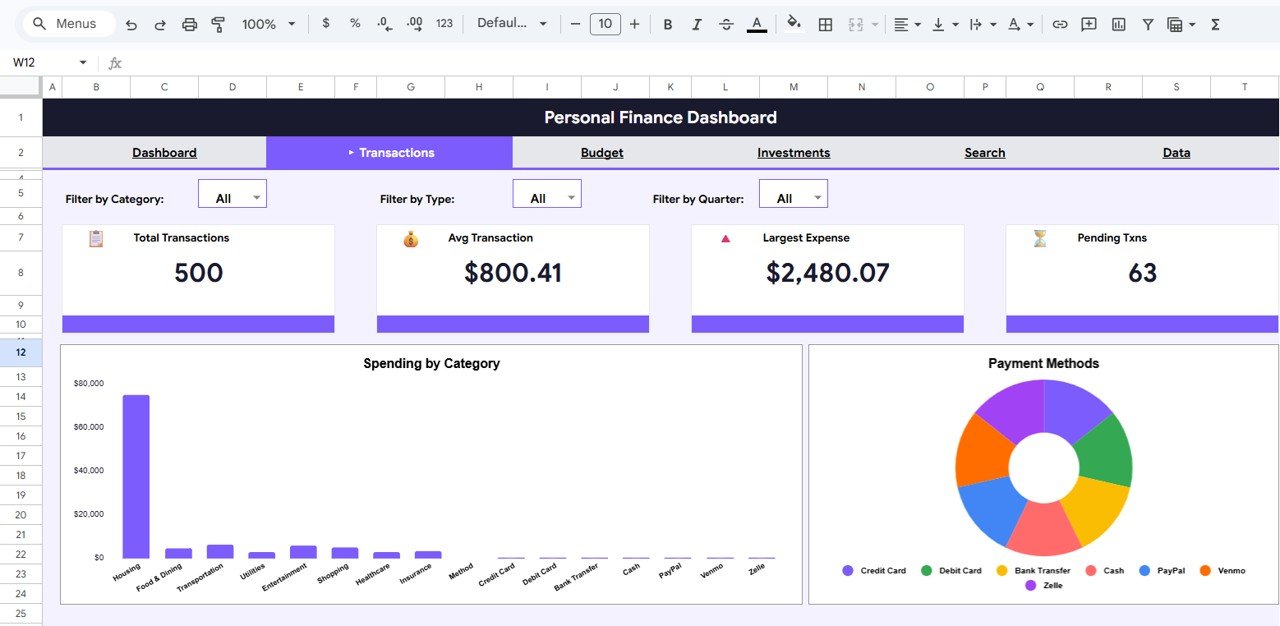
Transactions Analysis
3. Budget Analysis
The Budget Analysis page is designed for anyone who wants to compare their financial plans against actual performance. It includes Budget vs Actual by Category and Quarterly Budget vs Actual by Quarter charts. These visualizations make it easy to see which categories are over budget and which ones are under budget, helping you make smarter financial decisions going forward. If you also want a dedicated budgeting tool, check out the Budget Tracking Calendar in Google Sheets.
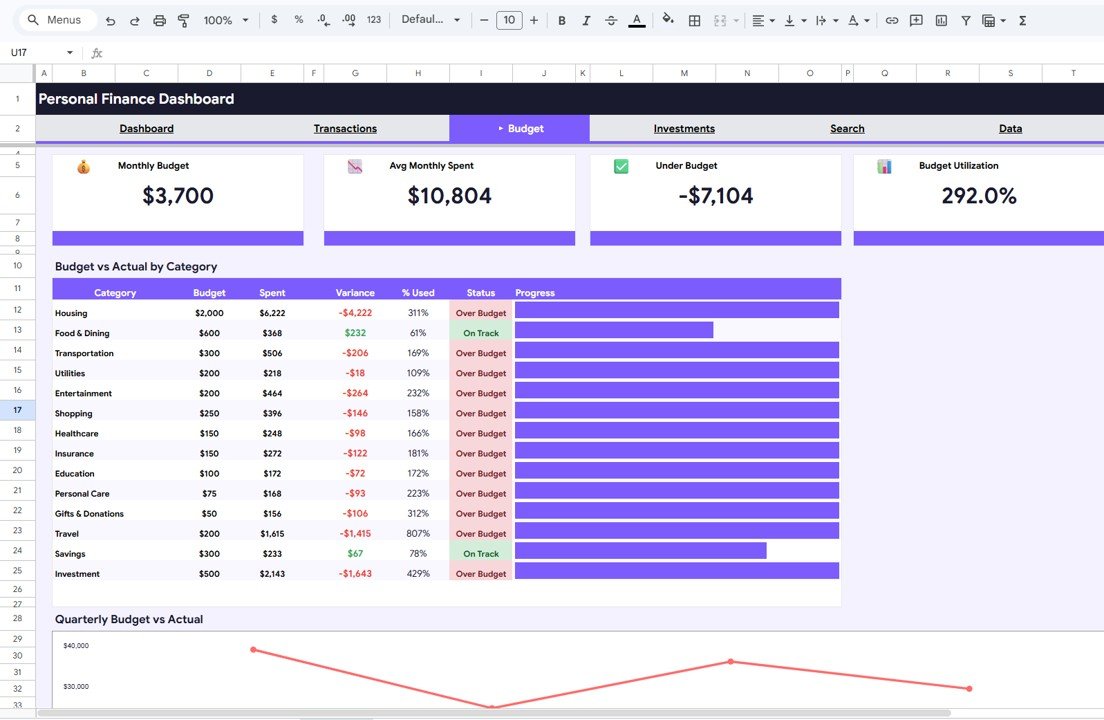
Budget Analysis
4. Investments Analysis
The Investments Analysis page gives you a complete view of your investment portfolio. It includes three key charts: Portfolio Allocation by Asset Class, Portfolio Breakdown by Asset Class, and Monthly Investment Contributions by Month. Whether you invest in stocks, bonds, mutual funds, real estate, or crypto, this page helps you understand your asset distribution and track how much you are contributing each month. For a more detailed investment tracking tool, also explore the Personal Investment KPI Dashboard in Google Sheets.
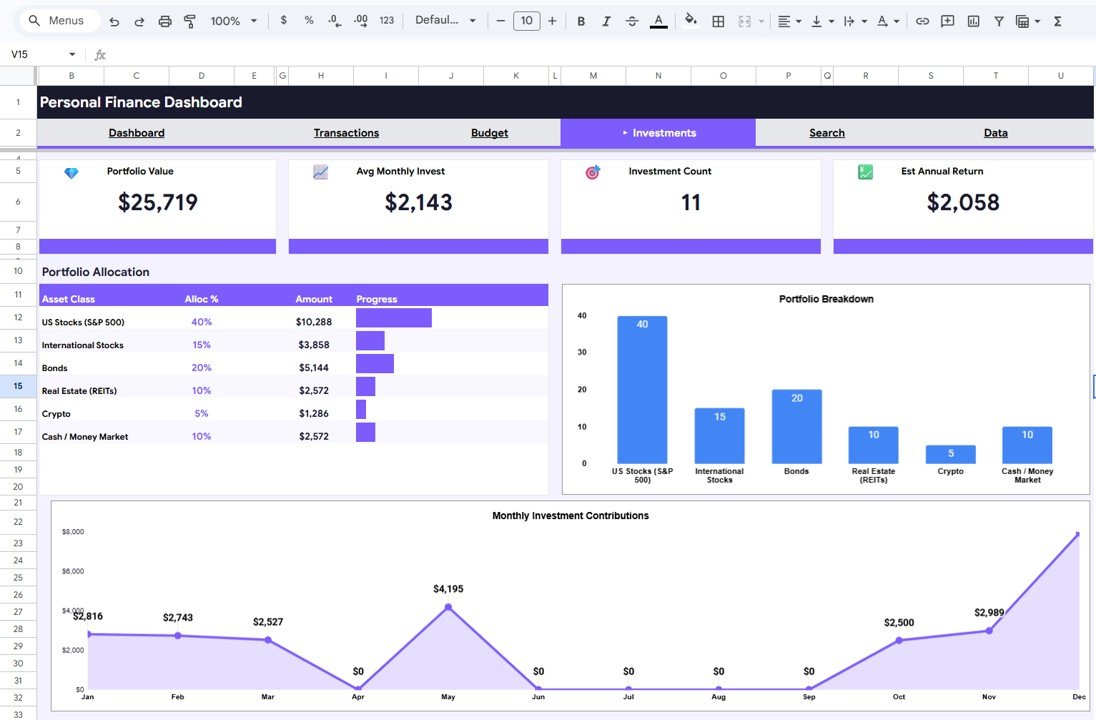
Investments Analysis
5. Search Transactions
The Search Transactions page acts as a built-in search engine for your financial records. It provides Transaction Search Results by Category, Type, and Status, making it easy to locate any specific transaction without scrolling through hundreds of rows of data. This is especially useful when you need to find a specific purchase, verify a payment, or track the status of a pending transaction.

Search Transactions
6. Data Sheet Tab
The Data Sheet tab is the backbone of your dashboard. This is where all your raw financial data is stored — income records, expense entries, budget allocations, investment details, and transaction logs. Simply add your data in the same format as the sample entries, and the entire dashboard — including all charts, KPIs, and analysis pages — will update automatically.
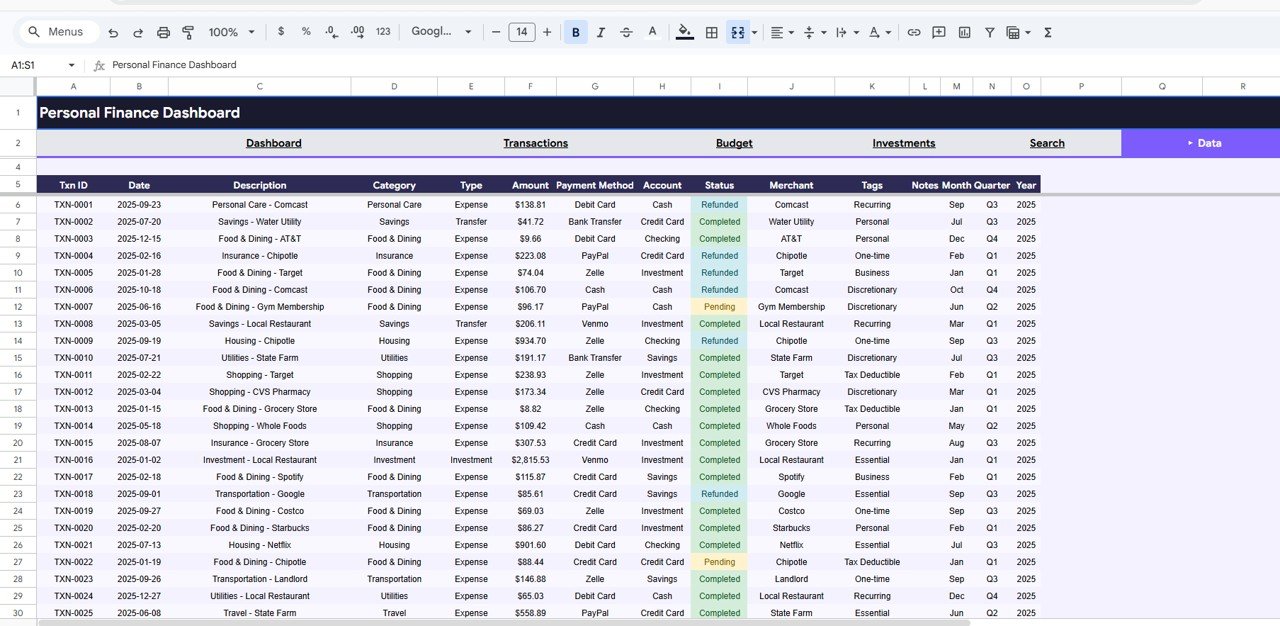
Data Sheet Tab
Advantages of the Personal Finance Dashboard in Google Sheets
- All-in-One Financial Hub – Instead of using multiple apps and spreadsheets, track everything from one dashboard
- Visual Decision Making – Interactive charts make it easy to spot spending patterns, budget gaps, and investment trends at a glance
- Zero Software Cost – Built on Google Sheets, so no additional software licenses or installations are needed
- Real-Time Collaboration – Share with a spouse, financial advisor, or accountant for collaborative financial planning
- Fully Customizable – Modify categories, account names, and budget structures to fit your unique financial situation
- Automatic Updates – All charts and KPIs refresh automatically when you update the Data Sheet
Opportunities for Improvement
- Bank API Integration – Currently data entry is manual; future versions could integrate with bank APIs for automatic transaction imports
- Goal Tracking – Adding specific savings goal trackers with progress bars would enhance the motivational aspect
- Multi-Currency Support – For users with international accounts, a currency conversion feature would add value
- Debt Tracking Integration – Combining this with a Debt Payoff Calculator would create a more comprehensive financial planning tool
Best Practices for Using This Dashboard
Click to Buy Personal Finance Dashboard in Google Sheets
- Update Weekly – Enter your transactions at least once a week to keep your dashboard current and accurate
- Set Monthly Budget Targets – Use the Budget Analysis page to set realistic targets and track your progress every month
- Review Investments Quarterly – Use the Investments Analysis page to rebalance your portfolio every quarter
- Use Slicers Strategically – Apply filters to focus on specific time periods, categories, or accounts when analyzing your data
- Back Up Regularly – While Google Sheets auto-saves, create periodic backups of your financial data for extra safety
- Track Net Worth Over Time – Combine this dashboard with a Net Worth Tracker in Google Sheets to monitor your long-term financial growth
Explore Relevant Templates
Click to Buy Personal Finance Dashboard in Google Sheets
If you found this Personal Finance Dashboard useful, you might also want to explore these related templates:
- Financial Transactions Dashboard in Google Sheets – Advanced transaction-level analysis and tracking
- Net Worth Tracker in Google Sheets – Monitor your total net worth across all assets and liabilities
- Monthly Budget Plan Template in Google Sheets – Detailed monthly budgeting with category-wise tracking
- Tax Planning Worksheet Template in Google Sheets – Organize deductions, tax-saving strategies, and liability calculations
- Personal Investment KPI Dashboard in Google Sheets – Deep-dive into investment performance metrics
Frequently Asked Questions
Click to Buy Personal Finance Dashboard in Google Sheets
What is the best personal finance dashboard template for Google Sheets?
The Personal Finance Dashboard in Google Sheets by NextGenTemplates is one of the best options available. It includes 6 interactive pages covering income tracking, expense analysis, budget comparison, investment monitoring, and transaction search — all with automated charts and KPI cards that update as you enter your data.
How do I track income and expenses in Google Sheets?
You can track income and expenses in Google Sheets using the Personal Finance Dashboard template. Simply enter your income and expense records in the Data Sheet tab, and the dashboard automatically generates visual charts showing Monthly Income vs Expenses, Spending by Category, Account Balances, and more.
Can I track my investment portfolio in Google Sheets?
Yes. The Personal Finance Dashboard in Google Sheets includes a dedicated Investments Analysis page with Portfolio Allocation by Asset Class, Portfolio Breakdown by Asset Class, and Monthly Investment Contributions by Month. It supports tracking stocks, bonds, mutual funds, real estate, and other asset classes.
Is this template free or paid?
Click to Buy Personal Finance Dashboard in Google Sheets
This is a premium template priced at $17.99 (on sale from $24.99). It includes 6 professionally designed dashboard pages with interactive charts, slicers, and a transaction search engine. You can purchase the Personal Finance Dashboard here.
Do I need to know formulas to use this dashboard?
No. All formulas and charts are pre-built. You simply replace the sample data in the Data Sheet with your own financial records, and everything updates automatically. No coding or formula knowledge is required.
Can I share this dashboard with my financial advisor?
Absolutely. Since the dashboard runs on Google Sheets, you can share it with anyone via Google Drive. Your financial advisor can view your income, expenses, budget performance, and investment portfolio in real time.
Conclusion
Click to Buy Personal Finance Dashboard in Google Sheets
The Personal Finance Dashboard in Google Sheets is a complete financial management solution for anyone who wants to take control of their money. With 6 interactive pages, 4 KPI cards, visual charts for income, expenses, budgets, and investments, plus a built-in transaction search engine — this template gives you everything you need to make smarter financial decisions.
Whether you are tracking monthly spending, comparing budget vs actual, monitoring your investment portfolio, or simply searching for a past transaction — this dashboard makes it effortless. Stop guessing and start managing your finances with clarity and confidence.
👉 Click here to Purchase the Personal Finance Dashboard in Google Sheets
🎥 For step-by-step video tutorials, visit our YouTube channel: Youtube.com/@NeoTechNavigators
Click to Buy Personal Finance Dashboard in Google Sheets