The Municipal Services KPI Scorecard in Google Sheets tracks 15+ municipal performance indicators across 4 structured worksheets, delivering MTD and YTD comparisons, trend charts, and color-coded conditional formatting in a single cloud-based file. According to the International City/County Management Association (ICMA), municipalities that implement structured KPI tracking see 18-25% faster issue resolution and 30% reduction in reporting time compared to manual spreadsheet-based approaches.
Managing a city’s public services involves coordinating dozens of departments — from waste collection and water supply to road maintenance and emergency response. The Municipal Services KPI Scorecard in Google Sheets centralizes all service delivery metrics into one interactive, shareable dashboard, letting city administrators spot underperforming areas before they escalate and present data-backed results to city councils and oversight boards.
Get the Municipal Services KPI Scorecard in Google Sheets
Key Features of Municipal Services KPI Scorecard In Google Sheets
The Municipal Services KPI Scorecard in Google Sheets includes 4 dedicated worksheets: Scorecard, KPI Trend, Input Data, and KPI Definition. It tracks 15+ pre-built KPIs including waste collection efficiency, water quality compliance, streetlight uptime, emergency response time, road maintenance completion rate, revenue collection rate, citizen satisfaction score, and public safety response metrics.
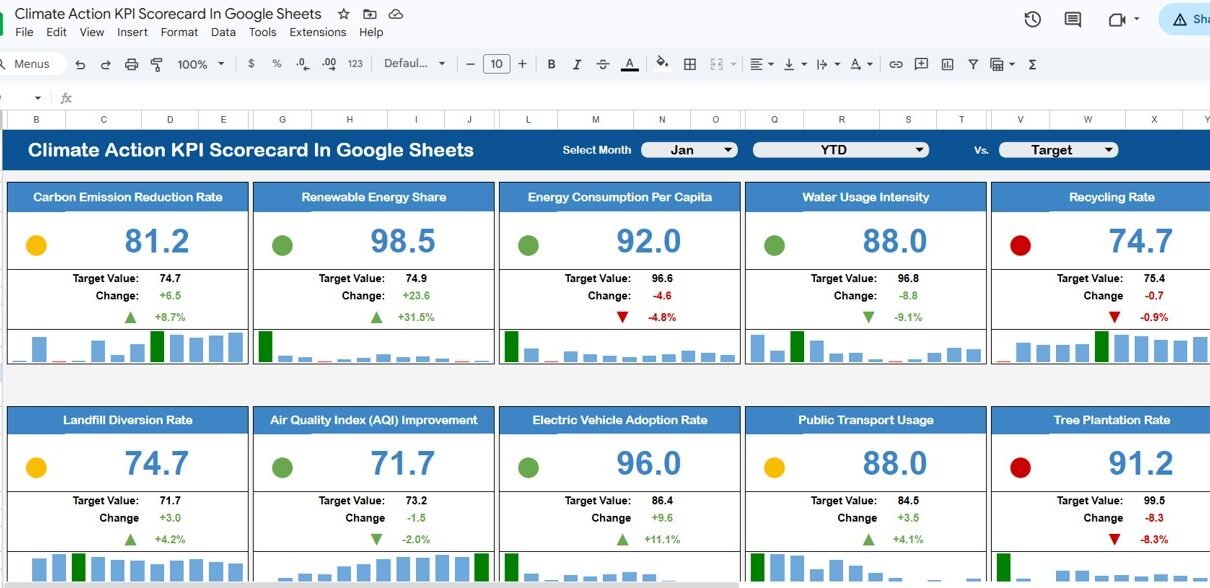
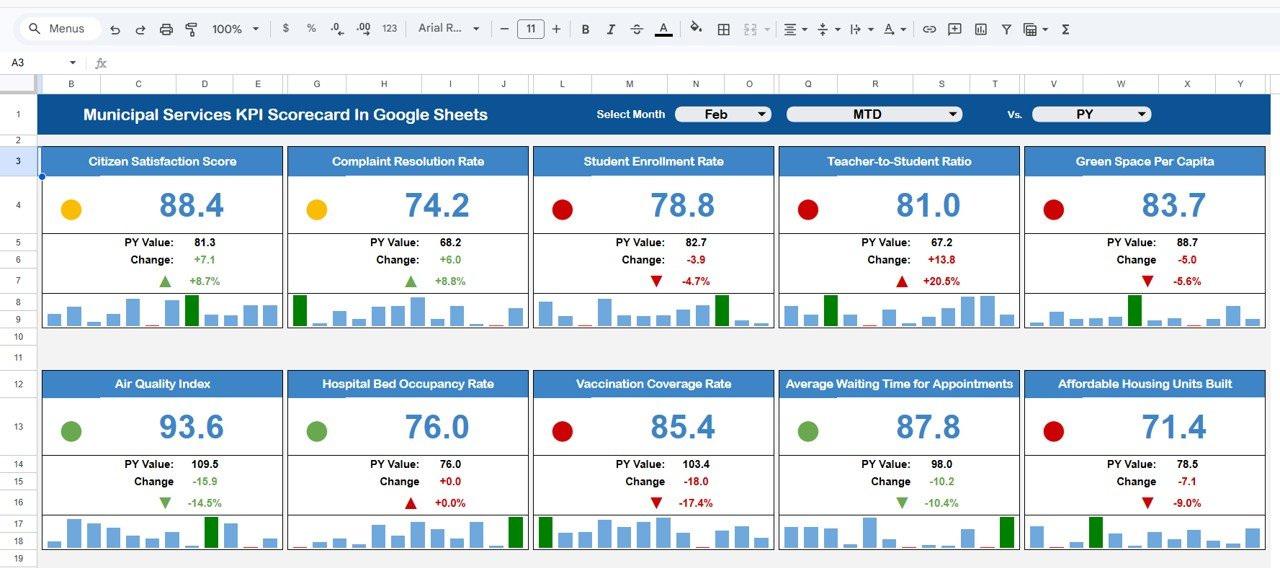
Each KPI is classified as “Upper the Better” (UTB) or “Lower the Better” (LTB) to ensure correct benchmarking. The scorecard uses conditional formatting with traffic-light color coding — green for on-track, red for below-target — so managers identify underperforming service areas at a glance. Dropdown menus let you toggle between any month and switch between MTD and YTD views without editing formulas.
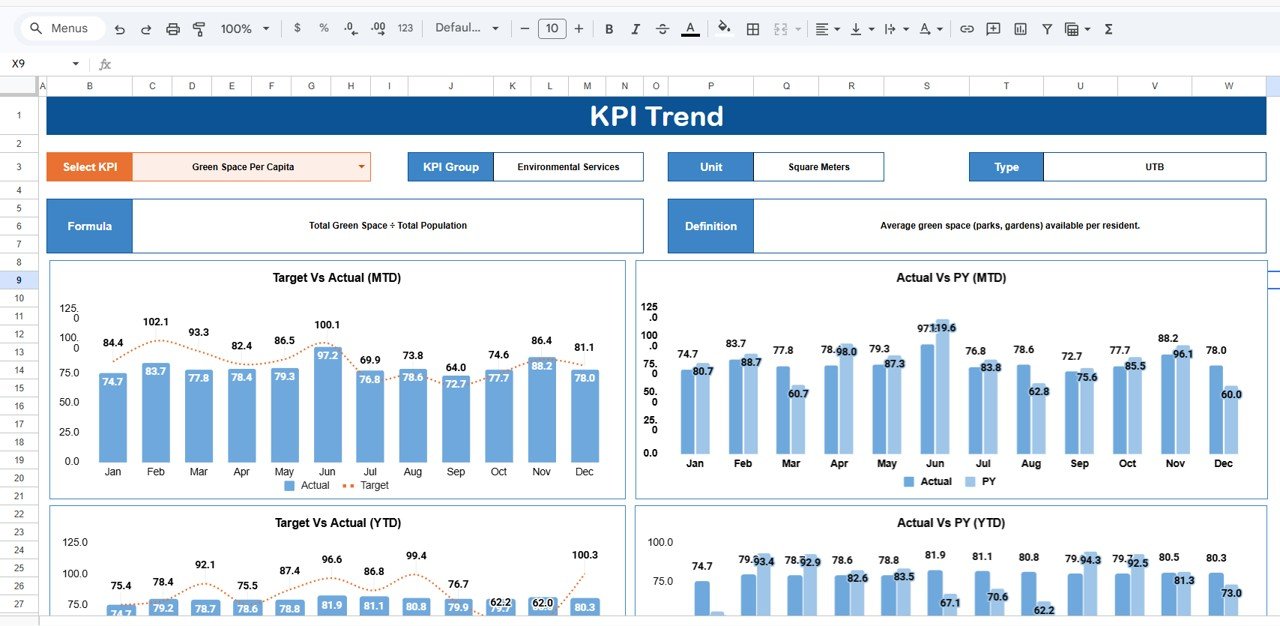
The KPI Trend sheet generates visual charts comparing Actual vs Target vs Prior Year data for any selected metric. This year-over-year trend analysis is commonly requested by city councils, audit committees, and oversight boards when reviewing quarterly performance reports. Because this template runs in Google Sheets, multiple department heads can access and update data simultaneously from any device — no desktop installation or IT support needed.
Dashboard Pages Explanation
1. Scorecard Sheet
The Scorecard sheet is the main interface where you view KPI performance at a glance. Key features include dropdown menus to select the reporting month, MTD or YTD toggle for period analysis, Actual vs Target value comparisons for each KPI, and color-coded visual indicators using conditional formatting. This single sheet provides a complete overview of all municipal metrics — from waste management and water quality to infrastructure and public safety — in a format suitable for council presentations and departmental reviews.
Municipal Services KPI Scorecard In Google Sheets
2. KPI Trend Sheet
Select any KPI name from the dropdown available on range C3 to see its detailed trend analysis. The sheet displays the KPI Group, Unit of KPI, Type (Lower the Better or Upper the Better), Formula, and Definition. Below the metadata, MTD and YTD trend charts plot Actual, Target, and Prior Year numbers for visual year-over-year comparison. This sheet is particularly useful for identifying seasonal patterns — for example, waste collection efficiency may drop during monsoon months while water supply interruptions peak during summer.
KPI Trend Sheet
3. Input Data Sheet
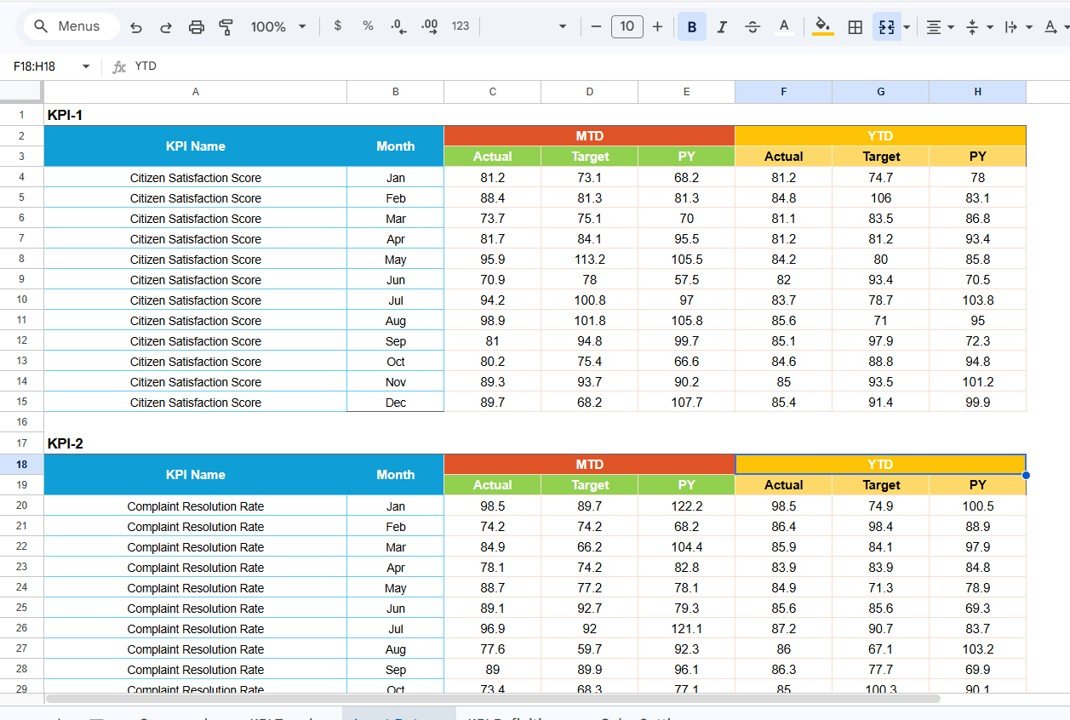
The Input Data sheet is where you enter all KPI data. Record actual values, targets, and prior year metrics for each KPI by month. The layout is straightforward — one row per KPI, one column per month. Update the data as new results become available and the Scorecard and Trend sheets refresh automatically. No formulas to edit, no manual chart updates required.
Input Data Sheet
4. KPI Definition Sheet
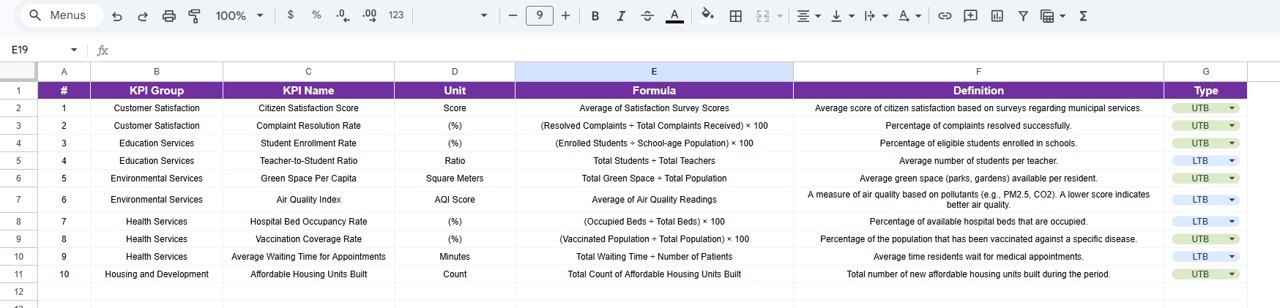
In this sheet tab, you enter the KPI Name, KPI Group, Unit, Formula, and KPI Definition. This sheet serves as the single source of truth for every metric tracked across your municipality — ensuring all department heads, council members, and auditors reference the same definitions. The pre-configured KPIs cover waste management, water supply, infrastructure, public safety, and revenue, but you can customize every field to match your city’s specific terminology and reporting requirements.
KPI Definition Sheet
Municipal Services KPI Scorecard vs. Microsoft Excel Dashboard vs. Paid Government Analytics — Feature Comparison
| Feature | Municipal Services KPI Scorecard (Google Sheets) | Microsoft Excel Dashboard | Paid Government Analytics (CityBase / OpenGov) |
|---|---|---|---|
| Cost | $8.99 one-time | $14.99 one-time (Excel version) | $500-2,000/month |
| Platform | Google Sheets (cloud) | Excel Desktop | Web-based SaaS |
| Setup Time | Under 10 minutes | Under 10 minutes | 2-8 weeks onboarding |
| Real-time Team Collaboration | ✅ Built-in | Limited (OneDrive) | ✅ Yes |
| Mobile Access | ✅ Any browser | Excel Mobile (limited) | ✅ Yes |
| Customizable KPIs | ✅ Fully editable | ✅ Fully editable | Requires admin setup |
| Year-1 Cost (5 users) | $8.99 total | $14.99 total | $6,000-24,000 |
| No IT Dependency | ✅ Yes | ✅ Yes | ❌ Requires IT support |
| Trend Analysis Charts | ✅ Built-in | ✅ Built-in | ✅ Advanced |
For municipal teams that want structured KPI tracking without paying $500+/month for government analytics software, the Municipal Services KPI Scorecard in Google Sheets sits in the sweet spot.
Who Should Use This Template
Perfect for:
- City administrators and municipal corporation managers tracking 10-20 departmental KPIs
- Urban planners and public works directors monitoring infrastructure and service delivery
- Small-to-medium municipalities (10,000-500,000 population) needing structured performance reporting
- NGOs and development agencies tracking public service delivery in partner cities
Not a fit if:
- Your metro government needs real-time IoT sensor integration and GIS mapping capabilities
- Your organization requires SOC 2 compliance and enterprise-grade access controls
- You need automated data feeds from SCADA systems or ERP platforms
Real-World Use Cases
Ravi manages public works for a 150,000-population city in India. He uses the Municipal Services KPI Scorecard in Google Sheets to track road maintenance completion rates, streetlight uptime, and waste collection efficiency across 8 municipal zones. Before this template, his team spent 2 days per month compiling reports manually. Now the scorecard updates automatically, and he presents data-backed results to the city council in under 30 minutes.
Maria leads citizen services for a county government in the Philippines. She tracks 12 KPIs including emergency response time, water quality compliance, and citizen satisfaction scores. The Google Sheets format lets her share live dashboards with field supervisors on mobile devices — no software licenses needed.
David runs sustainability reporting for a mid-size European municipality. He uses the YTD trend analysis to compare recycling rates and energy consumption against annual targets, generating quarterly reports for the city’s environmental compliance board without purchasing separate analytics software.
Advantages of Municipal Services KPI Scorecard In Google Sheets
The template eliminates 2-3 days of manual report preparation each month by automating all KPI calculations and chart updates. Because it runs in Google Sheets, there are zero software costs beyond the one-time $8.99 purchase — no per-user licensing, no annual renewals, no IT deployment. Multiple departments can access the same file simultaneously, eliminating version conflicts that are common with emailed Excel files.
The traffic-light conditional formatting system ensures that non-technical stakeholders — elected officials, community board members, and citizens — can immediately understand performance status without reading through raw data tables. The KPI Definition sheet standardizes metric definitions across departments, solving the common problem of different teams calculating the same KPI differently.
Opportunities for Improvement
The scorecard is a manual data entry tool — it does not connect to live data sources like SCADA systems, IoT sensors, or municipal ERP platforms. For organizations that need automated data feeds, this template works best as a reporting layer where monthly aggregated data is entered from source systems. The Google Sheets format may have performance limitations with very large datasets (500+ KPIs), though it handles 15-30 KPIs smoothly. Additionally, offline access is limited compared to Excel Desktop, although Google Sheets offline mode covers most use cases.
Best Practices
Define 10-15 KPIs that directly map to your municipality’s strategic priorities rather than tracking every possible metric. Update data monthly on a fixed schedule (e.g., the 5th of each month) for consistency. Review both MTD and YTD views during performance meetings to capture both short-term issues and long-term trends. Protect formula cells in Google Sheets (Data > Protected sheets and ranges) to prevent accidental edits. Share the file with “View only” access for council members and “Edit” access only for data entry staff.
Explore Relevant Templates
📊 Municipal Services KPI Scorecard in Excel — Same template structure in Excel format for desktop-only teams.
📊 Water Supply KPI Scorecard in Google Sheets — Dedicated scorecard for water distribution, quality compliance, and supply interruption metrics.
📊 Waste Management KPI Scorecard in Google Sheets — Track waste collection, recycling rates, and landfill diversion KPIs.
📊 Recycling KPI Scorecard in Google Sheets — Monitor recycling performance and environmental sustainability metrics.
📊 Smart Cities KPI Scorecard in Excel — Track urban performance, infrastructure, and sustainability KPIs.
Browse all Google Sheets KPI Dashboard Templates
To build stronger reporting skills for scorecards like this, see the Excel Pivot Tables & Dashboards course on NextGenTemplates Academy, which includes practice files.
Get the Municipal Services KPI Scorecard in Google Sheets
Frequently Asked Questions
What KPIs does the Municipal Services KPI Scorecard in Google Sheets track?
The Municipal Services KPI Scorecard in Google Sheets tracks 15+ KPIs including waste collection efficiency, water quality compliance, streetlight uptime, emergency response time, road maintenance completion, revenue collection rate, and citizen satisfaction. All KPIs are fully customizable — you can add, rename, or remove any metric.
How long does setup take for this municipal scorecard?
Setup takes under 10 minutes. Open the template via the Google Sheets copy link provided in the PDF guide, replace the sample data with your municipality’s actual data, and every chart, indicator, and summary updates automatically. No formulas to edit manually.
Can I add custom KPIs specific to my municipality?
Yes. The KPI Definition sheet lets you add, rename, or remove any KPI. Enter the KPI name, group, unit, formula, and definition, and the scorecard integrates it into all dashboards and trend charts automatically. There are no hard-coded limits on the number of KPIs.
How does this compare to paid government analytics software like OpenGov?
The Municipal Services KPI Scorecard in Google Sheets costs $8.99 one-time versus $500-2,000 per month for OpenGov or CityBase. It covers the same core KPI tracking functionality — MTD/YTD analysis, trend charts, and conditional formatting — without requiring IT setup, training programs, or per-user licensing fees.
Does this template work on mobile devices?
Yes. Since it runs in Google Sheets, you can access the scorecard from any smartphone, tablet, or computer with a web browser. Field supervisors can view and update data on the go using the Google Sheets mobile app. No desktop installation is required.
Can multiple departments collaborate on this scorecard?
Yes. Google Sheets supports real-time collaboration natively. Multiple users across departments can view and edit the scorecard simultaneously. You can set granular permissions — edit access for data entry staff and view-only access for council members, auditors, and external reviewers.
Is this template available in Excel format?
Yes. The Municipal Services KPI Scorecard in Excel is available separately with the same 4-worksheet structure and KPIs, designed for organizations that prefer Microsoft Excel over Google Sheets.
About the Author
Built by PK — Microsoft Certified Professional with 15+ years of Excel, Google Sheets, and Power BI experience. Founder of NextGenTemplates, reaching 300K+ subscribers across YouTube channels. Every template is hand-built and tested before release.
Conclusion
The Municipal Services KPI Scorecard in Google Sheets gives city administrators, municipal planners, and department heads a structured, visual, and collaborative way to track public service performance — at a fraction of the cost of enterprise analytics platforms.
✅ Instant download · One-time payment · No subscription