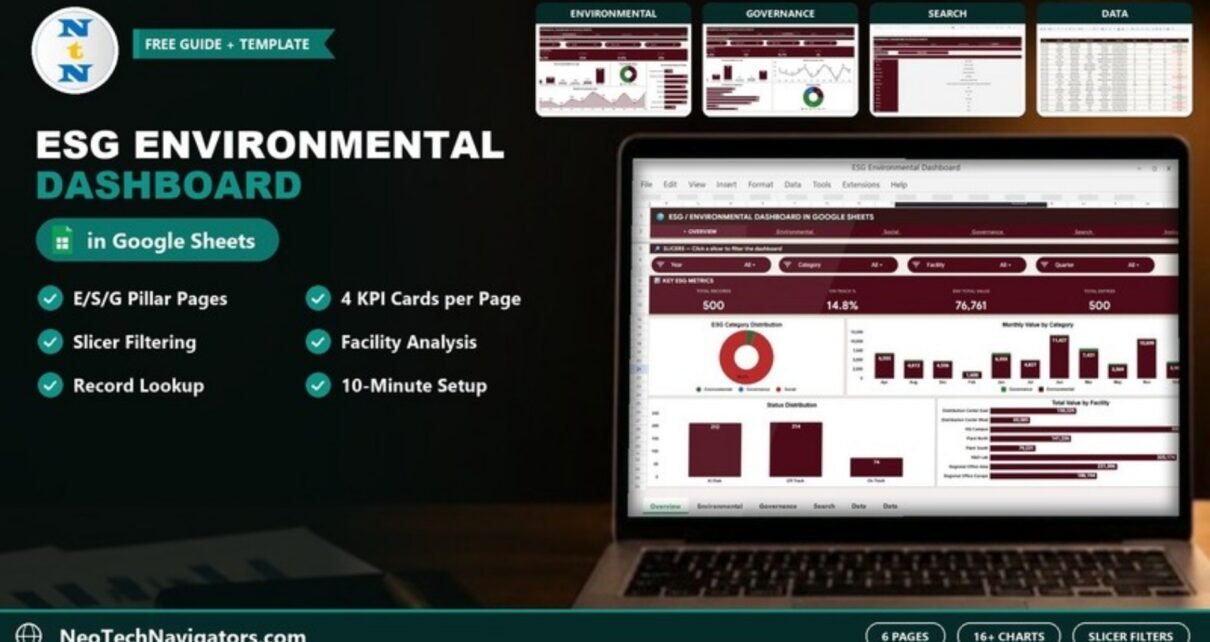
The ESG Environmental Dashboard in Google Sheets puts Environmental, Social and Governance metrics into one shareable file. It has six main pages: an Overview, one page each for the E, S and G pillars, a record lookup Search sheet and a single Data sheet, plus an Instructions tab. Each analysis page shows four KPI cards and four charts that rebuild from the Data sheet, with four slicers for quick filtering.
It is aimed at sustainability managers, ESG reporting leads, facility managers and consultants who need monthly ESG visibility without paying for an enterprise ESG platform. Setup is simple: open the PDF guide, make your own Google Sheets copy from the link inside, and replace the sample rows with your own ESG records.
🎥 Watch the Video Tutorial
Get the ESG Environmental Dashboard
What Problem Does This ESG Dashboard Solve?
ESG reporting is shifting from a once-a-year PDF to regular, data-backed updates. Boards, investors, lenders and large customers increasingly ask for numbers on emissions, energy, water, people and governance, not just narrative. Smaller teams often keep these figures in separate spreadsheets per facility or department, which makes a quick monthly view hard to produce.
This template gives you one data sheet for every ESG record and builds the reporting layer on top: totals, On Track percentages, trends by month and quarter, and breakdowns by facility, department and metric type. It does not calculate emissions for you; it organises and visualises the values you already have.
Key Features of the ESG Environmental Dashboard in Google Sheets
- Six main pages: Overview, Environmental, Social, Governance, Search and Data, plus an Instructions tab.
- Four KPI cards and four charts on each of the Overview and pillar pages.
- Four slicers per page, for example Year, Category, Facility and Quarter on the Overview, to filter a page in a couple of clicks.
- Three status values in the sample data: On Track, Off Track and At Risk.
- Record lookup: pull up every field of a single ESG record by its Record ID.
- Native Google Sheets: no add-ons or scripts, works in any browser and on the Sheets mobile app, with real-time sharing.
Dashboard Pages Explained
1. Overview
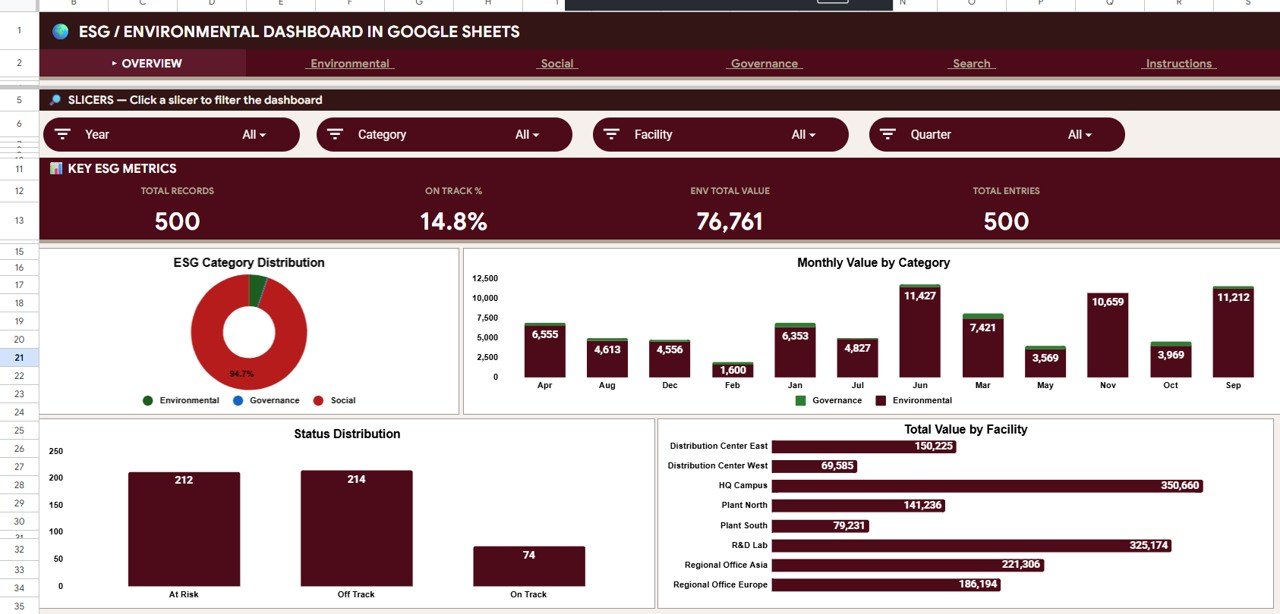
Slicers: Year, Category, Facility and Quarter. KPI cards for Total Records, On Track %, Env Total Value and Total Entries. Charts show ESG Category Distribution, Monthly Value by Category, Status Distribution (At Risk, Off Track, On Track) and Total Value by Facility, giving a cross-pillar summary for a monthly leadership update. In the sample data, 74 of the 500 records are On Track, which is the 14.8% shown on the On Track % card.
2. Environmental
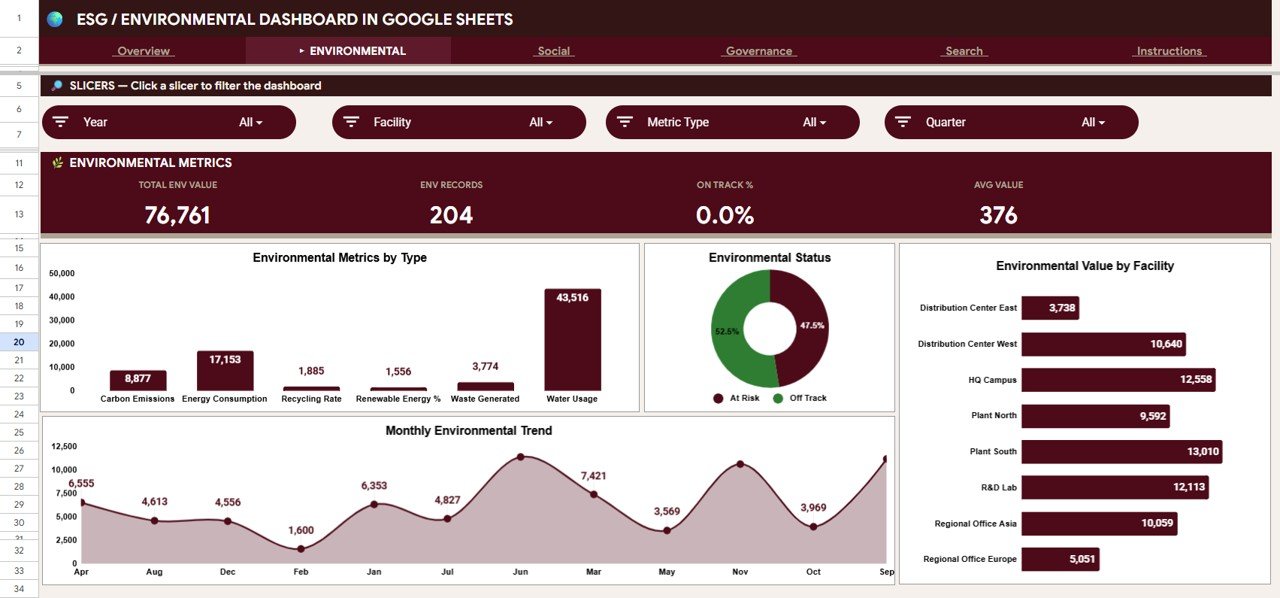
Slicers: Year, Facility, Metric Type and Quarter. Cards for Total Env Value, Env Records, On Track % and Avg Value. Charts cover Environmental Metrics by Type (Carbon Emissions, Energy Consumption, Recycling Rate, Renewable Energy %, Waste Generated and Water Usage in the sample data), Environmental Status, Environmental Value by Facility and the Monthly Environmental Trend, so you can see which sites lag on environmental targets.
3. Social
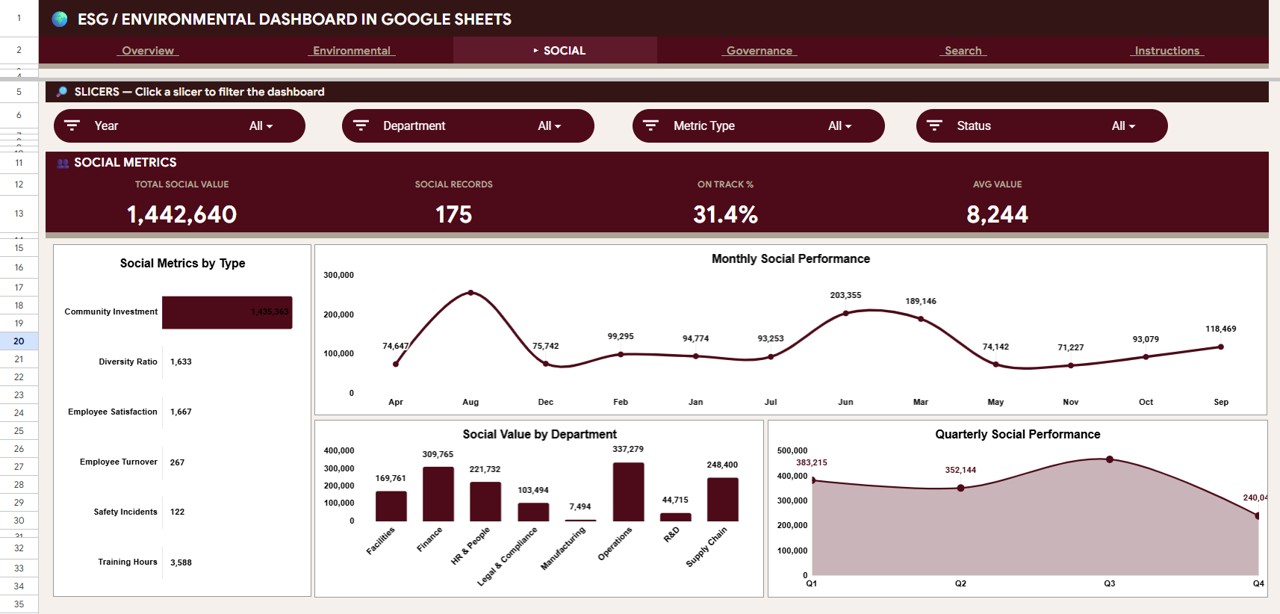
Slicers: Year, Department, Metric Type and Status. Cards for Total Social Value, Social Records, On Track % and Avg Value. Charts show Social Metrics by Type (Community Investment, Diversity Ratio, Employee Satisfaction, Employee Turnover, Safety Incidents and Training Hours in the sample data), Monthly Social Performance, Social Value by Department and Quarterly Social Performance.
4. Governance
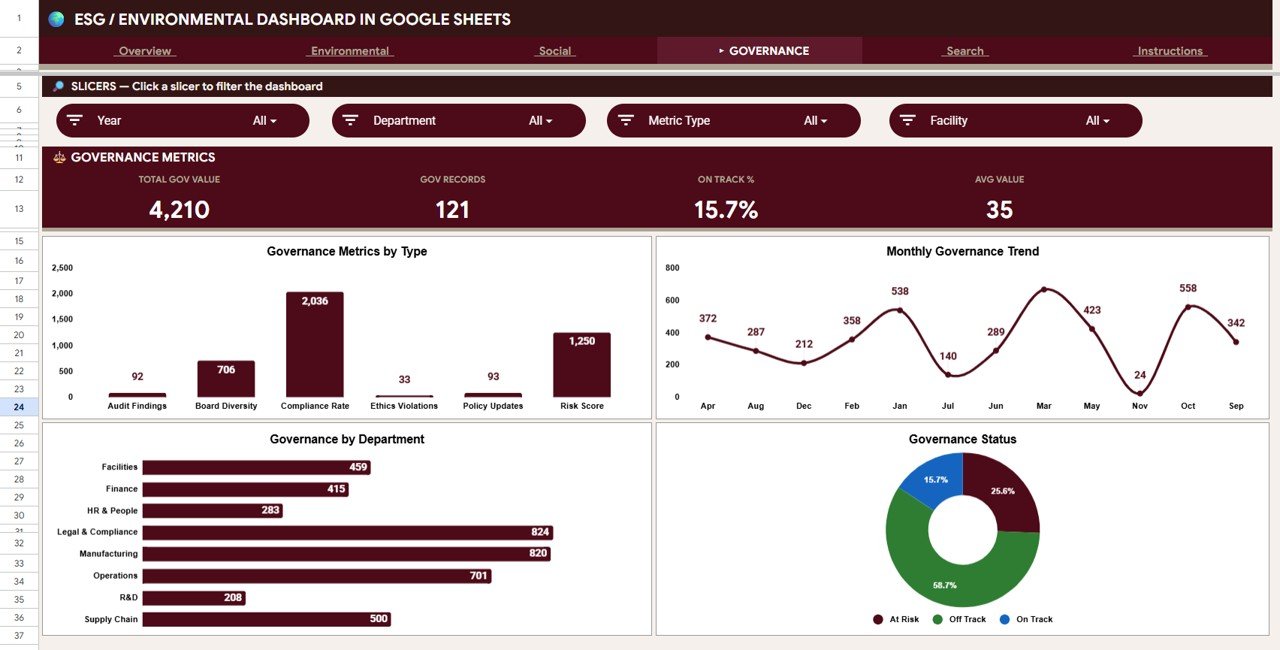
Slicers: Year, Department, Metric Type and Facility. Cards for Total Gov Value, Gov Records, On Track % and Avg Value. Charts show Governance Metrics by Type (Audit Findings, Board Diversity, Compliance Rate, Ethics Violations, Policy Updates and Risk Score in the sample data), the Monthly Governance Trend, Governance by Department and Governance Status, which suits compliance teams tracking audit, ethics and risk items.
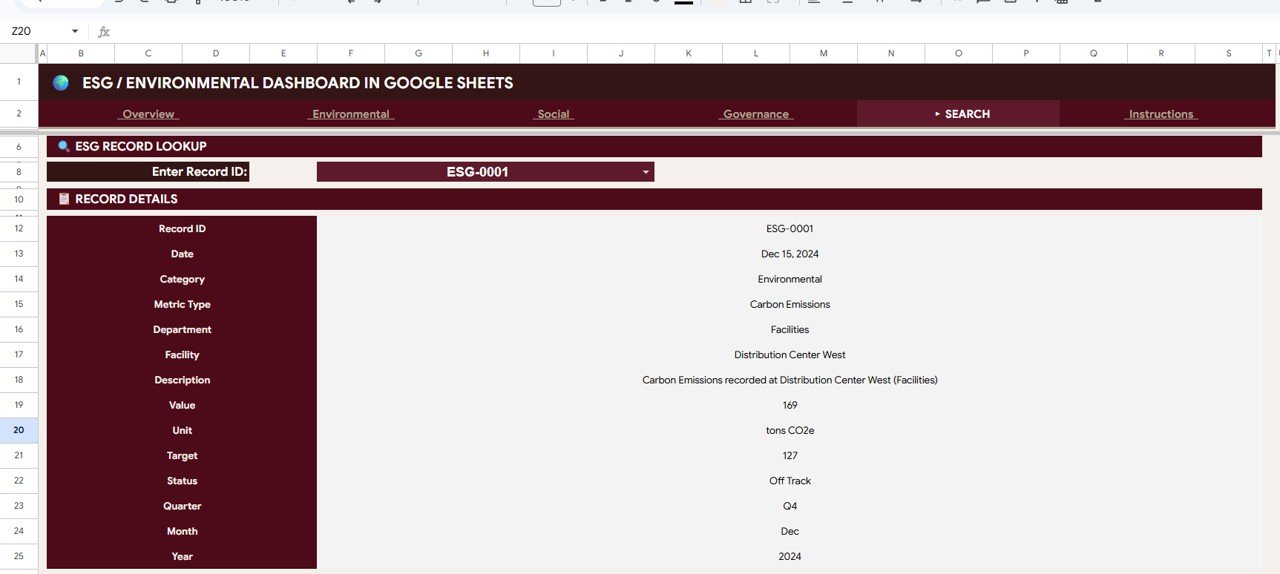
5. Search Sheet
Select a Record ID from the dropdown (for example ESG-0001) and the sheet returns the full record: Record ID, Date, Category, Metric Type, Department, Facility, Description, Value, Unit, Target, Status, Quarter, Month and Year. It is handy when an auditor or manager asks about one specific entry.
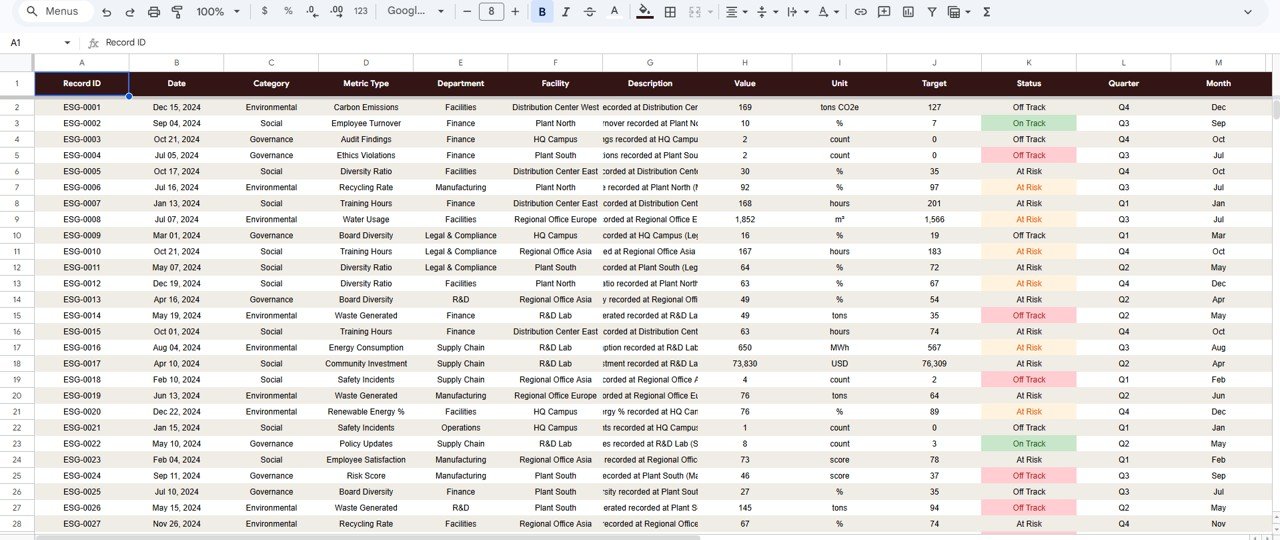
6. Data Sheet
The only input sheet, with the columns Record ID, Date, Category, Metric Type, Department, Facility, Description, Value, Unit, Target, Status, Quarter, Month and Year. Replace the sample rows with your own ESG records in the same column layout and every card, chart and slicer updates.
The KPIs on the Dashboard
| KPI | What it measures | How it is calculated | Better when |
|---|---|---|---|
| Total Records / Total Entries | How many ESG data points are being tracked | Count of rows in the Data sheet (after filters) | Complete coverage, not higher for its own sake |
| On Track % | Share of records with the status On Track | Records with status On Track ÷ total records × 100 (74 ÷ 500 = 14.8% in the sample) | Higher |
| Env / Social / Gov Total Value | Sum of recorded values for the pillar | Sum of Value for that category | Depends on the metric (e.g. lower for emissions, higher for training hours) |
| Env / Social / Gov Records | Number of data points per pillar | Count of records for that category | Complete coverage |
| Avg Value | Typical value per record in the pillar | Total value ÷ number of records (76,761 ÷ 204 ≈ 376 on the Environmental page) | Depends on the metric |
Because emissions, water and waste are “lower is better” while training hours or community investment are “higher is better”, read the totals by metric type rather than as a single score. The Status column and On Track % are the cleanest overall signal.
How to Use It with Your Own Data
- Open the PDF guide from the download and use its link to create your own editable copy in Google Drive.
- List the ESG metrics you report on, grouped as Environmental, Social or Governance, with a unit and target for each.
- On the Data sheet, replace the sample rows with your records: record ID, date, category, metric type, department, facility, description, value, unit, target, status (On Track, Off Track or At Risk), quarter, month and year.
- Keep units consistent per metric type (for example always tons CO2e for carbon emissions, always m³ for water usage).
- Open Overview and use the slicers to check totals by year, category, facility and quarter.
- Use the pillar pages for detail and the Search sheet to verify individual records before a report goes out.
- Share the file as Viewer with stakeholders and keep edit access for the people who maintain the data.
Google Sheets vs Excel vs ESG Software
| Feature | ESG Dashboard in Google Sheets | ESG Dashboard in Excel | Enterprise ESG software |
|---|---|---|---|
| Cost model | One-time template purchase | One-time template purchase | Annual subscription |
| Where it runs | Any browser, Sheets mobile app | Excel desktop | Vendor cloud |
| Collaboration | Real-time sharing by link | Through OneDrive or SharePoint | Per-seat access |
| Carbon accounting and data connectors | No, values entered manually | No, values entered manually | Usually yes |
| Audit-grade controls | Version history only | Version history only | Usually yes |
| Best for | Small and mid-sized teams wanting a monthly ESG view | Teams standardised on Excel | Regulated, large or listed companies |
Real-World Use Cases
- Manufacturer with several plants: the sustainability lead logs energy, water and waste figures for each site monthly, then uses Environmental Value by Facility to show leadership which plant is behind target.
- NGO reporting to donors: the programme team tracks community investment and training hours on the Social page and shares a view-only link with funders each quarter.
- ESG consultant: keeps one copy per client, fills the Data sheet from client submissions and uses the Search sheet to answer questions about individual data points.
Best Practices
- Update records on a fixed monthly date so trends stay comparable.
- Define each metric once (name, unit, target, owner) before you start entering data.
- Record the source of each value in the Description column so it can be traced later.
- Use the slicers live in review meetings instead of preparing static screenshots.
- Check On Track % alongside the raw totals; a rising total can be good or bad depending on the metric.
If you want to build or extend dashboards like this yourself, the Excel Pivot Tables and Dashboards course on NextGenTemplates Academy covers the summary tables, charts and slicers behind them.
Limitations: Who Should Not Use It
- It does not calculate GHG Protocol Scope 1, 2 or 3 emissions; enter pre-calculated values.
- There is no automatic import from utility bills, meters or IoT sensors; data entry is manual or by paste.
- Google Sheets version history is not an audit-grade control. Companies with CSRD, SEC or similar assured reporting obligations need a certified platform.
Related ESG and Sustainability Dashboards
Prefer a monthly target scorecard? See the ESG KPI Dashboard in Google Sheets and the Sustainability Reporting KPI Dashboard. For a deeper environmental focus, the Environmental KPI Dashboard, the Energy Consumption Analysis Dashboard and the Climate Action KPI Scorecard are good companions.
The same dashboard is also available as the ESG Environmental Dashboard in Excel and the ESG Environmental Dashboard in Power BI.
Frequently Asked Questions
What does the ESG Environmental Dashboard in Google Sheets track?
Environmental, Social and Governance records, each with a value, unit, target and status. Each pillar has its own page with four KPI cards and four charts, plus an Overview across all three.
How do I add my own ESG metrics?
Add rows to the Data sheet using the same columns. New metric types, departments and facilities are picked up by the charts and slicers.
Does it calculate carbon emissions?
No. It reports values you enter. Calculate Scope 1, 2 and 3 emissions with your preferred method or tool, then record the results in the Data sheet.
Can I share it with investors or a board?
Yes. Share the Google Sheet as view-only so they can use the slicers without changing the data, or export pages to PDF.
Does it work on mobile?
Yes, it opens in the Google Sheets app on Android and iOS, although the pages are easiest to read on a larger screen.
Is it suitable for regulated ESG disclosures?
It is a reporting and monitoring tool. For assured disclosures under CSRD, SEC or similar rules, use it for internal tracking and rely on a certified system for the audit trail.
Wrapping Up
The ESG Environmental Dashboard in Google Sheets gives a small sustainability team one place to log ESG data and a clear, filterable view of the three pillars. Start by defining your metrics and targets, load a few months of data, then use the Overview and pillar pages in your monthly review.
Get the ESG Environmental Dashboard
📅 Last updated: October 2026