The Podcast Analytics Dashboard in Google Sheets tracks 4 headline KPIs across 6 interactive sheets — covering downloads, listeners, revenue, and ratings across every episode, show, genre, platform, and country. Thirteen pre-built charts and multiple slicers deliver a complete view of podcast performance in under 10 minutes of setup. Whether you run a single show or manage a multi-show network, this $9.99 one-time Google Sheets template replaces the $20–$200/month SaaS tools most podcasters pay to get fragmented insights.
🌍 Join 8,400+ teams in 40+ countries using NextGenTemplates to replace paid SaaS subscriptions with one-time-purchase Excel, Google Sheets, Power BI, and HTML templates.
✅ Instant download · One-time payment · No subscription · No per-user fees · Lifetime access
Get the Podcast Analytics Dashboard in Google Sheets
Key Features of Podcast Analytics Dashboard in Google Sheets
The Podcast Analytics Dashboard in Google Sheets is built around 6 purpose-specific sheet tabs — Overview, Episodes Analysis, Audience Analysis, Revenue Analysis, Search, and Data — each designed to answer a different podcast business question without cluttering a single view.
This dashboard tracks 13 distinct analyses across 4 analytical pages, including Revenue per 1K Downloads (the metric sponsorship networks benchmark against), Avg Completion Rate by Show, Top Countries by Listeners, and Monthly Revenue by platform. The Episode Lookup tool in the Search sheet lets you select any Episode ID from a dropdown and instantly display all 14 fields — date, show name, title, genre, host, platform, downloads, listeners, duration, completion rate, rating, revenue, and country — without scrolling the raw dataset.
All 4 KPI cards and 13 charts update automatically when you paste new episode data into the Data sheet. The dashboard is shareable as a Google Drive link, making it the only $9.99 tool that consolidates episode-level, audience, and monetization data in one file you can send directly to sponsors or ad agencies for review.
Dashboard Sheets Explanation
Overview Page
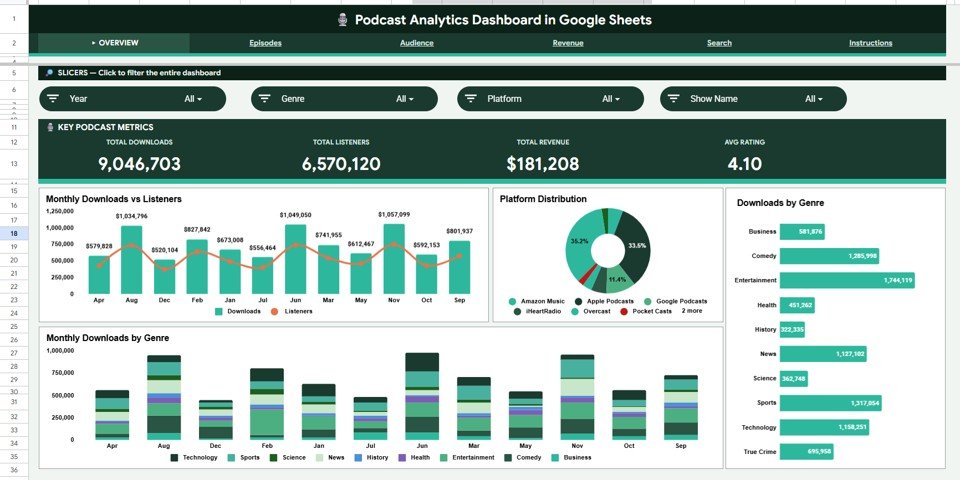
The Overview page is the landing sheet. Four KPI cards at the top display Total Downloads, Total Listeners, Total Revenue, and Avg Rating — the four numbers sponsors ask for first. Four charts below visualize Monthly Downloads vs Listeners (a side-by-side trend showing audience alignment), Platform Distribution (which platform drives the most reach), Downloads by Genre (which content category performs best), and Monthly Downloads by Genre (seasonal genre trends over time). Multiple slicers let you filter the entire page instantly by platform, genre, or month without editing a single formula.
Overview Page — 4 KPIs, 4 Charts, Multi-Slicer Filtering
Episodes Analysis Page
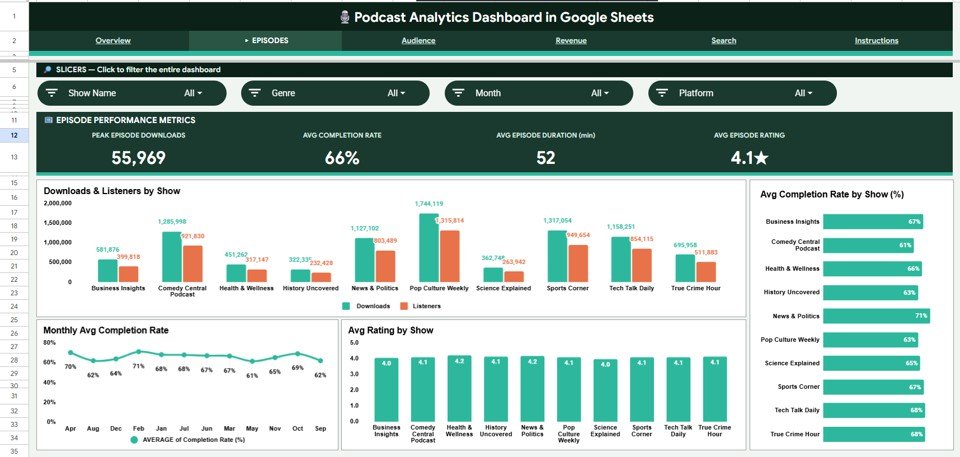
The Episodes Analysis page breaks down per-episode and per-show performance with 8 analysis views: Peak Episode Downloads, Avg Completion Rate, Avg Episode Duration (min), Avg Episode Rating, Downloads & Listeners by Show, Avg Completion Rate by Show (%), Monthly Avg Completion Rate, and Avg Rating by Show. Completion rate by show is the metric that reveals which hosts retain audiences — a key benchmark for improving episode structure and pitching advertisers.
Episodes Analysis Page
Audience Analysis Page
The Audience Analysis page focuses entirely on listener geography and growth with 6 views: Total Listeners, Avg Listeners/Episode, Top Countries by Listeners, Monthly Listener Growth, Platform Listener Share, and Downloads vs Listeners by Country. The Top Countries chart is particularly valuable for independent podcasters pitching geo-targeted sponsorships — knowing that 38% of your audience is in Germany, for example, unlocks entirely different advertiser conversations.

Audience Analysis Page
Revenue Analysis Page
The Revenue Analysis page provides 8 monetization views: Total Revenue, Peak Episode Revenue, Avg Revenue/Episode, Revenue per 1K Downloads, Monthly Revenue ($), Revenue by Platform, Revenue by Genre ($), and Revenue by Show ($). Revenue per 1K Downloads is the single most important metric for podcast sponsorship negotiations — ad networks use this number to compare your show against others when deciding rates.

Revenue Analysis Page
Search Sheet Tab
The Search sheet is an episode lookup tool. Select any Episode ID from the dropdown and all 14 episode fields display instantly: Episode ID, Date, Show Name, Episode Title, Genre, Host, Platform, Downloads, Listeners, Duration (min), Completion Rate (%), Rating (1–5), Revenue ($), and Country. No scrolling, no filtering — one dropdown to retrieve the full episode profile in seconds.

Search Sheet Tab
Data Sheet Tab
The Data sheet is where all episode records live. Add or paste rows in the same column structure — Episode ID, Date, Show Name, Title, Genre, Host, Platform, Downloads, Listeners, Duration, Completion Rate, Rating, Revenue, Country — and every analysis page across the entire dashboard refreshes automatically. No manual chart adjustments or formula edits required.

Data Sheet Tab
Podcast Analytics Dashboard in Google Sheets vs. Excel Dashboard vs. Chartable / Buzzsprout — Feature Comparison
| Feature | Podcast Analytics Dashboard (Google Sheets) | Excel Dashboard | Chartable / Buzzsprout |
|---|---|---|---|
| Cost | $9.99 one-time | $9.99–$17.99 one-time | $20–$200 / month |
| Platform | Google Sheets (browser) | Microsoft Excel (desktop) | Proprietary cloud SaaS |
| Setup time | Under 10 minutes | Under 10 minutes | 1–3 hours onboarding |
| Real-time collaboration | Built-in (share link) | Via OneDrive only | Limited (seat-based) |
| Mobile access | Google Sheets app | Excel mobile (limited) | Yes |
| Episode-level lookup tool | ✅ Dropdown search sheet | ✅ Search sheet | Limited |
| Revenue per 1K Downloads | ✅ Included | ✅ Included | ❌ Not available |
| Year-1 cost at 5 users | $9.99 total | $9.99–$17.99 total | $240–$2,400 |
| Data ownership | 100% in Google Drive | 100% local file | Vendor-hosted |
For podcasters and agencies that want multi-show, multi-platform analytics without paying $20–$200 per month in SaaS fees, the Podcast Analytics Dashboard in Google Sheets sits in the sweet spot.
Who Should Use This Template
Perfect for:
- Independent podcasters with 1–10 shows tracking downloads, listeners, and ratings across Spotify, Apple Podcasts, and YouTube
- Podcast agencies and production teams managing multiple shows and presenting performance data to clients or sponsors
- Content marketers using podcasts as a B2B channel who need Revenue per 1K Downloads and geographic audience data for sponsor decks
- Google Sheets users who want a shareable, browser-based dashboard from the Google Sheets Dashboards collection without installing Excel
Not a fit if:
- You need live API connections to Spotify or Apple Podcasts for automatic data pull
- You have no episode data yet — this template requires manual data entry from platform exports
- You need raw SQL or Tableau-level custom visualization flexibility
Real-World Use Cases
James runs a weekly business podcast with 12,000 listeners per episode. He uses the Revenue Analysis page to present Revenue per 1K Downloads to ad agencies — the exact sponsorship benchmark networks use — and closed a $5,000/month deal by sharing the Google Sheets dashboard link directly, without exporting any files or paying for a SaaS analytics tool.
Priya manages 4 shows for a podcast production agency in Bangalore. She uses the Episodes Analysis page to identify which show has the highest Avg Completion Rate and which hosts drive the most downloads, then builds monthly client reports from the Audience Analysis page — all from one Google Sheets file shared with clients as a view-only Drive link, replacing a $49/month SaaS subscription per client.
Carlos is a solo true crime podcaster tracking audience growth across Spotify and Apple Podcasts. The Audience Analysis page’s Top Countries by Listeners chart revealed that 38% of his audience was in the UK — which completely changed his approach to pitching UK-based advertisers and resulted in two new sponsorships within 60 days.
Advantages of Podcast Analytics Dashboard in Google Sheets
- 13 analyses in one file — episode-level, audience, and revenue analytics consolidated without switching between platform dashboards
- Revenue per 1K Downloads built-in — the sponsorship benchmark metric that most SaaS tools don’t even surface
- Real-time collaboration — share the Google Sheet as Viewer with sponsors, ad agencies, or co-hosts with a single Drive link
- $9.99 one-time vs $240–$2,400/year for Chartable or Buzzsprout — saves most podcasters $200+ in year one alone
- Episode ID lookup eliminates scrolling — pull any episode’s full 14-field record in seconds from the Search sheet
- Mobile-ready — review charts and KPI cards on the Google Sheets app during commutes or recording sessions
Opportunities for Improvement
- No automated API connection to Spotify, Apple Podcasts, or Amazon Music — episode data entry is manual (paste from platform CSV exports)
- Google Sheets slicers are functional but less fluid than Power BI or Excel slicers for advanced cross-filtering scenarios
- No built-in currency conversion — podcasters earning revenue in multiple currencies will need to normalize to a single currency before pasting data
- No listener demographic breakdown (age, gender) — those fields would require manual segmentation from survey data
Best Practices
- Update the Data sheet monthly with exports from each podcast platform to keep trends current and meaningful
- Use consistent Show Name and Platform spelling — variations break slicer filtering across all analysis pages
- Share the dashboard as Viewer with sponsors so they can browse analytics without editing your data
- Duplicate the file quarterly to archive historical snapshots before clearing old episode data
- Use the Search sheet when sponsors ask for stats on a specific episode — it’s faster than scrolling 500 rows of data
Explore Relevant Templates
Podcast Analytics Dashboard in Excel — same 6-page analytics in a Microsoft Excel workbook for teams on Office 365.
Podcast Analytics Dashboard in Power BI — DAX-powered podcast analytics with advanced drill-through for networks and agencies.
Content Creator Revenue Dashboard in Google Sheets — multi-platform revenue tracker for YouTubers, podcasters, and bloggers earning from ads, sponsorships, and courses.
Read the companion blog post: Podcast Performance KPI Dashboard in Google Sheets — KPI scorecard format for podcasters who prefer MTD/YTD target tracking.
For a comprehensive overview of all Google Sheets dashboard options, browse the full Google Sheets Dashboard Templates collection on NextGenTemplates.
Learn how Google Sheets handles collaborative data sharing via the Google Workspace sharing documentation.
If you want to learn how to build analytics dashboards like this one, the Excel Pivot Tables & Dashboards course on NextGenTemplates Academy covers it with downloadable practice files.
Get the Podcast Analytics Dashboard in Google Sheets
Frequently Asked Questions
What KPIs does the Podcast Analytics Dashboard in Google Sheets track?
The Podcast Analytics Dashboard in Google Sheets tracks 4 headline KPIs — Total Downloads, Total Listeners, Total Revenue, and Avg Rating — across 6 sheets and 13 analyses covering episodes, audience geography, platform distribution, genre performance, completion rates, and monetization breakdowns. All metrics update automatically when you update the Data sheet.
How long does setup take?
Setup takes under 10 minutes. Open the Google Sheets copy link from the PDF download guide, make your copy in Google Drive, paste episode data into the Data sheet, and every chart and KPI card across all 6 pages updates automatically without any formula edits or dashboard configuration.
Can I track multiple podcast shows in one dashboard?
Yes. The Data sheet includes a Show Name column. All analysis pages — including Downloads & Listeners by Show, Avg Completion Rate by Show, Avg Rating by Show, and Revenue by Show — break down metrics per show automatically. Use slicers to filter any single show in isolation across the entire dashboard.
How does this compare to Chartable or Buzzsprout Analytics?
Chartable and Buzzsprout charge $20–$200 per month and only track data within their own platform. The Podcast Analytics Dashboard in Google Sheets costs $9.99 one-time, works across any platform (Spotify, Apple, YouTube, Amazon Music), includes full revenue analytics including Revenue per 1K Downloads, and stores all your data 100% in Google Drive.
Does this dashboard work on mobile?
Yes. The Podcast Analytics Dashboard in Google Sheets opens in the Google Sheets mobile app on iOS and Android. Charts and KPI cards display correctly in read-only mode, while data entry works on both phone and tablet via the Google Sheets app — no desktop required for reviewing analytics.
Can I share this dashboard with sponsors or ad agencies?
Yes. Share the Google Sheets link as Viewer with any sponsor or agency. They can browse all analytics without editing your data. The dashboard surfaces the exact metrics sponsors benchmark: downloads, listeners by country, completion rates, and Revenue per 1K Downloads — all in one shareable link.
What podcast platforms can I track?
Any platform. The Platform column in the Data sheet accepts any text — Spotify, Apple Podcasts, YouTube, Amazon Music, Google Podcasts, Pocket Casts, iHeart, or custom entries. All charts and slicers update automatically when new platform values are added to the dataset.
About the Author
Built by PK — Microsoft Certified Professional with 15+ years of Excel, Google Sheets, and Power BI experience. Founder of NextGenTemplates, reaching 300K+ subscribers across YouTube channels (@PK-AnExcelExpert, @NextGenTemplates, @NeoTechNavigators). Every template is hand-built and tested before release.
Conclusion
The Podcast Analytics Dashboard in Google Sheets gives independent podcasters, agencies, and content marketers a single dashboard to track downloads, listeners, revenue, and ratings across every show, episode, platform, and country — for a one-time $9.99 payment instead of $20–$200 per month in SaaS fees.
Instant download · One-time payment · No subscription