According to industry research, event teams that use structured analytics dashboards reduce post-event reporting time by up to 70% and increase revenue yield per venue by an average of 18% year-over-year. Yet most event planners still rely on scattered spreadsheets and manual pivot tables that take hours to produce. The Event Management Analysis Dashboard in Google Sheets solves this with 6 purpose-built analytical pages, 4 KPI cards, 14 interactive charts, and slicer-based filtering — all in a single Google Sheets file accessible from any browser. Trusted by 8,400+ teams across corporate, hospitality, nonprofit, and university event sectors.
Whether you manage 10 events a year or 200, this dashboard gives you the revenue, venue, ticket, and client-type analytics you need to make faster decisions — without a SaaS subscription, API integration, or desktop software requirement.
Get the Event Management Analysis Dashboard in Google Sheets
Key Features of the Event Management Analysis Dashboard in Google Sheets
The Event Management Analysis Dashboard in Google Sheets delivers 4 headline KPIs (Total Revenue, Total Events, Total Profit, Tickets Sold) and 14 charts grouped across 4 analytical themes. Every chart is powered by Google Apps Script with dynamic SORT(UNIQUE()) formulas — meaning no hardcoded dropdowns and no manual updates when you add new events, venues, or cities to the Data Sheet.
Key capabilities include interactive slicers that filter entire dashboard pages in one click, a Venue Revenue Ranking that surfaces your highest-earning locations, a Tickets Sold vs Capacity analysis to identify fill-rate gaps, and an Event ID Search Sheet that retrieves any event’s full record from a single dropdown — no row scrolling required.
Per Google’s documentation on Sheets slicers, slicer-based filtering in Google Sheets is one of the most efficient ways to segment pivot-driven charts without modifying underlying data ranges — exactly how this dashboard is built.
Dashboard Pages Explanation
The Event Management Analysis Dashboard in Google Sheets is organized into 6 pages, each serving a distinct analytical purpose:Event Management Analysis Dashboard in Google Sheets
1 — Overview Page
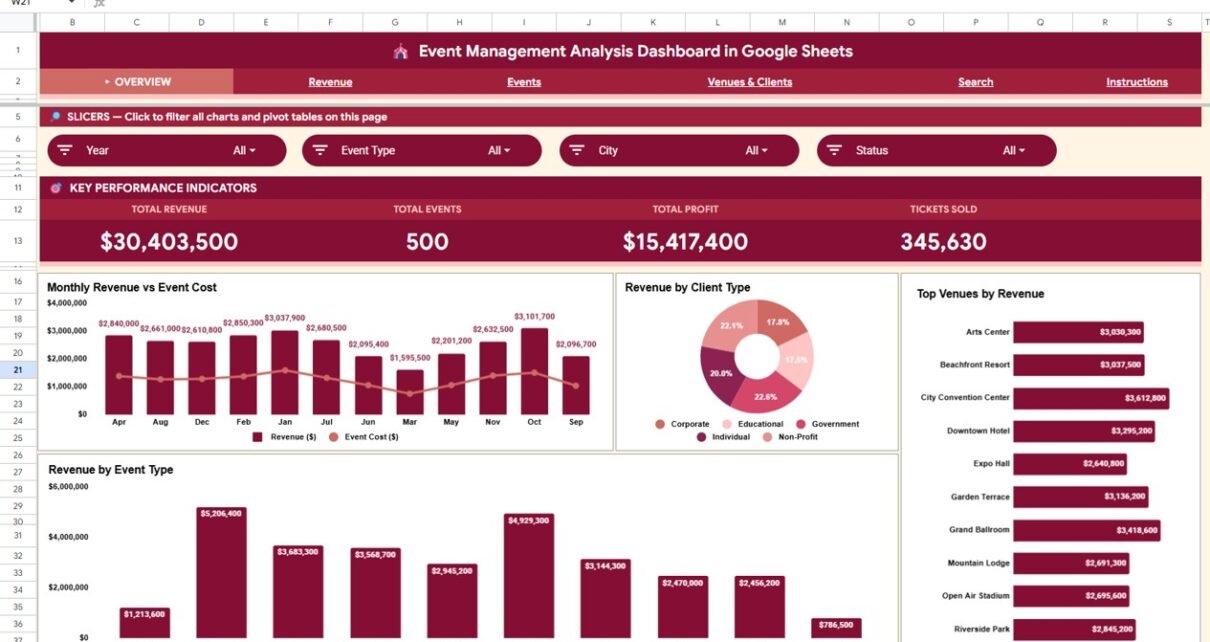
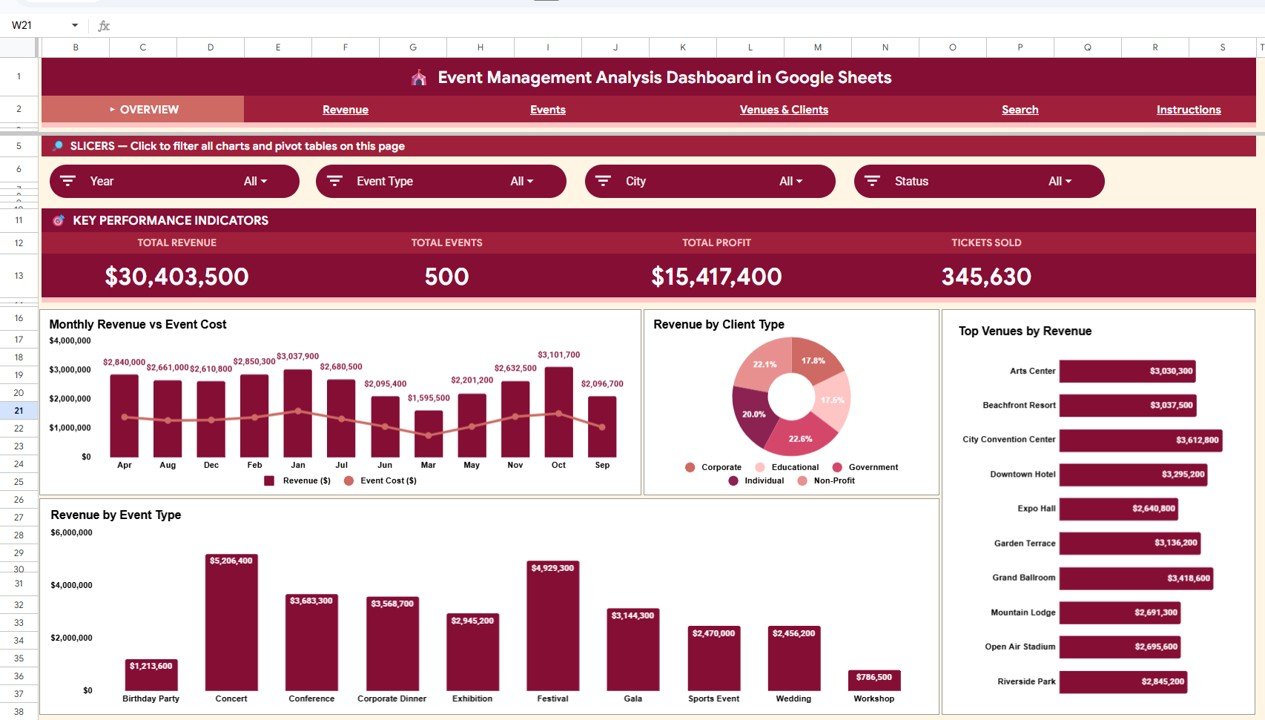
The top-level summary page displays 4 KPI cards: Total Revenue, Total Events, Total Profit, and Tickets Sold. Four charts provide an executive view: Monthly Revenue vs Event Cost by Month tracks 12-month financial health side by side; Revenue by Client Type reveals which client segments (corporate, individual, nonprofit, etc.) generate the most income; Top Venues by Revenue ranks your best-earning locations at a glance; Revenue by Event Type shows how conferences, galas, workshops, and other event categories contribute to overall revenue. Multiple slicers let you apply cross-filters instantly.Event Management Analysis Dashboard in Google Sheets
Event Management Analysis Dashboard in Google Sheets
2 — Revenue Page
Four charts dedicated entirely to revenue analytics: Monthly Revenue & Cost Trend by Month for a 12-month side-by-side view; Revenue by Client Type for client segment analysis; Revenue by City to identify geographic revenue concentration; Revenue Breakdown by Event Type & Month as a matrix showing revenue contribution by category and period simultaneously.
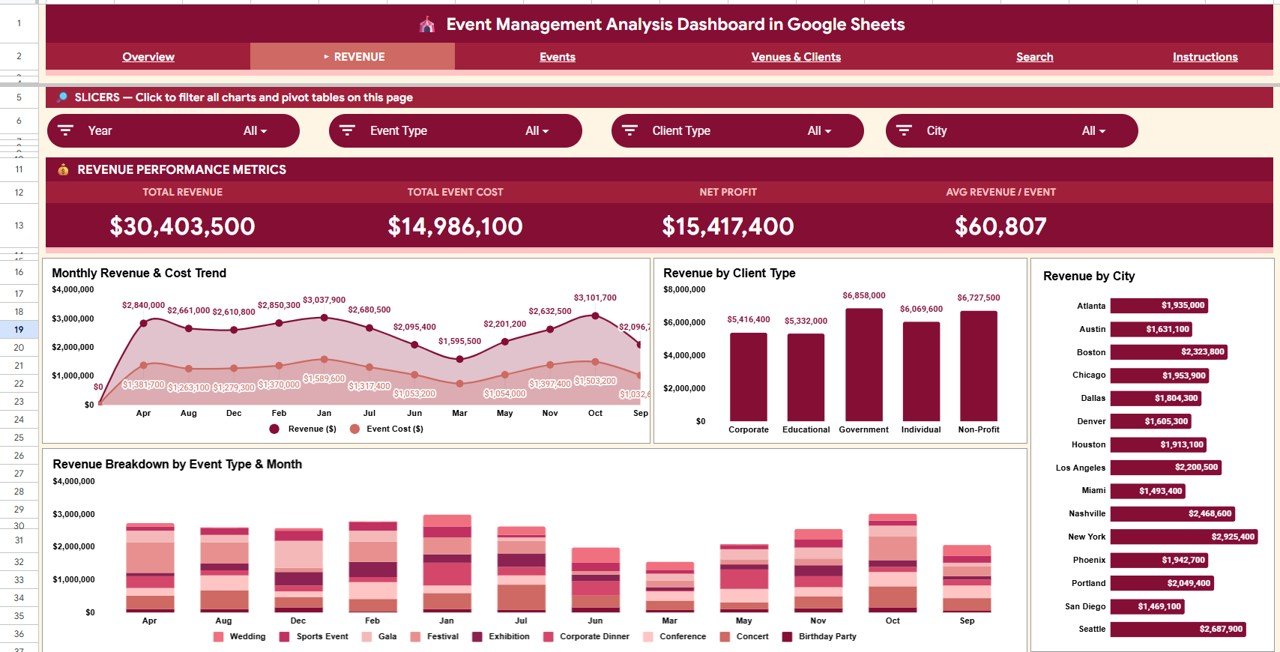
Revenue Analysis Tab
3 — Events Page
Four event-level charts: Events & Tickets by Event Type to compare volumes across categories; Event Status Distribution showing confirmed, cancelled, and pending event counts; Tickets Sold vs Capacity by Type to surface utilization rates and capacity gaps; Monthly Event Count & Tickets Sold for full-year activity trending.Event Management Analysis Dashboard in Google Sheets
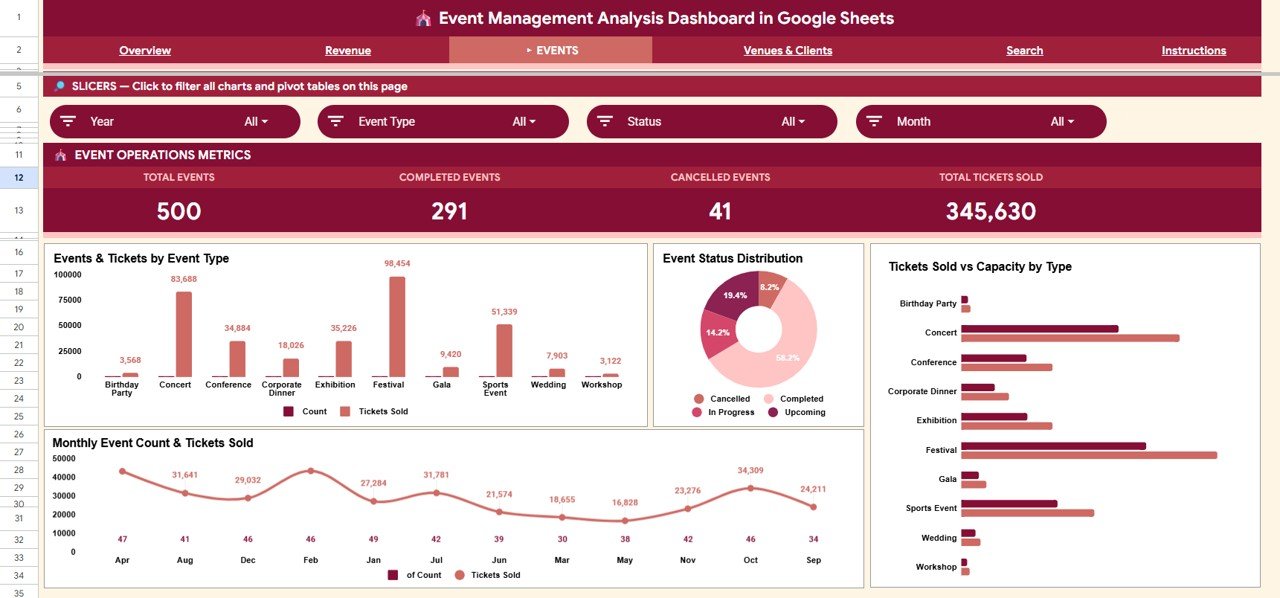
Events Analysis Tab
4 — Venues & Clients Page
Four charts focusing on venue and client performance: Venue Revenue Ranking for top location identification; Revenue Share by Client Type for portfolio-level segmentation; Monthly Revenue by Client Type for segment trend tracking; Revenue by City & Client Type for granular geographic + segment cross-analysis.
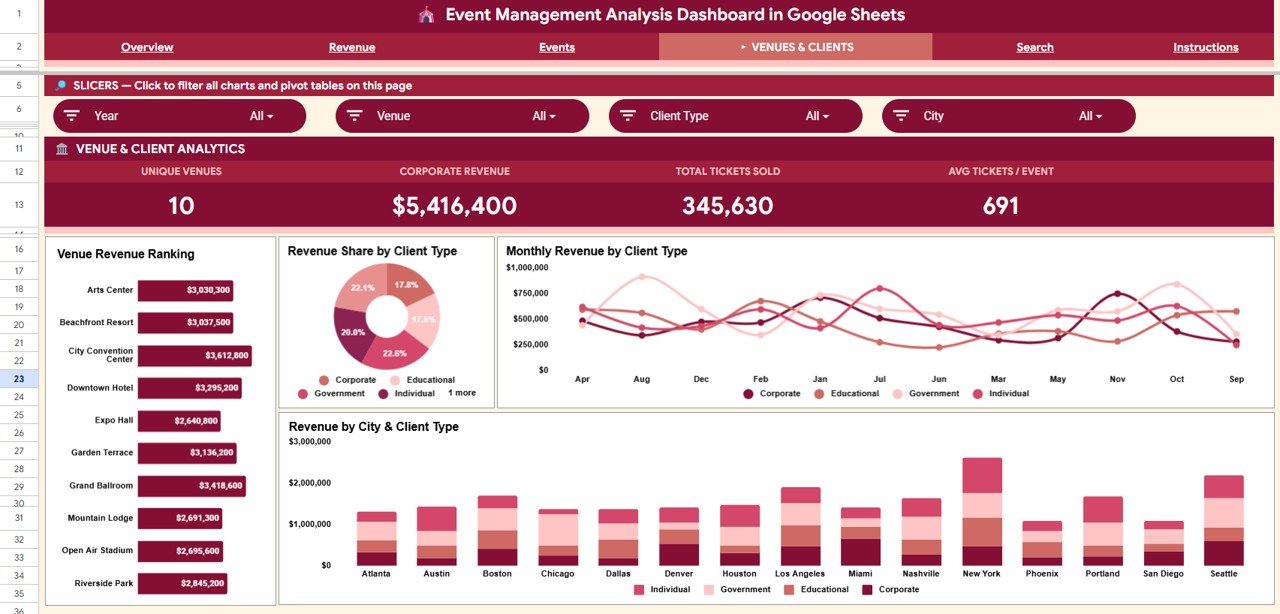
Venues & Clients Tab
5 — Search Sheet
Select any Event ID from the dropdown to immediately surface that record’s complete profile: Date, Event Type, Event Name, Venue, City, Client Type, and Revenue. Ideal for budget reviews, client reporting, and controller audits without scrolling through hundreds of rows.
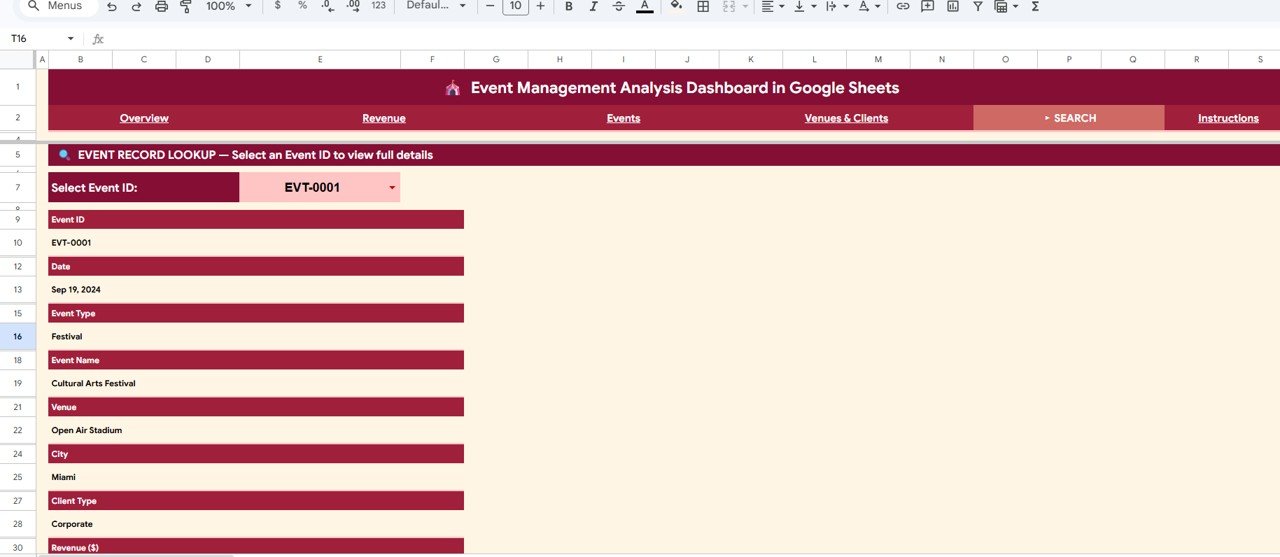
Search Sheet tab
6 — Data Sheet
The structured data entry tab. Enter your event records following the column headers and all dashboard pages update automatically. Supports hundreds of records without performance degradation.Event Management Analysis Dashboard in Google Sheets
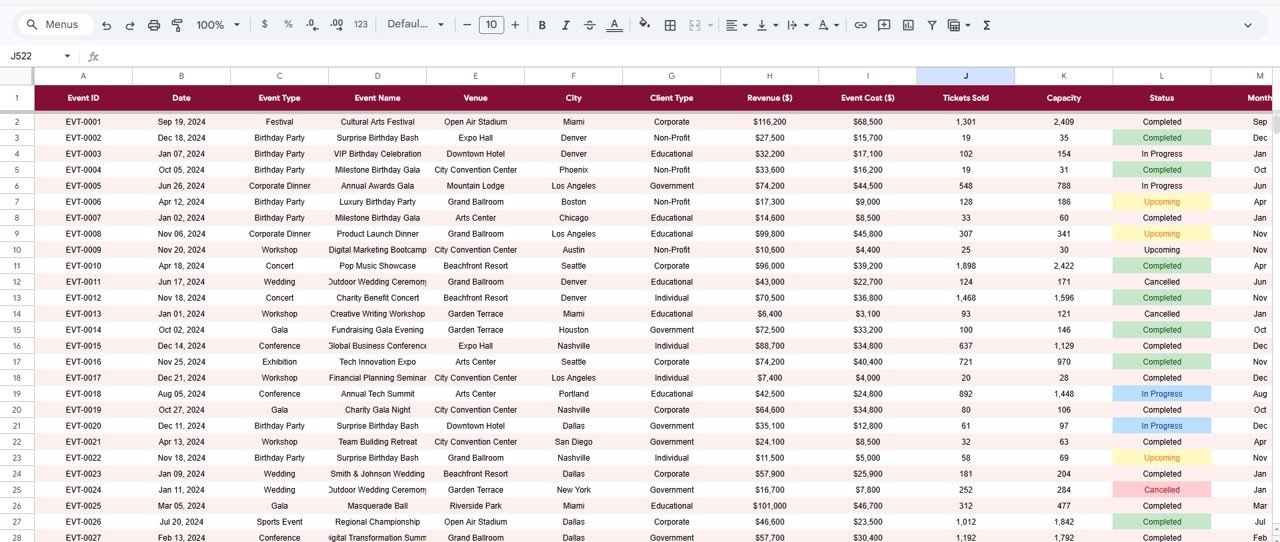
Data Sheet tab
Event Management Analysis Dashboard in Google Sheets vs. Microsoft Excel vs. Eventbrite — Feature Comparison
| Feature | Event Management Analysis Dashboard in Google Sheets | Excel Event Dashboard | Eventbrite / Event SaaS |
|---|---|---|---|
| Cost | $9.99 one-time | $9.99–$17.99 one-time | $9–$29/user/month |
| Platform | Google Sheets (browser) | Desktop Excel required | Web app |
| Setup Time | Under 10 minutes | Under 15 minutes | Hours of configuration |
| Real-time Collaboration | ✅ Built-in Google sharing | Limited (SharePoint only) | ✅ Yes |
| Offline Access | ✅ Google Drive offline mode | ✅ Full desktop offline | ❌ Cloud only |
| Revenue & Profit Tracking | ✅ 4 KPIs + 14 charts | ✅ Similar capability | ❌ Ticket sales only |
| Venue Analytics | ✅ Ranking + city breakdown | Requires manual setup | ❌ Not included |
| Capacity Utilization Tracking | ✅ Tickets vs Capacity chart | Requires custom formula | ❌ Not available |
| Year-1 Cost (5 users) | $9.99 total | $9.99–$17.99 total | $540–$1,740/year |
For event teams that need deep revenue and venue analytics without a monthly SaaS subscription, the Event Management Analysis Dashboard in Google Sheets sits in the sweet spot.
Who Should Use This Template
Perfect for:
- Event planners and coordinators managing 10–200+ events annually across multiple venues and cities
- Marketing managers tracking event ROI, revenue by client type, and campaign profitability
- Corporate event teams presenting revenue, profit, and ticket performance to leadership each quarter
- Hospitality and venue businesses comparing location revenue, client mix, and fill rates
- Freelance event consultants delivering professional data-backed post-event reports to clients
Not a fit if:
- You need real-time online ticketing, attendee registration, or payment processing (Eventbrite is better suited)
- Your team requires CRM API integration, SOC 2 compliance, or enterprise-level access controls
- You’ve never used Google Sheets and prefer a guided onboarding experience
Real-World Use Cases
Maria manages marketing for a regional hospitality group running 60+ corporate events annually across 8 venues in 4 cities. Each month she opens the Event Management Analysis Dashboard in Google Sheets, applies the city slicer, and generates a revenue-by-venue report for her VP — a task that previously took half a workday now takes under 5 minutes. She also uses the Venue Revenue Ranking to negotiate better rates with underperforming venues at the start of each quarter.
James is an independent event consultant who uses the dashboard to deliver data-backed post-event reports to clients, showcasing revenue vs cost trends, top ticket categories, and client-type revenue breakdown. The Comparison Table in his presentations — built from this dashboard’s charts — has helped him close 3 new retainer contracts this year without any additional software investment.
A mid-size university events department uses the Search Sheet to retrieve individual event records during controller budget reviews and the Tickets Sold vs Capacity analysis to identify two chronically underperforming event formats. They reallocated $12,000 in event spend to higher-yield categories for the next academic year — based entirely on dashboard data.
Advantages of the Event Management Analysis Dashboard in Google Sheets
The most practical advantage is accessibility. Because it runs in Google Sheets, every stakeholder with a Google account can view or edit it without installing software, purchasing a license, or maintaining a server. The slicer-based filtering is genuinely faster than pivot-table manual filtering — one click changes the entire page view. The 6-page structure means different stakeholders (finance, marketing, operations) each have a dedicated view rather than one overwhelming tab. And the $9.99 one-time price delivers what most SaaS tools charge $300–$500 per year to provide.
Opportunities for Improvement
Like all template-based dashboards, this tool works best when event records are entered consistently. If team members use inconsistent naming (e.g., “Corporate” vs “corporate” vs “Corp” for client types), chart groupings may not aggregate correctly. It also does not include real-time data connections to ticketing platforms — data must be entered or imported manually. Teams managing more than 1,000 events per year may want to consider a database-backed solution for volume at that scale.
Best Practices
Standardize your data entry conventions before entering records: decide on a fixed list of Event Types, Client Types, and City names and stick to them. Run a monthly slicer review — filter by city or client type on the Revenue page to spot patterns early. Use the Event Status Distribution chart on the Events page each week to monitor cancellation rates in real time. And share a view-only version of the dashboard with clients or leadership by using Google Sheets’ link-sharing to avoid accidental edits.
Explore Relevant Templates
Looking for more event and business analytics dashboards in Google Sheets?
- Fundraising Campaign KPI Dashboard in Google Sheets — Track fundraising campaigns, donors, and KPIs with a dedicated dashboard
- Event Management Report in Excel — A desktop Excel-based event reporting tool for teams not using Google Sheets
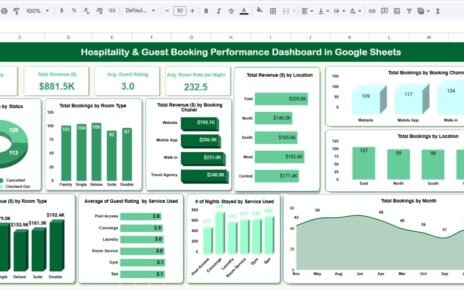
- Hospitality & Guest Booking Performance Dashboard in Google Sheets — Deep-dive venue and booking analytics for hospitality businesses
- Browse all Google Sheets Dashboards — 300+ dashboard templates across every department and industry
Want to build skills like this step by step? The Excel Pivot Tables & Dashboards course on NextGenTemplates Academy walks you through event and revenue reporting with practice files.
Get the Event Management Analysis Dashboard in Google Sheets
Frequently Asked Questions
What does the Event Management Analysis Dashboard in Google Sheets track?
The Event Management Analysis Dashboard in Google Sheets tracks 4 KPIs (Total Revenue, Total Events, Total Profit, Tickets Sold) and 14 charts covering revenue trends by month, client type, city, and event category, plus ticket utilization, venue rankings, and event status distribution. All metrics auto-update when you add records to the Data Sheet.
Do I need any add-ons or a paid Google account?
No. The dashboard runs entirely on native Google Sheets functionality and Google Apps Script. A free Google account is sufficient. No add-ons, extensions, or Google Workspace paid tier is required.
How do the slicers work in this dashboard?
Slicers are interactive filter controls placed at the top of each dashboard page. Clicking a value (e.g., selecting “Corporate” under Client Type) instantly filters every chart on that page to display only matching records — no formula editing needed.
How long does it take to set up this dashboard?
Under 10 minutes. After purchase, open the PDF guide, click the Google Sheets copy link, make your own copy in Google Drive, and enter your event data in the Data Sheet. All charts and KPIs populate automatically.
Can I add new event types, venues, or cities?
Yes. Add new rows to the Data Sheet using the same column structure. Dynamic formulas using SORT(UNIQUE()) pick up new values automatically so slicers and charts update without any manual intervention.
How does this compare to Eventbrite for analytics?
Eventbrite is optimized for ticketing, registration, and attendee management. The Event Management Analysis Dashboard in Google Sheets is built for financial and operational analytics — revenue vs cost trends, venue ROI, client-type segmentation, and profit tracking — for a $9.99 one-time cost with no monthly fees.
Is this template suitable for small and mid-size event businesses?
Yes. It works well for any business managing at least a handful of paid events per year. The Data Sheet supports hundreds of records. Teams of 1 to 20 users can collaborate simultaneously via Google Sheets’ native sharing and live editing features.
About the Author
Built by PK — Microsoft Certified Professional with 15+ years of Excel, Google Sheets, and Power BI experience. Founder of NextGenTemplates, reaching 300K+ subscribers across YouTube channels. Every template is hand-built and tested before release.
Conclusion
The Event Management Analysis Dashboard in Google Sheets gives event planners, marketing managers, and hospitality teams the revenue, venue, ticket, and client-type analytics they need — in a single Google Sheets file, for a one-time cost of $9.99. No monthly subscription, no per-user fees, no software installs.
✅ Instant download · One-time payment · No subscription · Lifetime access
📅 Last updated: May 2026