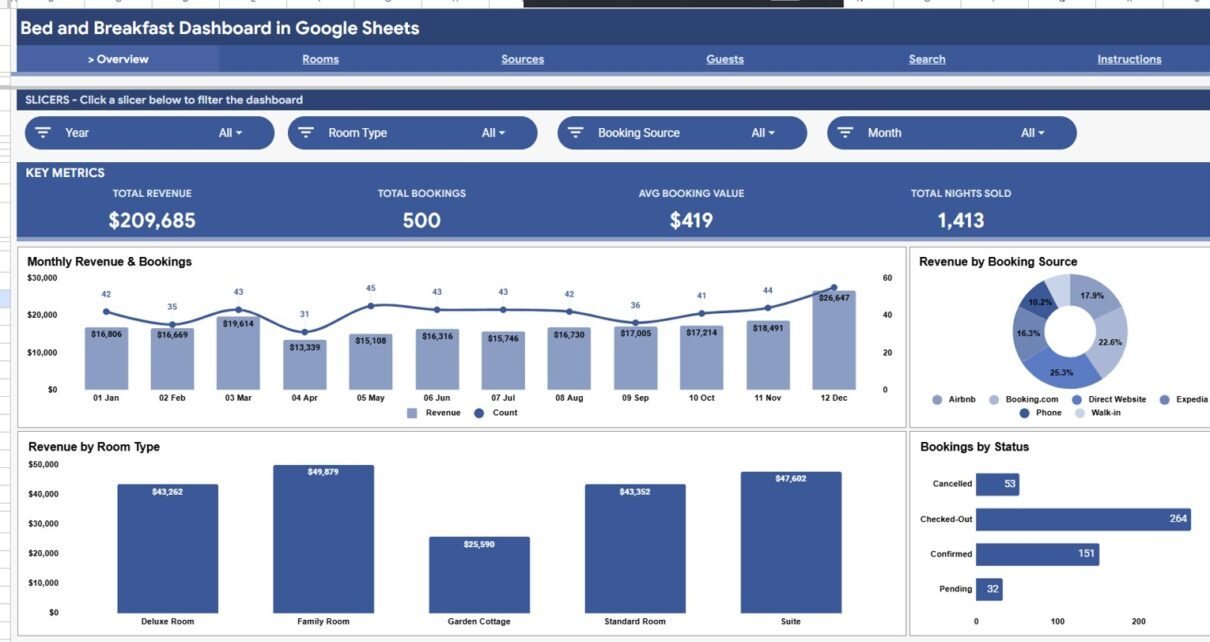
The Bed and Breakfast Dashboard in Google Sheets turns a single list of reservations into 4 KPI cards and 16 interactive charts across 4 analysis pages, plus a Booking ID search tab and a structured Data sheet. For a small B&B owner, that means the same revenue and booking insight a $30–$150/month property-management platform offers — for a one-time $9.99 and under 10 minutes of setup.
If you run a bed and breakfast, guesthouse or short-stay rental, you probably track bookings in a messy spreadsheet and guess at which rooms or channels actually make money. This Bed and Breakfast Dashboard in Google Sheets fixes that: paste your bookings into one Data sheet and every card, chart and slicer updates automatically, so you can see revenue by month, room type, booking source and guest type at a glance.
Get the Bed and Breakfast Dashboard in Google Sheets
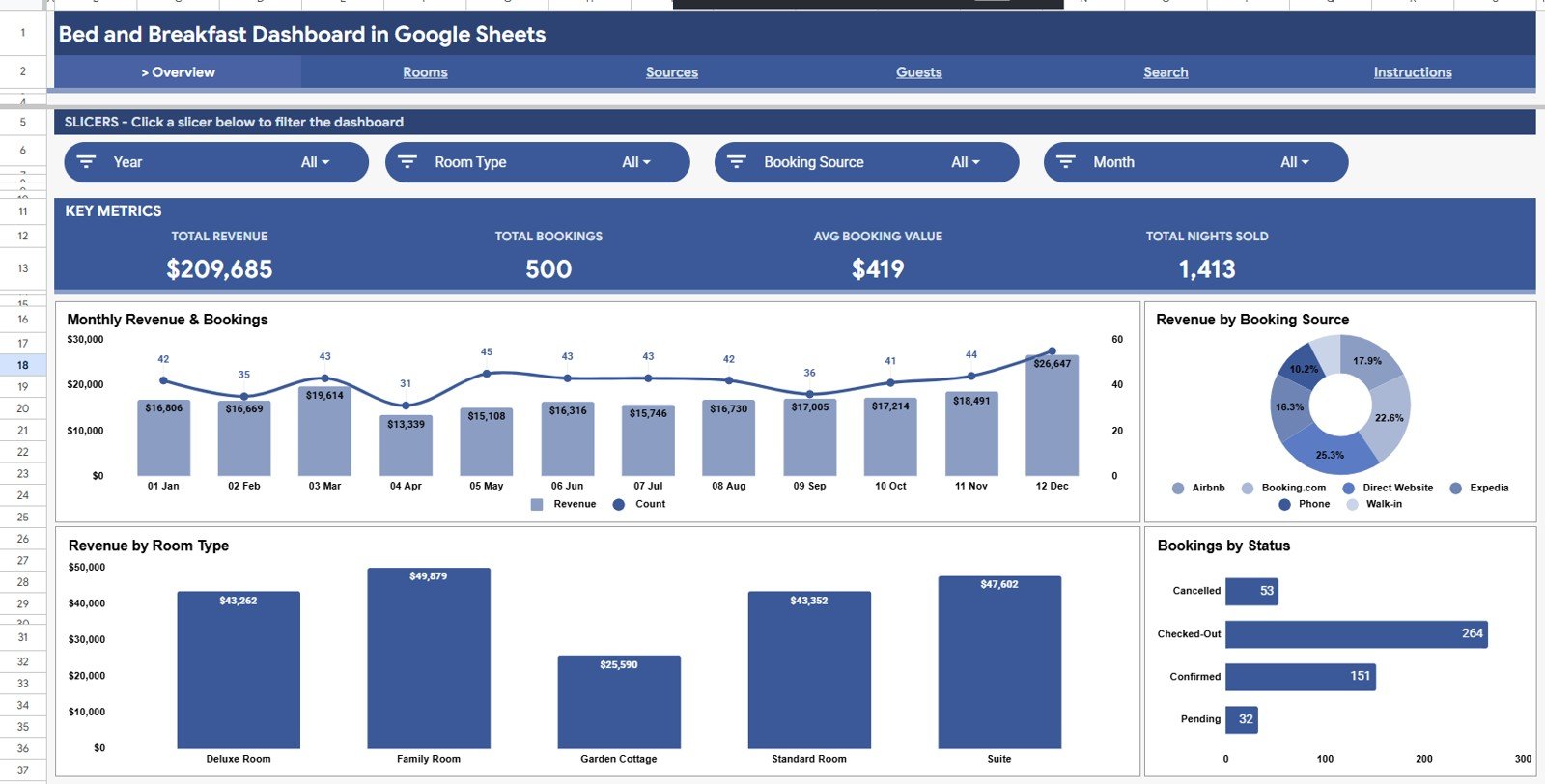
Key Features of the Bed and Breakfast Dashboard in Google Sheets
- 4 KPI cards — Total Revenue, Total Bookings, Average Booking Value and Total Nights Sold, all recalculated the moment you add a booking.
- 16 charts across 4 pages covering monthly trends, room types, booking sources and guest types.
- Slicer filtering by Month, Room Type, Booking Source, Guest Type and Status — the whole Overview page responds in one click.
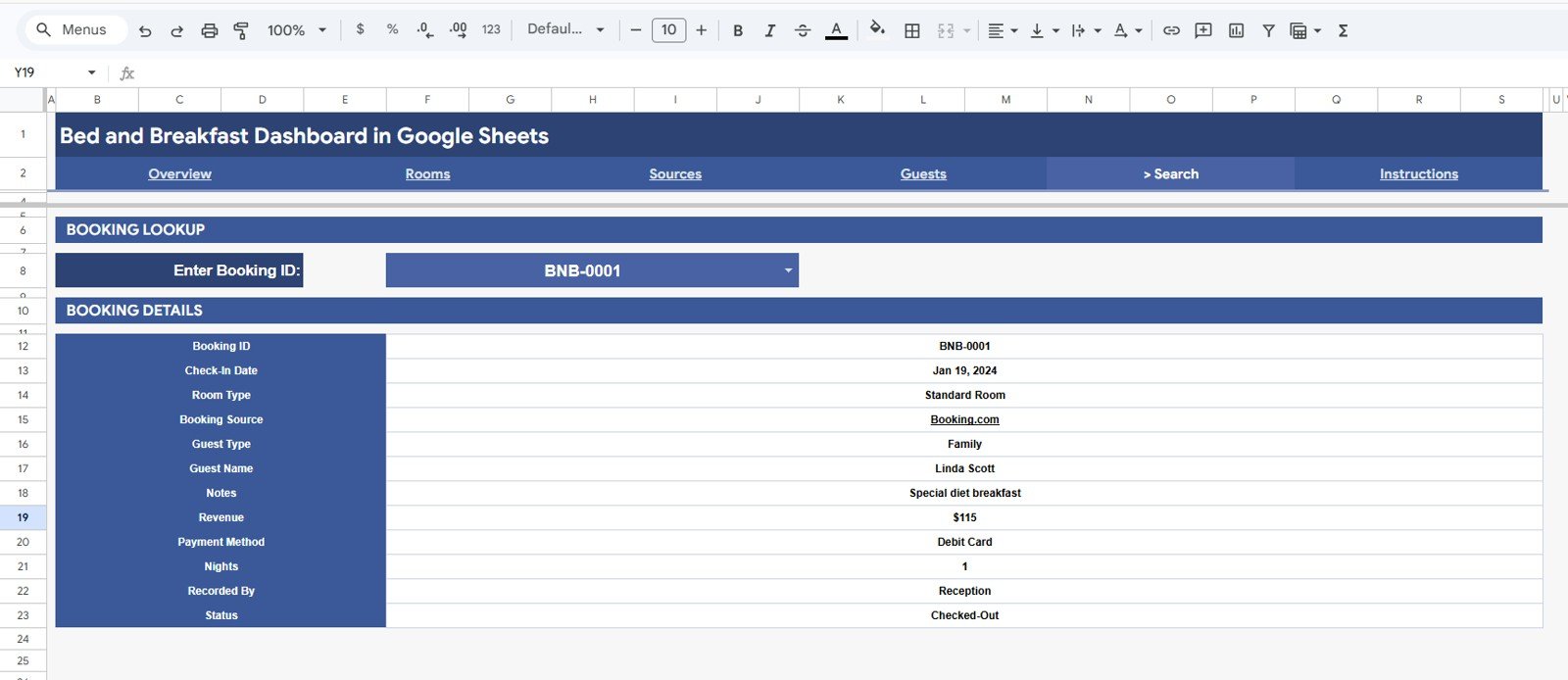
- Booking ID search that returns a full reservation record, including guest name, notes, payment method and nights.
- 100% native Google Sheets — no Apps Script, add-ons or macros to enable; it runs in any free Google account and shares with a link.
Dashboard Pages Explanation
The Bed and Breakfast Dashboard in Google Sheets is built across six tabs — four analysis pages, a Search tab and a Data sheet — so you can move from a high-level view to a single booking in seconds.
Page 1: Overview
The Overview page leads with the four KPI cards and four charts: Revenue and Bookings by Month, Revenue by Booking Source, Revenue by Room Type, and Bookings by Status. Slicers sit above the cards so you can filter the entire page instantly.
Page 2: Rooms Analysis
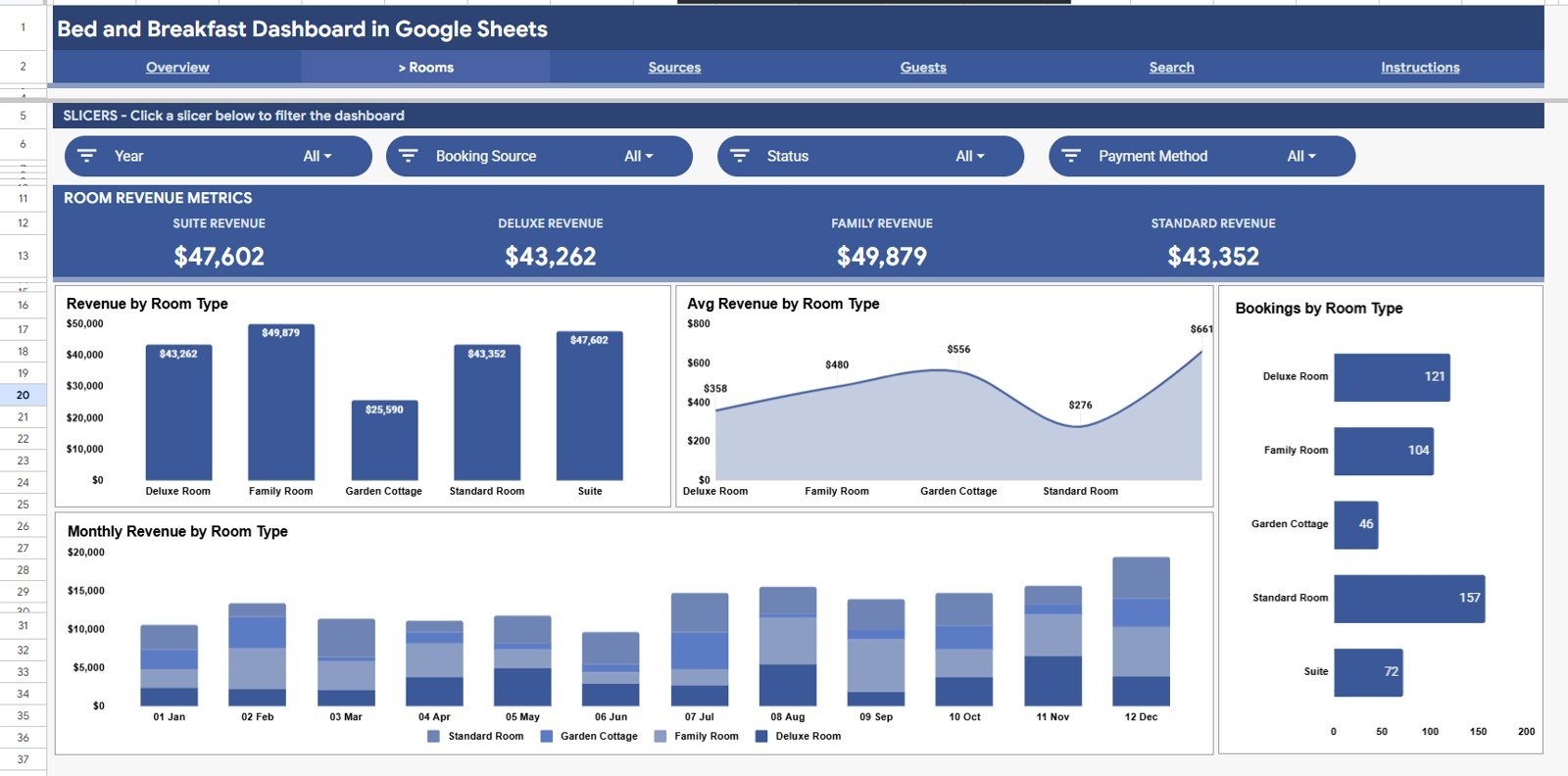
The Rooms Analysis page compares room categories with Revenue by Room Type, Avg Revenue by Room Type, Bookings by Room Type, and Monthly Revenue by Room Type — so you can see which rooms earn the most per stay and which fill most often.
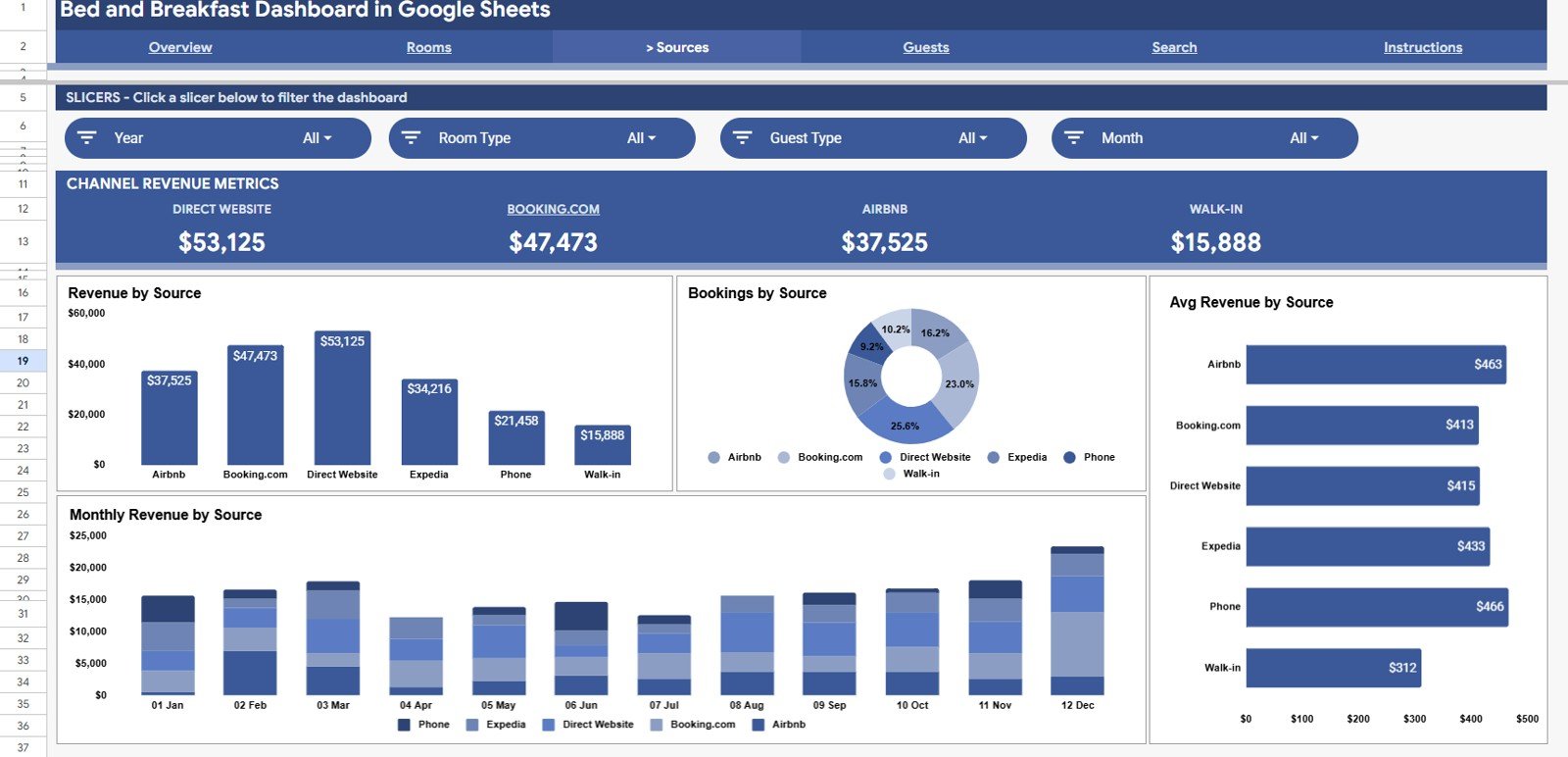
Page 3: Sources Analysis
The Sources Analysis page breaks performance down by channel with Revenue by Source, Bookings by Source, Avg Revenue by Source, and Monthly Revenue by Source — ideal for comparing direct bookings against OTAs like Airbnb and Booking.com.
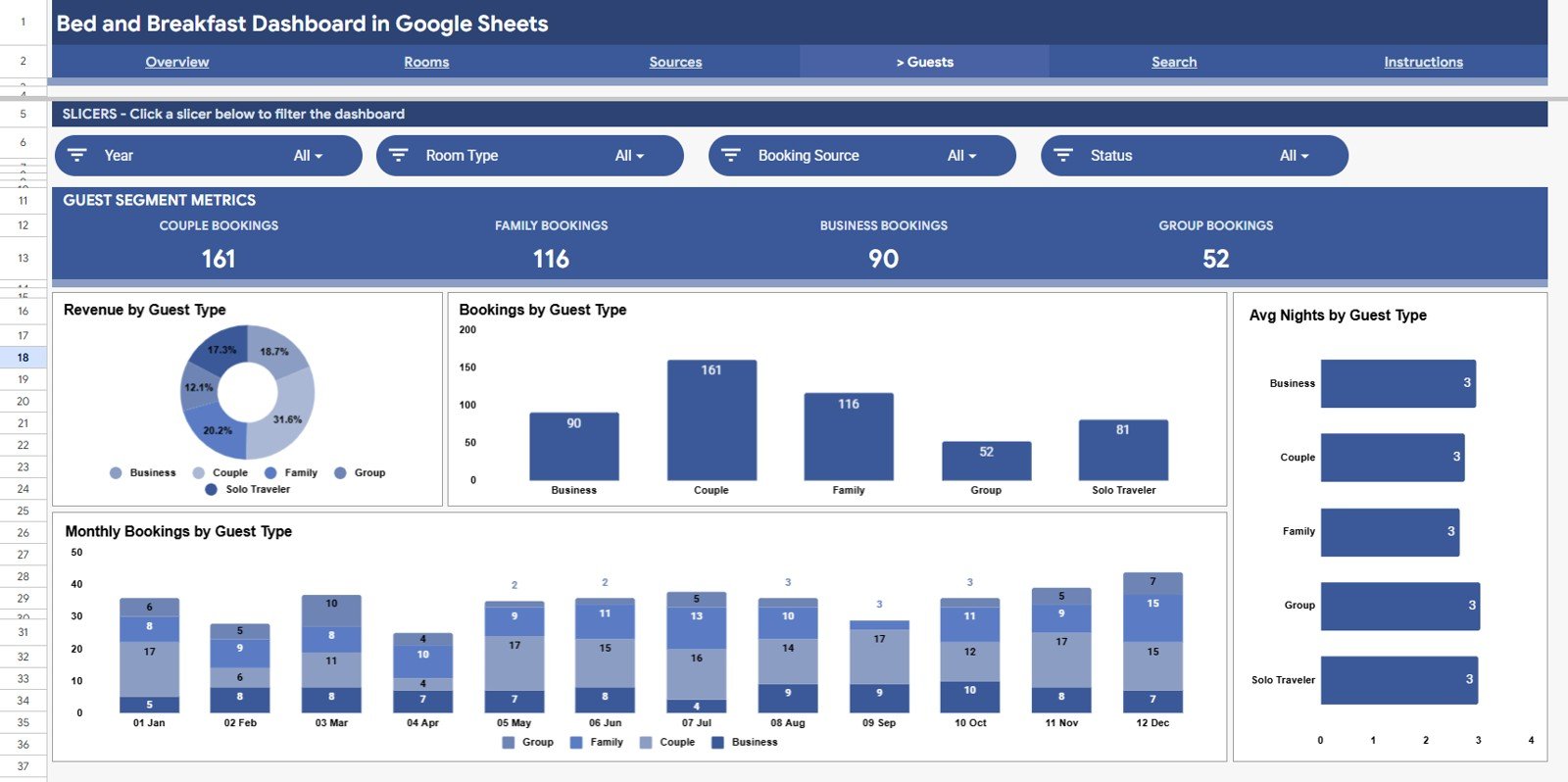
Page 4: Guests Analysis
The Guests Analysis page profiles your visitors with Revenue by Guest Type, Bookings by Guest Type, Avg Nights by Guest Type, and Monthly Bookings by Guest Type — useful for spotting repeat guests and your most profitable segments.
Search Sheet
Type any Booking ID into the Search tab and it returns the full record: Check-In Date, Room Type, Booking Source, Guest Type, Guest Name, Notes, Revenue, Payment Method, Nights, Recorded By and Status.
Data Sheet
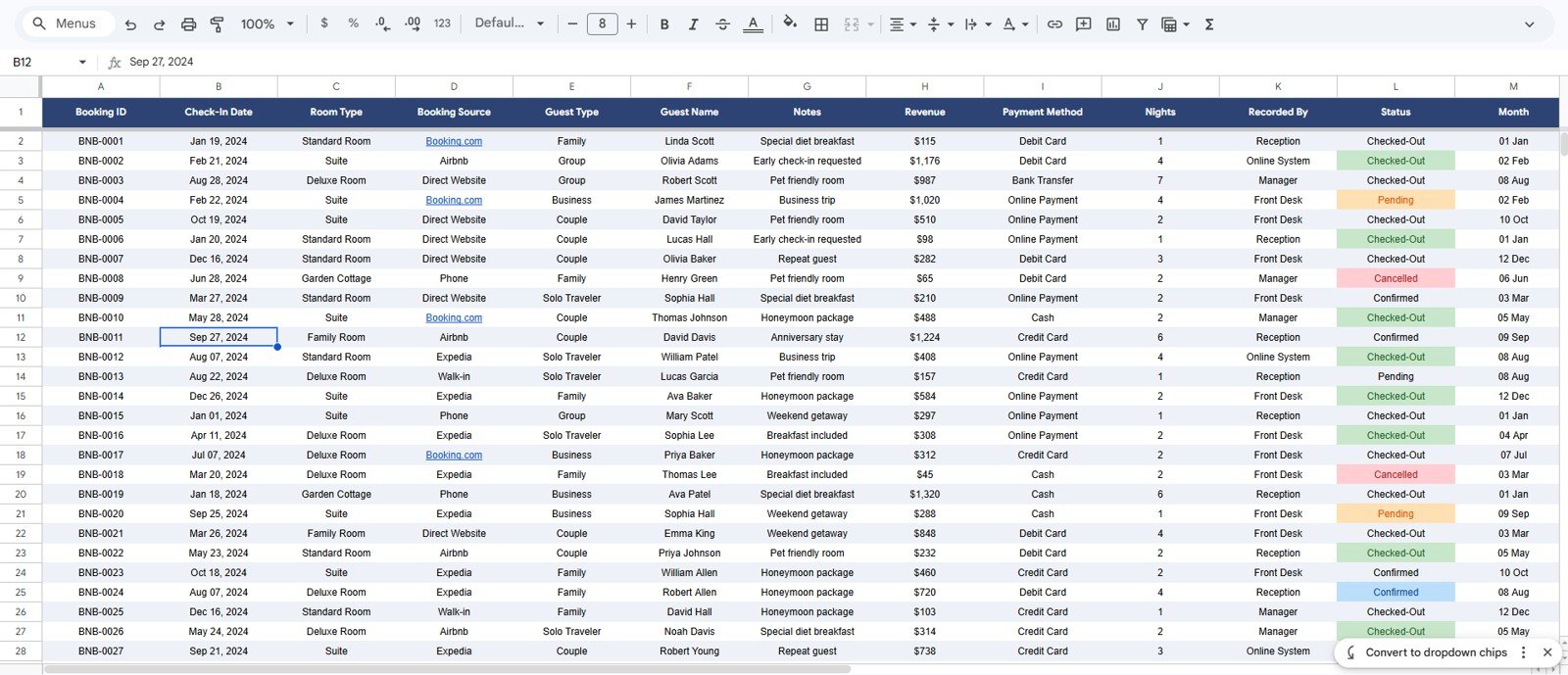
The Data sheet is the single source for the whole dashboard. Enter each booking in the existing column format and add new rows as reservations come in; the cards, charts and search all read from here. Google’s own guidance on charts in Google Sheets is handy if you ever want to tweak a visual.
Bed and Breakfast Dashboard: Google Sheets vs. Excel vs. Paid B&B Software — Feature Comparison
| Feature | Bed and Breakfast Dashboard (Google Sheets) | Microsoft Excel Dashboard | Cloudbeds / Lodgify / Little Hotelier |
|---|---|---|---|
| Cost | $9.99 one-time | $13.99–$17.99 one-time | $30–$150 / month |
| Platform | Google Sheets (browser, any device) | Excel desktop | Cloud PMS / web app |
| Setup time | Under 10 minutes | Under 10 minutes | Days (onboarding) |
| Real-time collaboration | Built in | Needs OneDrive | Yes |
| Mobile access | Google Sheets app | Limited | Yes |
| Share with link | One click | File send | Yes |
| Channel / OTA sync | Manual entry | Manual entry | Automated |
| Year-1 cost (small B&B) | $9.99 total | ~$17.99 total | $360–$1,800+ |
For owners who want clear booking and revenue analytics without paying a monthly PMS fee, the Bed and Breakfast Dashboard in Google Sheets sits in the sweet spot.
Who Should Use This Template
Perfect for:
- Bed and breakfast, guesthouse and small inn owners with up to ~15 rooms.
- Airbnb and short-stay hosts who want monthly revenue, room and channel analysis in one place.
- Hospitality owners who prefer a one-time Google Sheets tool over a recurring subscription.
Not a fit if:
- You run a large hotel that needs automated OTA/channel-manager sync and live availability.
- You need built-in online booking, payment processing or housekeeping scheduling.
Real-World Use Cases
Maria runs a 6-room seaside B&B. She pastes each week’s bookings into the Data sheet and watches Revenue and Bookings by Month to judge how the shoulder season is tracking — without paying $40 a month for a PMS dashboard she barely uses.
James hosts three Airbnb cottages. He uses the Sources Analysis page to compare direct bookings against OTA channels, then checks the Guests Analysis page to see how repeat guests book more nights than first-timers.
Priya manages a countryside guesthouse. Each morning she opens the Search tab, types a Booking ID, and reads the guest’s notes and payment method before they arrive for check-in.
Advantages of the Bed and Breakfast Dashboard in Google Sheets
- Cost — a one-time $9.99 versus hundreds to thousands of dollars a year for cloud PMS analytics.
- Speed — paste-and-go setup; no onboarding calls or data migration.
- Clarity — four focused analysis pages mean you answer “which rooms and channels make money?” in seconds.
- Portability — it lives in your own Google Drive and opens on phone, tablet or laptop.
Opportunities for Improvement
To be balanced: this is an analytics dashboard, not a full property-management system. It does not sync automatically with OTAs, take online payments, or manage live room availability — bookings are entered manually into the Data sheet. Very large properties with thousands of monthly reservations may prefer a dedicated PMS. For a small B&B or a handful of short-stay units, manual entry takes only a few minutes a week and keeps your data fully in your control.
Best Practices
- Keep the Data sheet columns intact — add rows, don’t rearrange headers, so charts keep reading correctly.
- Use consistent labels for Room Type, Source and Guest Type so slicers group cleanly.
- Enter bookings weekly rather than monthly to keep the monthly trend charts accurate.
- Duplicate the file each year to keep an annual archive while starting fresh figures.
Explore Relevant Templates
- Hotel Hospitality Revenue Dashboard in Google Sheets — a broader revenue view for larger properties.
- Airbnb Host Dashboard — built around short-stay hosting metrics.
- Hotel and Hospitality Revenue Dashboard in HTML — a self-contained web version.
- Rental Property Investment Dashboard — for owners tracking property returns.
- Hotel Booking Management System and the Restaurant Management System web apps for bigger operations.
Curious how dashboards like this are built? The Excel Pivot Tables & Dashboards course on NextGenTemplates Academy shows the approach with practice files.
Get the Bed and Breakfast Dashboard in Google Sheets
Frequently Asked Questions
What KPIs does the Bed and Breakfast Dashboard in Google Sheets track?
The Bed and Breakfast Dashboard in Google Sheets tracks 4 KPI cards — Total Revenue, Total Bookings, Average Booking Value and Total Nights Sold — plus 16 charts covering room type, booking source, guest type and monthly trends. Every metric updates when you add bookings.
Do I need add-ons or scripts to use it?
No. The Bed and Breakfast Dashboard in Google Sheets uses only native Google Sheets features. There are no macros or plug-ins to enable — copy the file to your Drive and start entering bookings.
How long does setup take?
Under 10 minutes. Copy the template, paste your reservations into the Data sheet in the existing format, and the cards, charts and slicers populate automatically.
How does it compare to paid B&B software like Cloudbeds or Lodgify?
Paid platforms cost $30–$150 per month and add channel sync and online booking. The Bed and Breakfast Dashboard in Google Sheets is a one-time $9.99 analytics tool for owners who want revenue and booking insight without a subscription.
Can I filter by room type or booking source?
Yes. Slicers let you filter the Overview by Month, Room Type, Booking Source, Guest Type and Status, and dedicated Rooms, Sources and Guests pages break each dimension down further.
Will it work for an Airbnb or short-stay host?
Yes. Short-stay hosts use the Sources Analysis page to compare channels and the Guests Analysis page to track repeat stays, so the Bed and Breakfast Dashboard in Google Sheets suits Airbnb-style rentals too.
About the Author
Built by PK — Microsoft Certified Professional with 15+ years of Excel, Google Sheets, and Power BI experience. Founder of NextGenTemplates, reaching 300K+ subscribers across YouTube channels. Every template is hand-built and tested before release.
Conclusion
If you want clear, fast analytics for your bed and breakfast without a monthly bill, this template earns its keep on day one. Start turning your booking list into decisions.
Instant download · One-time payment · No subscription.
Last updated: June 2026