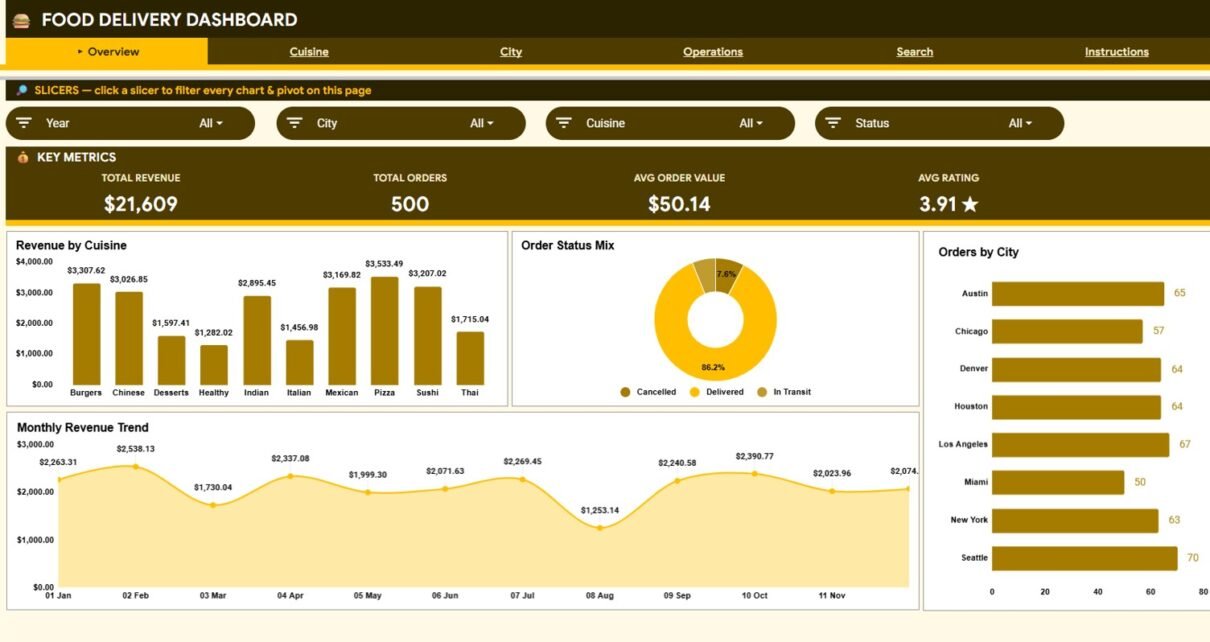
The Food Delivery Dashboard in Google Sheets tracks 4 headline KPIs across 6 connected sheets, with 17 pre-built charts and click-to-filter slicers. Setup takes under 10 minutes — paste your order data into one sheet and every card, chart, and lookup updates on its own.
Food delivery runs on thin margins and fast decisions. When orders, cuisines, cities, channels, and ratings live in scattered exports, you lose hours stitching them together. This Food Delivery Dashboard in Google Sheets pulls all of it into one shared file your whole team can open in a browser — no add-ons, no Apps Script, no monthly fee.
Get the Food Delivery Dashboard in Google Sheets
Key Features of the Food Delivery Dashboard in Google Sheets
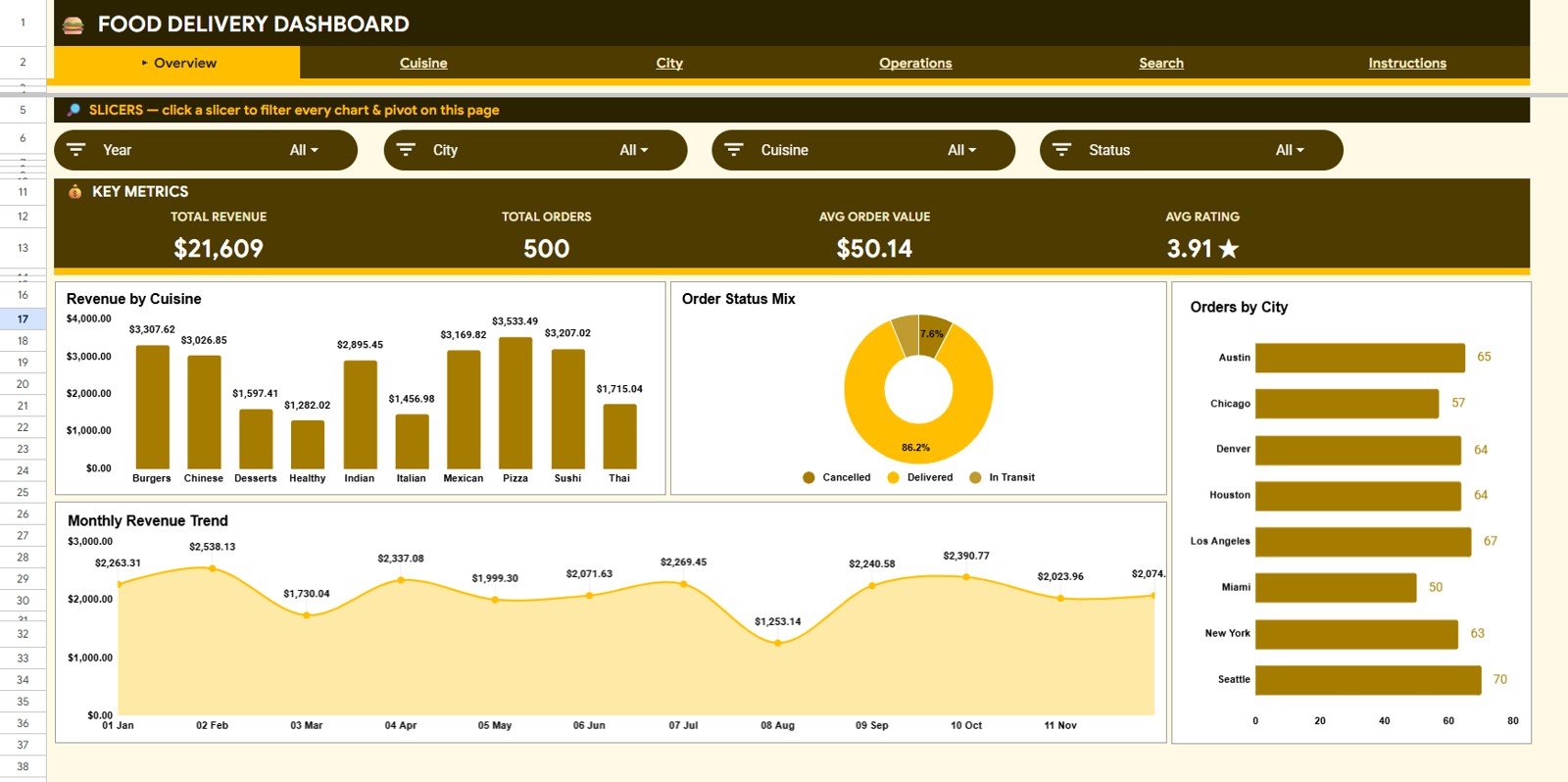
This dashboard tracks 4 headline KPIs — Total Revenue, Total Orders, Average Order Value, and Average Rating — and refreshes all of them the moment you paste new rows into the Data sheet. There are no formulas to rebuild and no charts to re-link.
It ships with 17 pre-built charts spread across four analysis pages, covering revenue, orders, delivery time, and ratings by cuisine, city, payment method, channel, and month. Every chart is already wired to the data range, so it expands automatically as your order history grows.
Each analysis page carries slicer filters. Click a cuisine, city, status, channel, or payment method and the whole page recalculates to show only the matching orders — the kind of drill-down you would expect from a paid BI tool, running entirely inside Google Sheets.
Dashboard Pages Explanation
The Food Delivery Dashboard in Google Sheets is built as six connected sheets: an overview, three analysis pages, a single-order search, and the data entry sheet.
Overview Page
The Overview page opens with four KPI cards — Total Revenue, Total Orders, Average Order Value, and Average Rating. Below the cards, charts show Revenue by Cuisine, Orders by Status, Orders by City, and Revenue by Month, while slicers at the top filter the entire page in a single click.
Cuisine Analysis
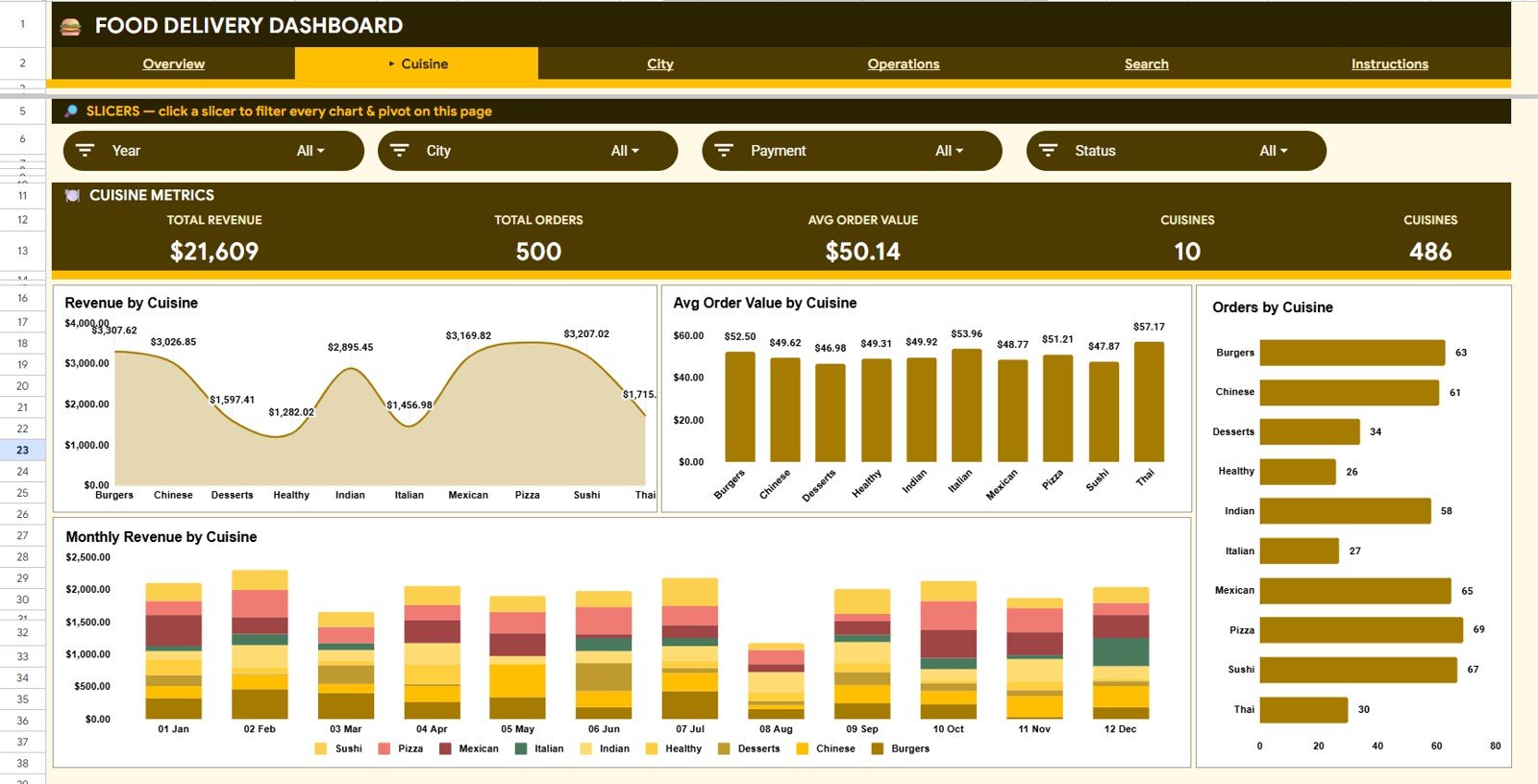
This page breaks performance down by cuisine type so you can see which menus drive the business. Charts include Revenue by Cuisine, Average Order Value by Cuisine, Orders by Cuisine, and Monthly Revenue by Cuisine.
City Analysis
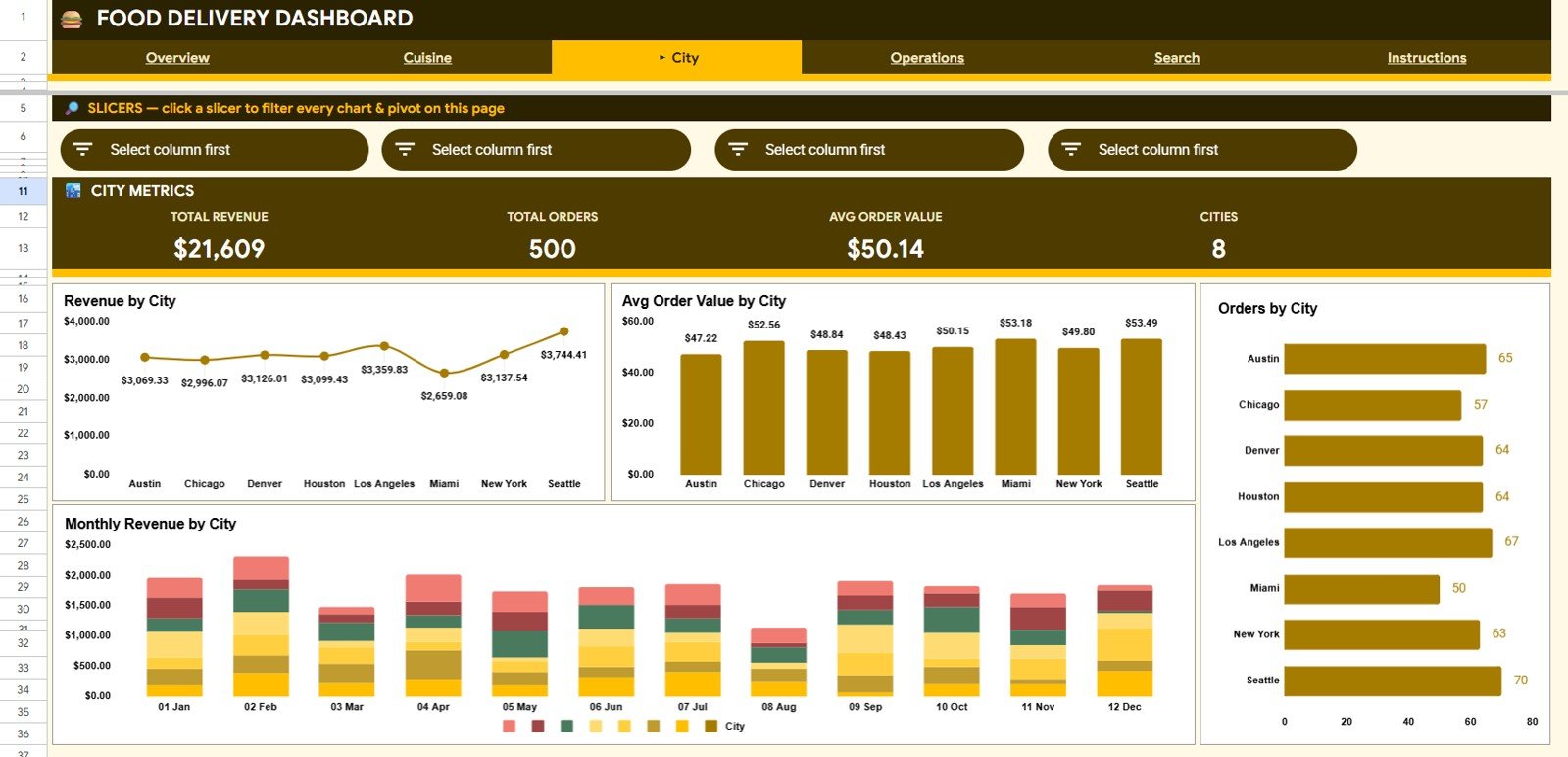
The City Analysis page compares delivery zones and locations head to head. Charts include Revenue by City, Average Order Value by City, Orders by City, and Monthly Revenue by City, revealing where demand is concentrated.
Operations Analysis
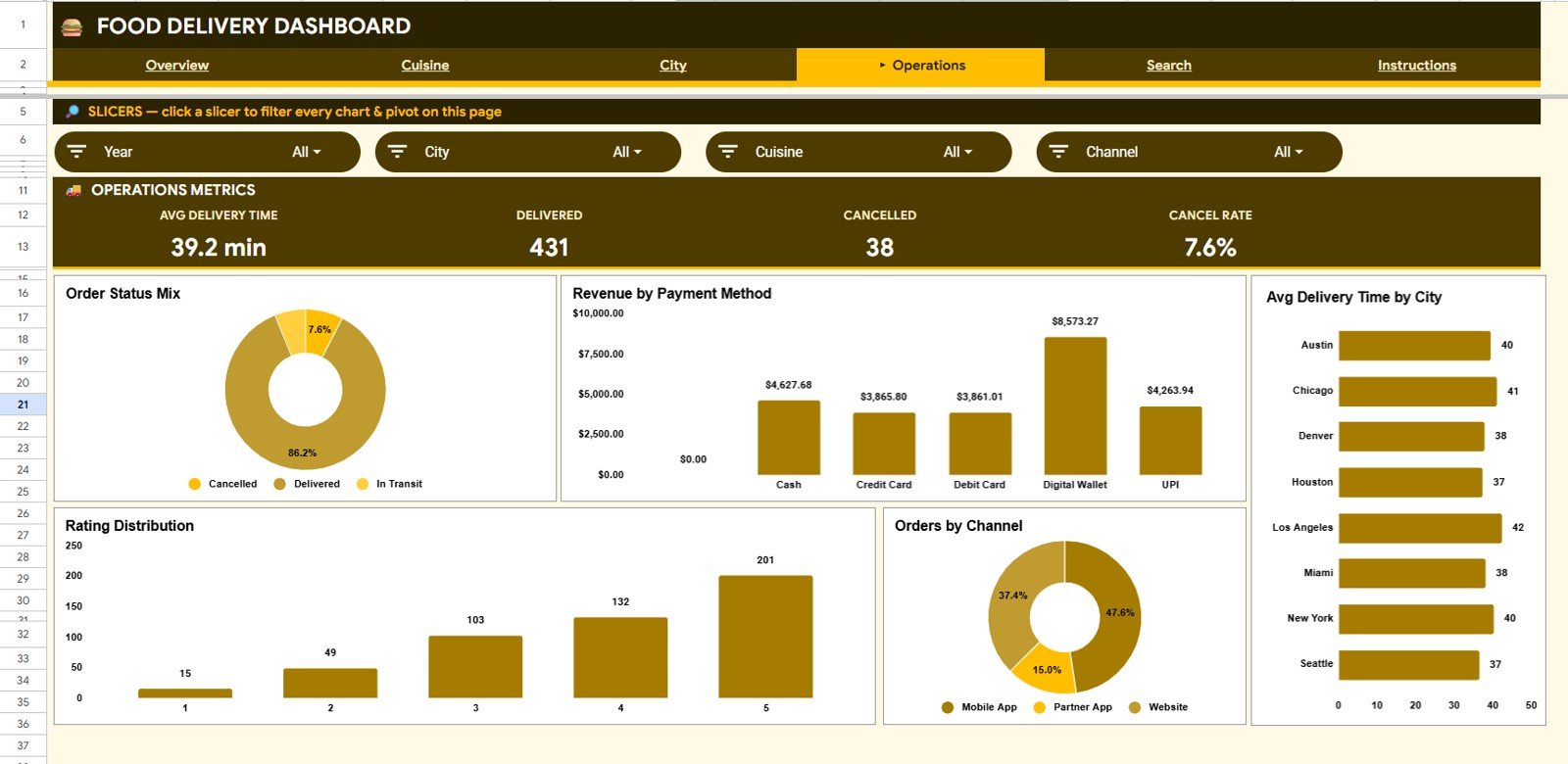
This page focuses on fulfilment and service quality. Charts include Orders by Status, Revenue by Payment Method, Average Delivery Time by City, Orders by Rating, and Orders by Channel — so delays, cancellations, and low-rated zones surface fast.
Search Sheet
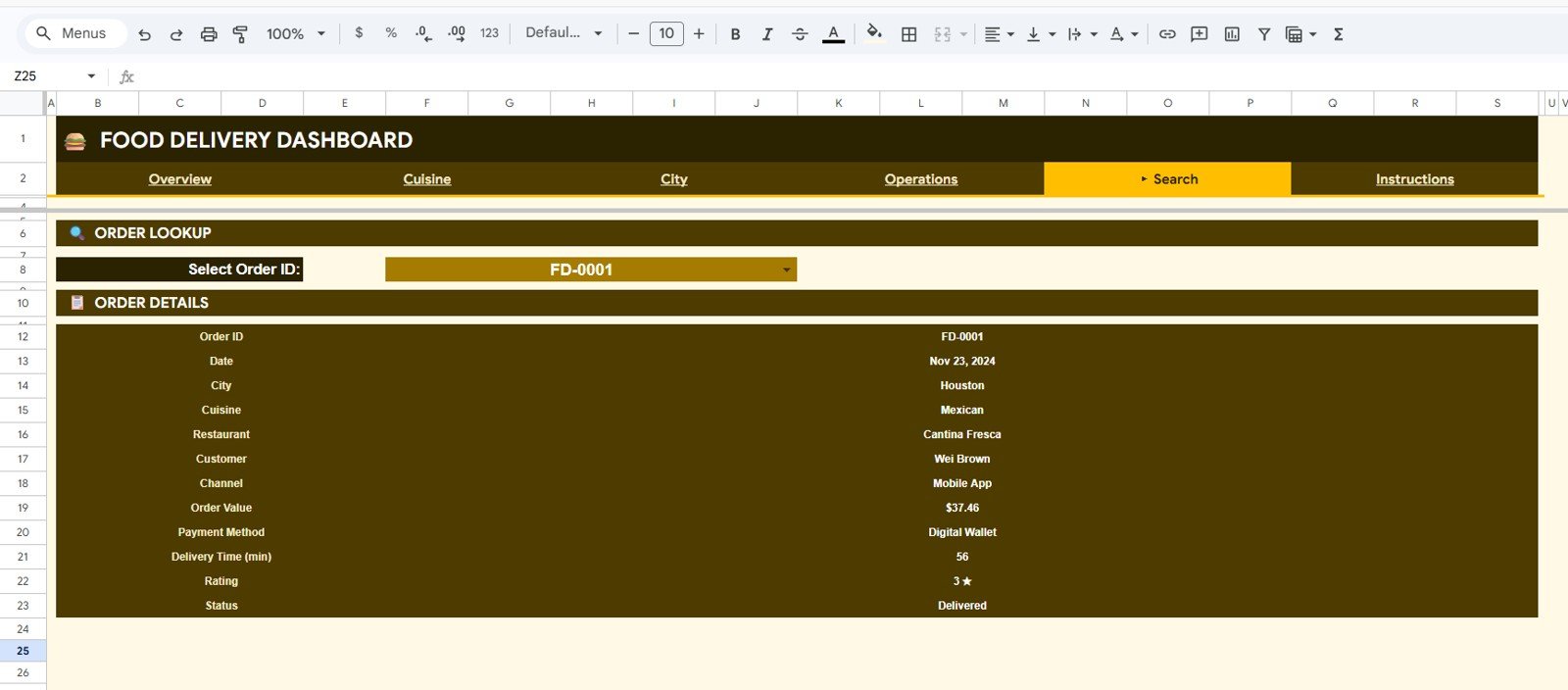
The Search sheet lets you look up any single order instantly. Select an Order ID from the dropdown and every detail appears at once — date, city, cuisine, restaurant, customer, channel, order value, payment method, delivery time, rating, and status.
Data Sheet
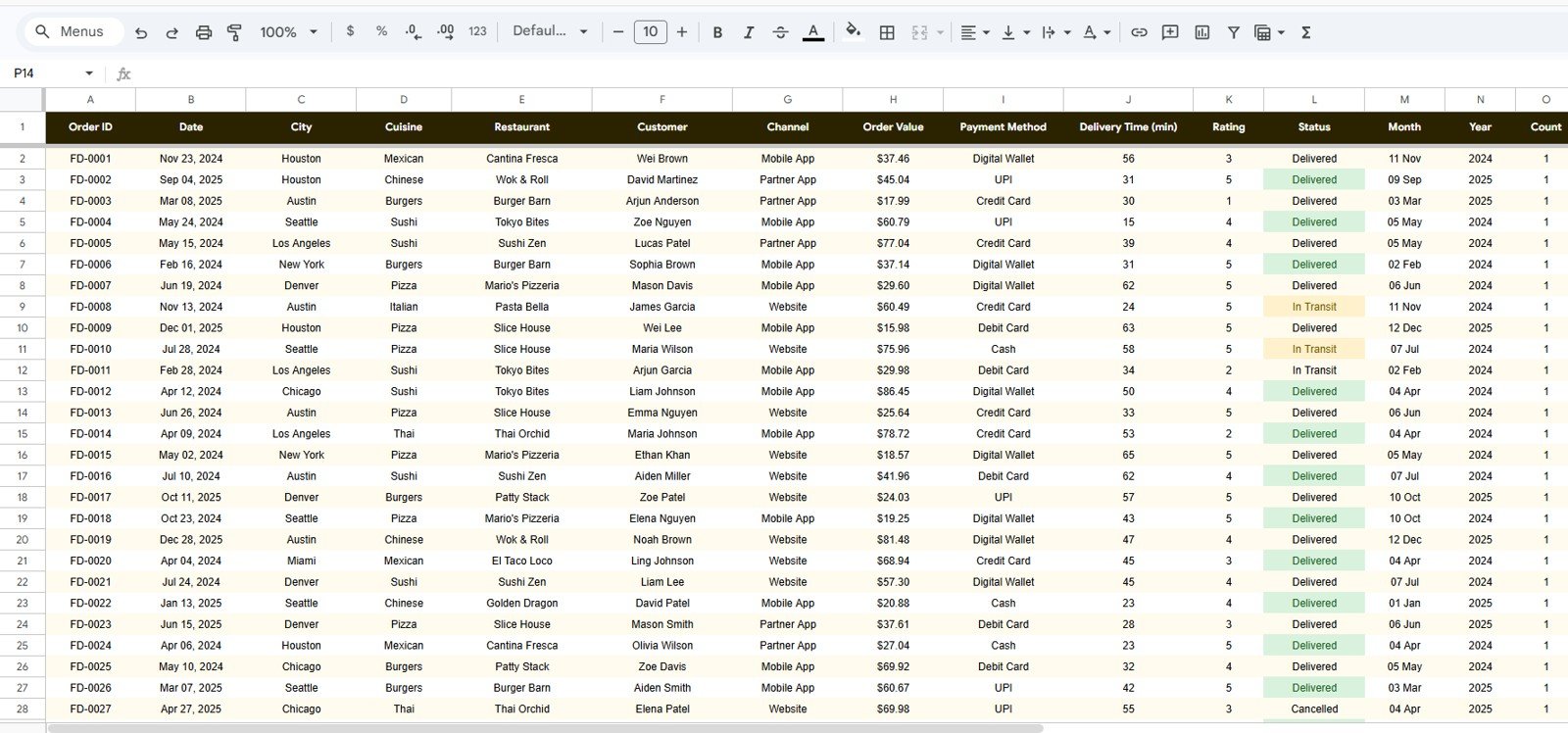
This is the Data sheet, where you add your orders in the same column format as the sample rows. Every KPI card, chart, and search result reads from this sheet, so keeping it clean and consistent keeps the whole dashboard accurate.
Food Delivery Dashboard: Google Sheets vs. Excel vs. Restaurant Analytics SaaS — Feature Comparison
| Feature | Food Delivery Dashboard (Google Sheets) | Microsoft Excel Dashboard | Restaurant Analytics SaaS (Toast / Lighthouse) |
|---|---|---|---|
| Cost | $9.99 one-time | $17.99 one-time | $69–$300 / month |
| Platform | Google Sheets (browser) | Desktop Excel | Vendor cloud + POS lock-in |
| Setup time | Under 10 minutes ✅ | Under 10 minutes ✅ | Days to onboard |
| Real-time team collaboration | Yes, shared link ✅ | Limited | Yes ✅ |
| Mobile access | Yes, Sheets app ✅ | Limited | Yes ✅ |
| Single-order search | Yes, built-in ✅ | Yes ✅ | Yes ✅ |
| Own your data | Yes, your Drive ✅ | Yes ✅ | No, vendor-hosted |
| Year-1 cost at 5 users | $9.99 ✅ | $17.99 | $4,000+ |
For food delivery operators who want live cuisine, city, and operations analytics without paying four figures a year for a SaaS suite, this dashboard sits in the sweet spot.
Who Should Use This Template
Perfect for:
- Cloud kitchens and delivery-first restaurants tracking revenue and orders across cuisines and cities
- Owners and managers who want one shared dashboard the whole team can open on any device
- Operations staff who need fast filtering by status, channel, payment method, and rating
- Franchise and multi-location food businesses comparing performance across zones
Not a fit if:
- You need a live POS integration with automatic order syncing — this reads from a Data sheet you maintain
- You require SSO, audit logs, or role-based access controls
- You want full profit-and-loss accounting — the Restaurant Profit and Loss Dashboard is a better fit
Real-World Use Cases
Aisha runs a cloud kitchen with three cuisines. She checks Revenue by Cuisine each week, spots which menu is slipping, and reallocates her ad budget — without paying $200 a month for restaurant BI software.
Marco manages delivery for a five-city chain. He filters the City Analysis page by location to compare Average Order Value and Average Delivery Time, then shares the link with each city manager so everyone sees the same numbers.
Priya handles customer experience for a delivery brand. She watches Orders by Rating and Orders by Status on the Operations page, catches a spike in cancellations in one zone, and fixes the handoff before it hurts repeat orders.
Advantages of the Food Delivery Dashboard in Google Sheets
The biggest advantage is cost versus capability. A one-time $9.99 purchase replaces analytics work that would otherwise need a monthly SaaS subscription or hours of manual reporting. Because it lives in Google Drive, sharing is a single link and collaboration is real-time across desktop and mobile.
It is also genuinely no-code. Since it relies on native Google Sheets features — charts and slicers reading from a single Data sheet — you can add new cuisines, cities, channels, and payment methods just by typing them in. If you are new to these features, the official Google Sheets slicer guide is a helpful reference.
Opportunities for Improvement
This is a reporting dashboard, not an order-management system. It does not connect directly to a POS or delivery aggregator, so orders are added to the Data sheet rather than synced automatically. Teams that need live syncing or multi-user logins should look at a full app like the Restaurant Management System Web App. For pure profitability tracking, pair it with a dedicated P&L tool.
Best Practices
- Keep the Data sheet columns consistent — every chart and the search lookup depend on that structure.
- Use one clear value per field (one spelling per cuisine and city) so slicers group cleanly.
- Paste new orders below existing rows rather than inserting in the middle, so chart ranges stay intact.
- Duplicate the file monthly if you want a historical snapshot alongside your live data.
Explore Relevant Templates
If you run a food or restaurant business, these pair well with this dashboard:
- Catering Business KPI Dashboard in Google Sheets
- Regional Franchise Performance Dashboard in Google Sheets
- Inventory Tracker in Google Sheets
- Drop Shipping Dashboard in Google Sheets
Prefer Microsoft Excel? This template is also available as the Food Delivery Dashboard in Excel.
To learn the reporting techniques behind dashboards like this, the Excel Pivot Tables & Dashboards course on NextGenTemplates Academy walks through them with practice files.
Get the Food Delivery Dashboard in Google Sheets
Frequently Asked Questions
What KPIs does the Food Delivery Dashboard in Google Sheets track?
The Food Delivery Dashboard in Google Sheets tracks 4 headline KPIs — Total Revenue, Total Orders, Average Order Value, and Average Rating — plus 17 charts covering cuisine, city, operations, and monthly trends. All metrics update automatically when you replace the sample data.
How long does setup take?
Setup takes under 10 minutes. Make your own copy from the included link, paste your orders into the Data sheet using the same columns as the sample, and every KPI card, chart, and search result recalculates on its own.
Do I need any add-ons or Apps Script?
No. The Food Delivery Dashboard in Google Sheets is 100% native Google Sheets — no add-ons, no Apps Script permissions, and no installation. It works in any browser and on the Google Sheets mobile app.
How does this compare to restaurant analytics SaaS like Toast?
Restaurant analytics SaaS tools run $69–$300 a month and lock data into a vendor cloud. The Food Delivery Dashboard in Google Sheets is a one-time $9.99 purchase, keeps data in your own Drive, and offers cuisine, city, and operations analytics with slicer filters.
Can I add my own cuisines, cities, and channels?
Yes. Type your own values into the Data sheet — the charts and slicers read directly from that sheet, so new cuisines, cities, channels, and payment methods appear automatically with no setup.
About the Author
Built by PK — Microsoft Certified Professional with 15+ years of Excel, Google Sheets, and Power BI experience. Founder of NextGenTemplates, reaching 300K+ subscribers across YouTube channels. Every template is hand-built and tested before release.
Conclusion
If you want clear, shareable food delivery analytics without a monthly bill, this template earns its place. Start tracking revenue, cuisines, cities, and operations in minutes.
Instant download · One-time payment · No subscription.
Last updated: June 2026