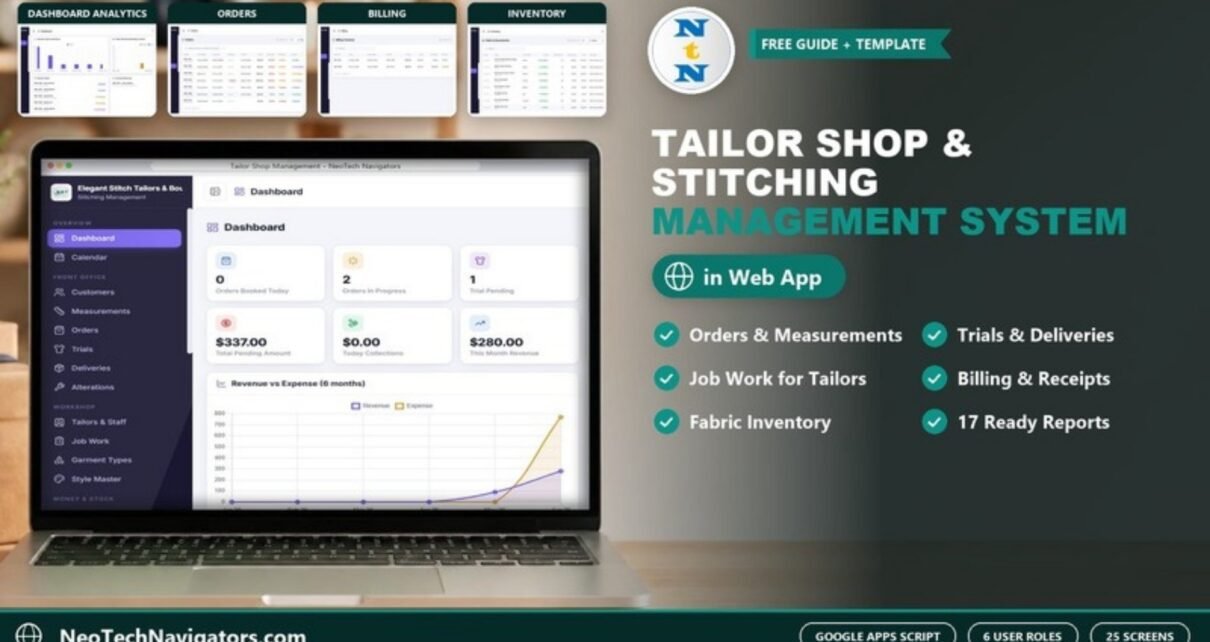
The Tailor Shop and Stitching Management System Web App connects 25 working screens, from order booking to delivery, billing and fabric inventory, inside a single Google Sheets app, and supports six user roles (Admin, Manager, Reception, Tailor, Accounts and Viewer). Built on Google Sheets and Google Apps Script, it runs in your own Google account with no monthly fees and no per-user charges, so a 4-tailor boutique pays once instead of $30–$90 per user every month for tailoring SaaS.
Most tailoring shops still juggle a measurement diary, a separate order register, loose payment slips and a fabric notebook. This Tailor Shop Management Software pulls all of that into one connected web app. A measurement captured at reception flows straight into orders, job work, trials, delivery and billing without anyone re-typing it.
🎥 Watch the Video Tutorial
🚀 Try the Live Demo Before You Buy
We have deployed this web app in our own Google account so you can test every page and every role with sample data before purchasing. No signup or email is required.
🔑 Demo Login Details
Sign in as admin to see every module (orders, customers, measurements, billing, staff and settings), then try the role-based logins below to see exactly what each team member can access.
💡 What you get after purchase: the full source code (Code.gs + Index.html) plus a step-by-step deployment guide, so you can deploy your own private copy in your own Google account in under 15 minutes.
Get the Tailor Shop Management Web App
Key Features of the Tailor Shop and Stitching Management System Web App
- Secure role-based login. Six roles (Admin, Manager, Reception, Tailor, Accounts and Viewer) mean each person only sees the screens and data relevant to their job.
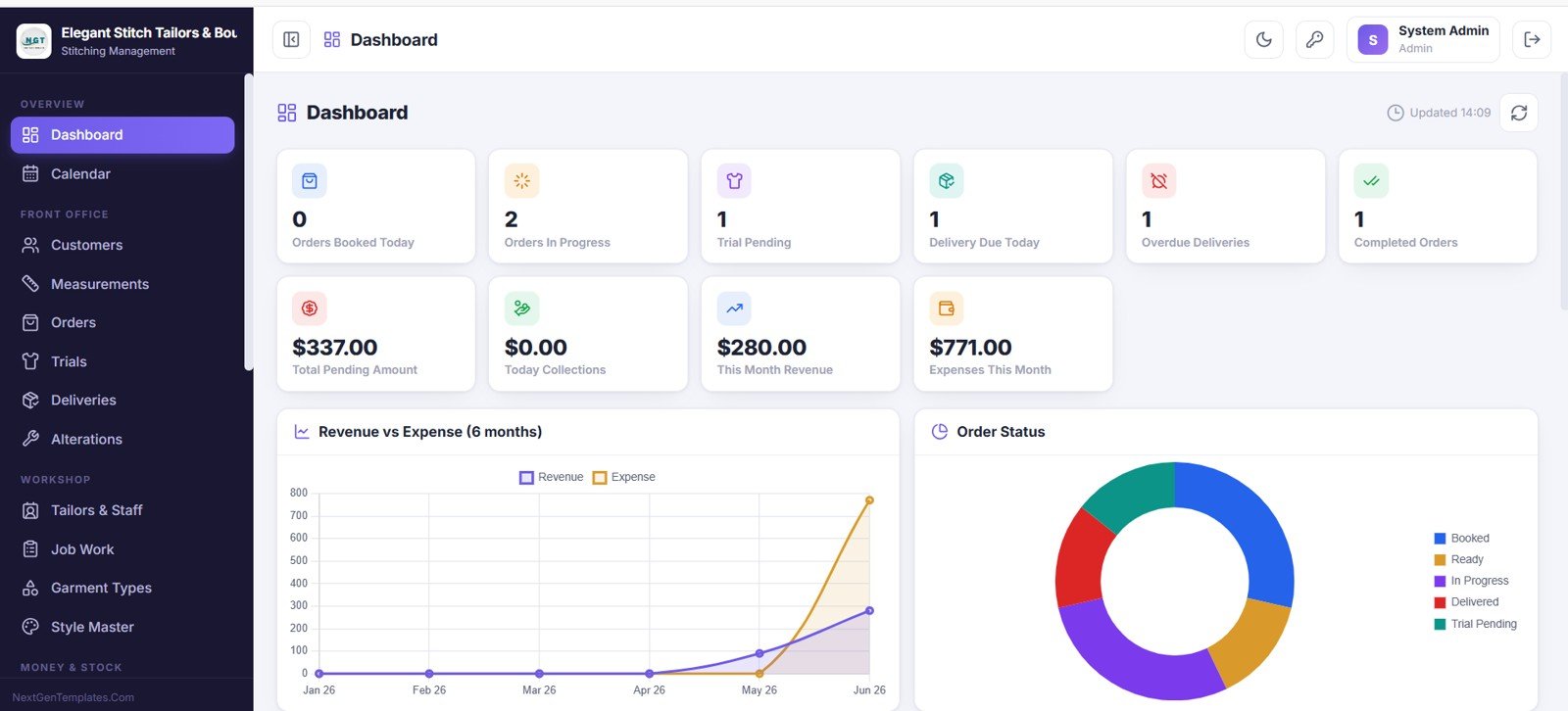
- Live owner dashboard. Ten KPI cards: Orders Booked Today, Orders In Progress, Trial Pending, Delivery Due Today, Overdue Deliveries, Completed Orders, Total Pending Amount, Today Collections, This Month Revenue and Expenses This Month, alongside Revenue vs Expense (6 months) and Order Status charts.
- End-to-end order flow. Book orders, store measurement profiles, assign job work, schedule trials, log alterations and track deliveries, all linked by order number.
- Billing and money control. Create invoices, record receipts by payment mode, and log expenses so the Accounts role always knows dues, collections and monthly profit.
- Fabric and accessories inventory. Track stock with reorder levels and low-stock highlighting, plus a full stock-transaction audit trail and a supplier directory.
Dashboard and Screens Explained
The app is organised into 25 connected screens. Here is what each one does.
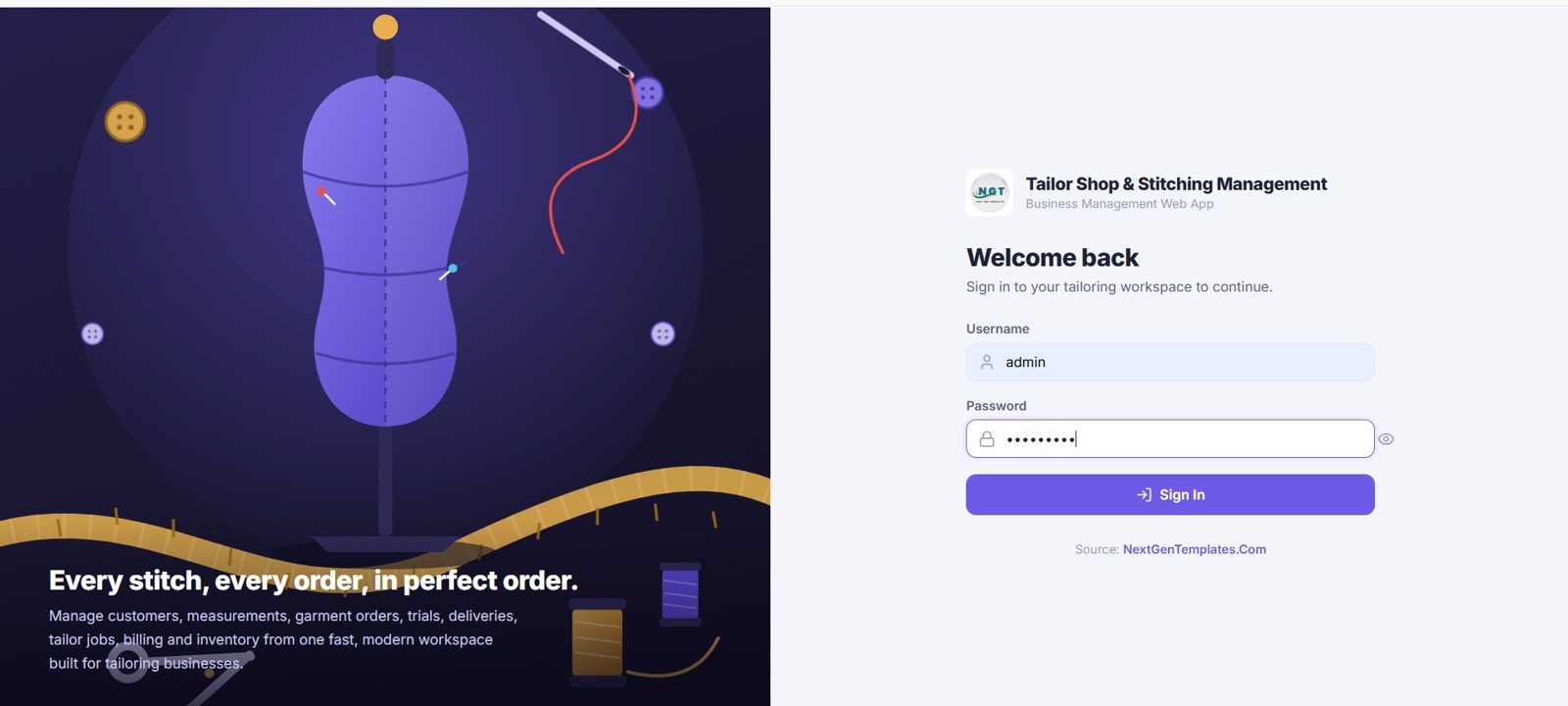
1. Login Screen
A clean, secure login where each team member signs in with a username and password, with access controlled by role.
2. Dashboard
The main dashboard shows the ten KPI cards for orders, trials, deliveries, pending amount, collections, revenue and expenses, plus the Revenue vs Expense (6 months) line chart and the Order Status donut (Booked, Ready, In Progress, Delivered, Trial Pending).
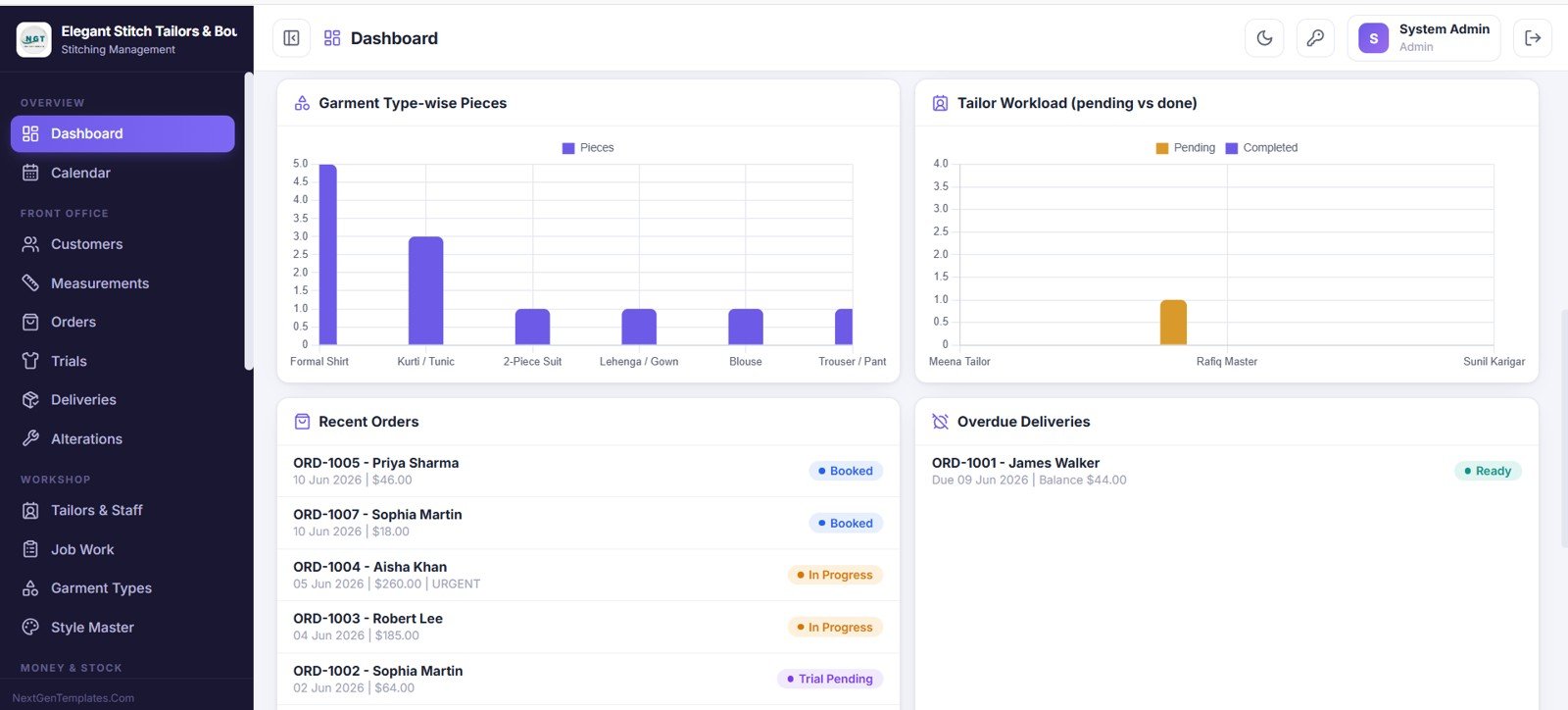
3. Dashboard Analytics
Further down the dashboard you get Garment Type-wise Pieces and Tailor Workload (pending vs done) charts, plus Recent Orders and Overdue Deliveries panels.
4. Calendar and Scheduler
Month, week, day and list views of the whole shop. Filter by event type or tailor and click any date to see orders, trials and deliveries due.
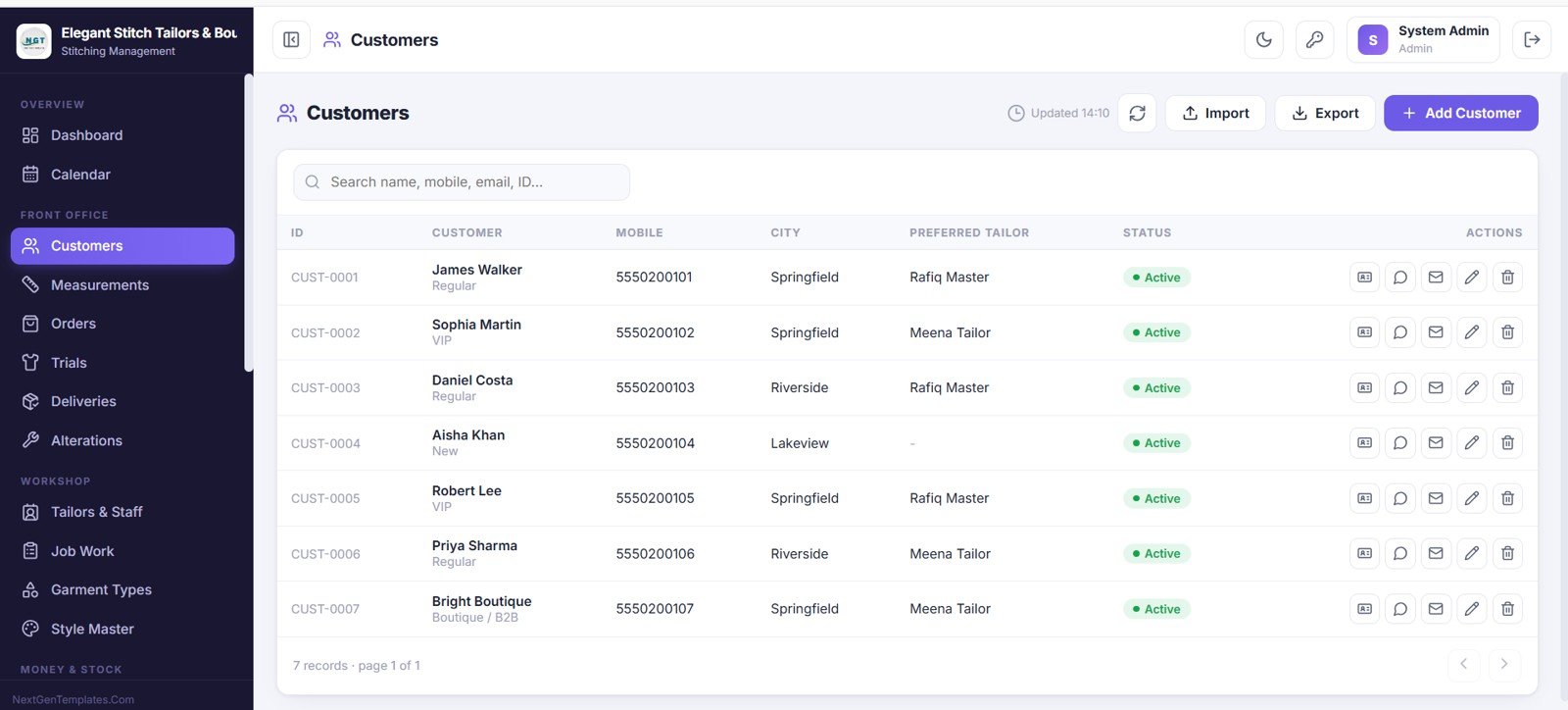
5. Customers
Every customer profile in one place (ID, name, type, mobile, city, preferred tailor and status) with search, add, import, export and direct contact.
6. Measurements
All measurement profiles per customer, showing garment, date and fit, with print, duplicate and edit options so you never re-measure a regular client.
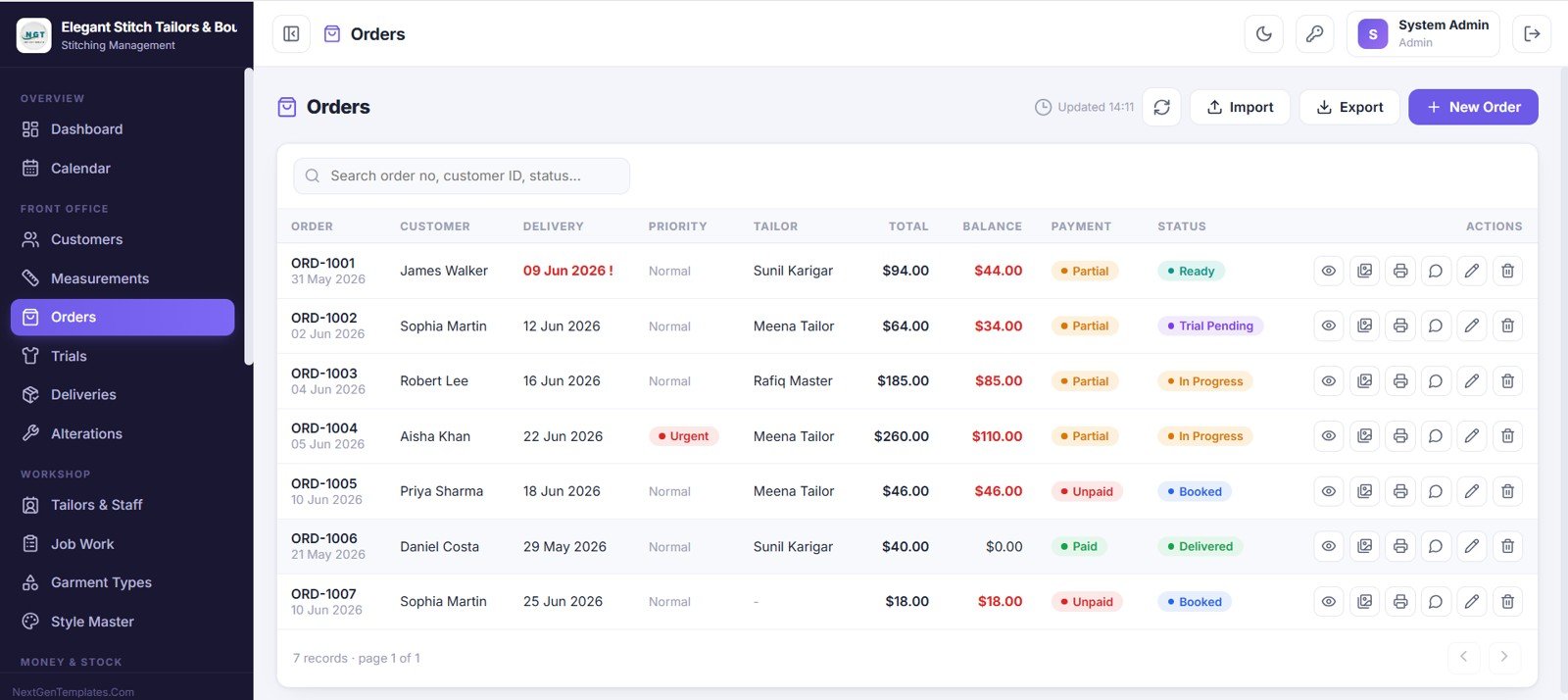
7. Orders
Book and manage every garment order: order number, customer, delivery date, priority, tailor, total, balance, payment status and order status, with view, print, edit and other actions per row.
8. Trials
Manage fitting trials with trial date, order, customer, status, alteration-needed flag and next trial date, plus printable trial slips and reminders.
9. Deliveries
Track every delivery (date, order, customer, delivery mode, balance due and status) with printable delivery slips and customer email.
10. Alterations and Repairs
Keep all rework in one place: ID, customer, alteration type, garment, due date, tailor, charges and status, tracked from start to finish.
11. Tailors and Staff
Every team member profile with speciality, role, mobile, salary type, status and workload, so you can balance jobs across your tailors.
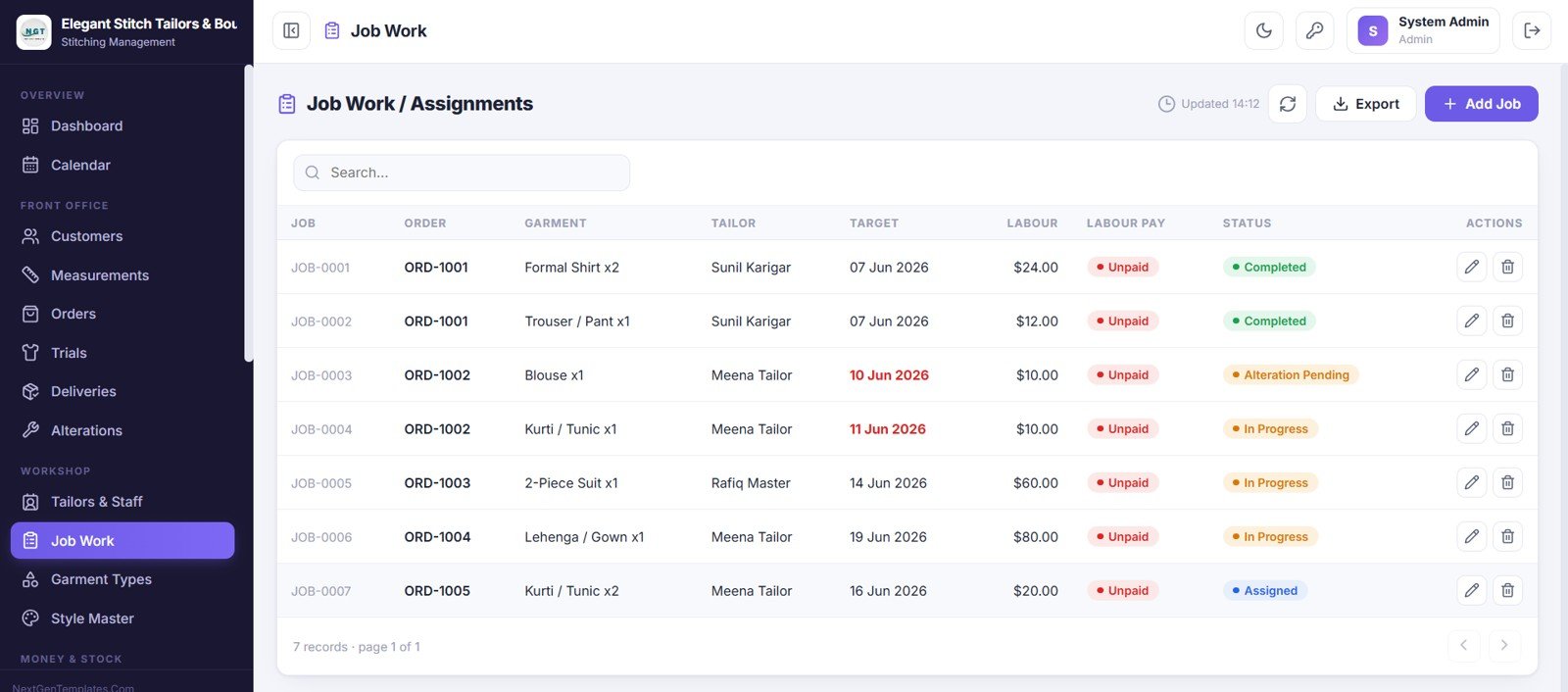
12. Job Work and Assignments
Assign stitching jobs to tailors with job number, order, garment, quantity, target date, labour charge, labour pay status and job status.
13. Garment Types
Your garment master and price list (category, who it is for, base rate and lead days), which flows into orders automatically.
14. Style Master
Stores design styles linked to each garment, recording neck, sleeve, pattern or cut and a design reference for repeat orders.
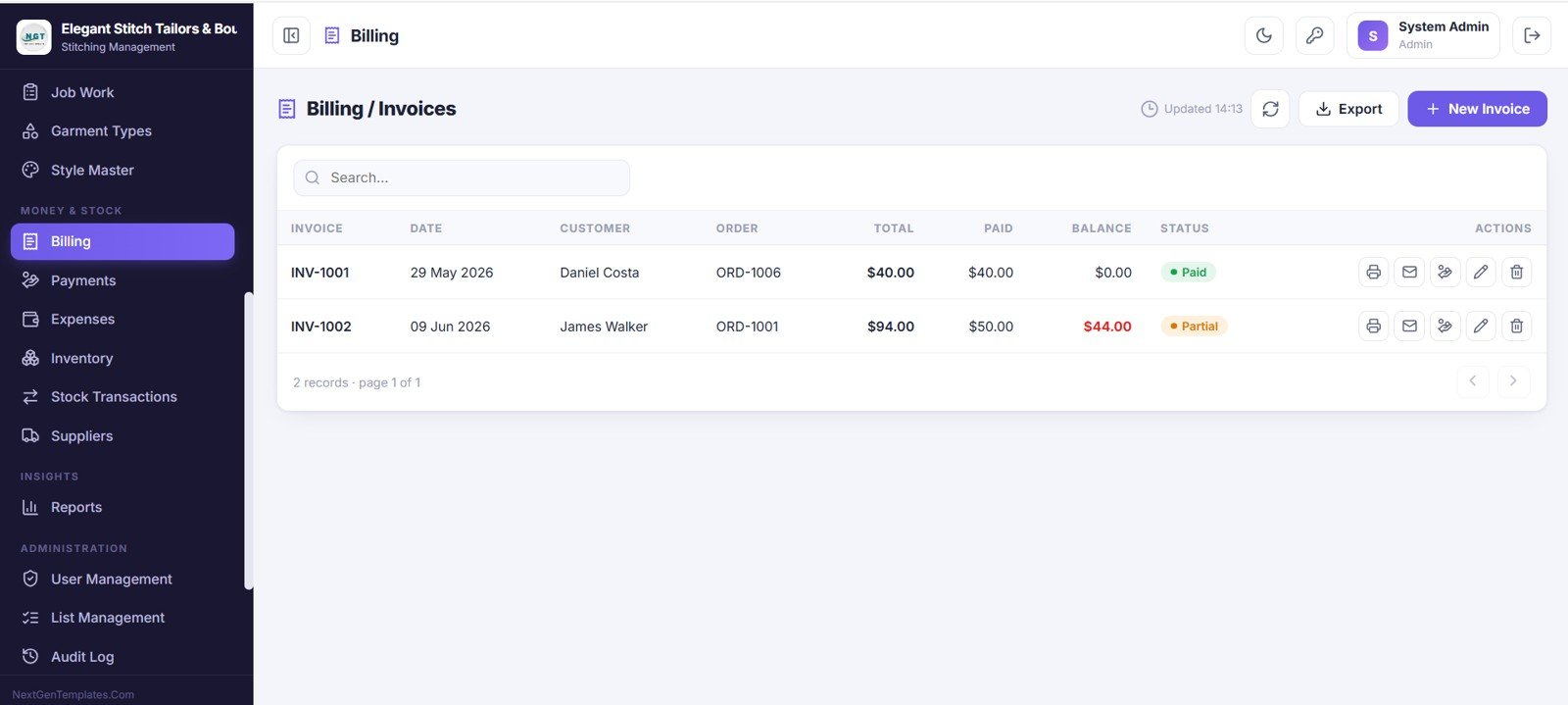
15. Billing and Invoices
Create and manage invoices with number, date, customer, order, total, paid, balance and status, plus print, email and record-payment actions.
16. Payments and Receipts
Record every payment with receipt number, date, customer, order, payment type, mode and amount, with printable or emailable receipts.
17. Expenses
Log all shop expenses by date, category, payee, payment mode, reference and amount for a clear view of spending.
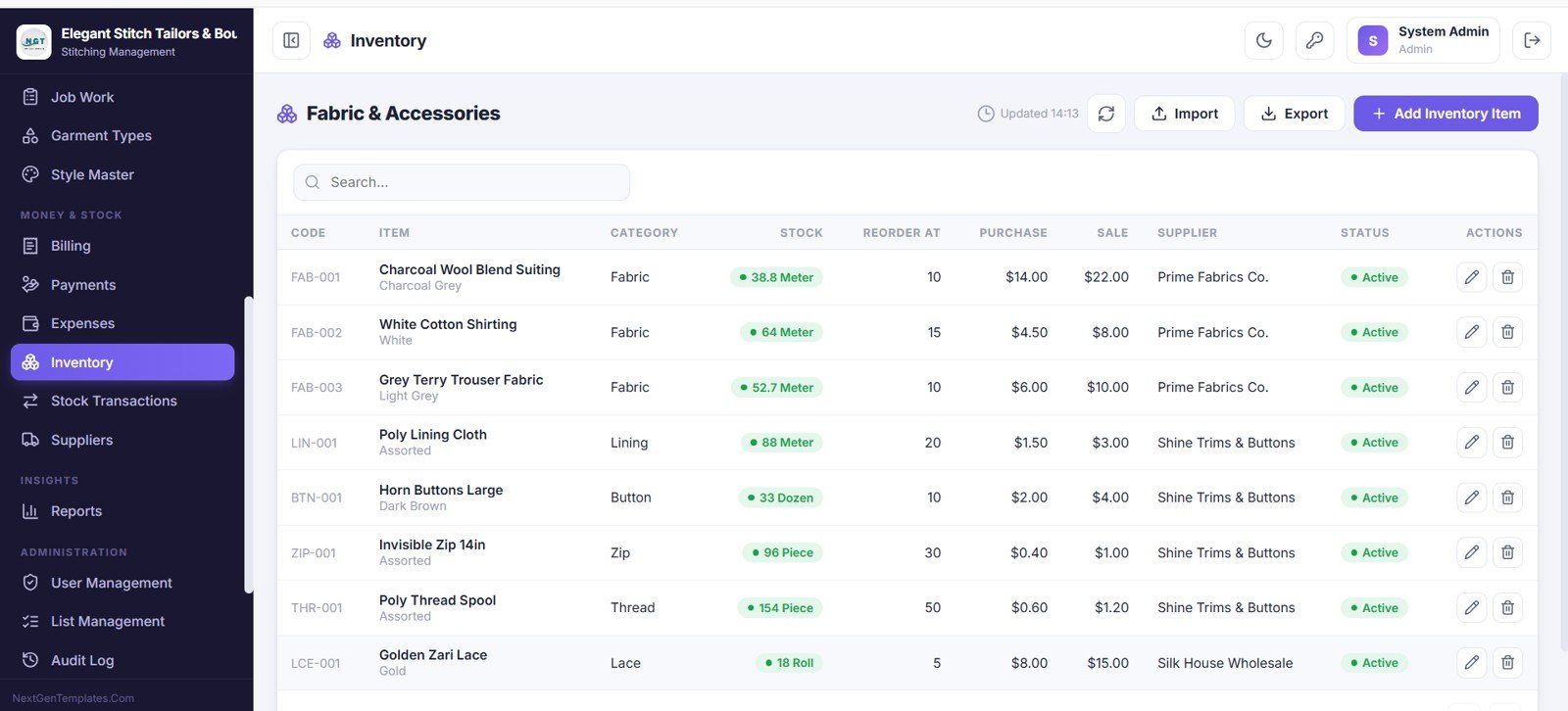
18. Inventory: Fabric and Accessories
Track fabric and accessories with code, item, category, stock, reorder level, purchase and sale price, supplier and status. Sample items include suiting and shirting fabric, lining cloth, buttons, zips, thread and lace.
19. Stock Transactions
A full inventory audit trail recording date, item, transaction type, quantity in and out, rate, amount and reference.
20. Suppliers
A supplier directory with contact person, mobile, city, outstanding balance and status, making fabric and trim reordering easy.
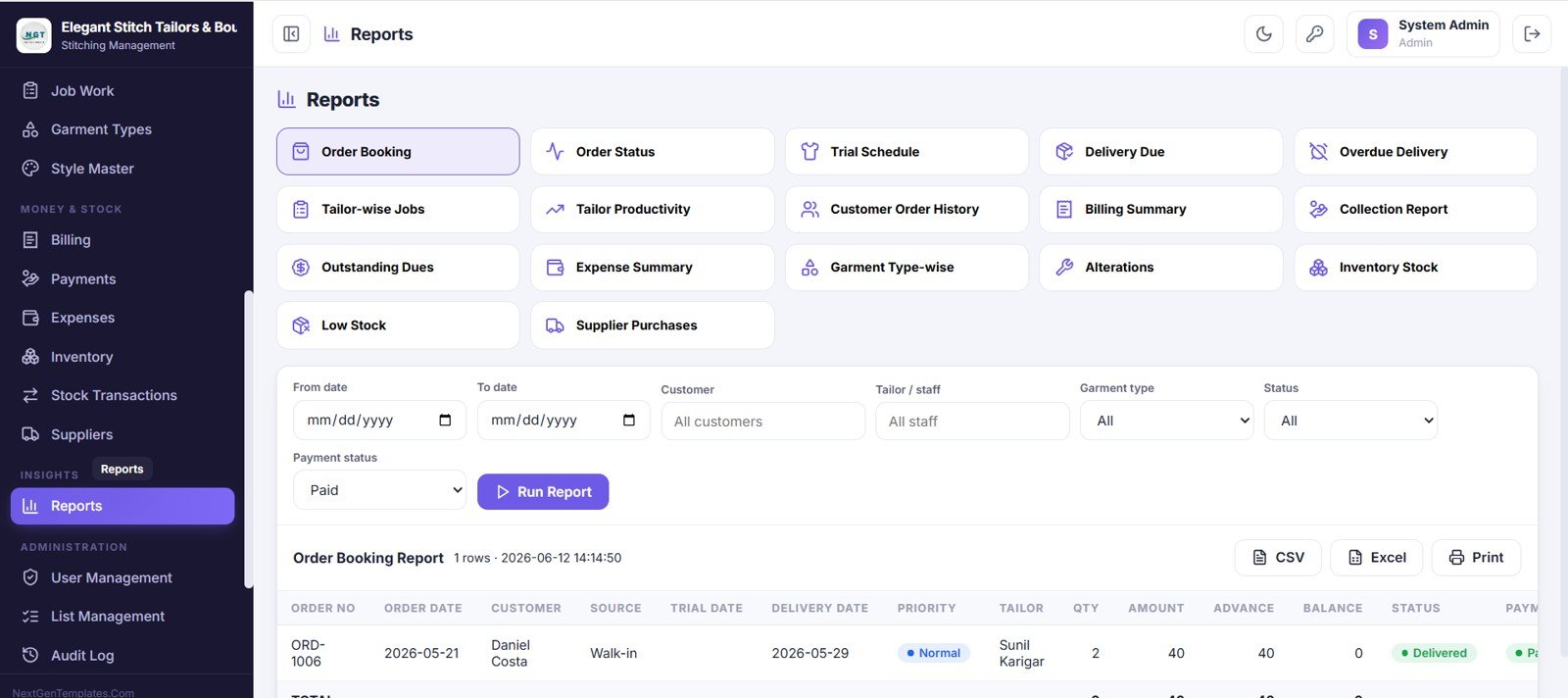
21. Reports
Seventeen ready-made reports, including Order Booking, Order Status, Trial Schedule, Delivery Due, Overdue Delivery, Tailor Productivity, Billing Summary, Collection Report, Outstanding Dues, Expense Summary, Inventory Stock and Low Stock. Filter by date, customer, tailor, garment type, status and payment status, then export to CSV or Excel or print.
22. User Management
The admin controls every account, role and access level, viewing each user’s name, username, role, linked staff, last login and status.
23. List Management
Edit the dropdown values used across the app, such as garment categories and payment modes, keeping the system flexible.
24. Audit Log
A complete activity trail recording who did what and when across logins, prints, updates and status changes.
25. Settings
Configure the shop profile and billing details (name, logo, address, contact and currency) so every invoice and slip matches your brand.
Tailor Shop Web App vs. Excel/Desktop Tool vs. Paid Tailoring SaaS
| Feature | Tailor Shop Web App | Excel / Desktop Tool | Paid Tailoring / POS SaaS |
|---|---|---|---|
| Cost | $39.99 one-time | $0–$120 one-time | $30–$90 / user / month |
| Platform | Google Sheets (any device) | Windows desktop only | Vendor cloud |
| Setup time | Under 15 minutes | Manual file sharing | Onboarding + training |
| Real-time team access | ✅ 6 roles | ❌ One file at a time | ✅ Yes |
| Measurements + orders linked | ✅ Built in | ❌ Separate sheets | ✅ Yes |
| Fabric inventory + suppliers | ✅ Built in | ⚠️ Limited | Add-on / higher tier |
| Owns the data | ✅ Your Google account | ✅ Your PC | ❌ Vendor servers |
| Year-1 cost at 5 users | $39.99 total | Varies | $1,800–$5,400 |
For tailoring shops that want order, measurement, billing and inventory control without a monthly per-user bill, this web app sits in the sweet spot.
Who Should Use This Template
Perfect for:
- Tailoring shops, boutiques and stitching units with 1–20 staff
- Owners who want measurements, billing and fabric inventory linked to each order
- Teams needing role-based access for reception, tailors and accounts
- Shops that prefer a one-time Google Sheets app over monthly tailoring software
Not a fit if:
- You run a large garment factory needing barcode scanning and ERP integration
- You require offline desktop software with no Google account
- You need SOC 2, SSO and enterprise audit certification out of the box
Real-World Use Cases
The scenarios below are illustrative examples of how different shops can use the app.
A 4-tailor neighbourhood boutique. The owner books orders at reception, stores each customer’s measurements, assigns job work to the right tailor and watches Delivery Due Today on the dashboard, without paying a monthly tailoring software fee.
A ladies’ boutique with walk-in and bulk orders. The manager tracks fabric inventory, reorders from suppliers before stock runs low, and prints branded invoices and receipts so the Accounts role always knows dues and monthly revenue.
An owner with two stitching outlets. Each outlet’s staff get a Viewer or Reception login, while the owner reviews tailor productivity and collection reports and exports them to Excel for the accountant every month.
Advantages of the Tailor Shop and Stitching Management System Web App
Because the app runs on Google Sheets and Apps Script, you own your data and avoid recurring SaaS bills: a five-user tailoring SaaS can cost $1,800–$5,400 in year one, while this is a single $39.99 purchase. Every screen is connected, so there is no double entry between measurements, orders, job work, billing and inventory. And because it is web-based, your reception desk, workshop and accountant can work from the same data on any device.
Limitations to Consider
This is an honest fit assessment. The app is built for small and mid-size shops, so very large garment factories that need barcode-driven production lines, MRP or full ERP integration will outgrow it. It also depends on a Google account and internet access, so shops that need a fully offline desktop tool should consider a VBA-based option instead. Finally, advanced enterprise security such as SSO and SOC 2 certification is outside its scope.
Best Practices
- Fill the Garment Types, Style Master and Suppliers masters first so orders and inventory auto-fill.
- Give each staff member their own login and role rather than sharing one account. The Audit Log is only useful when logins are personal.
- Record payments the moment they are collected so Today Collections and outstanding dues stay accurate.
- Set realistic reorder levels on fabric so low-stock highlighting warns you before a popular cloth runs out.
Explore Related Web Apps
If you run a service-based shop, the Salon and Spa Management System Web App follows the same appointment-driven pattern, and the Service Center and Repair Shop Management System Web App suits job-card based businesses. For billing-heavy shops, read about the GST Billing System Web App. You can also keep client contacts tidy with the Customer Address Book Web App or compare supplier quotes with the Daily RFQ and Quote Comparison Web App.
Related templates on NextGenTemplates: the Web-based Advanced Inventory Management System for deeper fabric and stock control.
If you would like to build your own spreadsheet skills alongside tools like this, the NextGenTemplates Academy learning paths walk you through them step by step with practice files.
Frequently Asked Questions
What does the Tailor Shop and Stitching Management System Web App include?
It includes 25 connected screens: login, dashboard, calendar, customers, measurements, orders, trials, deliveries, alterations, staff, job work, garment types, style master, billing, payments, expenses, inventory, stock transactions, suppliers, reports, user management, list management, audit log and settings, all running on Google Sheets.
How many user roles does it support?
Six roles: Admin, Manager, Reception, Tailor, Accounts and Viewer. Role-based access means each person only sees the screens relevant to their job.
Do I need coding or a server to run it?
No. It runs on Google Sheets and Google Apps Script. You make a copy, deploy it as a web app from your own Google account, and start using it. No server, hosting or coding is required.
How does this compare to paid tailoring SaaS?
Paid tailoring or POS SaaS typically costs $30–$90 per user each month. This web app is a one-time $39.99 purchase with no per-user fees, and your data stays in your own Google account.
How long does setup take?
Most shops are running in under 15 minutes: copy the file, set your shop profile, add staff and roles, fill the garment and supplier masters, and begin booking orders the same day.
Can I track fabric inventory and suppliers?
Yes. The Inventory screen tracks fabric and accessories with reorder levels and low-stock highlighting, Stock Transactions logs every movement, and the Suppliers directory tracks outstanding balances.
About the Author
Built by PK, Microsoft Certified Professional with 15+ years of Excel, Google Sheets and Power BI experience and founder of NextGenTemplates. Every template is hand-built and tested before release. The app is built with Google Apps Script, Google’s official platform for extending Google Sheets.
Wrapping Up
The Tailor Shop and Stitching Management System Web App gives a tailoring shop or boutique one connected place to run orders, measurements, trials, deliveries, billing, inventory and staff, without monthly SaaS fees. Try the live demo with the Admin login first, then switch to the Tailor and Reception logins to see how each role works day to day.
Get the Tailor Shop and Stitching Management System Web App
Instant download · One-time payment · No subscription.
📅 Last updated: October 2026