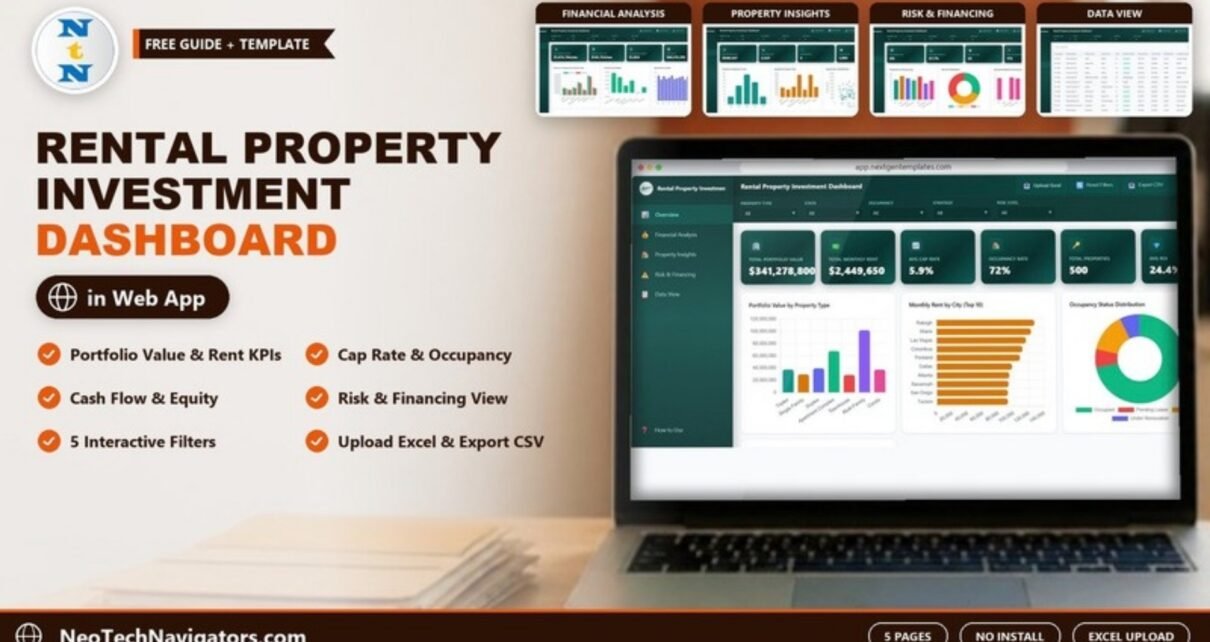
The Rental Property Investment Dashboard in HTML is a browser-based analytics template for landlords, property investors and portfolio managers. It turns a list of rental properties into five interactive pages: Overview, Financial Analysis, Property Insights, Risk & Financing and Data View. Together they cover portfolio value, rent, cap rate, occupancy, cash flow, equity, financing and risk.
It opens in any modern browser from an index.html file, so there is nothing to install and no BI license to pay for. This guide walks through every page using the template’s own screenshots and sample figures. It explains the filters and the Upload Excel, Reset Filters and Export CSV buttons, and shows how to read the key numbers with a worked example.
🎥 Watch the Video Tutorial
Get the Rental Property Investment Dashboard
What Problem Does It Solve?
Once you own more than a handful of rentals, the questions get harder to answer from a spreadsheet. Which property types bring in the most rent? Which strategy actually produces cash flow? How much of the portfolio is vacant or waiting on a lease? How exposed are you to high-interest or high-risk financing? Each answer usually means another pivot table or another filter.
This dashboard answers those questions on one screen. You choose a property type, state, occupancy status, strategy or risk level, and every KPI card and chart updates together. It is designed for investors reviewing their own portfolio, for managers reporting to owners, and for analysts preparing a summary for a lender or partner.
Dashboard Controls: Filters and Buttons
Every page shares the same header:
- Five filters: Property Type, State, Occupancy, Strategy and Risk Level. Each starts at “All”.
- Upload Excel to load your own property data file.
- Reset Filters to clear all selections at once.
- Export CSV to download the current data.
- A light/dark theme toggle and a full-screen button.
A left sidebar switches between the five pages and includes a How to Use link.
Rental Property Investment Dashboard in HTML: Page-by-Page Walkthrough
1. Overview
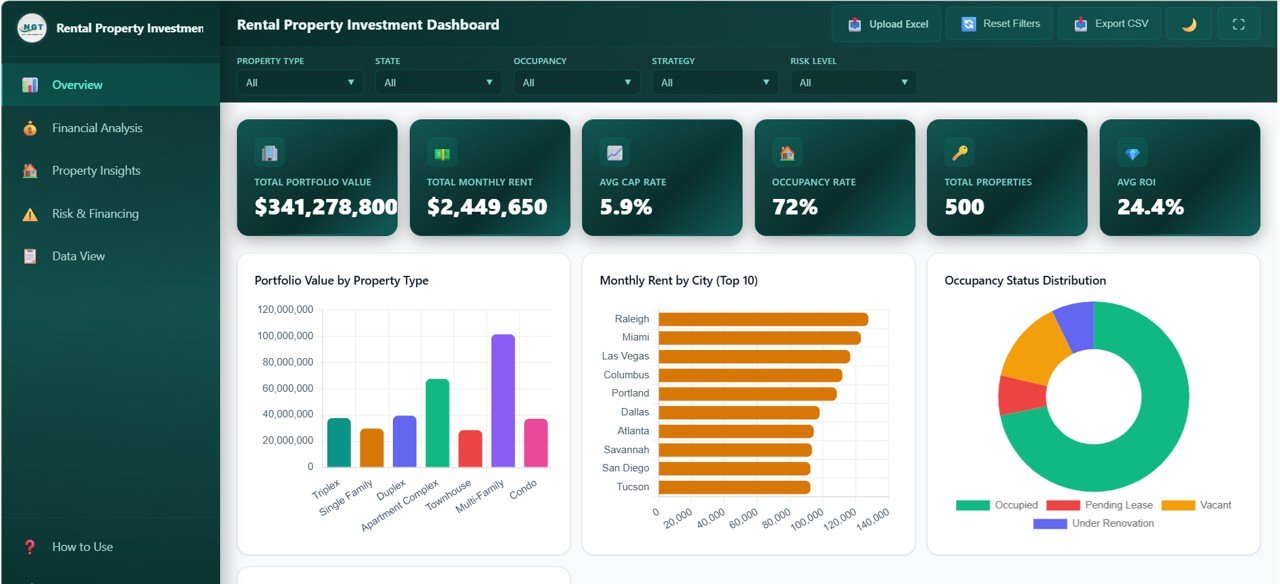
Six KPI cards sit across the top. With all filters at “All”, the sample data shows:
| KPI card | Sample value | What it tells you |
|---|---|---|
| Total Portfolio Value | $341,278,800 | Combined current value of the properties in view |
| Total Monthly Rent | $2,449,650 | Rent roll per month |
| Avg Cap Rate | 5.9% | Average capitalisation rate across properties |
| Occupancy Rate | 72% | How much of the portfolio is currently occupied |
| Total Properties | 500 | Number of properties in the current filter |
| Avg ROI | 24.4% | Average return on investment per property |
The charts on this page are Portfolio Value by Property Type (Triplex, Single Family, Duplex, Apartment Complex, Townhouse, Multi-Family and Condo, with Multi-Family the largest in the sample), Monthly Rent by City (Top 10), led by Raleigh and Miami, and Occupancy Status Distribution (Occupied, Pending Lease, Vacant and Under Renovation). Investment Strategy Breakdown and Purchase Price vs Current Value Trend appear further down.
2. Financial Analysis
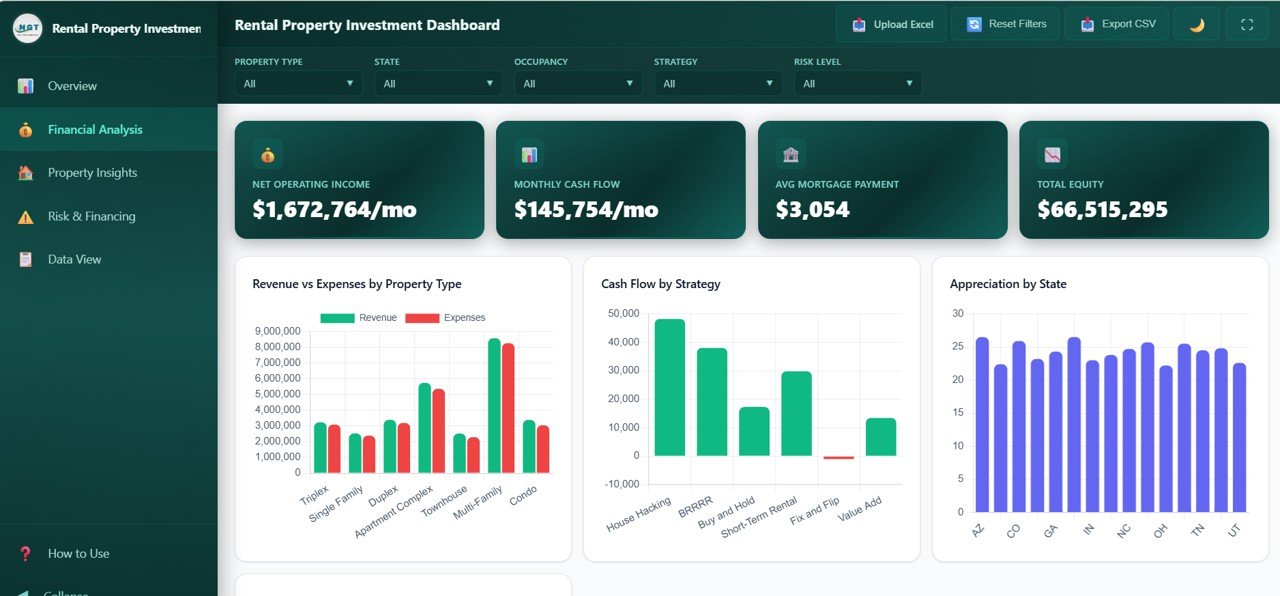
This page has four cards: Net Operating Income ($1,672,764/mo in the sample), Monthly Cash Flow ($145,754/mo), Avg Mortgage Payment ($3,054) and Total Equity ($66,515,295). The charts are:
- Revenue vs Expenses by Property Type: paired bars, so you can see where the margin is thin.
- Cash Flow by Strategy: House Hacking, BRRRR, Buy and Hold, Short-Term Rental, Fix and Flip, and Value Add. In the sample, Fix and Flip is slightly negative.
- Appreciation by State: value growth for each state.
- Expense Breakdown by Category: further down the page.
3. Property Insights
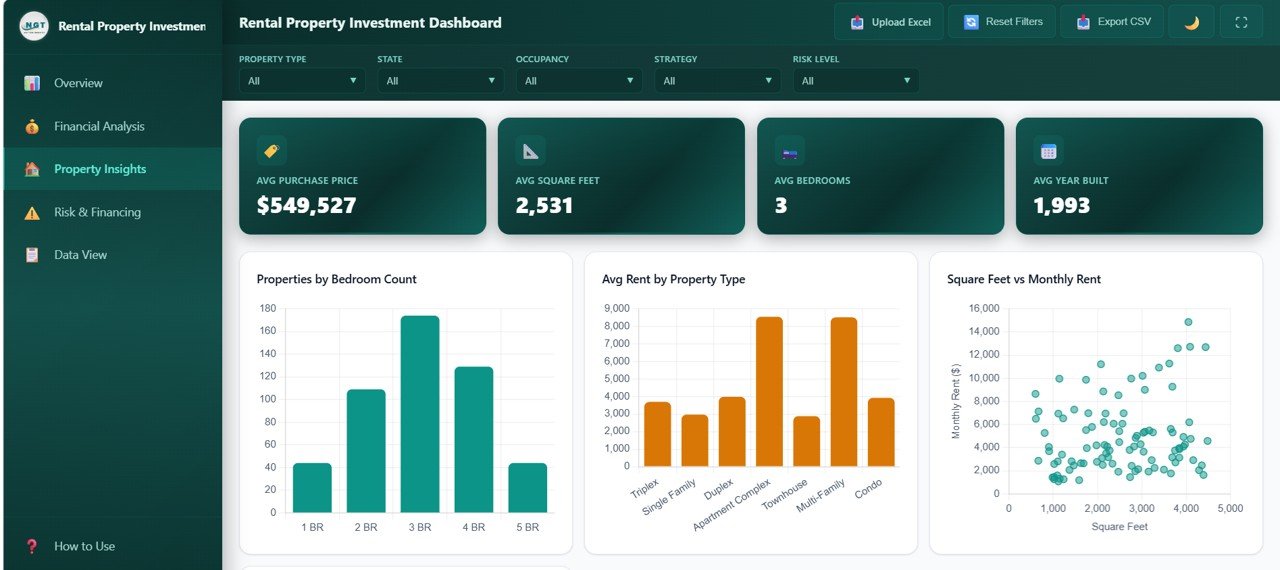
The cards show Avg Purchase Price ($549,527), Avg Square Feet (2,531), Avg Bedrooms (3) and Avg Year Built (1993). The charts cover Properties by Bedroom Count (1 BR to 5 BR, with 3 BR the most common), Avg Rent by Property Type, a Square Feet vs Monthly Rent scatter plot and Properties by Neighborhood. The scatter plot is the quickest way to spot units that rent well below what their size suggests.
4. Risk & Financing
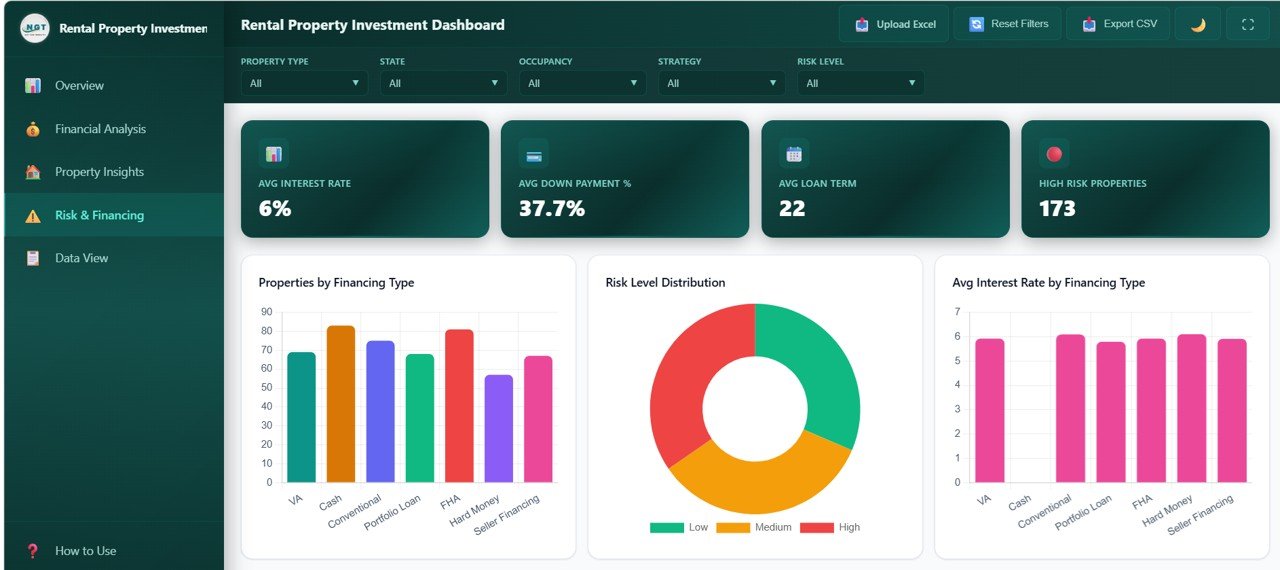
The cards show Avg Interest Rate (6%), Avg Down Payment % (37.7%), Avg Loan Term (22) and High Risk Properties (173). The charts are Properties by Financing Type (VA, Cash, Conventional, Portfolio Loan, FHA, Hard Money and Seller Financing), Risk Level Distribution (Low, Medium, High), Avg Interest Rate by Financing Type and Properties by Risk and Strategy. Use this page before you take on another loan to see how much of the portfolio is already high risk.
5. Data View
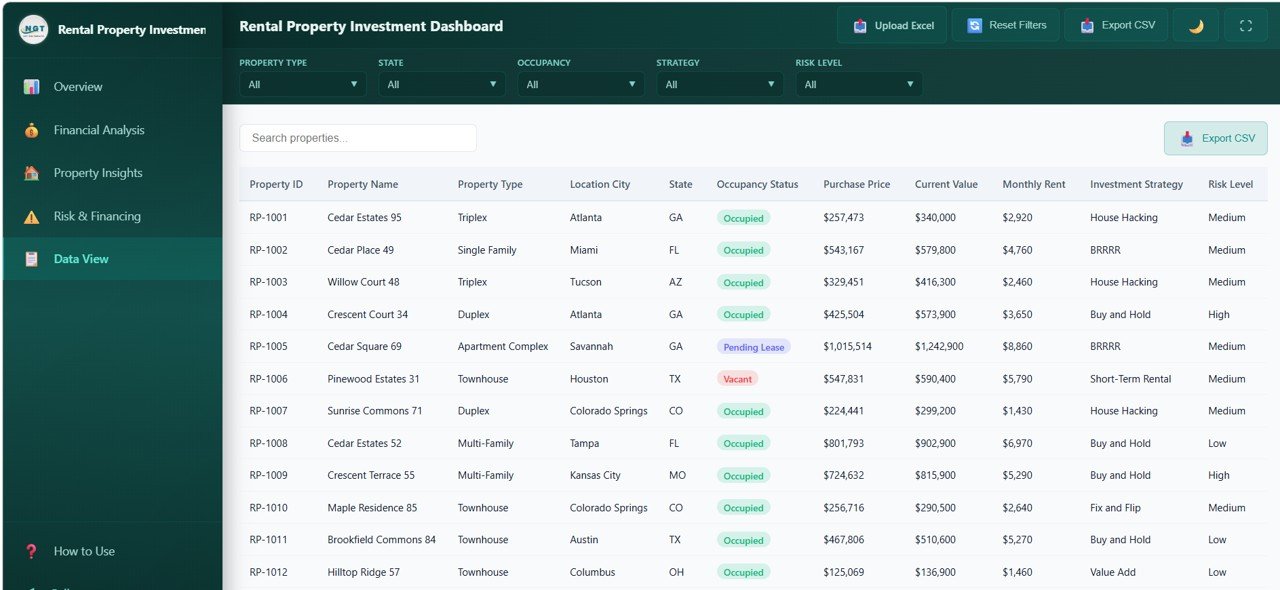
This page is a searchable table of every property, with a Search properties box and its own Export CSV button. The visible columns are Property ID, Property Name, Property Type, Location City, State, Occupancy Status, Purchase Price, Current Value, Monthly Rent, Investment Strategy and Risk Level. Columns can be sorted and the table is paginated.
Worked Example: Checking One Property
The first row in Data View is RP-1001, Cedar Estates 95, a Triplex in Atlanta, GA. It is Occupied, the strategy is House Hacking and the risk level is Medium. Its purchase price is $257,473, its current value is $340,000 and the monthly rent is $2,920. Two quick standard checks you can do on any row:
Appreciation      = (340,000 - 257,473) / 257,473 = 32.1%
Gross rent yield  = (2,920 x 12) / 340,000         = 10.3%
These are general investor calculations on the sample row. The dashboard’s own Avg Cap Rate and Avg ROI cards are averages calculated from the fields in its data file, so do not expect them to match a quick gross figure like this.
The portfolio-level cards do reconcile with each other, which is a useful sanity check after you load your own data:
Annual NOI / Portfolio Value = (1,672,764 x 12) / 341,278,800 = 5.9%   (Avg Cap Rate card: 5.9%)
NOI - (Avg Mortgage x Properties) = 1,672,764 - (3,054 x 500) = 145,764   (Monthly Cash Flow card: $145,754)
The $10 difference is most likely rounding, because the card shows the average mortgage payment to the nearest dollar.
Standard Rental Metrics Worth Knowing
This is general guidance, not a description of the template’s internal calculations. These are the textbook definitions most investors use:
| Metric | Common formula | Generally better when |
|---|---|---|
| Net Operating Income (NOI) | Rental income − operating expenses (before debt service) | Higher |
| Cap Rate | Annual NOI ÷ property value | Higher, though very high cap rates can signal higher risk |
| Cash Flow | NOI − mortgage payments | Higher |
| Occupancy Rate | Occupied units ÷ total units | Higher |
| Equity | Current value − loan balance | Higher |
How to Use It With Your Own Data
- Download and unzip the package, then open index.html in Chrome, Edge, Firefox or Safari.
- Open How to Use in the sidebar for the built-in instructions, and check the column headers in the sample data file. Keep the same headers in your own file.
- Prepare your property list in Excel with one row per property.
- Click Upload Excel and select your file. The KPI cards, charts and Data View then show your portfolio.
- Use the five filters to compare segments, and Reset Filters to return to the full portfolio.
- Use Export CSV when you need to send a filtered list to your accountant, lender or partner.
If you want to learn to build this kind of portfolio report from scratch in Excel, the Excel Pivot Tables & Dashboards course on NextGenTemplates Academy walks through the full process.
HTML vs Excel vs Power BI: Which Version Fits?
| Point | HTML dashboard | Excel version | Power BI version |
|---|---|---|---|
| Software needed | A web browser | Microsoft Excel | Power BI Desktop |
| Best for | Quick sharing and presenting | People who live in spreadsheets | Teams already using Power BI |
| Editing the logic | HTML/JavaScript skills | Formulas and pivot tables | DAX and Power Query |
Related templates: The same topic is available as the Rental Property Investment Dashboard in Power BI. On this blog you can also read the walkthrough of the Rental Property Investment Dashboard in Google Sheets.
Real-World Use Cases
- Individual investor with 10–50 doors: Filters by Strategy to check whether BRRRR deals really produce more cash flow than Buy and Hold, and uses the result to choose the next acquisition.
- Property manager reporting to owners: Filters by Occupancy to list Vacant and Pending Lease units before the weekly call, then exports them as CSV.
- Analyst preparing for a lender: Uses the Risk & Financing page to show the financing mix, average interest rate and number of high-risk properties.
If you manage tenants and maintenance rather than investments, the Property Management Dashboard in HTML is closer to your day-to-day work. For sales-side analytics, see the Real Estate Dashboard in HTML.
Best Practices
- Update monthly. Refresh rent, occupancy and current value at the same time each month so the trends stay comparable.
- Use consistent labels. Spell property types, strategies and risk levels the same way in every row, because the filters group by exact text.
- Be conservative with current value. Use appraisals or a consistent valuation method, because value drives equity, appreciation and cap rate.
- Keep a backup of your data file. The dashboard is reusable, but your records are not.
Limitations: Who Should Not Use It
- It is an analytics view, not a property management or accounting system. Leases, rent collection and maintenance tickets belong elsewhere.
- It shows the data you load. It does not pull live market values or listing data.
- Changing chart logic or adding pages needs basic HTML and JavaScript. If you prefer formulas, a spreadsheet version such as the Property Portfolio Dashboard in Google Sheets may be easier to adapt.
For KPI-style monthly tracking of a managed portfolio, also see the Property Management KPI Dashboard in Google Sheets.
Frequently Asked Questions
What pages does the Rental Property Investment Dashboard in HTML include?
Five: Overview, Financial Analysis, Property Insights, Risk & Financing and Data View, plus a How to Use guide in the sidebar.
Which KPIs are on the Overview page?
Total Portfolio Value, Total Monthly Rent, Avg Cap Rate, Occupancy Rate, Total Properties and Avg ROI. The other pages add cards such as Net Operating Income, Monthly Cash Flow, Total Equity, Avg Interest Rate and High Risk Properties.
Do I need to install anything?
No. Unzip the download and open index.html in a modern browser such as Chrome, Edge, Firefox or Safari.
How do I load my own property data?
Use the Upload Excel button in the header with a file that follows the sample data structure. The KPIs, charts and Data View table then update to your portfolio.
Can I filter the dashboard?
Yes. Five filters (Property Type, State, Occupancy, Strategy and Risk Level) apply to every page, and Reset Filters clears them in one click.
Can I export the data?
Yes. The Export CSV button downloads the property records, which is handy for sharing a filtered list.
Wrapping Up
The Rental Property Investment Dashboard in HTML gives landlords and investors a fast, browser-based view of value, rent, cash flow, property mix and financing risk across five focused pages. Load your property list, start with the Overview, then use the filters to find out which strategies, cities and property types are really doing the work in your portfolio.
Get the Rental Property Investment Dashboard
📅 Last updated: October 2026