The fitness industry loses an estimated 30-50% of gym members within the first 6 months of joining — a churn rate that costs the average gym thousands in lost monthly revenue. Yet most gym owners track membership counts without ever digging into why members leave, which branches retain best, or which acquisition channels deliver the longest-staying members. The Gym Retention Dashboard in Google Sheets was built to close that visibility gap.
This ready-to-use Google Sheets template tracks 4 high-level KPIs, 12 analytical charts across 4 analysis pages, and includes a member search page and structured data sheet — all in a single file that updates automatically when you enter your data. Whether you operate a single gym or a multi-branch fitness chain, this dashboard gives you the retention intelligence that paid SaaS platforms like Mindbody and Glofox charge $129–$349/month to deliver.
Get the Gym Retention Dashboard in Google Sheets
Key Features of Gym Retention Dashboard in Google Sheets
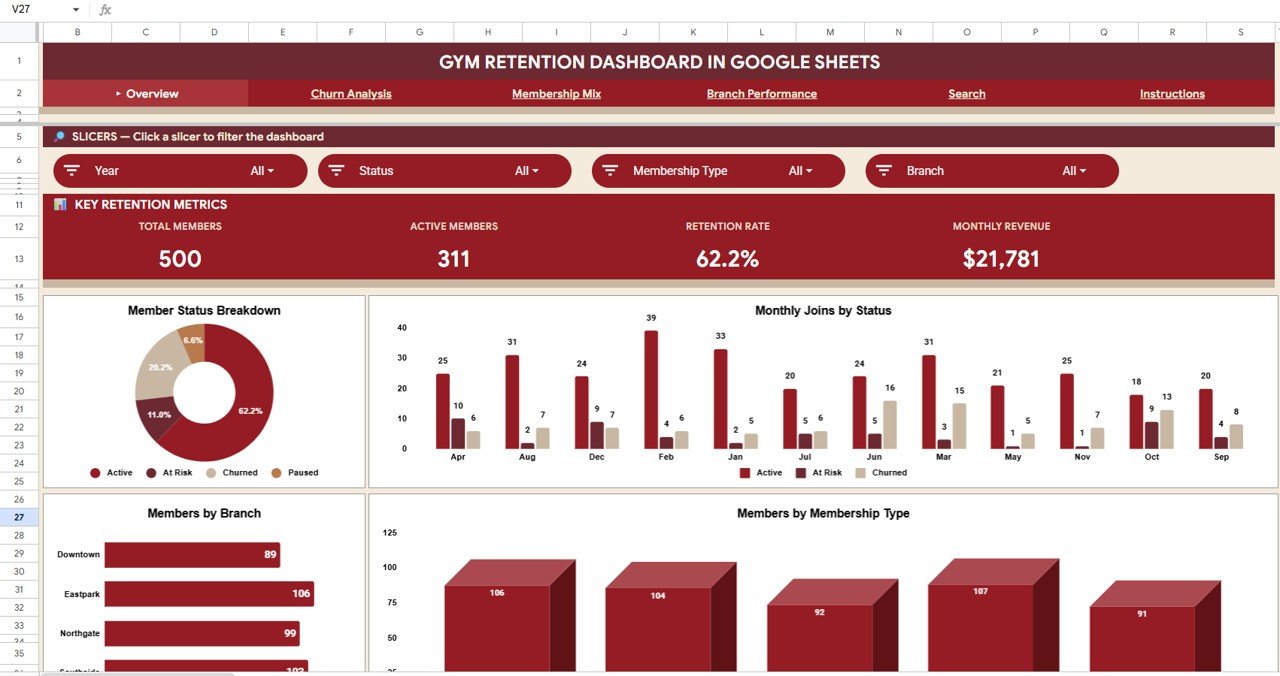
The Gym Retention Dashboard in Google Sheets tracks 4 KPIs (Total Members, Active Members, Retention Rate, Monthly Revenue), 12 charts across 4 analysis pages, a member search page, and a structured data sheet — 6 sheet tabs total. It covers churn reason analysis, branch-level retention comparison, membership plan distribution, acquisition channel effectiveness, and individual member lookup. Every chart updates automatically when you replace the sample data with your own records.
Key highlights include a dedicated Churn Analysis page with Member Count by Churn Reason, Avg Months Before Leaving by Branch, Churned Members by Age Group, and Churn by Original Join Month. The Branch Performance page compares Members by Branch, Member Status by Branch, Monthly Active Revenue by Branch, and Avg Tenure by Branch. The Membership Mix page breaks down Members by Plan, Avg Monthly Fee by Plan, Members by Acquisition Channel, and Members by Plan and Membership Type. Multiple slicers on the Overview page let you filter everything instantly.
Dashboard Pages Explanation
1 — Overview Page
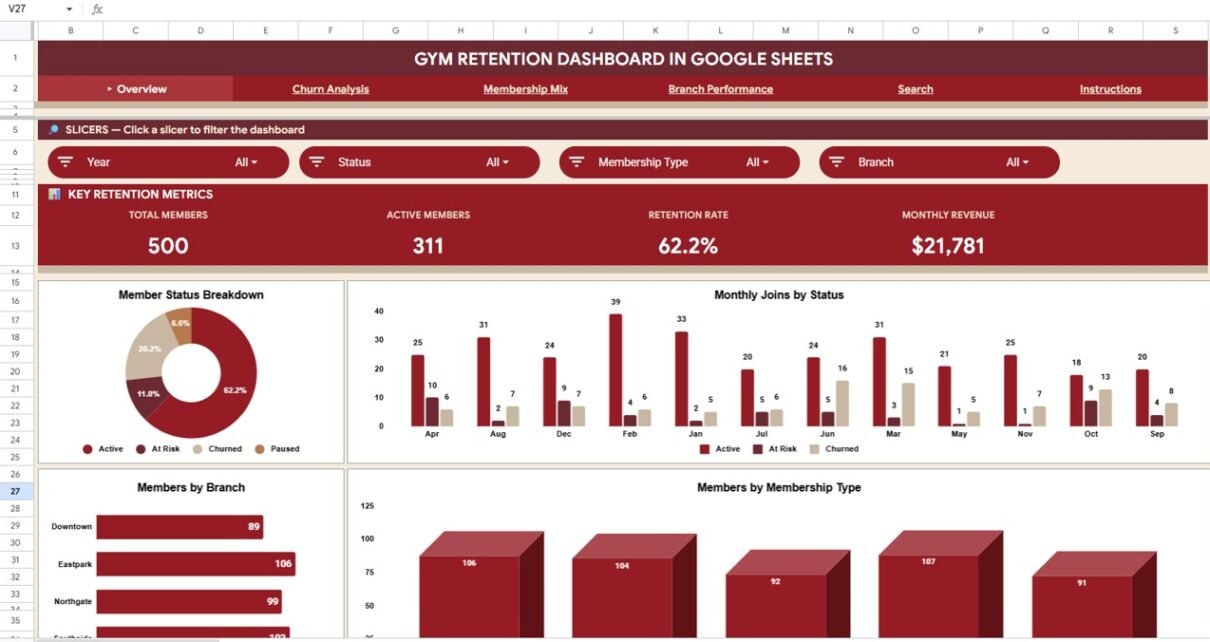
The landing page opens with 4 KPI cards (Total Members, Active Members, Retention Rate, Monthly Revenue) and interactive charts: Members by Status shows the active vs churned vs frozen split, Monthly Joins by Status tracks new member acquisition against cancellations, Members by Branch reveals location-level headcount, and Members by Membership Type breaks down the member base by tier. Slicers at the top filter the entire page by branch, plan, status, and more.
Overview Page2 — Churn Analysis
The retention strategy page. Member Count by Churn Reason surfaces the top cancellation drivers — relocation, pricing, dissatisfaction, or time constraints. Avg Months Before Leaving by Branch shows tenure per location before churn. Churned Members by Age Group identifies at-risk demographics. Churn by Original Join Month reveals seasonal cancellation patterns.
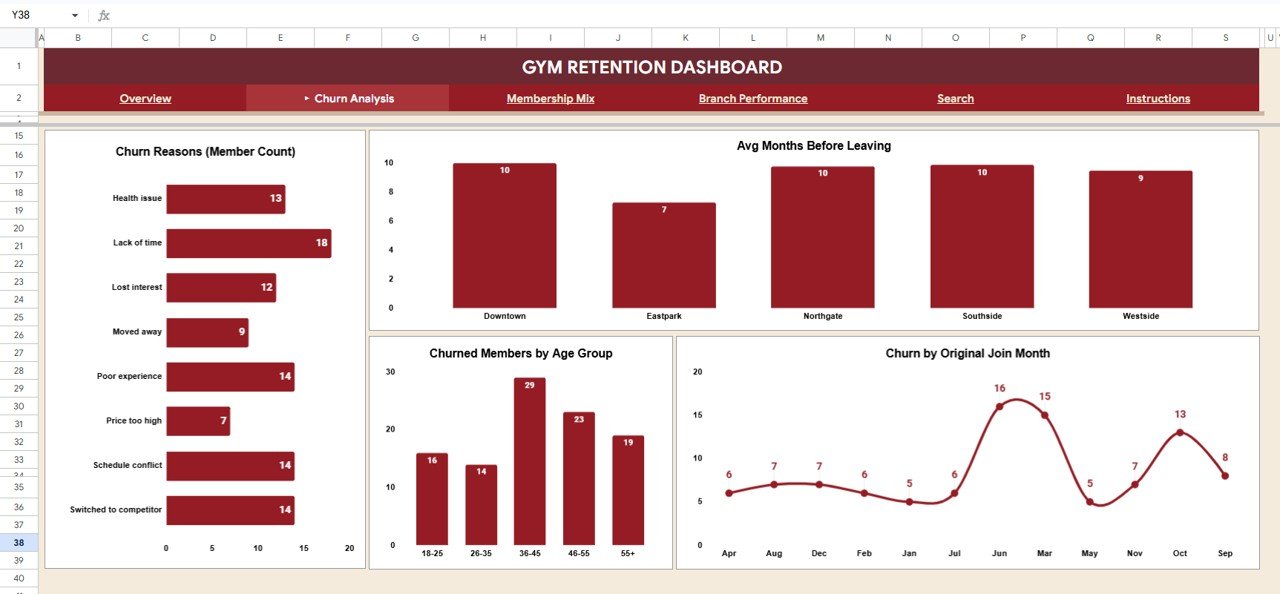 Churn Analysis
3 — Membership Mix
Members by Plan shows distribution across monthly, quarterly, and annual plans. Avg Monthly Fee by Plan reveals pricing effectiveness. Members by Acquisition Channel identifies which channel — referrals, social, walk-ins, ads — drives sign-ups. Members by Plan and Membership Type cross-references duration with tier for segmentation.
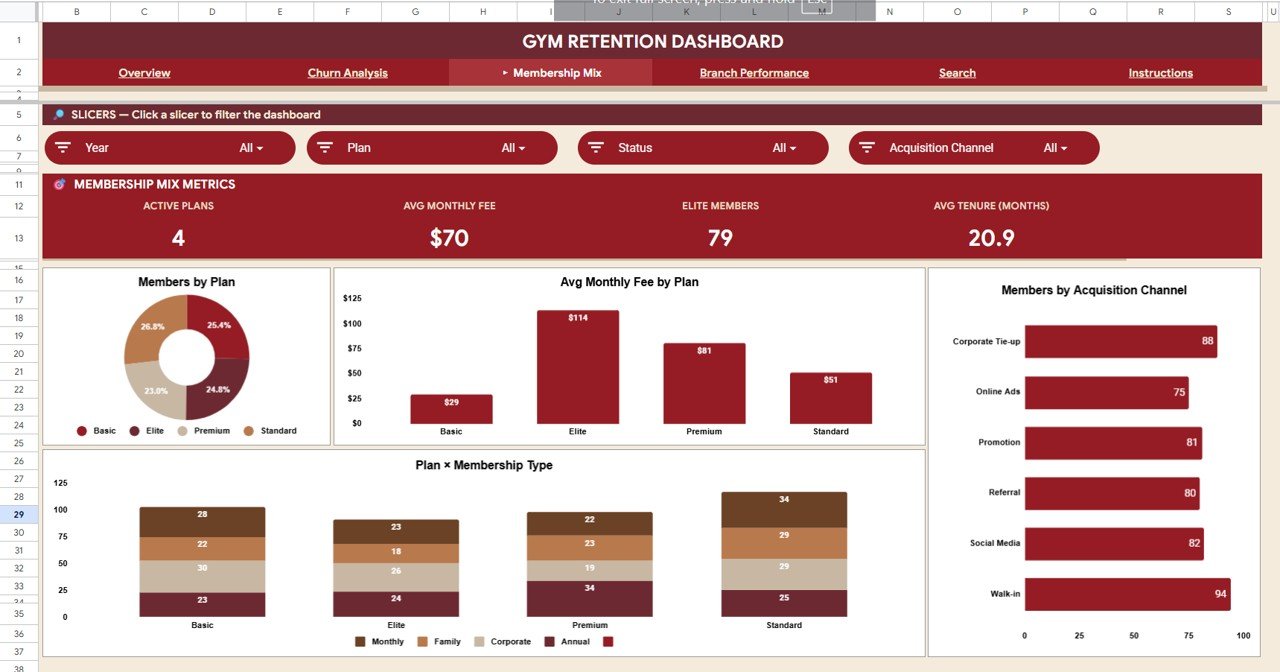 Membership Mix
4 — Branch Performance
Members by Branch gives headcount. Member Status by Branch shows active/churned/frozen splits per location. Monthly Active Revenue by Branch tracks income per outlet. Avg Tenure (Months) by Branch highlights which locations keep members longest — a direct retention quality proxy.
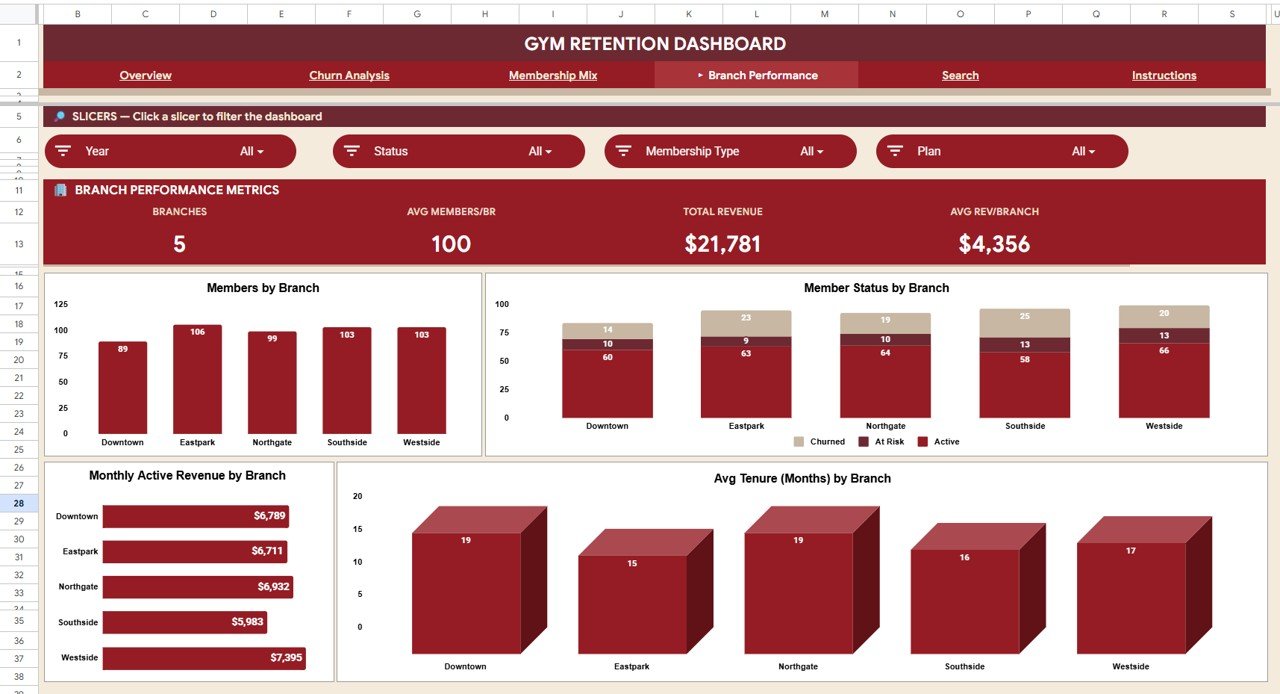 Branch Performance
5 — Search
Select any Member ID from the dropdown to instantly view 12 fields: Member ID, Join Date, Status, Membership Type, Plan, Branch, Age Group, Monthly Fee, Tenure (Months), Last Visit (Days), Acquisition Channel, and Churn Reason.
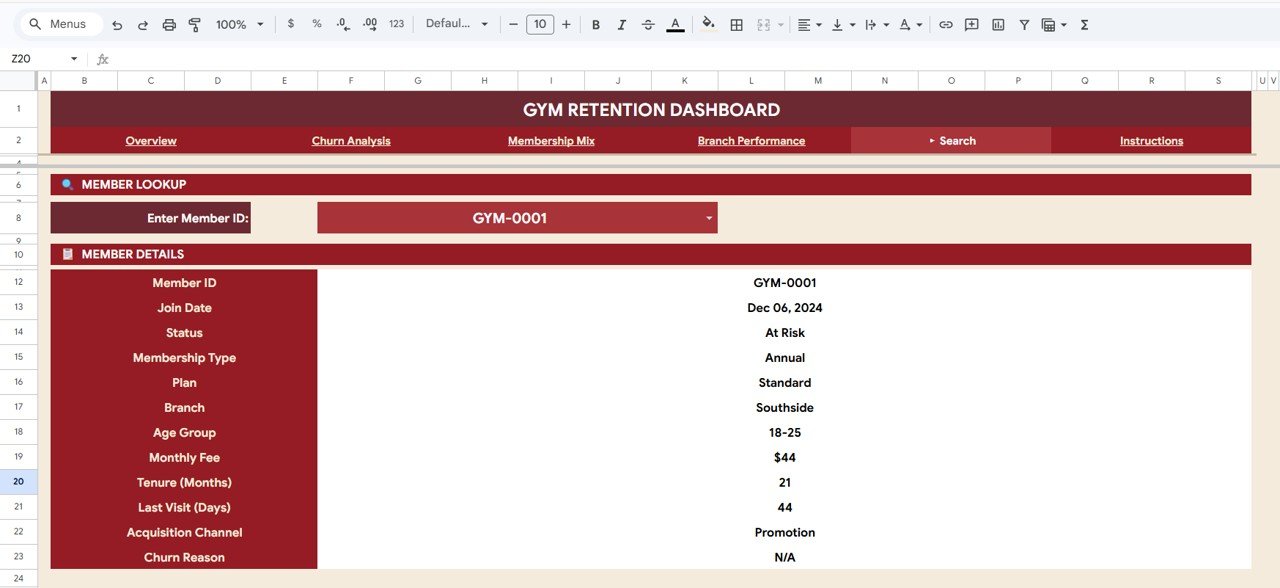 Search tab
6 — Data Sheet
Your single data entry point. Add member records row-by-row and every chart, KPI, and analysis page updates automatically.
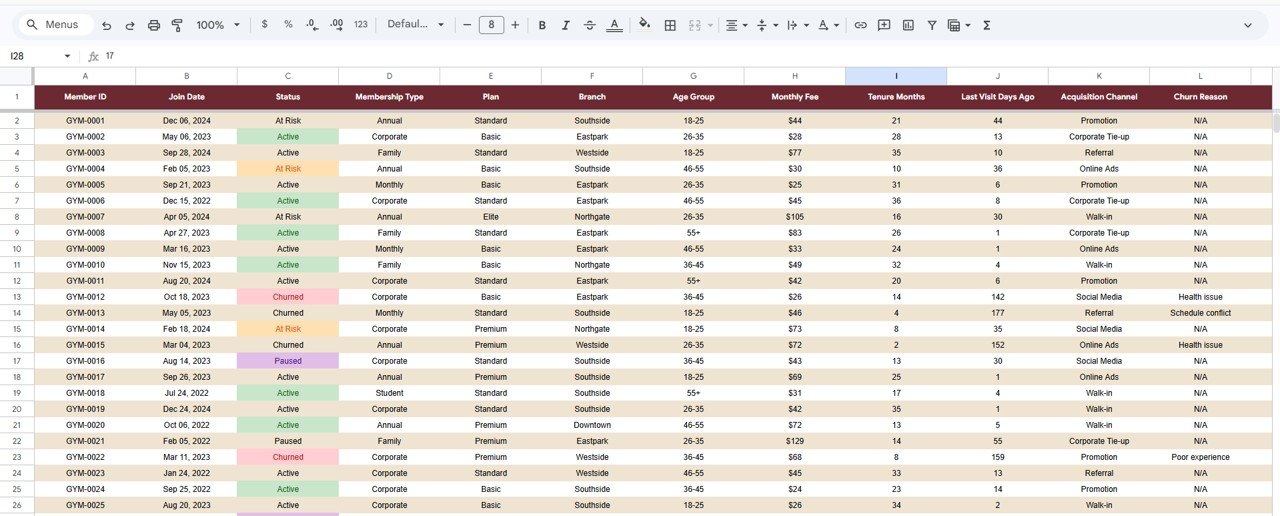 Data Sheet tab
Gym Retention Dashboard in Google Sheets vs. Microsoft Excel vs. Paid Gym SaaS — Feature Comparison
| Feature | Gym Retention Dashboard (Google Sheets) | Microsoft Excel Dashboard | Paid Gym SaaS (Mindbody / Glofox) |
|---|---|---|---|
| Cost | $9.99 one-time | $17-25 one-time | $129–$349/month |
| Platform | Google Sheets (cloud) | Excel Desktop | Web + mobile |
| Setup time | Under 10 minutes | Under 10 minutes | 2-6 weeks |
| Real-time collaboration | Built-in | File-based | Cloud native |
| Churn reason analysis | Dedicated page | Build manually | Varies by tier |
| Branch retention comparison | Included | Build manually | Higher tiers |
| Member search | Dropdown lookup | Requires VBA | Built-in CRM |
| Year-1 cost (5 users) | $9.99 total | $17-25 total | $1,548–$4,188 |
For gym owners who want dedicated retention analytics without paying $1,500+/year for SaaS, the Gym Retention Dashboard in Google Sheets sits in the sweet spot.
Who Should Use This Template
Perfect for:
- Gym owners with 50–5,000 members tracking why members cancel and which branches retain best
- Membership directors monitoring retention rate, churn reasons, and tenure trends
- Marketing managers analyzing which acquisition channels deliver longest-staying members
- Multi-location gym chains comparing branch-level retention
Not a fit if:
- Enterprise gym chains needing SOC 2, SSO, and 24/7 vendor support
- You need booking, payments, and door-access features — this is analytics only
- You prefer working entirely offline without a Google account
Real-World Use Cases
Rahul manages a 3-branch gym chain with 1,200 members in Delhi. He opens the Gym Retention Dashboard every Monday to check Branch Performance. Last quarter, his Noida branch showed an average tenure of just 4.2 months vs 8.1 at the flagship — Churn Analysis revealed “lack of parking” as the top reason, an insight standard reports missed entirely.
Sophie runs a boutique fitness studio with 300 members in Melbourne. The Membership Mix page showed annual members stay 3x longer than monthly holders. She shifted her marketing budget toward annual-plan promotions and cut monthly churn by 18% in one quarter — without paying $229/month for Glofox analytics.
Carlos is a membership director at a mid-size health club in Miami. He uses the Search tab before retention calls to pull each member’s full profile. The Churn by Original Join Month chart revealed January joiners churn 40% faster than April joiners, reshaping his onboarding strategy entirely.
Advantages of Gym Retention Dashboard in Google Sheets
- Dedicated churn analysis page — most gym dashboard templates skip this entirely
- Branch-level retention comparison for multi-location operators
- Member search with 12-field instant lookup for frontline staff
- Cloud-based with real-time collaboration — share with your team instantly
- $9.99 one-time vs $1,500+/year for SaaS alternatives
- No macros, no scripts, no advanced skills — replace data and go
Opportunities for Improvement
- Currently tracks churn reasons as free-text categories — a standardized dropdown taxonomy in the data sheet would improve consistency across large teams
- No automated email alerts for members approaching churn risk thresholds — integrating with Google Sheets triggers could add this
- Revenue forecasting based on retention trends is not built in — would require adding projected revenue formulas
- The template is designed for single-currency tracking; multi-currency gym chains would need manual conversion columns
Best Practices
- Update data weekly for the most actionable churn insights — monthly updates miss short-term patterns
- Standardize churn reason categories across all branches to make the Churn Analysis page comparable
- Use the Branch Performance page in monthly management meetings to hold location managers accountable for retention
- Review the Membership Mix page quarterly to adjust pricing and plan structure based on actual retention data
- Export the Search tab results before retention calls so frontline staff have member context ready
Explore Relevant Templates
- Gym Fitness Business Dashboard in Google Sheets — broader gym business analytics with membership, revenue, and class tracking
- Fitness Industry KPI Scorecard in Google Sheets — MTD/YTD KPI tracking with trend analysis
- CrossFit Gym KPI Dashboard in Google Sheets — CrossFit-specific KPIs and trainer performance
- Gym Fitness Business Dashboard in Excel — pivot-powered Excel version with 7 sheet tabs
- Fitness Trainer Dashboard in Power BI — trainer-level revenue and session analytics
Curious how dashboards like this are put together? The Excel Pivot Tables & Dashboards course on NextGenTemplates Academy covers the charting and analysis skills with practice files.
Get the Gym Retention Dashboard in Google Sheets
Frequently Asked Questions
What KPIs does the Gym Retention Dashboard in Google Sheets track?
The Gym Retention Dashboard tracks 4 primary KPIs — Total Members, Active Members, Retention Rate, and Monthly Revenue — plus 12 analytical charts across churn analysis, membership mix, branch performance, and member search covering churn reasons, tenure, acquisition channels, and age-group breakdowns.
How does this compare to Mindbody or Glofox?
Mindbody and Glofox are full gym management platforms costing $129–$349 per month. The Gym Retention Dashboard in Google Sheets is a one-time $9.99 analytics template focused on member retention and churn analysis. It adds retention visibility that standard SaaS tiers often lack.
How long does setup take?
Under 10 minutes. Open the PDF, click the Google Sheets link, replace sample data, and every page updates automatically. No onboarding calls or account creation needed.
Can I use this for multiple gym branches?
Yes. A dedicated Branch Performance page compares members, revenue, tenure, and status across all locations automatically.
Do I need advanced Google Sheets skills?
No. Replace the sample data in the Data Sheet tab and everything updates. No macros, scripts, or coding required.
Can I customize the charts?
Yes. It is a native Google Sheets file — modify charts, add KPIs, change colors, and extend the data model to fit your needs.
Is this dashboard available in other formats?
Currently available in Google Sheets. For broader gym analytics, explore our Excel, HTML, and Power BI gym dashboards.
About the Author
Built by PK — Microsoft Certified Professional with 15+ years of Excel, Google Sheets, and Power BI experience. Founder of NextGenTemplates, reaching 300K+ subscribers across YouTube channels. Every template is hand-built and tested before release.
Conclusion
The Gym Retention Dashboard in Google Sheets gives gym owners, membership directors, and fitness studio managers the retention intelligence they need — churn reason analysis, branch-level retention comparison, membership mix breakdown, and individual member lookup — in a single Google Sheets file for $9.99 one-time. No subscription, no per-user fees, no onboarding calls.
✅ Instant download · One-time payment · No subscription · Lifetime access