The Wedding Budget Dashboard in Google Sheets tracks 4 KPIs across 6 interactive sheet tabs, with 18+ pre-built charts and multiple slicer filters for instant data filtering. Whether you are a couple planning your first wedding or a professional planner managing multiple client budgets, this Google Sheets template gives you a data-driven command center that updates automatically when you modify the underlying data — no formulas to write, no scripts to run.
According to Google Sheets documentation, pivot tables and slicers in Google Sheets can handle large datasets with automatic recalculation, making them ideal for budget tracking across dozens of wedding expense categories. The Wedding Budget Dashboard in Google Sheets leverages these native features to deliver 6 focused analysis pages covering Overview, Budget Analysis, Payments, Vendors, Search Sheet, and Data Sheet — all accessible from any device with a browser.
Get the Wedding Budget Dashboard in Google Sheets
Key Features of Wedding Budget Dashboard in Google Sheets
The Wedding Budget Dashboard in Google Sheets includes 6 interactive sheet tabs covering every angle of wedding financial management. Here are the features that make this template stand out:
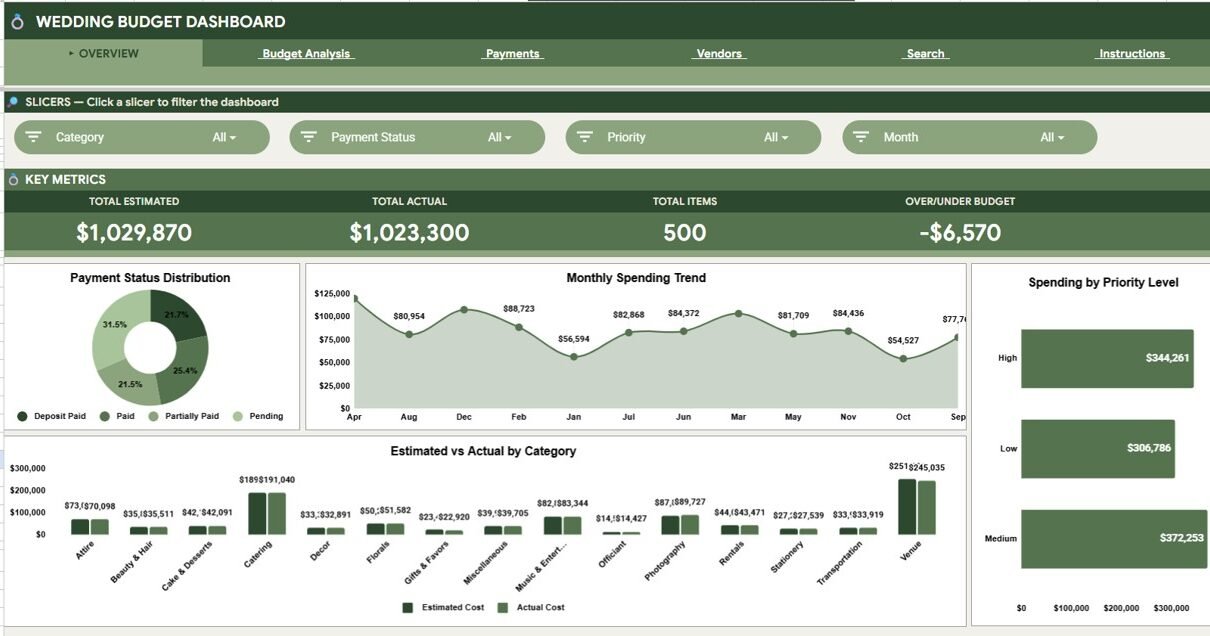
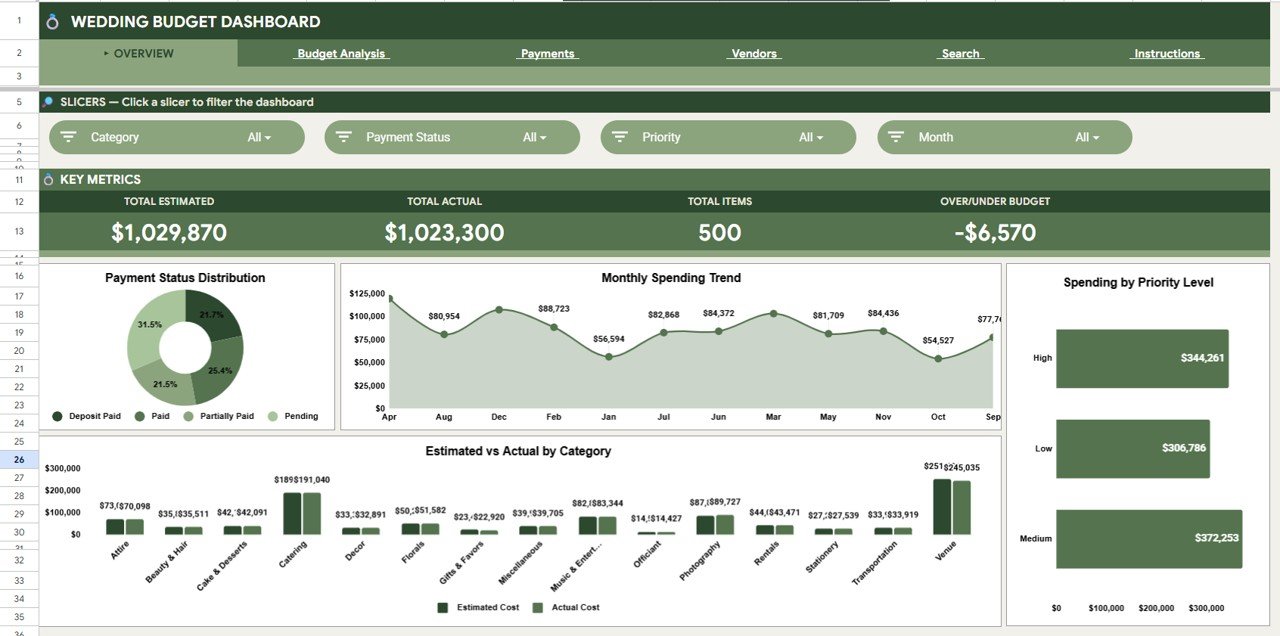
- 4 KPI Summary Cards — Total Estimated, Total Actual, Total Items, and Over/Under Budget displayed on the Overview page for instant executive-level visibility.
- 18+ Dynamic Charts — Payment Status Distribution by Status, Monthly Spending Trend by Month, Spending by Priority Level, Estimated vs Actual by Category, Avg Estimated by Wedding Items, Top Sub-Categories by Spend, and more.
- Slicer Filters — Multiple slicers on the Overview page let you filter by category, vendor, payment status, priority, and payment method in one click.
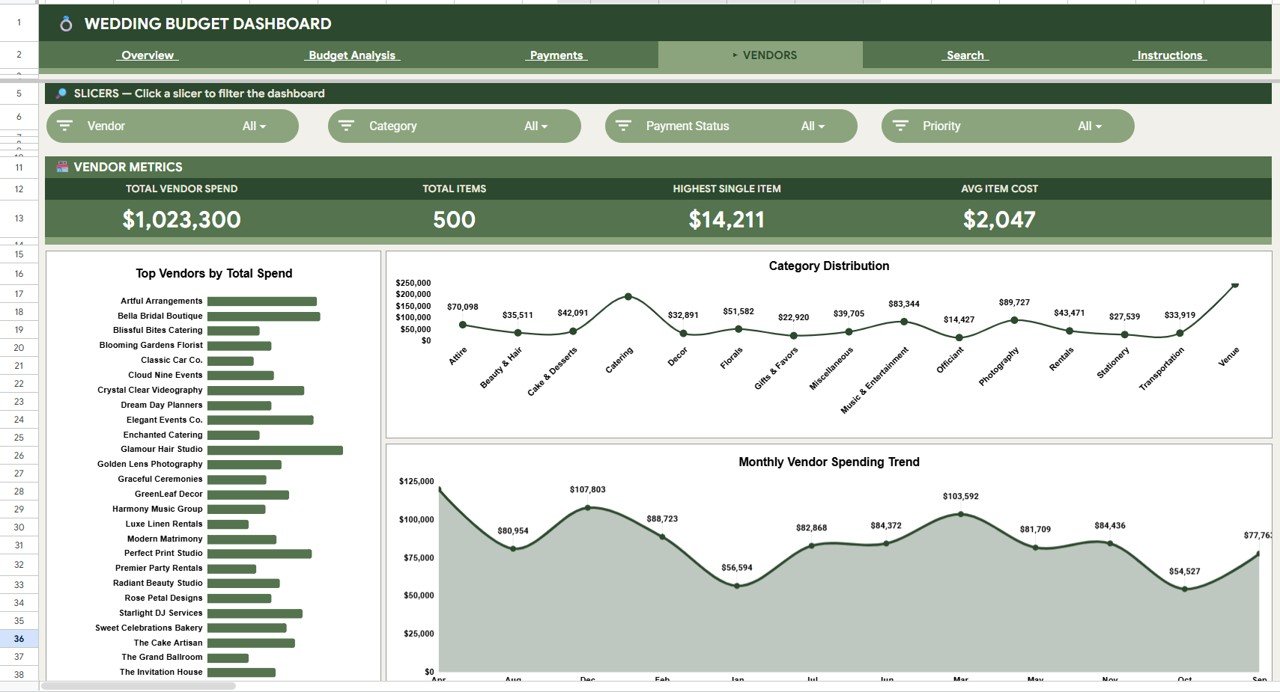
- Vendor Tracking — Total Vendor Spend, Item Count, Highest Single Item, Avg Item Cost, Top Vendors by Spend, and Monthly Spending Trend by Vendor.
- Payment Analysis — Total Paid vs Pending by Status and Method, Payment Status Distribution, Spending by Payment Method.
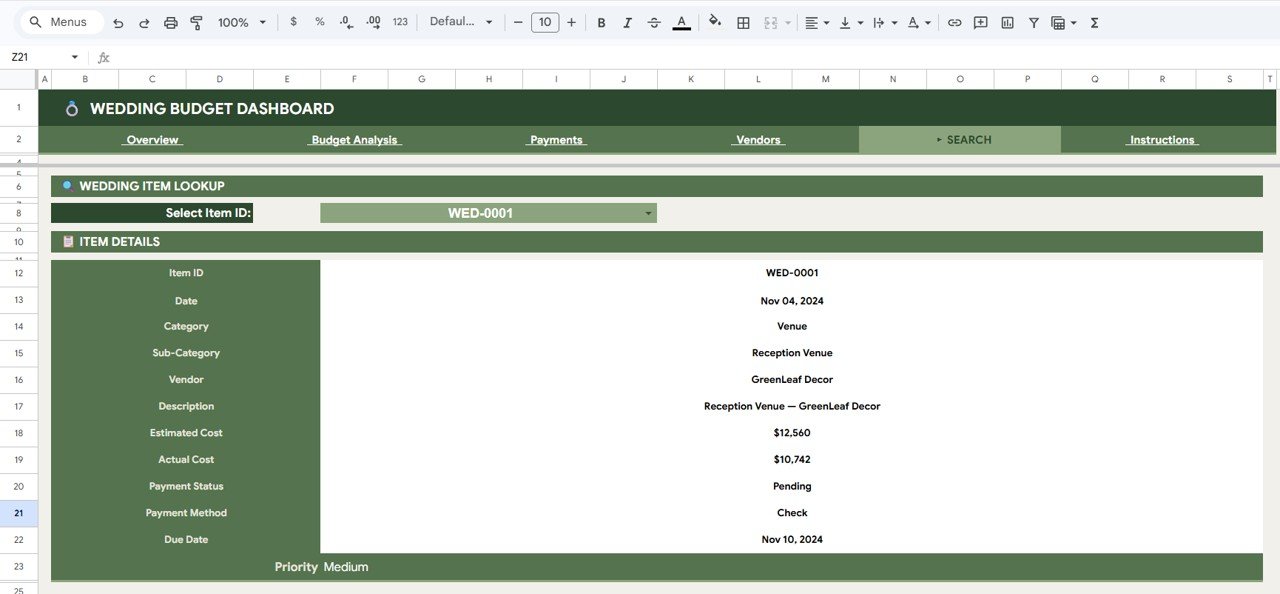
- Item Lookup Search Sheet — Select any Item ID from a dropdown and instantly view all details including Date, Category, Vendor, Estimated Cost, Actual Cost, Payment Status, and Priority.
- Real-time Collaboration — Share the dashboard with your partner, family, or wedding planner via a Google Sheets link with view or edit permissions.
Dashboard Sheets Explanation
1 — Overview Page
The Overview page is your command center. At the top, 4 KPI cards display Total Estimated, Total Actual, Total Items, and Over/Under Budget. Below the cards, four charts show Payment Status Distribution by Status, Monthly Spending Trend by Month, Spending by Priority Level, and Estimated vs Actual by Category. Multiple slicer filters let you slice the data instantly across all dimensions.
2 — Budget Analysis
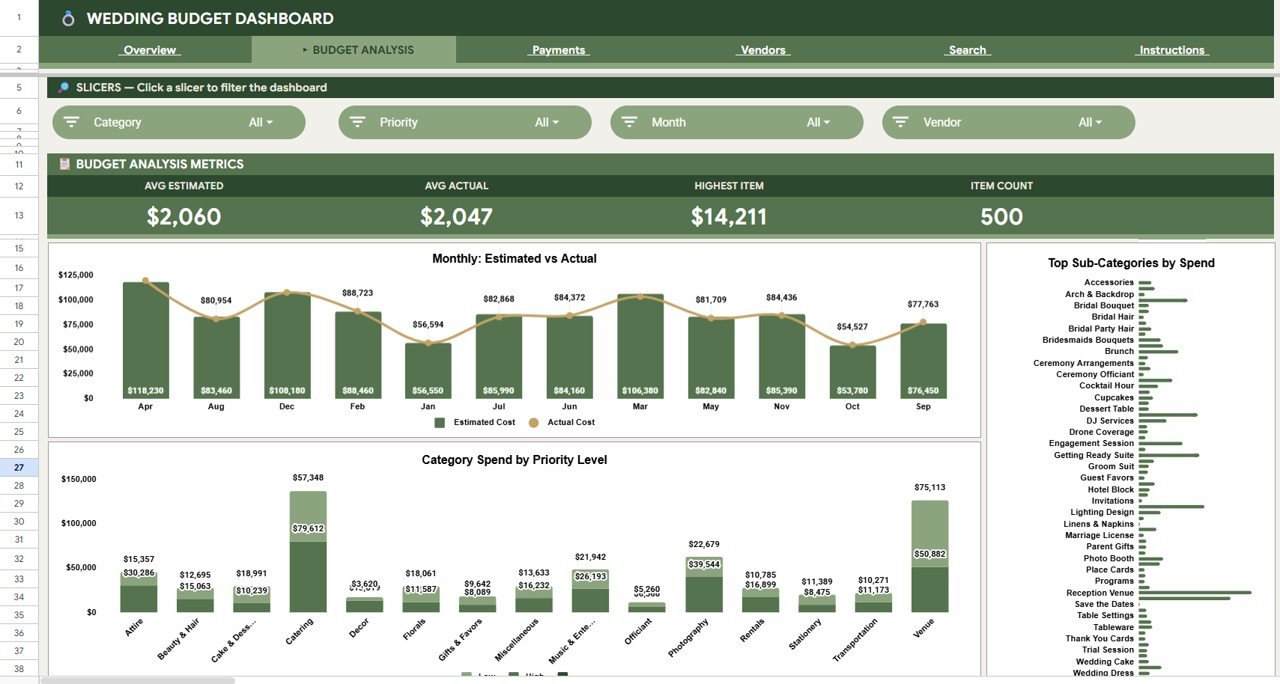
This sheet tab focuses on deep budget comparison with charts for Avg Estimated by Wedding Items, Avg Actual by Wedding Items, Highest Item by Spend, Item Count by Category, Monthly Estimated vs Actual by Month, Top Sub-Categories by Spend, and Category Spend by Priority Level. The estimated vs actual comparison by month helps you quickly spot periods where spending exceeds the plan.
3 — Payments
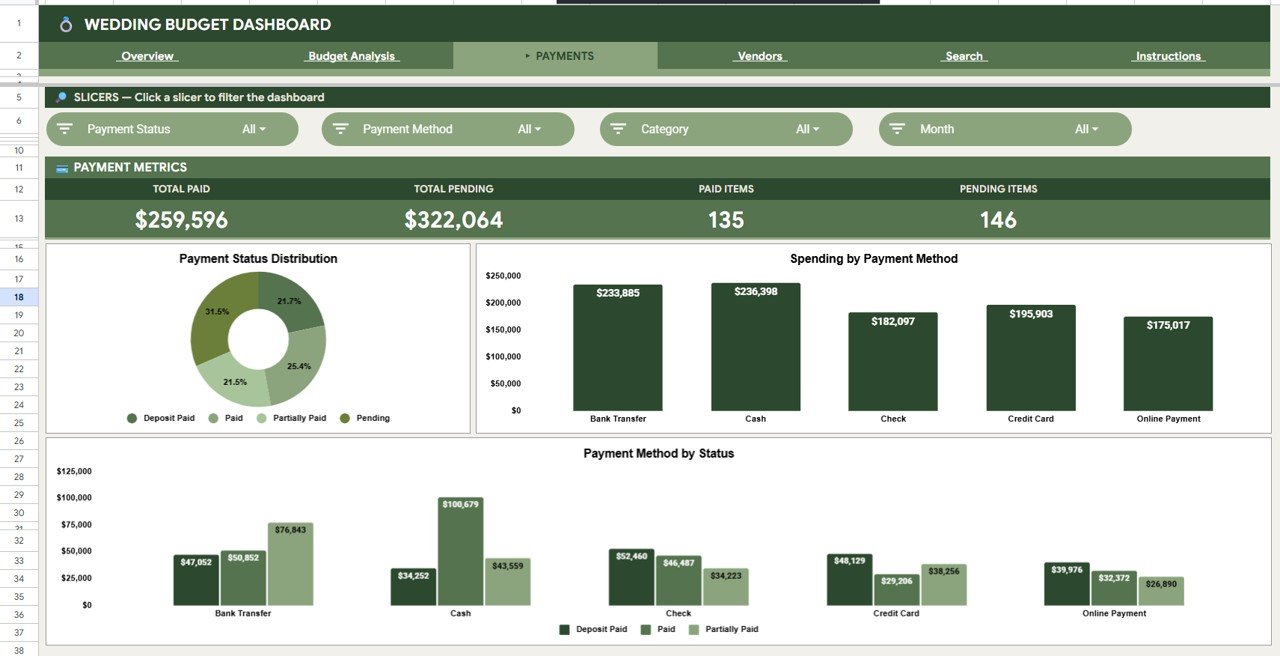
Track payment timelines and breakdowns with charts for Total Paid by Payment Status, Total Pending by Payment Status, Paid Items by Payment Method, Pending Items by Payment Method, Payment Status Distribution by Status, Spending by Payment Method, and Payment Method by Status. This page gives you full financial clarity — tracking which payments are complete and which are still pending.
4 — Vendors
Analyze vendor-related finances with charts for Total Vendor Spend by Vendor, Total Items by Vendor, Highest Single Item by Vendor, Avg Item Cost by Vendor, Top Vendors by Total Spend, Category Distribution by Category, and Monthly Vendor Spending Trend by Month. This page is essential for evaluating which vendors are costing the most and monitoring spending trends.
5 — Search Sheet
This sheet tab features a Wedding Item Lookup where you can select any Item ID from a dropdown and instantly see all related details — Date, Category, Sub-Category, Vendor, Description, Estimated Cost, Actual Cost, Payment Status, Payment Method, Due Date, and Priority. This makes it easy to find specific wedding item details quickly without scrolling through the entire data.
6 — Data Sheet
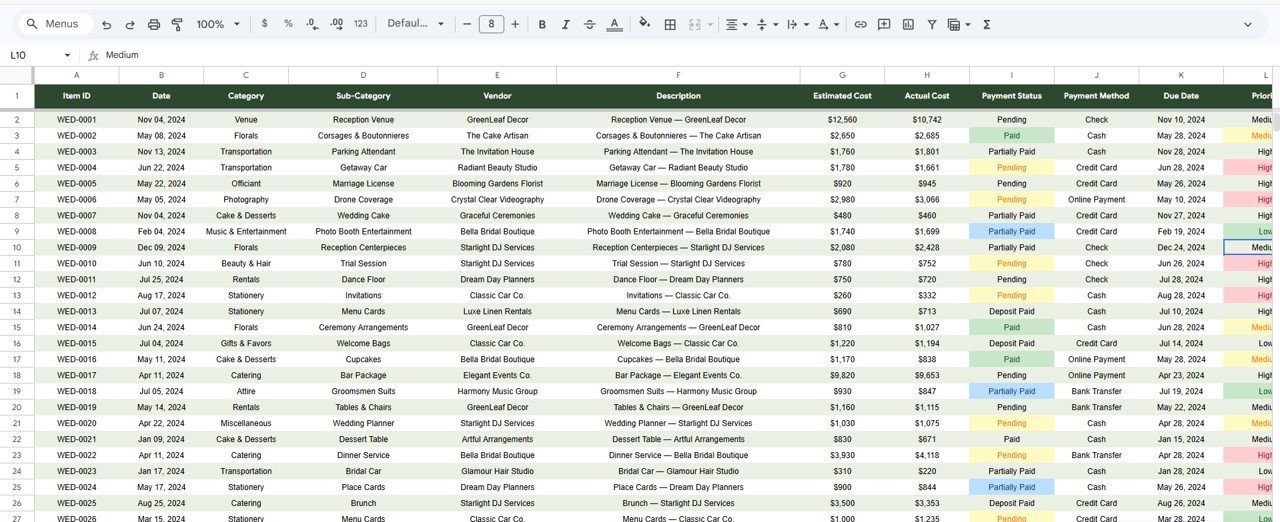
This is the Data sheet where you add your wedding budget data in the same format as the sample records. Replace the sample entries with your own wedding expenses, vendors, payment details, and priority levels — all charts and KPI cards update automatically.
Wedding Budget Dashboard in Google Sheets vs. Excel Dashboard vs. Paid Wedding SaaS — Feature Comparison
| Feature | Wedding Budget Dashboard in Google Sheets | Excel Wedding Dashboard | Zola / The Knot / WeddingWire Pro |
|---|---|---|---|
| Cost | $9.99 one-time | $17.99 one-time | $0 basic / $30–$150+ per month premium |
| Platform | Google Sheets (free) | Microsoft Excel | Web SaaS |
| Setup time | Under 10 minutes | Under 15 minutes | 30–60 minutes |
| Real-time collaboration | Yes — share via link | Limited | Yes |
| Mobile access | Google Sheets app | Limited | Yes |
| Customizable fields | Fully editable | Fully editable | Template-locked |
| Year-1 cost at 2 users | $9.99 total | $17.99 total | $360–$1,800+ |
| Data ownership | 100% Google Drive | 100% local file | Vendor cloud |
For couples who want Zola-style budget analytics without the monthly subscription, the Wedding Budget Dashboard in Google Sheets sits in the sweet spot.
Who Should Use This Template
Perfect for:
- Couples planning a wedding with 50–500 guests who want to track every expense category
- Professional wedding planners managing 5–20 client budgets in Google Drive
- Families coordinating wedding finances across multiple contributors
- Event coordinators who prefer Google Sheets for real-time collaboration
Not a fit if:
- You need live vendor booking, RSVP tracking, and guest management — use Zola or The Knot
- You require SOC 2 compliance and enterprise audit trails
- You don’t have a Google account
Real-World Use Cases
Ananya is planning her 200-guest wedding in Delhi on a ₹15 lakh budget. She uses the Wedding Budget Dashboard in Google Sheets to compare estimated vs actual costs across 12 categories. The Monthly Spending Trend chart helps her space out vendor deposits. She shares the dashboard with her mother and wedding planner via a Google Sheets link — everyone sees the same live numbers.
Rachel runs a boutique wedding planning business in London managing 8 weddings at once. She duplicates the template for each client, tracks vendor payments on the Payments page, and uses the Search Sheet to pull up item details during client calls. Before this template, she spent 3 hours per week manually updating spreadsheets — now she spends 20 minutes.
Carlos and Maria are planning a destination wedding in Cancún from Toronto. They use the Vendor Tracker page to compare costs across local vendors and the Budget Analysis page to track estimated vs actual by sub-category. The Google Sheets format means they can update the budget from their phones during venue visits.
Advantages of Wedding Budget Dashboard in Google Sheets
- Zero software cost — Google Sheets is free with any Google account, keeping the total investment at just $9.99
- Instant collaboration — Share with any number of people via link, no per-user fees
- Mobile-ready — Update expenses from your phone during vendor meetings using the Google Sheets app
- Automatic updates — All charts and KPI cards recalculate when you modify the data sheet
- Item Lookup — The Search Sheet saves time by letting you pull up any item’s full details in seconds
Opportunities for Improvement
- The template does not include RSVP or guest list management — couples needing that should pair it with a separate guest tracker or use Zola/The Knot for guest management
- Charts in Google Sheets are less visually customizable than Power BI or HTML dashboards — couples wanting premium chart styling should consider the Power BI version
- Offline access is limited — Google Sheets requires an internet connection for real-time collaboration features
Best Practices
- Enter expenses in the Data Sheet on the same day they occur to keep the dashboard current
- Use the slicer filters on the Overview page to check specific categories before vendor meetings
- Share the dashboard with edit access to your partner and view-only access to family members
- Review the Budget Analysis page weekly to catch over-budget categories early
- Use the Search Sheet during vendor calls to quickly verify payment status and due dates
Explore Relevant Templates
Wedding Budget Dashboard in Excel — the same wedding budget tracking experience using Excel pivot tables and slicers.
Wedding Budget Dashboard in Power BI — advanced interactive analytics with DAX-powered calculations and cross-filtering.
Wedding Budget Dashboard in HTML — browser-based dashboard with 15+ charts and CSV export.
Event Management Analysis Dashboard in Excel — full event portfolio tracking with revenue, budget, and attendance analysis.
Browse all Google Sheets Dashboard Templates for more options.
Get the Wedding Budget Dashboard in Google Sheets
If you enjoy working with budget data like this, the Excel Pivot Tables & Dashboards course on NextGenTemplates Academy shows how to build summaries and charts step by step, with practice files.
Frequently Asked Questions
What KPIs does the Wedding Budget Dashboard in Google Sheets track?
The Wedding Budget Dashboard in Google Sheets tracks 4 headline KPIs — Total Estimated, Total Actual, Total Items, and Over/Under Budget. Across 6 sheet tabs, it covers 18+ charts analyzing spending by category, vendor, payment method, priority level, and monthly trends.
Do I need paid software to use this dashboard?
No. Google Sheets is free with any Google account. Open the copy link and the entire dashboard runs in your browser. No Excel, no Power BI, no installation needed.
Can I share this dashboard with my partner and wedding planner?
Yes. Google Sheets lets you share the dashboard via a link with view or edit permissions. Your partner, parents, and planner can all access the same live dashboard from any device.
How does this compare to Zola or The Knot budget tools?
Zola and The Knot offer integrated wedding websites and RSVP management alongside basic budgeting. The Wedding Budget Dashboard in Google Sheets is a one-time $9.99 purchase focused on financial analytics — 6 pages of charts, vendor tracking, payment analysis, and item search.
How long does setup take?
Setup takes under 10 minutes. Click the copy link in the PDF guide, replace sample data with your own wedding expenses, and every chart updates automatically.
Can I customize the categories and vendors?
Yes. The Data Sheet uses standard columns — you can add, rename, or remove categories, sub-categories, vendors, and payment methods. All charts adapt dynamically.
Can I use this dashboard on my phone?
Yes. The Wedding Budget Dashboard in Google Sheets works in the Google Sheets mobile app on both iOS and Android. Update expenses and check KPIs during venue visits.
About the Author
Built by PK — Microsoft Certified Professional with 15+ years of Excel, Google Sheets, and Power BI experience. Founder of NextGenTemplates, reaching 300K+ subscribers across YouTube channels. Every template is hand-built and tested before release.
Conclusion
The Wedding Budget Dashboard in Google Sheets gives couples and wedding planners a structured, visual, and collaborative way to manage every dollar of their wedding finances. With 4 KPIs, 18+ charts, 6 dedicated analysis pages, and a built-in item search feature, it replaces manual spreadsheets and expensive SaaS subscriptions with a single $9.99 Google Sheets template.
✅ Instant download · One-time payment · No subscription
📅 Last updated: April 2026