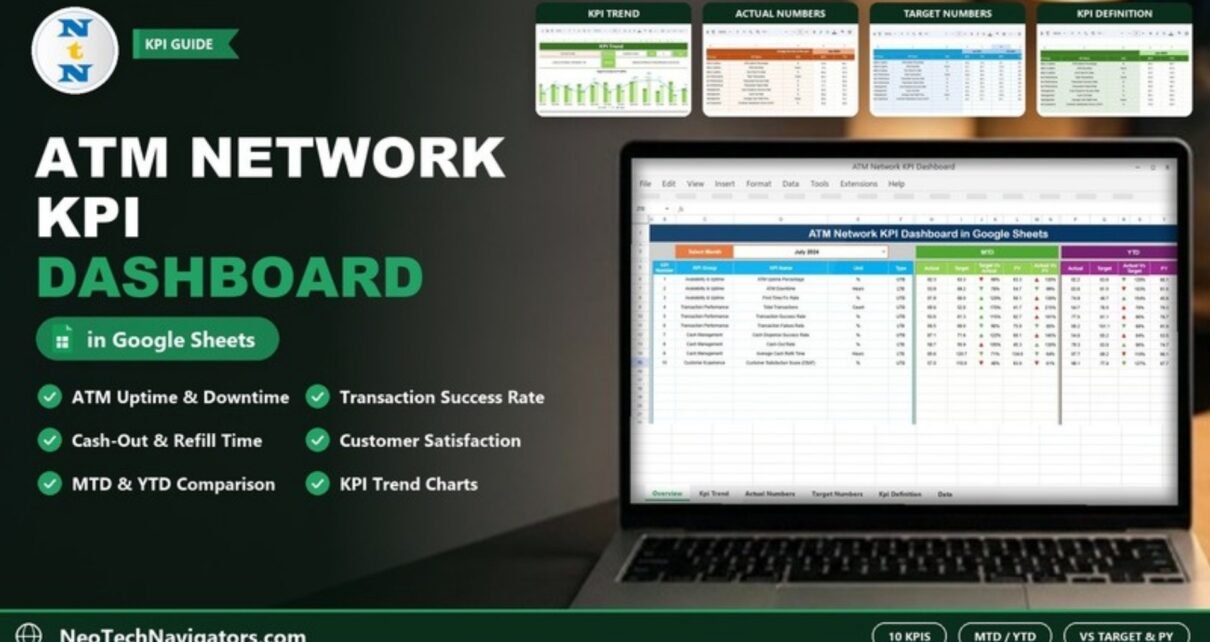
The ATM Network KPI Dashboard in Google Sheets gives ATM operations teams one monthly view of uptime, transactions, cash management and customer satisfaction. You pick a month and the dashboard shows every KPI’s MTD and YTD actual, target and previous-year value, with green and red arrows that show at a glance what is on track.
It is designed for bank and credit union ATM managers, branch network leads, cash-in-transit coordinators and independent ATM operators who receive monthly figures from reports and want a consistent scorecard. The file has six tabs: Dashboard, KPI Trend, Actual Numbers, Target Numbers, Previous Year Numbers and KPI Definition. The sample is set up with ten KPIs in four groups, and every KPI’s formula and definition is written out on the KPI Definition tab.
Get the ATM Network KPI Dashboard
Why Use an ATM Network KPI Dashboard in Google Sheets?
ATM performance data usually arrives in pieces: uptime from the monitoring system, transaction counts from the switch, cash-out incidents from the cash team and satisfaction scores from surveys. Putting them side by side each month, against target and last year, is slow and error-prone when done by hand.
This template separates the work into input tabs and a reporting tab. You type monthly MTD and YTD values into three input sheets, and the Dashboard does the comparisons. Because it is a Google Sheet, regional managers can open the same file from any browser, and you can control who edits and who only views.
The KPIs in the Template
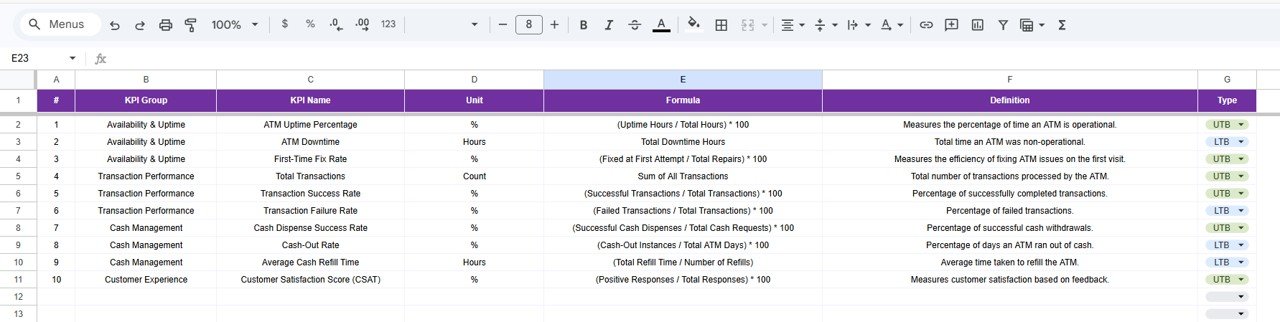
These are the ten KPIs defined on the KPI Definition tab of the sample file, with the formulas and types exactly as written there. UTB means Upper the Better and LTB means Lower the Better.
| KPI (group) | What it measures | Formula | Better when |
|---|---|---|---|
| ATM Uptime Percentage (Availability & Uptime) | Percentage of time an ATM is operational | (Uptime Hours / Total Hours) * 100 | Higher (UTB) |
| ATM Downtime (Availability & Uptime) | Total time an ATM was non-operational, in hours | Total Downtime Hours | Lower (LTB) |
| First-Time Fix Rate (Availability & Uptime) | Efficiency of fixing ATM issues on the first visit | (Fixed at First Attempt / Total Repairs) * 100 | Higher (UTB) |
| Total Transactions (Transaction Performance) | Total number of transactions processed by the ATM | Sum of All Transactions | Higher (UTB) |
| Transaction Success Rate (Transaction Performance) | Percentage of successfully completed transactions | (Successful Transactions / Total Transactions) * 100 | Higher (UTB) |
| Transaction Failure Rate (Transaction Performance) | Percentage of failed transactions | (Failed Transactions / Total Transactions) * 100 | Lower (LTB) |
| Cash Dispense Success Rate (Cash Management) | Percentage of successful cash withdrawals | (Successful Cash Dispenses / Total Cash Requests) * 100 | Higher (UTB) |
| Cash-Out Rate (Cash Management) | Percentage of days an ATM ran out of cash | (Cash-Out Instances / Total ATM Days) * 100 | Lower (LTB) |
| Average Cash Refill Time (Cash Management) | Average time taken to refill the ATM, in hours | (Total Refill Time / Number of Refills) | Lower (LTB) |
| Customer Satisfaction Score (CSAT) (Customer Experience) | Customer satisfaction based on feedback | (Positive Responses / Total Responses) * 100 | Higher (UTB) |
You can rename these, change formulas or add more rows on the KPI Definition tab, so the list can grow to match your own network reporting.
Dashboard Tab
Choose a month in Select Month (cell D3). For each KPI, the MTD block shows Actual, Target, Target Vs Actual, PY and Actual Vs PY, and the YTD block repeats the same comparison for the year to date (there the third column is labelled Actual Vs Target). Arrows next to the percentages show whether the result is good or bad for that KPI’s type.
Here is how to read one row from the sample for July 2024. Transaction Success Rate has an MTD actual of 93.6 against a target of 81.3, so Target Vs Actual is 93.6 ÷ 81.3 = 115% with a green up arrow. Against last year’s 92.7, Actual Vs PY is 93.6 ÷ 92.7 = 101%. For ATM Downtime, which is Lower the Better, an actual of 53.9 hours against a target of 69.2 gives 78%, and the arrow is green because less downtime is good.
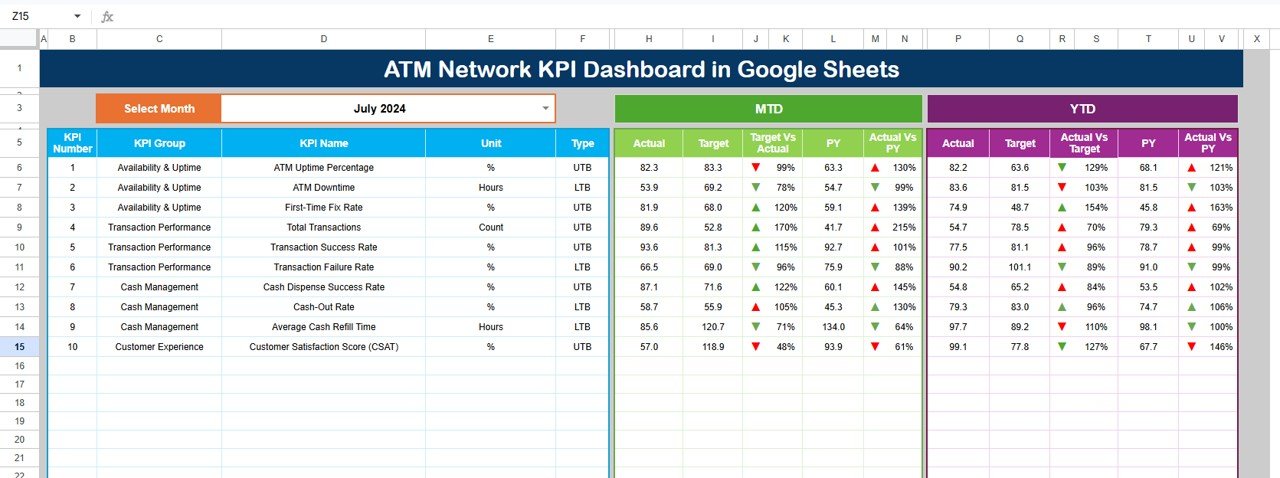
If you want to reproduce a comparison yourself, the percentage is a simple division. For example, ATM Uptime Percentage sits in row 6 of the Dashboard, with its MTD actual in H6 (82.3) and target in I6 (83.3):
=H6/I6Formatted as a percentage, that returns 99%, which is what the Target Vs Actual column shows with a red down arrow, because uptime is just below target.
KPI Trend Tab
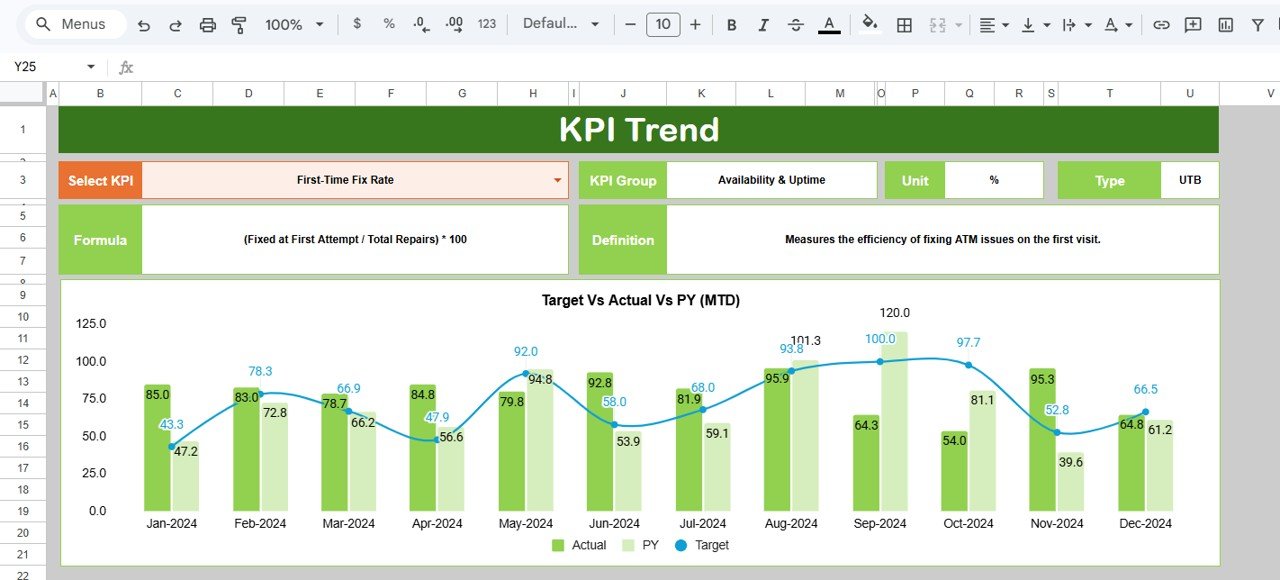
Pick a KPI in Select KPI (cell C3). The tab shows its KPI Group, Unit, Type, Formula and Definition, and plots Actual, Target and PY by month. The sample screenshot shows First-Time Fix Rate in the Target Vs Actual Vs PY (MTD) chart from Jan-2024 to Dec-2024, and the tab also includes a matching YTD chart. Use it to see whether a miss is a one-off month or a lasting trend.
Input Tabs
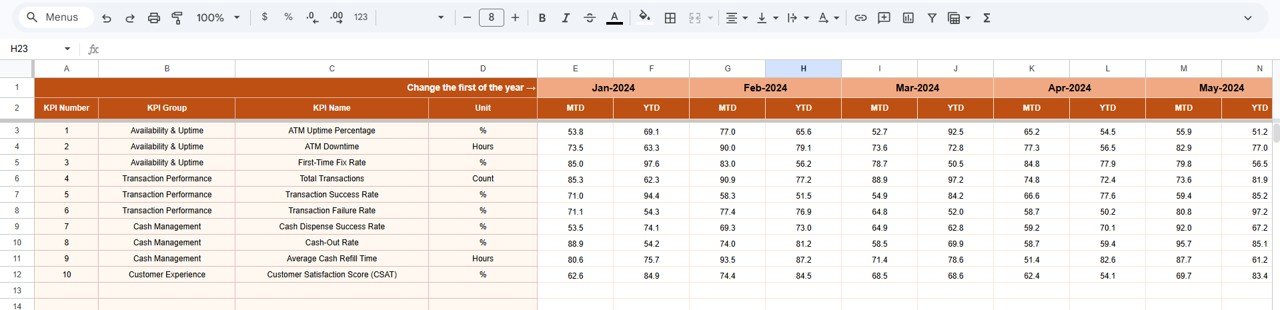
Actual Numbers
Enter the MTD and YTD actual value for each KPI and month. Type the first month of your year in cell E1 (“Change the first of the year”) and the following months fill in automatically, starting from Jan-2024 in the sample.
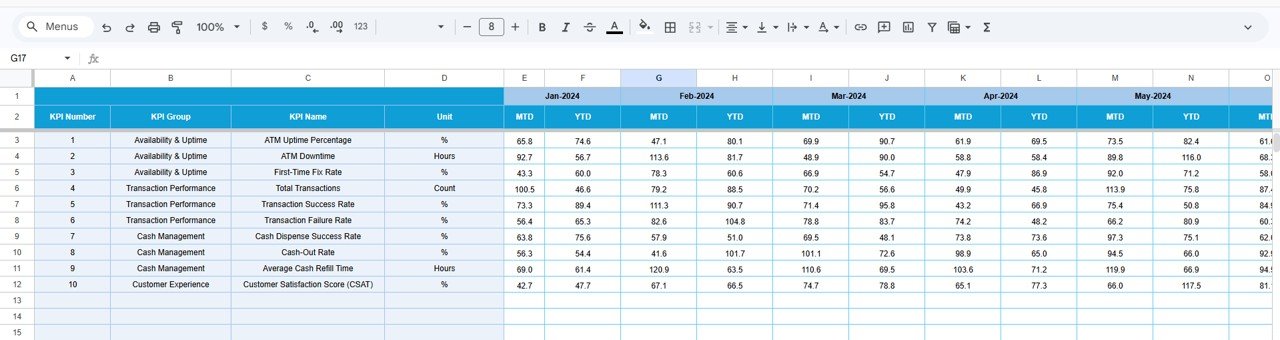
Target Numbers
Enter the MTD and YTD target for every KPI and month. These are the values the Dashboard compares against in the Target Vs Actual columns.
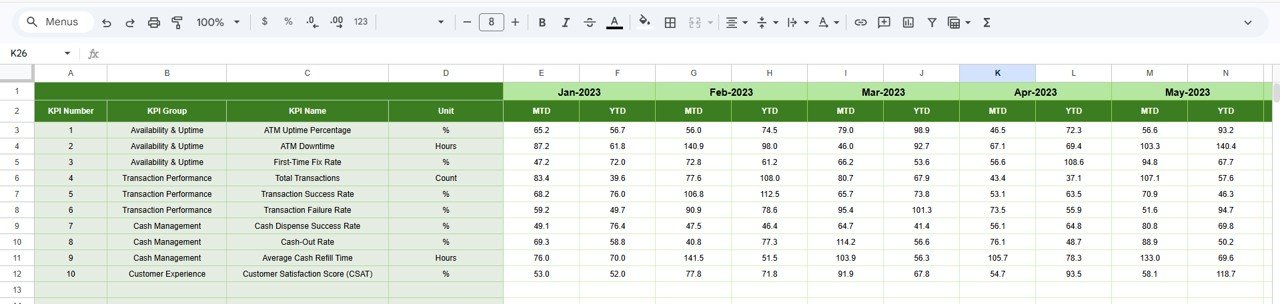
Previous Year Numbers
Enter last year’s MTD and YTD values in the same layout (Jan-2023 onward in the sample). They feed the PY and Actual Vs PY columns.
KPI Definition
This tab lists each KPI’s group, name, unit, formula, definition and type (UTB or LTB, chosen from a dropdown). The KPI Trend tab reads its information bar from here, and the type controls the arrow direction on the Dashboard.
How to Use It With Your Own Data
- Open the Google Sheets file from the PDF in your download and choose File > Make a copy to save it to your Google Drive.
- On KPI Definition, review the ten KPIs. Edit names, formulas and definitions to match how your bank measures them, and set each Type to UTB or LTB.
- On Actual Numbers, type your first month in cell E1.
- Fill in Previous Year Numbers and Target Numbers for all months.
- Each month, add the new MTD and YTD actuals on Actual Numbers.
- Open Dashboard, choose the month in D3 and review the arrows. Use KPI Trend for any KPI that needs a closer look.
Real-World Use Cases
- Monthly network review. An ATM operations manager selects the latest month and walks regional leads through every red arrow, starting with uptime and cash-out rate.
- Vendor and service checks. A team responsible for maintenance contracts tracks First-Time Fix Rate and ATM Downtime over twelve months on the KPI Trend tab before a vendor review.
- Cash planning. A cash management lead watches Cash-Out Rate and Average Cash Refill Time together to judge whether refill schedules need to change.
Best Practices
- Agree the definitions on the KPI Definition tab before entering data so everyone reads the numbers the same way.
- Check the UTB/LTB type carefully; a wrong type turns good results into red arrows.
- Enter both MTD and YTD values every month. YTD is entered, not calculated, so it must match your source reports.
- Share the file as view-only with leadership and edit access only for the people who enter data.
- Use the same unit across all months, especially for hours-based KPIs such as downtime and refill time.
Limitations
- Data is entered by hand. There is no live link to ATM monitoring, switch or core banking systems.
- It is a monthly reporting tool, not a real-time alerting system for machine faults.
- It reports at network or group level; per-machine analysis would need a separate data sheet.
- It does not handle regulatory or audit-trail requirements on its own.
Other ATM KPIs Worth Tracking
The template does not include these by default, but many teams add them as extra rows on the KPI Definition tab: average transactions per ATM per day, cash-in-transit cost per refill, mean time to repair, and customer complaints per 10,000 transactions.
Related Guides and Templates
For broader bank reporting, see the Banking KPI Dashboard in Google Sheets and the Banking Operations KPI Dashboard. If you prefer a single-page scorecard, compare the Banking KPI Scorecard in Google Sheets. Teams that report on transaction-level data can look at the Banking Dashboard in Google Sheets, and finance teams may find the Finance KPI Scorecard in Google Sheets useful alongside it.
Related template: working in Excel instead? The ATM Network KPI Dashboard in Excel covers the same topic.
If you want to learn how KPI dashboards like this are put together, the Excel Pivot Tables and Dashboards course on NextGenTemplates Academy is a structured place to start.
Frequently Asked Questions
How many KPIs does the ATM Network KPI Dashboard include?
The sample file is set up with ten KPIs across Availability & Uptime, Transaction Performance, Cash Management and Customer Experience. You can edit them or add more rows on the KPI Definition tab.
What do UTB and LTB mean?
UTB (Upper the Better) is for KPIs where a higher value is good, such as ATM Uptime Percentage. LTB (Lower the Better) is for KPIs where a lower value is good, such as ATM Downtime or Cash-Out Rate. The type decides the arrow direction.
How is Target Vs Actual calculated?
It is Actual divided by Target, shown as a percentage. For example, an actual of 93.6 against a target of 81.3 shows 115%.
Can I start the year in a month other than January?
Yes. Type your first month in cell E1 of the Actual Numbers tab and the following months update from there.
Does it connect to my ATM monitoring system?
No. You enter monthly figures from your reports. That keeps it simple and works with any vendor’s data.
Can my team use it at the same time?
Yes. It is a Google Sheet, so you can share it and edit together. Give view-only access to people who just need to read the results.
Wrapping Up
The ATM Network KPI Dashboard in Google Sheets gives you a consistent monthly scorecard for uptime, transactions, cash management and customer satisfaction, with targets and last year built in. Set up your KPI definitions, enter last year’s numbers and this year’s targets, and your first monthly review is ready as soon as the actuals are in.
Get the ATM Network KPI Dashboard in Google Sheets
📅 Last updated: October 2026