The Restaurant POS Web App is a 20-screen point-of-sale system that runs entirely on Google Sheets and Google Apps Script. It handles dine-in, takeaway, delivery, and counter orders, opens with a 9-KPI sales dashboard, ships with 19 built-in reports, and gives six roles (Admin, Manager, Cashier, Waiter, Inventory User, and Viewer) their own secure login. Setup takes under 15 minutes with no coding.
Many independent restaurants either pay a monthly fee for a SaaS POS like Toast or Square, or run billing on paper and a calculator. The Restaurant POS Web App is a one-time purchase that puts touch-friendly billing, a live table floor, a kitchen display, inventory, and reporting in one browser tab. This guide walks through every main screen so you can see how it works before you deploy it. The full gallery is on the NextGenTemplates product page.
Get the Restaurant POS Web App
🎥 Watch the Video Tutorial
🚀 Try the Live Demo Before You Buy
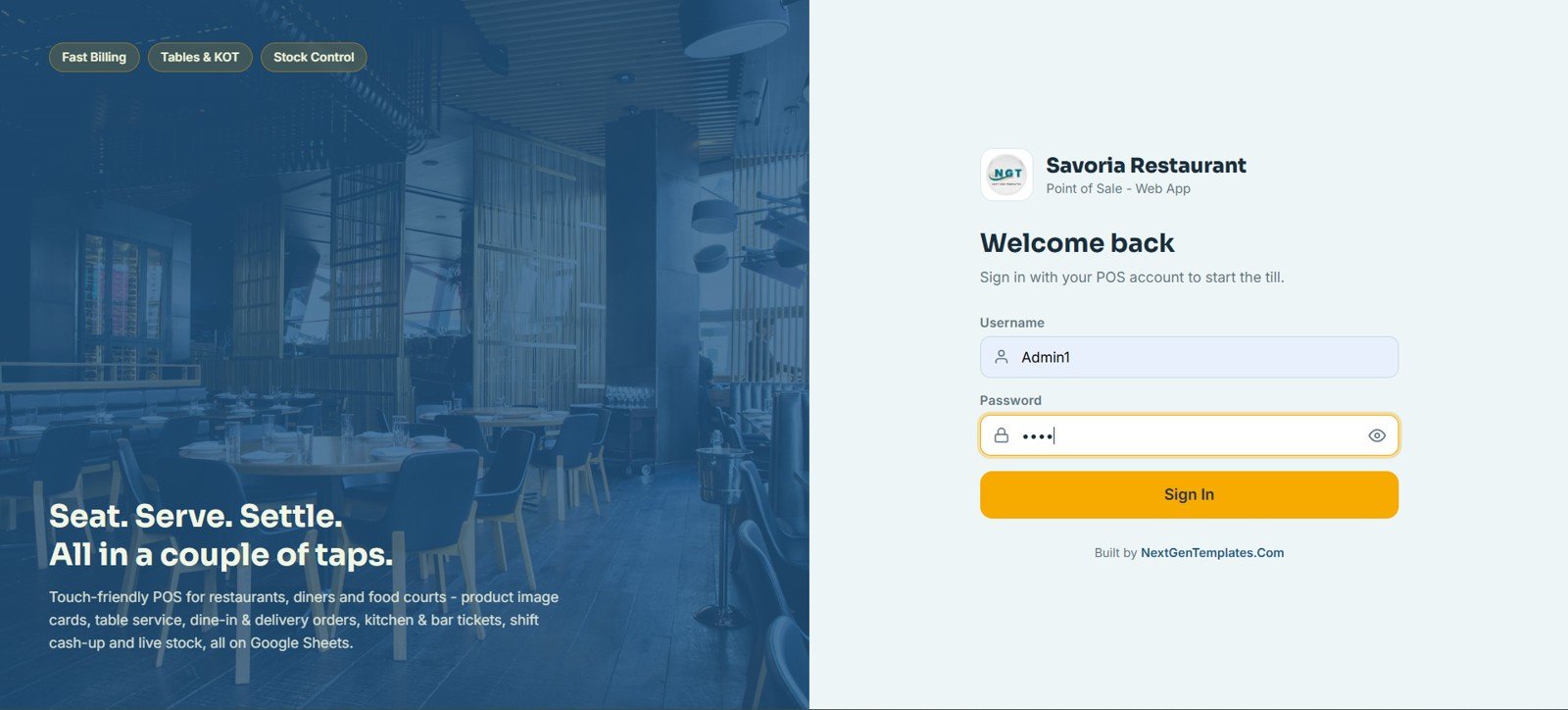
We have deployed this web app in our own Google account so you can test every page, every role, and every feature with sample data before purchasing. No signup or email is needed.
🔑 Demo Login Details
Sign in as Admin1 for full access to every module, or try any of the other five roles below to see exactly what each staff member can do. Every demo password is abcd.
| Role | Username | Password |
|---|---|---|
| Admin | Admin1 | abcd |
| Manager | Manager1 | abcd |
| Cashier | Cashier1 | abcd |
| Waiter | Waiter1 | abcd |
| Inventory User | Inventory1 | abcd |
| Viewer | Viewer1 | abcd |
💡 What you get after purchase: the full source code (Code.gs + Index.html) plus a step-by-step deployment guide, so you can deploy your own private instance in your own Google account in under 15 minutes.
Key Features of the Restaurant POS Web App
The Restaurant POS Web App covers the full operational loop of a restaurant: ordering, kitchen routing, billing, stock, suppliers, customers, cash handling, and reporting. Three facts define it:
- It bundles 20 connected screens into one Apps Script web app, from touch-screen billing to a full audit log.
- It supports six role-based logins running at the same time, so waiters, cashiers, and managers each see only the screens they need.
- It includes 19 exportable reports and a 9-KPI dashboard, giving owners a daily read on sales, tax, discounts, and stock without any spreadsheet formulas.
Every sale deducts stock, routes a ticket to the kitchen display, and writes an audit entry, the same flow a paid POS gives you without the monthly fee.
Restaurant POS Web App Screens Explained
POS / Billing
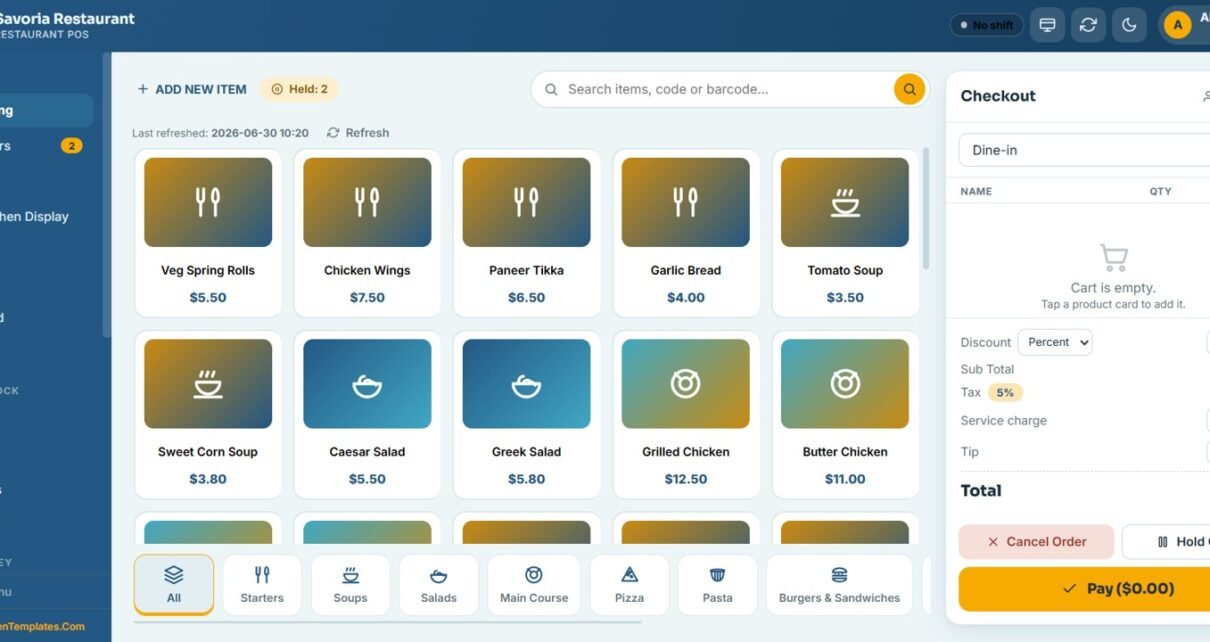
The billing screen is where staff build an order from menu cards grouped by category: Starters, Soups, Salads, Main Course, Pizza, Pasta, and Burgers & Sandwiches. The live checkout panel handles order type (Dine-in, Takeaway, Delivery, Counter), discount, 5% tax, service charge, tip, hold order, and final payment.
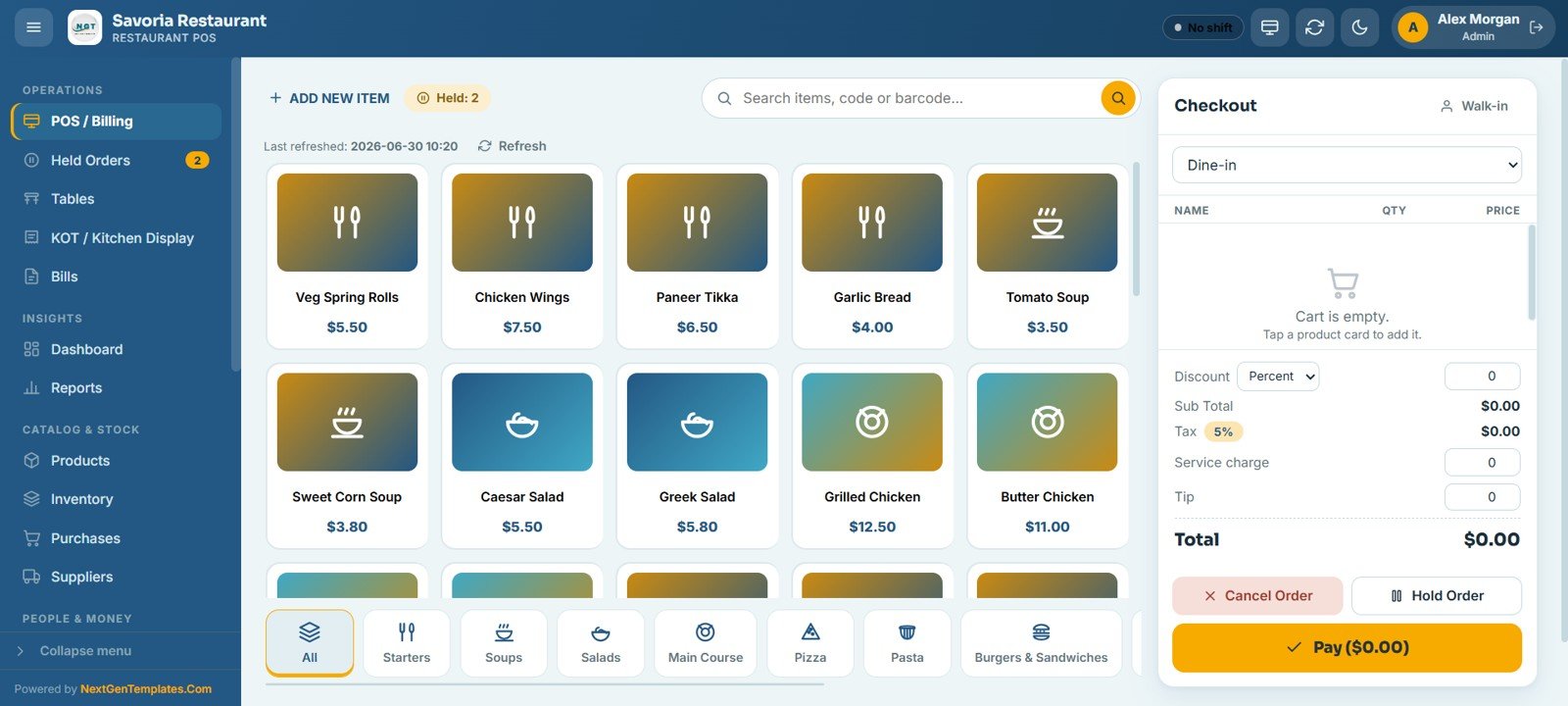
Tables Floor View
The Tables screen is a live floor view grouped by area, such as Bar, Outdoor, and Private Dining in the demo. Each card shows the seat count and status (for example Available) and lets you start an order or reserve the table in one tap.
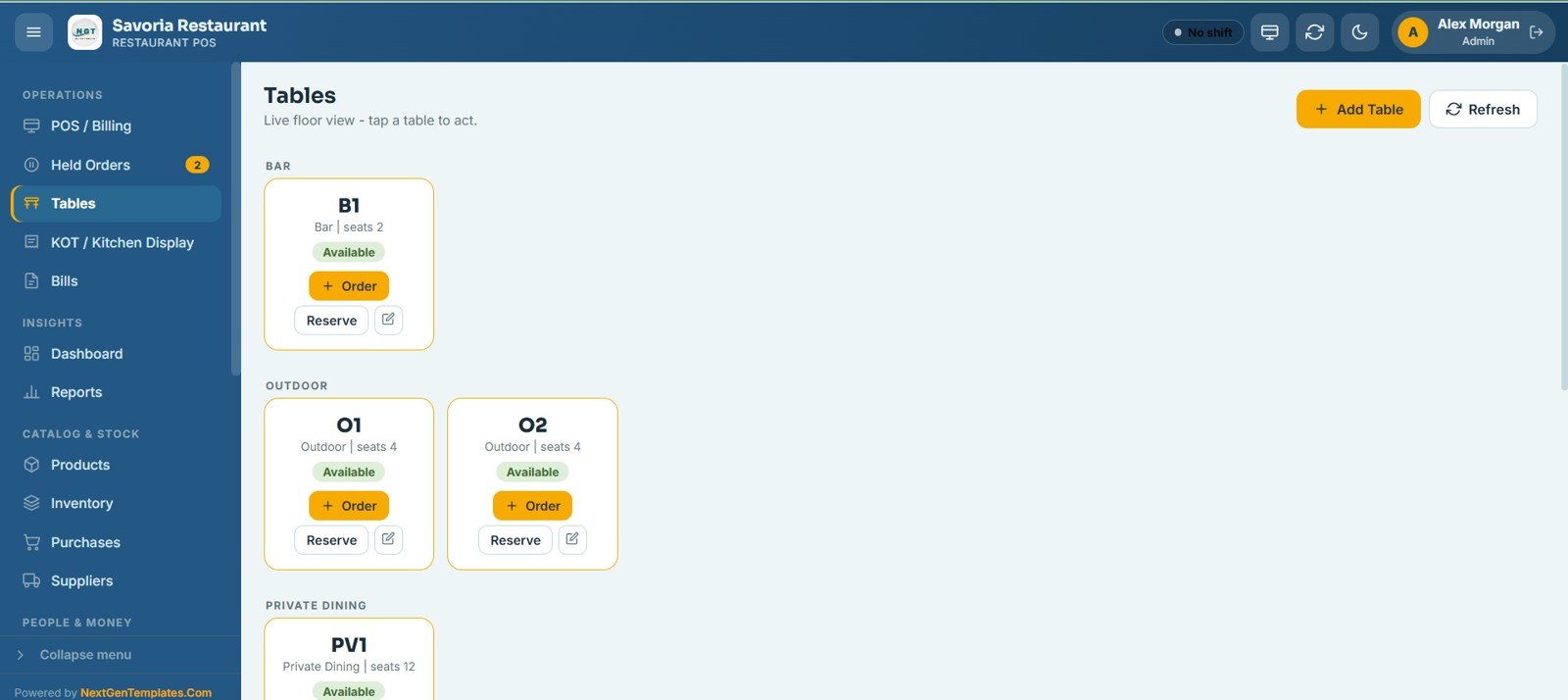
KOT / Kitchen Display
The KOT board moves each ticket through Pending, Preparing, Ready, and Served. Kitchen and bar staff update status, print, or cancel tickets, and an active-only filter keeps the board clean during a rush so no order is missed.
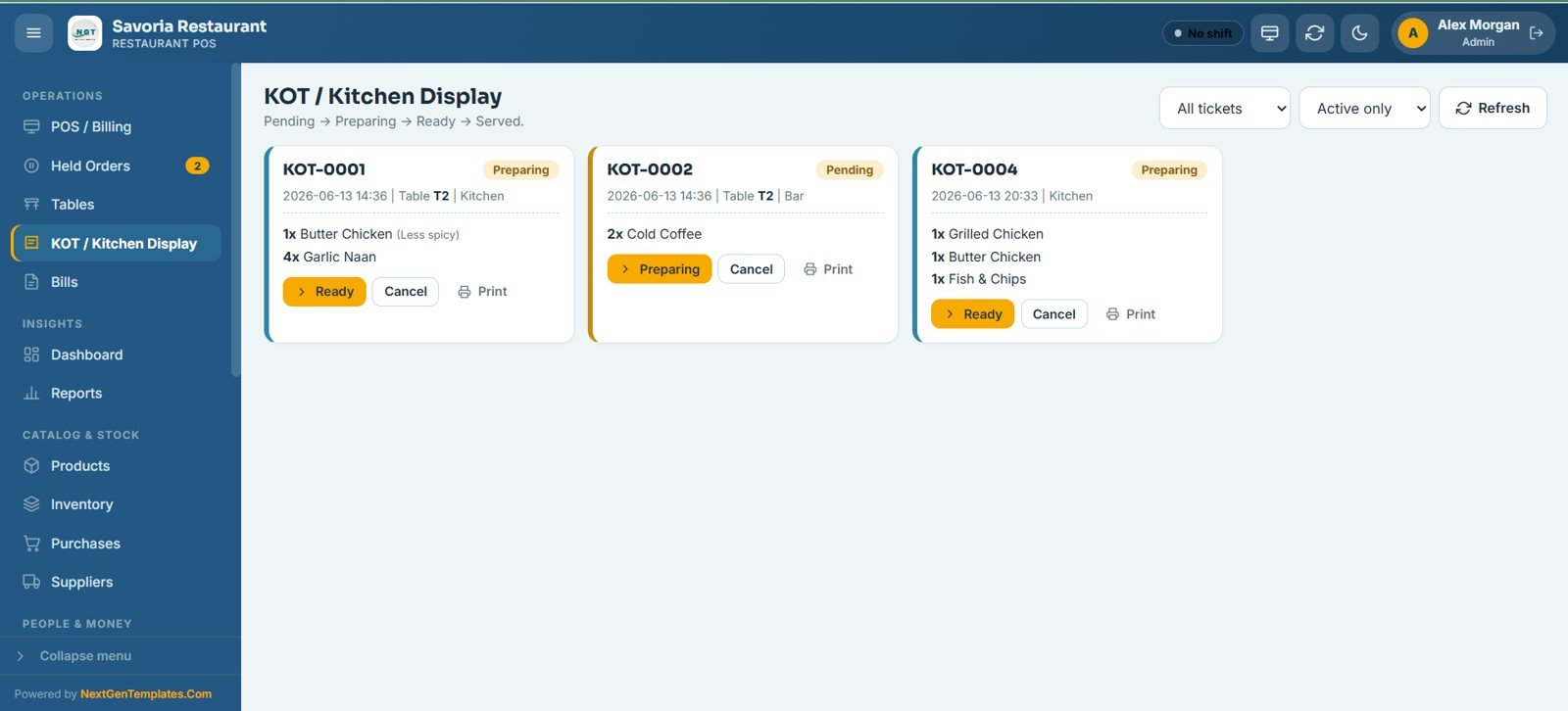
Bills
The Bills screen lets you search, view, reprint, void, or refund any bill with date-range and status filters. Each row shows the bill number, date and time, order type, table, customer, cashier, total, payment mode, and status, and the list exports to Excel.
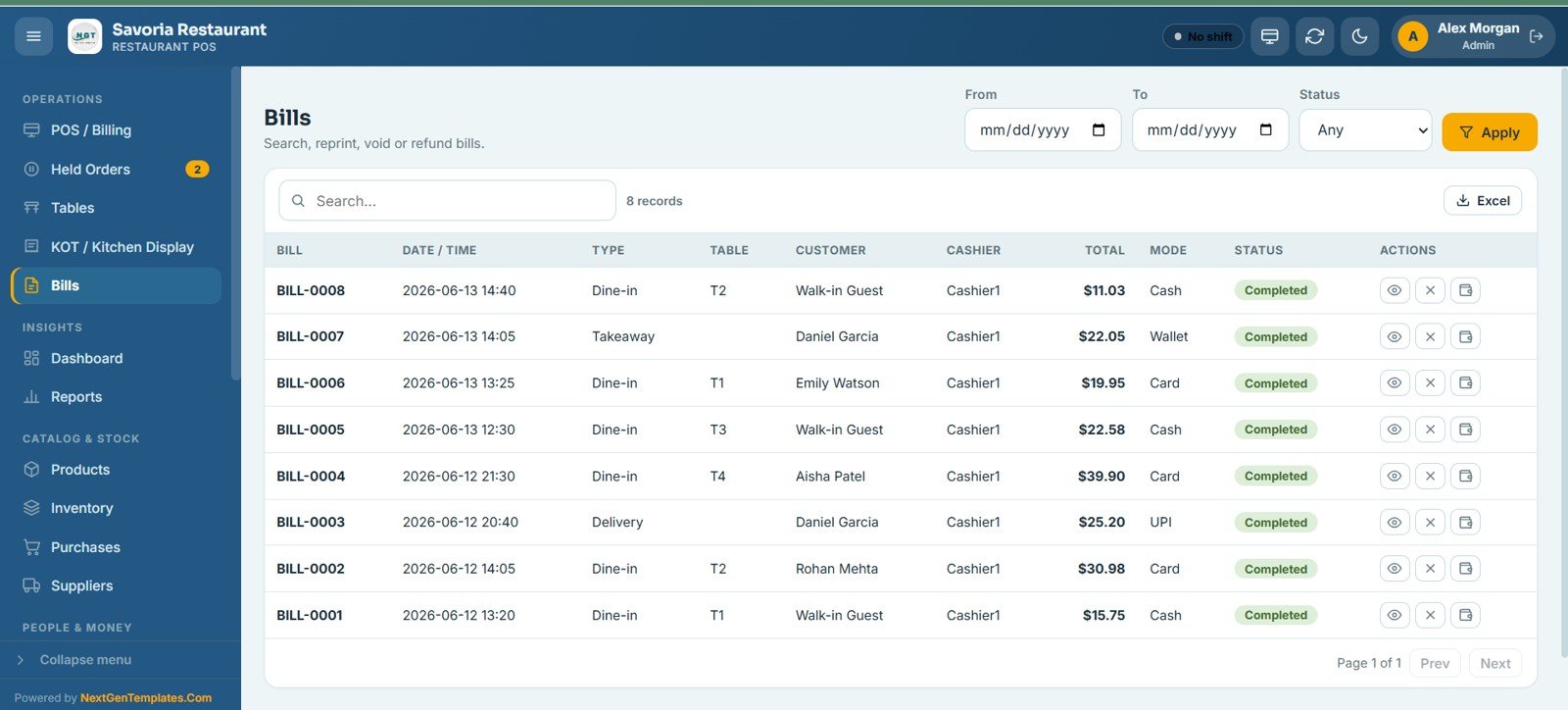
Sales Dashboard
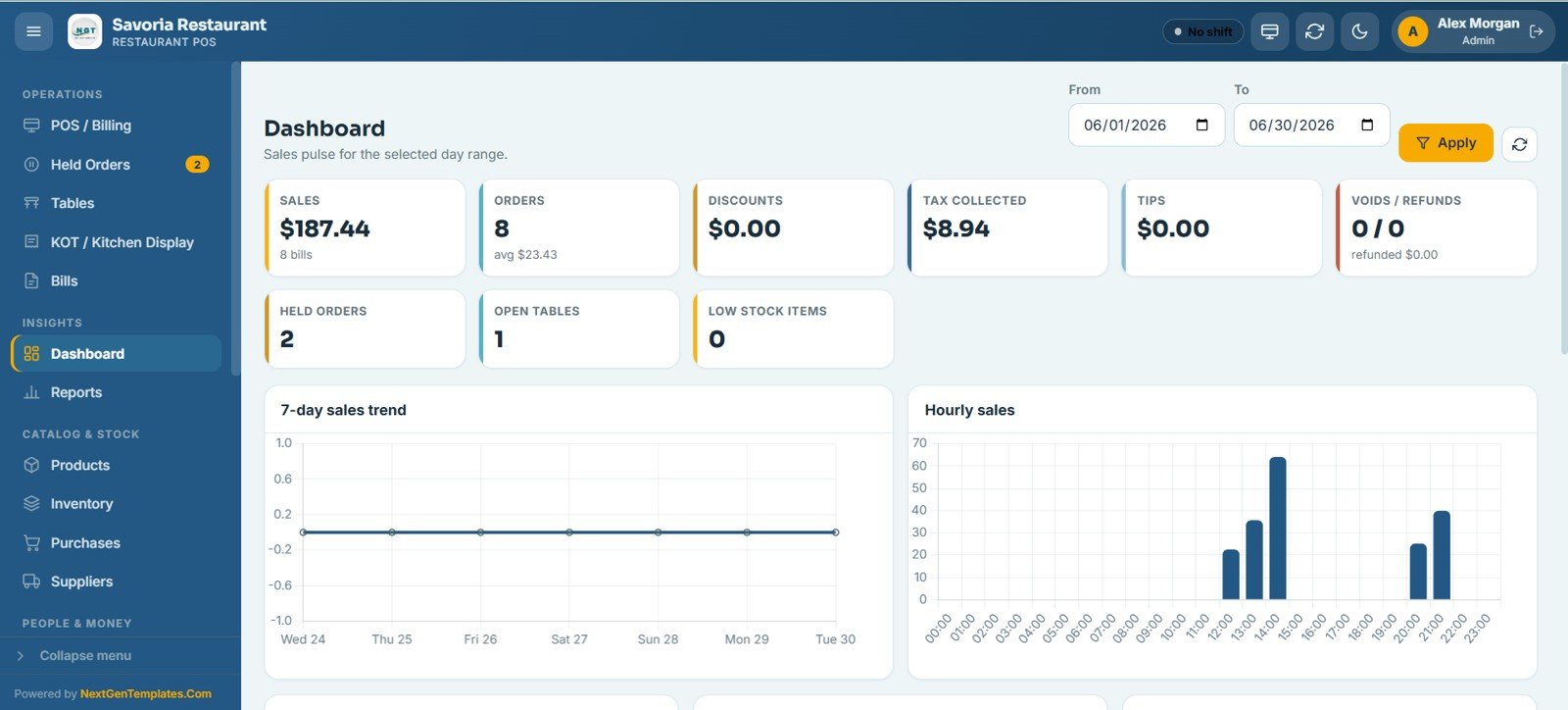
The dashboard opens with 9 KPI cards (Sales, Orders, Discounts, Tax Collected, Tips, Voids / Refunds, Held Orders, Open Tables, and Low Stock Items) for the selected date range, followed by 7-day sales trend and hourly sales charts that show when your busiest hours fall. In the demo, the eight completed bills on the Bills screen ($11.03 + $22.05 + $19.95 + $22.58 + $39.90 + $25.20 + $30.98 + $15.75) add up to the $187.44 Sales card, and $187.44 ÷ 8 orders gives the $23.43 average shown under Orders.
Reports Center
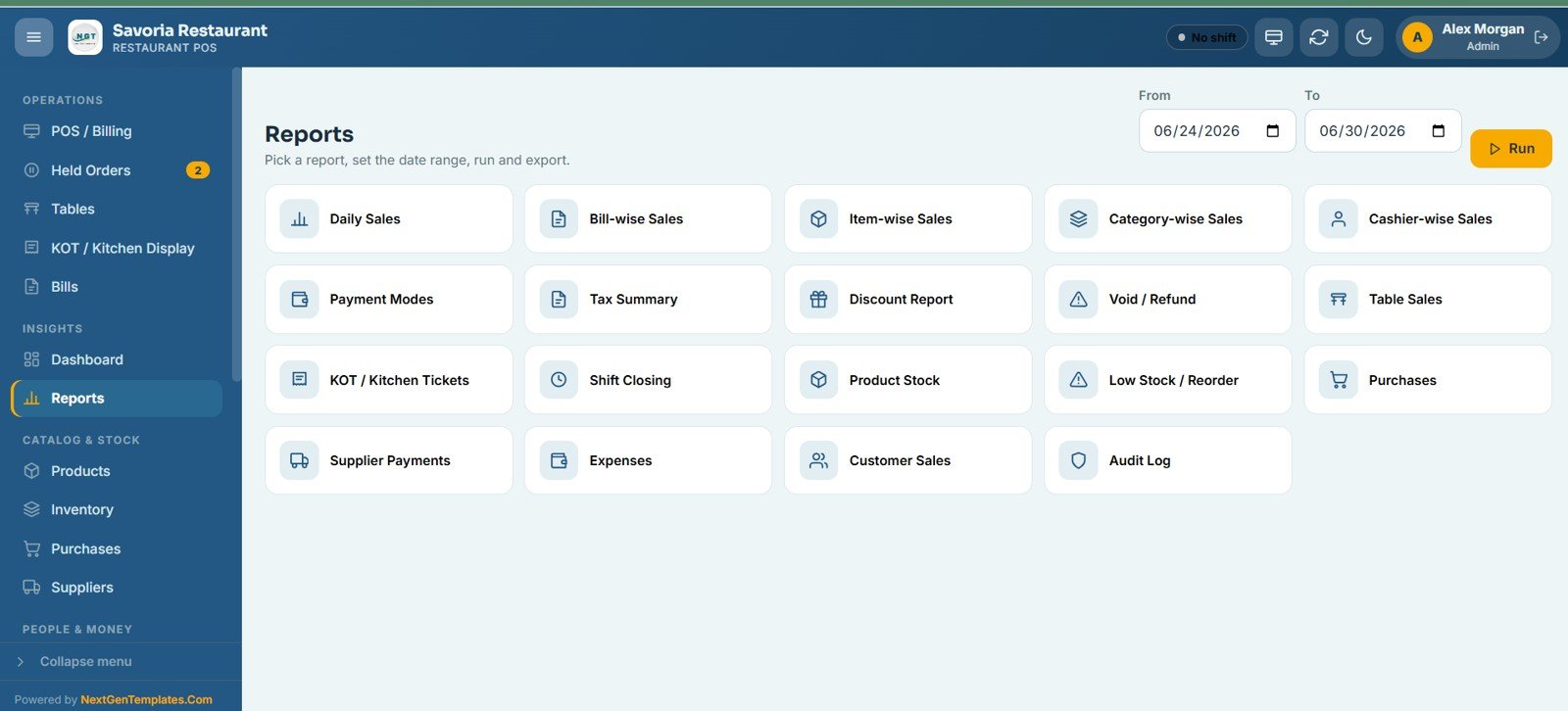
The Reports center provides 19 ready-made reports: Daily Sales, Bill-wise Sales, Item-wise Sales, Category-wise Sales, Cashier-wise Sales, Payment Modes, Tax Summary, Discount Report, Void / Refund, Table Sales, KOT / Kitchen Tickets, Shift Closing, Product Stock, Low Stock / Reorder, Purchases, Supplier Payments, Expenses, Customer Sales, and Audit Log. Pick a report, set a date range, run it, and export to Excel.
Inventory, Purchases and Suppliers
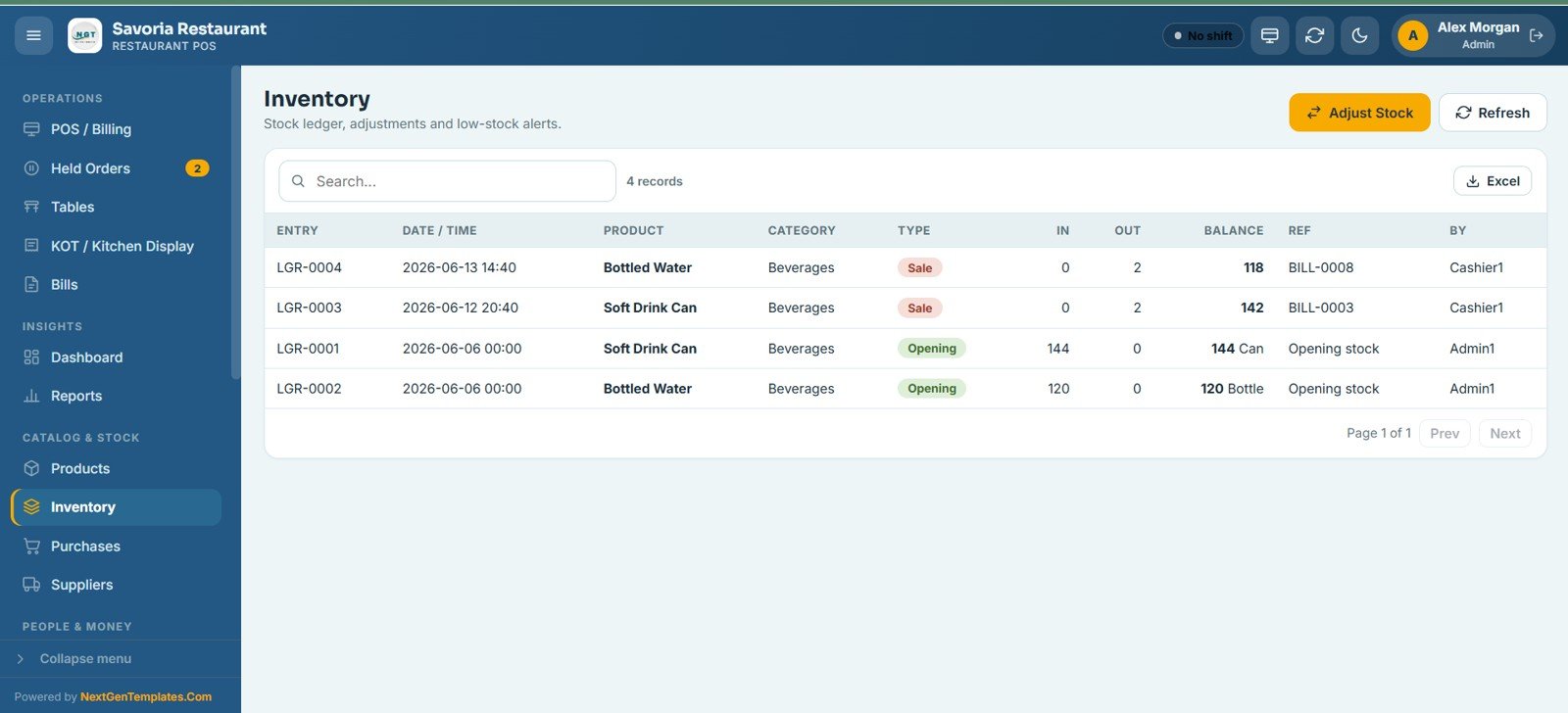
The Inventory ledger records every movement with entry number, date and time, product, category, type, quantity in and out, running balance, and reference bill, and highlights low-stock items. Purchases logs stock inward from suppliers with invoice, total, and paid amount, while the Suppliers directory holds each vendor’s contact, terms, and status.
Shifts, Customers and Settings
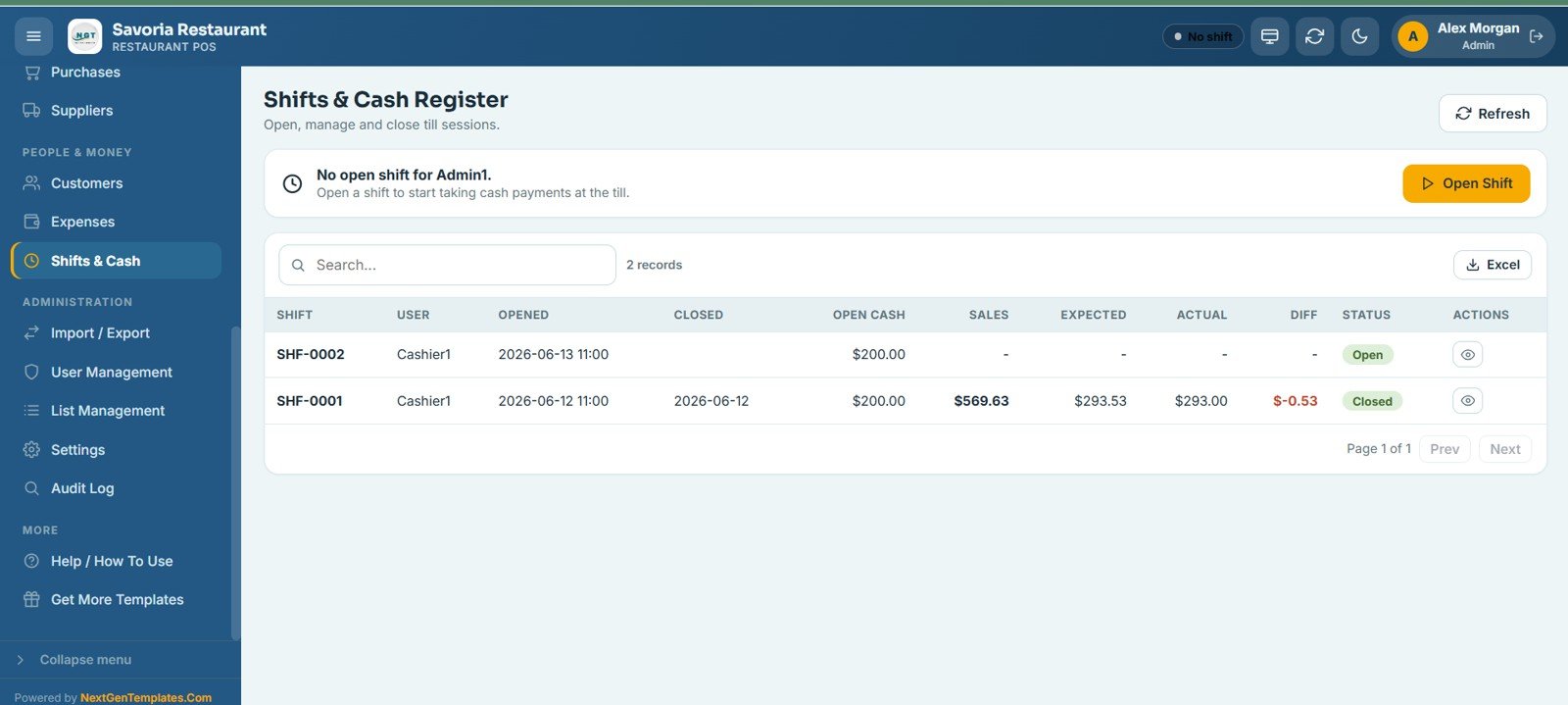
The Shifts & Cash Register screen lets each cashier open and close their till with opening cash, then compares expected and actual cash and shows the difference. In the demo, shift SHF-0001 expected $293.53 in the drawer, the cashier counted $293.00, and the Diff column shows -$0.53. The Customers screen tracks loyalty points and birthdays, and Settings configures business profile, tax, service charge, tips, and receipt formats.
Restaurant POS Web App vs. Excel POS vs. Toast / Square: Feature Comparison
| Feature | Restaurant POS Web App | Excel POS Template | Toast / Square POS |
|---|---|---|---|
| Cost | One-time purchase | One-time template price | Monthly plan plus hardware |
| Platform | Google Sheets + Apps Script | Microsoft Excel | Proprietary SaaS |
| Setup time | Under 15 minutes | 30 to 60 minutes | Days, plus onboarding |
| Real-time team access (multi-user) | Yes, role-based | No (single file) | Yes |
| Mobile / tablet access | Yes, any browser | Limited | Yes (dedicated hardware) |
| Table and KOT workflow | Built in | Not available | Yes |
| Integrated card payments | No (recorded manually) | No | Yes |
| Audit log and void tracking | Full audit trail | Manual only | Yes |
For restaurants, diners, and food courts that want a complete POS without paying monthly POS fees, the Restaurant POS Web App sits in the sweet spot.
Who Should Use This Template
Perfect for:
- Independent restaurant, diner, and café owners who want a full POS without a monthly SaaS fee
- Food court and cloud-kitchen operators running dine-in, takeaway, and delivery from one screen
- Restaurant managers handling a few outlets with a small front-of-house and kitchen team
Not a fit if:
- You run an enterprise chain needing formal compliance, offline POS hardware, or direct card-terminal integrations
- You need built-in payment gateways (card and UPI payments are recorded manually here)
- You process very high order volumes per hour and need dedicated POS hardware
Real-World Use Cases
Aisha runs a 60-cover family restaurant. She manages table orders across her main hall and outdoor section, pushes tickets straight to the kitchen display, and reconciles her two cashiers’ tills at close. Her kitchen sees every order the moment it is placed.
Marco operates a cloud kitchen. He loaded his menu across seven categories, tracks daily revenue by category and payment mode in the Reports center, and logs supplier purchases so month-end stock reconciliation takes far less time.
Priya manages a café with a private-dining room. She uses the Customers screen to track regulars, loyalty points, and birthdays, while shift reconciliation flags any cash difference at the end of each day.
Advantages of the Restaurant POS Web App
The biggest advantage is cost: a one-time purchase instead of an open-ended monthly subscription. Because it runs on Google Apps Script, it works on any tablet, phone, or desktop browser with no hardware lock-in, and all data lives in your own Google Drive. The 19 reports and 9-KPI dashboard replace the manual end-of-day spreadsheets many small restaurants still rely on, and the audit log gives owners accountability over voids, refunds, and stock edits.
Opportunities for Improvement
The Restaurant POS Web App records card and UPI payments manually rather than integrating a payment gateway, so it is not a fit for venues that need automatic card-terminal reconciliation. As an Apps Script app, very high-volume kitchens will be better served by dedicated POS hardware. It also relies on a stable internet connection, since it runs in the browser against Google Sheets. For most independent restaurants, these trade-offs are minor against the cost saving.
Best Practices
Configure your tax rate, service charge, and tip rules in Settings before your first shift, and define menu categories and table areas in List Management so the POS and floor view match your real layout. Have each cashier open a shift with a declared opening cash amount so the till always reconciles. Run the Daily Sales and Shift Closing reports at the end of every service, and review the Low Stock / Reorder report weekly so purchases stay ahead of demand. For deployment, follow Google’s official Apps Script web app guide alongside the included PDF.
Explore Relevant Templates
The Restaurant POS Web App shares its engine with several other point-of-sale systems:
- Restaurant Management System Web App: a broader restaurant system with table management, KOT, billing, and inventory.
- Bar POS System Web App: the same engine tuned for bars, pubs, and lounges.
- Coffee Cafe POS Web App: café-focused billing and shift reconciliation.
- Restaurant P&L Dashboard in Google Sheets: monthly profit and loss reporting.
- Food Delivery Dashboard in Google Sheets: for delivery-heavy operations.
Want to build skills like this step by step? The NextGenTemplates Academy learning paths cover spreadsheet trackers and management systems, with practice files included.
Frequently Asked Questions
What does the Restaurant POS Web App include?
It includes 20 screens covering billing, held orders, tables, KOT / kitchen display, bills, a 9-KPI dashboard, 19 reports, products, inventory, purchases, suppliers, customers, expenses, shifts, import/export, user management, list management, settings, and an audit log.
Does it work on mobile and tablet?
Yes. It runs in any modern browser, so it works on tablets, smartphones, and desktops with no native app install. The POS uses touch-friendly menu cards for fast order entry during service.
How does it compare to Toast or Square?
Toast and Square are subscription POS platforms with their own hardware and integrated card payments. The Restaurant POS Web App is a one-time purchase with no monthly fee, no per-user charge, and no hardware requirement, though payments are recorded manually.
How long does setup take?
Under 15 minutes. You copy the Google Sheets file from the PDF guide link, deploy the web app from Apps Script, configure your settings, and add your menu and team. No coding is required.
Can I customise the menu and tables?
Yes. You define menu categories, table areas, payment modes, units, and expense categories in List Management, and configure tax, service charge, tips, and receipt format in Settings, all without editing code.
Where is my data stored?
All data is stored in your own Google Sheets file within your Google Drive account, protected by your Google account security. NextGenTemplates does not have access to your copy.
About the Author
Built by PK, Microsoft Certified Professional with 15+ years of Excel, Google Sheets, and Power BI experience. Founder of NextGenTemplates. Every template is hand-built and tested before release.
Wrapping Up
The Restaurant POS Web App gives independent restaurants a complete, multi-user point-of-sale system on Google Sheets (billing, tables, kitchen display, inventory, and 19 reports) for a one-time price instead of a monthly subscription. Run a test service in the live demo as a waiter and a cashier, then deploy it in your own Google account.
Get the Restaurant POS Web App
Instant download. One-time payment. No subscription.
📅 Last updated: October 2026