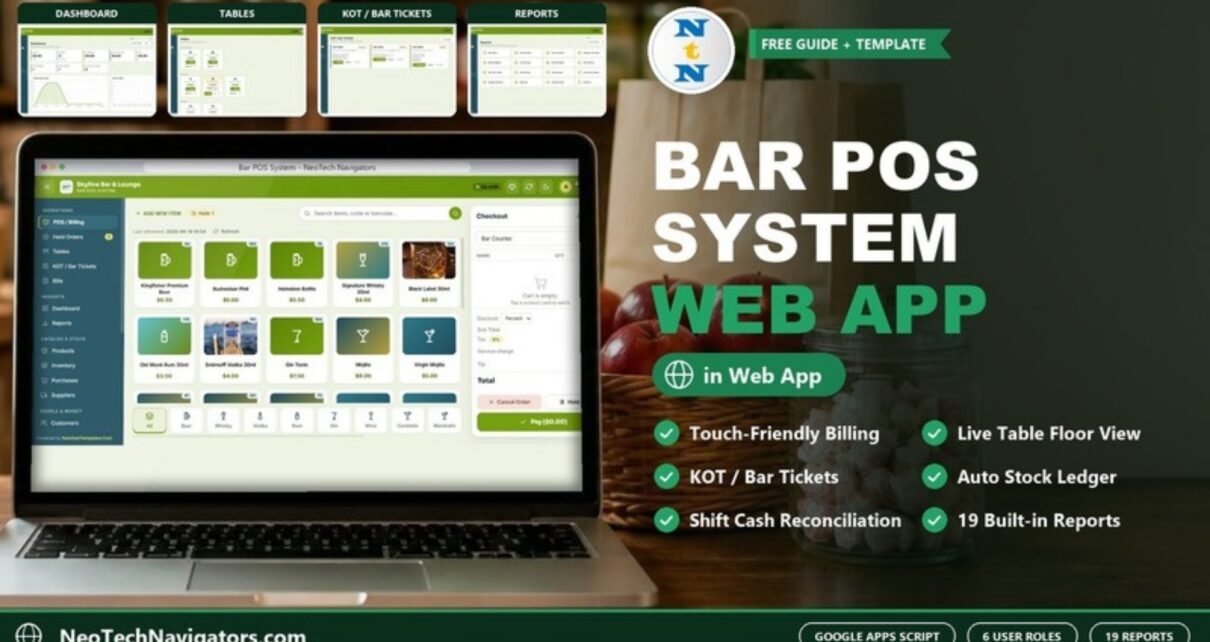
The Bar POS System Web App is a complete point-of-sale and bar management system built on Google Sheets and Google Apps Script. It runs in a web browser on a tablet, phone or desktop and covers the full bar workflow across 20 connected screens: touch-friendly billing, held orders, a live table floor view, KOT / bar tickets, bills, a sales dashboard, 19 reports, products, an inventory ledger, purchases, suppliers, customers, expenses, shift and cash register reconciliation, import/export, user and list management, settings and an audit log.
It is designed for bars, pubs, lounges and café-bars that want digital billing and stock control without a monthly POS subscription. Your data stays in a Google Sheets file in your own Google Drive, and each team member signs in with a role-based login.
🎥 Watch the Video Tutorial
Get the Bar POS System Web App
🚀 Try the Live Demo Before You Buy
We have deployed this web app in our own Google account so you can test every page and every role with sample data before purchasing. No signup or email is required.
🔑 Demo Login Details
Sign in as Admin1 for full control including menu, staff and reports, or use any role below to see that role’s permissions.
💡 What you get after purchase: the full source code (Code.gs + Index.html) plus a step-by-step deployment guide so you can deploy your own private instance in your own Google account.
Key Features of the Bar POS System Web App
The app tracks 9 KPI cards on its dashboard, includes 19 ready-made reports and provides role-based access for 6 team roles, all inside a Google Apps Script web app with nothing to install.
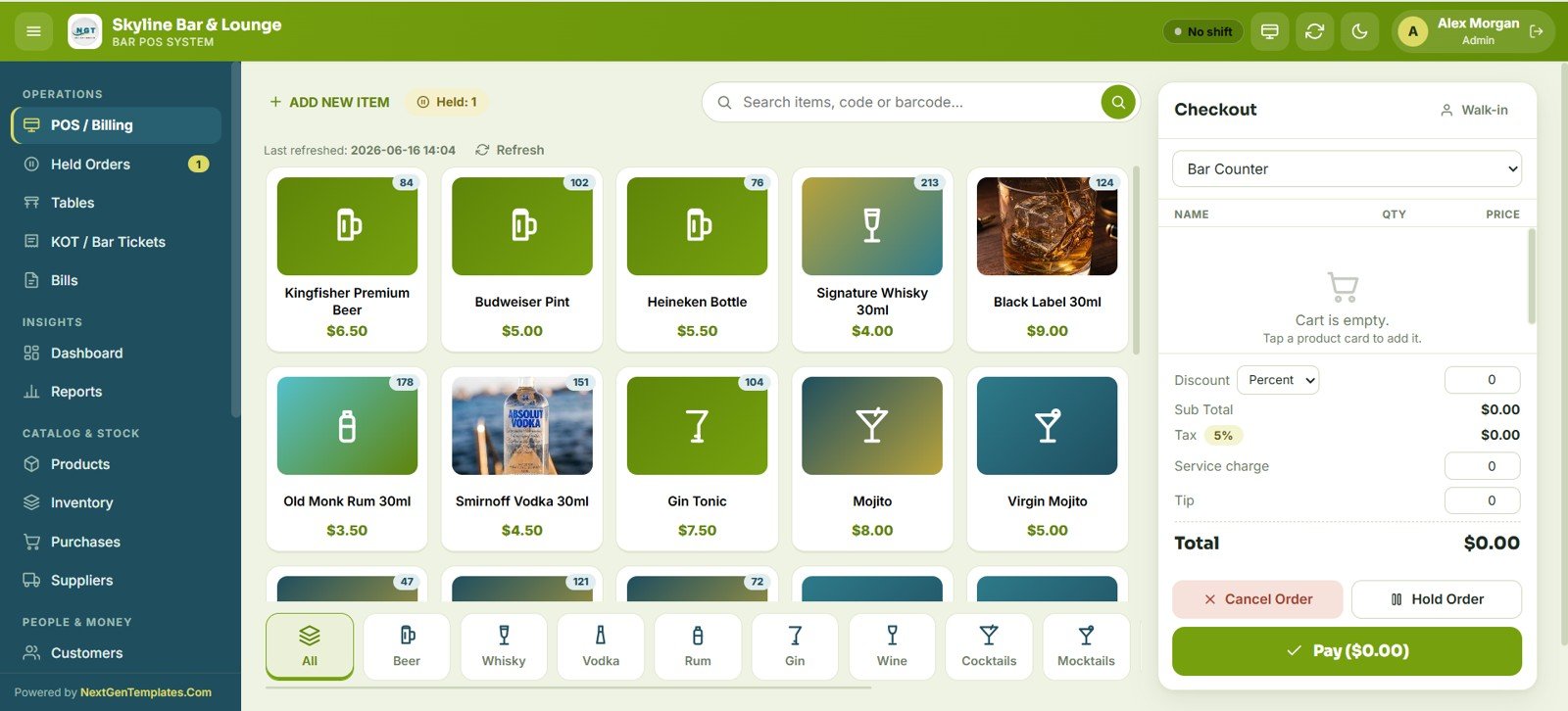
- Touch-friendly POS with image product cards – Staff build orders by tapping product cards grouped into Beer, Whisky, Vodka, Rum, Gin, Wine, Cocktails and Mocktails. The checkout panel handles order type, discount, tax, service charge, tip, hold order and payment on one screen.
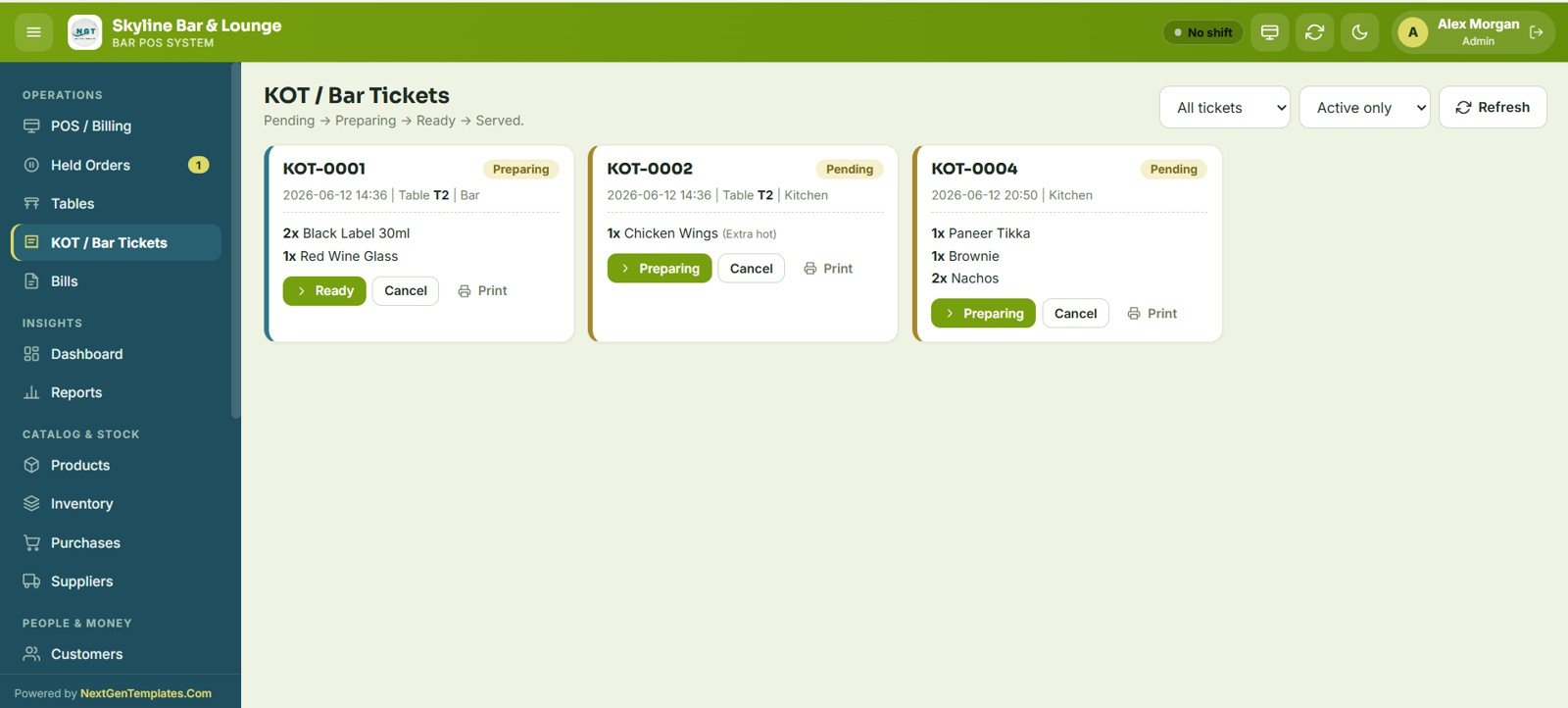
- KOT and bar ticket workflow – Tickets move through Pending, Preparing, Ready and Served with one-tap status updates, print and cancel controls, and an Active only filter.
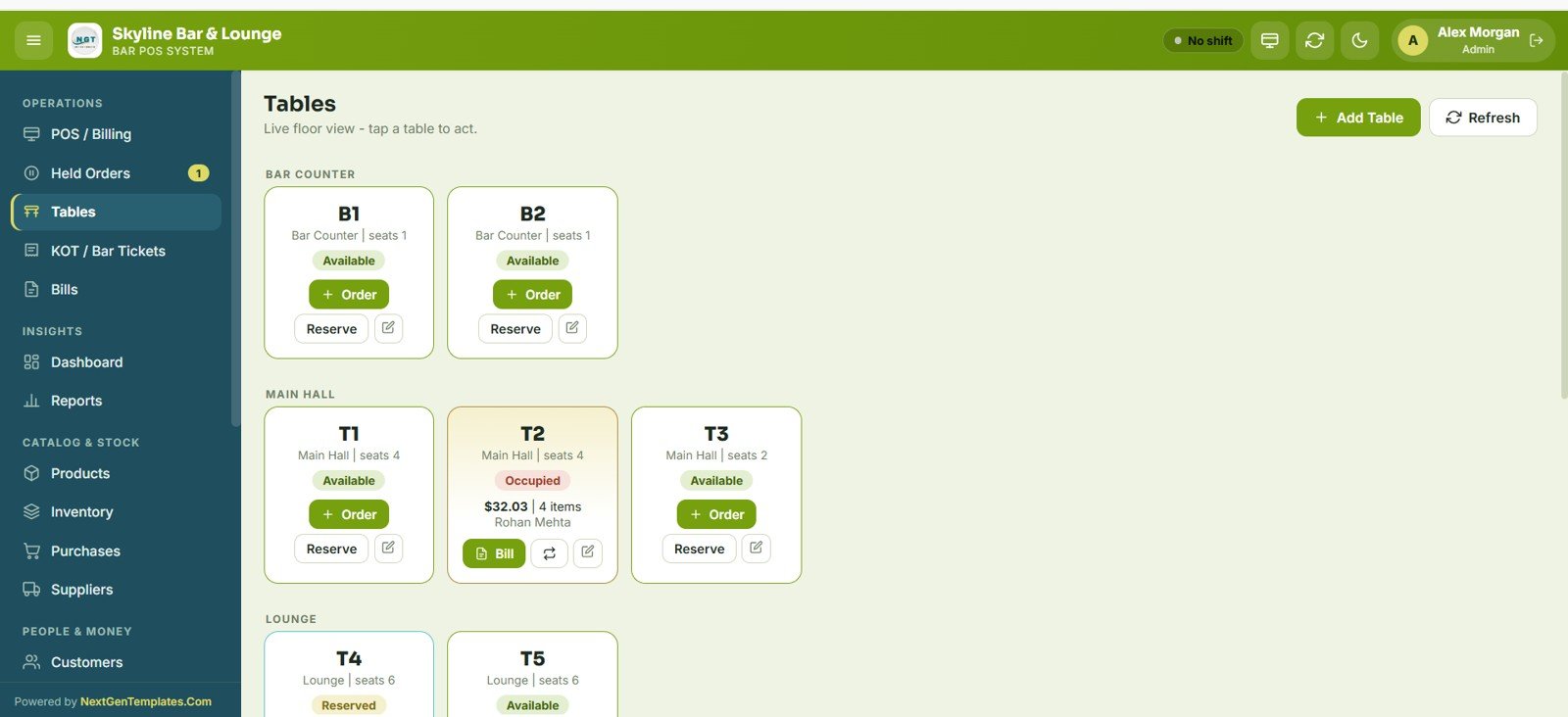
- Live table floor view – Tables are grouped by area (Bar Counter, Main Hall, Lounge). Each card shows seats and status (Available, Occupied or Reserved) with one-tap Order, Reserve or Bill actions.
- Six role-based access levels – Admin, Manager, Cashier, Bartender, Inventory User and Viewer each get their own screen access.
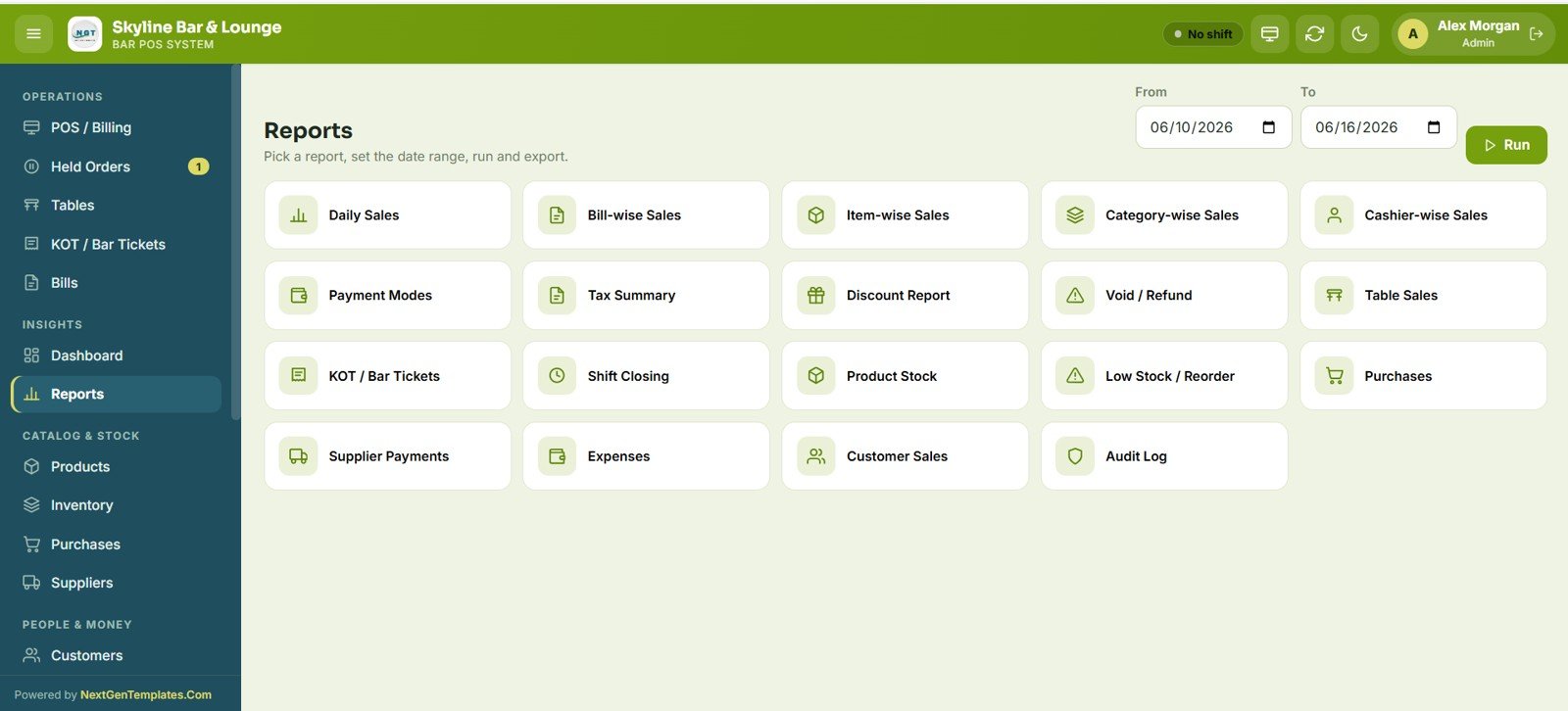
- 19 built-in reports – Daily Sales, Bill-wise, Item-wise, Category-wise and Cashier-wise Sales, Payment Modes, Tax Summary, Discount Report, Void / Refund, Table Sales, KOT / Bar Tickets, Shift Closing, Product Stock, Low Stock / Reorder, Purchases, Supplier Payments, Expenses, Customer Sales and Audit Log.
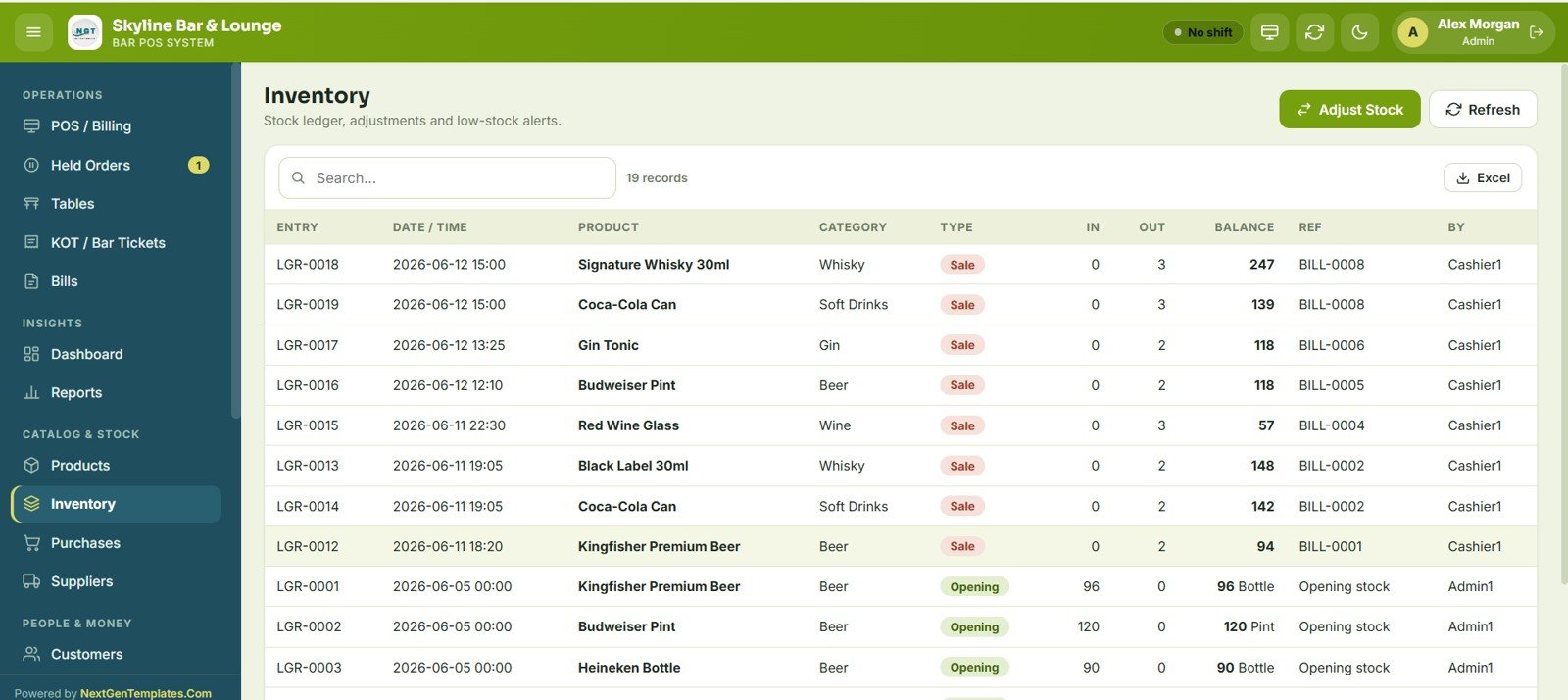
- Auto-deducting inventory ledger – Each sale reduces stock, and every movement is logged with entry, date, product, category, type, quantity in/out, running balance and reference bill.
- Shift and cash register reconciliation – Cashiers open a shift with opening cash; the system shows sales, expected cash, actual cash and the difference at close.
- Customer loyalty and birthdays – Store mobile, email, birthday and loyalty points, and view upcoming birthdays.
- Bulk import and export – Download an Excel/CSV template per module, import with validation, and export any module to Excel. Rows with an existing ID update; rows without an ID are inserted.
Screen-by-Screen Explanation
1 – Login Page
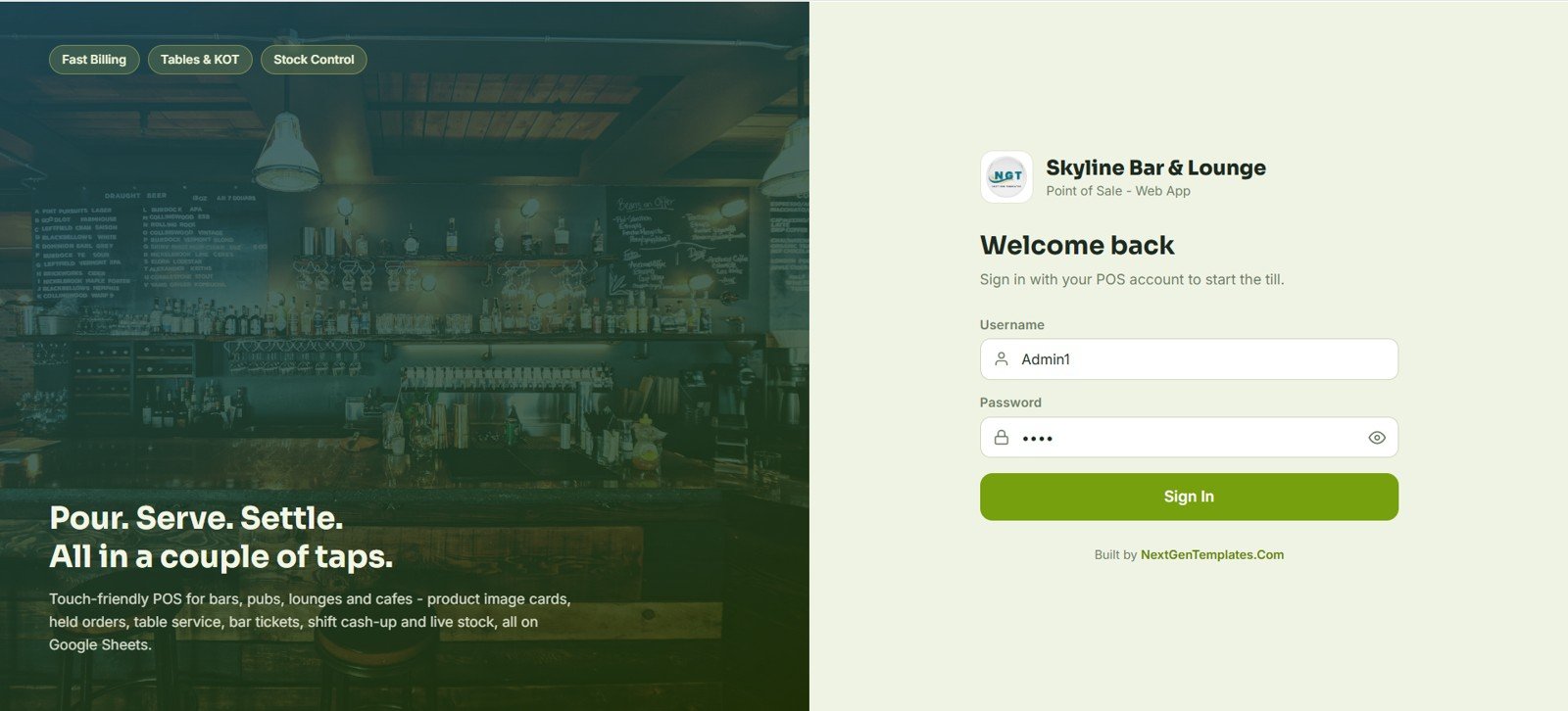
The login screen carries the bar’s name and branding. Every user signs in with their own username and password and sees only the screens their role allows.
2 – POS / Billing
The main point-of-sale screen shows product image cards with prices, filtered by category tabs along the bottom. The Checkout panel on the right handles order type (for example Bar Counter), discount, tax, service charge, tip, Cancel Order, Hold Order and Pay.
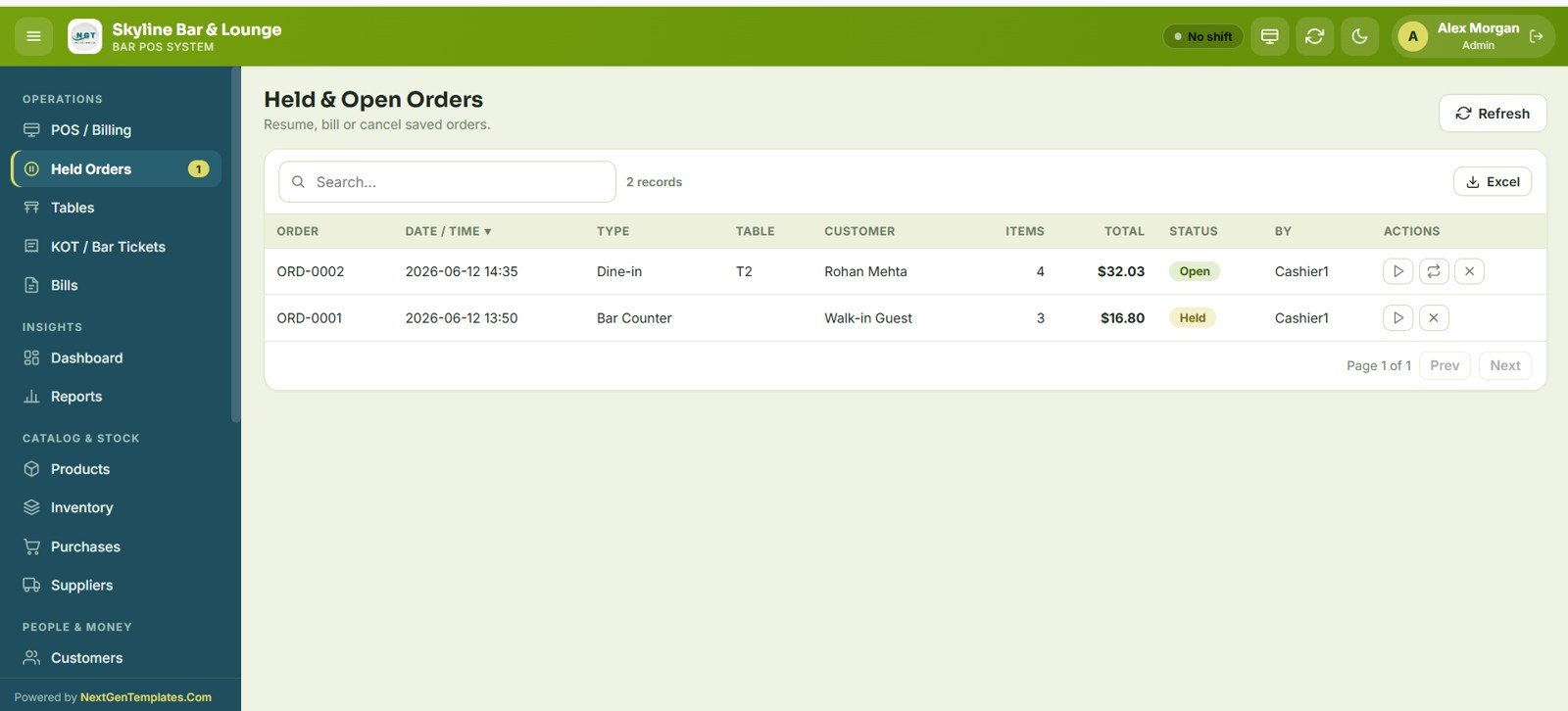
3 – Held and Open Orders
This screen lists every saved or running order with order number, date/time, type, table, customer, items, total, status (Open or Held) and the staff member. You can resume, bill or cancel an order from here.
4 – Tables
A live floor view grouped by Bar Counter, Main Hall and Lounge. Each table card shows seats and status, and occupied tables show the running total and customer, with a Bill button.
5 – KOT / Bar Tickets
The preparation board moves each ticket through Pending, Preparing, Ready and Served. Bar and kitchen tickets show the table and items, with Ready, Cancel and Print buttons.
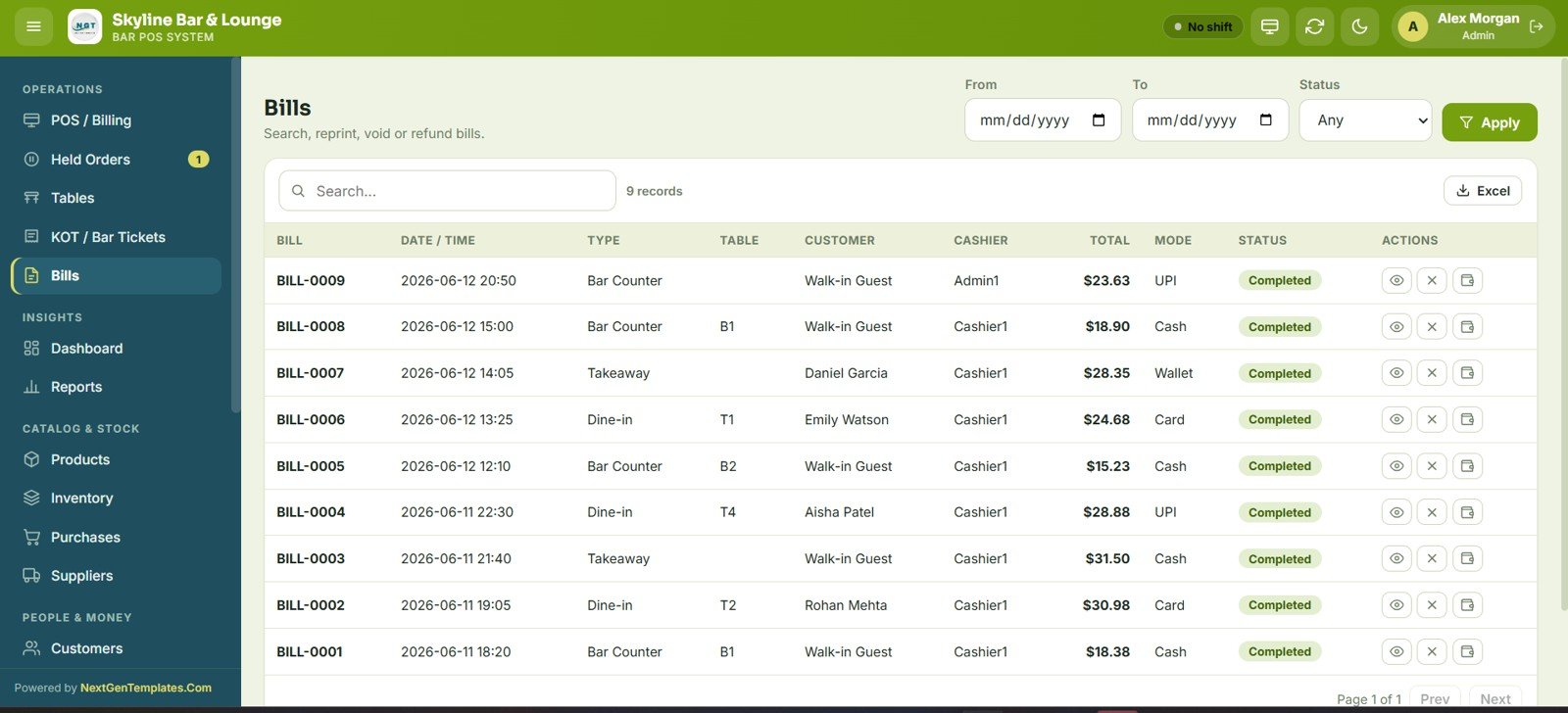
6 – Bills
Search, view, reprint, void or refund completed bills with date range and status filters. Each row shows bill number, date/time, type, table, customer, cashier, total, payment mode (Cash, Card, UPI or Wallet in the sample) and status, with Excel export.
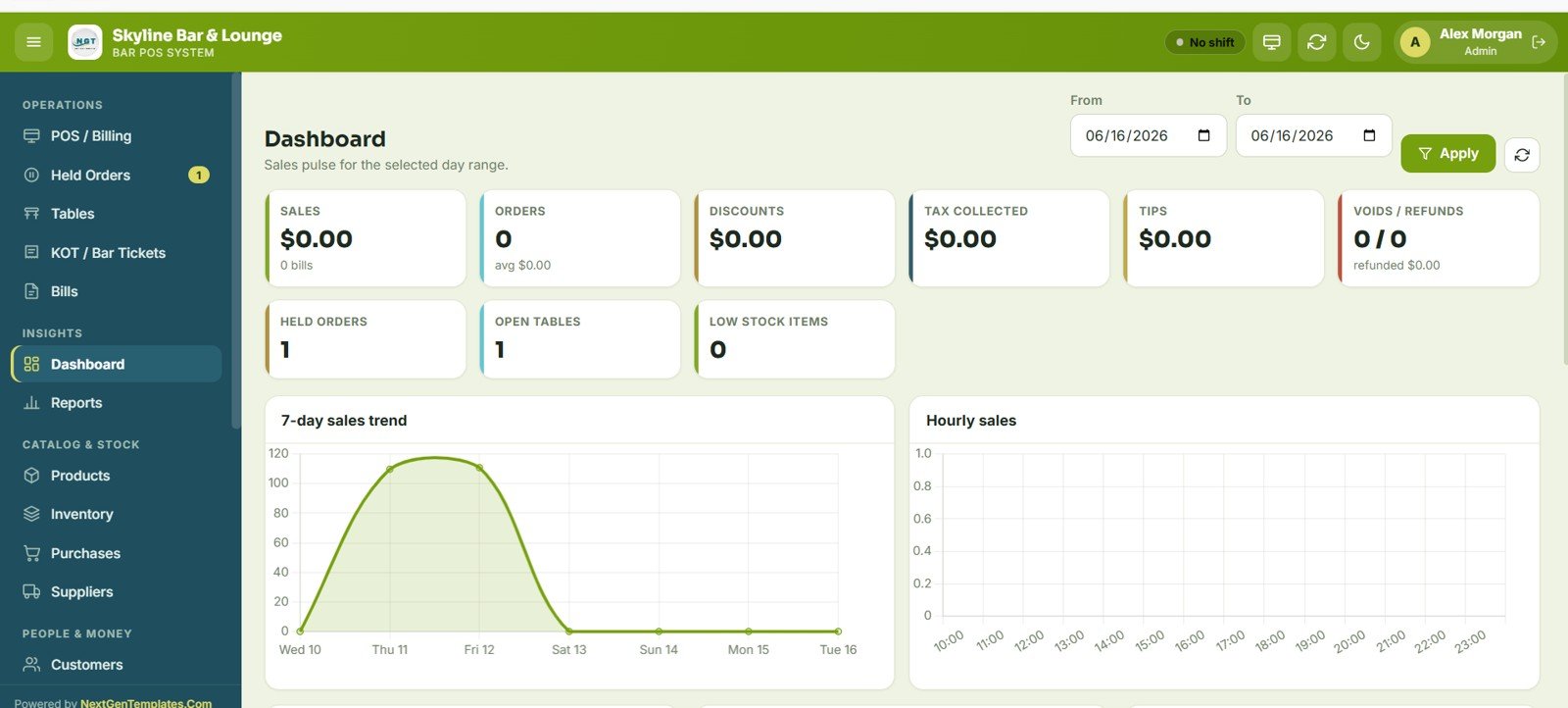
7 – Dashboard
The dashboard shows 9 KPI cards for the selected date range: Sales, Orders, Discounts, Tax Collected, Tips, Voids / Refunds, Held Orders, Open Tables and Low Stock Items. Below the cards are 5 charts:
- 7-Day Sales Trend – daily sales over the past week.
- Hourly Sales – sales by hour of the day, useful for staffing.
- Category Sales – sales by drink and food category.
- Payment Modes – the split across payment methods.
- Top Products – best-selling items.
8 – Reports
Pick a report tile, set the From and To dates, click Run and export. The 19 tiles are listed in the features section above.
9 – Products
The products master holds every drink and food item with image, code, category, type, price, tax percent, stock level and status. Products can be added one by one, imported in bulk from Excel and exported at any time.
10 – Inventory
The stock ledger records every movement (Opening, Sale and adjustments) with date, product, category, quantity in/out, balance, reference bill and user. Use Adjust Stock for manual corrections.
11 – Purchases
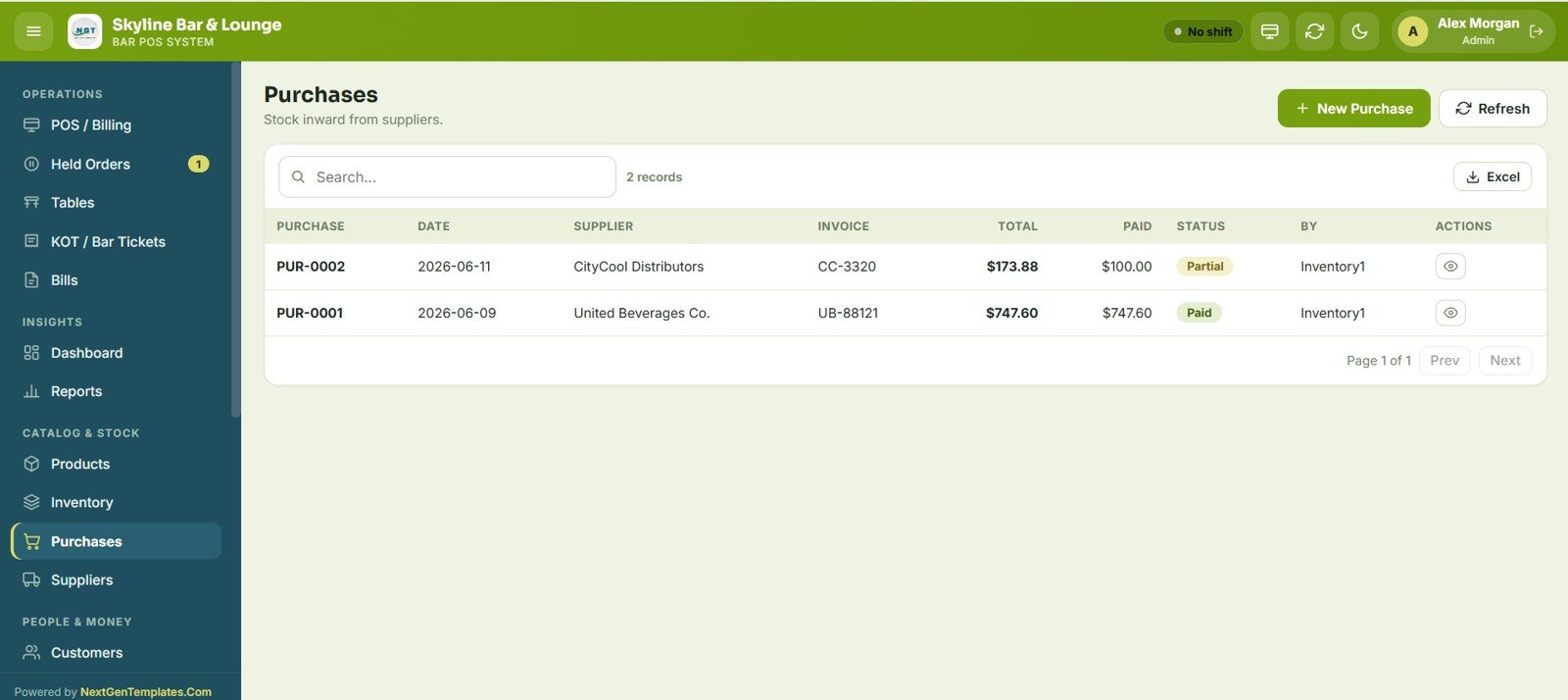
Record stock inward from suppliers with date, supplier, invoice number, total, amount paid and status (Paid or Partial). Raise a New Purchase and export the list to Excel.
12 – Suppliers
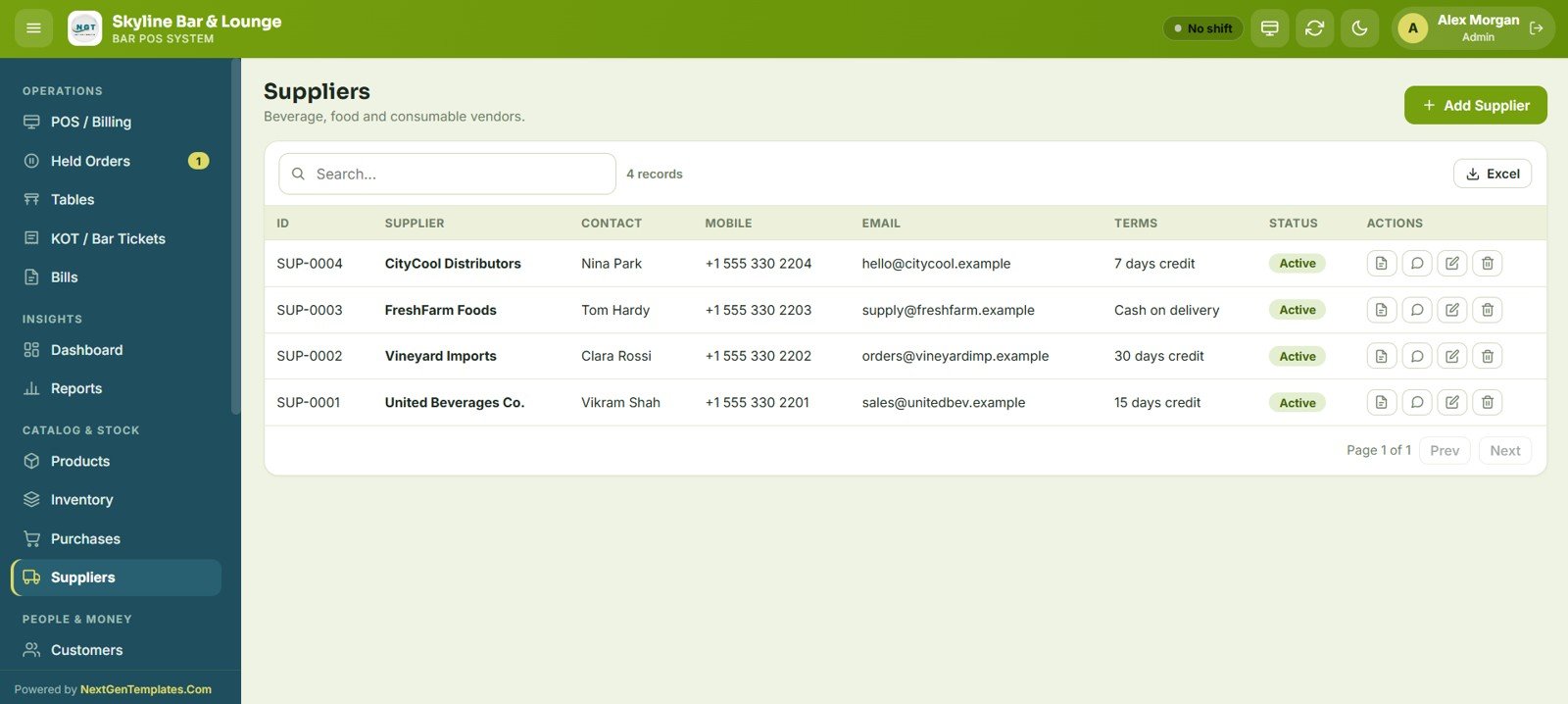
A directory of beverage, food and consumable vendors with contact person, mobile, email, payment terms (such as 7 days credit or Cash on delivery) and status.
13 – Customers
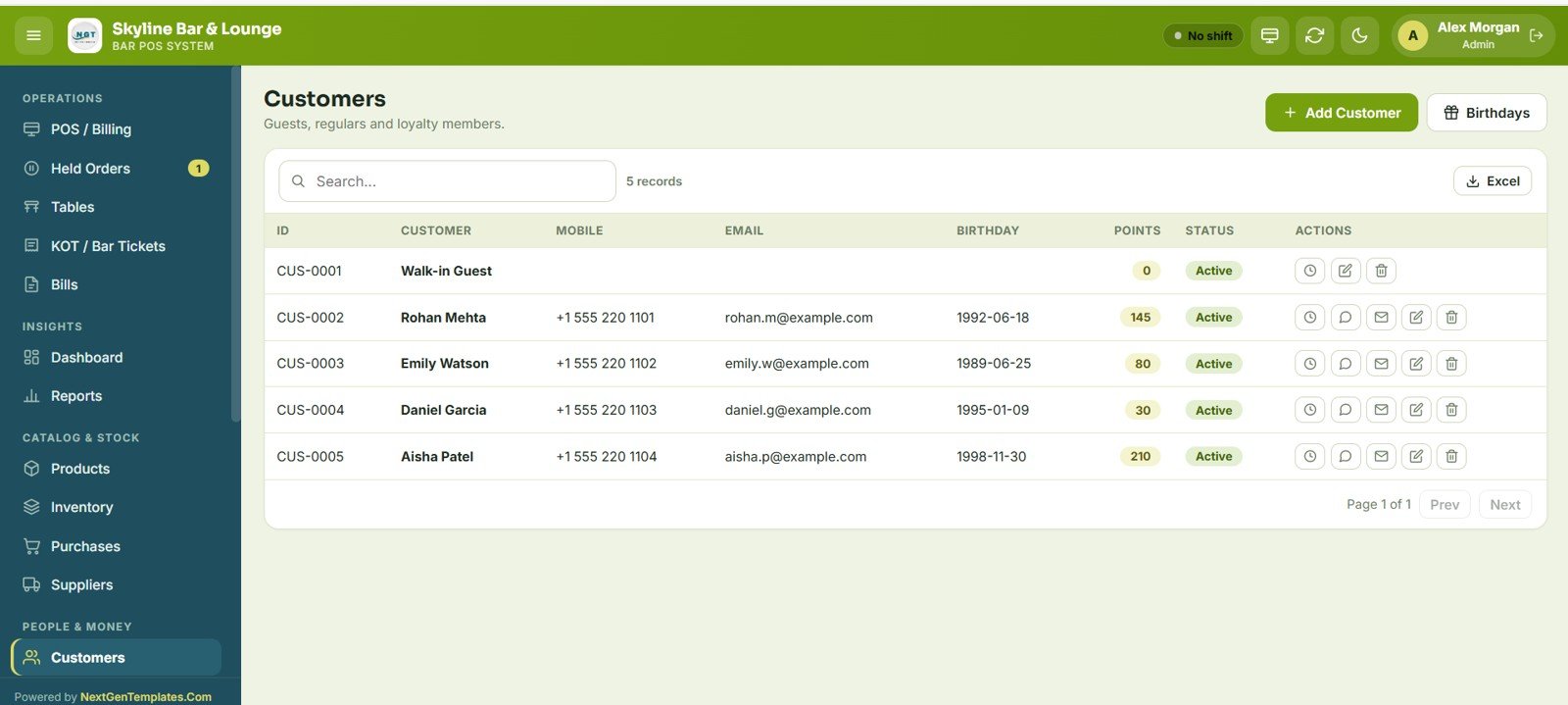
Keep guests, regulars and loyalty members with mobile, email, birthday, loyalty points and status. The Birthdays button shows upcoming birthdays.
14 – Expenses
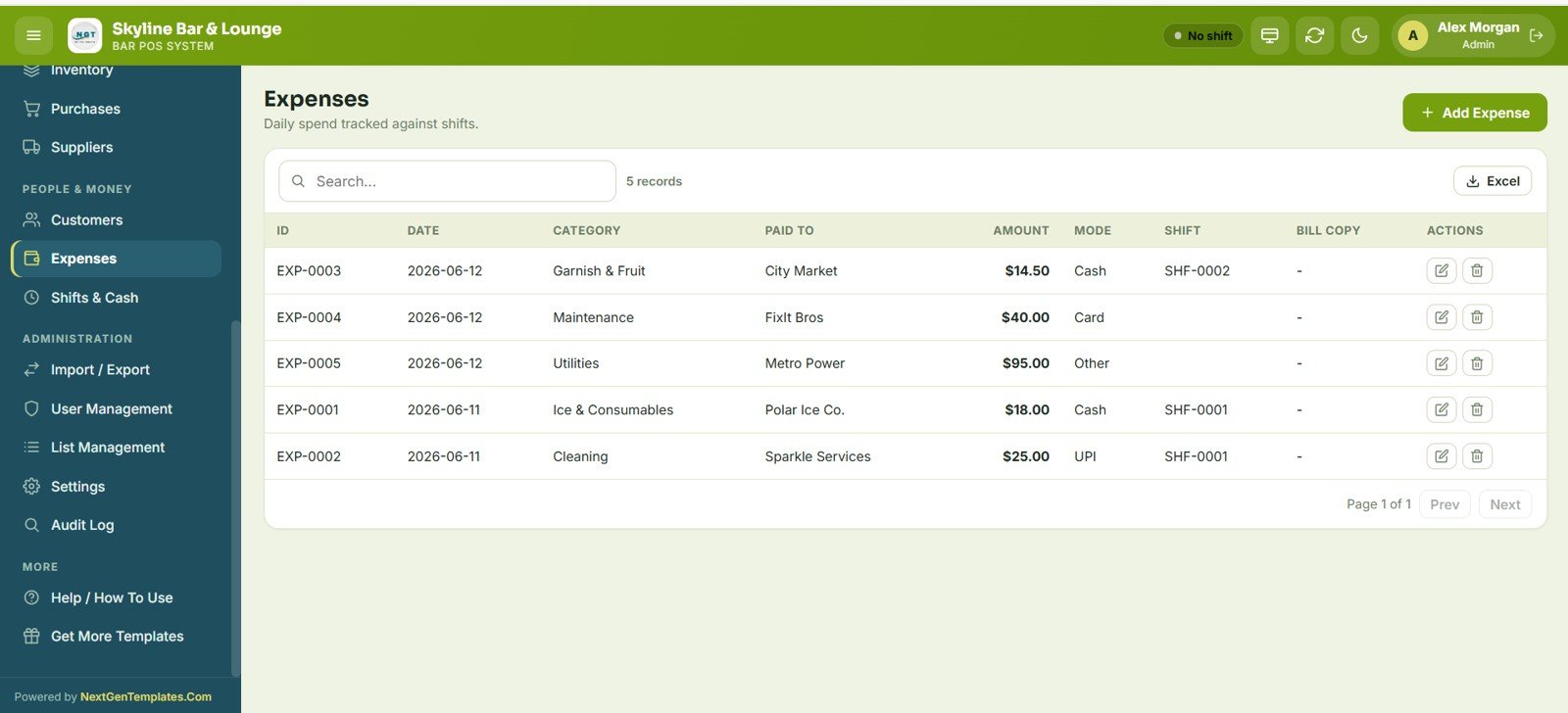
Track daily spend with date, category, payee, amount, payment mode, linked shift and bill copy, and export to Excel.
15 – Shifts and Cash Register
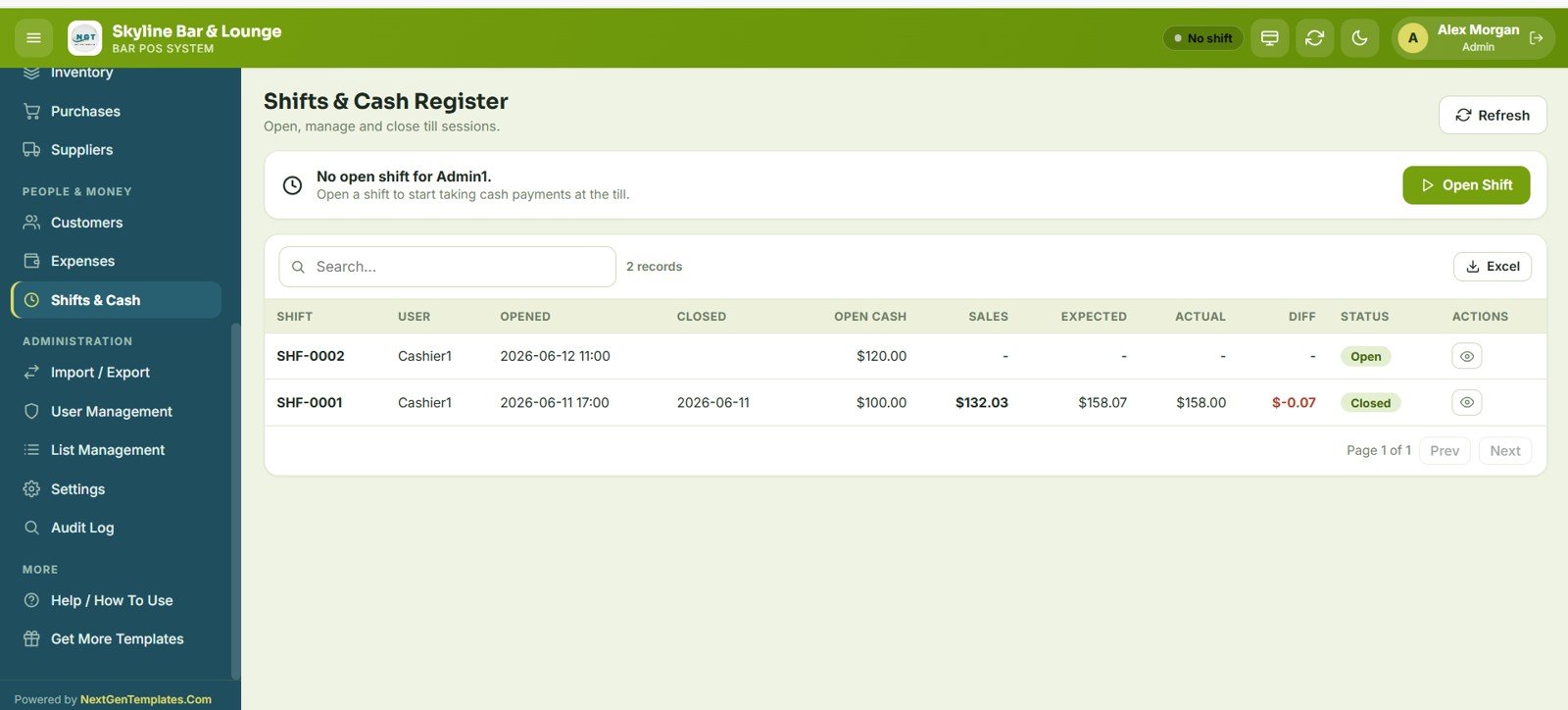
Cashiers open, manage and close till sessions. Each shift shows user, opened and closed time, opening cash, sales, expected cash, actual cash, difference and status (Open or Closed).
16 – Import / Export
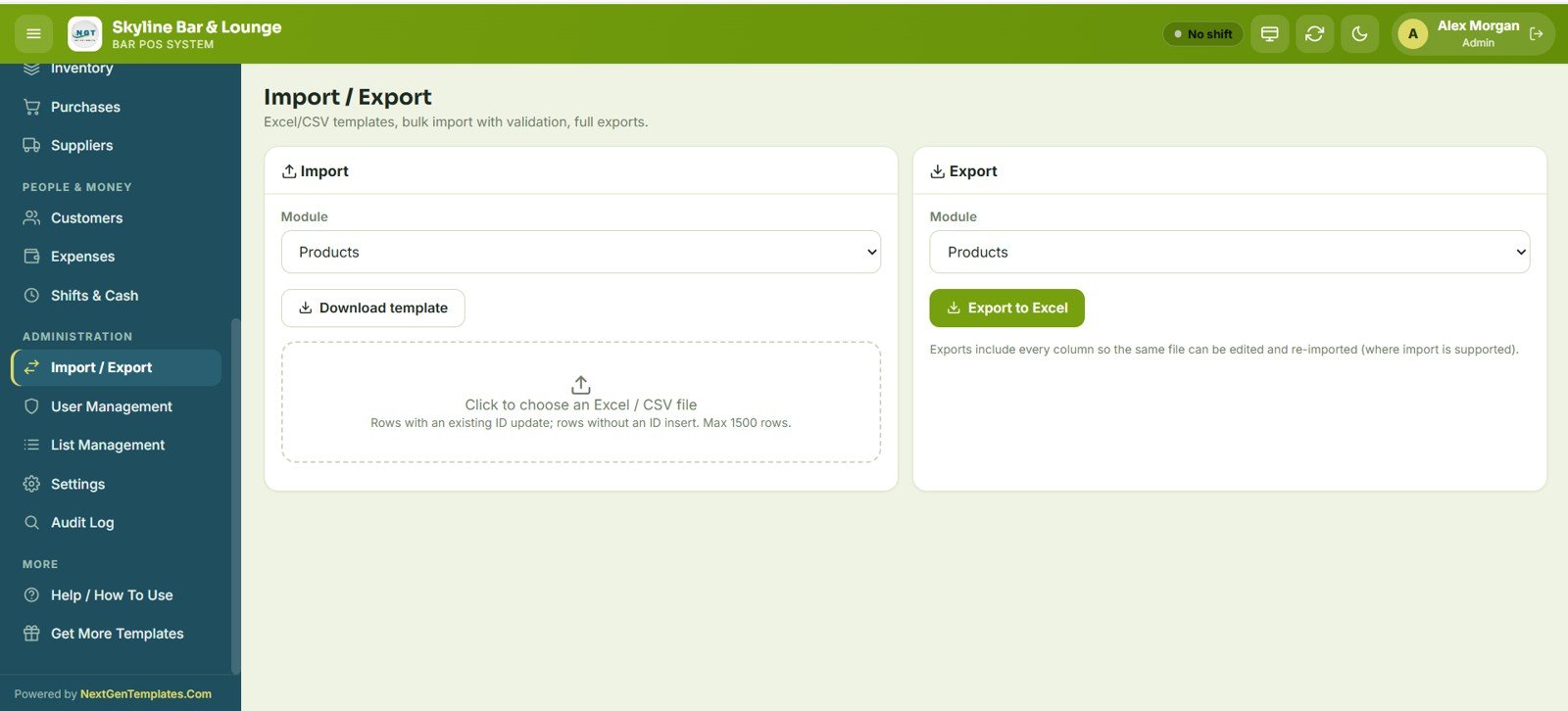
Choose a module, download its template, and import an Excel or CSV file with validation (up to 1,500 rows per import). Export any module to Excel in the same format so it can be edited and re-imported.
17 – User Management
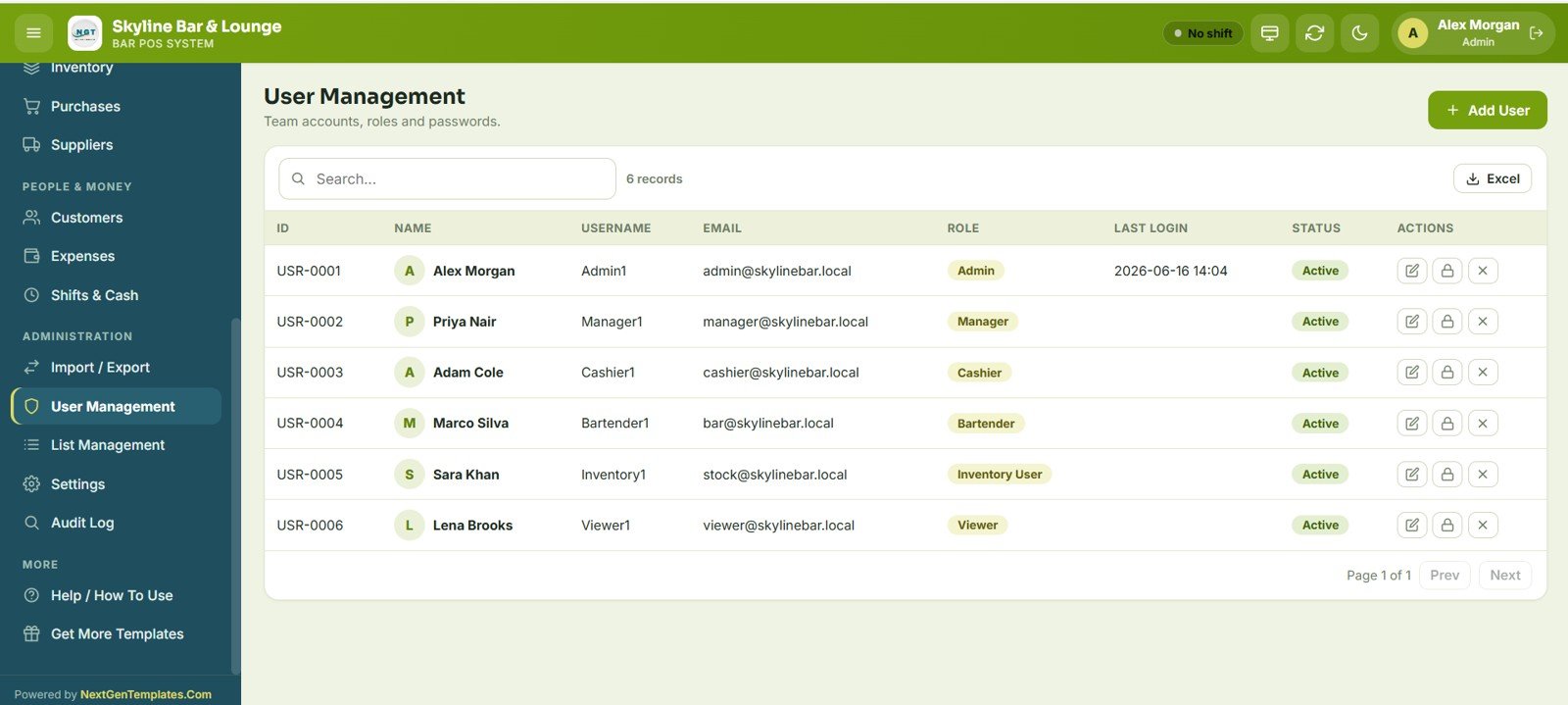
The admin adds team members and assigns Admin, Manager, Cashier, Bartender, Inventory User or Viewer roles, and manages usernames, passwords, last login and active status.
18 – List Management
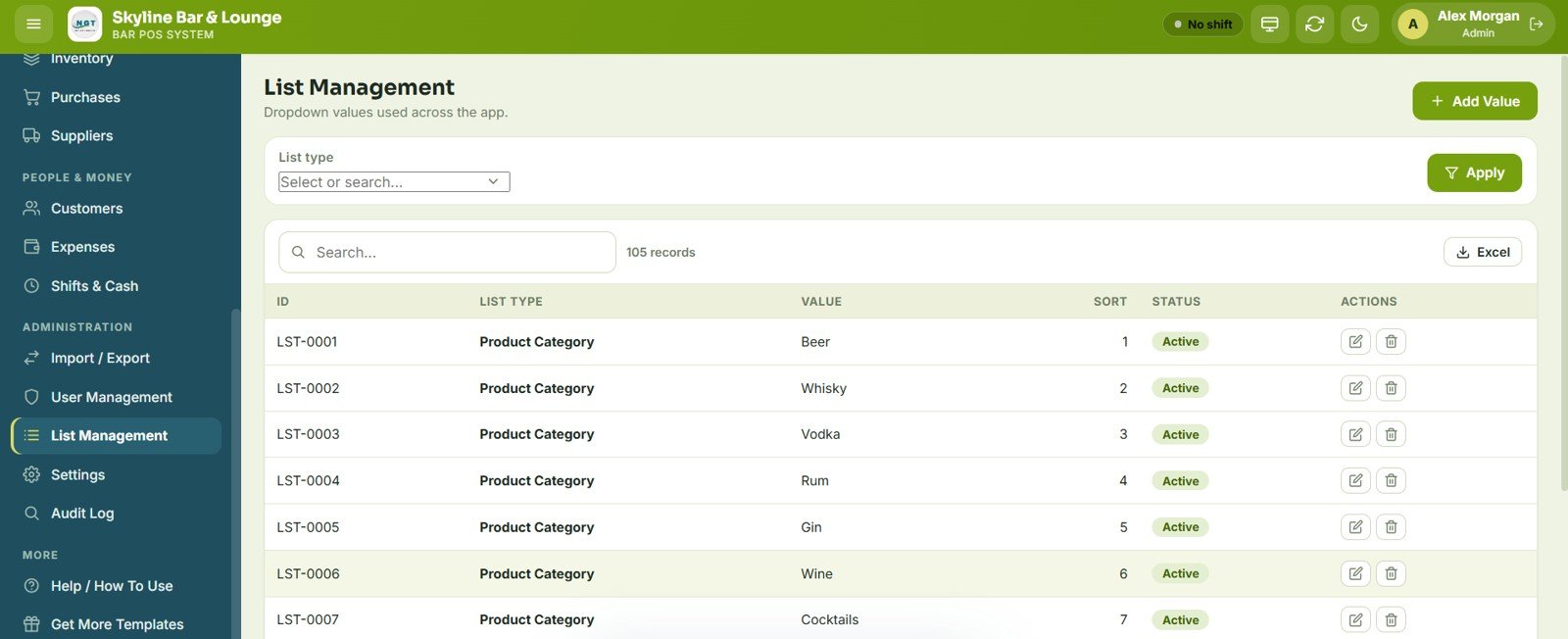
Configure the drop-down lists used across the app, such as product categories, units, payment modes, table areas and expense categories, with sort order and active status.
19 – Settings
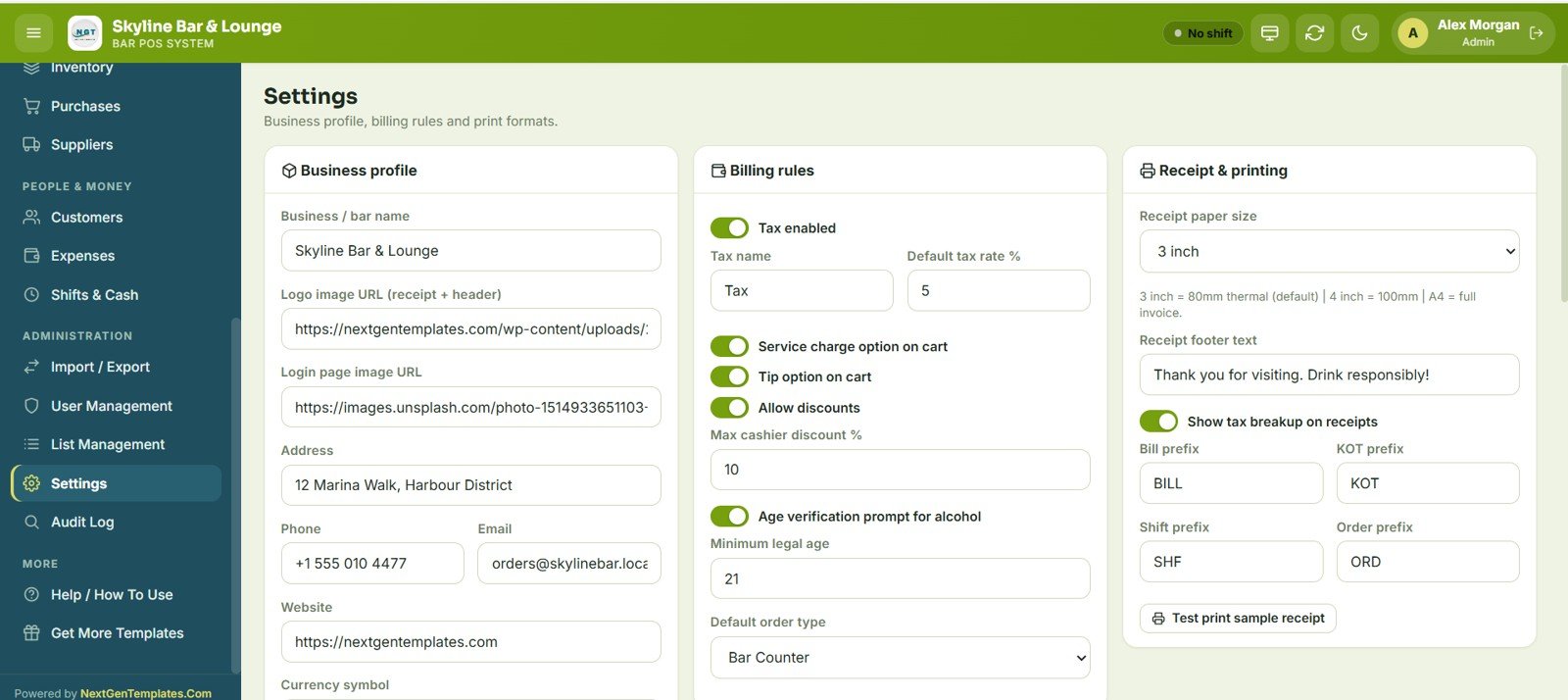
Set the business profile (bar name, logo, login image, address, contact), billing rules (tax, service charge, tip, discounts and maximum cashier discount, age verification prompt for alcohol with minimum legal age, default order type) and receipt printing (3 inch, 4 inch or A4 paper, footer text, tax breakup, and bill, KOT, shift and order prefixes).
20 – Audit Log
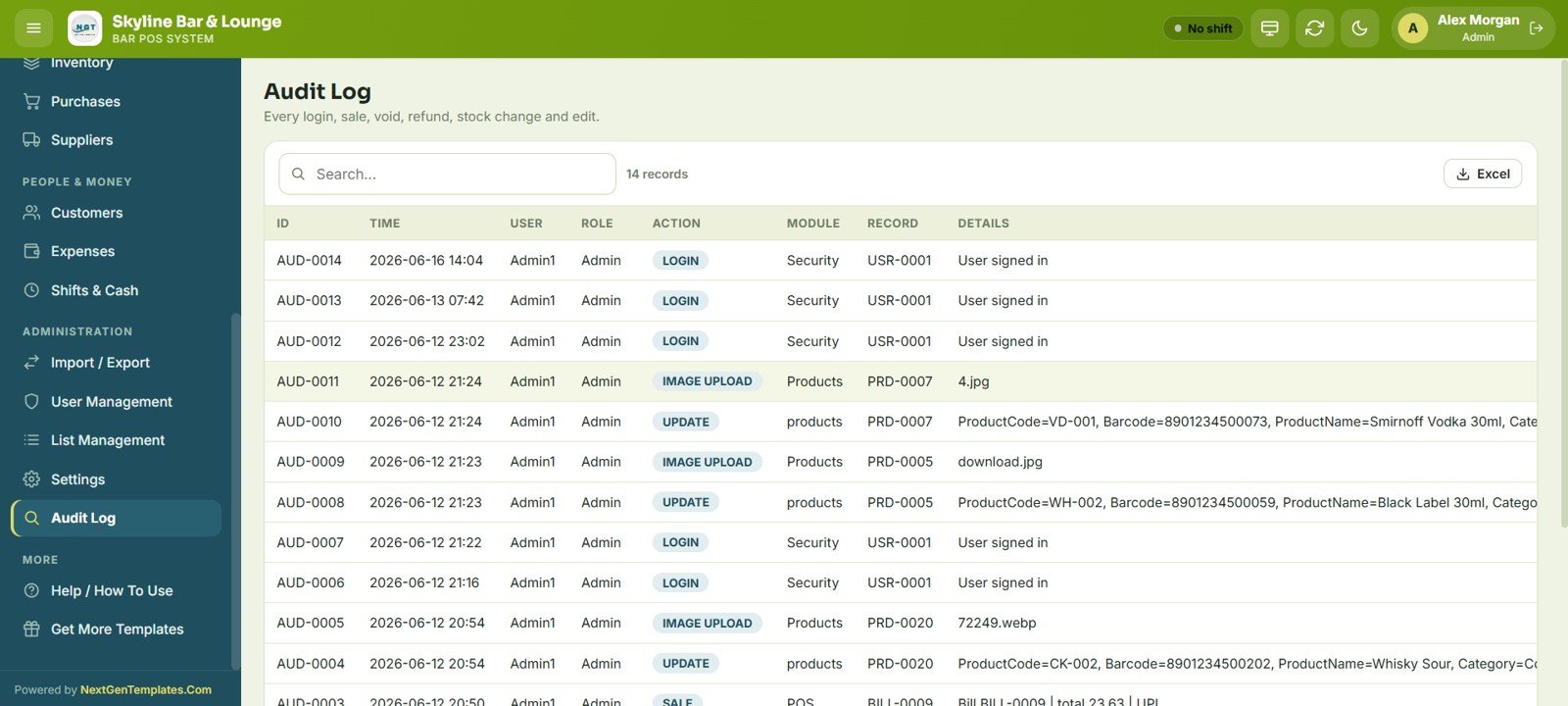
Every login, sale, void, refund, stock change and edit is recorded with time, user, role, action, module, record and details.
Bar POS System Web App vs. Excel POS vs. Subscription POS Apps
| Feature | Bar POS System Web App | Excel POS Template | Subscription POS apps |
|---|---|---|---|
| Pricing model | One-time purchase | One-time purchase | Monthly fees (vary by plan), often plus hardware |
| Platform | Google Sheets + Apps Script | Microsoft Excel | Vendor’s own software |
| Multi-user access | Yes, role-based logins | No (single file) | Yes |
| Mobile / tablet access | Yes, any browser | Limited | Yes |
| KOT / bar ticket workflow | Built in | Usually not available | Yes |
| Audit log and void tracking | Full audit log | Manual only | Yes |
| Card terminal integration | No (payments recorded manually) | No | Yes |
| Offline mode | No | Yes | Often |
Who Should Use This Template
Good fit for:
- Bar and pub owners who want a complete POS without a monthly fee
- Lounge and café managers running small teams
- Restaurants with a separate bar section that needs its own billing
- Bar staff and cashiers who need a fast, touch-friendly ordering screen
Not a fit if:
- You need offline POS hardware, payment gateway integration or formal compliance certifications
- You require direct card terminal pairing (card payments are recorded manually)
- You run a very high-volume venue that needs dedicated POS hardware
Real-World Use Cases
A neighbourhood pub can use the Tables and KOT screens so bartenders see each order as soon as it is placed, then reconcile each cashier’s till with the Shifts & Cash Register screen at closing.
A rooftop lounge can set up its own table areas (for example terrace, indoor bar and VIP) in List Management, load its products and categories, and review sales by category and payment mode on the dashboard and reports.
A café-bar can use the Customers screen to record regulars’ birthdays and loyalty points, and the Shift Closing report to check that cash in the drawer matches expected cash every night.
Advantages of the Bar POS System Web App
- Low running cost – it runs on Google Sheets and Apps Script in your own Google account, with no separate server or database.
- Multi-device access – open the same web app on a counter tablet for billing, a laptop for reports and a phone for tables.
- Complete operational coverage – from the first order to supplier payments and shift closing.
- Customisable – edit categories, tables, tax, service charge and branding from Settings and List Management without touching code.
- Accountability – every action is logged with time, user and role.
Limitations to Know
- No offline mode – as an Apps Script web app it needs an internet connection; venues with unreliable connectivity should have a backup plan.
- No payment gateway integration – cash, card and UPI payments are recorded manually; a separate card terminal is still needed.
- Very high volume – Google Sheets suits most small and mid-sized bars, but very busy venues may notice slower responses at peak times.
Best Practices
- Follow the deployment guide’s access settings so every team member can sign in with their own credentials.
- Run the Shift Closing report at the end of every day.
- Check the Low Stock / Reorder report weekly so popular drinks do not run out at peak times.
- Turn on the Age verification prompt for alcohol in Settings if your area requires it.
- Back up the Google Sheets file monthly with File > Make a copy; all data lives in the spreadsheet.
Want to build skills like this step by step? The NextGenTemplates Academy learning paths on spreadsheet trackers and management systems come with practice files.
Explore Relevant Templates
Running a different kind of venue? Compare the Restaurant POS Web App, the Coffee Cafe POS Web App and the fuller Restaurant Management System Web App. For tracking profit once sales are flowing, see the Restaurant P&L Dashboard in Google Sheets and the Daily Sales Purchase System Web App.
- Restaurant Management System Web App – restaurant POS with tables, KOT, billing and inventory on the same Google Sheets and Apps Script platform.
- Salon and Spa Management System Web App – appointments, clients, services, billing and staff scheduling.
- Food Delivery Dashboard in Excel – delivery orders, rider performance and revenue.
For more, browse the Google Sheets templates collection or read the Google Apps Script documentation.
Frequently Asked Questions
What does the Bar POS System Web App include?
20 screens: login, POS/billing, held orders, tables, KOT/bar tickets, bills, dashboard (9 KPI cards and 5 charts), reports center with 19 reports, products, inventory, purchases, suppliers, customers, expenses, shifts/cash register, import/export, user management, list management, settings and audit log.
Does it work on mobile and tablet?
Yes. It runs in any modern browser on tablets, phones and desktops. The billing screen uses large product cards that work well on a counter tablet.
How many users can use the system at the same time?
Several team members can be signed in at once, each with their own login and one of six roles: Admin, Manager, Cashier, Bartender, Inventory User or Viewer.
How does it compare to subscription POS apps?
Subscription POS apps charge monthly fees that vary by plan and usually offer card terminal integration and offline hardware. This web app is a one-time purchase with no monthly fee, but payments are recorded manually and it needs an internet connection.
How long does setup take?
Follow the included deployment guide: copy the Google Sheets file, deploy the Apps Script web app, set your bar name, logo, tax and service charge, then add products and team members. No coding is needed.
Can I customise categories, tables and tax settings?
Yes. List Management controls product categories, table areas, payment modes, units and expense categories. Settings controls tax, service charge, tips, age verification, receipt size and number prefixes.
Is my data private?
Your data is stored in a Google Sheets file in your own Google Drive account, protected by your Google account security.
About the Author
Built by PK, founder of NextGenTemplates, who has worked with Excel, Google Sheets and Power BI for many years. Every template is built and tested before release.
Wrapping Up
The Bar POS System Web App brings billing, tables, bar tickets, stock, suppliers, shifts and reports into one browser-based system that lives in your own Google account. Try the live demo with the Admin1 login, check the screens your team will use most, and then deploy your own copy.
Get the Bar POS System Web App
📅 Last updated: October 2026