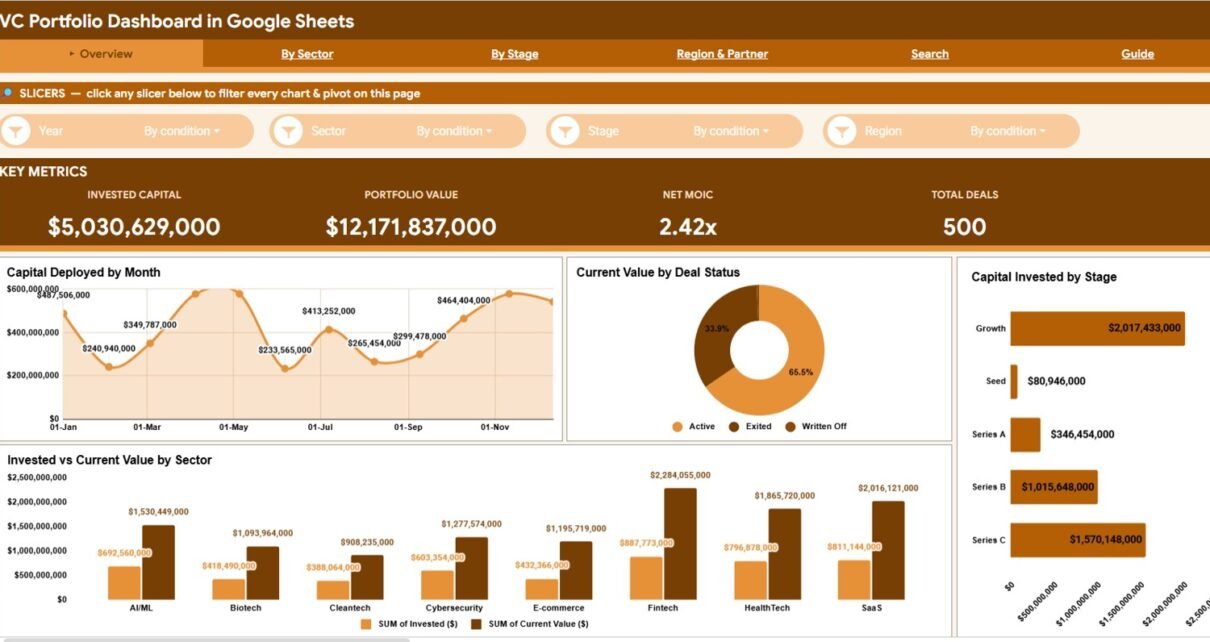
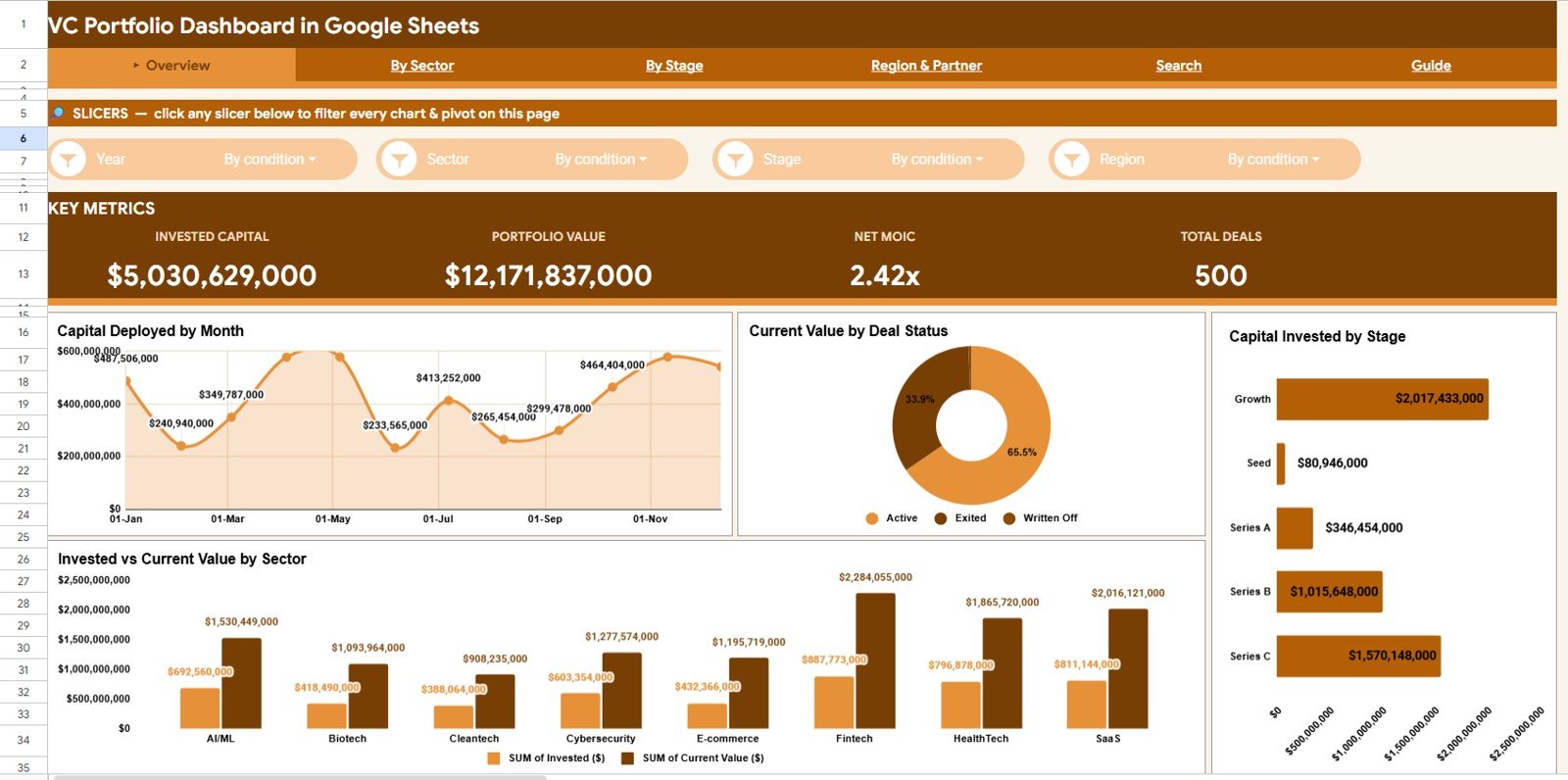
The VC Portfolio Dashboard in Google Sheets tracks 4 fund-level KPIs — Invested Capital, Portfolio Value, Net MOIC, and Total Deals — across 6 connected tabs with 16 pre-built charts. Setup takes under 10 minutes, and the whole thing runs in a browser with no add-ons or macros.
For emerging managers and angel investors, fund-tracking software like Carta or Visible.vc often starts at $300–$1,000+ per month. This VC Portfolio Dashboard in Google Sheets gives you the core performance view — MOIC, sector mix, stage distribution, and partner attribution — for a one-time price, so you can manage deal data and report to LPs without a recurring subscription.
Get the VC Portfolio Dashboard in Google Sheets
Key Features of the VC Portfolio Dashboard in Google Sheets
Every page reads from one Data tab, so you maintain a single list of investments and the rest of the workbook stays in sync.
- Four headline KPIs — Invested Capital, Portfolio Value, Net MOIC, and Total Deals sit on the Overview so fund health is readable at a glance.
- Sixteen analysis charts spread across four dedicated tabs covering time, sector, stage, and region/partner views.
- Slicer filtering lets you slice the entire Overview by sector, stage, region, or status with one click.
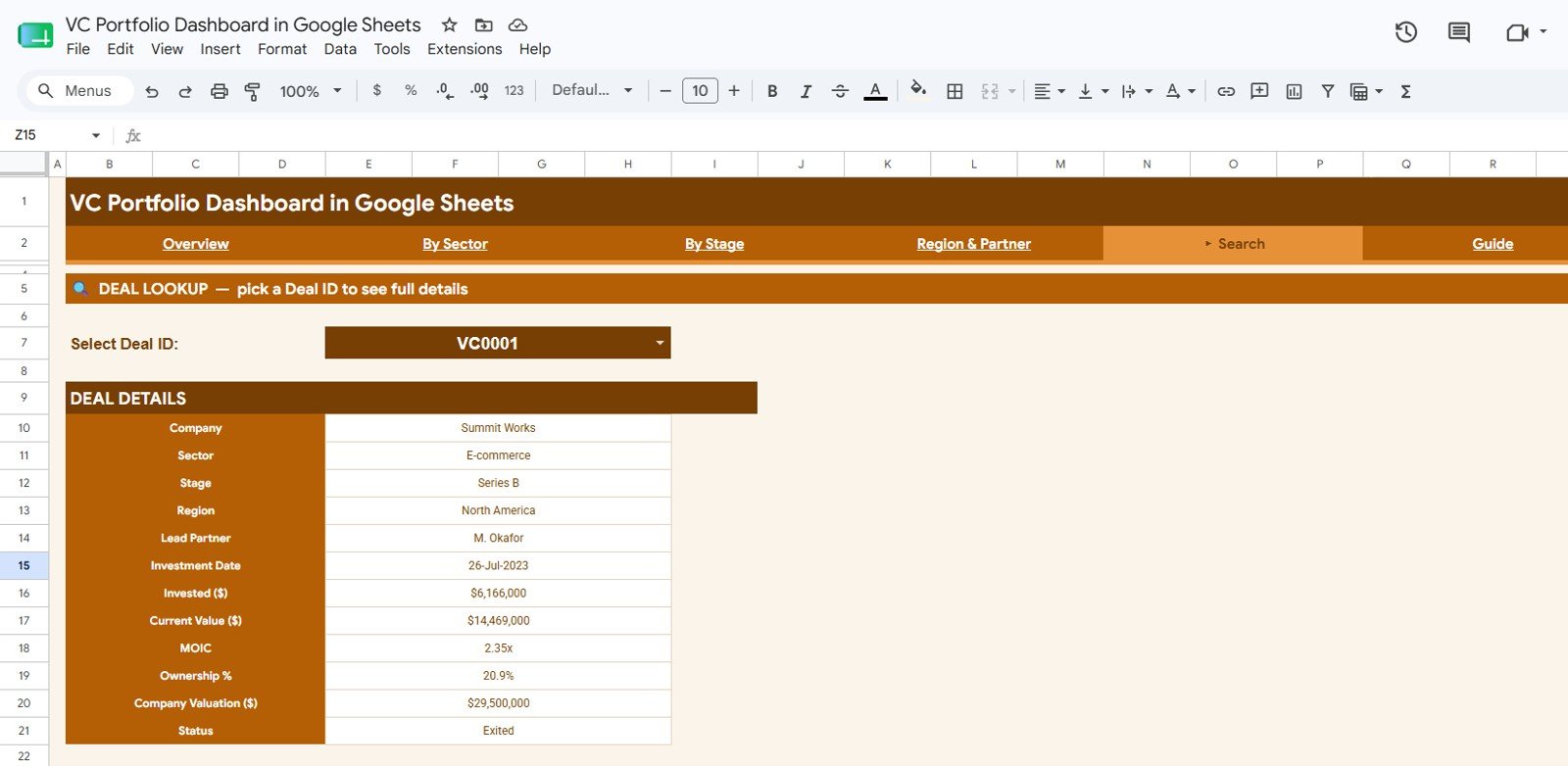
- A Deal Search tab returns 12 fields for any Deal ID, from invested amount to ownership percent and company valuation.
Dashboard Pages Explanation
The workbook is organised into six tabs. Here is what each one does.
Overview Page
The landing tab shows the four KPI cards above four charts: Capital Deployed by Month, Current Value by Deal Status, Capital Invested by Stage, and Invested vs Current Value by Sector. Slicers across the top filter the whole page instantly.
By Sector
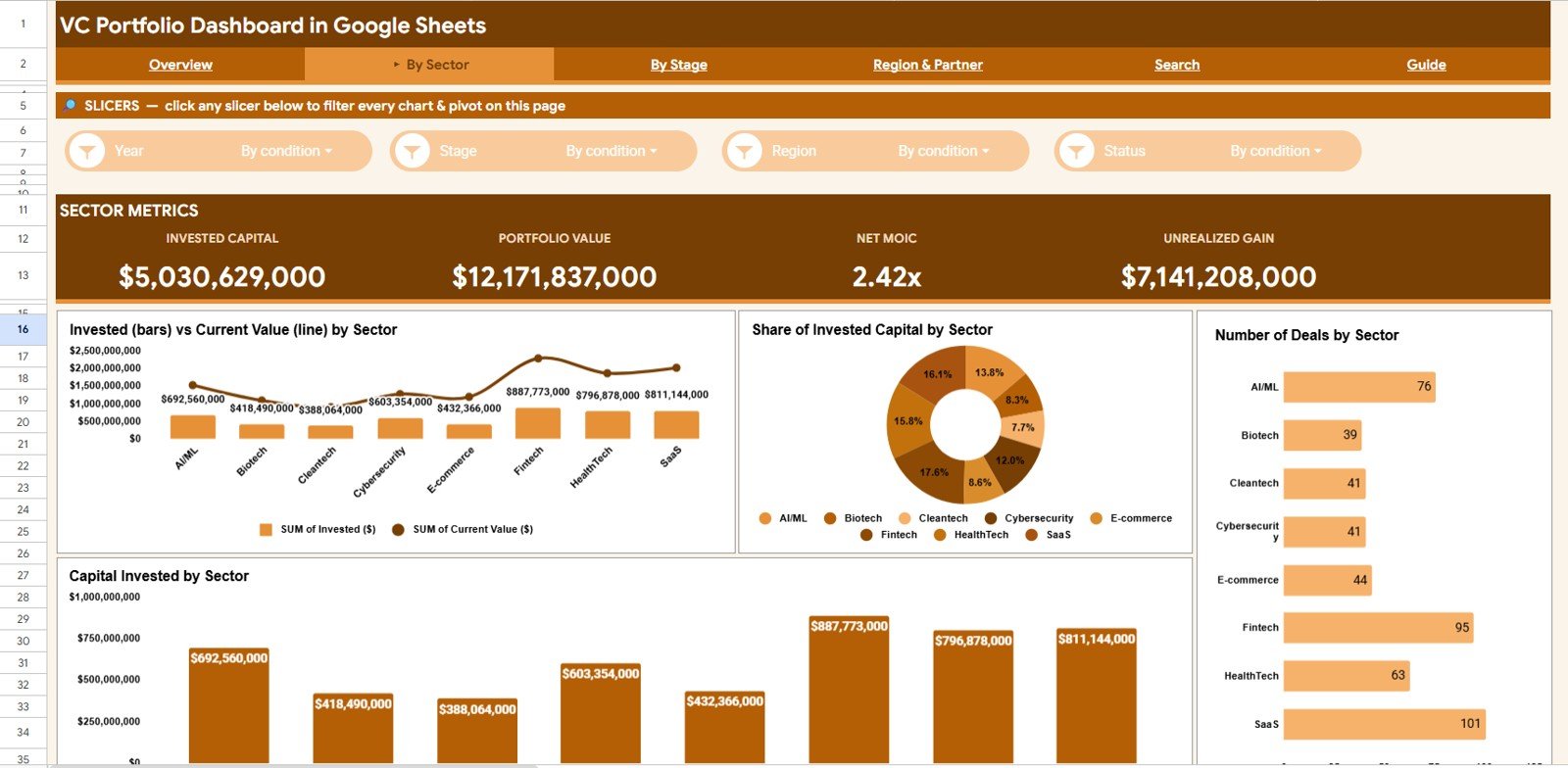
This tab breaks the book down by industry with Invested vs Current Value by Sector, Share of Invested Capital by Sector, Number of Deals by Sector, and Capital Invested by Sector — useful for spotting concentration risk and which sectors are creating value.
By Stage
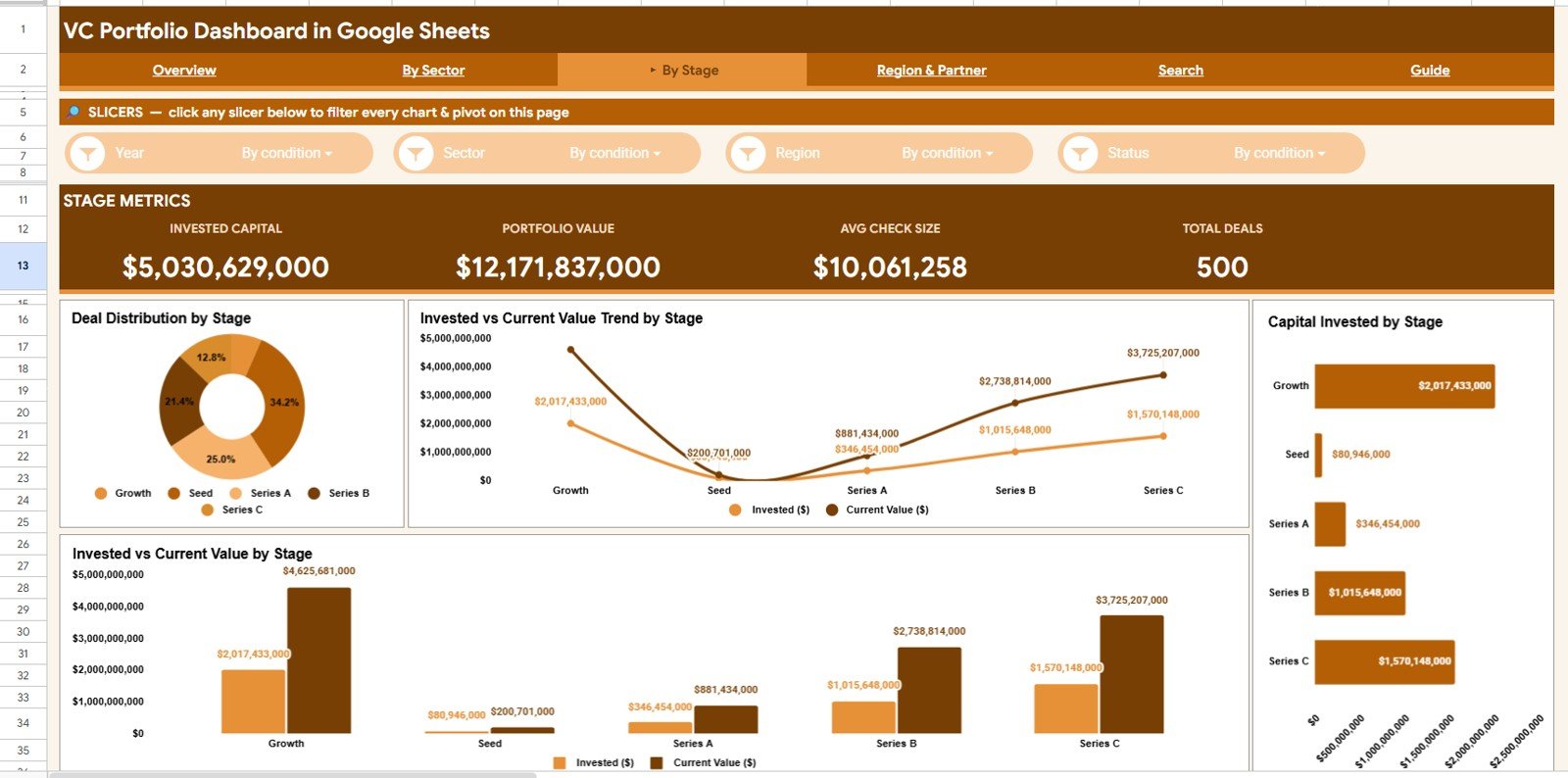
This tab analyses the portfolio by investment stage with Deal Distribution by Stage, Invested vs Current Value Trend by Stage, Capital Invested by Stage, and Invested vs Current Value by Stage — so you can see how seed, Series A, and later rounds are performing.
Region & Partner
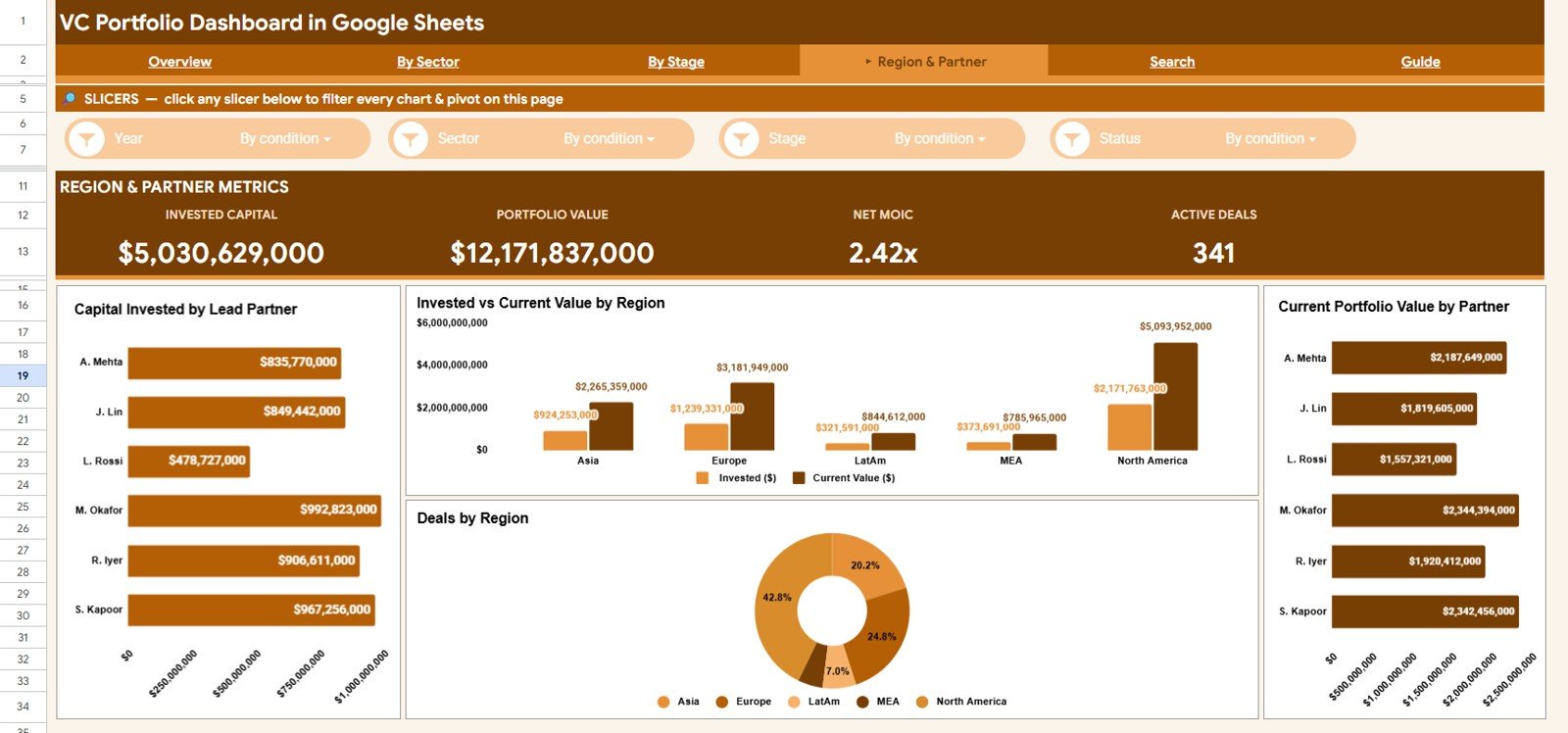
This tab attributes the portfolio across geography and team with Capital Invested by Lead Partner, Invested vs Current Value by Region, Current Portfolio Value by Partner, and Deals by Region — ideal for partner reviews and checking regional exposure.
Search Sheet
Pick any Deal ID from the dropdown and instantly see the full record — company, sector, stage, region, lead partner, investment date, invested amount, current value, MOIC, ownership percent, company valuation, and status — without scrolling the raw data.
Data Sheet
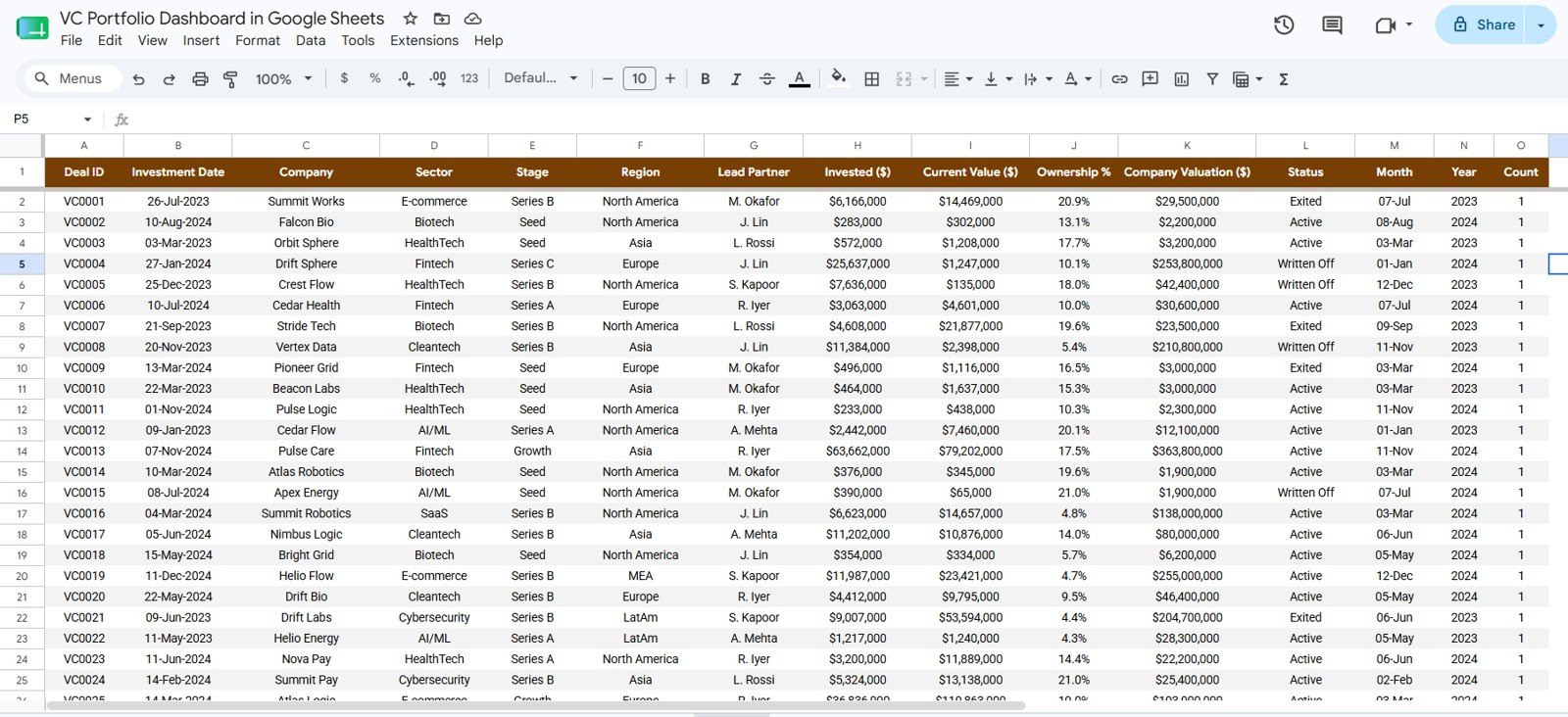
This is where you maintain the portfolio. Add each investment as a row in the same column format and the KPI cards, all 16 charts, and the Search tab update from this single source.
VC Portfolio Dashboard in Google Sheets vs. Microsoft Excel vs. Paid Fund Software — Feature Comparison
| Feature | VC Portfolio Dashboard (Google Sheets) | Microsoft Excel Dashboard | Carta / Visible.vc |
|---|---|---|---|
| Cost | $9.99 one-time | $9.99–$17.99 one-time | $300–$1,000+ / month |
| Platform | Browser-based, no install | Requires Microsoft Excel | Web SaaS |
| Setup time | Under 10 minutes | Under 10 minutes | Days (onboarding) |
| Real-time team collaboration | Yes (native) | Limited | Yes |
| Mobile access | Sheets app | Excel mobile | Yes |
| Customizable fields | Fully editable | Fully editable | Limited to vendor schema |
| Share with link | One click | Needs file upload | Yes |
| MOIC & stage analytics | Built in | Built in | Yes |
| Year-1 cost at 5 users | $9.99 total | $9.99–$17.99 total | $3,600–$12,000+ |
For emerging managers and angels who want clear MOIC, sector, and stage analytics without paying four figures a month for Carta, the VC Portfolio Dashboard in Google Sheets sits in the sweet spot.
Who Should Use This Template
Perfect for:
- Emerging VC fund managers and micro-VCs tracking 10–100 portfolio companies
- Angel investors and syndicate leads who want MOIC and sector exposure at a glance
- Family offices and solo GPs who need a shareable, one-time-cost alternative to Carta
Not a fit if:
- You need cap-table management, 409A valuations, or SOC 2 compliance
- You require automated bank or brokerage data feeds rather than manual deal entry
Real-World Use Cases
Maya runs a $20M micro-VC fund. She uses the VC Portfolio Dashboard in Google Sheets to track Net MOIC and current value across 35 companies, filters the Overview by stage before LP calls, and shares a read-only link with her two analysts — instead of paying for a per-seat fund platform.
Devansh leads an angel syndicate. He logs each deal on the Data tab and uses the By Sector and Region & Partner tabs to show members where capital is concentrated and which lead partners are driving returns.
A family office associate uses the Search tab to answer ad-hoc questions during quarterly reviews — typing a Deal ID to instantly surface ownership percent, company valuation, and status.
Advantages of the VC Portfolio Dashboard in Google Sheets
The biggest advantage is cost. Replacing a $300–$1,000+ monthly platform with a one-time $9.99 template can save a small fund thousands of dollars a year while still delivering the performance metrics that matter most to LPs.
Because it runs in Google Sheets, collaboration is native — partners and analysts can work in the same file in real time, and you can share a link rather than emailing file versions. MOIC (multiple on invested capital) and stage analytics are built in, so you are not rebuilding formulas from scratch.
Opportunities for Improvement
This template is a tracking and reporting tool, not a fund-administration suite. It does not manage cap tables, generate 409A valuations, or pull automated data feeds, so values are updated manually on the Data tab. Funds with strict compliance requirements or hundreds of positions may eventually outgrow a spreadsheet — but for most emerging managers and angels, manual entry is a fair trade for full control and zero subscription cost.
Best Practices
- Update current values on a consistent cadence (monthly or quarterly) so Net MOIC stays meaningful.
- Keep the Data tab column order intact — the charts and Search tab depend on it.
- Use a separate working copy for what-if scenarios so your reporting copy stays clean.
- Share a view-only link with LPs and an edit link only with your internal team.
Explore Relevant Templates
Get the VC Portfolio Dashboard in Google Sheets here. It is also available as the VC Portfolio Dashboard in Excel and the VC Portfolio Dashboard in Power BI. Investors also use our Hedge Fund Administration Dashboard and Business Angel Networks Dashboard. If you track other asset types, see our Property Portfolio Dashboard in Google Sheets and browse more Google Sheets Dashboards.
Interested in the pivot tables and charts behind a dashboard like this? The Excel Pivot Tables & Dashboards course on NextGenTemplates Academy covers them with practice files.
Get the VC Portfolio Dashboard in Google Sheets
Frequently Asked Questions
What KPIs does the VC Portfolio Dashboard in Google Sheets track?
The VC Portfolio Dashboard in Google Sheets tracks four headline KPIs — Invested Capital, Portfolio Value, Net MOIC, and Total Deals — plus 16 supporting charts. Every metric updates automatically when you add or edit deals on the Data tab.
How does this compare to Carta or Visible.vc?
Carta and Visible.vc are SaaS platforms that can cost $300–$1,000+ per month. The VC Portfolio Dashboard in Google Sheets is a one-time $9.99 alternative for performance tracking — MOIC, sector, stage, region, and partner analytics — without cap-table or compliance modules.
How long does setup take?
Setup takes under 10 minutes. Make your own copy from the included link, paste your deals into the Data tab using the existing column order, and the KPI cards, charts, and Search tab populate instantly.
Can my whole fund team use it at once?
Yes. Because the VC Portfolio Dashboard in Google Sheets runs in Google Sheets, multiple teammates can view and edit in real time and you can share a link with view-only or edit access, with no per-user fees.
Is the Net MOIC calculated automatically?
Yes. Net MOIC is derived from invested capital versus current value across the portfolio and recalculates as you update deal values, so the figure on the Overview always reflects your latest data.
Do I need any add-ons or scripts to run it?
No. The VC Portfolio Dashboard in Google Sheets works in any modern browser with standard Google Sheets functions and slicers — no installs, macros, or third-party add-ons required.
About the Author
Built by PK — Microsoft Certified Professional with 15+ years of Excel, Google Sheets, and Power BI experience. Founder of NextGenTemplates, reaching 300K+ subscribers across YouTube channels. Every template is hand-built and tested before release.
Conclusion
If you need a clear, shareable view of fund performance without a recurring bill, the VC Portfolio Dashboard in Google Sheets is a practical place to start.
Instant download · One-time payment · No subscription.
Last updated: June 2026