The Cemetery Management Dashboard in Google Sheets brings interments, revenue, and plot occupancy into one shareable file. It tracks 4 headline KPIs and 16 charts across 4 interactive analysis pages, plus a Search tab and a Data sheet. Setup takes under 10 minutes: you replace the sample records and every card, chart, and slicer refreshes on its own.
Many cemetery offices, memorial parks, and funeral providers still record burials in paper registers or a tangle of separate spreadsheets. That makes a simple question, such as how many plots are occupied or reserved in one section, or how much revenue came from cremation niches last quarter, surprisingly hard to answer. This Google Sheets cemetery dashboard pulls that reporting into one place that any staff member can open in a browser, on any device, with nothing to install.
Get the Cemetery Management Dashboard
Key Features of the Cemetery Management Dashboard in Google Sheets
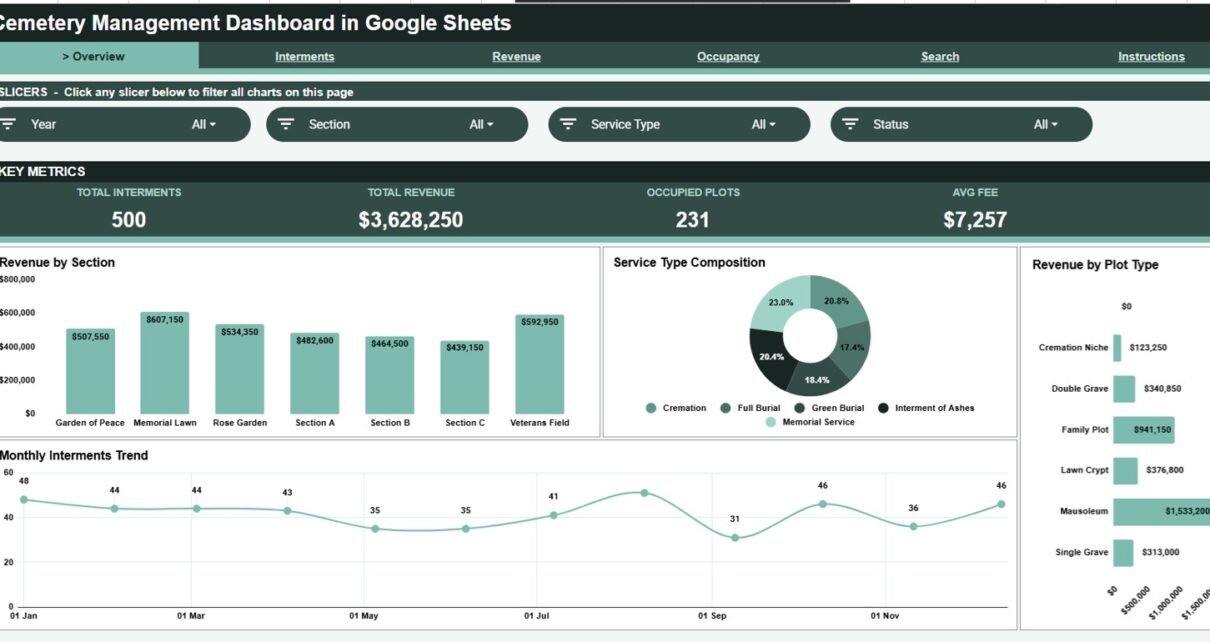
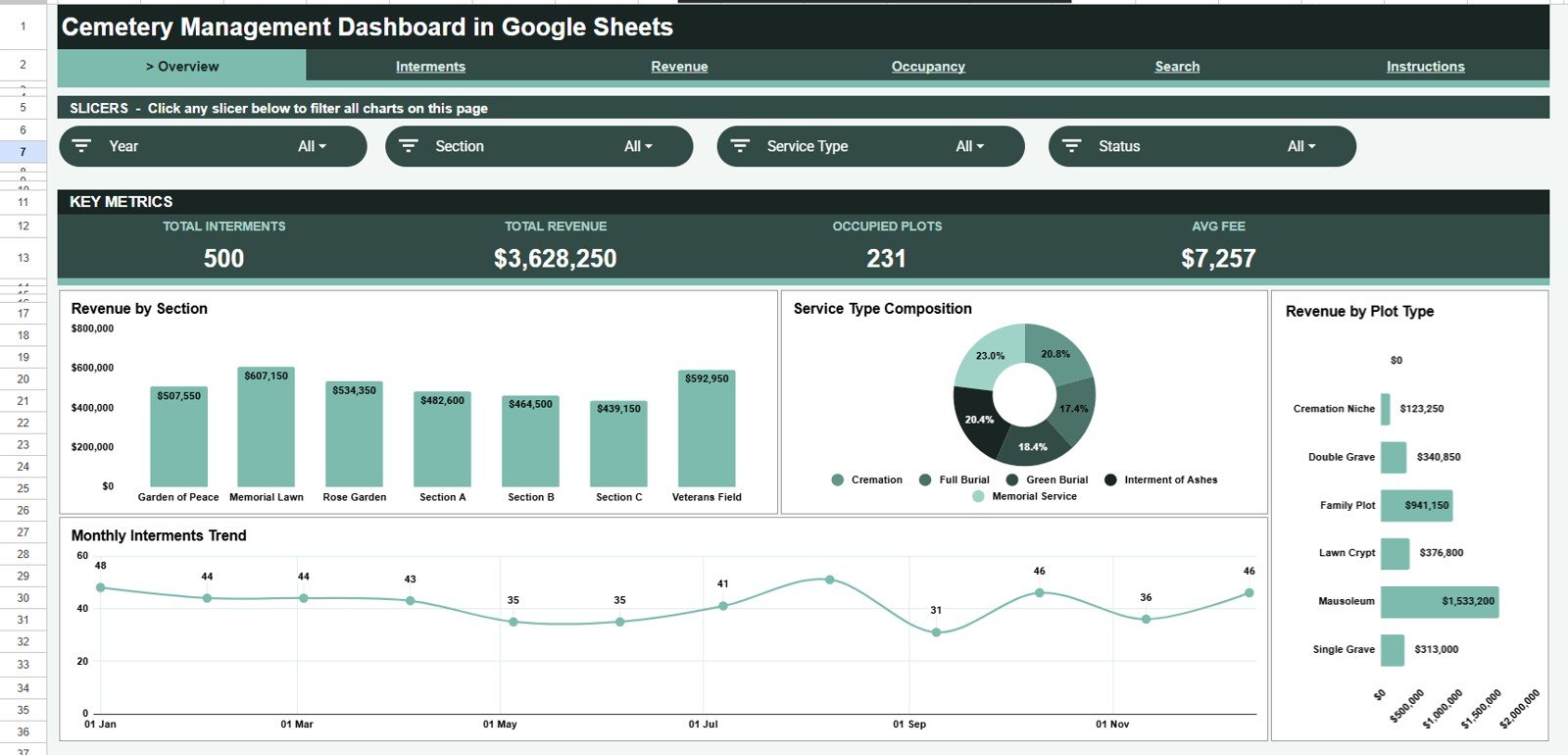
The Cemetery Management Dashboard tracks 4 KPI cards (Total Interments, Total Revenue, Occupied Plots, and Avg Fee) that recalculate the moment you log a new record. With the 500 sample records they read 500 interments, $3,628,250 in revenue, 231 occupied plots, and a $7,257 average fee. Around them sit 16 pre-built charts, so you never have to build a chart or write a formula yourself.
Filtering is handled by slicers at the top of each page. On the Overview, click a Year, Section, Service Type, or Status and the whole page narrows to it, then resets just as quickly. A dedicated Search tab lets you pull any single interment record by its Record ID. Because the file lives in Google Sheets, the office can share it by link and work in it at the same time with no per-user fees.
Dashboard Pages Explanation
Overview Page
The Overview is the landing page. It carries the four KPI cards above four charts: Revenue by Section, Service Type Composition, Revenue by Plot Type, and a Monthly Interments Trend. The sample grounds have seven sections (Garden of Peace, Memorial Lawn, Rose Garden, Section A, Section B, Section C, and Veterans Field) and six plot types (Cremation Niche, Double Grave, Family Plot, Lawn Crypt, Mausoleum, and Single Grave).
Interments Page
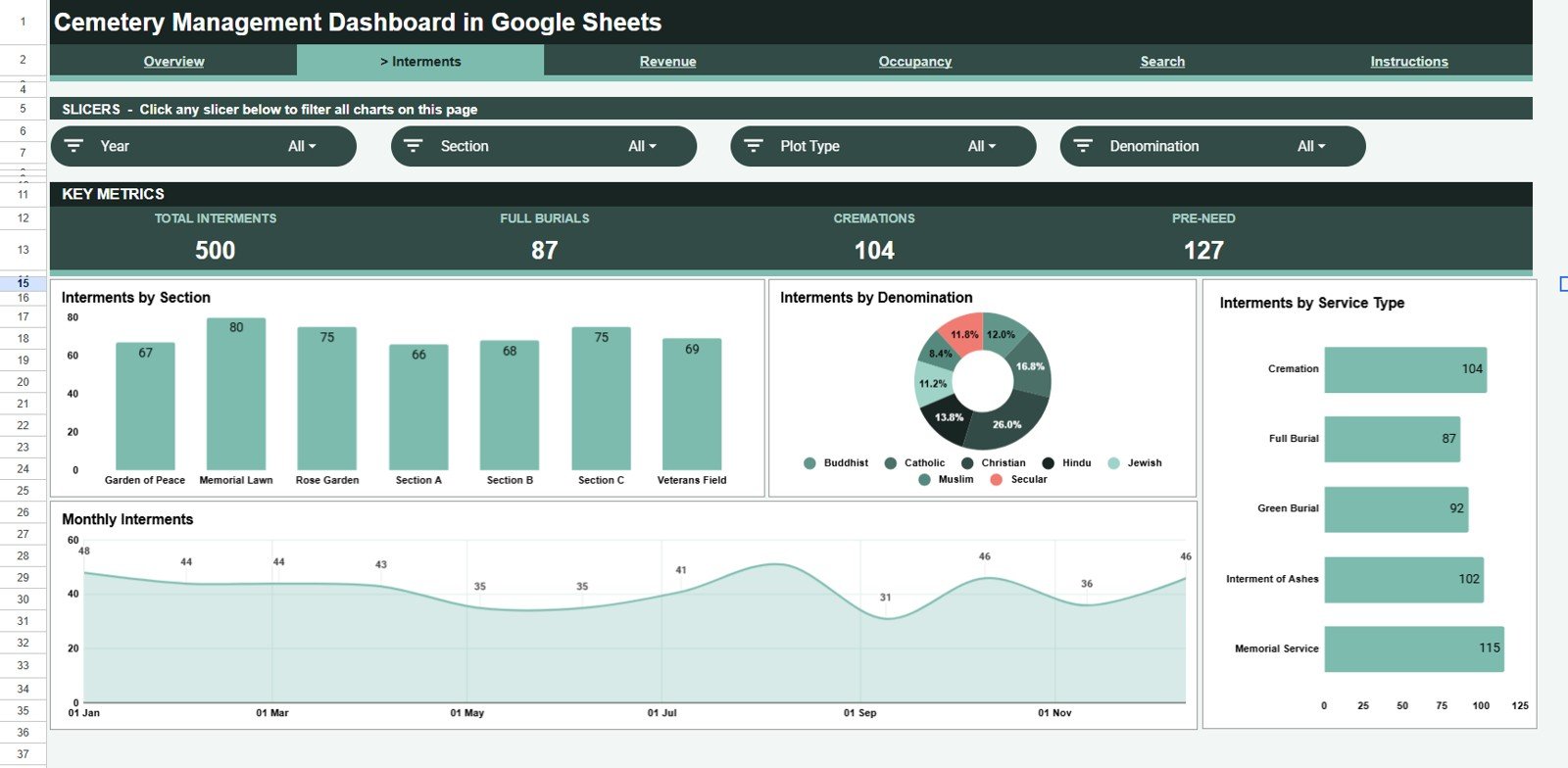
This tab focuses on burial activity. Its cards show Total Interments, Full Burials, Cremations, and Pre-Need, and four charts (Interments by Section, Interments by Denomination, Interments by Service Type, and Monthly Interments) show which areas of the grounds and which service types are busiest and how volume moves through the year. Service types in the sample are Cremation, Full Burial, Green Burial, Interment of Ashes, and Memorial Service.
Revenue Page
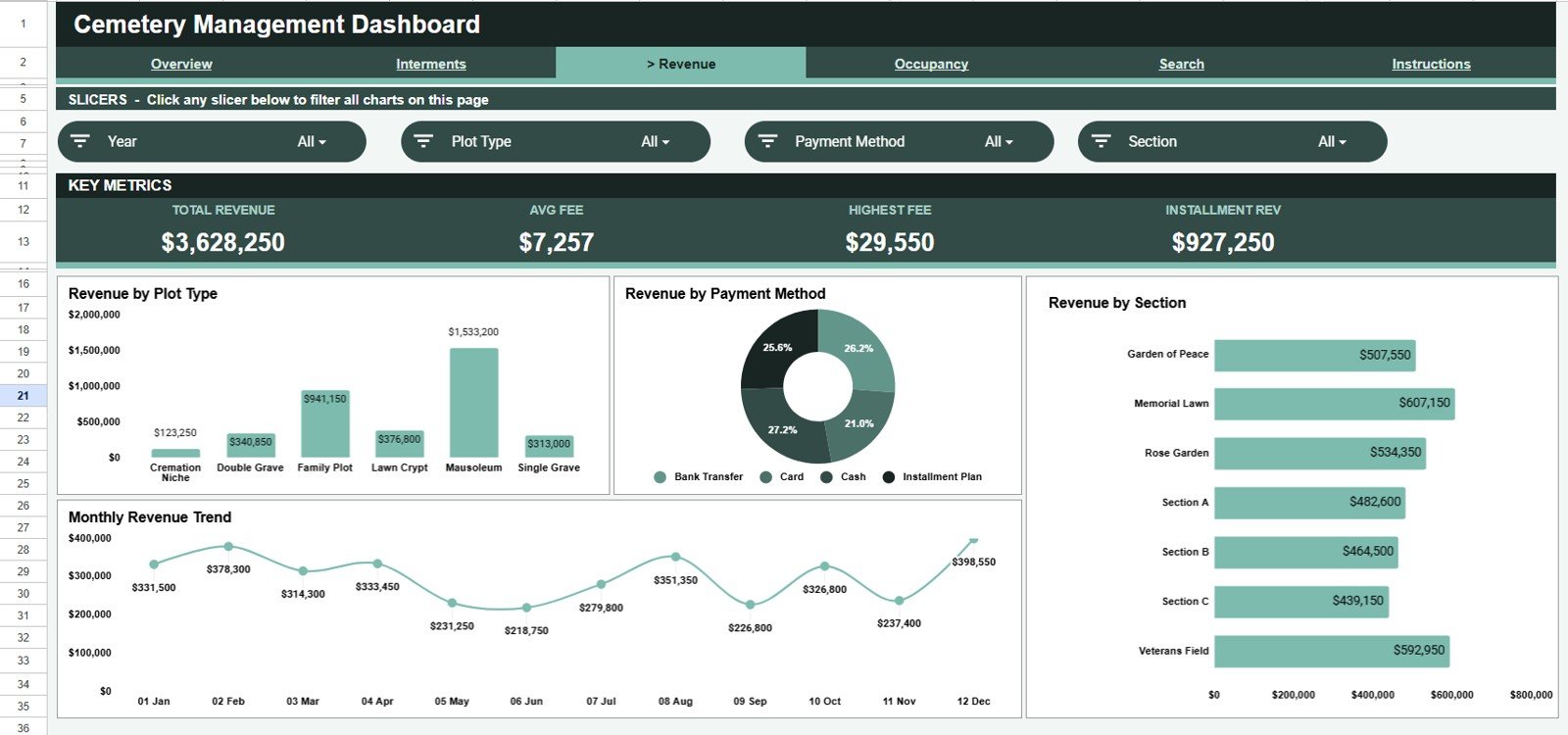
The Revenue tab follows the money. Its cards show Total Revenue, Avg Fee, Highest Fee, and Installment Revenue, and it charts Revenue by Plot Type, Revenue by Payment Method (Bank Transfer, Card, Cash, Installment Plan), Revenue by Section, and a Monthly Revenue Trend, giving you a clear read on where fees come from and how cash flow changes across the calendar.
Occupancy Page
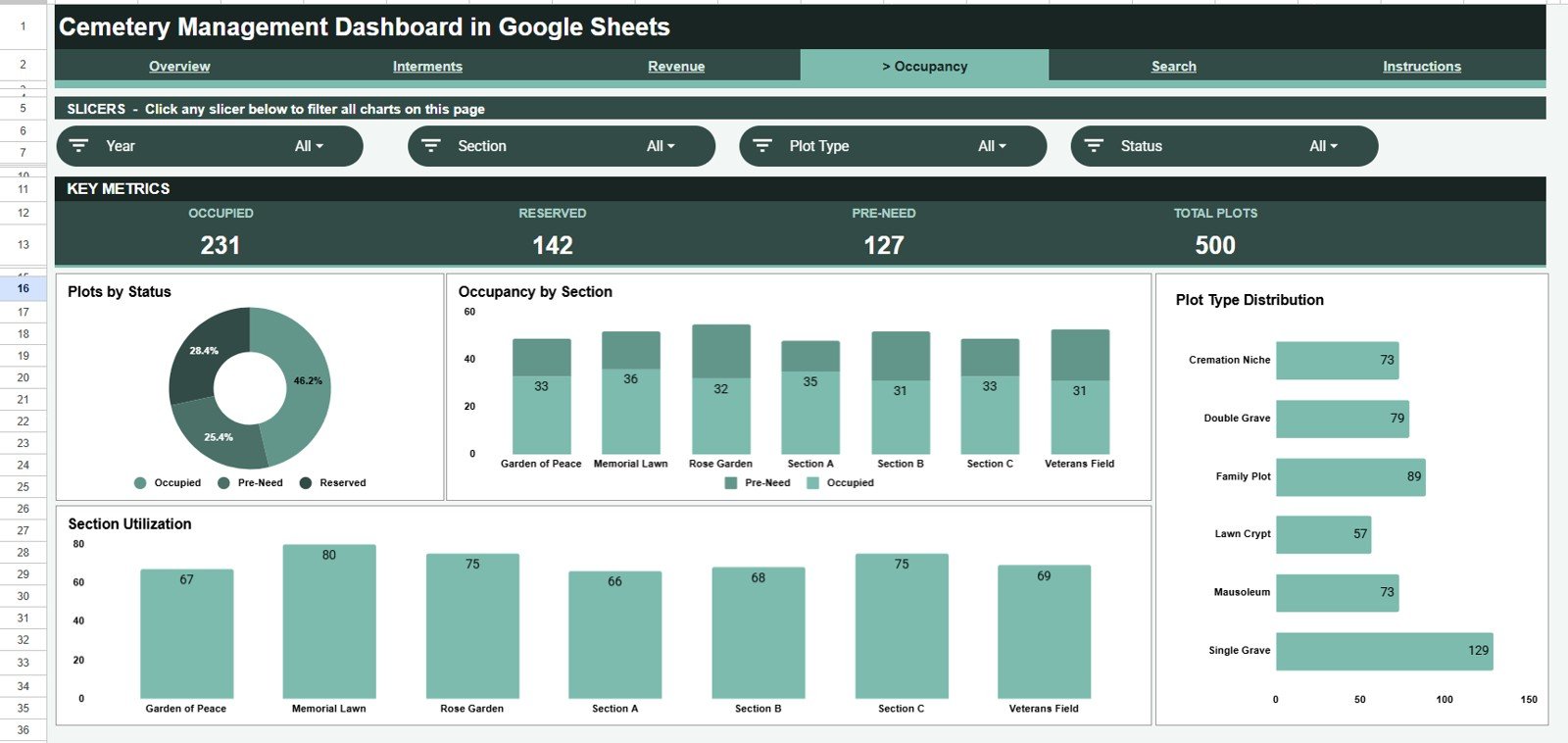
The Occupancy tab tracks plot status with cards for Occupied, Reserved, Pre-Need, and Total Plots, and charts for Plots by Status (Occupied, Reserved, Pre-Need), Occupancy by Section, Plot Type Distribution, and Section Utilization. Together these show which sections are filling fastest and how much of the inventory is already reserved or sold pre-need.
Search Page
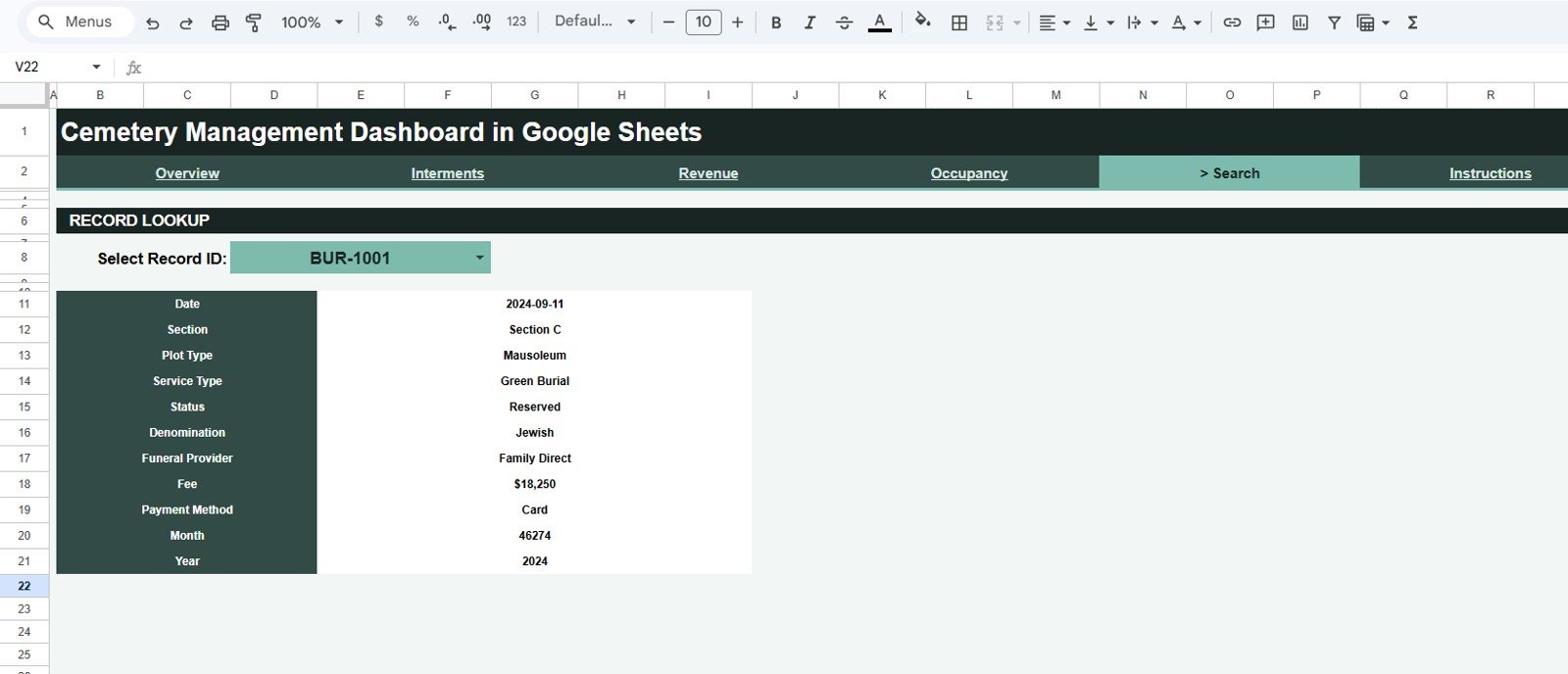
The Search tab is a record lookup. Choose any Record ID from the dropdown and the page shows that interment’s Date, Section, Plot Type, Service Type, Status, Denomination, Funeral Provider, Fee, Payment Method, Month, and Year, which is handy when a family calls with a question.
Data Sheet
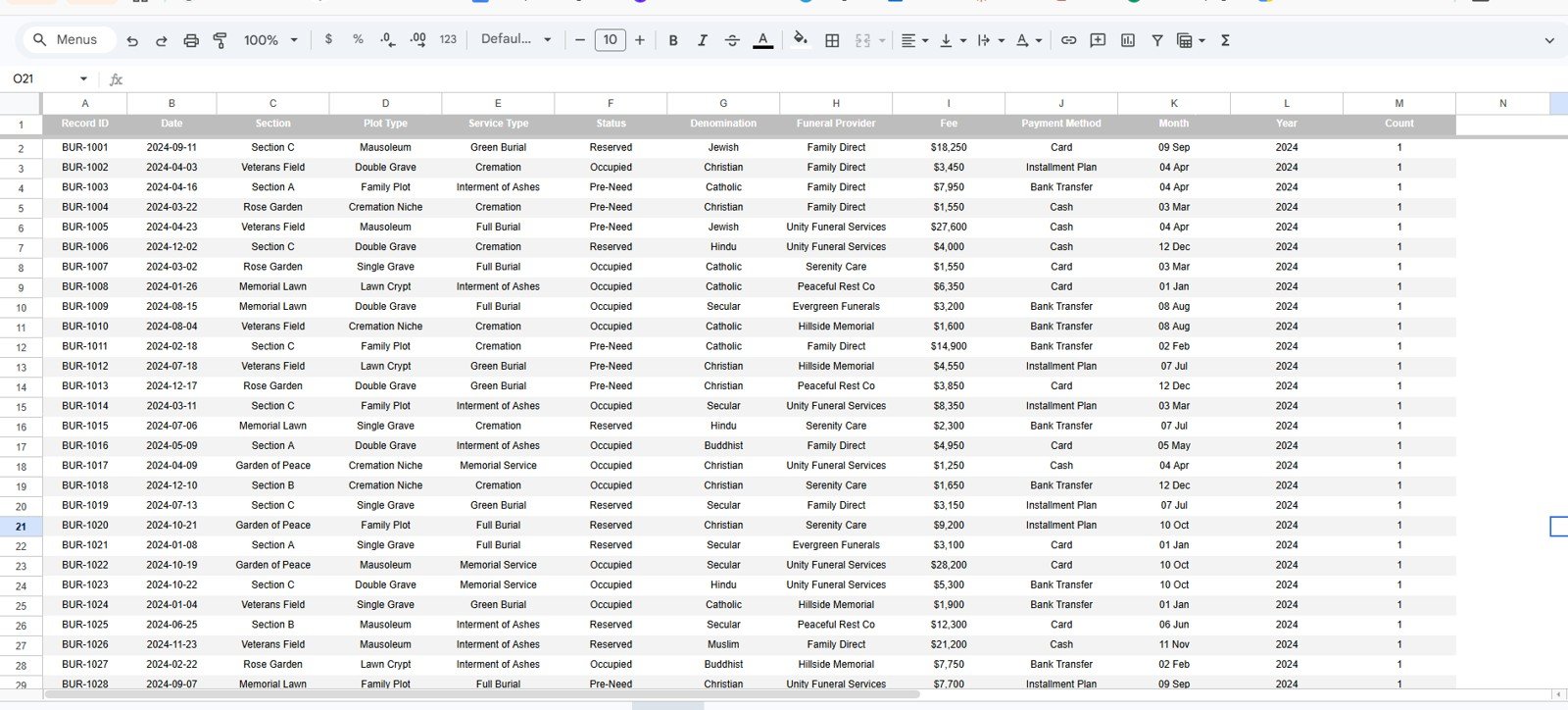
The Data sheet is the single source of truth, with the columns Record ID, Date, Section, Plot Type, Service Type, Status, Denomination, Funeral Provider, Fee, Payment Method, Month, Year, and Count. Add one row per interment in the existing column format and every KPI, chart, slicer, and the Search tab update automatically; there is no formula editing and nothing to rewire. An Instructions tab explains the workflow.
Cemetery Management Dashboard vs. Excel vs. Paid Cemetery Software: Feature Comparison
| Feature | Cemetery Management Dashboard (Google Sheets) | Microsoft Excel Dashboard | PlotBox / Pontem Cemetery Software |
|---|---|---|---|
| Cost | One-time purchase | One-time template price | Annual contract plus setup |
| Platform | Browser, any device | Desktop Excel | Cloud SaaS |
| Setup time | Under 10 minutes | Under 10 minutes | Weeks of onboarding |
| Real-time team collaboration | Yes, native | Limited | Yes |
| Mobile access | Built in | Add-on app | Yes |
| Customizable fields | Fully editable | Fully editable | Vendor-controlled |
| Share with link | Yes | File send only | Yes |
| GIS plot mapping and deeds | No | No | Yes |
| Owns your data file | You keep it | You keep it | Hosted by vendor |
For cemetery offices that want clear interment, revenue, and occupancy reporting without a software contract, the Cemetery Management Dashboard sits in the sweet spot.
Who Should Use This Template
Perfect for:
- Cemetery and memorial-park offices managing a few hundred to a few thousand plots
- Funeral homes and burial providers needing a shared interment and fee register
- Churches, trusts, and municipal bodies running a graveyard on paper or spreadsheets
- Administrators who want charts and a fast record search without new software
Not a fit if:
- You run a large multi-site operation needing GIS plot mapping, deeds, and survey integration
- You require an audited, access-controlled database with role-based permissions
Real-World Use Cases
Margaret manages a municipal cemetery. She logs each interment on the Data sheet and uses the Occupancy page to show the council how many plots are occupied, reserved, or sold pre-need in each section. The yearly review that used to take days is now a glance at a chart.
David runs a family-owned funeral and burial service. He checks the Revenue page to see income by plot type and payment method each month, and uses the Search tab to pull a family’s record in seconds when relatives phone with questions about a grave.
Sister Anne keeps the records for a parish churchyard. With no IT budget, she shares the Google Sheets file with two volunteers, who each add burials from home while the Interments page keeps a running picture of activity by denomination.
Advantages of the Cemetery Management Dashboard
The biggest advantage is cost against capability. A one-time purchase replaces paper registers for reporting while still delivering interment, revenue, and occupancy analysis. Because it runs in Google Sheets, there is nothing to install, it works on any device, and updates are shared the instant they are typed.
It is also fully editable. You own the file, so you can rename sections, add columns, or adjust charts to match how your grounds are organised, something locked SaaS tools rarely allow. If you want to learn how these pivot-driven reports are built, the Pivot Tables and Dashboards course on NextGenTemplates Academy teaches the method step by step.
Opportunities for Improvement
This dashboard is built for reporting, not for spatial mapping. It does not include a graphical plot map or GIS overlay, so cemeteries that need to click a grave on a map will want to pair it with a mapping tool. It also relies on consistent data entry: if Section or Plot Type values are typed inconsistently, the charts will split them, so a short list of standard values is worth agreeing on up front. For very large multi-site operations, a full database with user permissions will eventually serve better than a shared spreadsheet.
Best Practices
Keep one row per interment and never leave the key columns blank; Section, Plot Type, Service Type, Status, and Fee drive almost every chart. Use data-validation dropdowns on the Data sheet so everyone enters the same spelling of each value. Make a backup copy before a major clean-up, and if you collaborate, give volunteers edit access to the Data sheet only. Google’s own guide to charts and pivot tables in Sheets is a useful reference.
Explore Relevant Templates
- Church Transaction Analysis Dashboard in Google Sheets: track giving and transactions for a faith community.
- Church Finance Dashboard in Google Sheets: income and expense reporting for a parish or congregation.
- Property Management Dashboard in Google Sheets: occupancy and revenue tracking for managed properties.
- IT Help Desk Dashboard in Google Sheets: another slicer-driven service dashboard in the same style.
On NextGenTemplates you can also find the Building Utility Cost Dashboard in Google Sheets for monitoring facility running costs.
Frequently Asked Questions
What KPIs does the Cemetery Management Dashboard track?
It tracks 4 headline KPIs (Total Interments, Total Revenue, Occupied Plots, and Average Fee) plus 16 charts covering interments, revenue, and occupancy. Every metric updates automatically when you add records to the Data sheet.
Do I need to install any software?
No. The dashboard runs entirely in Google Sheets in your browser, so it works on Windows, Mac, Chromebook, tablets, and phones with nothing to download or install.
How long does it take to set up?
Under 10 minutes. Make your own copy, paste your interment records into the Data sheet in the existing column order, and the cards, charts, slicers, and Search tab all refresh on their own.
Can several staff use it at the same time?
Yes. Because it lives in Google Sheets, you can share the file by link and multiple staff can view or edit the same dashboard simultaneously, with no per-user fees.
How does it compare to paid cemetery software?
Dedicated cemetery platforms add GIS mapping, deeds, and records management under an ongoing contract. The Cemetery Management Dashboard is a one-time purchase covering interment, revenue, and occupancy reporting for offices that do not need those extras.
Can I customise the sections and plot types?
Yes. You own the file, so you can rename sections, add plot types, or adjust the columns to match your grounds. As long as you keep the Data sheet format consistent, the charts and the Search tab will follow your changes.
About the Author
Built by PK, Microsoft Certified Professional with 15+ years of Excel, Google Sheets, and Power BI experience. Founder of NextGenTemplates. Every template is hand-built and tested before release.
Wrapping Up
If you are still tracking burials in a paper register or scattered tabs, the Cemetery Management Dashboard in Google Sheets gives you interment, revenue, and occupancy reporting in one shared file for a one-time price. Copy it, enter your current records, and use the Occupancy page as the basis for your next board or council report.
Get the Cemetery Management Dashboard in Google Sheets
Instant download. One-time payment. No subscription.
📅 Last updated: October 2026