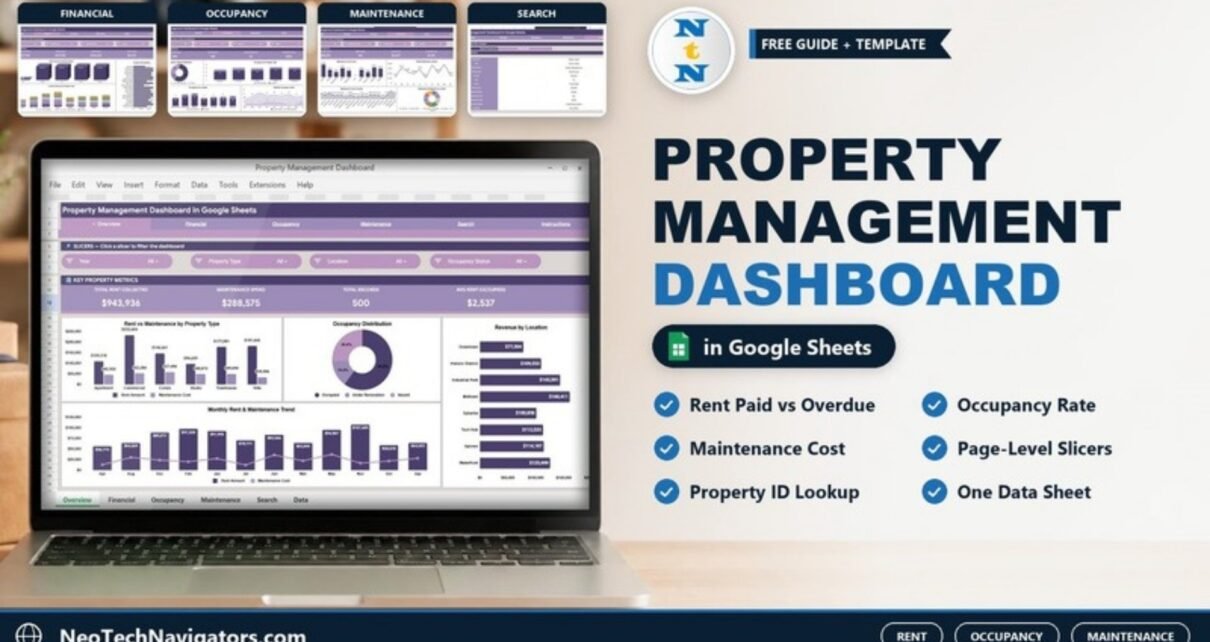
The Property Management Dashboard in Google Sheets gives landlords and property managers one place to see rent, occupancy and maintenance. Four report pages each have their own slicers and KPI strip. A Property ID lookup and a single Data sheet sit behind them.
It suits small and mid-size rental portfolios that already keep a property and tenant list in a spreadsheet and want a monthly report without building charts by hand. Everything runs in Google Sheets with standard slicers and formulas. You do not need add-ons or macros.
🎥 Watch the Video Tutorial
Get the Property Management Dashboard
What This Property Management Dashboard Solves
A rental portfolio produces three kinds of questions every month. How much rent came in, and how much is overdue or pending? Which units are occupied, vacant or under renovation? Where is the maintenance budget going? In a plain spreadsheet, each of those means a new filter or pivot table.
This template answers all three on fixed pages, with a navigation bar across the top: Overview, Financial, Occupancy, Maintenance, Search and Instructions. A Data sheet holds the records. The numbers quoted below come from the 500 sample records that ship with the file.
Dashboard Pages Explained
1. Overview
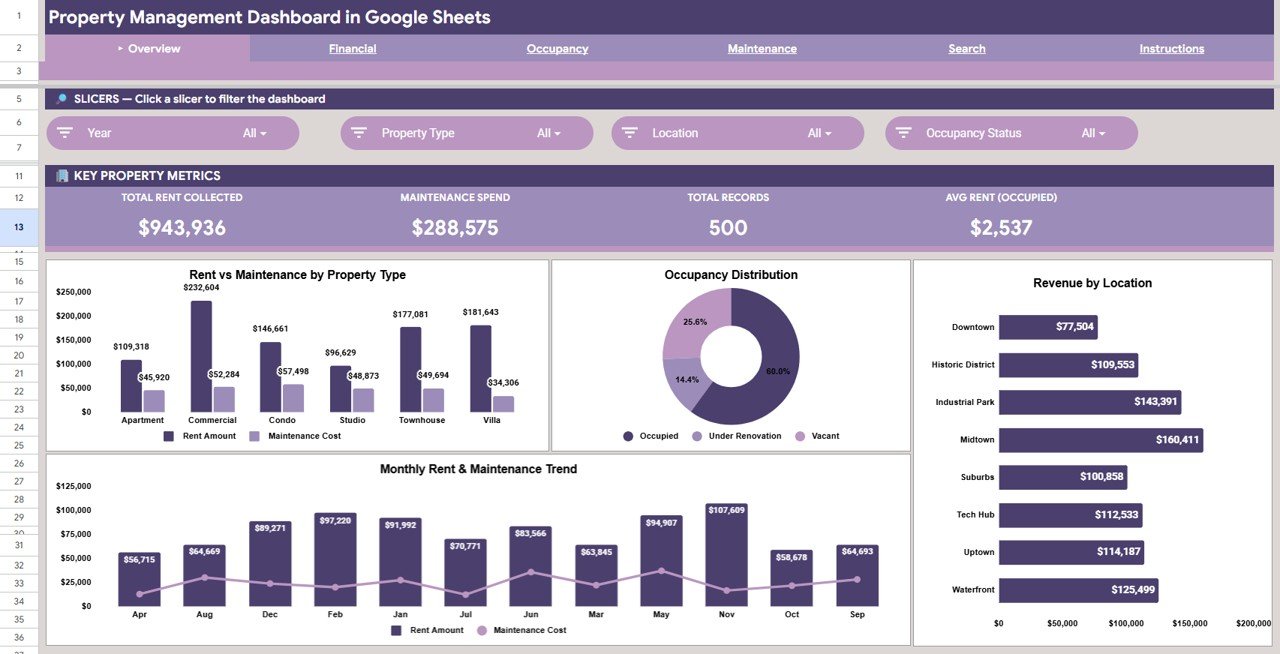
Slicers: Year, Property Type, Location and Occupancy Status. The “Key Property Metrics” strip shows Total Rent Collected ($943,936), Maintenance Spend ($288,575), Total Records (500) and Avg Rent (Occupied) ($2,537).
The charts are:
- Rent vs Maintenance by Property Type, covering Apartment, Commercial, Condo, Studio, Townhouse and Villa. Commercial is highest at $232,604 rent.
- Occupancy Distribution: 60.0% Occupied, 25.6% Vacant and 14.4% Under Renovation.
- Revenue by Location, with Midtown leading at $160,411.
- Monthly Rent & Maintenance Trend.
2. Financial
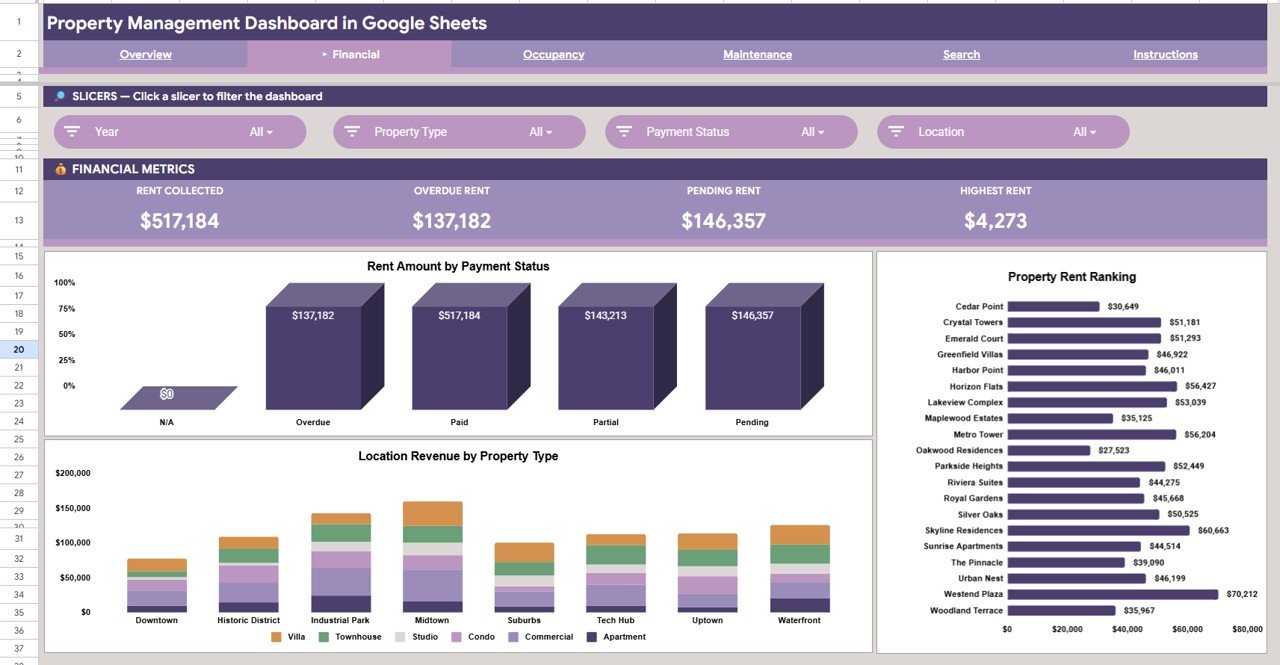
Slicers: Year, Property Type, Payment Status and Location. The “Financial Metrics” strip shows Rent Collected ($517,184), Overdue Rent ($137,182), Pending Rent ($146,357) and Highest Rent ($4,273).
The charts are:
- Rent Amount by Payment Status, covering N/A, Overdue, Paid, Partial and Pending.
- Property Rent Ranking, a ranked bar for each property. Westend Plaza is top at $70,212.
- Location Revenue by Property Type, a stacked column for each location.
Note the difference between the two rent figures. On the Overview, Total Rent Collected adds up the rent amount on every record, whatever its payment status. On the Financial page, Rent Collected counts only records marked Paid. Use the Financial page when you need cash actually received.
3. Occupancy
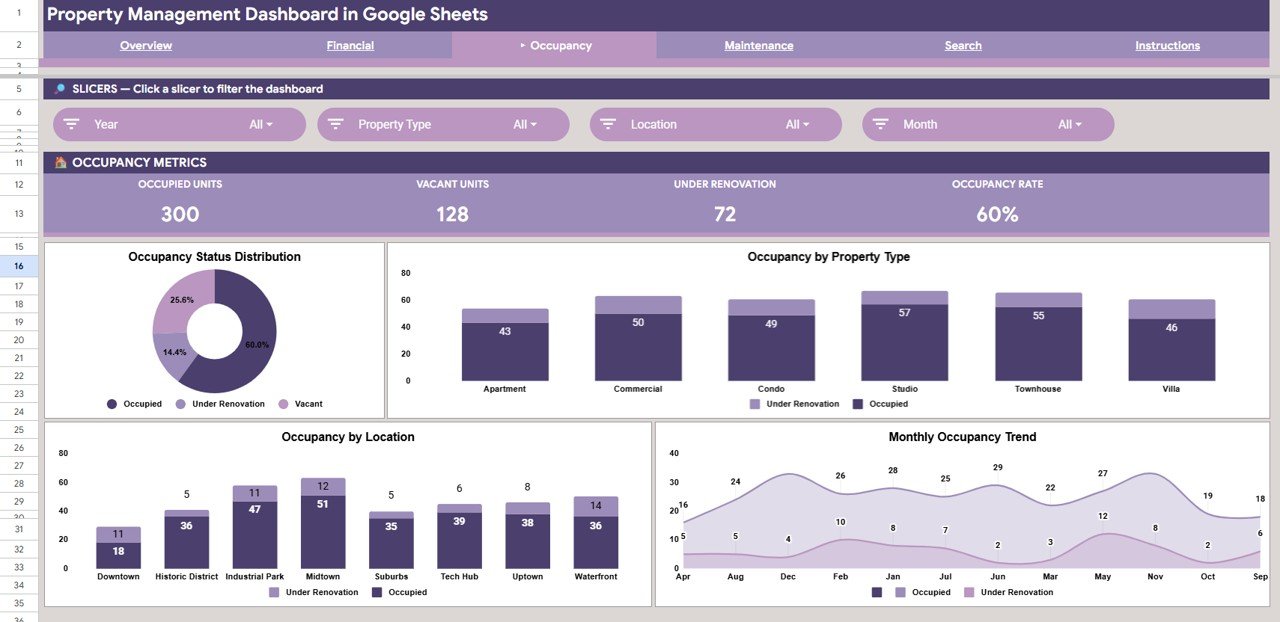
Slicers: Year, Property Type, Location and Month. The “Occupancy Metrics” strip shows Occupied Units (300), Vacant Units (128), Under Renovation (72) and Occupancy Rate (60%).
The charts are Occupancy Status Distribution, Occupancy by Property Type, Occupancy by Location and Monthly Occupancy Trend. The last three split Occupied from Under Renovation, so you can tell real vacancy apart from units that are only temporarily offline.
4. Maintenance
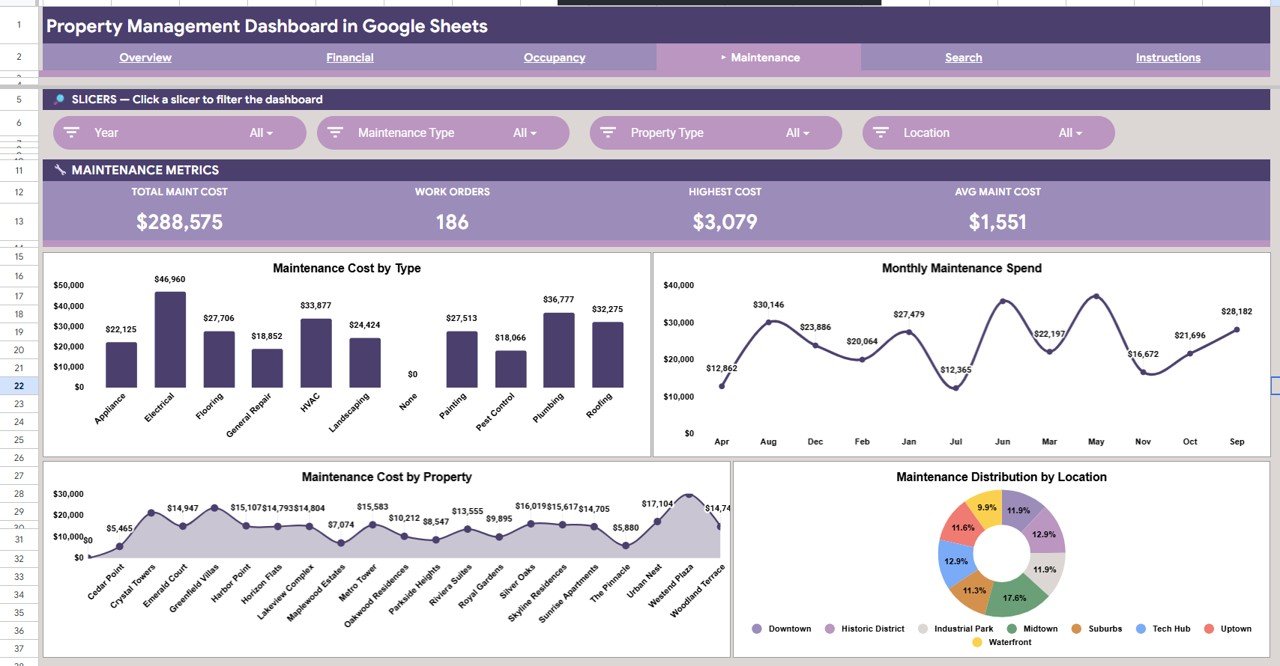
Slicers: Year, Maintenance Type, Property Type and Location. The “Maintenance Metrics” strip shows Total Maint Cost ($288,575), Work Orders (186), Highest Cost ($3,079) and Avg Maint Cost ($1,551).
The charts are:
- Maintenance Cost by Type, covering Appliance, Electrical, Flooring, General Repair, HVAC, Landscaping, Painting, Pest Control, Plumbing and Roofing. Electrical is highest at $46,960.
- Monthly Maintenance Spend.
- Maintenance Cost by Property.
- Maintenance Distribution by Location, where Midtown has the largest share at 17.6%.
5. Search (Property Record Lookup)
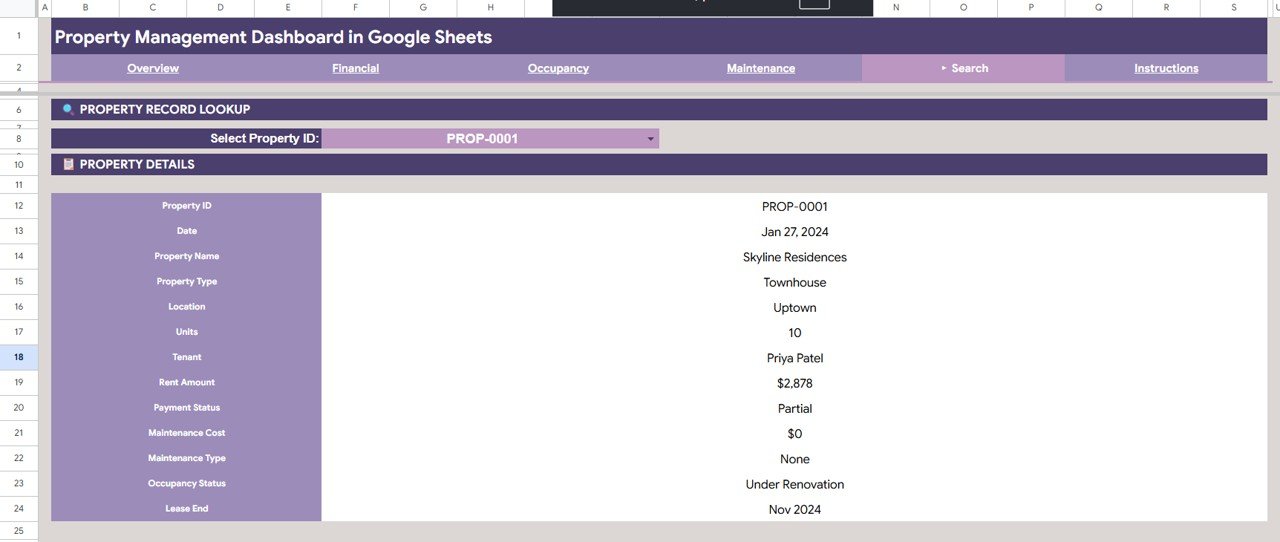
Choose a value from the Select Property ID dropdown and the Property Details panel fills in. It shows Property ID, Date, Property Name, Property Type, Location, Units, Tenant, Rent Amount, Payment Status, Maintenance Cost, Maintenance Type, Occupancy Status and Lease End. For PROP-0001 it shows Skyline Residences, a 10-unit Townhouse in Uptown. Rent is $2,878 with Partial payment, the status is Under Renovation and the lease ends in Nov 2024.
6. Data Sheet
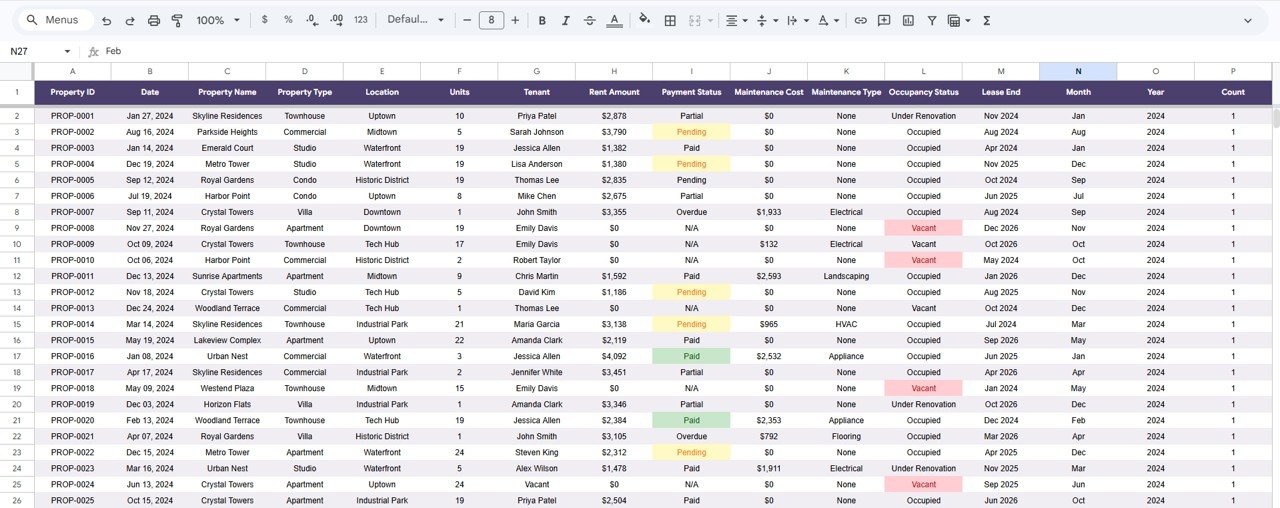
Each row is one property record, with these columns: Property ID, Date, Property Name, Property Type, Location, Units, Tenant, Rent Amount, Payment Status, Maintenance Cost, Maintenance Type, Occupancy Status, Lease End, Month, Year and Count. In the sample, some Payment Status and Occupancy Status cells carry colour highlights (for example Pending, Paid and Vacant).
Key Metrics in the Property Management Dashboard in Google Sheets
The table below lists the main metrics on each page and how they relate to the data. You can check the sample: 300 occupied ÷ 500 records = 60% occupancy rate, and $288,575 ÷ 186 work orders ≈ $1,551 average maintenance cost.
| Metric (page) | What it measures | How it is derived | Better when |
|---|---|---|---|
| Total Rent Collected (Overview) | Rent billed across all records | Sum of Rent Amount | Higher |
| Rent Collected (Financial) | Rent actually paid | Sum of Rent Amount where Payment Status = Paid | Higher |
| Overdue Rent / Pending Rent | Money still owed | Sum of Rent Amount for Overdue or Pending records | Lower |
| Avg Rent (Occupied) | Typical rent on occupied records | Average Rent Amount where Occupancy Status = Occupied | Higher, in line with the market |
| Occupancy Rate | Share of records occupied | Occupied ÷ total records | Higher |
| Vacant Units / Under Renovation | Records not earning rent | Count by Occupancy Status | Lower |
| Total Maint Cost | Maintenance spend | Sum of Maintenance Cost | Lower, without skipping needed work |
| Avg Maint Cost | Typical cost per work order | Total Maint Cost ÷ Work Orders | Lower |
How to Use It With Your Own Data
- Open the Google Sheets copy link in the PDF guide and choose File > Make a copy.
- Read the Instructions tab once, then open the Data sheet.
- Replace the sample rows with your own records. Keep the column headers and their order unchanged.
- Use consistent values: Payment Status (Paid, Partial, Pending, Overdue, N/A), Occupancy Status (Occupied, Vacant, Under Renovation) and Maintenance Type (“None” when there was no job).
- Fill Month and Year from the Date column. With a date in B2, these formulas do it:
=TEXT(B2,"mmm") =YEAR(B2) - Go back to the Overview and confirm the totals match your own figures. Then use the slicers on each page to drill in.
If you want to build this kind of slicer-driven report from scratch, the Pivot Tables & Dashboards course on NextGenTemplates Academy covers the same techniques in structured lessons.
Real-World Use Cases
- Monthly owner report: Set Year and Month on the Occupancy page. Screenshot the Financial page with Payment Status set to “Overdue”, and share both with the owner.
- Collections follow-up: Filter the Financial page to Pending or Overdue. Then use the Search page to pull the tenant and rent details for each property you need to chase.
- Maintenance budgeting: Use Maintenance Cost by Type and by Property to spot high-cost properties or repeat jobs such as plumbing or HVAC before you set next year’s budget.
Best Practices
- Update the Data sheet on the same date each month, after rent day, so the payment status picture is complete.
- Do not leave Maintenance Cost blank. Enter 0 and “None”, so averages and work-order counts stay correct.
- Check Lease End dates on the Search page 60 to 90 days ahead and start renewal conversations early.
- Keep one copy of the file per owner or client if you manage properties for several people.
- Share with view-only access for owners and investors, and keep edit access for whoever maintains the data.
Limitations: Who Should Not Use This Template
- It is a reporting template. It does not collect rent online, send tenant messages, screen tenants or generate leases.
- Records are entered or pasted by you. There is no connection to bank feeds or property software.
- Large portfolios with many thousands of records will recalculate slowly in Google Sheets. The Power BI version suits larger data.
Dashboard vs Spreadsheet vs Property Software
| Need | Plain spreadsheet | This dashboard | Property management software |
|---|---|---|---|
| Rent, occupancy and maintenance reports | Build by hand | Ready-made pages with slicers | Yes |
| Single-property lookup | Scroll or filter | Property ID dropdown | Yes |
| Online rent collection, tenant portal | No | No | Yes |
| Who owns the data | You | You (your Google Drive) | Vendor platform |
| Cost model | Free | One-time template purchase | Usually monthly |
Related Property Templates and Guides
For target-vs-actual tracking, see the Property Management KPI Dashboard in Google Sheets. Investors focused on returns may prefer the Rental Property Investment Dashboard in Google Sheets. For a tenant-centred view, read about the Tenant and Property Management Dashboard, and for lease analysis, the Lease & Property Insights Dashboard. If you prefer a browser-only file, there is also a Property Management Dashboard in HTML.
Related templates: Property Management Dashboard in Excel and Property Management Dashboard in Power BI.
Frequently Asked Questions
What does the Property Management Dashboard in Google Sheets track?
It tracks rent (total, paid, overdue and pending), occupancy (occupied, vacant, under renovation and occupancy rate) and maintenance (total cost, work orders, highest and average cost). It also includes a Property ID lookup.
Why are Total Rent Collected and Rent Collected different?
The Overview card sums rent on all records. The Financial page’s Rent Collected only counts records with Payment Status = Paid. The gap between them is your overdue, partial and pending rent.
Can I add my own locations and property types?
Yes. The charts and slicers use the values in the Data sheet. New locations, property types or maintenance types appear once you enter them.
How do I find one tenant’s details quickly?
Open the Search page and choose the Property ID from the dropdown. Tenant, rent, payment status, maintenance and lease end date all appear in one panel.
Does it work on a phone?
Yes. You can open it in the Google Sheets app or a mobile browser. The slicers and charts are easiest to use on a larger screen.
Is there an Excel or Power BI version?
Yes. The same topic is available as an Excel dashboard and a Power BI dashboard on NextGenTemplates, linked above.
Wrapping Up
If you already track rentals in a spreadsheet, this dashboard turns that list into a monthly report covering money collected and owed, occupancy and maintenance spend. Paste your records into the Data sheet, check the Overview totals and use each page’s slicers to answer owner and budget questions in minutes.
Get the Property Management Dashboard
📅 Last updated: October 2026