Most collection agencies do not fail because their collectors are bad on the phone. They fail somewhere quieter: a promise nobody chased, a payment plan that broke three instalments ago and was never noticed, a client statement that does not reconcile and takes two days to fix, a cease and desist that was filed in an inbox instead of a register. All of that is a record-keeping problem, and record-keeping problems are solvable.
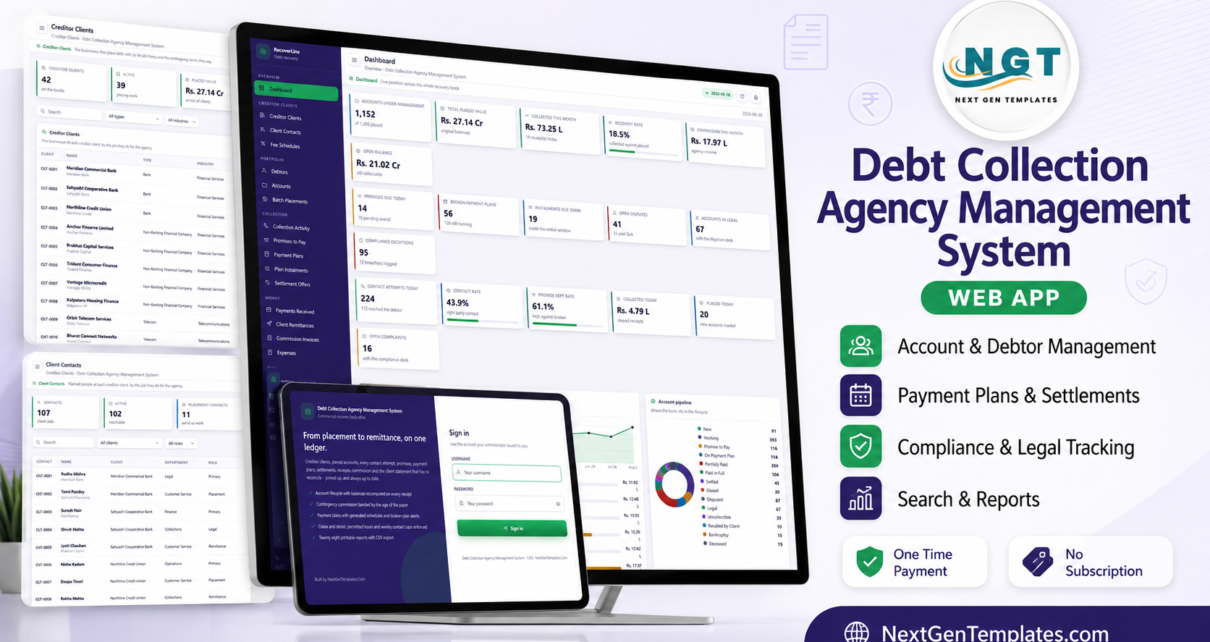
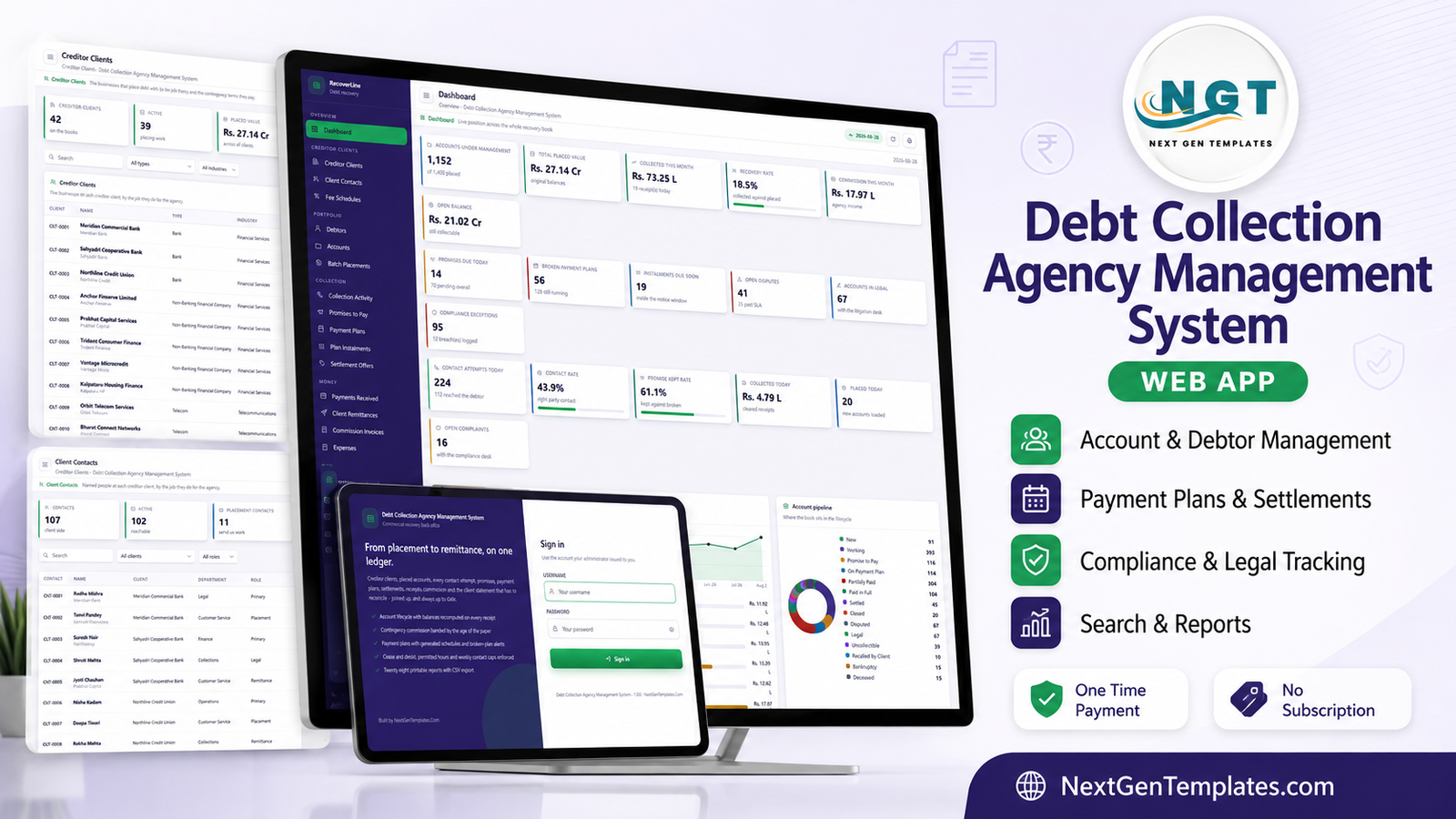
The Debt Collection Agency Management System Web App is our attempt at solving it in one place. It is a Google Apps Script web app – 38 working screens, 8 server-enforced roles, 36 database tables and 28 printable reports – that runs inside your own Google account and carries a placed account from the day a creditor hands it over to the day the client statement is signed off.
Before anything else: there is a live demo, it is fully seeded, and every login is published below. Ten minutes in it will tell you more than this article can.
🚀 Try the Live Demo Before You Buy
We have deployed this web app in our own Google account so you can test every page, every role and every report – with a full seeded recovery book of 1,400 placed accounts – before purchasing. No signup, no email required.
🔑 Test Login Credentials
Sign in as admin to see everything, including Users, Roles & Permissions, Settings, the Audit Log and the Database Archive. Then sign out and sign in as collector1. A collector works allocated accounts and records contact, promises and plans – but every balance, commission and remittance figure is blanked on the server before the page is sent. That role separation is the whole point, so it is worth signing in twice. All 14 seeded accounts across the 8 roles are below.
These credentials are public on purpose. They belong to a shared demonstration instance that is periodically reset, not to a customer deployment. Your own copy gets its own database, its own users and its own passwords – and the manual’s first instruction is to change the admin password and delete the seeded accounts.
A note on the law, up front
Debt collection is regulated almost everywhere – the FDCPA and state licensing in the United States, the FCA’s CONC rules in the United Kingdom, RBI directions on recovery agents in India, and equivalents elsewhere. This system does not make you compliant with any of them and does not enforce, certify or guarantee lawful collection practice. It is a record-keeping and workflow tool. What it gives you is a place to configure the operating rules you have decided to follow – a permitted contact window, a weekly attempt cap, a do not contact and cease-and-desist register, deceased and bankruptcy flags, dispute and complaint SLAs, versioned letter wording – and a log of what actually happened. Setting those values correctly, and complying with the law and the client contracts that apply to you, remains entirely your responsibility. Nothing here is legal advice.
What the dashboard actually shows
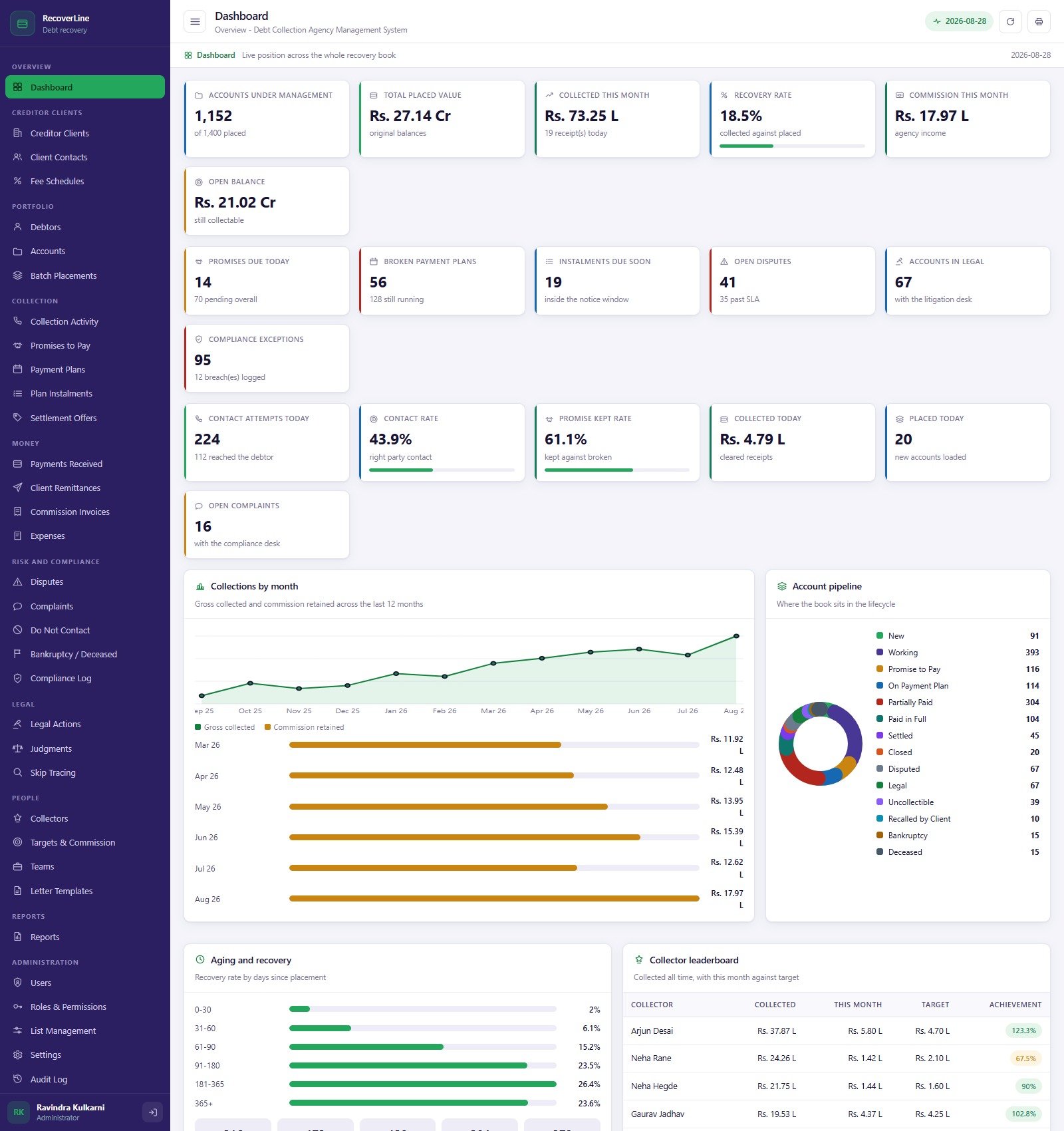
Eighteen counters, and they are the ones a recovery manager is asked about in a Monday meeting: Accounts Under Management, Total Placed Value, Collected This Month, Recovery Rate, Commission This Month, Open Balance, Promises Due Today, Broken Payment Plans, Instalments Due Soon, Open Disputes, Accounts in Legal, Compliance Exceptions, Contact Attempts Today, Contact Rate, Promise Kept Rate, Collected Today, Placed Today and Open Complaints.
Underneath sit four views of the book: Collections by month (gross collected against commission retained over twelve months), the Account pipeline across all fourteen lifecycle statuses, Aging and recovery – recovery rate by days since placement, which is the chart that tells you what aged paper is really worth – and a Collector leaderboard of collected against target.
The five things that make it a system and not a spreadsheet
1. The server owns the balance
Current balance is not a formula in a cell somebody can overwrite. It is computed on the server as original balance + interest accrued + fees added − payments received − settlement adjustment, and it is recomputed on every receipt and every reversal. When it reaches zero the account closes itself as Paid in Full, or as Settled where a settlement discount applied.
2. Commission is banded by the age of the paper
Each creditor client has a fee schedule split into six tiers – Fresh, Early, Standard, Aged, Late, Legacy – each with its own contingency rate, legal rate and minimum fee. Commission on a receipt is the receipt times the band rate for that account’s age; the remainder is the net owed to the client. The seeded demo carries 252 fee bands across 42 clients, which is roughly what a mid-sized agency’s fee book looks like.
3. A remittance statement has to balance before it can exist
The Client Remittances screen refuses a statement unless gross − commission + legal recovered + adjustments = net remitted. There is a “Not reconciling” counter at the top of the page whose only acceptable value is zero. If you have ever spent the last two days of a month hunting a 400-rupee gap between a receipts list and a client statement, this is the screen that pays for the template.
4. Payment plans break on their own
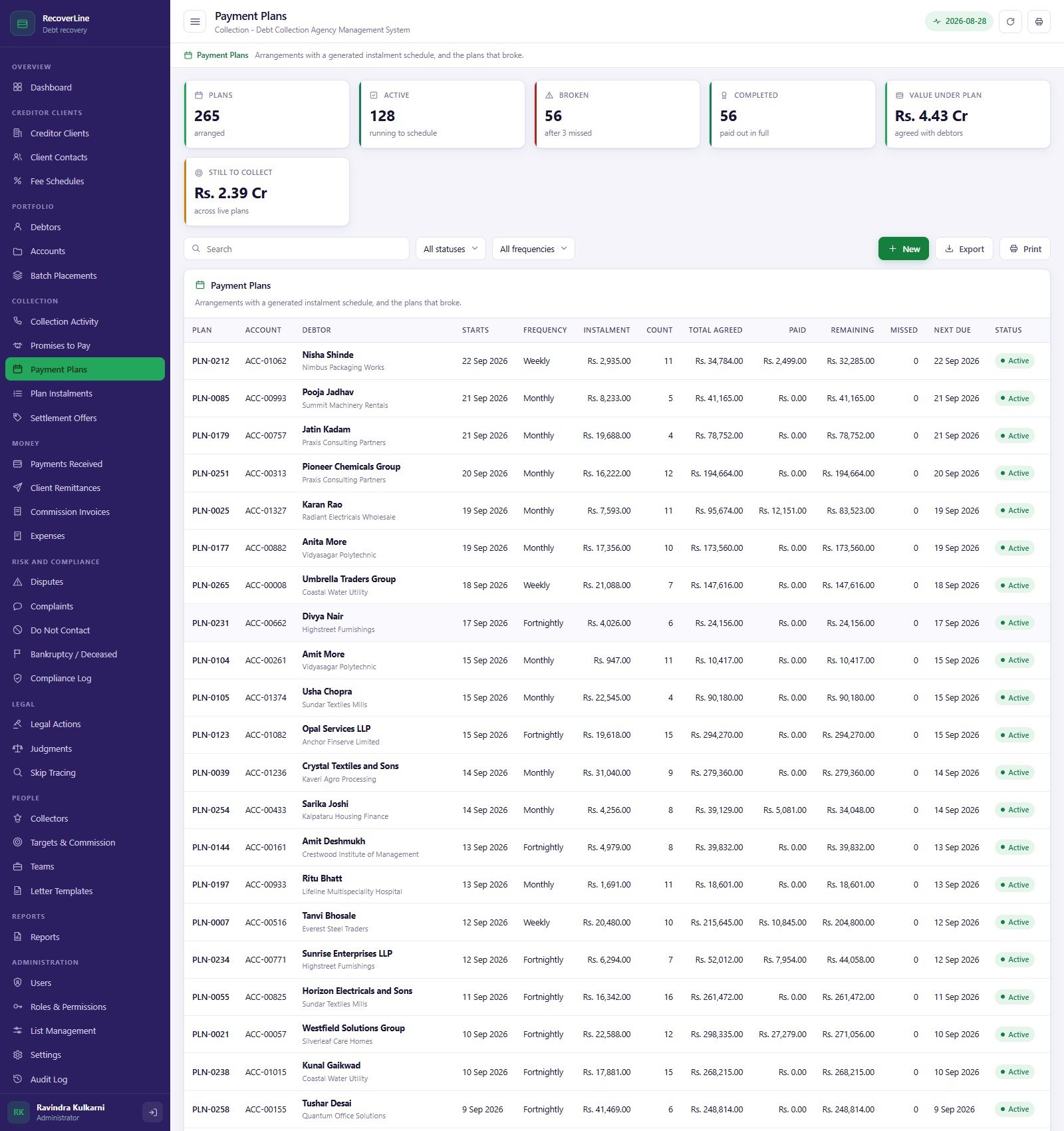
You agree a plan; the server generates the instalment schedule. An instalment whose due date passes unpaid becomes Missed, and once the missed count reaches your Settings threshold – three by default – the plan is marked Broken and the account goes back into the working pool. That is the difference between “we have 265 plans” and “we have 128 plans actually running, 56 broken and 56 completed”, which is what the demo book shows.
5. Some contact attempts are simply refused
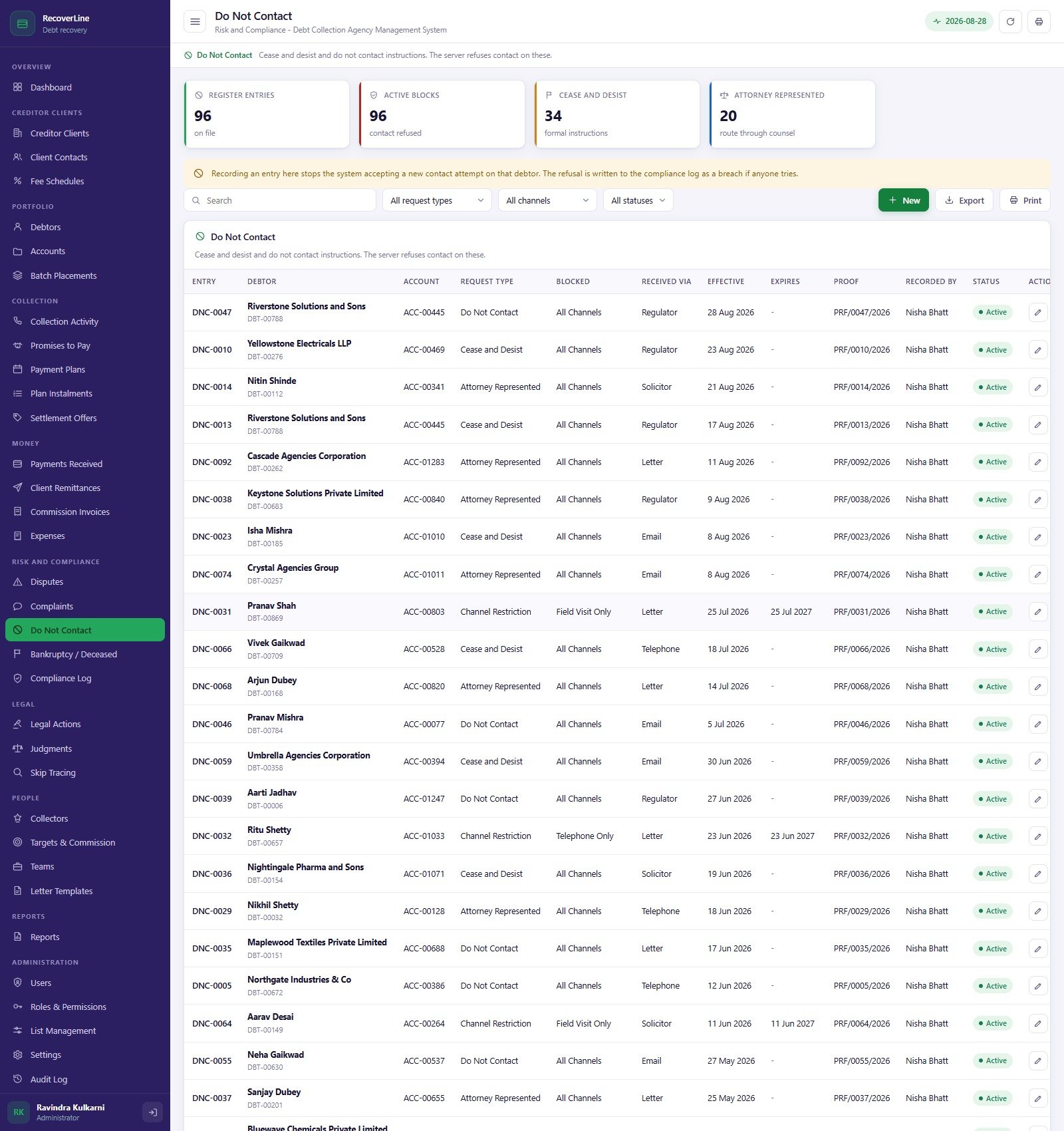
The Do Not Contact register holds cease and desist instructions, do not contact requests, attorney-represented routes and channel restrictions, each with a proof reference and an effective date. An attempt against a debtor on that register – or one flagged deceased or bankrupt – is refused by the server and written to the compliance log as a breach. Attempts outside your permitted window (08:00 to 21:00 by default) or above your weekly cap (7 per account) are accepted but flagged, so a supervisor sees them on the Compliance Log the same day rather than in a complaint letter three weeks later.
Eight roles, and one of them cannot see money
The system ships with eight permission sets over 72 individual rights: Administrator, Operations Manager, Collections Supervisor, Collector, Legal Officer, Compliance Officer, Finance Officer and Client Services. Five of them see money; three do not.
The Collector role is the interesting one. A collector works allocated accounts, records contact attempts, promises, plans and settlement requests, and reads the debtor and account file – but every balance, commission and remittance column is blanked on the server before the payload leaves. It is not a hidden column in the browser that a curious agent can unhide. The same permission map drives both the sidebar and the guard on every server entry point, so hiding a page also blocks the call behind it.
Sign in to the demo as collector1 and then as opsmanager and put the two dashboards side by side; it is the fastest way to understand what you are buying.
What is actually in the box
- Creditor clients – clients, named contacts by role, and the fee schedules that price the work.
- Portfolio – debtors with contactability scores and protection flags, accounts with balance maths and age bands, and the batch placement file each account arrived on.
- Collection – activity across call, letter, email, SMS, WhatsApp and field visit with ten outcome codes; promises to pay; payment plans; plan instalments; settlement offers with a 25% collector discount limit above which client approval is required.
- Money – payments received with the commission split on every receipt, client remittances, commission invoices with tax, and expenses split into recoverable and borne.
- Risk and compliance – disputes with SLA clocks and on-hold status, complaints with severity and regulator notification, the do not contact register, bankruptcy and deceased flags with case numbers and trustees, and the compliance log.
- Legal – legal actions from letter before action to enforcement with court and solicitor fees, judgments with costs and enforcement steps, and skip tracing with a hit rate and cost per provider.
- People – collectors with grades, licence expiry and targets; monthly targets and commission earned; eight desks by focus area; and 27 versioned, compliance-approved letter templates.
- Reports – 28 printable reports with CSV export across portfolio, recovery, collection, money, risk and legal.
- Administration – users, roles and permissions, 328 list values feeding every dropdown, settings the server reads, an audit log, a database archive and on-demand backups.
Setting it up
- Try the live demo above first. Sign in as
admin, then ascollector1. - Unzip the download. In a new Google Apps Script project, paste
Code.cs.txtintoCode.gs, add an HTML file named exactlyIndexand pasteIndex.txtinto it. - Deploy > New deployment > Web app, Execute as Me, Who has access Anyone, and accept the permission prompt.
- Open the URL and press “Build the database now” on the sign-in card. Setup is staged and resumable, so Google’s six-minute limit cannot break it; it builds 36 tabs and seeds roughly 14,750 demonstration rows.
- Sign in as the seeded administrator, change that password, create real users and disable every seeded account.
- Put your agency name, licence number, tax registration and currency symbol into Settings, then set the contact hours, weekly cap, plan break threshold, discount limit, settlement validity and default contingency rate to whatever your regulator, licence and client contracts require.
- Load your creditor clients and their fee schedules, then your debtors and accounts, then record the batch placement each file came from.
A generic deployment walkthrough for our Apps Script systems is on YouTube.
What it deliberately does not do
- No dialler, IVR or call recording. It records the outcome of a contact; it does not place the call.
- No payment gateway, card processing or auto-debit execution. It records receipts; it does not move money.
- No live credit bureau, bank or utility feed. Skip trace requests and results are entered or imported.
- No debtor-facing portal or payment page.
- No compliance guarantee, as set out above.
We would rather list those plainly than have you find out after buying.
If you would like to get better at building trackers and reporting sheets yourself, the NextGenTemplates Academy learning paths are a good place to start, and they come with practice files.
Frequently asked questions
Can I try it before buying?
Yes – the green box above is a live, fully seeded deployment and every one of the 14 logins is published. Nothing you do there touches your own copy.
Where does the data live?
In your own Google account. On first run the system creates its own 36-tab Google Sheets database in your Drive; the web app reads and writes only that. Nothing is sent to us.
Does it make my agency compliant?
No. It records and reports collection work and lets you configure your own operating limits. Compliance with the collection laws and licences that apply to you remains your responsibility.
Will the database get too big?
The Database Archive takes a full copy into Drive first, then moves closed transactions dated before your cutoff out of the live sheet, leaving master tables and every open account behind. The Backup screen shows the row count in each tab so you can see it coming.
Can I change the code?
Yes – you get Code.cs.txt and Index.txt in full. Statuses, outcome codes and dropdown values can be changed from List Management without touching the code at all.
What is in the download?
One ZIP with Code.cs.txt, Index.txt and the user manual PDF covering every module, the roles, deployment and housekeeping.
Get the template
The Debt Collection Agency Management System Web App is a one-off purchase on NextGenTemplates.com – regular $59.99, currently $39.99 – and includes the full source code, the user manual and no subscription of any kind. Try the demo first; that is what it is there for.
If you want the reporting layer rather than the operating system, look at the Credit Recovery Agencies Dashboard in Power BI or the Excel version, the Credit Recovery Agencies KPI Dashboard in Excel, or the Loan Recovery Services Dashboard in Power BI. Creditors watching their own book before it ever becomes a placement should start with the Accounts Receivable KPI Dashboard in Google Sheets or the Debt Management KPI Dashboard in Excel. And if you like this architecture, the Chit Fund Management System Web App is built exactly the same way.