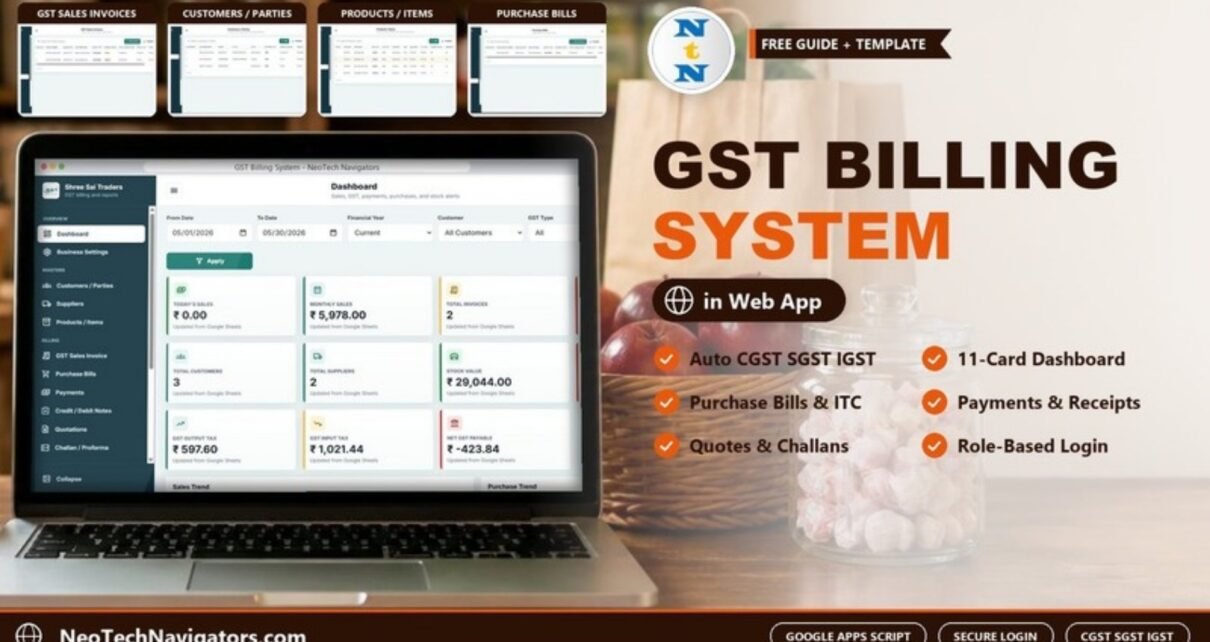
The GST Billing System Web App is a billing tool for Indian businesses that runs on Google Sheets and Google Apps Script. From one sidebar you create GST sales invoices and record purchase bills, payments, credit and debit notes, quotations and delivery challans. CGST and SGST are applied to intra-state sales and IGST to inter-state sales.
It is meant for traders, shops, distributors, service providers and accountants who want proper GST invoices and a live tax summary without a per-user subscription. The data stays in a Google Sheet in your own Drive. Users sign in with a username and password, and access depends on their role.
🎥 Watch the Video Tutorial
Get the GST Billing System Web App
Try the Live Demo First
A demo copy runs in the publisher’s own Google account, filled with sample data for a business called “Shree Sai Traders”. Open the GST Billing System live demo and sign in with one of the public demo logins below.
| Role | Username | Password | What the role is for |
|---|---|---|---|
| Admin | Admin1 | abcd | Masters, invoices, purchases, payments and GST settings |
| User | User1 | abcd | Create invoices, record payments and view the dashboard |
After you buy, you get the source code (Code.gs and Index.html) and a step-by-step deployment guide. You then deploy your own private copy in your own Google account.
Screens in the GST Billing System Web App
The sidebar is split into Overview (Dashboard, Business Settings), Masters (Customers / Parties, Suppliers, Products / Items) and Billing (GST Sales Invoice, Purchase Bills, Payments, Credit / Debit Notes, Quotations, Challan / Proforma). Every list screen has a search box, an add button (Add, New Invoice, New Purchase or New Quote) and Template, Import and Export buttons.
1. Login
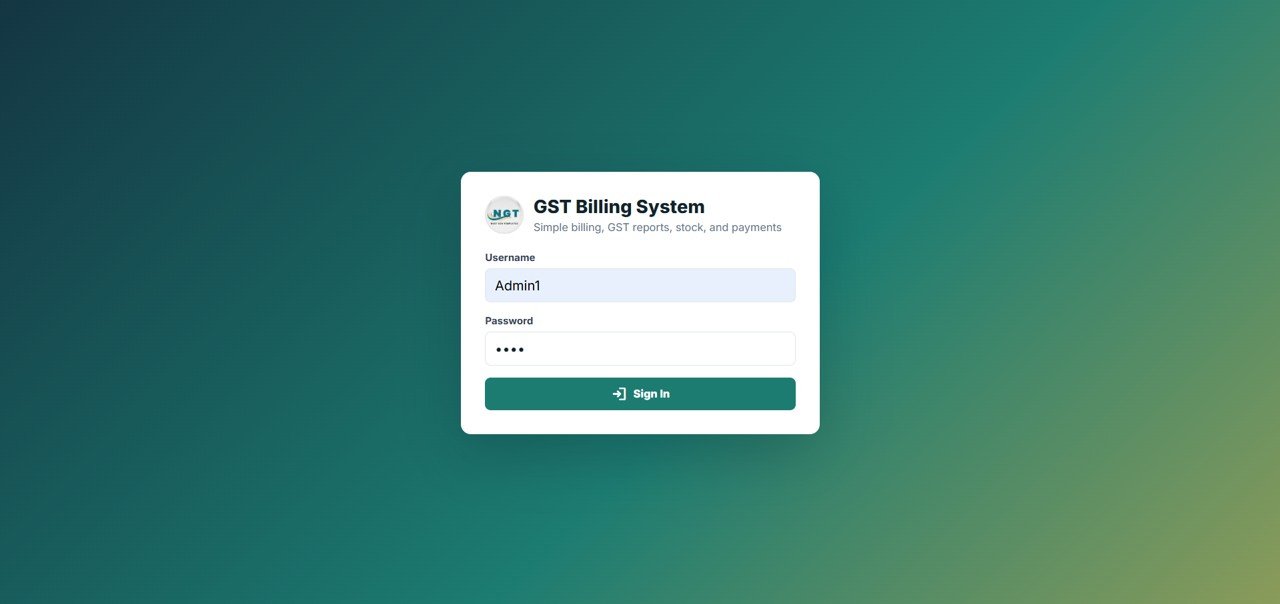
A simple sign-in card asks for Username and Password before any data is shown.
2. Dashboard
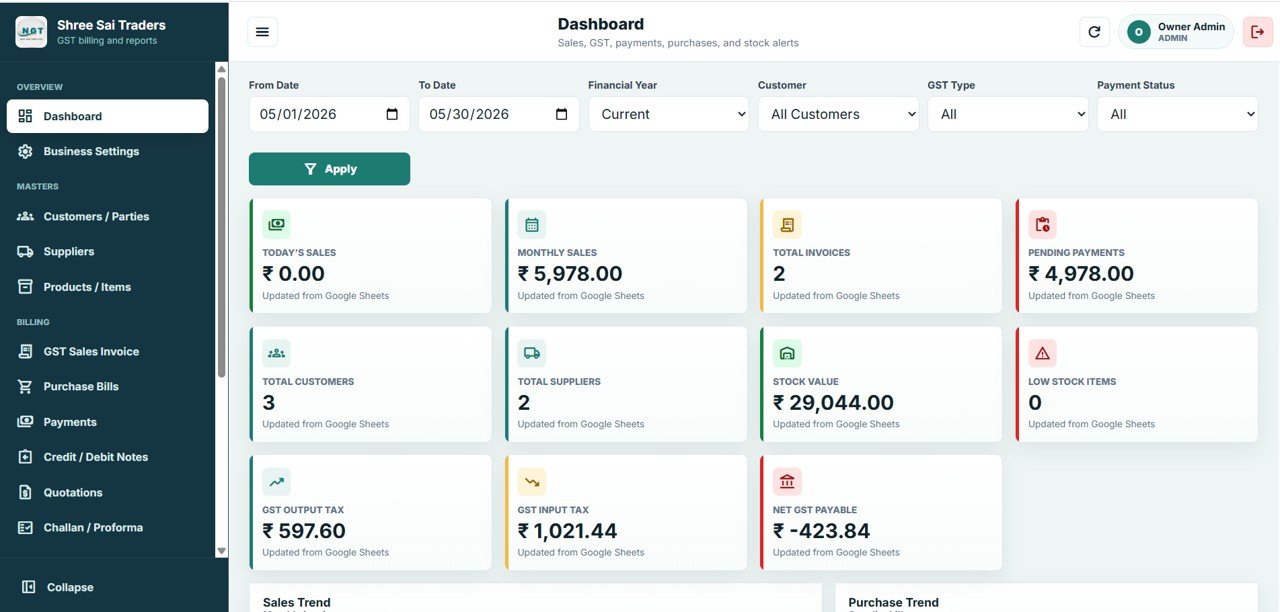
Filters across the top: From Date, To Date, Financial Year, Customer, GST Type and Payment Status, then Apply. Eleven cards follow: Today’s Sales, Monthly Sales, Total Invoices, Pending Payments, Total Customers, Total Suppliers, Stock Value, Low Stock Items, GST Output Tax, GST Input Tax and Net GST Payable. Sales Trend and Purchase Trend charts sit below the cards.
3. Customers / Parties
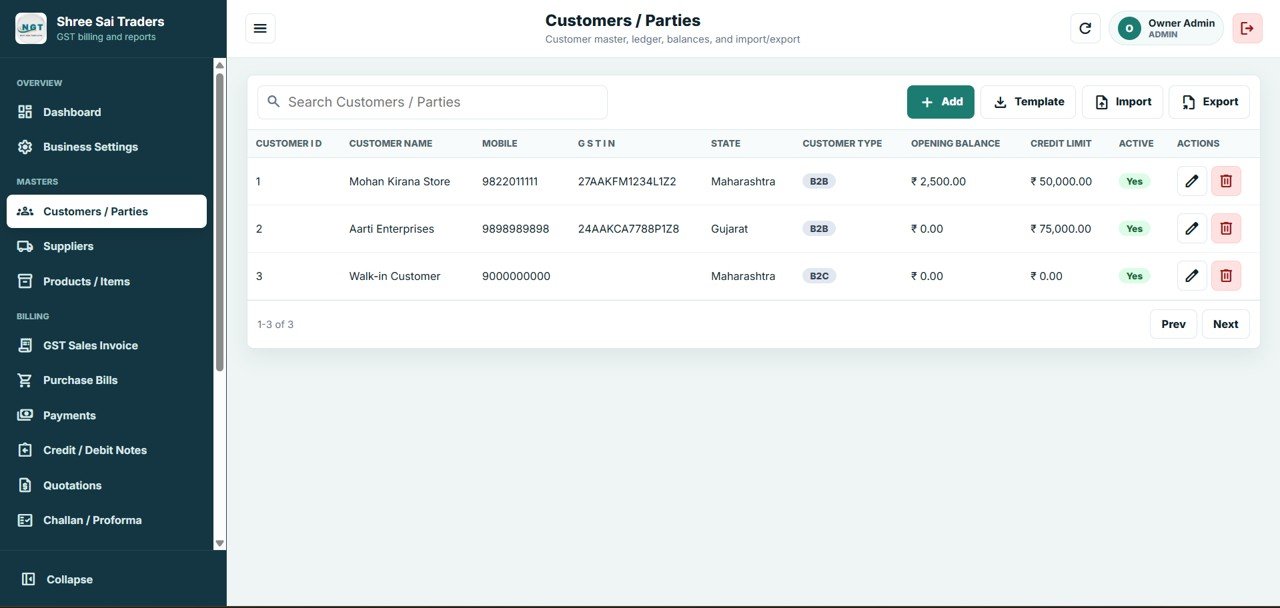
The customer master. Columns: Customer ID, Customer Name, Mobile, GSTIN, State, Customer Type (B2B or B2C), Opening Balance, Credit Limit and Active. The sample includes two B2B customers with GSTINs and a B2C “Walk-in Customer”.
4. Suppliers
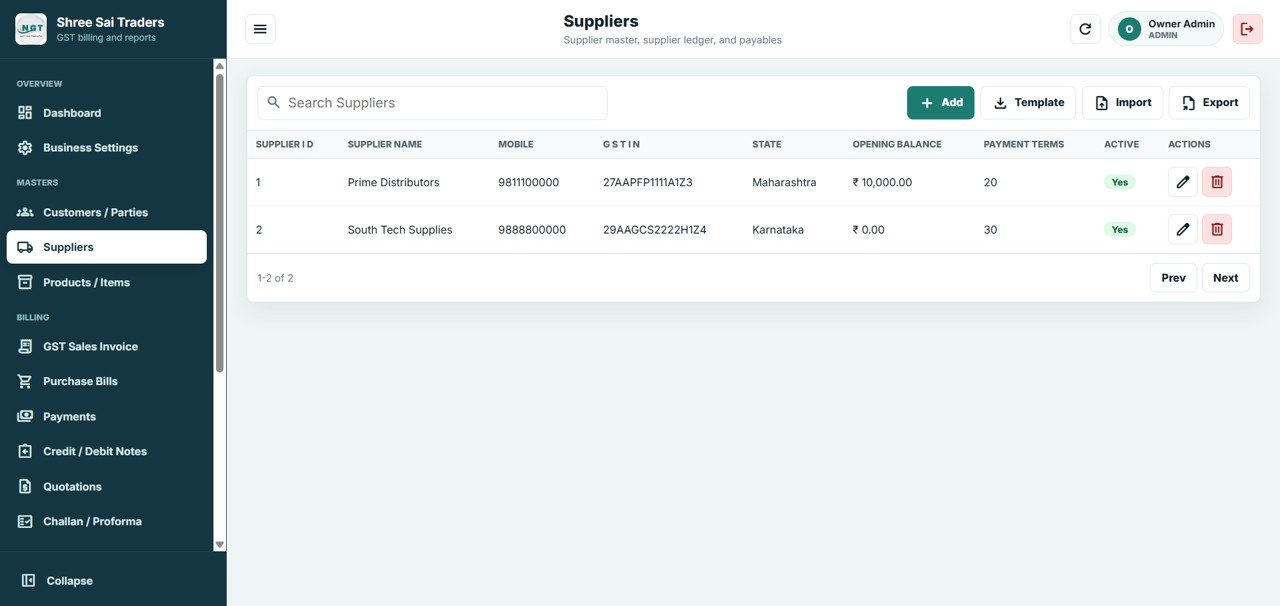
The supplier master. Columns: Supplier ID, Supplier Name, Mobile, GSTIN, State, Opening Balance, Payment Terms and Active.
5. Products / Items
Goods and services with their tax details. Columns: Item ID, Item Code, Item Name, Item Type (Goods or Service), HSN/SAC, Category, Unit, Sale Price, GST Rate, Current Stock, Minimum Stock and Active. In the sample, an LED Bulb 9W (HSN 8539) carries 18% GST and Rice Premium 5KG carries 5%. Installation Service is listed under SAC 9987.
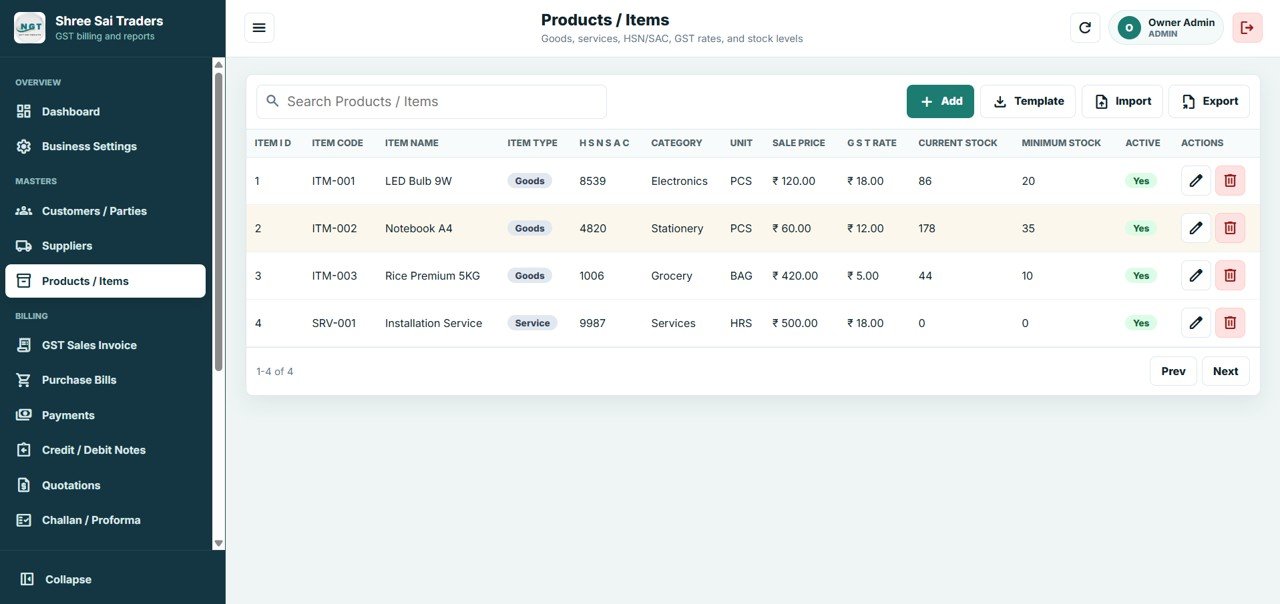
6. GST Sales Invoices
Create, print, email and export GST invoices with New Invoice. The list shows Invoice Number, Invoice Date, Customer Name, Supply Type (Intra-State or Inter-State), Payment Status, Total Taxable Value, Total CGST, Total SGST, Total IGST and Grand Total.
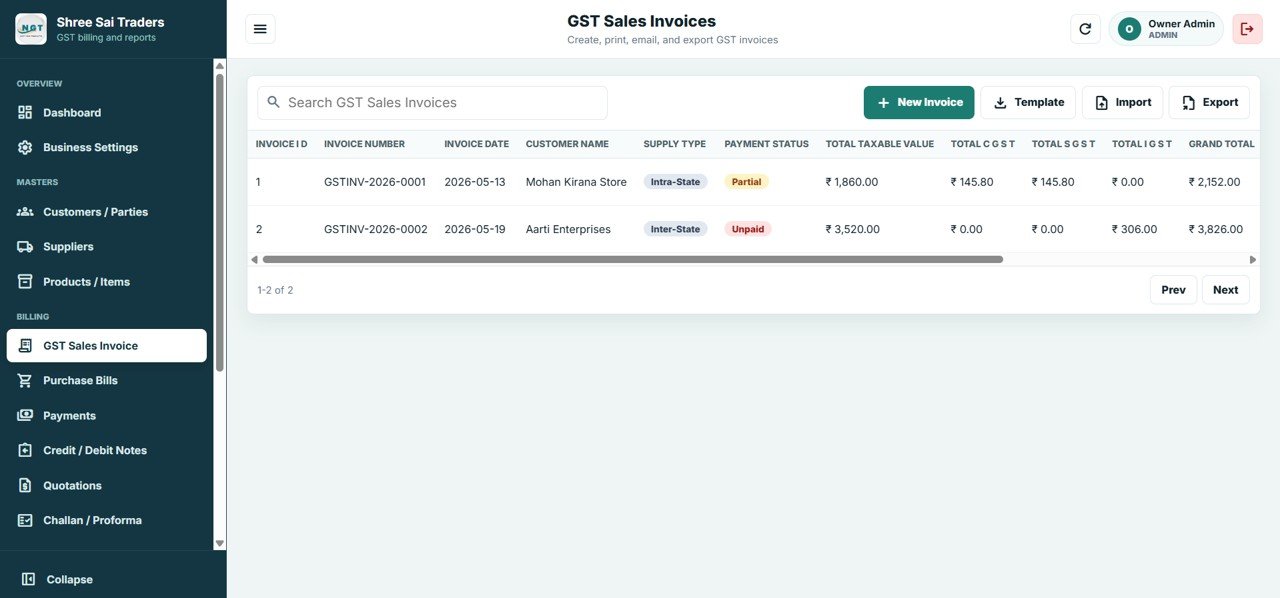
7. Purchase Bills
Supplier bills, input tax credit and stock inward, added with New Purchase. Columns: Purchase Bill Number, Purchase Date, Supplier Name, Supply Type, Payment Status, Total Taxable Value, Total CGST, Total SGST, Total IGST and Grand Total.
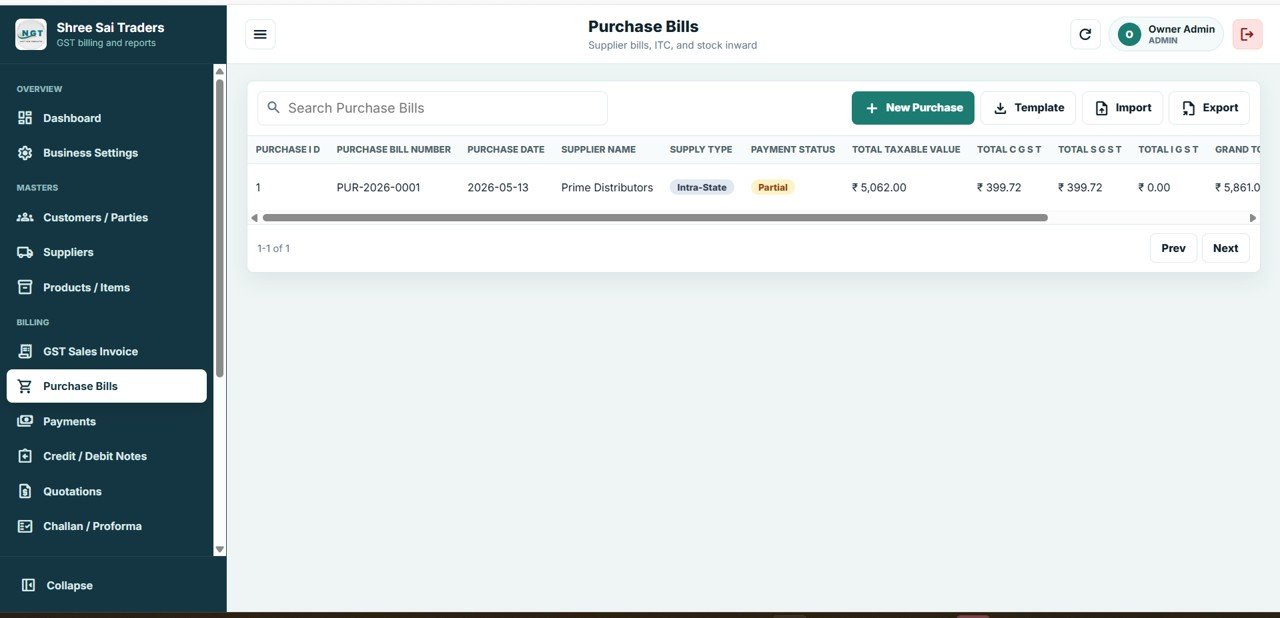
8. Payments / Receipts
Customer receipts and supplier payments in one list. Columns: Receipt ID, Date, Party Type (Customer or Supplier), Party Name, Reference Type (Sales Invoice or Purchase Bill), Reference ID, Amount, Payment Mode (UPI, Cheque and others) and Transaction Reference.
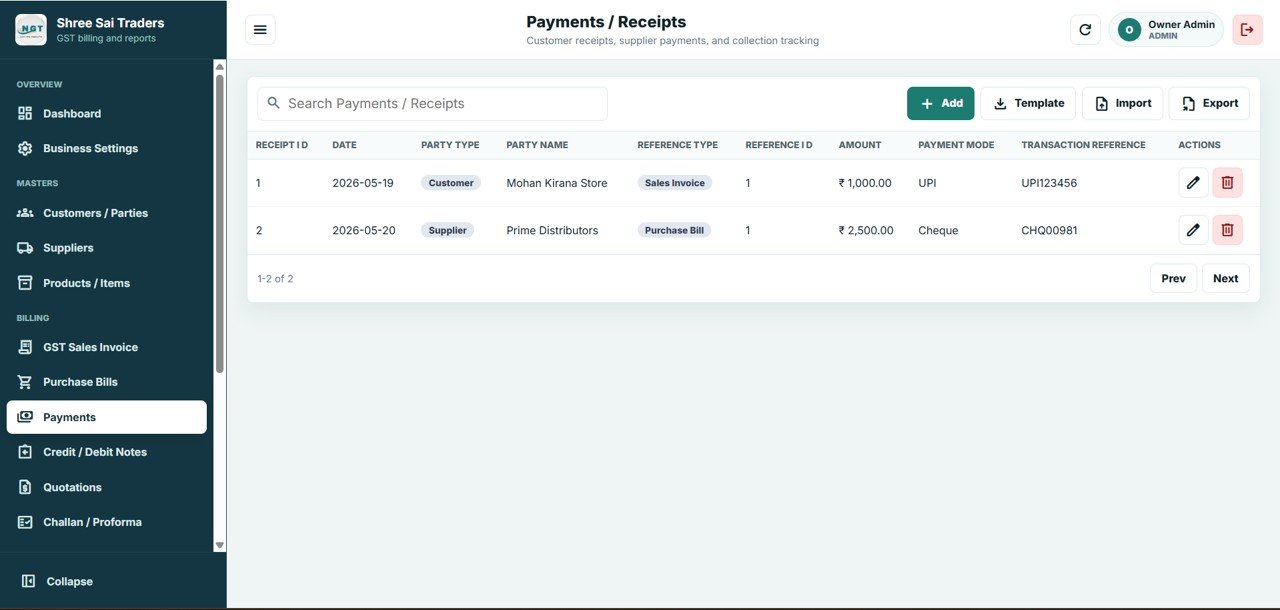
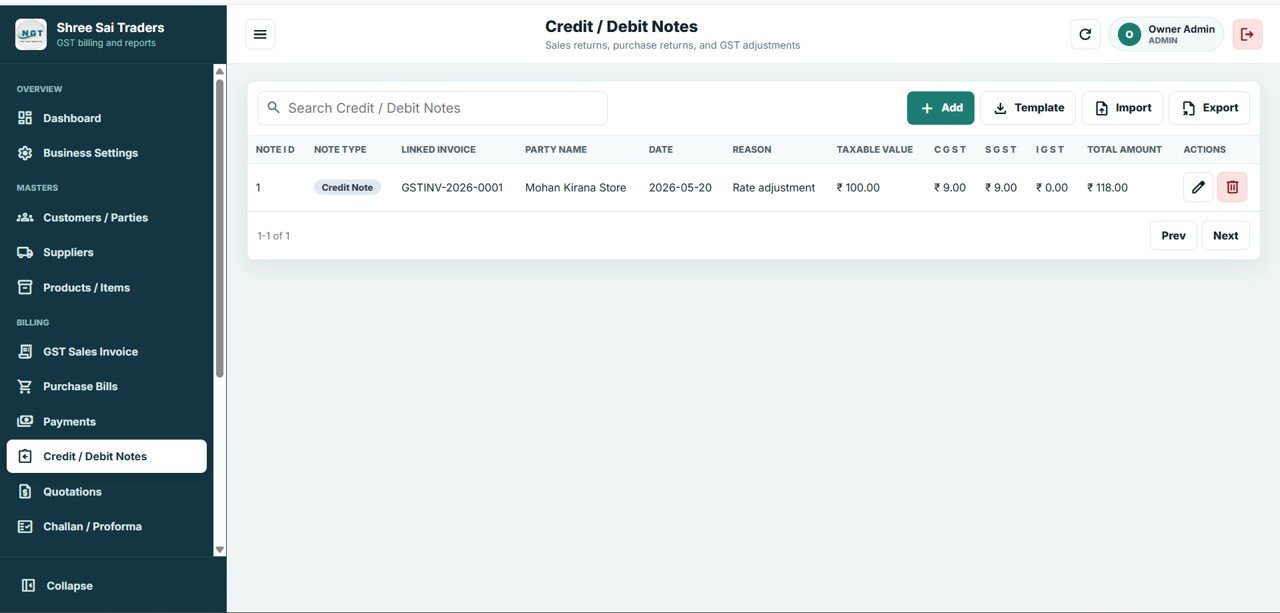
9. Credit / Debit Notes
Returns and GST adjustments. Columns: Note Type, Linked Invoice, Party Name, Date, Reason, Taxable Value, CGST, SGST, IGST and Total Amount. The sample credit note is a “Rate adjustment” against invoice GSTINV-2026-0001.
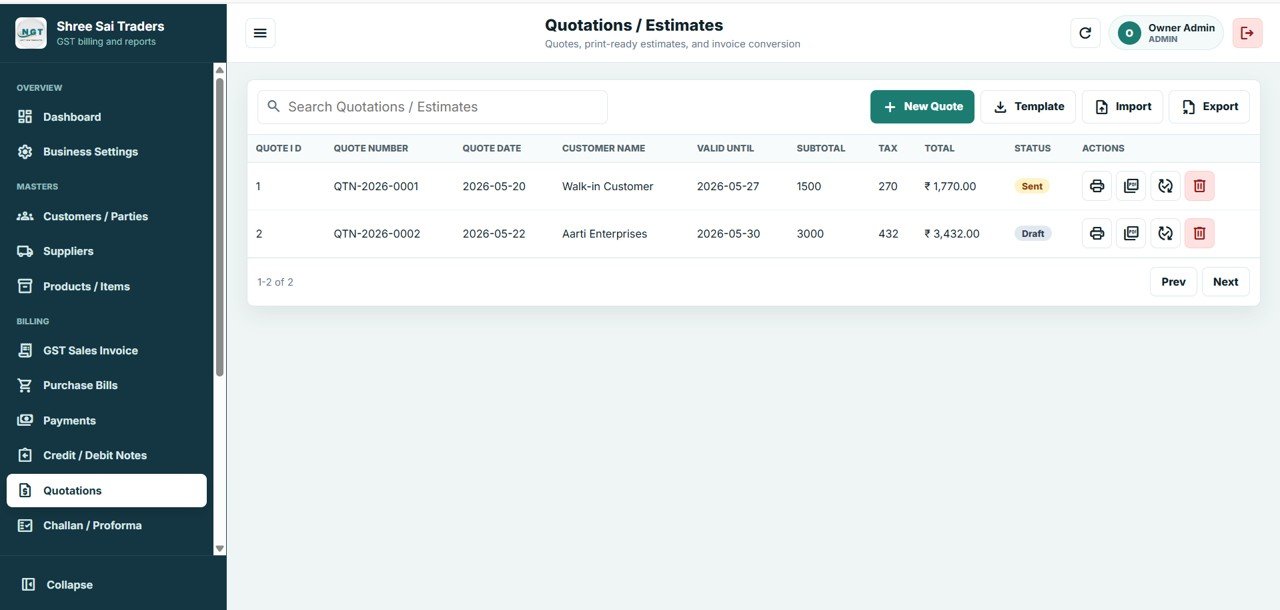
10. Quotations / Estimates
Quotes with Quote Number, Quote Date, Customer Name, Valid Until, Subtotal, Tax, Total and Status (Draft or Sent). Each row has buttons to print it and convert it into an invoice.
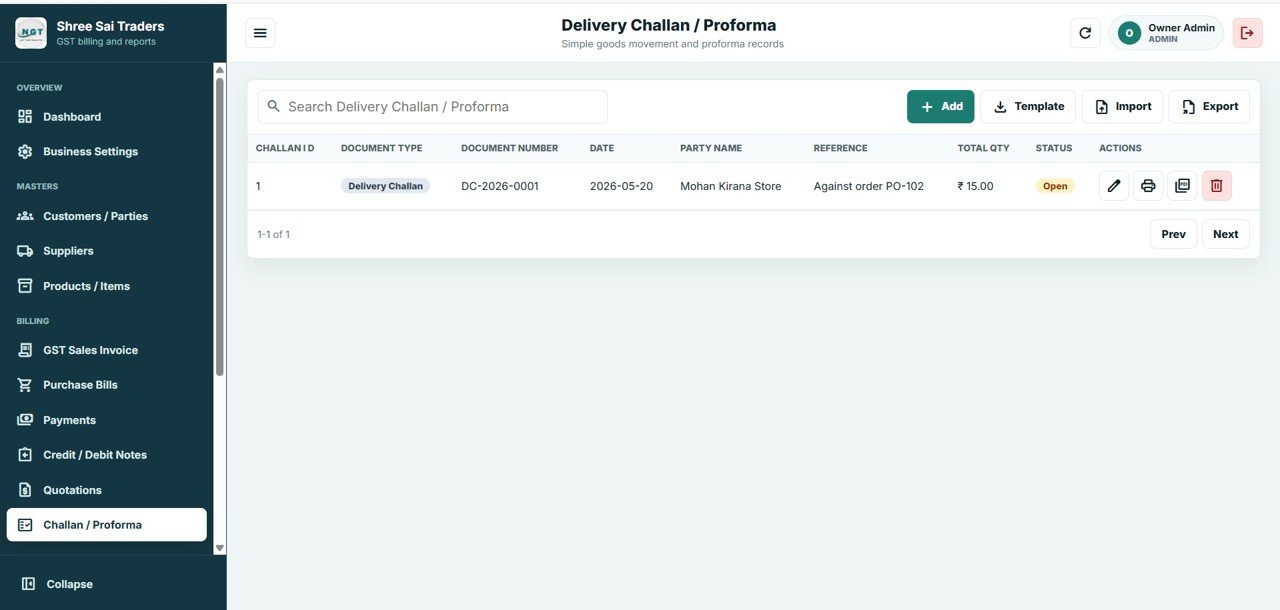
11. Delivery Challan / Proforma
Goods movement and proforma records: Document Type, Document Number, Date, Party Name, Reference (for example “Against order PO-102”), Total Qty and Status (for example Open). Each row has edit, print and convert actions.
Worked Example: How the GST Numbers Add Up
The demo data shows how the dashboard cards come from the documents. Here are the two sales invoices in May 2026:
| Invoice | Supply type | Taxable value | CGST | SGST | IGST | Grand total |
|---|---|---|---|---|---|---|
| GSTINV-2026-0001 (Maharashtra customer) | Intra-State | ₹1,860.00 | ₹145.80 | ₹145.80 | ₹0.00 | ₹2,152.00 |
| GSTINV-2026-0002 (Gujarat customer) | Inter-State | ₹3,520.00 | ₹0.00 | ₹0.00 | ₹306.00 | ₹3,826.00 |
Invoice 1 has ₹291.60 of tax on ₹1,860.00, and its grand total is rounded to ₹2,152.00. The dashboard then shows:
Monthly Sales     = 2,152.00 + 3,826.00         = ₹5,978.00
GST Output Tax    = 145.80 + 145.80 + 306.00    = ₹597.60
Pending Payments  = 5,978.00 − 1,000.00 (UPI)   = ₹4,978.00
Net GST Payable   = 597.60 − 1,021.44 (input)   = ₹−423.84
The GST Input Tax figure is read straight from the dashboard card. The one purchase bill on the Purchase Bills screen (PUR-2026-0001) carries ₹799.44 of input tax (₹399.72 CGST + ₹399.72 SGST), so the card also includes input tax from entries the screenshots do not break down.
A negative Net GST Payable means input tax credit is higher than output tax for the period. That is normal in a month with heavy purchases. To work through the tax maths by hand, see how to calculate GST in Google Sheets.
How to Set It Up in Your Own Google Account
- Create a new Google Sheet in your Drive. It will hold all your billing data.
- Open Extensions > Apps Script. Paste the supplied Code.gs into the script file and add an HTML file named Index with the supplied Index.html.
- Save, then choose Deploy > New deployment > Web app, and authorise the script when Google asks.
- Open the web app URL, sign in and fill in Business Settings.
- Add your masters first: Customers / Parties (with GSTIN and State), Suppliers and Products / Items (with HSN/SAC and GST Rate).
- Create a test invoice for an in-state customer and one for an out-of-state customer. Check that CGST + SGST and IGST appear as expected before you start live billing.
The included guide covers each step with screenshots. Deployment help from the NextGenTemplates team is available as a paid add-on.
Real-World Use Cases
- Retail counter or hardware shop: Raise invoices from a tablet browser, record UPI receipts the same day and watch Low Stock Items before you reorder.
- Distributor: Send a quotation and issue a delivery challan against the customer’s order. Convert it to a GST invoice when the goods are accepted, then track Pending Payments by customer.
- Accountant with small clients: Deploy one copy per client. Export invoices, purchase bills and notes each month as the base for return preparation.
Best Practices
- Enter the correct State on every customer and supplier. The supply type, and so the CGST/SGST or IGST split, depends on it.
- Check HSN/SAC codes and GST rates in Products / Items before your first invoice. Every later invoice depends on them.
- Record payments on the day they arrive so Pending Payments stays reliable.
- Back up with File > Make a copy on the Google Sheet each week or month.
- Review GST Output Tax, GST Input Tax and Net GST Payable for the period before each return.
Limitations
- It does not file returns. It produces the figures, and GSTR filing happens separately on the GST portal or through your accountant.
- Direct e-invoice (IRN) and e-way bill generation are not built in.
- It needs an internet connection and a Google account. It does not work offline.
- Very large invoice volumes will slow a single Google Sheet over time. Starting a fresh sheet each financial year helps.
Web App vs Excel Billing vs GST Software
| Need | Excel billing sheet | GST Billing System Web App | Subscription GST software |
|---|---|---|---|
| Automatic CGST/SGST vs IGST | Your own formulas | Built in, by supply type | Built in |
| Multi-user login with roles | No | Yes (Admin, User) | Yes |
| Purchases, payments, notes, quotes, challans | Separate sheets | One connected app | Yes |
| e-Invoice / e-way bill / return filing | No | No | Often, on higher plans |
| Where data lives | Your file | Your Google Sheet | Vendor cloud |
| Cost model | Free or one-time | One-time purchase | Monthly or yearly per user |
Related Templates and Guides
If you only need daily sales and purchase entries, the Daily Sales Purchase System Web App is simpler. For full books, see the Accounting Ledger Pro Management System Web App. Retail counters may prefer the General Store POS Web App. If you only need a printable invoice, the Professional Invoice Template in Google Sheets is a lighter option, and the Client Billing and Payment Tracker covers service billing.
Related template: GST Billing Software V1.0 (Excel/VBA desktop version).
Curious how systems like this are put together in a spreadsheet? The NextGenTemplates Academy learning paths build up the skills step by step, using practice files you can follow along with.
Frequently Asked Questions
How does the GST Billing System Web App decide between CGST/SGST and IGST?
It uses the supply type on each invoice or purchase bill. Intra-State documents split the tax equally into CGST and SGST. Inter-State documents carry the full tax as IGST, as the two sample invoices show.
What is on the dashboard?
Eleven cards: Today’s Sales, Monthly Sales, Total Invoices, Pending Payments, Total Customers, Total Suppliers, Stock Value, Low Stock Items, GST Output Tax, GST Input Tax and Net GST Payable. Below them are Sales Trend and Purchase Trend charts and filters for date, financial year, customer, GST type and payment status.
Can it file my GST returns or create e-invoices?
No. It records sales, purchases and notes and calculates the totals. Filing GSTR returns, generating IRNs and creating e-way bills happen outside the app.
Can I import my existing customers and products?
Yes. The master screens have Template, Import and Export buttons. Download the template, fill in your records and import them.
Where is my billing data stored?
In a Google Sheet in your own Google Drive, in the account where you deploy the app. You can export it at any time.
Do I need coding skills to deploy it?
No. You paste the two supplied files into Apps Script and deploy, following the included guide. If you prefer, paid deployment help is available.
Wrapping Up
If you want GST-ready invoices, purchase bills with input tax credit, payment tracking and a live Net GST Payable figure, without a monthly subscription, this web app covers the full billing cycle inside your own Google account. Try the demo with the sample data first. Then deploy your own copy and set up your masters before the first live invoice.
Get the GST Billing System Web App
📅 Last updated: October 2026