The General Store POS Web App runs your billing, stock and reporting from one Google Sheet. It has 20 connected screens, an 8-KPI sales dashboard, 19 built-in reports, role-based logins for six staff types, and a picking queue for delivery and pickup orders. Setup takes under 15 minutes, and you pay once instead of paying a monthly cloud POS fee.
Paper registers and single spreadsheets make it hard for a general store, grocery shop or mini-mart to track stock, reconcile the till and fill delivery orders accurately. This web app gives every cashier a touch-friendly billing screen with SKU and barcode search. The owner gets live sales figures, low-stock alerts and a full audit trail from any browser.
Get the General Store POS Web App
🎥 Watch the Video Tutorial
🚀 Try the Live Demo Before You Buy
We have deployed this web app in our own Google account, so you can test every page and all 6 user roles with sample data before you buy. No signup or email is needed.
🔑 Demo Login Details
Sign in as Admin1 for full control over users, settings and every module. Or try another role to see what each staff member can do, from billing at the counter to view-only reporting. Every demo password is abcd.
| Role | Username | Password |
|---|---|---|
| Admin | Admin1 | abcd |
| Manager | Manager1 | abcd |
| Cashier | Cashier1 | abcd |
| Storekeeper | Storekeeper1 | abcd |
| Inventory User | Inventory1 | abcd |
| Viewer | Viewer1 | abcd |
💡 What you get after purchase: the full source code (Code.gs + Index.html) and a step-by-step deployment guide, so you can deploy a private copy in your own Google account in under 15 minutes.
Key Features of the General Store POS Web App
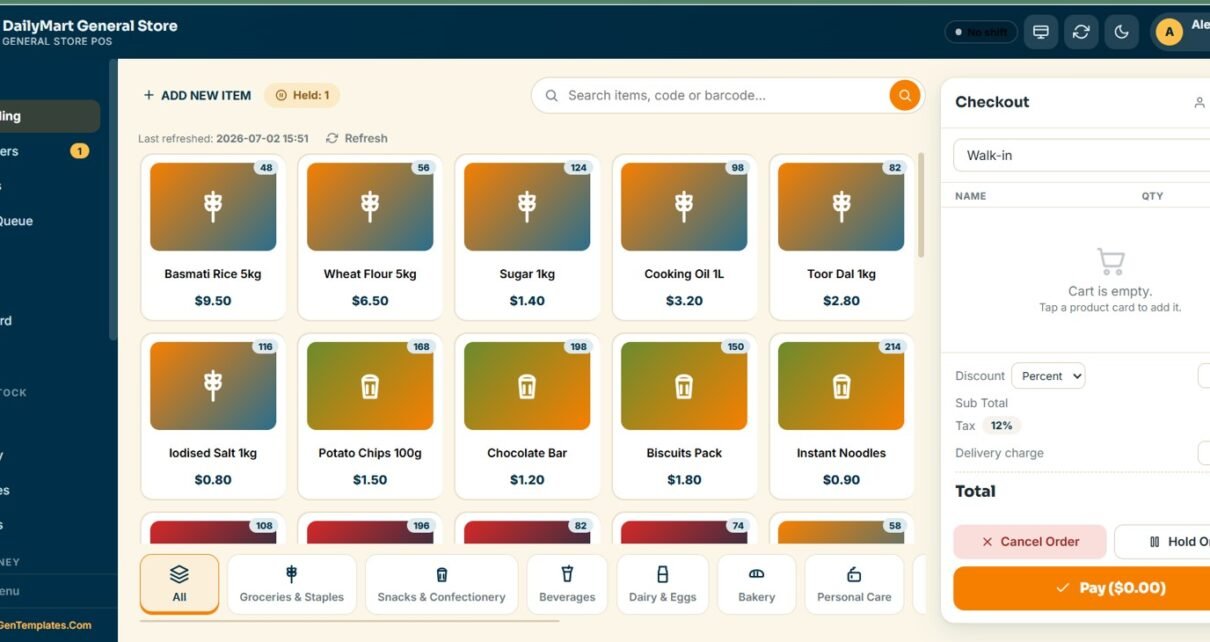
- Touch POS with SKU and barcode search: product cards are grouped by category, and one checkout panel handles the discount, 12% default tax, delivery charge, hold and payment.
- Counters, delivery and pickup board: walk-in counters, delivery lanes and pickup slots are managed from one live view.
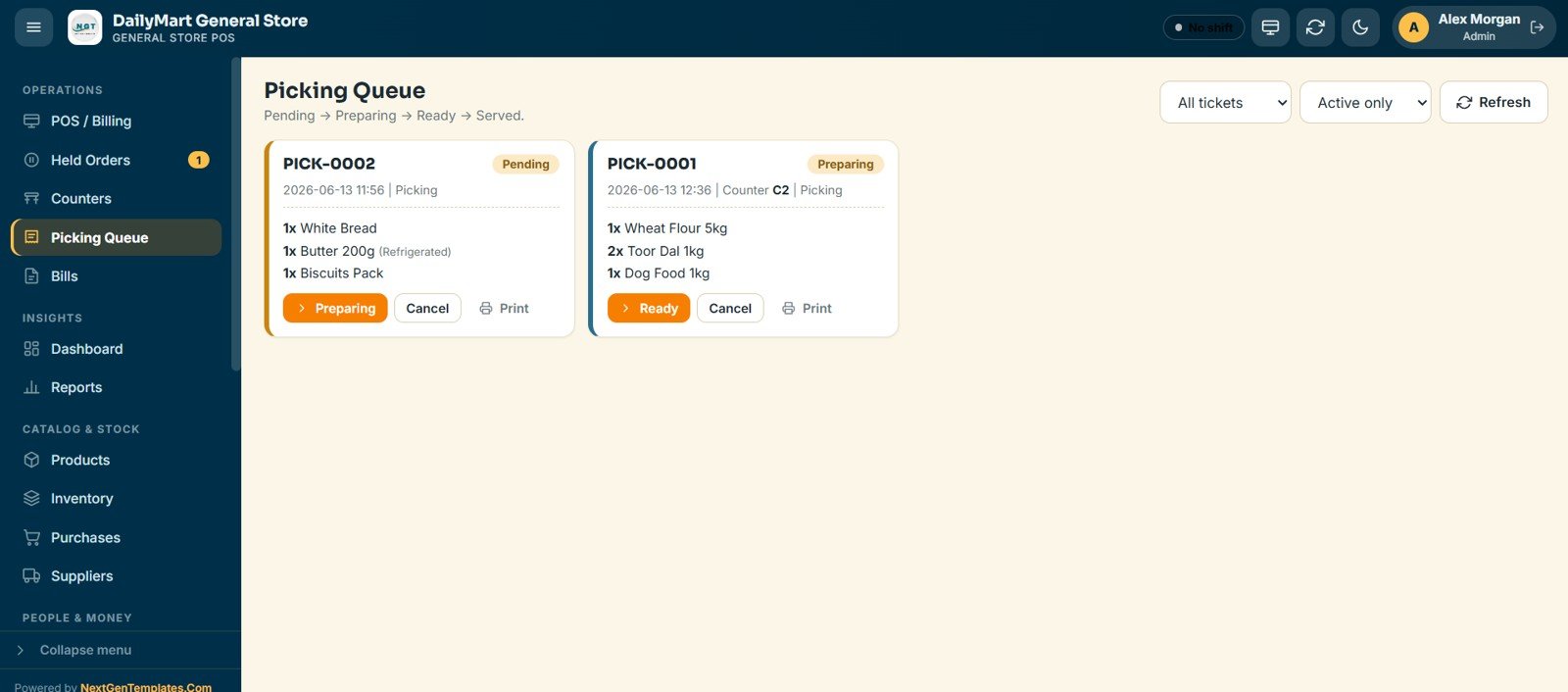
- Picking Queue: picking tickets move through Pending, Preparing, Ready and Served, and refrigerated items are flagged.
- Six role-based logins: Admin, Manager, Cashier, Storekeeper, Inventory User and Viewer.
- 19 reports you can export to Excel and an 8-KPI dashboard with a 7-day sales trend and an hourly sales chart.
- Inventory with automatic stock deduction: also covers purchase tracking, a supplier directory, expenses and shift cash reconciliation.
The 20 screens at a glance
| Menu group | Screens |
|---|---|
| Operations | POS / Billing, Held Orders, Counters, Picking Queue, Bills |
| Insights | Dashboard, Reports |
| Catalog & Stock | Products, Inventory, Purchases, Suppliers |
| People & Money | Customers, Expenses, Shifts & Cash |
| Administration | Import / Export, User Management, List Management, Settings, Audit Log |
| Access | Login page with role-based sign-in |
Screens Explanation
1. Login Page
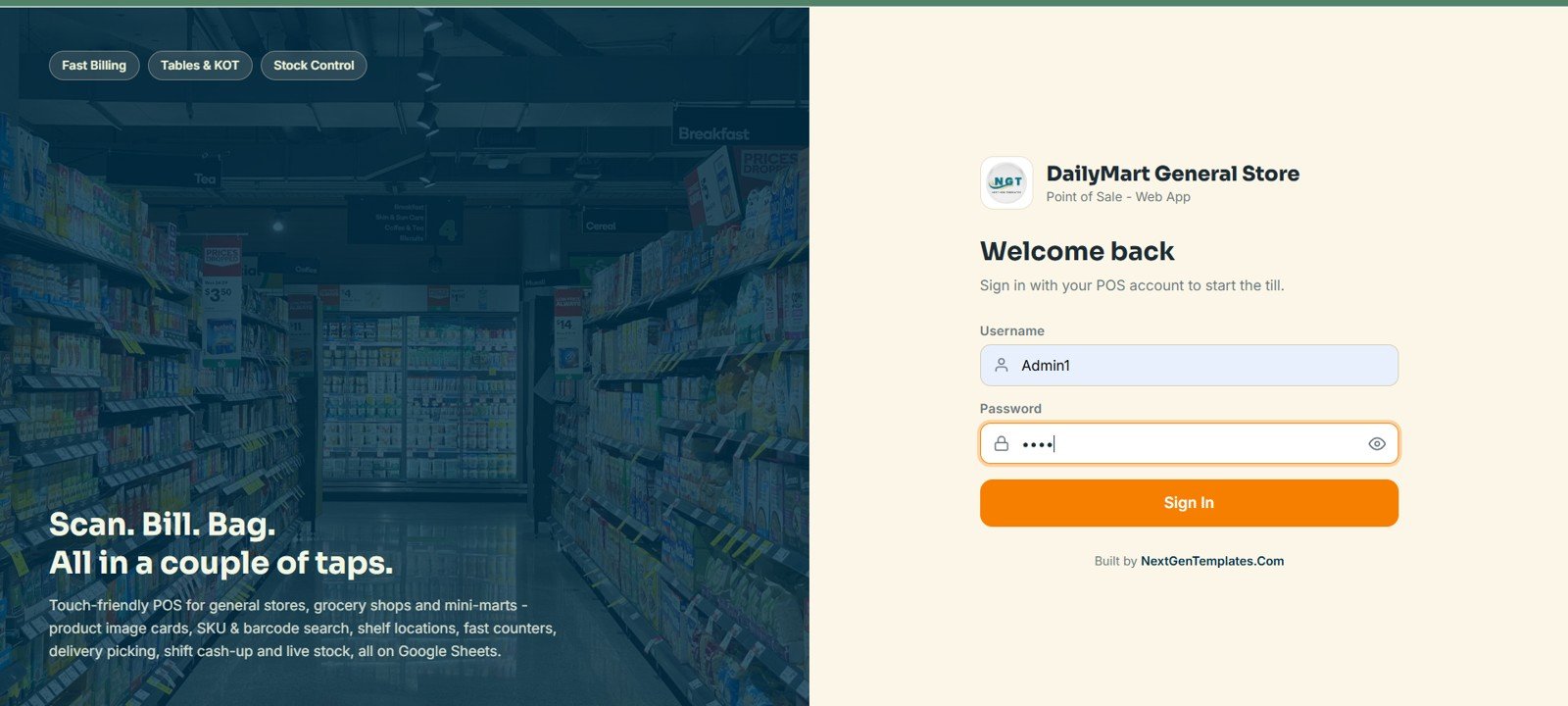
Every user signs in with their own username and password, and the app loads only the screens their role allows. The page carries the store’s branding and a touch-friendly welcome panel.
2. POS / Billing
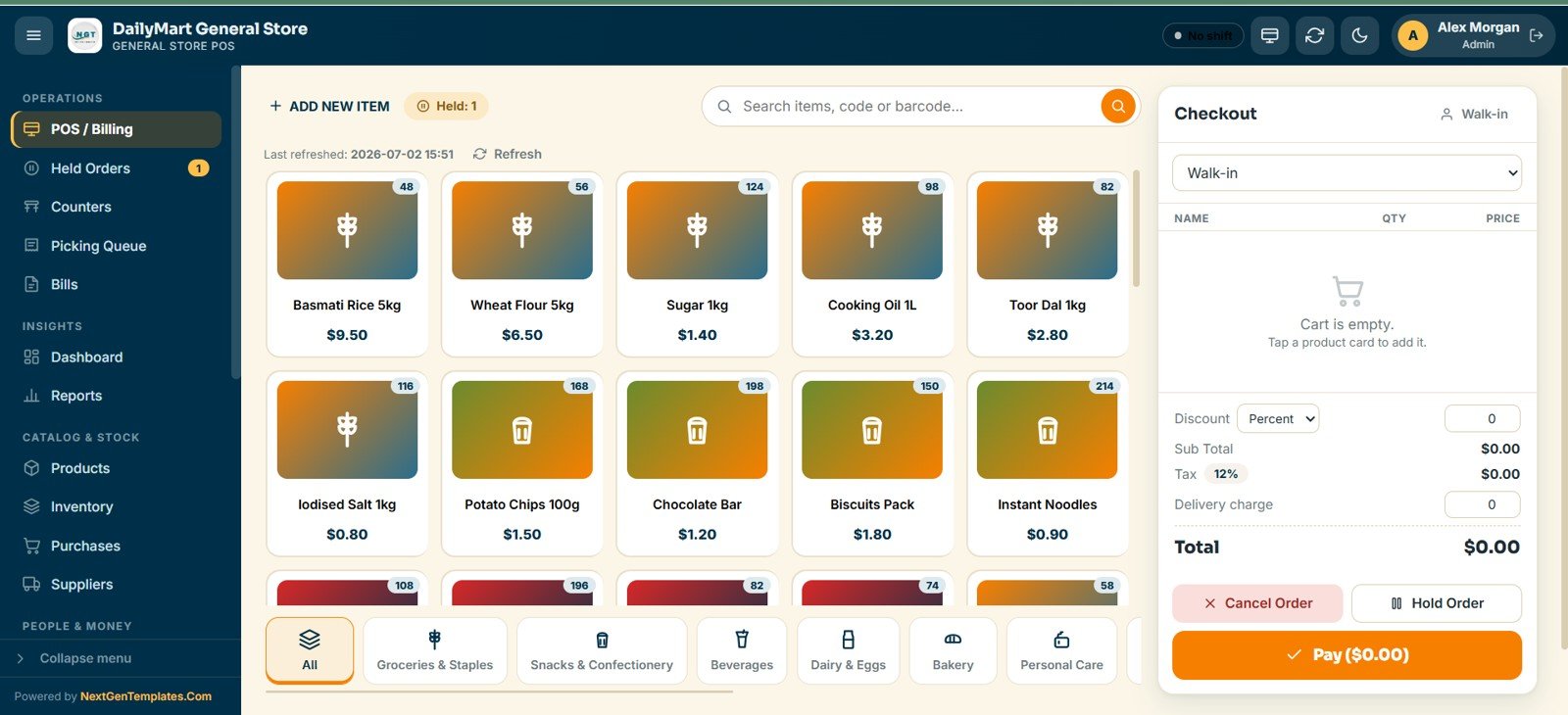
Cashiers build a cart from product image cards using SKU or barcode search. The cards are grouped into categories such as Groceries & Staples, Snacks & Confectionery, Beverages, Dairy & Eggs, Bakery and Personal Care. The checkout panel handles the customer, discount, 12% tax, delivery charge, hold and payment.
3. Held & Open Orders
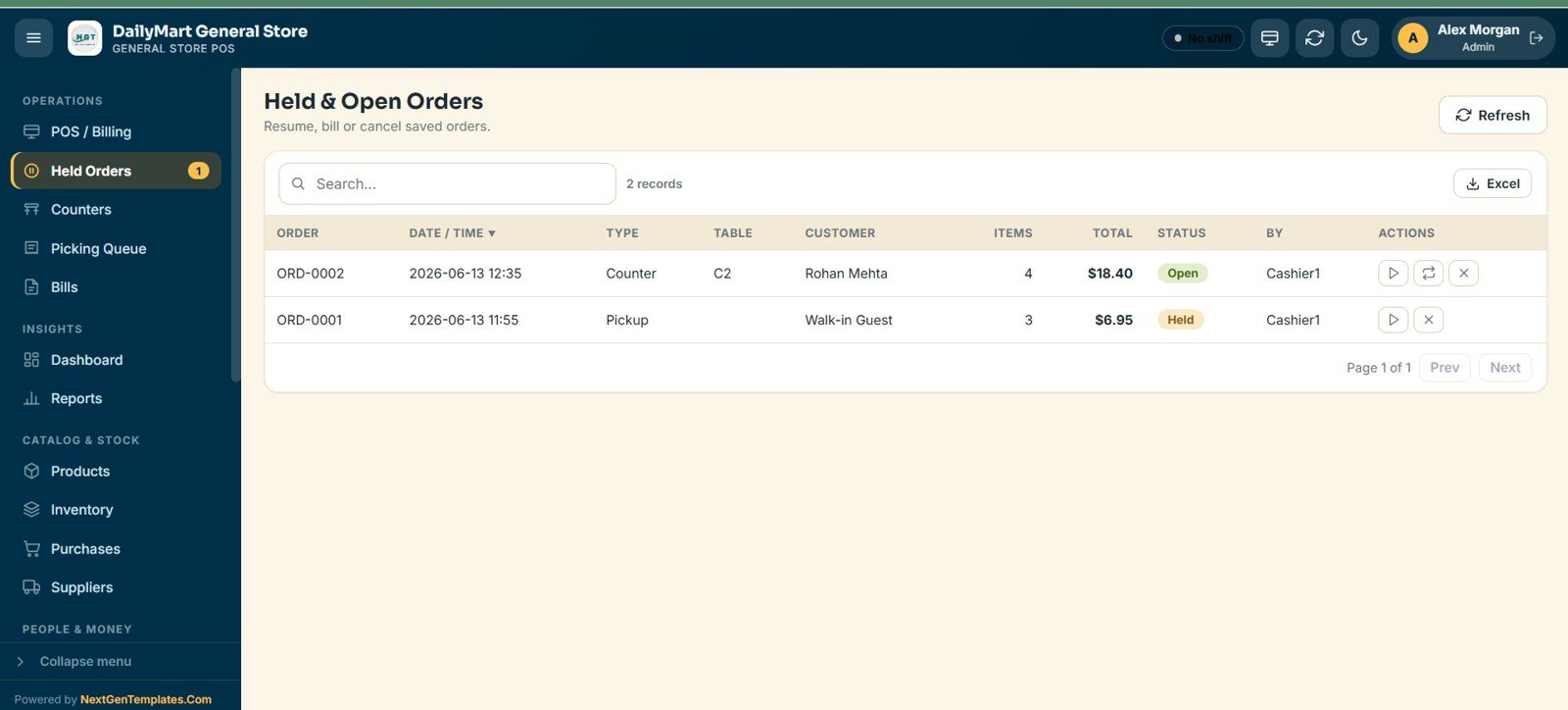
Every saved or running order is listed with its number, date, type, table or counter, customer, item count, total, status and cashier. Staff can resume, bill or cancel it.
4. Counters
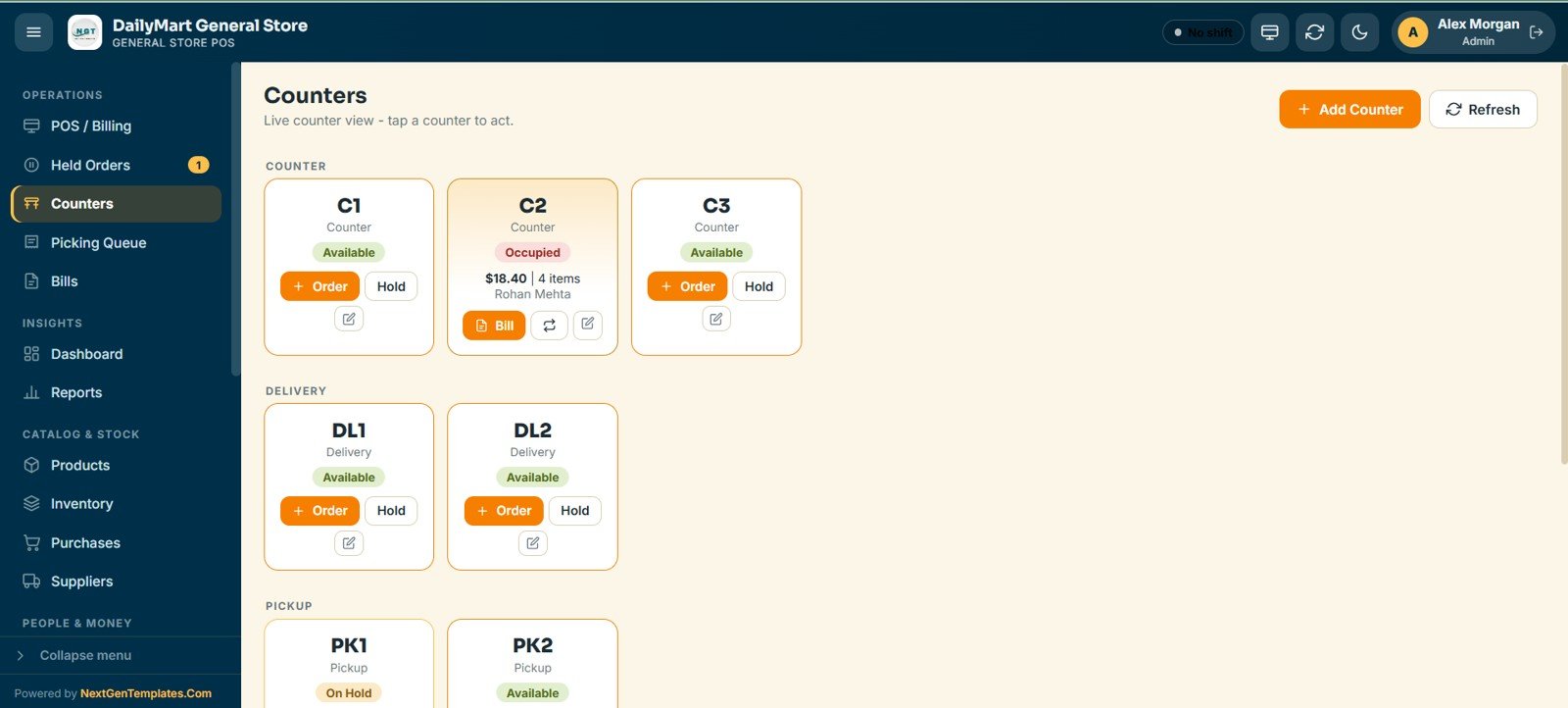
A live board is split into walk-in Counters, Delivery lanes and Pickup slots. Each card shows its status, running total and customer, and you can start an order, hold it or bill it with one tap.
5. Picking Queue
Orders sent for picking, such as delivery, pickup and counter orders, move through Pending, Preparing, Ready and Served. Staff pick each item and quantity, see which lines are refrigerated, print the pick list and filter to active tickets.
6. Bills
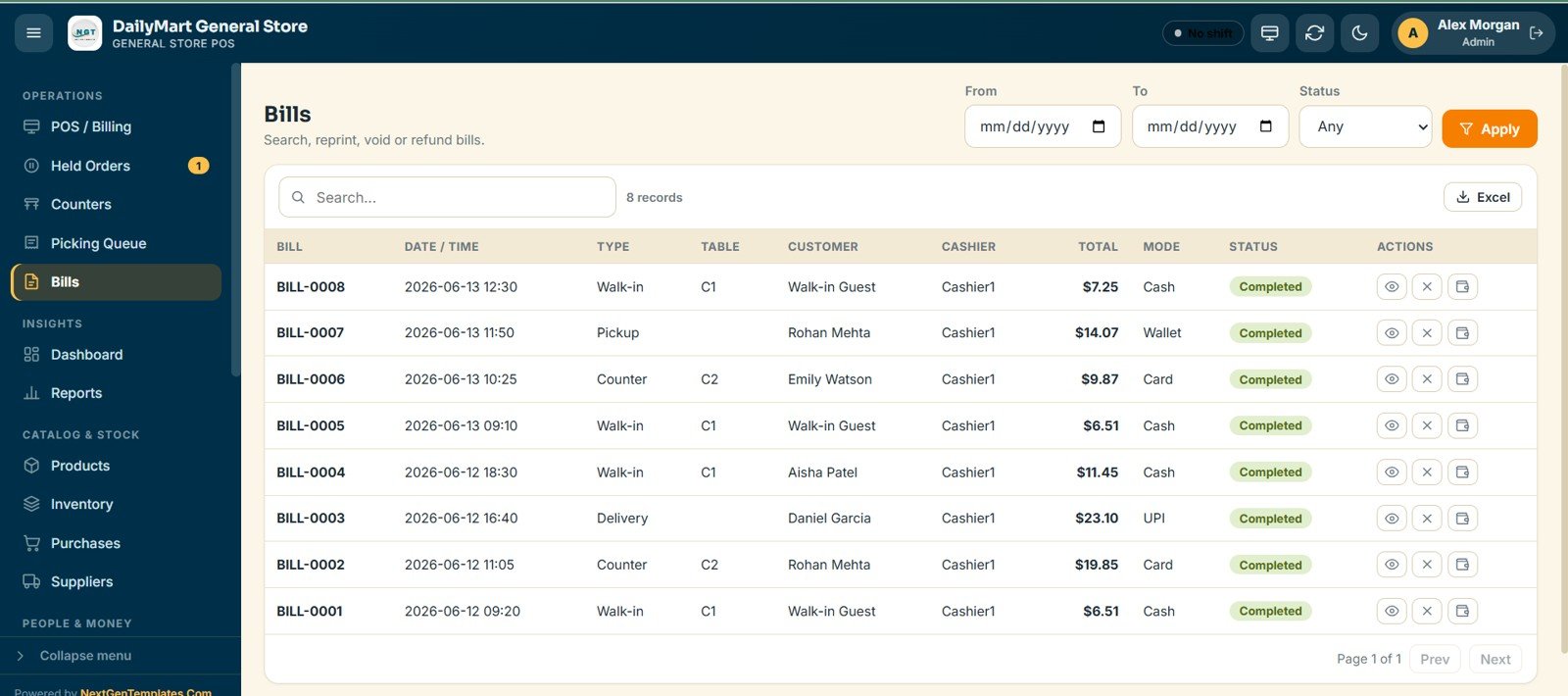
You can search, reprint, void or refund any completed bill, with date-range and status filters. Each row shows the bill number, date, type, counter, customer, cashier, total, payment mode and status.
7. Dashboard
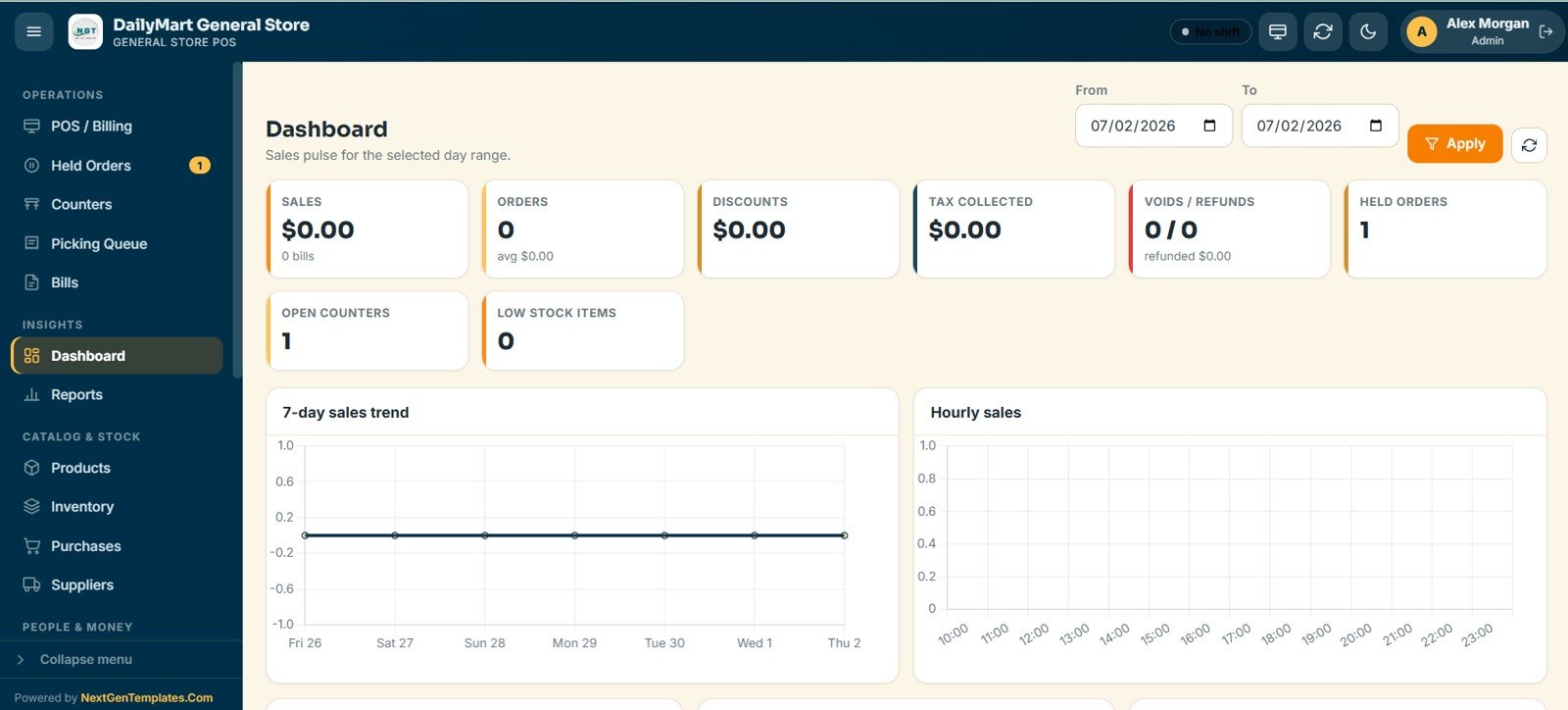
Eight KPI cards (Sales, Orders, Discounts, Tax Collected, Voids/Refunds, Held Orders, Open Counters and Low Stock Items) sit above a 7-day sales trend and an hourly sales chart for the selected date range.
8. Reports
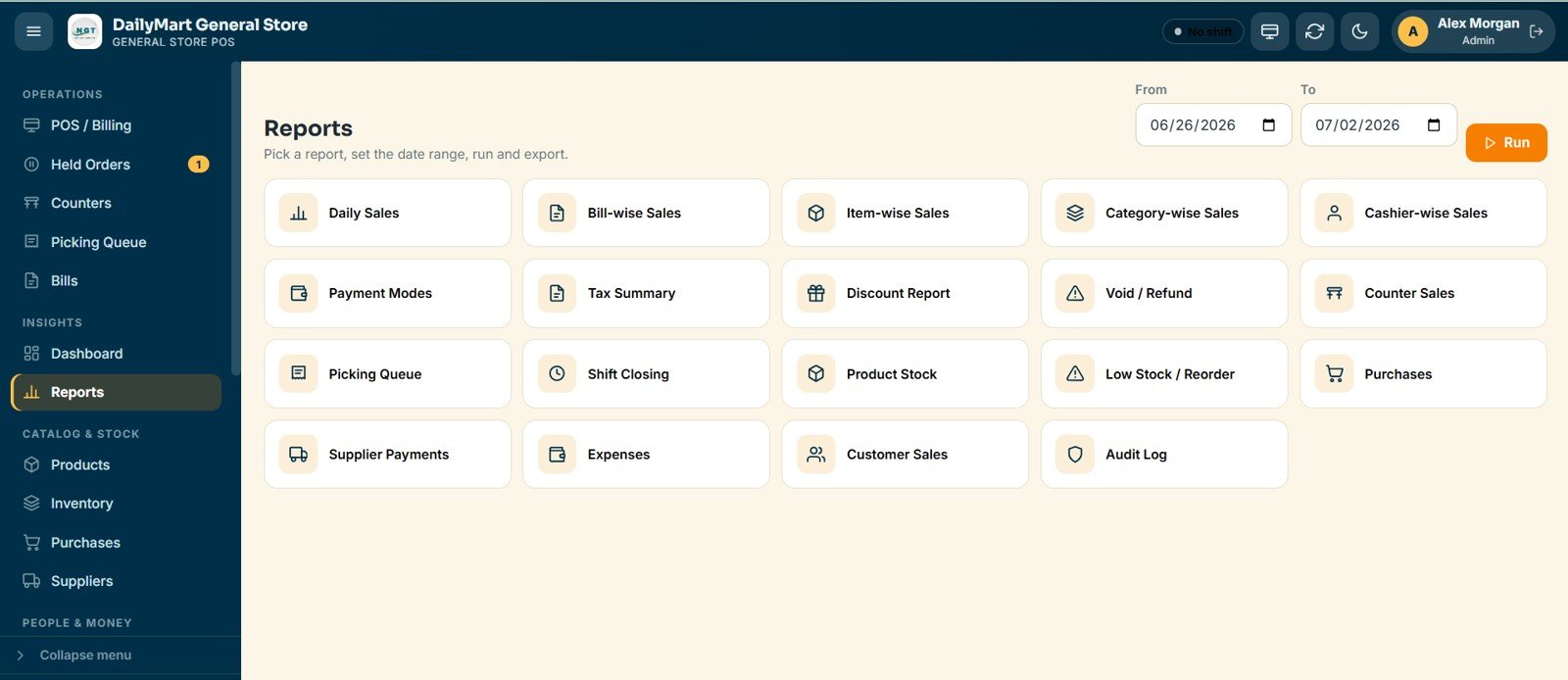
Nineteen ready-made reports cover daily sales, sales by bill, item, category and cashier, payment modes, tax, discounts, voids, counter sales, picking, shift closing, product stock, low stock, purchases, supplier payments, expenses, customer sales and a full audit log. All of them export to Excel.
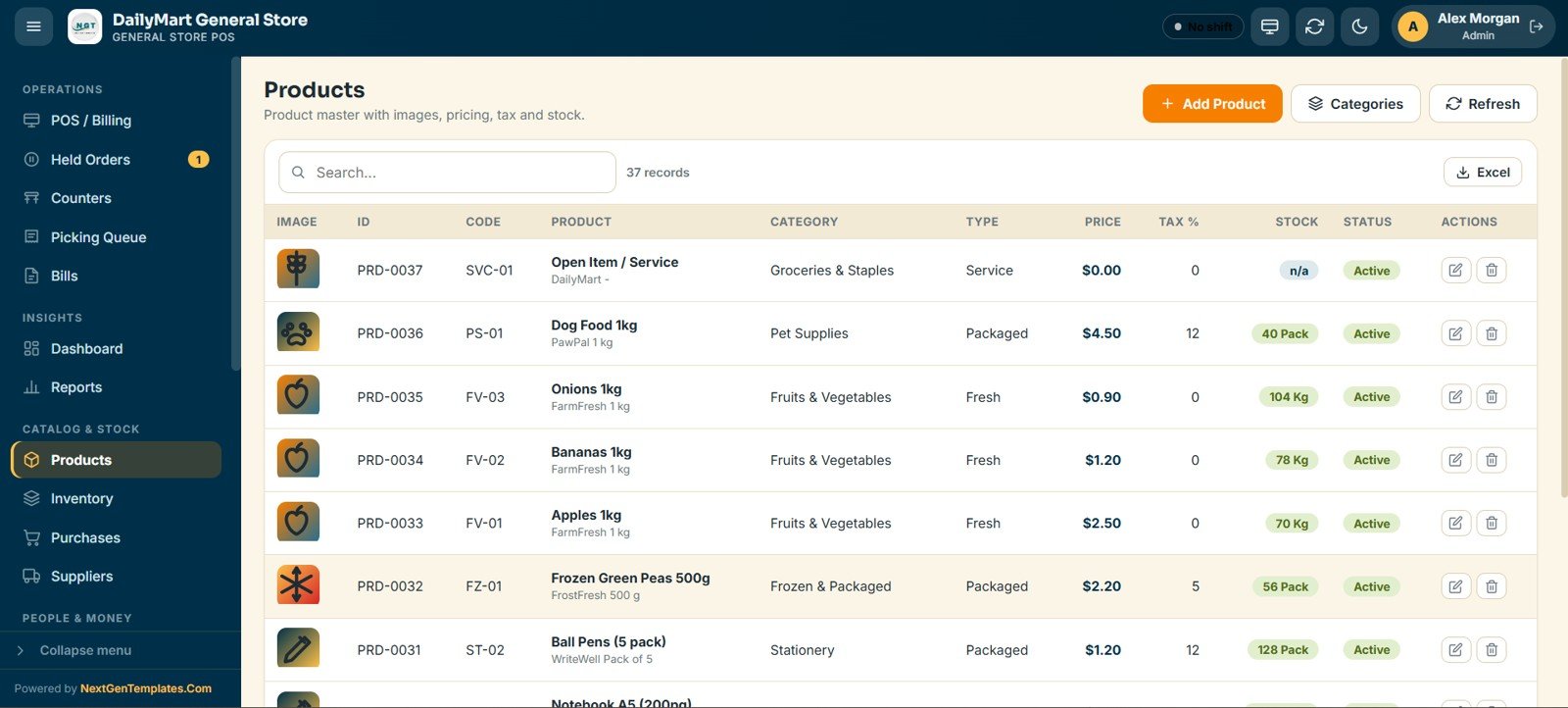
9. Products
The product master holds every item with its image, code, category, type, price, tax percent, stock and status. You can add, edit, import and export products and manage categories.
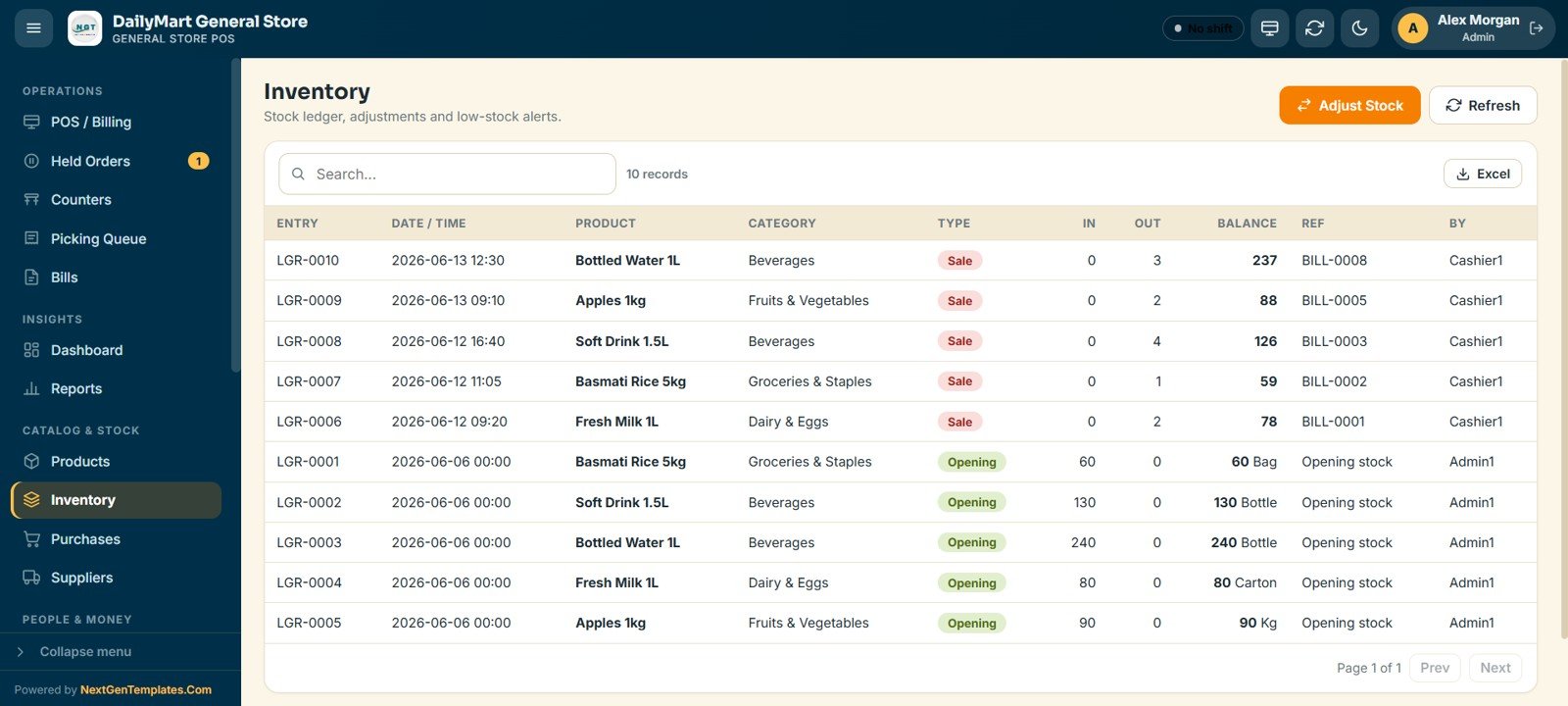
10. Inventory
A stock ledger records every movement with its date, product, category, type, quantity in and out, running balance and reference bill. Sales deduct stock automatically.
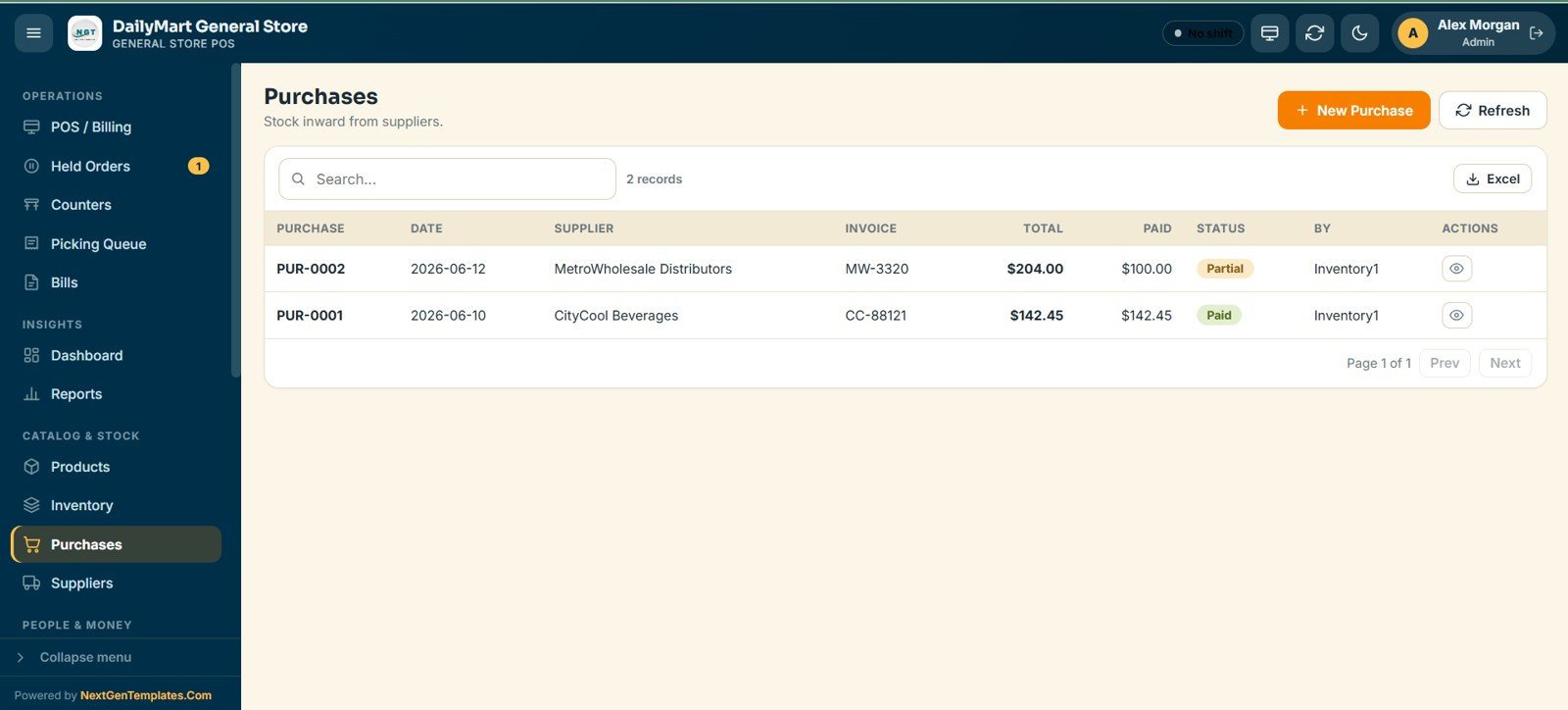
11. Purchases
Stock coming in from suppliers is logged with the date, supplier, invoice, total, amount paid and a Paid or Partial status, and the list exports to Excel.
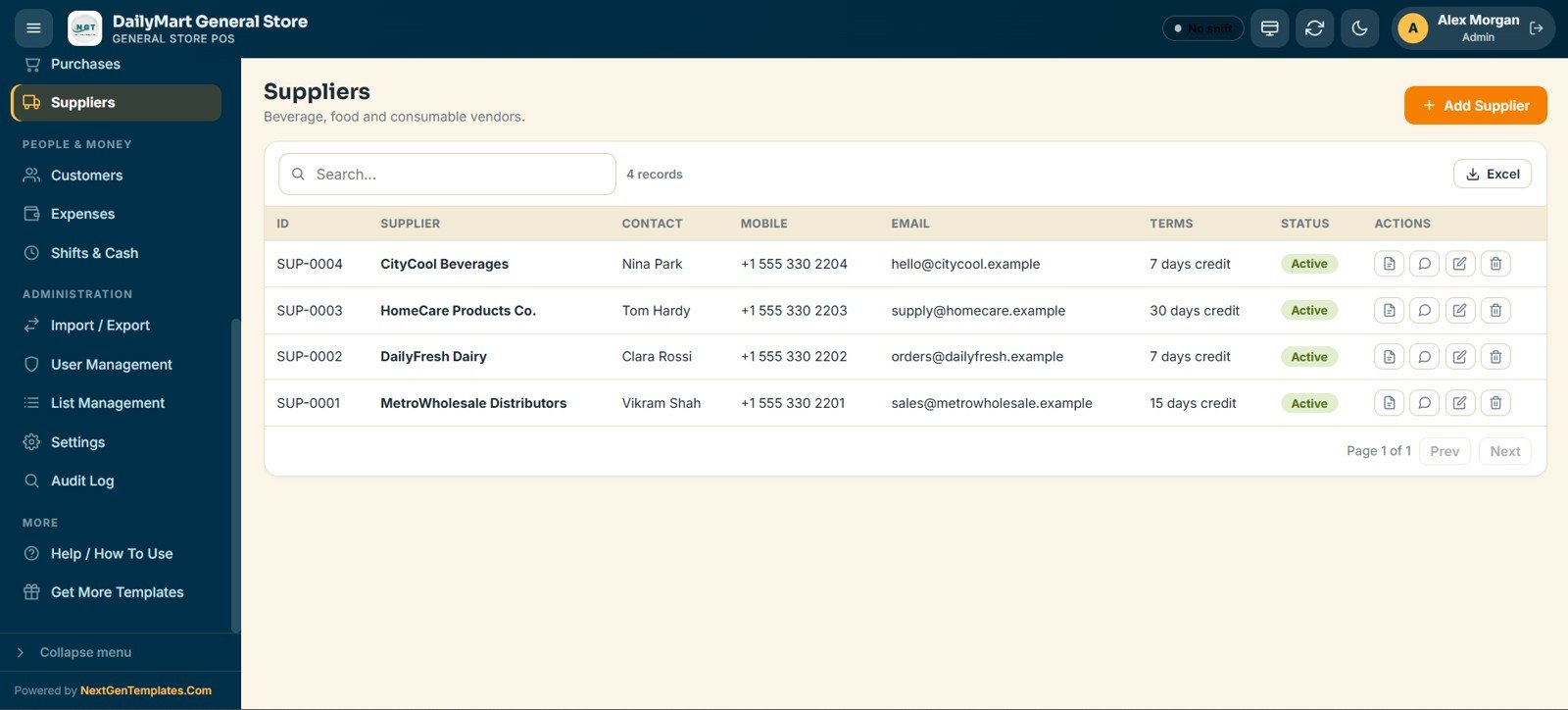
12. Suppliers
A directory of beverage, food and consumables vendors records the contact person, mobile, email, credit terms and status.
13. Customers
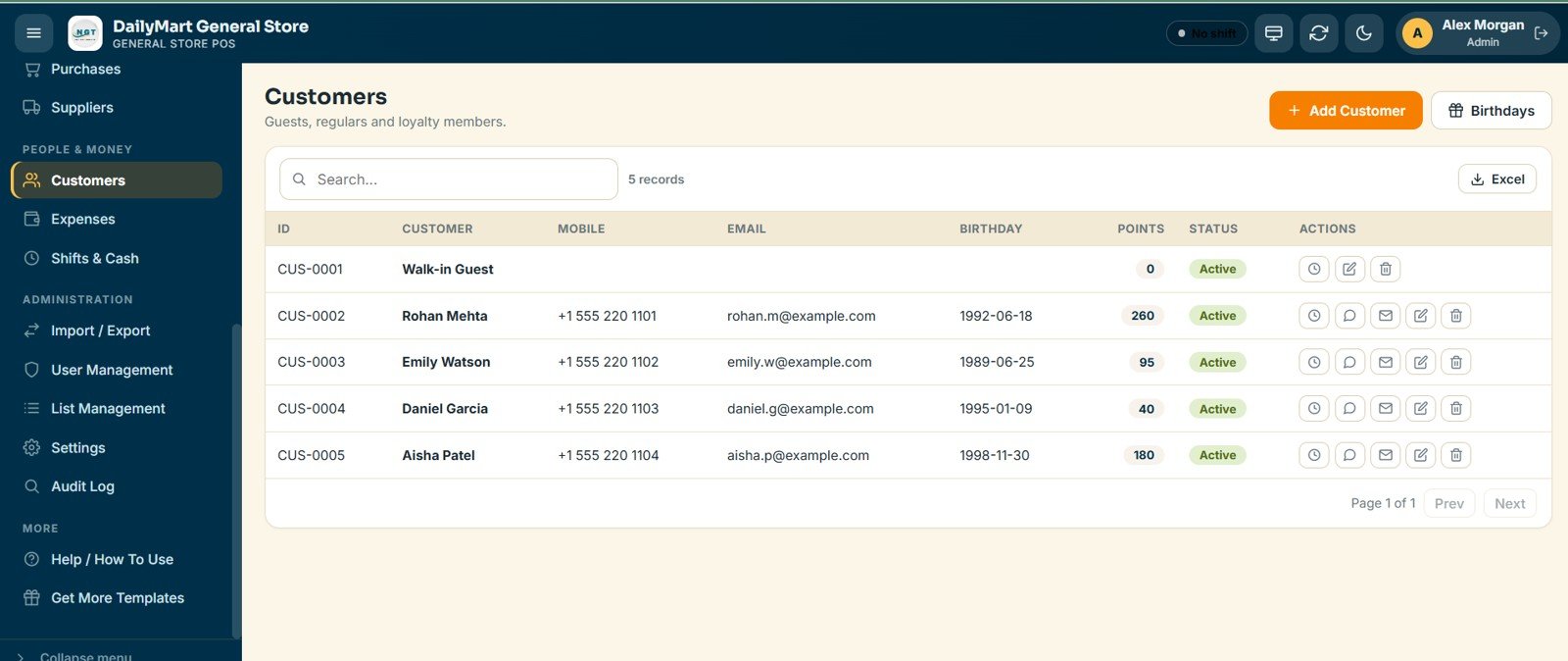
Walk-in guests, regulars and loyalty members are stored with their mobile, email, birthday, loyalty points and status, which you can use for targeted retail marketing.
14. Expenses
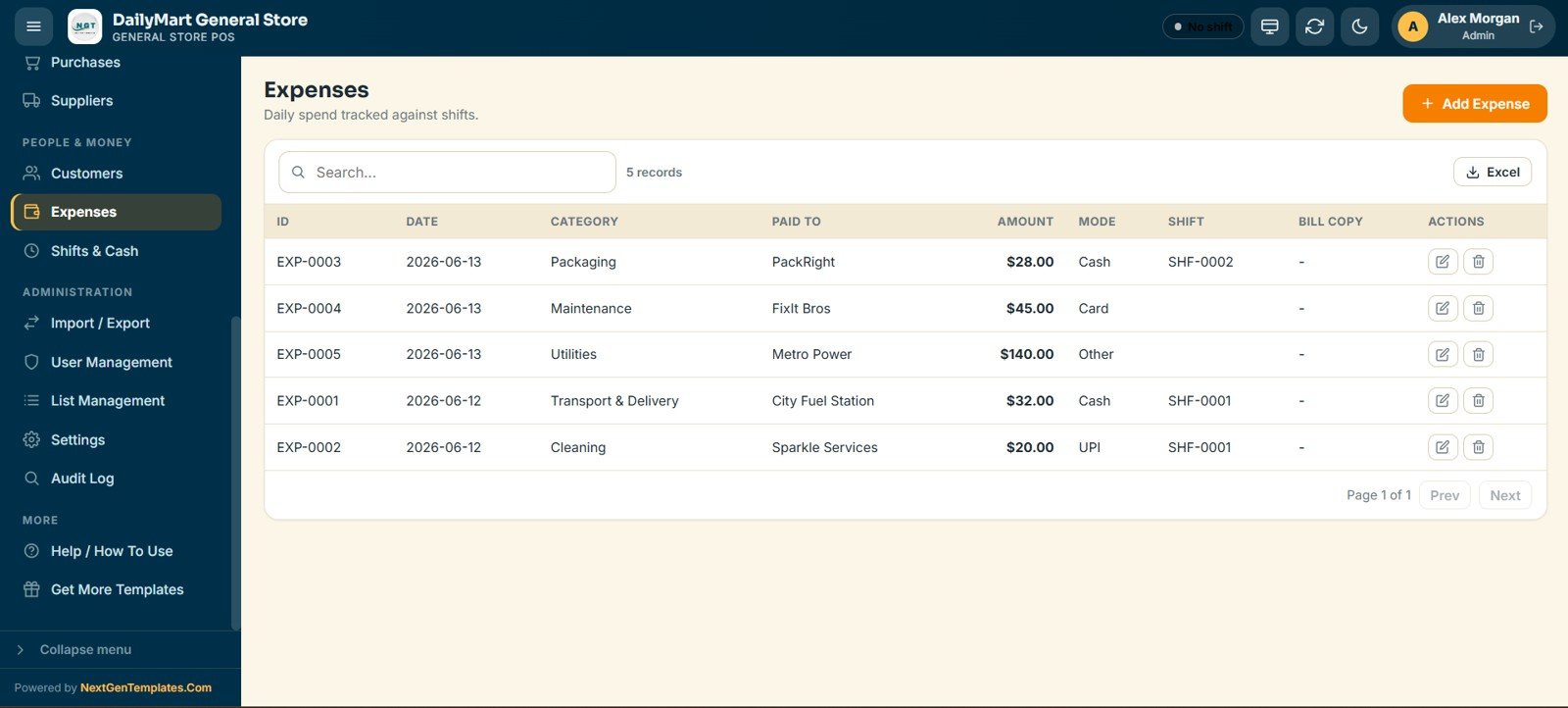
Daily spending is tracked against shifts, with the date, category, payee, amount, payment mode, linked shift and a bill copy.
15. Shifts & Cash Register
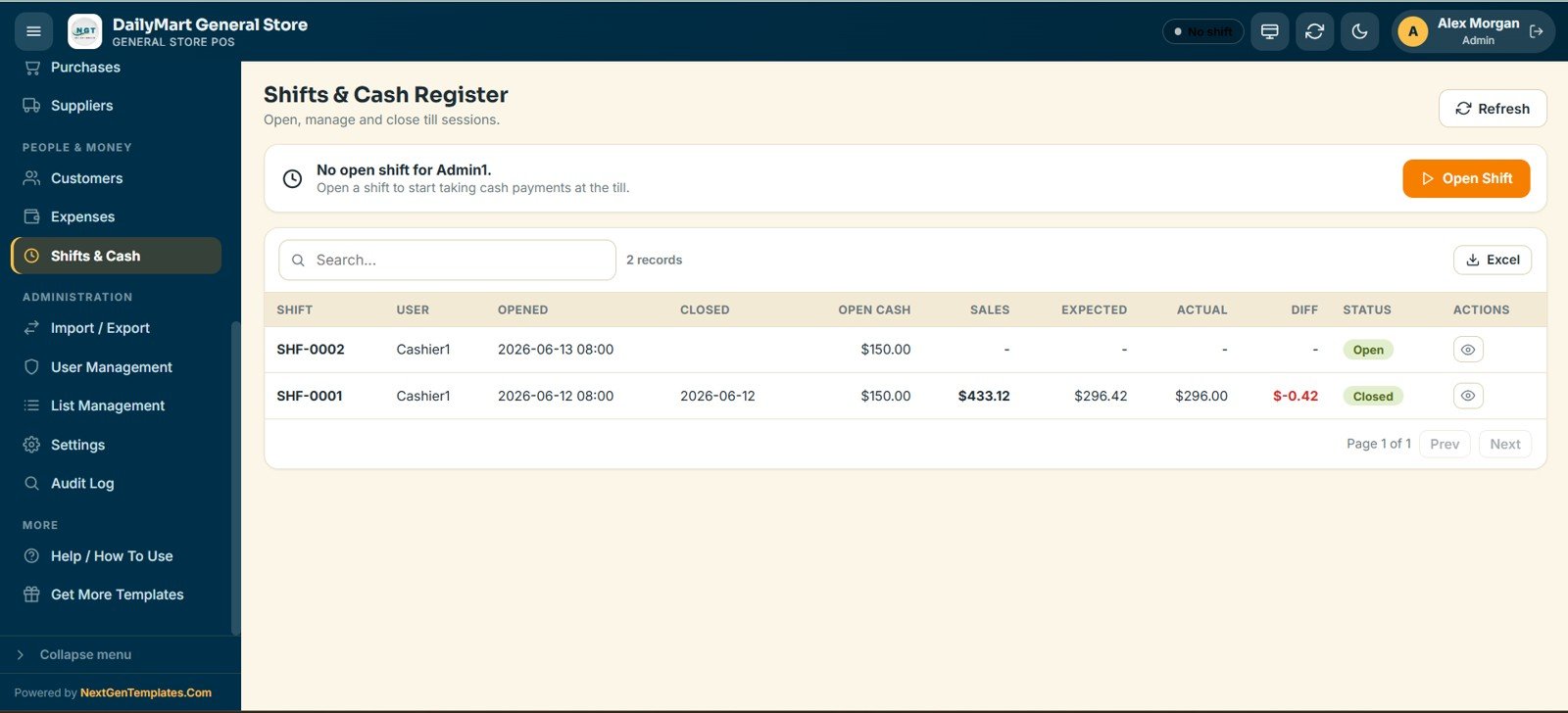
Cashiers open and close their till with an opening cash amount. The app compares expected cash with actual cash and flags any difference.
16. Import / Export
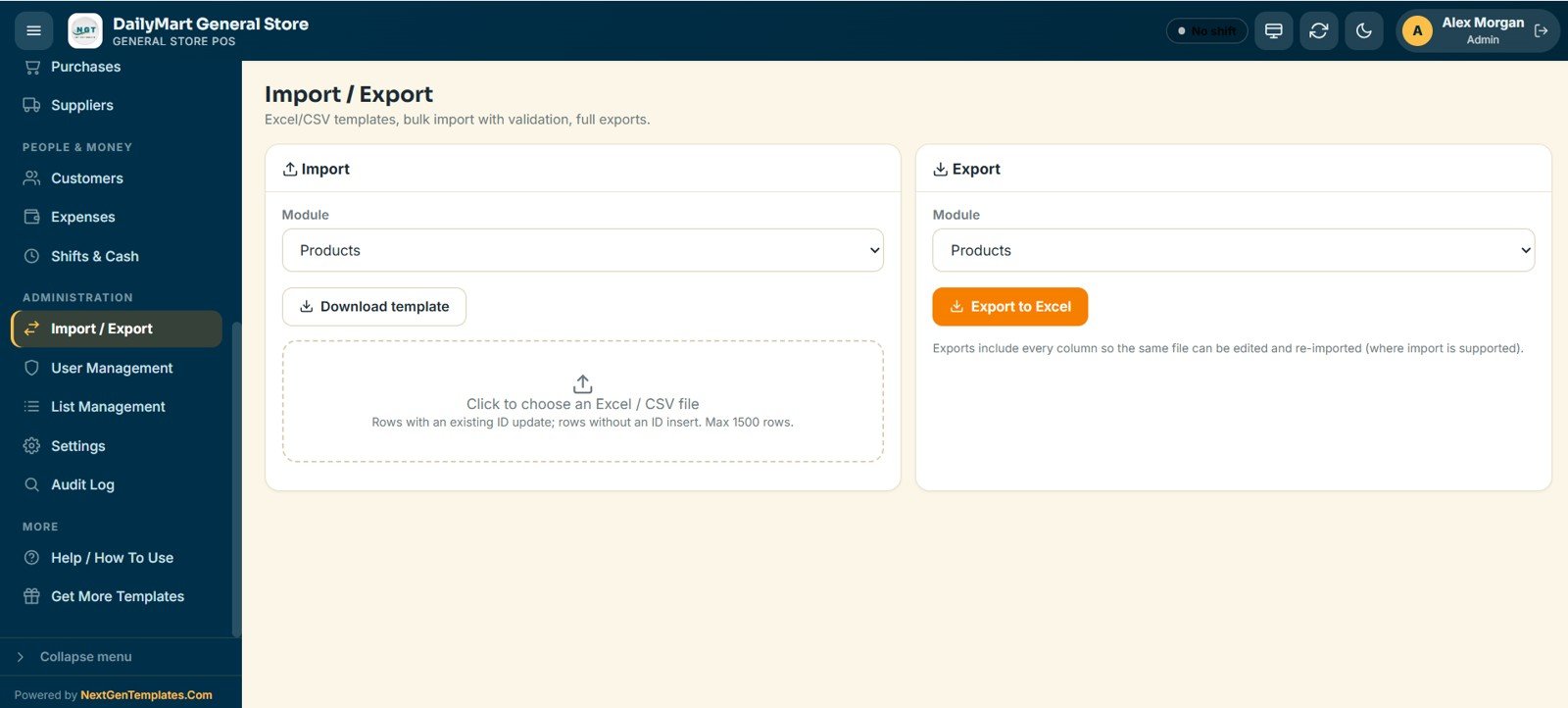
You can download an Excel or CSV template for any module and bulk-import up to 1,500 rows per file with validation. Rows with an existing ID are updated and new rows are inserted. Every module can also be exported to Excel.
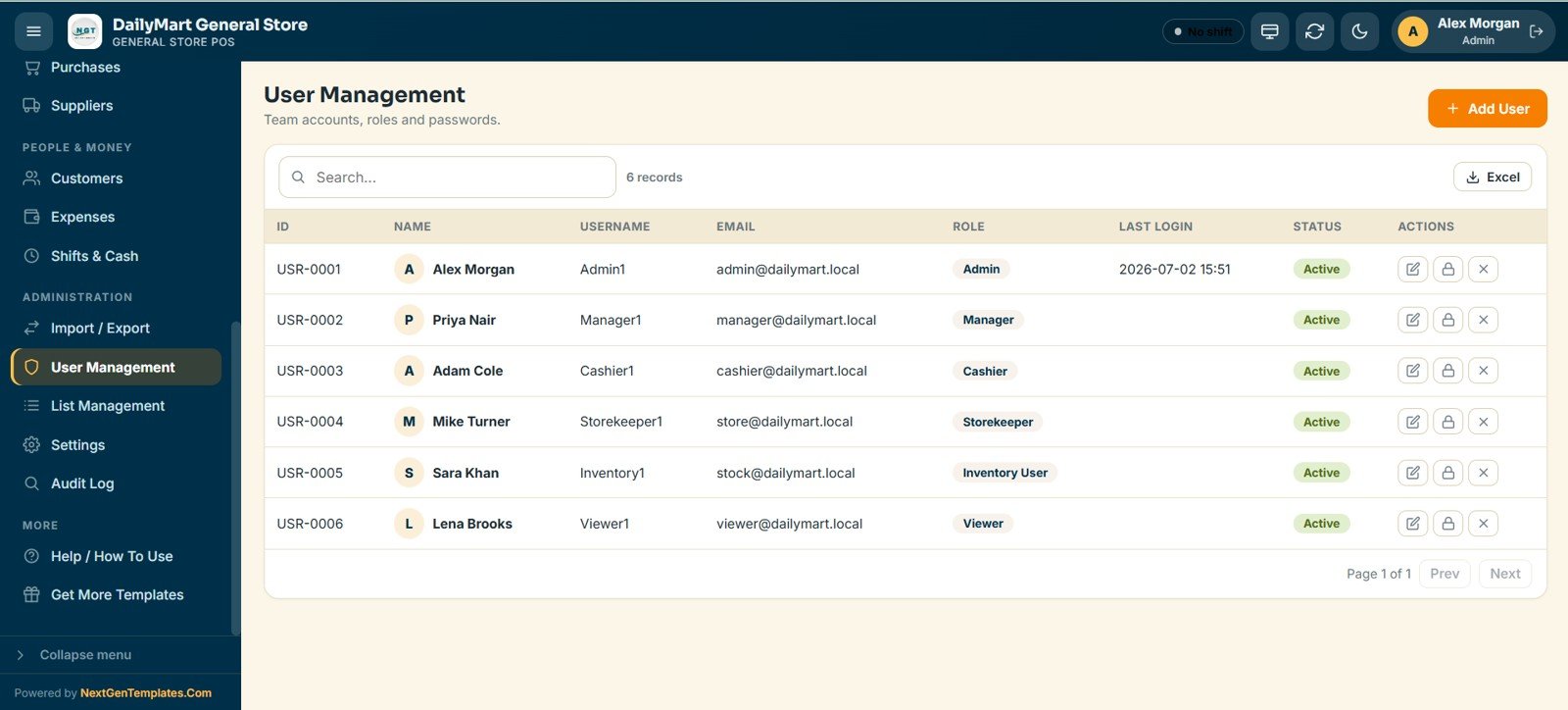
17. User Management
Admins add team members, assign one of the six roles (Admin, Manager, Cashier, Storekeeper, Inventory User or Viewer), and manage usernames, passwords and status.
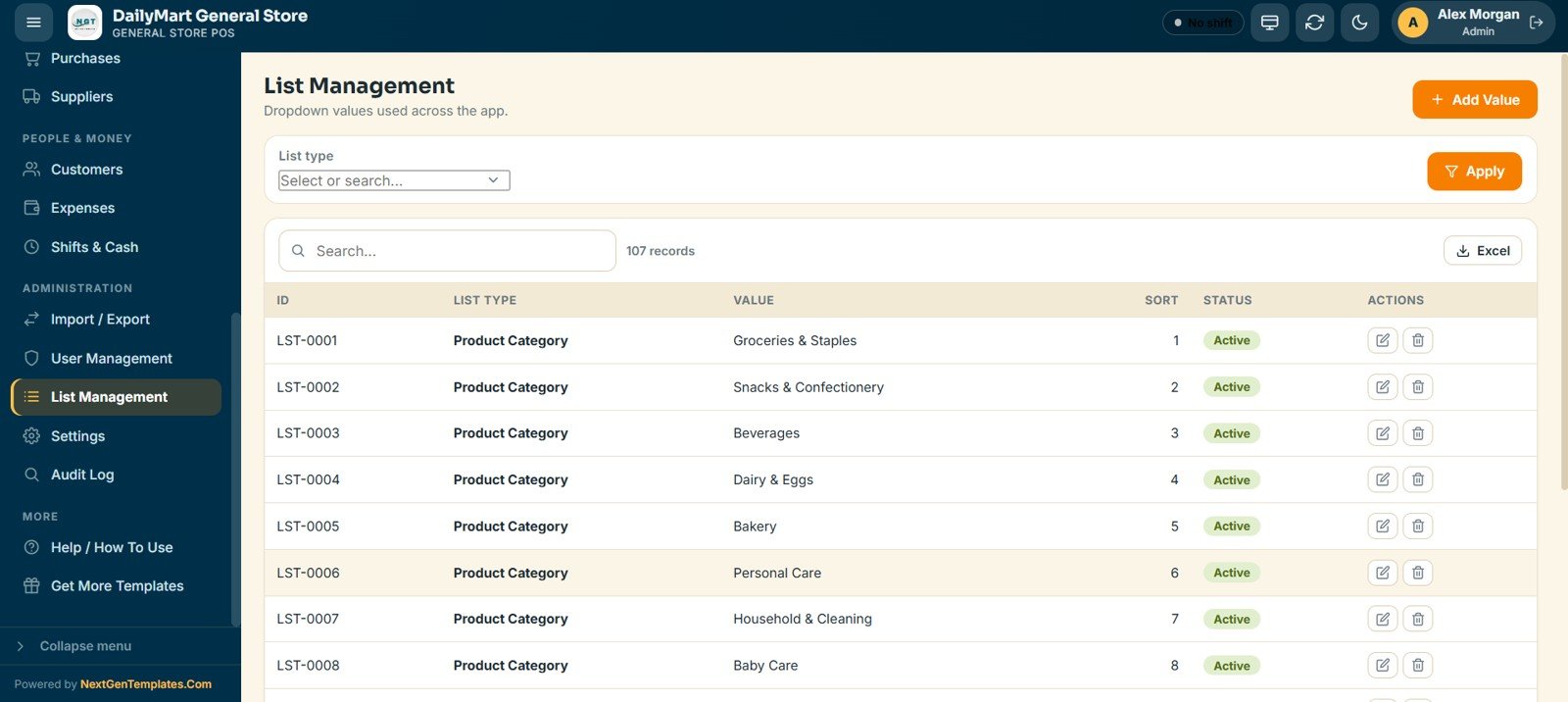
18. List Management
Here you set up the dropdown lists used across the app, such as product categories, units, payment modes, counter types and expense categories.
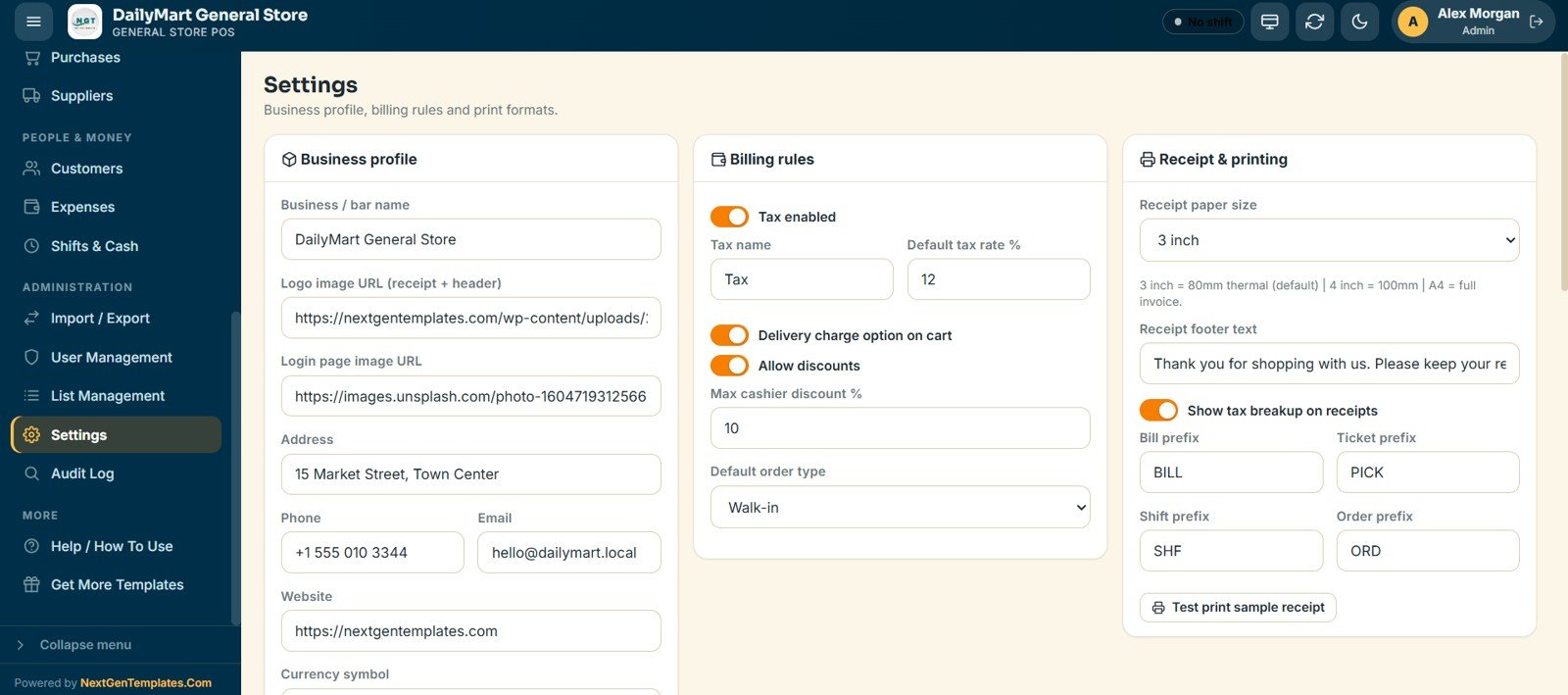
19. Settings
This screen holds the store profile, logo, tax rate, delivery charge option, discount rules, receipt paper size (3 inch, 4 inch or A4), and the prefixes for bills, tickets, shifts and orders.
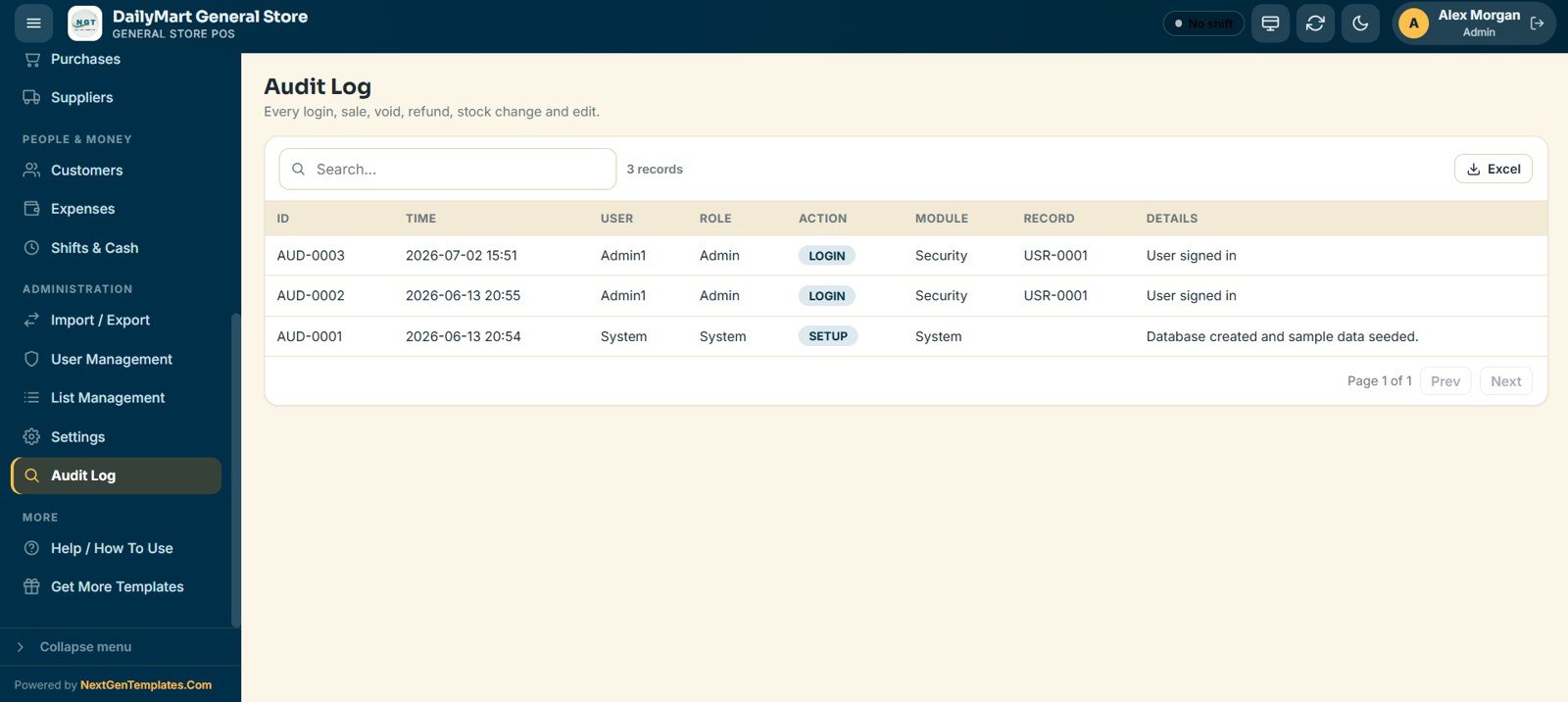
20. Audit Log
Every login, sale, void, refund, stock change and edit is recorded with the time, user, role, action, module, record and details.
General Store POS Web App vs. Excel POS vs. Cloud POS Subscriptions
| Feature | General Store POS Web App | Basic Excel POS template | Paid cloud POS subscription |
|---|---|---|---|
| Cost | One-time purchase | Low one-time cost | Monthly fees that vary by plan, add-ons and hardware |
| Platform | Google Sheets + Apps Script | Microsoft Excel | Vendor software and devices |
| Setup time | Under 15 minutes | Depends on the template | Onboarding, hardware and configuration |
| Multi-user, role-based access | Yes, 6 roles | Usually a single-user file | Yes |
| Mobile / tablet access | Any browser | Limited | Yes, usually through their own apps |
| Delivery & pickup picking | Built in | Not available | Varies by plan |
| Integrated card payments | No, payments are recorded manually | No | Yes |
| Audit log & void tracking | Full audit trail | Manual only | Yes |
Who Should Use This Template
A good fit for:
- Independent general store, grocery and mini-mart owners who want a full POS without a monthly fee
- Kirana and neighbourhood shops running walk-in, delivery and pickup sales from one screen
- Store managers running a small counter and stockroom team
- Cashiers and storekeepers who need fast, touch-friendly billing and picking
Not a fit if:
- You run a supermarket chain that needs weighing-scale integration or dedicated POS hardware
- You need a built-in payment gateway, because card, UPI and wallet payments are recorded manually
- You process very high bill volumes and need industrial barcode terminals
Real-World Use Cases
A neighbourhood kirana store bills walk-in customers at two counters, takes phone orders into a pickup slot, and reconciles the cashier’s till at closing. Barcode search speeds up billing for staples, and the Low Stock Items card shows what to reorder.
A mini-mart with home delivery loads its product list through Import / Export and sends every delivery order to the Picking Queue, so the storekeeper packs the right items. The category and payment-mode reports make month-end reconciliation much simpler.
A grocery shop with a loyalty programme tracks regulars, birthdays and points on the Customers screen. Shift reconciliation flags any gap between expected and actual cash at each handover.
Advantages of the General Store POS Web App
- Predictable cost: a single one-time payment, with no monthly fee and no per-user charge.
- No new infrastructure: it runs in the Google account you already have, on any phone, tablet or PC.
- Faster closing: automatic stock deduction, shift reconciliation and Excel exports cut out manual work.
- Clear accountability: the audit log records every sale, void, refund and stock change by user and time.
Opportunities for Improvement
It helps to know the limits before you buy. The app records card, UPI and wallet payments manually instead of through a payment gateway, so it does not settle transactions automatically. It also does not connect to weighing scales or barcode-printing hardware. Because it is built on Google Sheets, stores with very large transaction volumes may prefer a dedicated database. For most independent stores, these trade-offs are minor next to the saving.
Best Practices
- Import your product list and opening stock through Import / Export before your first trading day.
- Set accurate categories and units in List Management so the reports and the POS grid stay clean.
- Have each cashier open a shift with the opening cash declared and close it at handover to keep the drawer reconciled.
- Check the Low Stock / Reorder report daily and raise purchases before items run out.
- Back up the sheet to Google Drive regularly and give Admin access to owners only.
Explore Relevant Templates
The General Store POS Web App uses the same 20-screen engine as our other point-of-sale systems. If you run a different kind of shop, one of these may fit better:
- Pharmacy POS Web App: a chemist and medical store POS with batch and expiry tracking.
- Hardware Store POS Web App: billing and inventory for hardware and building supplies.
- Bakery POS Web App: a bakery POS with product cards and picking.
- Restaurant POS Web App: dine-in, takeaway and delivery with table and KOT management.
- Coffee Cafe POS Web App: a café POS with menu cards, KOT and shift reconciliation.
- Grocery Store KPI Dashboard in Google Sheets: track store KPIs alongside your POS data.
Prefer a desktop Excel tool? See the General Store Billing Management System in Excel VBA. All the web apps above are Google Apps Script web apps, so they deploy privately in your own Google account.
If you would like to learn how systems like this are put together, the NextGenTemplates Academy learning paths go through spreadsheet trackers and management systems with practice files.
Frequently Asked Questions
What is the General Store POS Web App?
It is a 20-screen point-of-sale and store management system built on Google Sheets and Apps Script. It handles billing, counters, picking, inventory, purchases, suppliers, customers, shifts, expenses and 19 reports for a general store, grocery shop or mini-mart.
Does the General Store POS Web App need a subscription?
No. It is a one-time purchase that runs in your own Google account, with no monthly fee and no per-user charge.
Can multiple cashiers use it at the same time?
Yes. It supports multiple users across six roles (Admin, Manager, Cashier, Storekeeper, Inventory User and Viewer), so several staff can bill, pick and manage stock at the same time in any browser.
How does the delivery and pickup workflow work?
Orders that need picking, such as delivery and pickup orders, go to the Picking Queue. There a storekeeper sees each item and quantity, notes the refrigerated lines and moves the ticket through Pending, Preparing, Ready and Served before handover.
How long does setup take?
Under 15 minutes. Copy the Google Sheets file using the PDF guide, deploy the web app from Apps Script, configure your store settings, and add products and team members. No coding is needed.
Is my store data private?
Yes. All data stays in your own Google Sheets file in your Google Drive, protected by your Google account security.
About the Author
Built by PK, a Microsoft Certified Professional with 15+ years of experience in Excel, Google Sheets and Power BI. He founded NextGenTemplates and its YouTube channels reach 300K+ subscribers. Every template is built by hand and tested before release.
Wrapping Up
The General Store POS Web App gives an independent store billing, counters, picking, inventory, shifts and reporting for a single payment, on a platform you already own. Try the live demo with any of the six roles first. When it fits your store, deploy your own copy in under 15 minutes.
Get the General Store POS Web App
📅 Last updated: October 2026