Ask ten independent agencies where a campaign actually lives and you will get ten different answers, most of them involving at least four tools. The media plan is a spreadsheet somebody owns. Creative approvals are an email thread. The job list is a whiteboard, or a Trello board nobody updates after Wednesday. Insertion orders are a Word template with last quarter’s vendor still in the footer. And the invoice is raised, eventually, by whoever remembers.
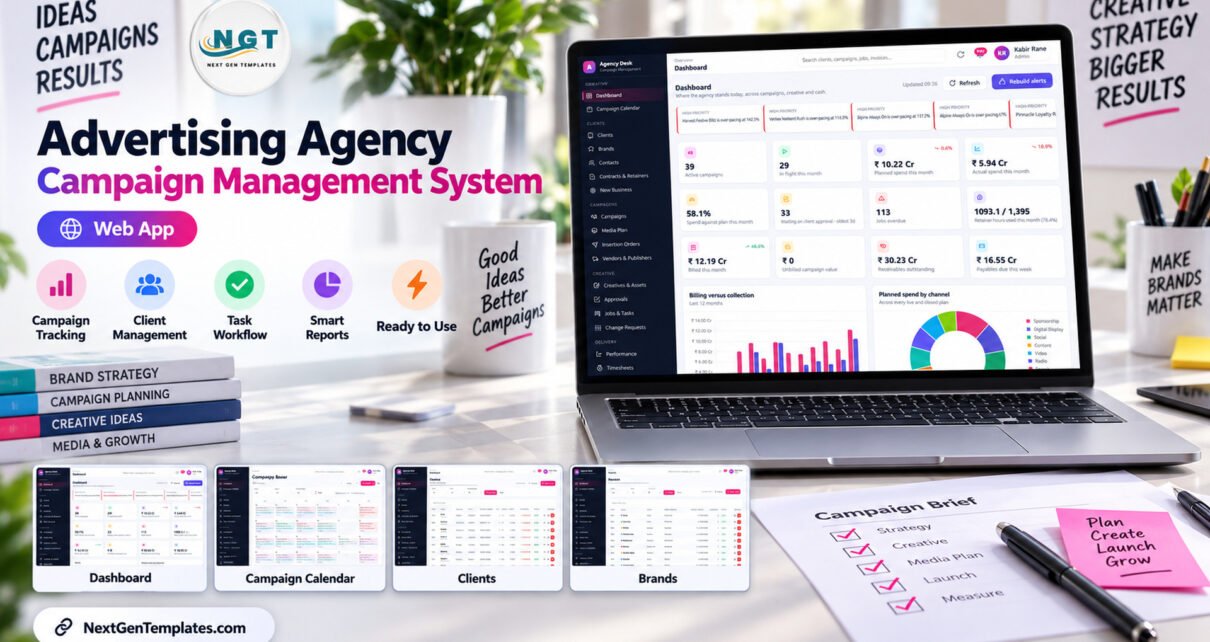
The Advertising Agency Campaign Management System Web App is an attempt to collapse that into one place. It is a Google Apps Script application — 32 modules, 7 role-based logins, 31 built-in reports — that runs on your own Google account, stores its data in your own Google Sheet, and costs one payment rather than a monthly fee per seat. This walkthrough goes through it module by module, using the shipped demo data, and it is honest about the things the advertising agency campaign management system deliberately does not do.
Get the Advertising Agency Campaign Management System
🚀 Try the Live Demo First
You do not have to take any of this on trust. The working system is deployed and open — no download, no sign-up. Sign in as two different roles and compare what each one can reach; that contrast is the whole product in thirty seconds.
Demo sign-in details — all 7 roles
| Role | User name | Password | What this role reaches |
|---|---|---|---|
| Admin | admin | Admin@123 | Everything, plus users, settings, archive and backup |
| Account Director | director | Director@123 | Clients and commercials; approves campaigns, plans and estimates; sees cost rates |
| Account Manager | manager | Manager@123 | Day-to-day servicing; no insertion orders, no payments, no cost rates |
| Media Planner | media | Media@123 | Media plans, vendors, insertion orders and performance; no client billing |
| Creative Lead | creative | Creative@123 | Creatives, versions, jobs and the workload view; no money access anywhere |
| Traffic Coordinator | traffic | Traffic@123 | Jobs, approvals, calendar and assets; read-only on campaigns and plans |
| Finance | finance | Finance@123 | Estimates, invoices, receipts, vendor bills, payments, expenses and tax |
These credentials are public on purpose. It is a shared demo instance seeded with fictional data that resets periodically — not anybody’s live agency. Your own deployment gets its own database, its own users and its own passwords.
Key Features of the Advertising Agency Campaign Management System
Three things separate this from a folder of spreadsheets, and all three are checkable in the demo.
- Permissions are enforced, not decorative. Seven roles, and the differences are structural: a Creative Lead has no money access anywhere in the product; an Account Manager cannot issue an insertion order, approve a vendor bill, release a payment or see cost rates; only Admin can manage users or delete a client, campaign or invoice outright.
- The media plan produces the insertion order. Approved plan lines become numbered orders with one action, and no line can appear on two orders. That single rule is what most media plan and insertion order software is sold on.
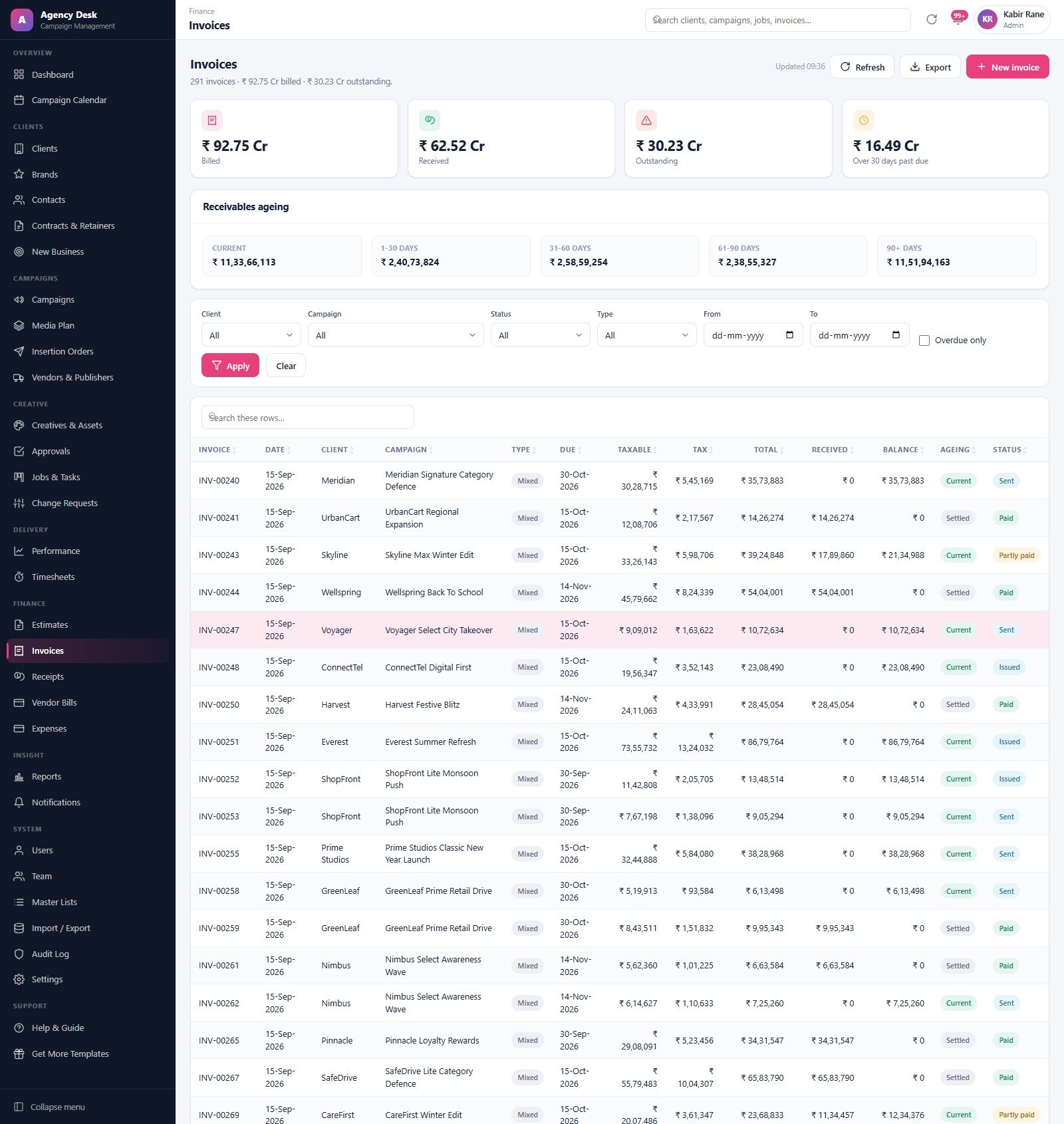
- The seeded numbers reconcile. This matters more than it sounds, because a demo that does not add up tells you nothing. In the shipped data, billed (₹92.75 Cr) minus received (₹62.52 Cr) equals outstanding (₹30.23 Cr) exactly; the five receivables ageing buckets total that same ₹30.23 Cr; the eight kanban columns sum to exactly 1,740 jobs; and the 113 overdue jobs on the board are the same 113 the dashboard reports.
Module Walkthrough
Dashboard
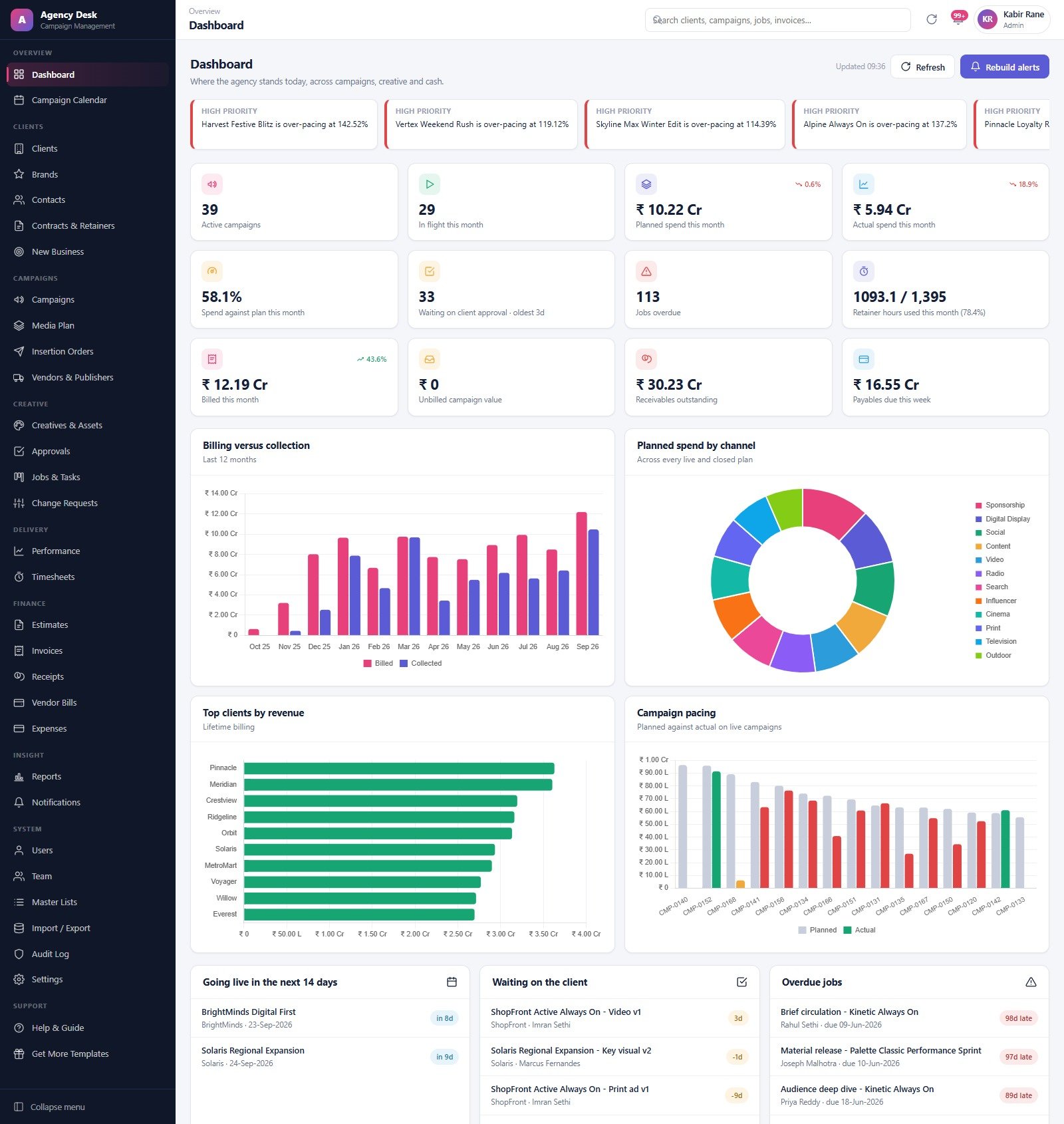
Twelve KPI cards across campaigns, creative and cash — active campaigns, in flight this month, planned versus actual spend, spend against plan, work waiting on client approval, overdue jobs, retainer hours used, billed this month, unbilled campaign value, receivables outstanding and payables due this week — under a strip of high-priority pacing alerts naming the campaigns running over plan. Below sit billing-versus-collection and planned-spend-by-channel charts, plus three working lists: going live in the next 14 days, waiting on the client, and overdue jobs.
Campaign Calendar
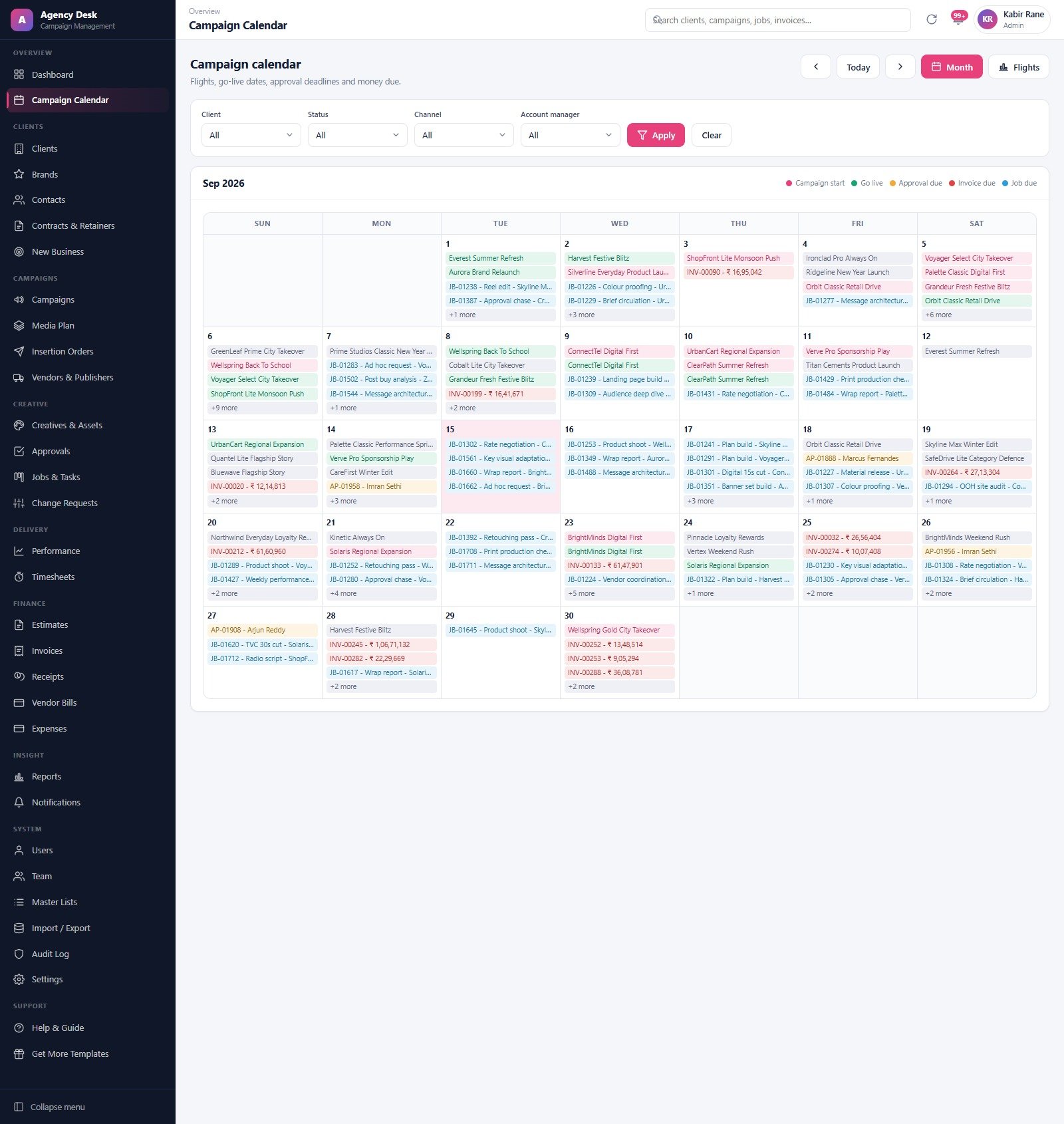
Month and Flights views, with a five-colour legend separating campaign starts, go-live dates, approval deadlines, invoice due dates and job due dates. Filter by client, status, channel or account manager. Busy days collapse to a “+N more” counter rather than overflowing the cell.
Media Plan
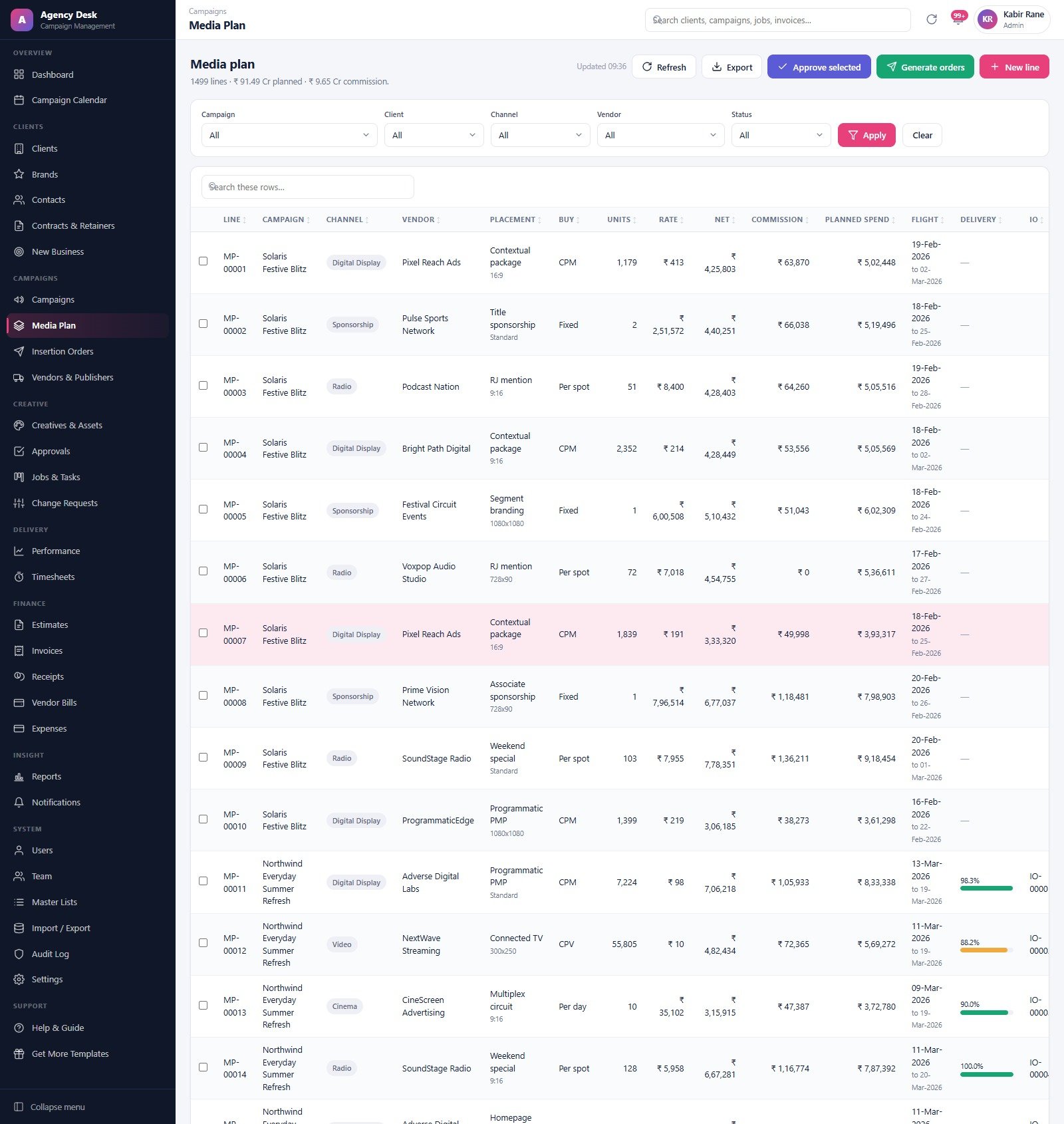
The densest screen in the product. Each line carries channel, vendor, placement and format, buy type (CPM, CPV, fixed, per spot, per day), units, rate, net, commission, planned spend, flight window, delivery percentage and the insertion order number once one exists. Five filters sit above it and the header carries Approve selected and Generate orders. The demo ships about 1,500 lines across twelve channels.
Insertion Orders and Vendors
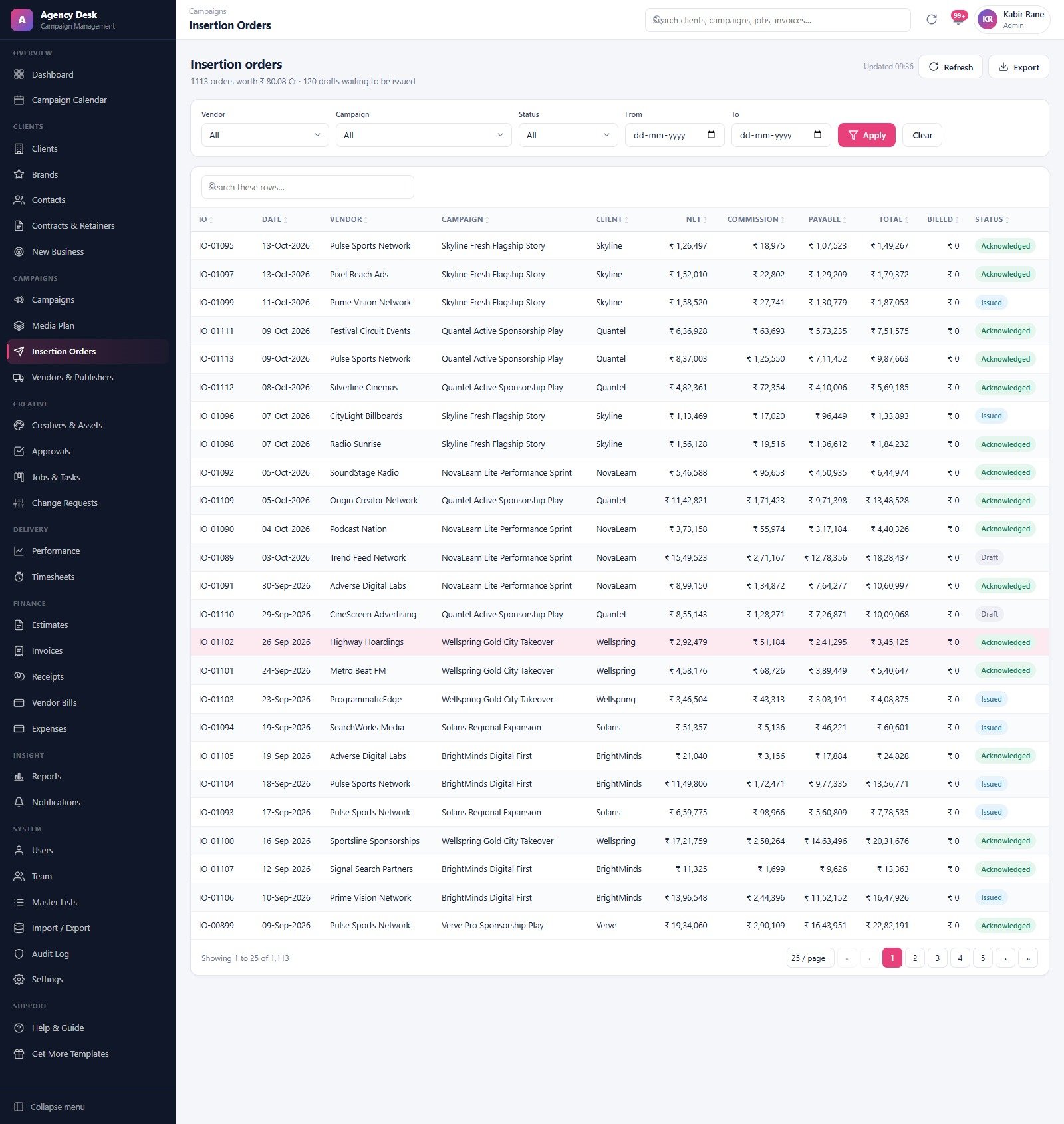
Orders are generated from approved lines rather than typed, so the numbers stay consistent and the audit trail is intact. Vendors & Publishers holds the 62 seeded suppliers across every channel, and the vendor delivery accuracy report later tells you which of them actually delivered what they sold.
Creatives, Approvals and Jobs
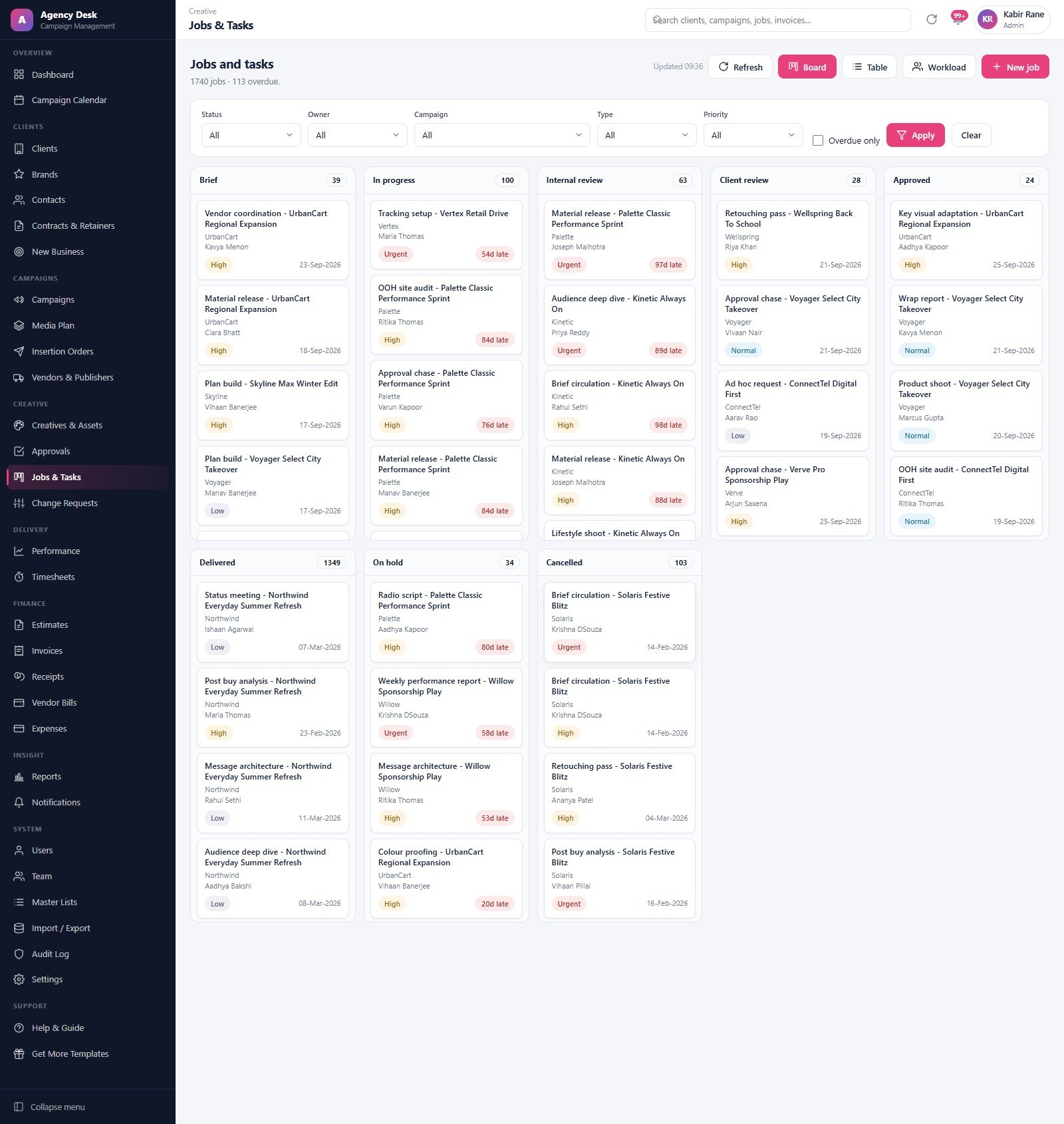
Creatives carry versions and an approval state; Approvals logs internal and client rounds separately with real turnaround times, in sequence, so a creative cannot show as Approved on a round that was later revised. Jobs & Tasks is the board the whole agency watches — eight statuses, filters on owner, campaign, type and priority, an overdue-only toggle, and Board, Table and Workload views. As an agency job and approval tracker it is the part most teams will have open all day.
The Finance Desk
Estimates, invoices, receipts, vendor bills, vendor payments and expenses. The Invoices screen leads with billed, received, outstanding and over-30-days-past-due cards, then a five-bucket receivables ageing strip, then the register itself with taxable, tax, total, received, balance, ageing and status per row. Finance is a role, so this whole area is invisible to the creative team.
Reports
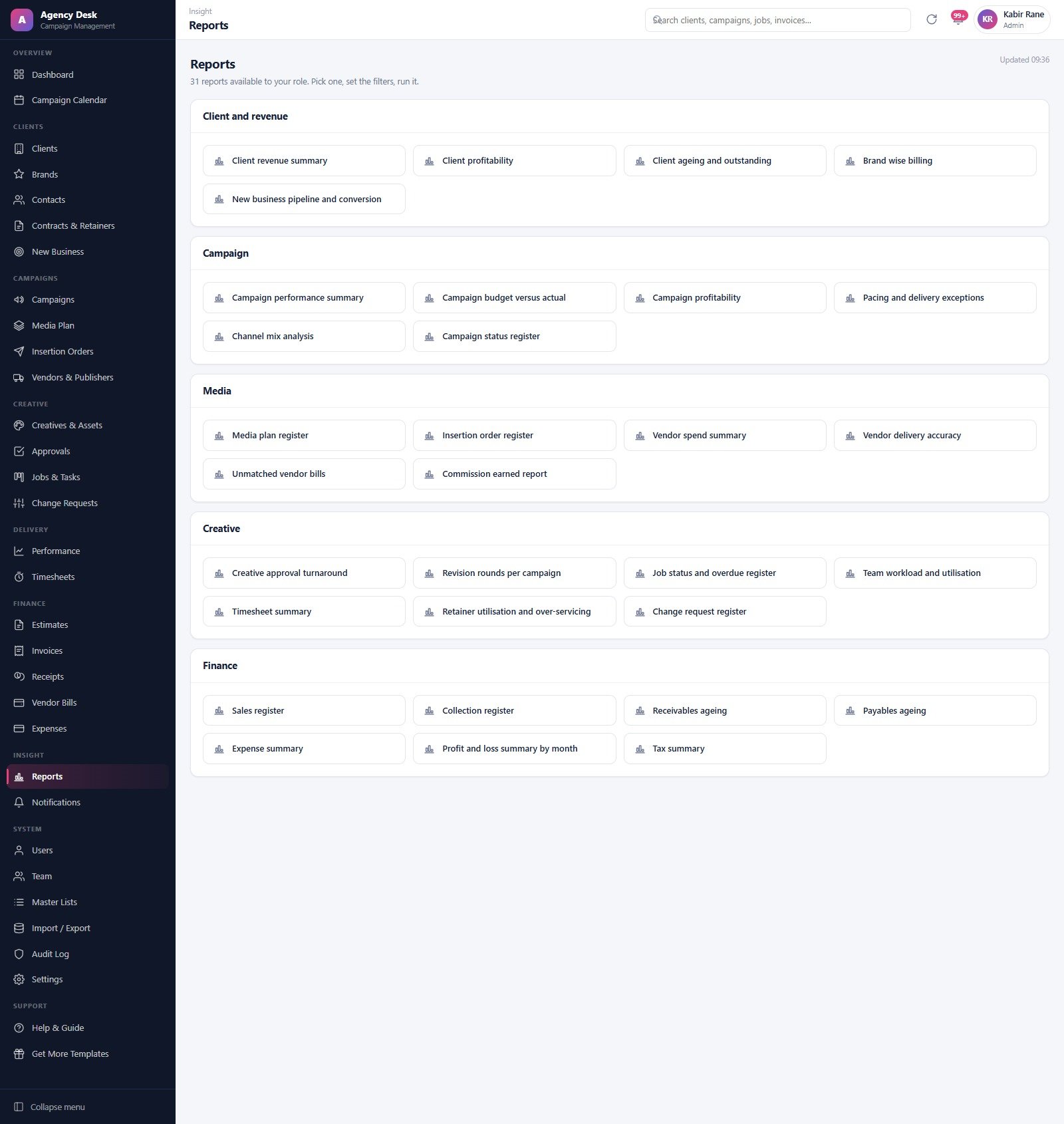
Thirty-one reports in five families: 5 client and revenue, 6 campaign, 6 media, 7 creative and 7 finance. The genuinely agency-specific ones are worth naming — pacing and delivery exceptions, unmatched vendor bills, vendor delivery accuracy, commission earned, retainer utilisation and over-servicing, and revision rounds per campaign. The list is filtered by role, so a Media Planner does not see the profit and loss summary.
Advertising Agency Campaign Management System vs. Spreadsheets vs. Paid Agency SaaS
| What you need | This Web App (one-time) | Spreadsheets + email | Paid agency SaaS (per seat, monthly) |
|---|---|---|---|
| Cost for a 10-person agency | One payment, unlimited users | Free, but paid for in rework | A recurring per-seat fee, indefinitely |
| Role-based permissions | 7 roles, enforced server-side | Sheet-level sharing at best | Yes |
| Media plan to insertion order | Built in, one click from approved lines | Manual retyping | Yes |
| Creative approval rounds | Internal and client rounds, in sequence | Email threads | Yes |
| Where your data lives | Your own Google Sheet, in your Drive | Your Drive, scattered | The vendor’s cloud |
| Connects to ad platforms | No — performance is entered or imported | No | Often yes |
| Export and portability | Full Import / Export; plain Sheets underneath | Yes | Varies by plan |
| Setup time | About 15 minutes | None | Days to weeks of onboarding |
The honest positioning: if live spend must flow automatically out of ad platforms, buy the SaaS. If you want one owned system where the plan, the creative, the job and the invoice all point at the same campaign record, this sits in the middle and costs nothing per month.
Who Should Use This Template
Perfect for: independent and boutique agencies of roughly 5–50 people; full-service shops that plan media as well as make the work; media buying houses that need a defensible insertion order trail; in-house brand teams running several campaigns against fixed budgets; and any owner who would rather buy ad agency software once than rent it forever.
Not a fit if: you need spend, impressions or clicks pulled automatically from Google Ads, Meta Ads Manager or DV360; you want an ad server, DSP or SSP; you need accredited measurement, viewability or brand-safety verification; you want a full accounting ledger; or your team cannot use a Google account.
Real-World Use Cases
Priya, servicing lead at a 12-person creative shop. She was losing an hour a day to “where is that creative”. Her traffic person gets the Traffic Coordinator role, her designers get Creative Lead. The board becomes the standup and Approvals becomes the audit trail — and nobody drifts into a finance screen, because the role will not open one.
Rohan, at a media buying house with 40 live plans. His team works almost entirely in the Media Plan grid: filter by vendor, approve the signed-off lines, generate orders. The delivery percentage sits next to the IO number, so post-buy reconciliation stops being a separate spreadsheet.
Meera, owner-operator. She opens Invoices weekly, reads four cards and an ageing strip, runs receivables ageing from the Reports menu, and chases from that list instead of from memory.
Advantages
One payment instead of a per-seat monthly bill is the obvious one, and for a ten-person agency it is the difference between a fixed cost and a permanent one. Less obvious but more useful day to day: the data is a Google Sheet you own, so nothing is hostage to a vendor’s export policy, and Import / Export is a first-class module rather than an upsell. The seeded demo is also a genuine advantage — 190 campaigns and 2,300 approval records mean you can evaluate the reports properly instead of staring at empty screens.
Opportunities for Improvement
Three things are worth knowing before you buy, and none of them is hidden in the product.
- No ad-platform connection at all. Performance data is typed in or imported. If your evaluation assumes automatic spend syncing, stop here.
- Single currency. Settings holds one currency symbol and a tax setting. The demo ships in Indian Rupees and you change it once; there is no exchange-rate handling and no multi-entity accounting.
- Redeploys need a new version. After editing the code you must create a new version of the Apps Script deployment, not just save the file, or users keep seeing the old build. This trips up almost everyone once.
There is also a normal spreadsheet-backed caveat: the real security perimeter is the sharing setting on the underlying Google Sheet. The app hashes passwords with salted SHA-256 and enforces roles, but anyone you hand the Sheet to directly bypasses all of that.Advertising Agency Campaign Management System Web App
Best Practices
Change all seven seeded passwords before anyone real signs in, and set the currency in Settings before the first invoice goes out. Give people the narrowest role that still lets them work — the temptation to make everyone an Account Director defeats the point. Use Import / Export to bring in your existing client, brand, contact and vendor lists rather than retyping them. And run the archive routine periodically; it copies the whole database into Drive before moving a single closed row, so it is safe to use.Advertising Agency Campaign Management System Web App
Explore Relevant Templates
- Influencer Collaboration Management System Web App — the natural companion if your agency also runs creator campaigns.Advertising Agency Campaign Management System Web App
- Graphic Design Agency Management System Web App — a studio-first system for teams that make work but do not buy media.
- Event Planning Management System Web App — if a good share of your campaigns end in an activation.Advertising Agency Campaign Management System Web App
Curious how systems like this are put together? The NextGenTemplates Academy learning paths cover the spreadsheet fundamentals behind them, with practice files.
Get the Advertising Agency Campaign Management System
Frequently Asked Questions
Can I try it before buying?
Yes. The green panel above carries a live link and all seven role logins for the Advertising Agency Campaign Management System. It is a shared demo seeded with fictional data that resets periodically, so sign in, open everything and break what you like.Advertising Agency Campaign Management System Web App
Does it connect to Google Ads, Meta or a DSP?
No. It connects to no ad platform, ad server, DSP or exchange, and it neither buys nor serves media. Delivery and performance figures are entered by your team or imported through the Import / Export module. That is a deliberate design choice, not a missing feature.Advertising Agency Campaign Management System Web App
What is actually in the download?
A ZIP holding Code.cs.txt (the Apps Script server code), Index.txt (the front end) and a PDF user manual. You paste the two files into your own Apps Script project and deploy. There is no installer and nothing runs on anyone else’s servers.
How does this compare with paid agency SaaS?
Paid platforms charge per seat every month and usually offer live ad-platform integrations. This is a one-time purchase with unlimited users, and the database is a Google Sheet you own. You are trading automatic spend syncing for ownership and the absence of a recurring bill.Advertising Agency Campaign Management System Web App
How long does setup take, and what does it need?
About fifteen minutes. A Google account, a new Apps Script project, two files pasted in, a web-app deployment, and one permission prompt covering Sheets, Drive and Gmail on your own account. The one-time setup routine then builds the database and seeds the demo data.Advertising Agency Campaign Management System Web App
Is there a user limit?
No. Users is an Admin-only module with no seat cap, because there is no per-seat licence. Every account is assigned one of the seven roles.Advertising Agency Campaign Management System Web App
About the Author
Written by the NextGenTemplates team, who have built more than a hundred Google Apps Script business systems and several thousand Excel, Google Sheets and Power BI templates for small businesses worldwide. Every screen in this walkthrough was opened and checked against the shipped build, and every figure quoted comes from the demo data linked above rather than from marketing copy.Advertising Agency Campaign Management System Web App
Conclusion
If your agency’s campaigns currently live in four tools and one person’s memory, this is a cheap experiment with a low floor: open the demo, sign in as two roles, and see whether the media-plan-to-insertion-order path matches how you actually work. If it does, the advertising agency campaign management system is a one-time purchase that keeps your data in your own Drive and adds nothing to your monthly software bill.Advertising Agency Campaign Management System Web App
👉 Get it here: Advertising Agency Campaign Management System Web App on NextGenTemplates — 59.99, currently 39.99, one-time, unlimited users.Advertising Agency Campaign Management System Web App
If you are new to this platform, Google’s own documentation on Apps Script web apps is the clearest explanation of what you are deploying and what the permission prompt is actually granting.