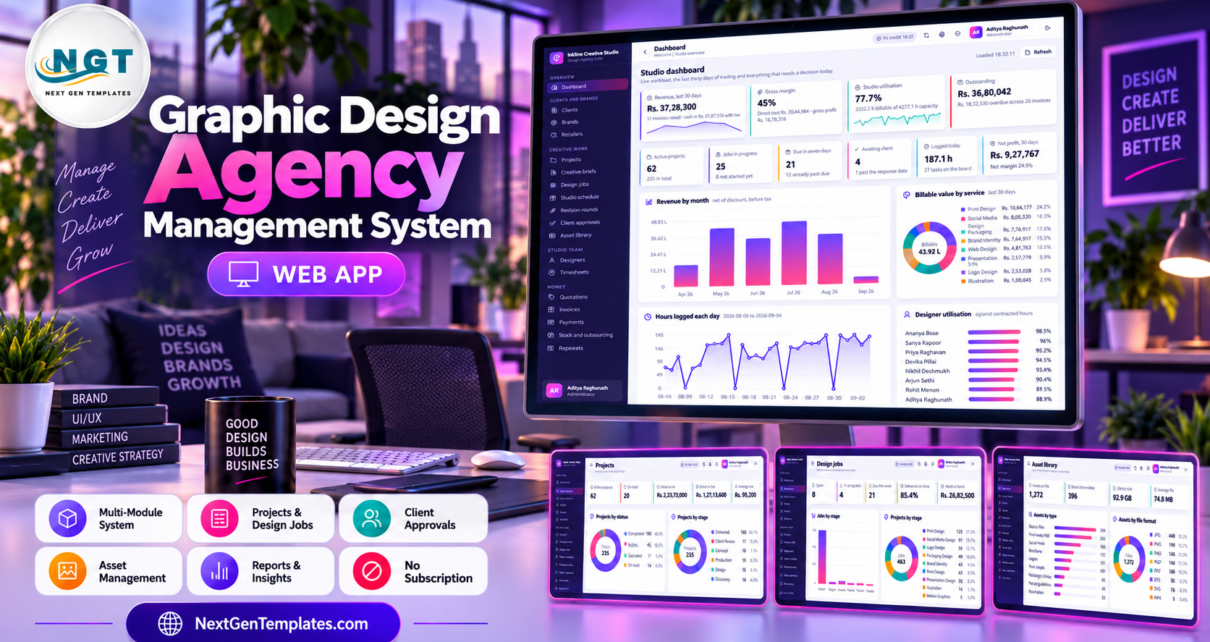
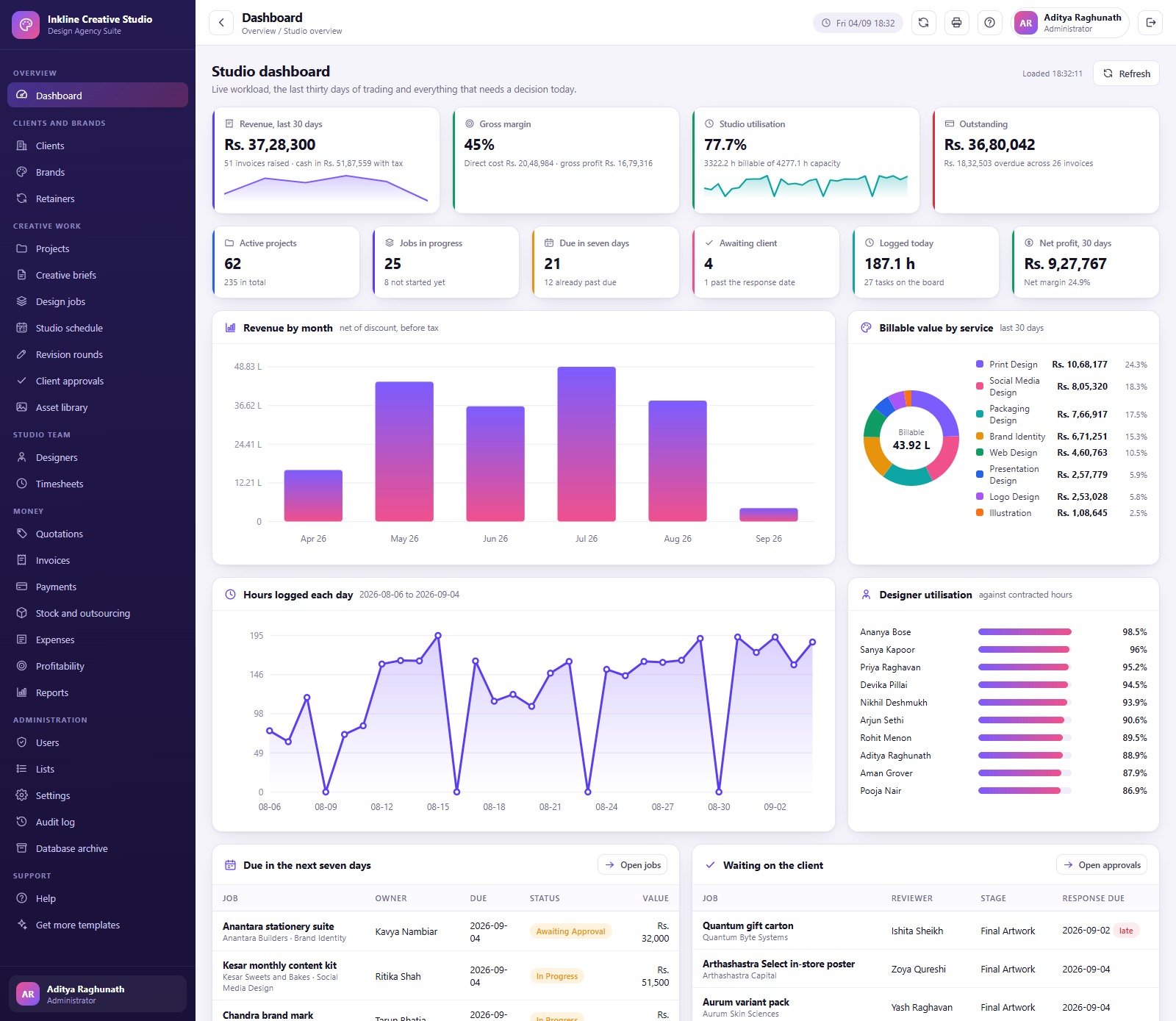
Creative work becomes difficult to manage when a studio tracks clients in one sheet, briefs in email, design jobs in chat, files in scattered folders, and invoices somewhere else. The Graphic Design Agency Management System Web App connects those operating records in one role-based Google Apps Script system. The delivered application contains 27 modules, 31 database tables, 15 reports, 8 seeded user accounts and 6 role types. Its demonstration dashboard shows 62 active projects, 25 jobs in progress, 21 jobs due within seven days, 4 client approvals waiting and 187.1 hours logged today. Those are sample values designed to exercise the system, not promises about your business.
Get the Graphic Design Agency Management System Web App
Try the Live Demo
Open the shared demonstration system and explore the role-based workflows before buying.
Demo login details
| Role | Username | Password |
|---|---|---|
| Administrator | admin | Studio#2026 |
| Studio Manager | manager | Manage#2026 |
| Account Manager | account | Client#2026 |
| Account Manager | account2 | Brief#2026 |
| Senior Designer | senior | Design#2026 |
| Designer | designer | Create#2026 |
| Designer | designer2 | Layout#2026 |
| Finance Executive | finance | Ledger#2026 |
These credentials belong to a shared seeded demo that may be reset. They are not customer deployment credentials.
Key Features of Graphic Design Agency Management System Web App
One connected studio workflow
Clients connect to brands, retainers and projects. Projects connect to briefs and design jobs. Jobs connect to schedules, timesheets, revisions, approvals and assets. Quotations connect the commercial conversation to invoices and payments, while costs, expenses and profitability help managers review the economic result.
Role-based working
The supplied Administrator, Studio Manager, Account Manager, Senior Designer, Designer and Finance Executive roles do not see the same menu or actions. Two seeded accounts demonstrate both Account Manager and Designer roles. The Users page lists the permission matrix so an administrator can review which modules each role can access.
Visible definitions instead of a black box
Settings control studio identity, currency, tax, terms, working patterns, utilisation targets, revision allowances and print defaults. Lists hold dropdown values. Help explains the daily rhythm, setup sequence, questions, and available reports. The Audit Log shows what happened by module and user.
System Modules Explained
Dashboard, Clients, Brands and Retainers
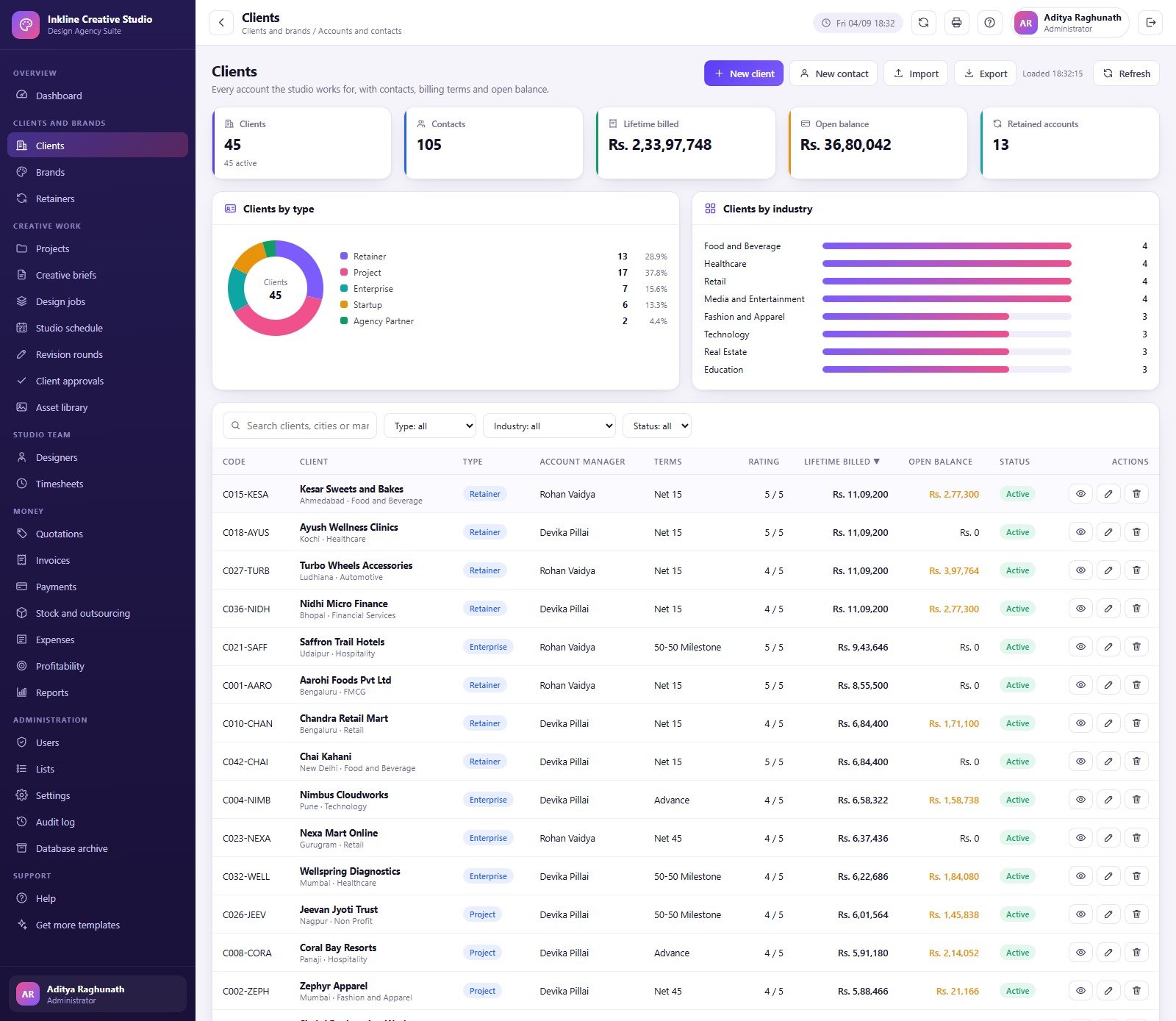
The dashboard combines trading, workload and decision cues in one view: revenue, gross margin, utilisation, receivables, active projects, jobs, deadlines, approvals, logged time and net profit. Clients record contacts, industry, payment terms, lifetime value, open balance and retainer details. Brands add category, tone, palette and status. Retainers show plan, dates, fee, included and used hours, overage and renewal status.
Projects, briefs and design jobs
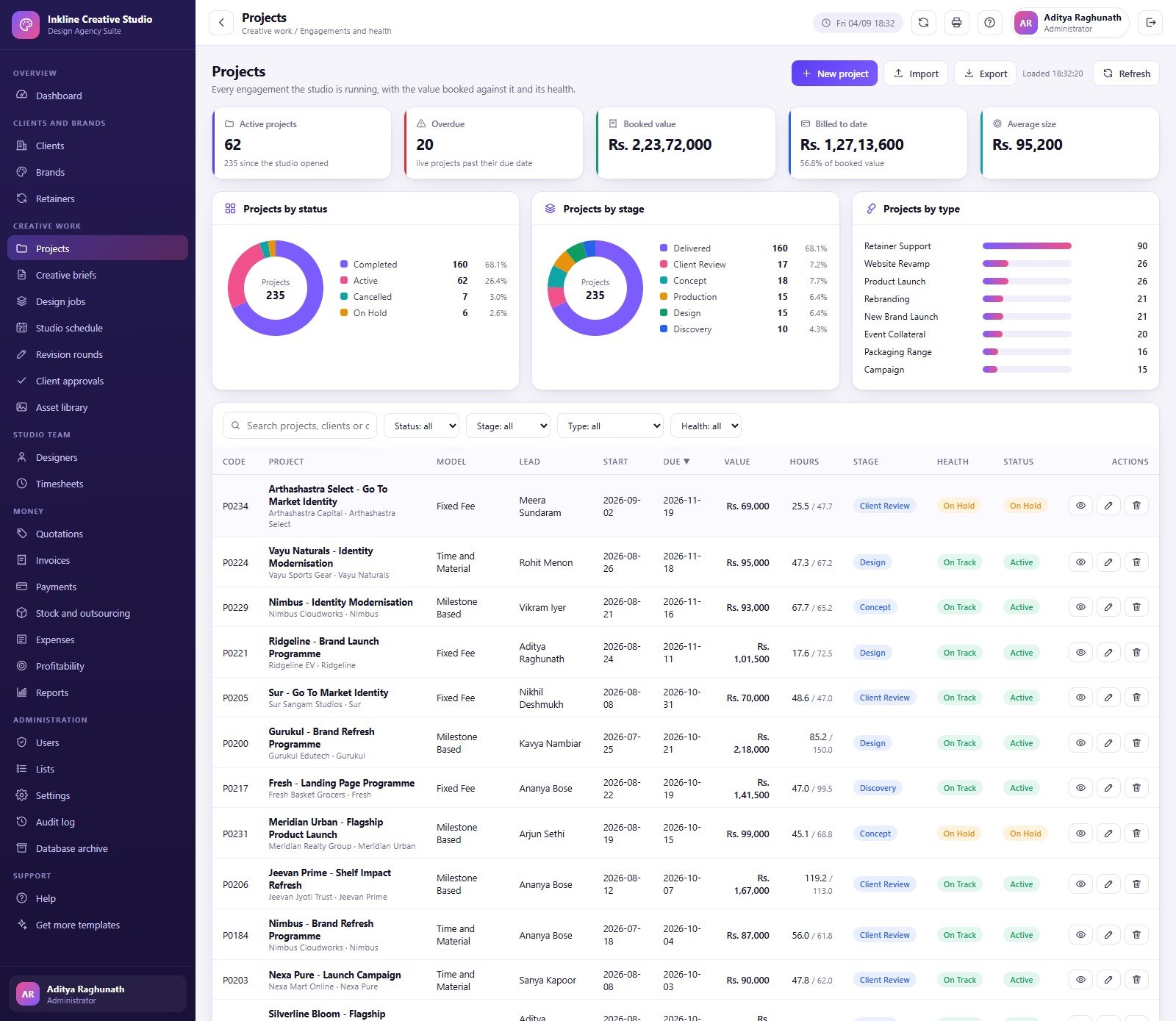
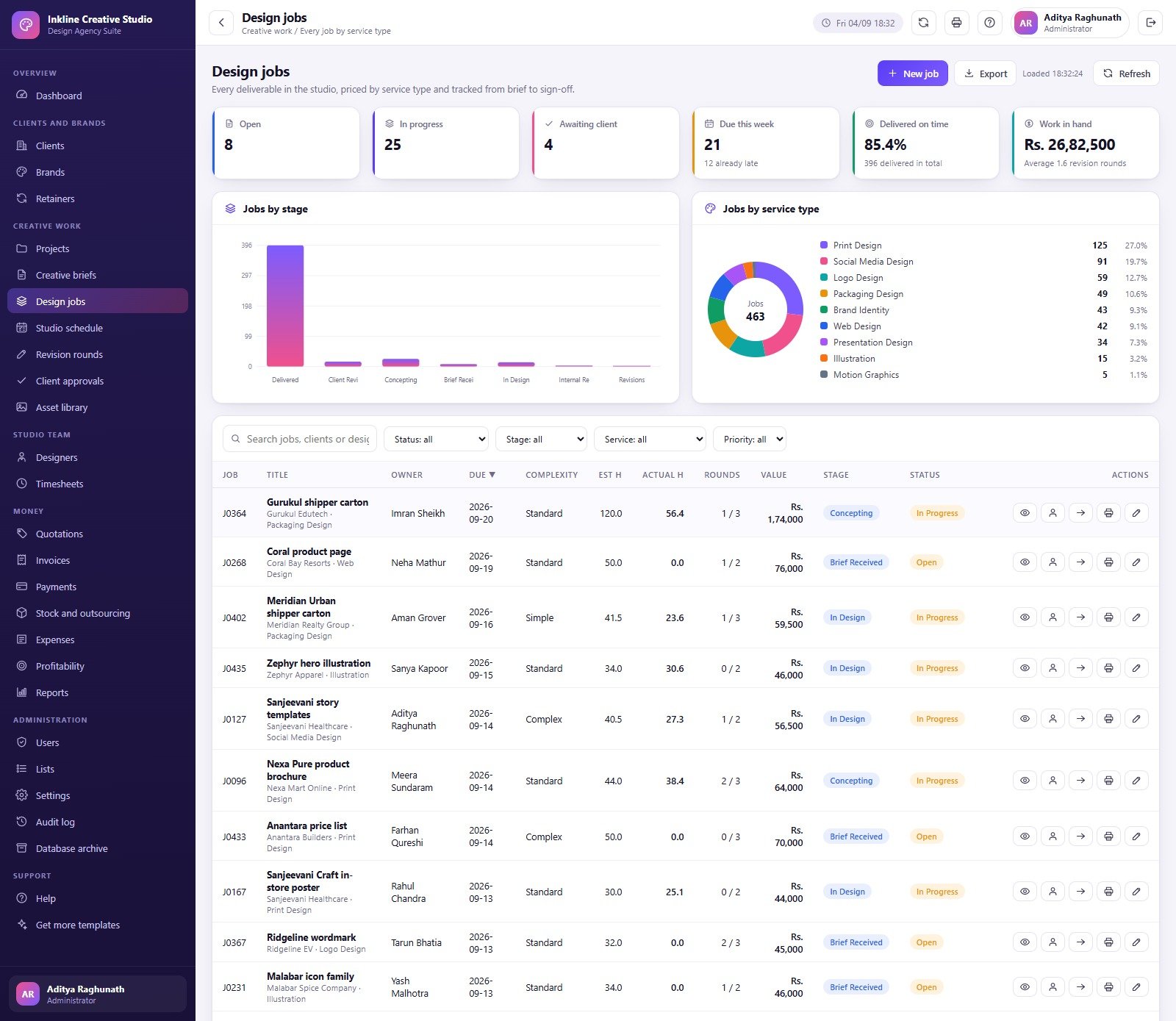
Projects track model, lead, start and due dates, value, hours, stage, health and status. Creative Briefs capture a client request, deadline, submitter, budget, approver and approval state. Design Jobs record who owns the work, the due date, complexity, estimated and actual hours, revision rounds, value and stage. Together they provide traceability from request to deliverable without claiming to create the artwork automatically.
Schedule, revisions, approvals and asset library
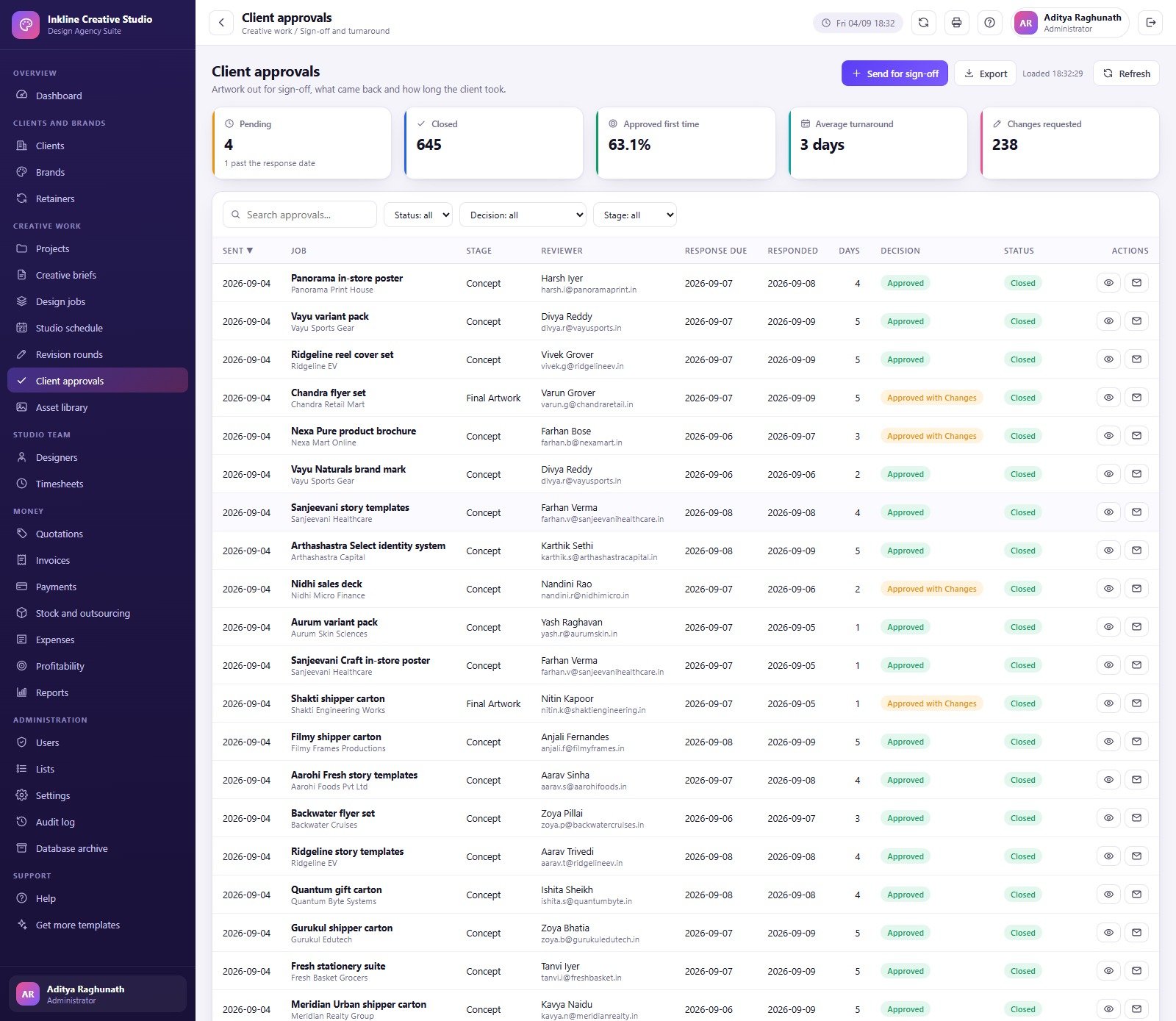
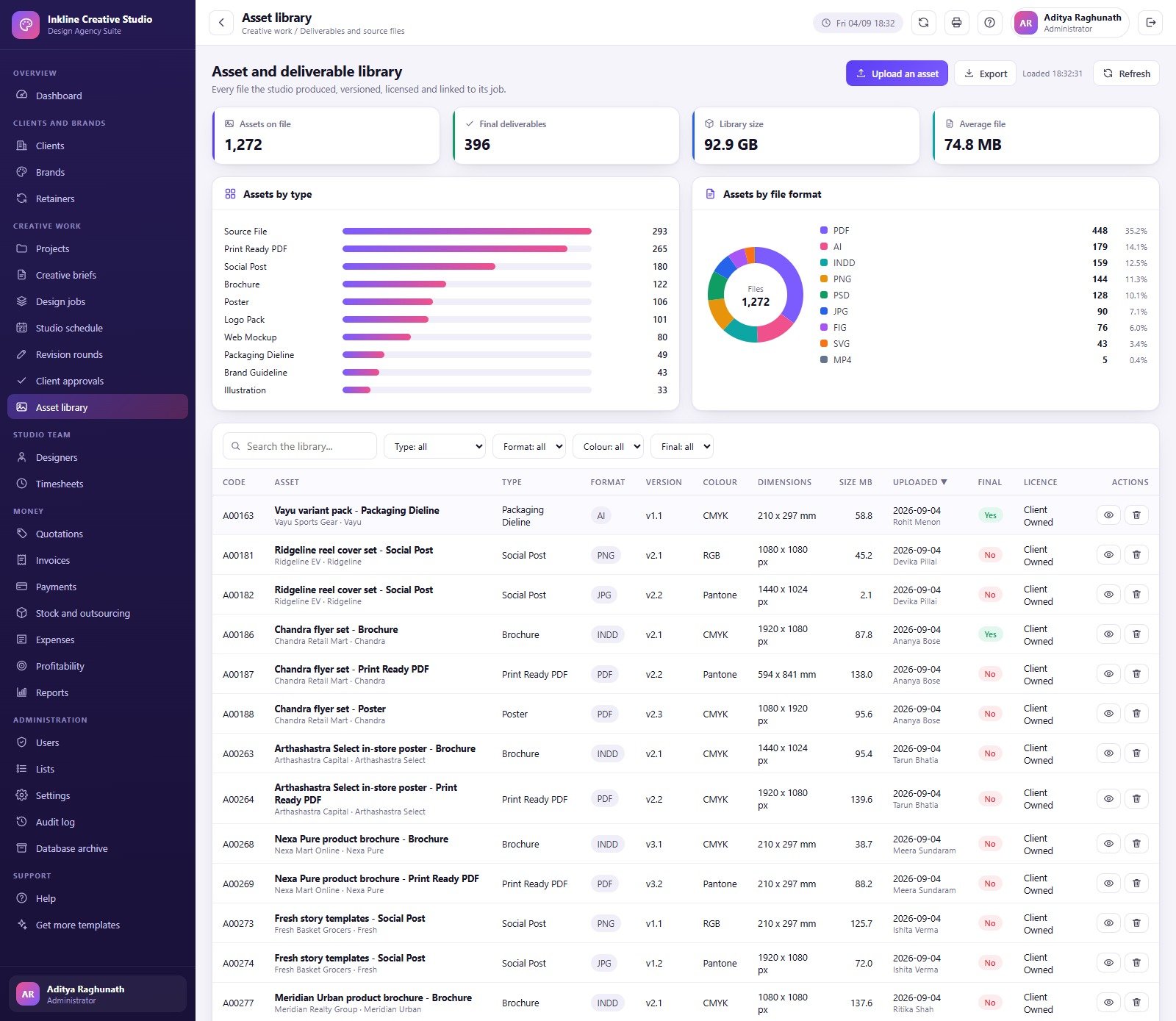
Studio Schedule compares planned and actual hours by task and designer. Revision Rounds record source, scope, owner, hours, charge, close date and status. Client Approvals capture stage, reviewer, response deadline, decision and state. Asset Library records asset type, format, version, colour mode, dimensions, size, upload date, final status, licence and owner; file links point to the actual storage location.
Designers and timesheets
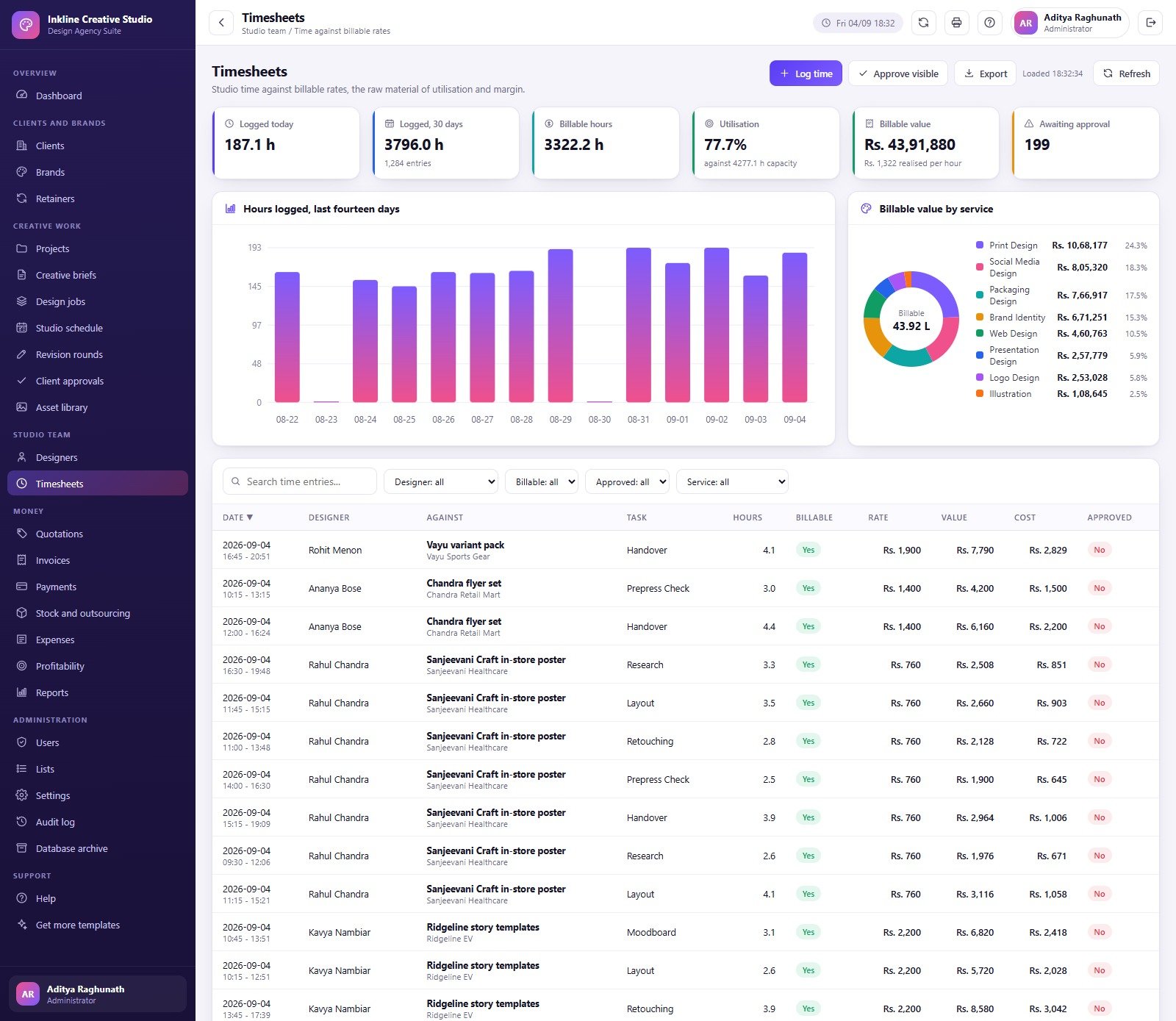
Designer profiles show role, department, contracted capacity, bill rate, cost rate, billable value, utilisation and status. Timesheets connect hours to designer, client and task, mark whether time is billable and approved, and calculate value and cost. These modules support management reporting; they do not replace employment records, payroll or timekeeping obligations.
Quotations, invoices, payments and profitability
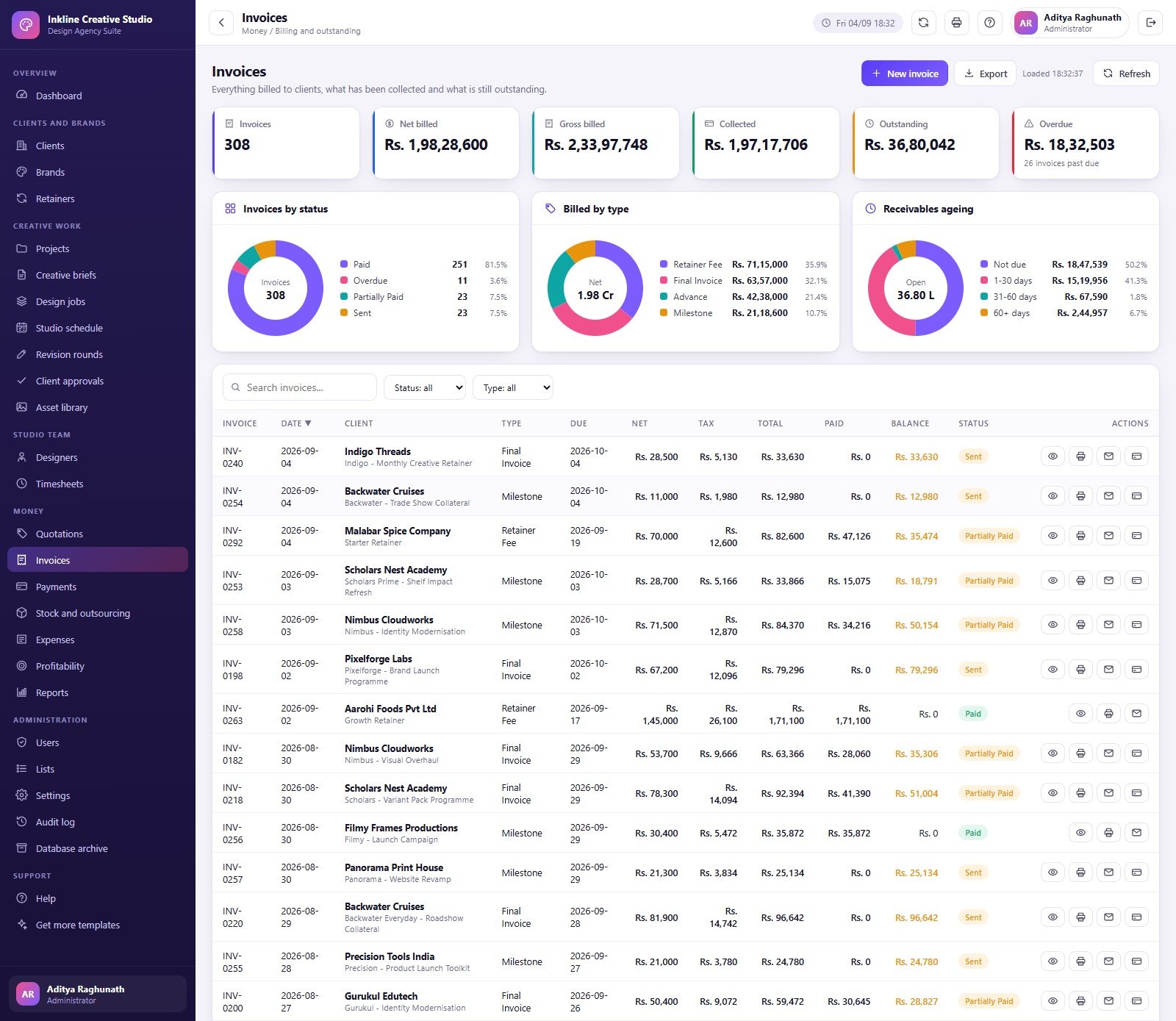
Quotations show preparation, validity, subtotal, discount, grand total and status. Invoices show type, due date, net, tax, total, paid, balance and collection state. Payments track invoice, method, amount and date. Stock and Outsourcing, Expenses, and Profitability bring direct and third-party costs into project review. Keep the statutory ledger, payroll, tax records and bank reconciliation in proper accounting software.
Reports and administration
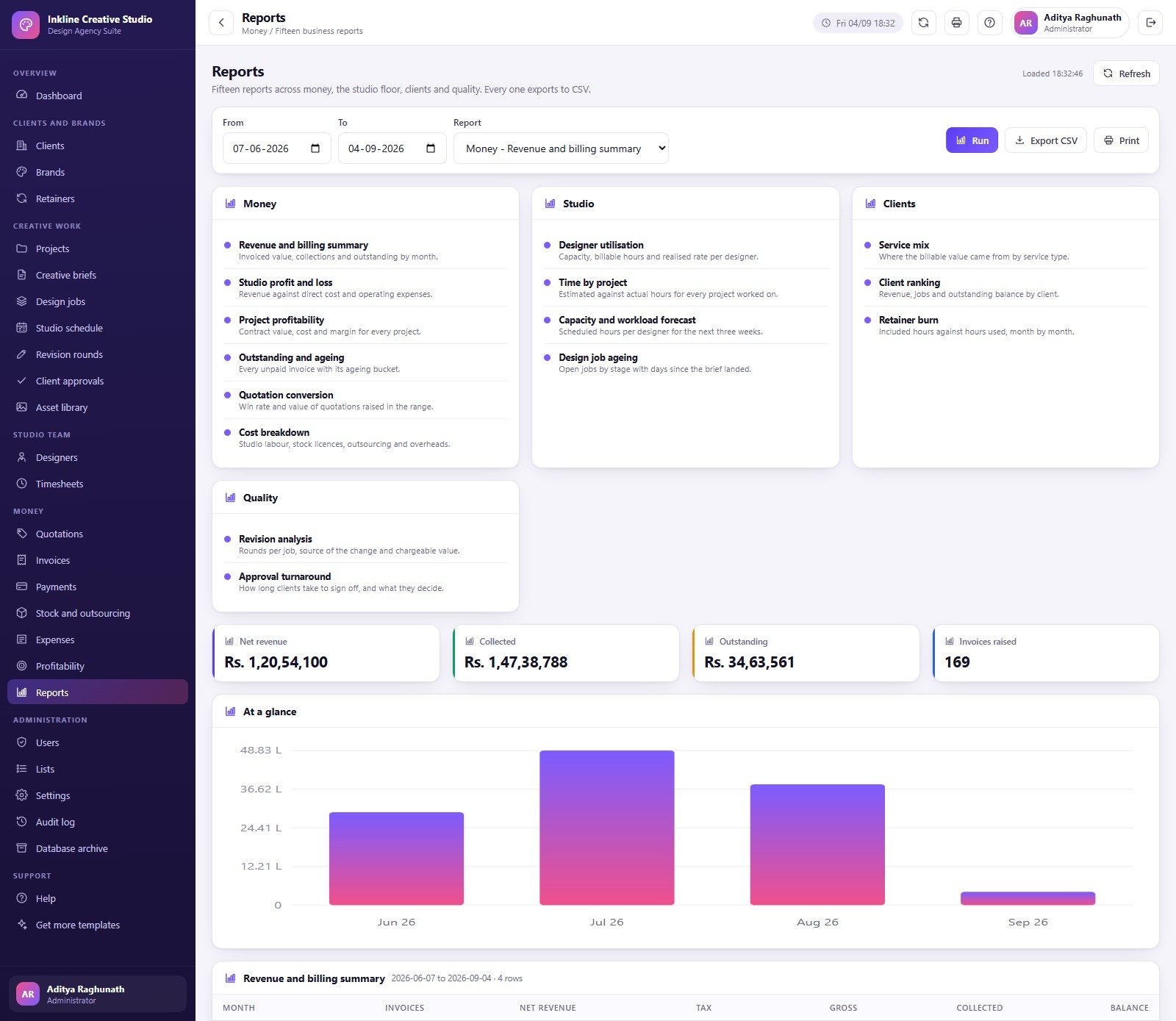
The Reports page groups 15 choices under Money, Studio, Clients and Quality, including revenue and billing, profit and loss, profitability, outstanding and ageing, quotations conversion, cost breakdown, utilisation, time by project, capacity forecast, job ageing, service mix, client ranking, retainer burn, revision analysis and approval turnaround. Users, Lists, Settings, Audit Log and Database Archive handle administration and recoverability.
Graphic Design Agency Management System Web App vs. Spreadsheets vs. Paid Agency SaaS – Feature Comparison
| Area | This web app | Separate spreadsheets | Paid agency SaaS |
|---|---|---|---|
| Year-one cost | $39.99 sale price plus your Google environment | Low licence cost, high coordination work | Recurring per-user or agency plan |
| Roles | Six supplied role types | Mostly file-level access | Plan-dependent permissions |
| Creative delivery | Projects, briefs, jobs, revisions, approvals, assets | Manual handoffs | Usually connected |
| Finance | Operational quotes, invoices, collections and margin | Multiple sheets | Native or integrated |
| File storage | Metadata and links | External folders | Vendor-dependent |
| Customisation | Apps Script source included | Open cells and formulas | Plan or vendor dependent |
Who Should Use This Template
Use it if you run a graphic design, branding, packaging, digital content or in-house creative team and need a structured studio operations layer. It suits teams comfortable deploying an Apps Script web app and administering permissions. Do not use it as a public client portal, automatic design platform, general ledger, payroll system, legal contract repository, identity provider, or regulated records system.
Real-World Use Cases
From brief to approval
Aisha creates the client and brand, opens the project, records the approved brief, assigns design jobs, captures revision rounds and logs the final client decision.
Capacity planning
Rohit reviews studio schedule, contracted hours, current utilisation, upcoming deadlines and outsourced work before accepting another campaign.
Commercial review
Meera compares quotation conversion, billed work, collection ageing, direct costs, expenses and project margin while maintaining the statutory books elsewhere.
Advantages of Graphic Design Agency Management System Web App
- Connected records replace repeated copy-and-paste between trackers.
- Role-based menus keep finance, design and administration responsibilities distinct.
- Seeded data and the live demo make the workflow understandable before configuration.
- Source code is included for controlled customisation.
- No subscription is charged by NextGenTemplates.
- Reports use the same underlying records as the operational pages.
Opportunities for Improvement
- The app requires manual deployment and administrator setup.
- It does not automatically integrate with accounting, payroll, CRM, cloud storage or design tools.
- Asset Library stores metadata and links rather than being a digital asset management repository.
- Operational finance does not provide a statutory general ledger or tax filing.
- Google Apps Script and Sheets quotas can limit very large deployments.
- A production team should define backup, retention and access-review procedures outside the app.
Best Practices
- Try the demo using several roles before deployment.
- Run setup once, then change every seeded password immediately.
- Delete unused accounts and apply the least privilege required.
- Configure currency, tax, terms, working hours and approval settings before importing data.
- Keep design files in approved storage and save controlled links in Asset Library.
- Reconcile invoices, payments and costs against the accounting system.
- Use the Audit Log and database archive on a documented schedule.
- Review Google Apps Script deployment guidance in Google’s official documentation.
Explore Relevant Templates
- Architecture Firm Project Management System Web App
- App Development Project Management System Web App
- Business Consulting Client Management System Web App
- Graphic Design Dashboard in Excel
- Graphic Design Dashboard in Power BI
Want to build skills like this step by step? The NextGenTemplates Academy learning paths walk you through spreadsheet and reporting skills with practice files.
Get the Graphic Design Agency Management System Web App
Frequently Asked Questions
Can I try it before buying?
Yes. Use the live demo above. It is shared and may be reset.
What files are included?
The ZIP contains the Apps Script server code, the HTML interface code and a PDF user manual.
Do I need paid Google Workspace?
Not necessarily, but Apps Script features and quotas depend on the Google account used for deployment.
Can I customise it?
Yes. The source is included. Test changes in a separate deployment before applying them to production data.
Does it store artwork?
It records asset metadata and URLs. Keep working and final files in your approved storage.
Does it replace accounting software?
No. Use the finance modules for studio operations and keep formal accounting, payroll and tax records in the appropriate system.
Are the demo credentials my customer credentials?
No. They are seeded accounts for a shared demonstration instance.
About the Author
Built by PK – Microsoft Certified Professional with 15+ years of Excel, Google Sheets, and Power BI experience. Founder of NextGenTemplates, reaching 300K+ subscribers across YouTube channels. Every template is hand-built and tested before release.
Conclusion
The Graphic Design Agency Management System Web App turns the major moving parts of a creative studio into one coherent operating flow: clients, brands, retainers, projects, briefs, jobs, capacity, time, revisions, approvals, assets, quotations, invoices, payments, costs, profitability and reporting. It is best for teams that want a transparent system they can deploy and control in their own Google environment, and that understand where specialist storage, accounting, HR and compliance tools still belong.
Get the Graphic Design Agency Management System Web App for $39.99 on sale. For Google Apps Script tutorials, visit NeoTechNavigators on YouTube.