The Hardware Store POS Web App turns an ordinary Google account into a complete point-of-sale and store-management system. It ships with role-based staff logins, a live sales dashboard, and a touch billing grid that lets a cashier search by name, code, or barcode, build a cart, and settle a bill in a few taps. Built on Google Sheets and Google Apps Script, it installs from a copied Google Sheet and is usually live in under 30 minutes, with no installer, no per-user fee, and no monthly subscription.
Many independent hardware shops still bill on paper or on a single locked desktop till. The Hardware Store POS Web App replaces that with a browser-based system your whole counter team can use at once, each signed in with their own role, while stock, purchases, and cash reconcile automatically. This guide walks through the main screens, compares it with desktop and SaaS alternatives, and explains who it fits. Full details are on the NextGenTemplates product page.
Get the Hardware Store POS Web App
🎥 Watch the Video Tutorial
🚀 Try the Live Demo Before You Buy
We have deployed this web app in our own Google account so you can test every page and every role with sample data before purchasing. No signup or email is needed.
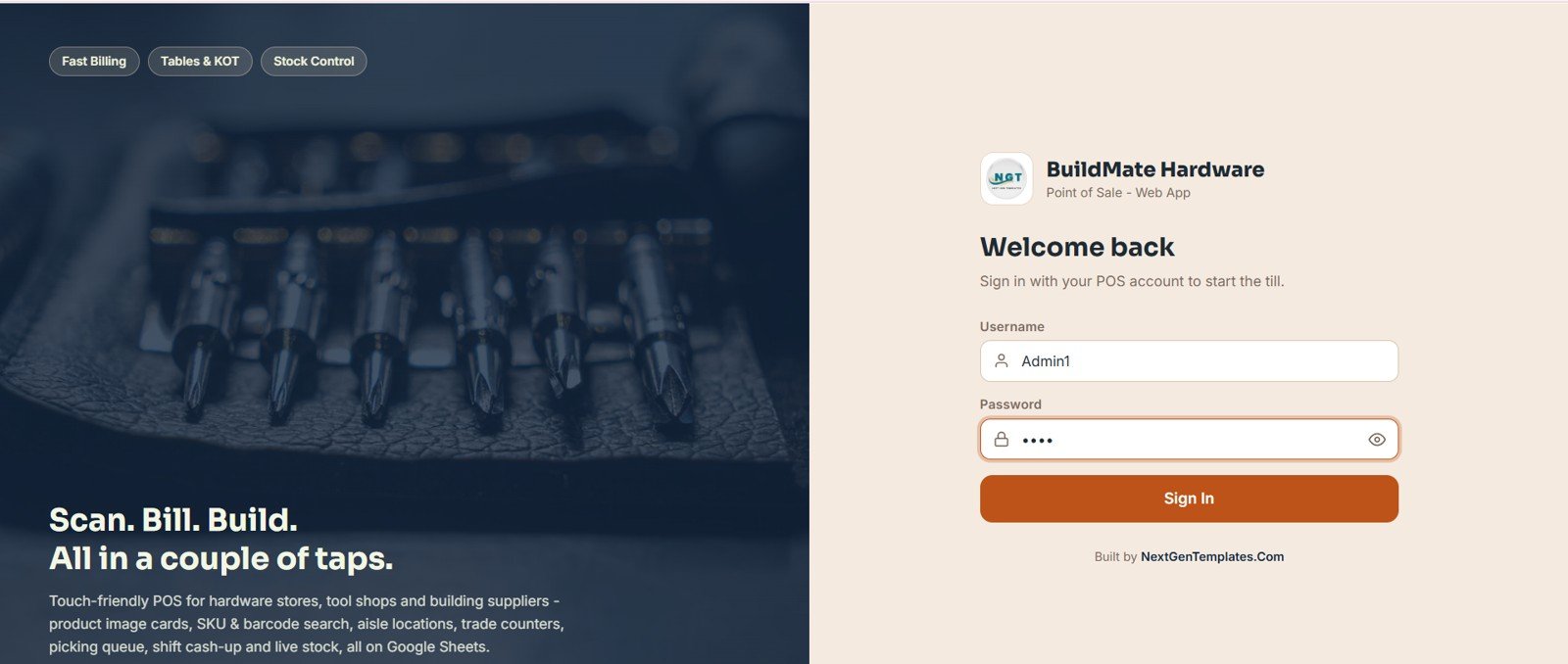
🔑 Demo Login Details
Sign in as Admin1 for full control over sales, inventory, users, and settings, or try any of the other demo logins below to see what each staff member can access. Every demo password is abcd.
| Role | Username | Password |
|---|---|---|
| Admin | Admin1 | abcd |
| Manager | Manager1 | abcd |
| Cashier | Cashier1 | abcd |
| Storekeeper | Storekeeper1 | abcd |
| Inventory User | Inventory1 | abcd |
| Viewer | Viewer1 | abcd |
💡 What you get after purchase: an instant download with a step-by-step PDF guide that walks you through copying the Google Sheet to your own Drive, deploying it as a Google Apps Script web app, and setting up users, products, and inventory, usually in under 30 minutes.
Key Features of the Hardware Store POS Web App
The system is a multi-user POS built entirely on Google Sheets, so all your data lives in your own Google Drive. It supports unlimited staff accounts across role-based permissions: Admin, Manager, Cashier, Inventory, and Viewer.
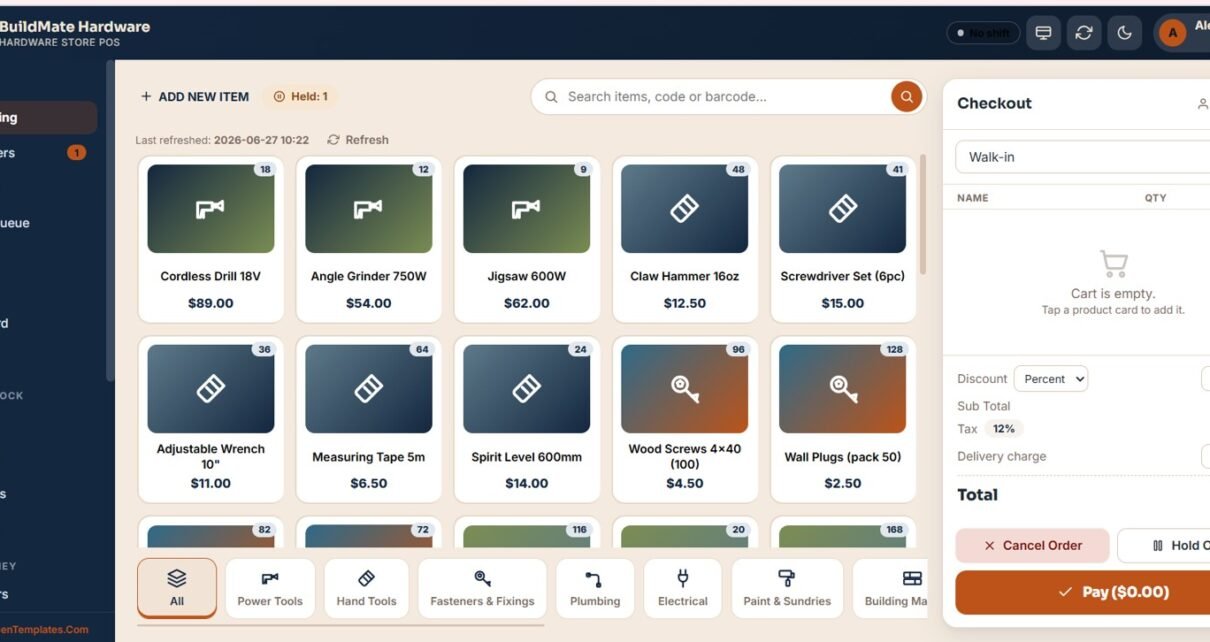
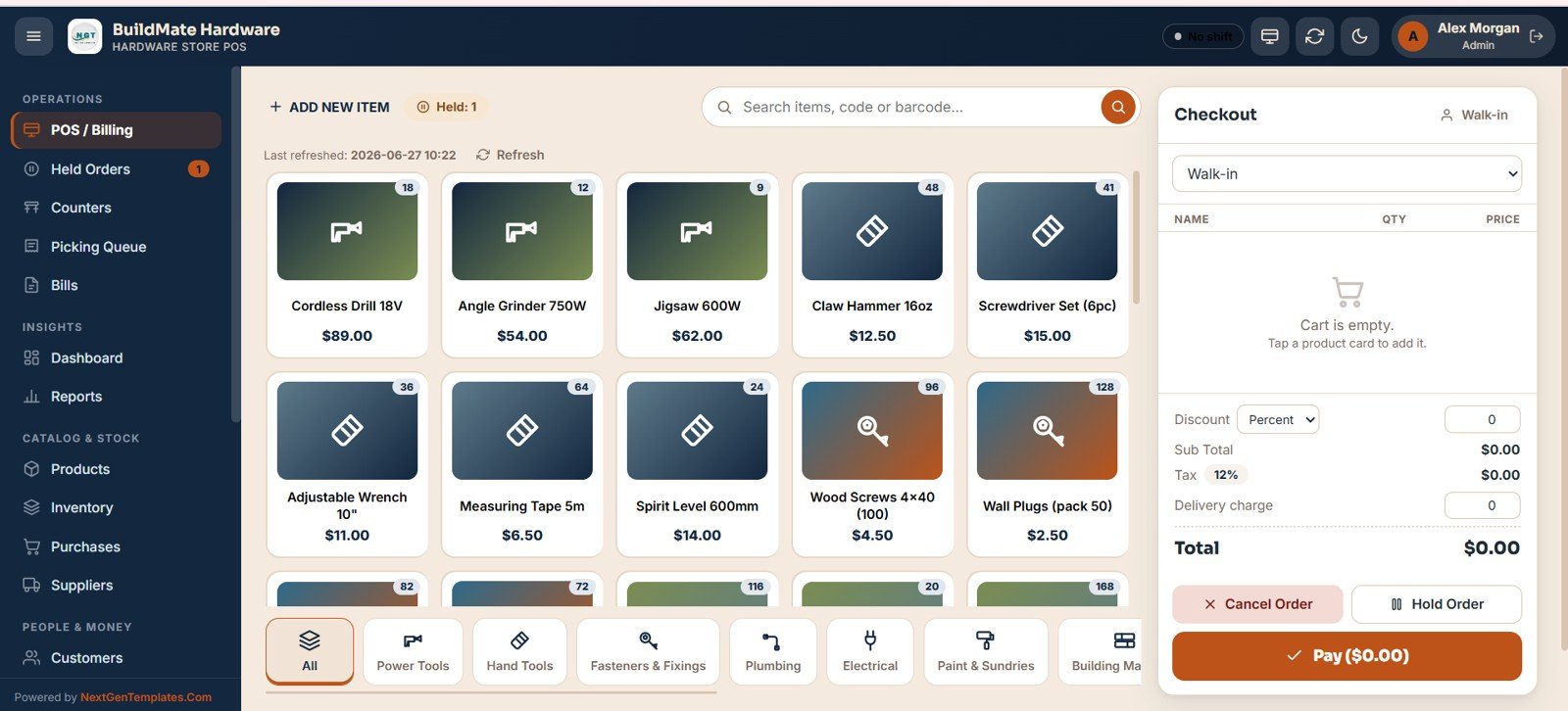
- Touch-first billing: item cards grouped into categories such as Power Tools, Hand Tools, Fasteners & Fixings, Plumbing, Electrical, and Paint & Sundries, with name, code, and barcode search, a quick-add cart, automatic tax, a delivery charge field, and Pay or Hold buttons.
- Held orders: park a contractor’s sale, serve the next customer, and resume or cancel it later without losing the cart.
- Counters and picking queue: separate counter sessions and a picking queue for orders that need to be gathered from the shelves.
- Bills register: every receipt is searchable and can be reprinted, voided, or refunded, with each action logged in the audit log.
- Stock control: a product master with price, tax %, and stock feeds an inventory ledger that flags low-stock SKUs.
- Purchases and suppliers: log stock inward against suppliers and track invoice totals, paid amounts, and payment terms.
- Shifts and cash register: open and close till sessions with expected-vs-actual cash reconciliation.
- Configurable receipts: print on 80mm, 100mm, or A4 with custom prefixes, tax breakup, and footer text.
Dashboard and Screens Explanation
POS / Billing Counter
The main till lists every item as a card with its price and live stock count. Staff search by name, code, or barcode, tap to add to the cart, and the checkout panel calculates sub-total, discount, tax, and delivery charge before Cancel Order, Hold Order, or Pay.
Live Sales Dashboard
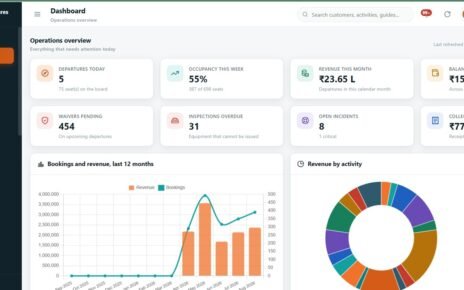
The dashboard shows sales for any date range through eight KPI cards (Sales, Orders, Discounts, Tax Collected, Voids / Refunds, Held Orders, Open Counters, and Low Stock Items), followed by a 7-day sales trend and an hourly sales chart, so you can see your busiest hours at a glance.

Products and Inventory
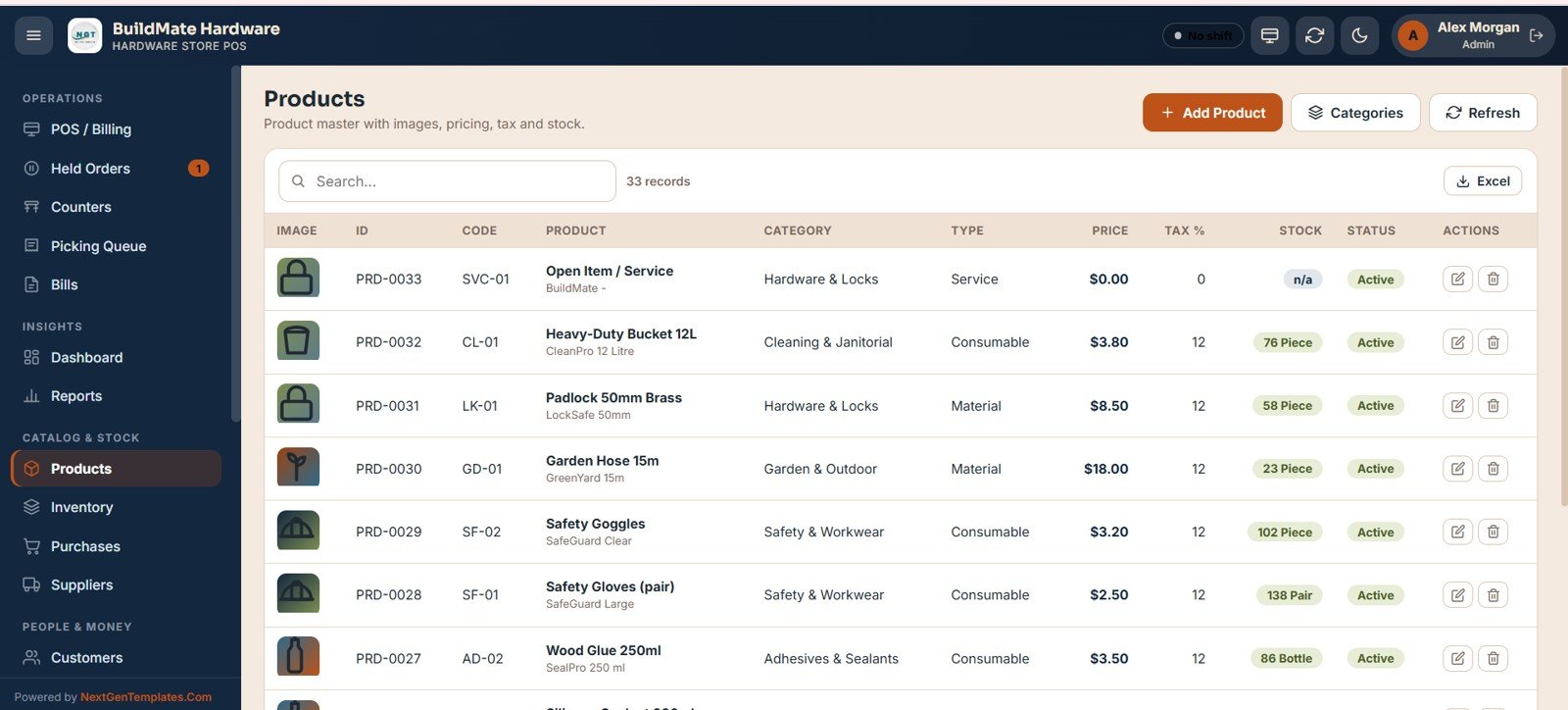
The Products screen is the product master: image, ID, code, product name, category (for example Hardware & Locks, Safety & Workwear, Garden & Outdoor, Adhesives & Sealants), type, price, tax %, stock, and status, with Excel export. Behind it, the Inventory page keeps a running stock ledger of opening balances, sales, and adjustments, with low-stock alerts so you reorder before fast-moving items run out.
Other screens include Held Orders, Counters, Picking Queue, Bills, Reports, Inventory, Purchases, Suppliers, Customers, Expenses, Shifts & Cash, User Management, List Management, Settings, an Audit Log, and a secure Login screen, together covering the full hardware-store workflow from purchase to sale to reconciliation.
Hardware Store POS Web App vs. Desktop POS Software vs. Cloud Retail SaaS
| Feature | Hardware Store POS Web App | Desktop POS software | Cloud retail SaaS (Vyapar / Marg) |
|---|---|---|---|
| Cost | One-time purchase | Licence fee | Subscription, often per user |
| Platform | Google Sheets + Apps Script | Windows desktop only | Vendor cloud |
| Setup time | Under 30 minutes | Installer and activation | Account onboarding |
| Multi-user, real-time | Yes, role-based | Usually single PC | Yes |
| Mobile / tablet access | Any browser | No | Yes |
| Customisable fields | Edit the sheet directly | Locked | Limited |
| Data ownership | Your Google Drive | Local | Vendor-hosted |
| E-commerce or ERP sync | No | Varies | Often available |
For independent hardware stores that want real-time, multi-counter billing without a monthly bill, the Hardware Store POS Web App sits in the sweet spot.
Who Should Use This Template
Perfect for:
- Independent hardware shops, paint stores, and building-supply counters wanting fast card-based billing.
- Small retailers with a few counters needing shared, role-based access on Google.
- Owners who want to own their data and avoid per-user SaaS subscriptions.
Not a fit if:
- You need integrated e-commerce, ERP, or warehouse-management connections out of the box.
- You require certified weighing-scale or serial-number tracking built in.
- Your team cannot use a Google account to host store data.
Real-World Use Cases
Ramesh runs a neighbourhood hardware shop. He bills walk-ins from item cards, holds a contractor’s order while he fetches stock from the back, and checks the low-stock count each evening before placing supplier orders, with no monthly software fee.
Priya manages a 3-counter building-supply store. Each cashier signs in with their own account, takes payments on a tablet, and closes the till with cash reconciliation at shift end, while Priya reviews sales, refunds, and the audit log from home in the same browser.
Sandeep, a paint-and-tools retailer, tracks repeat contractors in Customers and reprints any past bill from the Bills register when a customer needs a copy for a project claim.
Advantages of the Hardware Store POS Web App
Because it runs on Google Sheets, every counter, tablet, and back-office device sees the same live data. There is no server to maintain, the one-time price replaces a recurring SaaS bill, and because you own the underlying sheet you can add fields, dropdowns, and report columns yourself. Deployment uses Google’s own infrastructure; see the official Google Apps Script web-app documentation for how deployment works.
Opportunities for Improvement
This is a lightweight, owner-operated POS rather than an enterprise retail suite. It does not include built-in e-commerce sync, multi-warehouse transfers, or certified weighing-scale integration, and very high-volume stores processing thousands of bills a day may prefer a dedicated database. For most single- and multi-counter hardware shops, those limits rarely matter.
Best Practices
Import your full item list before go-live so barcode search works from day one, set accurate opening stock under Inventory, and give each staff member their own login so the audit log stays meaningful. Close every shift with cash reconciliation, and check the Low Stock Items card daily to keep fast-moving SKUs in stock.
Explore Relevant Templates
Browse more multi-user Google Sheets web apps, or pair this with a companion tool:
- General Store POS Web App: the same POS engine for grocery stores and mini-marts.
- Pharmacy POS Web App: the medical-store edition of the system.
- Bakery POS Web App: counter billing themed for a bakery.
- Coffee Cafe POS Web App: counter billing and KOT for a cafe.
- Construction Project Management System Web App: for the builders and contractors who buy from you.
If you prefer a desktop tool for stock only, the Hardware Store Inventory Data Entry System in Excel is an alternative.
To pick up the spreadsheet skills behind systems like this, the NextGenTemplates Academy learning paths walk through trackers and management systems with practice files.
Frequently Asked Questions
What is the Hardware Store POS Web App built on?
It is built on Google Sheets and Google Apps Script. After you copy the sheet and deploy it as a web app, it runs in any browser with no installation and stores all data in your own Google Drive.
How many users and roles does it support?
It supports unlimited staff accounts with role-based permissions (Admin, Manager, Cashier, Inventory, and Viewer), managed from the User Management screen.
Does it track stock and low-stock alerts?
Yes. It keeps a product master and an inventory ledger that records every in and out movement, and the dashboard shows a Low Stock Items count so you can reorder on time.
How long does setup take?
Most stores are live in under 30 minutes. You copy the Google Sheet from the included guide, deploy it as a web app, sign in as Admin, then add your items and staff.
How does it compare to Vyapar or Marg retail software?
Cloud retail SaaS such as Vyapar or Marg is sold as a subscription. The Hardware Store POS Web App is a one-time purchase you fully own, with multi-user billing, stock, and dashboards on Google Sheets.
About the Author
Built by PK, Microsoft Certified Professional with 15+ years of Excel, Google Sheets, and Power BI experience. Founder of NextGenTemplates. Every template is hand-built and tested before release.
Wrapping Up
The Hardware Store POS Web App gives independent hardware and building-supply stores a real, multi-user point-of-sale system (billing, stock, suppliers, customers, shifts, and live dashboards) for a one-time price, with no monthly fees and full data ownership. Test the live demo as a cashier and as an admin; when it fits your counter, deploy your own copy.
Get the Hardware Store POS Web App
Instant download. One-time payment. No subscription.
📅 Last updated: October 2026