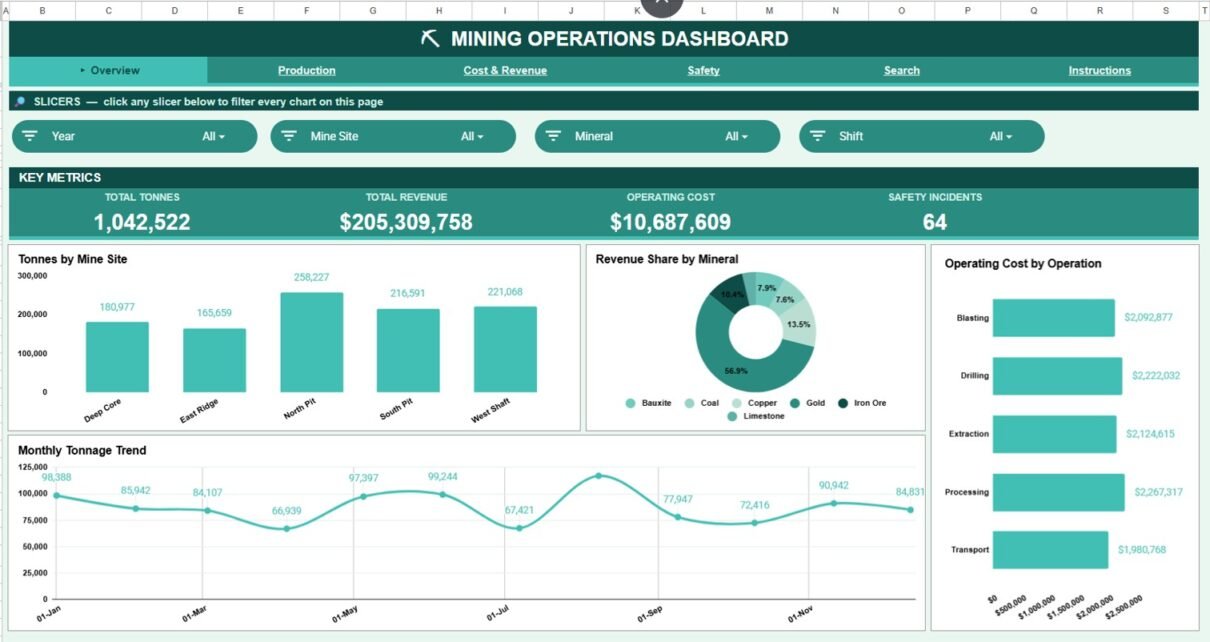
The Mining Operations Dashboard in Google Sheets tracks four headline KPIs across six connected tabs, with 16 pre-built charts and native slicer filters. It monitors 15 data fields per record, from tonnes extracted to operating cost, fuel, downtime, and safety incidents, and updates every chart automatically when you add new rows.
Many small and mid-size mining operations still juggle production logs, cost sheets, and safety registers in separate files. This mining operations dashboard pulls all of that into one browser-based workbook, so managers can read output, revenue, cost, and risk on a single screen without a paid BI licence. Setup takes under 10 minutes.
Get the Mining Operations Dashboard
Key Features of the Mining Operations Dashboard in Google Sheets
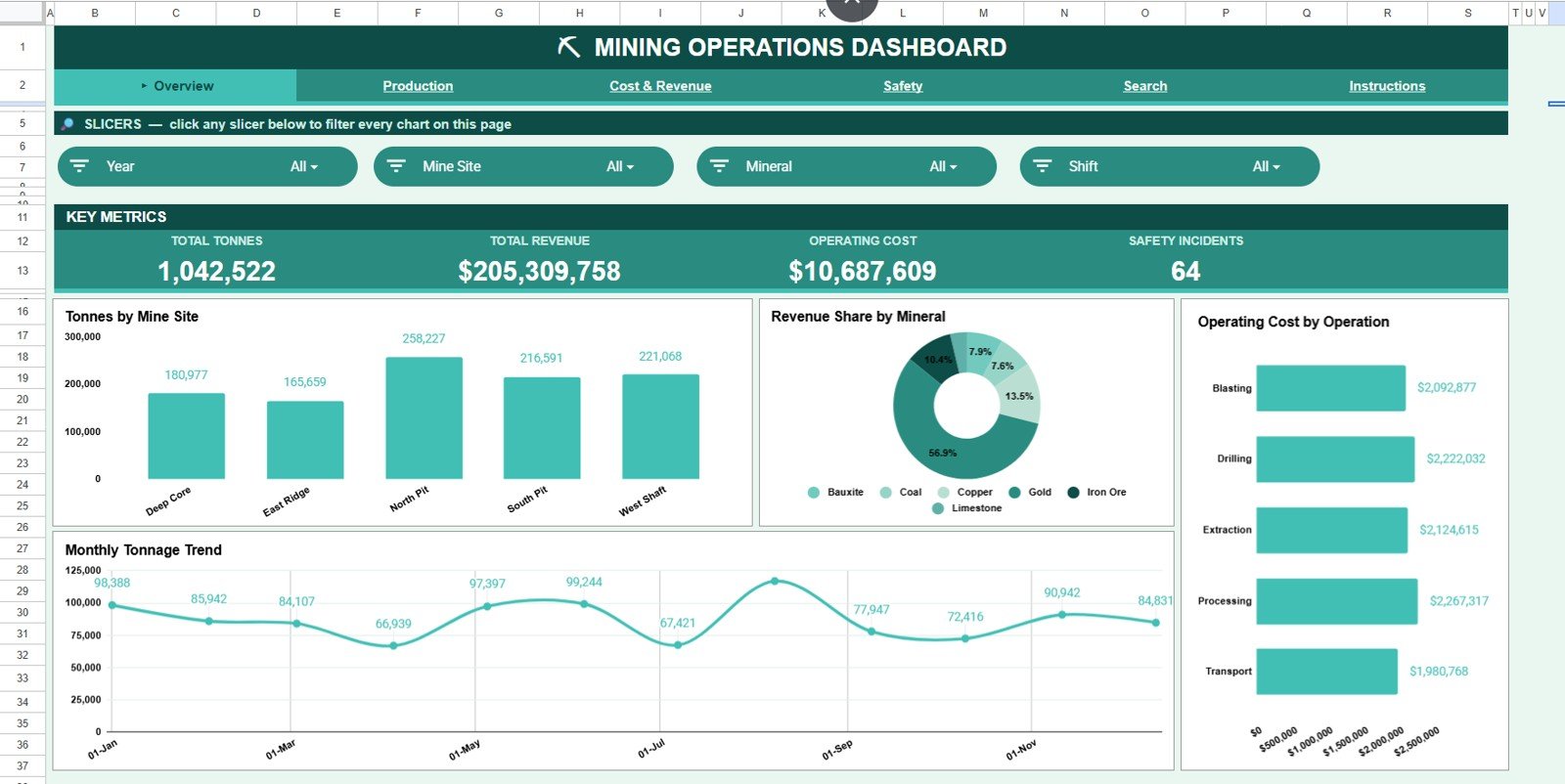
This Google Sheets mining dashboard rolls 15 tracked fields into four KPI cards (Total Tonnes, Total Revenue, Operating Cost, and Safety Incidents), giving leadership an instant read of the operation. With the sample data, the cards show 1,042,522 tonnes, $205,309,758 in revenue, $10,687,609 in operating cost, and 64 safety incidents.
- Four KPI cards summarising output, earnings, spend, and safety, plus four more metric cards on each analysis tab.
- Sixteen native charts spread across four analysis tabs.
- Slicer filters on every analysis tab: Year, Mine Site, Mineral, and Shift on the Overview, with Equipment and Operation slicers on other tabs.
- A Search tab that returns all 15 fields for any record number.
- A single Data tab that feeds every chart and KPI automatically, plus an Instructions tab.
Because it runs entirely in the browser, the dashboard opens on any device, shares with a link, and needs no Excel install or Power BI licence.
Dashboard Pages Explanation
The workbook has six working tabs. Here is what each one does.
Page 1: Overview
The Overview page shows the four KPI cards above slicers that filter the whole page. Charts include Tonnes by Mine Site (Deep Core, East Ridge, North Pit, South Pit, West Shaft), Revenue Share by Mineral (Bauxite, Coal, Copper, Gold, Iron Ore, Limestone), Operating Cost by Operation (Blasting, Drilling, Extraction, Processing, Transport), and a Monthly Tonnage Trend.
Page 2: Production
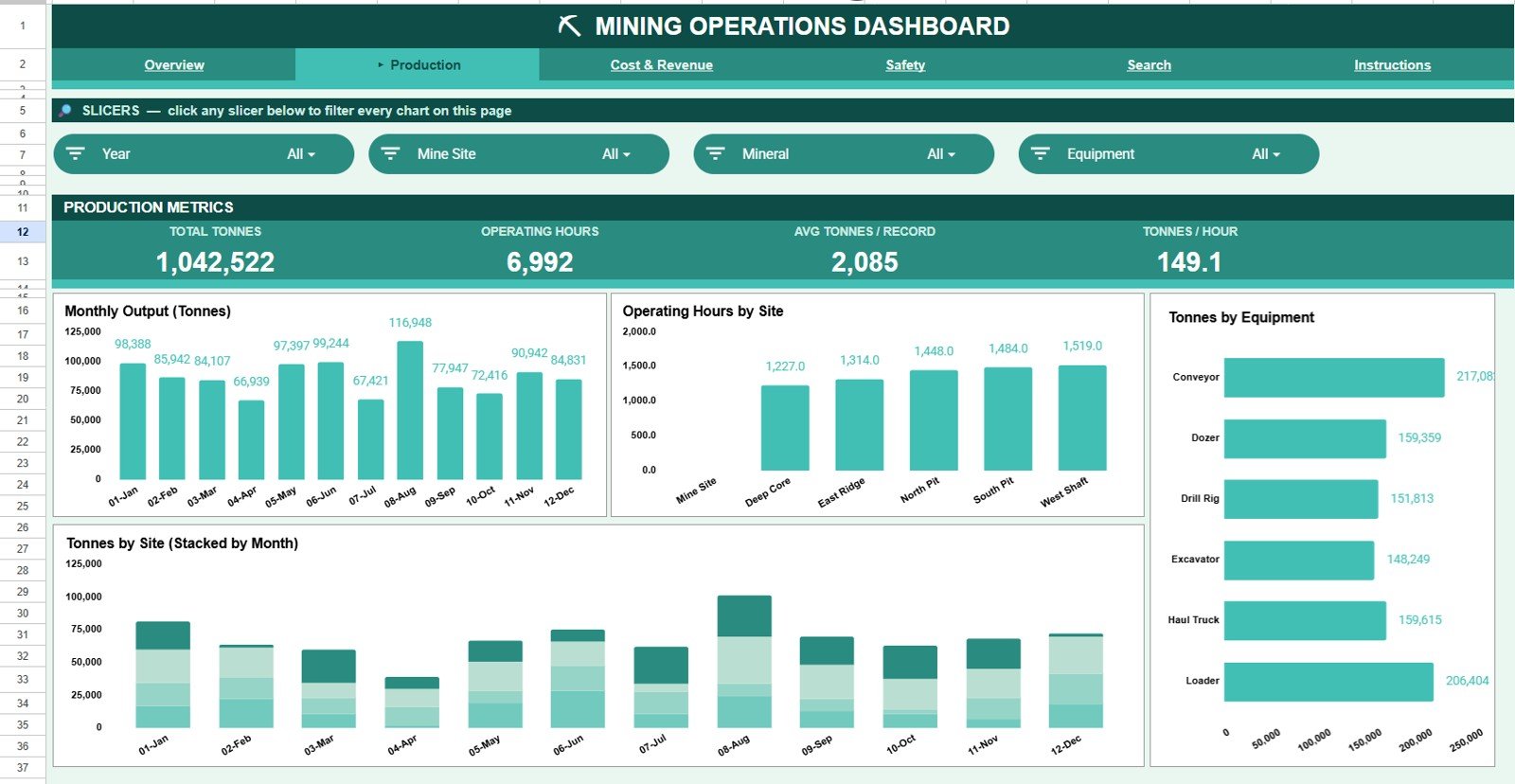
The Production tab focuses on throughput and utilisation. Its cards show Total Tonnes, Operating Hours, Avg Tonnes per Record, and Tonnes per Hour, and its charts include Monthly Output (Tonnes), Operating Hours by Site, Tonnes by Equipment, and Tonnes by Site stacked by month, so you can see which site or machine is driving volume. Tonnes per Hour is Total Tonnes divided by Operating Hours: 1,042,522 ÷ 6,992 = 149.1 in the sample data.
Page 3: Cost & Revenue
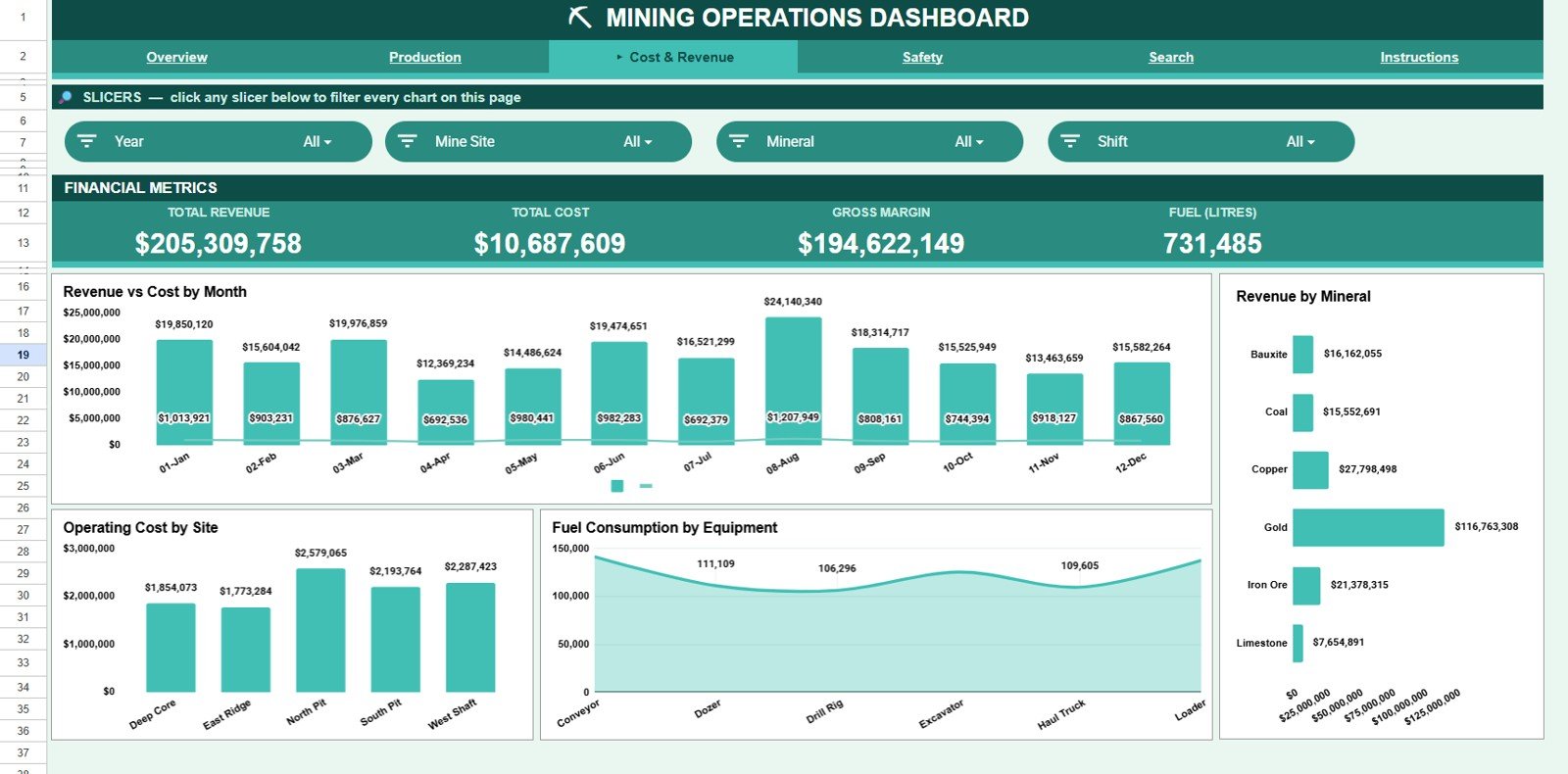
The Cost & Revenue tab connects money in with money out. Its cards show Total Revenue, Total Cost, Gross Margin, and Fuel (litres), and its charts include Revenue vs Cost by Month, Revenue by Mineral, Operating Cost by Site, and Fuel Consumption by Equipment, making margin trends easy to spot. Gross Margin is Total Revenue minus Total Cost, so the sample shows $205,309,758 − $10,687,609 = $194,622,149.
Page 4: Safety
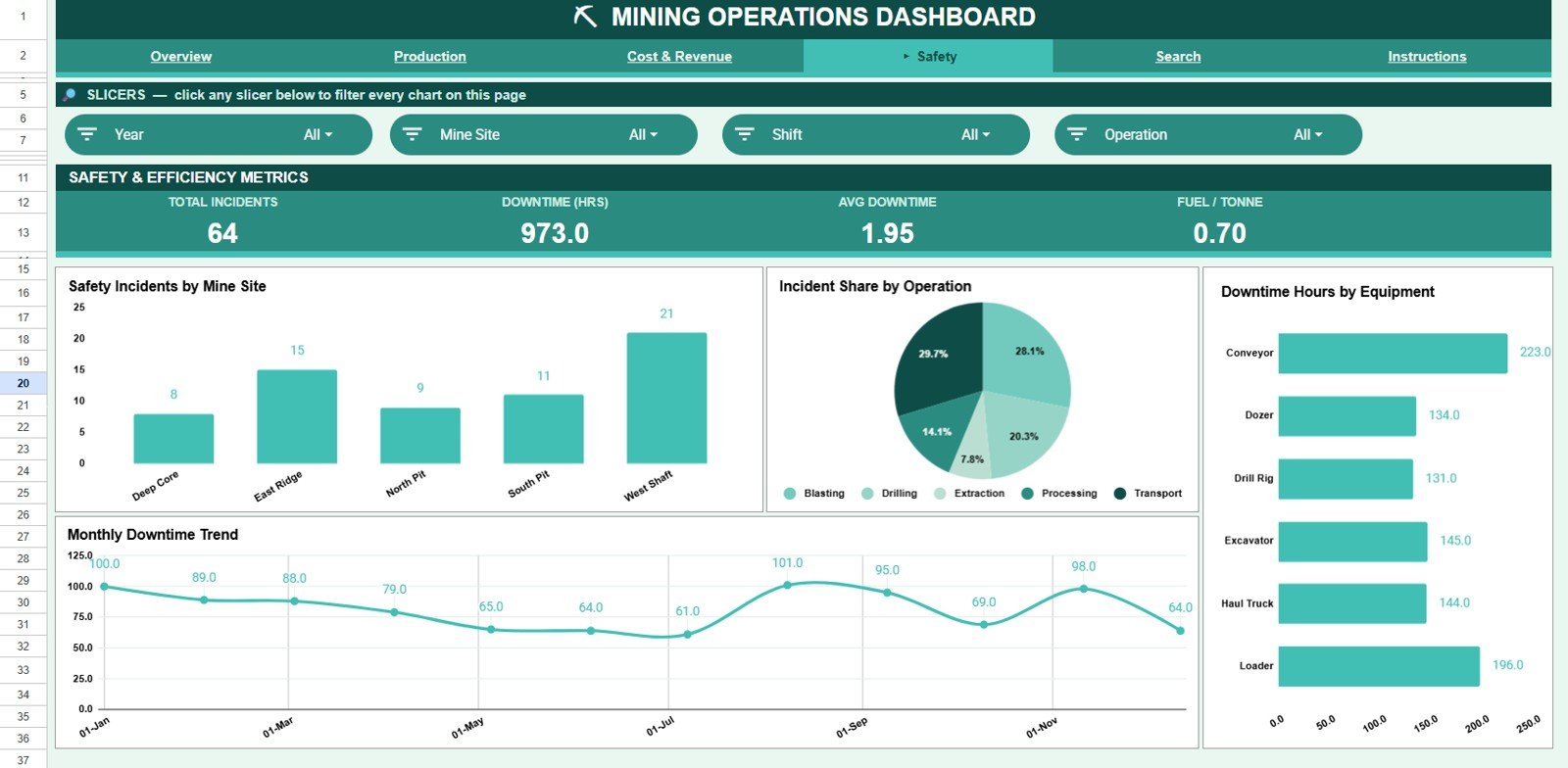
The Safety tab keeps incidents and downtime in view. Its cards show Total Incidents, Downtime (hours), Avg Downtime, and Fuel per Tonne, and its charts include Safety Incidents by Mine Site, Incident Share by Operation, Downtime Hours by Equipment, and a Monthly Downtime Trend, helping HSE teams target the highest-risk sites and machines.
Search Sheet
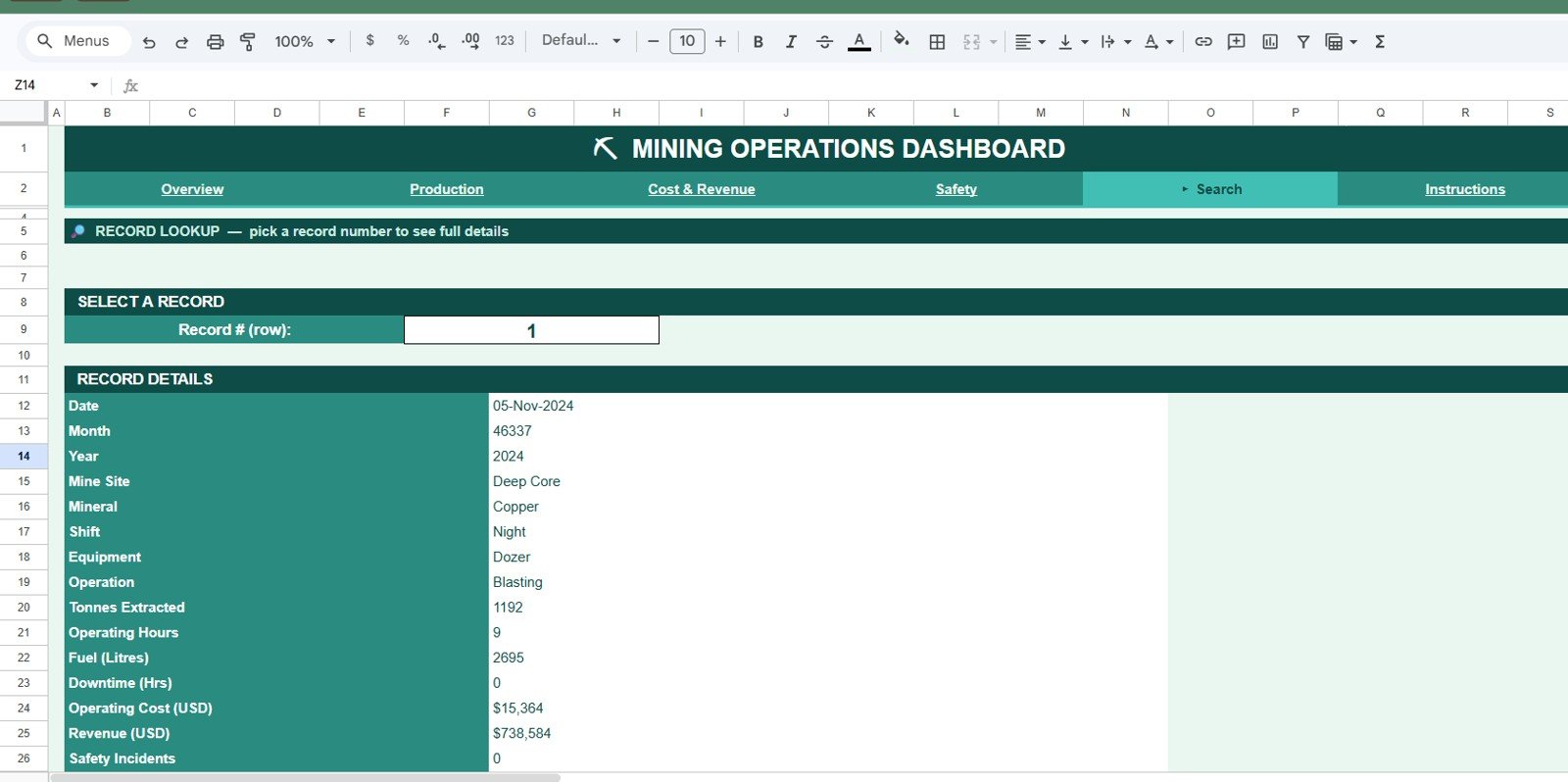
On the Search tab you enter a record number and every detail for that entry appears: date, month, year, mine site, mineral, shift, equipment, operation, tonnes extracted, operating hours, fuel, downtime, operating cost, revenue, and safety incidents.
Data Sheet
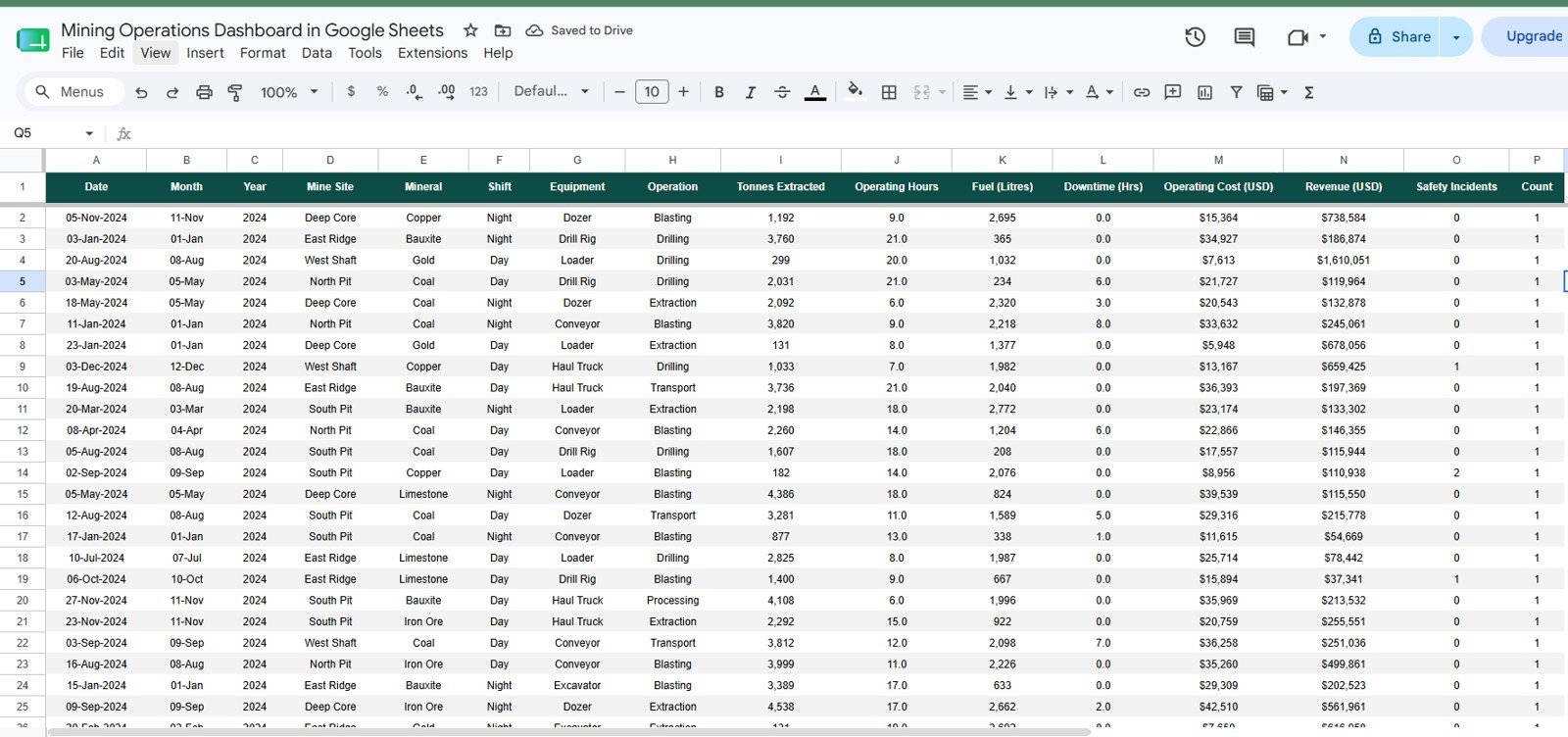
The Data tab is your input sheet, with the columns Date, Month, Year, Mine Site, Mineral, Shift, Equipment, Operation, Tonnes Extracted, Operating Hours, Fuel (Litres), Downtime (Hrs), Operating Cost (USD), Revenue (USD), Safety Incidents, and Count. Add each new record in the same column order and the dashboard, search, and every chart update automatically. It is the single source the whole workbook reads from.
Mining Operations Dashboard in Google Sheets vs. Excel vs. Paid BI SaaS: Feature Comparison
| Feature | Mining Operations Dashboard (Google Sheets) | Microsoft Excel Dashboard | Tableau / Power BI Pro |
|---|---|---|---|
| Cost | One-time purchase | One-time template price plus Office licence | Per-user monthly licence |
| Platform | Browser, nothing to install | Desktop Excel required | Desktop plus cloud service |
| Setup time | Under 10 minutes | 10 to 15 minutes | Hours to days |
| Real-time collaboration | Yes, built in | Limited (co-authoring) | Yes (paid seats) |
| Mobile access | Yes, any browser | Excel mobile app | Vendor mobile app |
| Slicer filtering | Native slicers | Slicers and timelines | Advanced filters |
| Share with a link | Yes | File share only | Yes (paid) |
| Live sensor or SCADA feeds | No | No | Possible with connectors |
For mining teams that want tonnage, cost, revenue, and safety analysis without paying per-seat BI fees, the Mining Operations Dashboard in Google Sheets sits in the sweet spot.
Who Should Use This Template
Perfect for:
- Mine managers and operations leads tracking output, cost, and safety across multiple sites.
- Small and mid-size mining or quarrying firms that want dashboards without a BI licence.
- HSE and finance teams who need shareable, browser-based reporting on any device.
Not a fit if:
- You need live sensor, IoT, or SCADA feeds streaming into the dashboard.
- Your organisation requires SSO, row-level security, or formal governance controls.
Real-World Use Cases
Ravi runs operations for a multi-site mining firm. He pastes daily extraction logs into the Data tab and uses the Overview slicers to compare tonnes and operating cost per site before his morning stand-up, without touching a formula.
Lena is the HSE lead at a mid-size mineral operation. She works from the Safety tab, watching Safety Incidents by Mine Site and the Monthly Downtime Trend to decide where to send her next audit, replacing a manual monthly slide deck.
Marco handles finance for a family quarry business. He uses Revenue vs Cost by Month and Fuel Consumption by Equipment to catch margin slippage early, sharing the sheet with a link instead of paying for BI seats.
Advantages of the Mining Operations Dashboard in Google Sheets
The biggest advantage is cost against capability: a single one-time purchase covers production, cost, revenue, and safety reporting with no per-seat BI fees. Because it is cloud-native, teams collaborate in real time and can open the dashboard on a phone on site. The Data-tab design means non-technical staff can maintain it: paste rows, and the charts, KPIs, and search all refresh on their own. If you want to learn how to build dashboards like this, the Pivot Tables and Dashboards course on NextGenTemplates Academy covers the method step by step.
Opportunities for Improvement
This is a reporting dashboard, not an operational control system. It does not ingest live telemetry from equipment, and very large datasets (tens of thousands of rows) will perform better in Excel or a dedicated BI tool. Teams needing granular access controls or audit-grade governance should handle that at the Google Workspace level, since the workbook itself relies on standard Sheets sharing.
Best Practices
- Keep the Data tab column order intact; the charts, KPIs, and Search tab all read from it.
- Enter dates consistently so the Monthly Tonnage and Downtime trends plot correctly.
- Use the slicers to build quick site- or mineral-specific views before meetings. Google’s help centre explains how Google Sheets slicers work.
- Duplicate the sheet each quarter if you want an archived snapshot.
Explore Relevant Templates
If you want a wider operational view, read about the Integrated Mining Operations Dashboard in Google Sheets or the simpler Mining Dashboard in Google Sheets. For a metrics-only view, the Mining KPI Scorecard in Google Sheets is a good companion, and safety teams may prefer the Mining Safety KPI Dashboard in Google Sheets. This dashboard is also offered as an Excel version and a Power BI version.
Frequently Asked Questions
What KPIs does the Mining Operations Dashboard in Google Sheets track?
It tracks four headline KPIs (Total Tonnes, Total Revenue, Operating Cost, and Safety Incidents) plus 16 charts covering production, cost, revenue, and safety across mine sites, minerals, operations, and equipment. All metrics update automatically when you replace the sample data.
How long does setup take?
Under 10 minutes. Copy the dashboard to your Drive, paste your records into the Data tab in the same column order, and the KPI cards, slicers, search, and every chart update on their own.
Do I need Excel or Power BI to use it?
No. It runs entirely in Google Sheets in the browser, so there is nothing to install and no Excel or Power BI licence required. It opens on any device with a browser.
Can I filter the dashboard by mine site or mineral?
Yes. The Overview page has native slicers for Year, Mine Site, Mineral, and Shift, and the Production and Safety tabs add Equipment and Operation slicers, so you can see a filtered result with one click.
How does this compare to paid BI tools like Tableau or Power BI Pro?
The Mining Operations Dashboard in Google Sheets is a one-time purchase with no per-seat fees, whereas Tableau and Power BI Pro are licensed per user. It covers the core tonnage, cost, revenue, and safety views most mining teams need.
Is this dashboard available in Excel or Power BI too?
Yes. The same Mining Operations Dashboard is available as an Excel version and a Power BI version, so you can pick the platform your team already uses.
About the Author
Built by PK, Microsoft Certified Professional with 15+ years of Excel, Google Sheets, and Power BI experience. Founder of NextGenTemplates. Every template is hand-built and tested before release.
Wrapping Up
The Mining Operations Dashboard in Google Sheets turns scattered production, cost, and safety logs into one clear, shareable view for a fraction of the cost of BI software. Copy it, load a month of production records, and use the Safety tab to decide where your next site audit should go.
Get the Mining Operations Dashboard in Google Sheets
Instant download. One-time payment. No subscription.
📅 Last updated: October 2026