The Debt Payoff (Snowball) Tracker in Google Sheets condenses an entire debt-freedom plan into one page: a live Total Debt Remaining KPI card, 4 auto-updating charts, a full debt table with interest rate, payments, snowball rank and estimated months left, and a Lookup Lists tab that keeps every dropdown consistent. It sells for a one-time $6.99 (regular $12.99) and sets up in under 10 minutes in any free Google account.
Most people trying to pay off multiple credit cards, personal loans, and auto loans track balances in their heads — or not at all — and lose the motivation the snowball method depends on. This Google Sheets debt payoff template fixes that by turning every payment into a visible change: the headline number drops, the charts move, and the next target debt is always obvious.
🎥 Watch the Video Tutorial
Get the Debt Payoff (Snowball) Tracker
Key Features of the Debt Payoff (Snowball) Tracker in Google Sheets
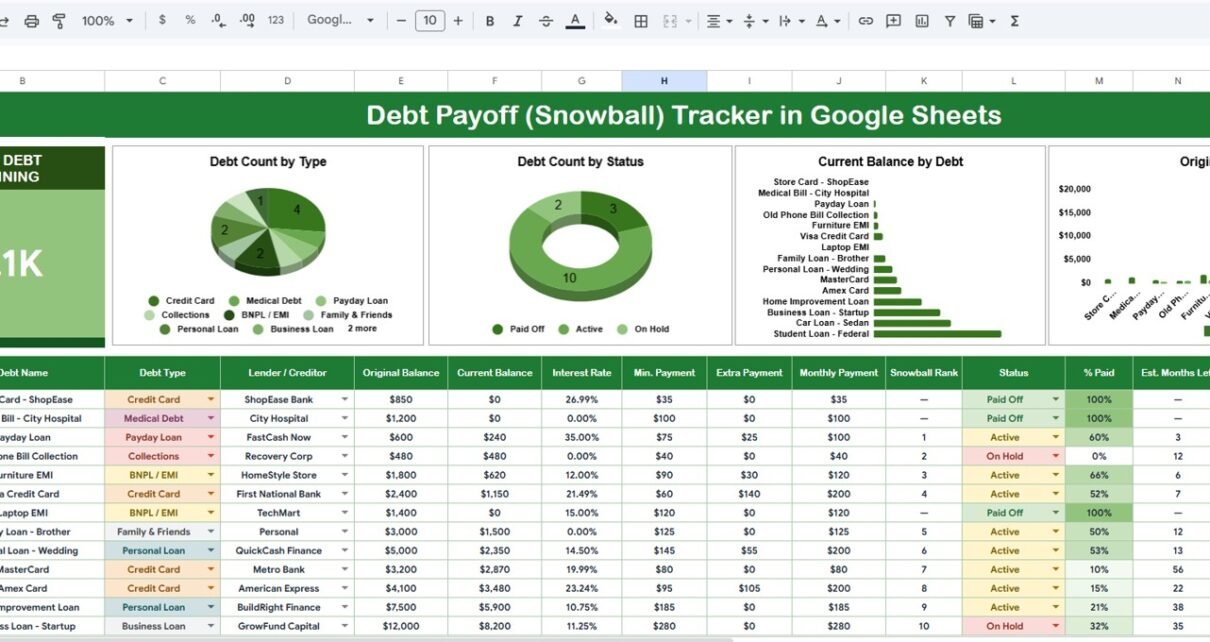
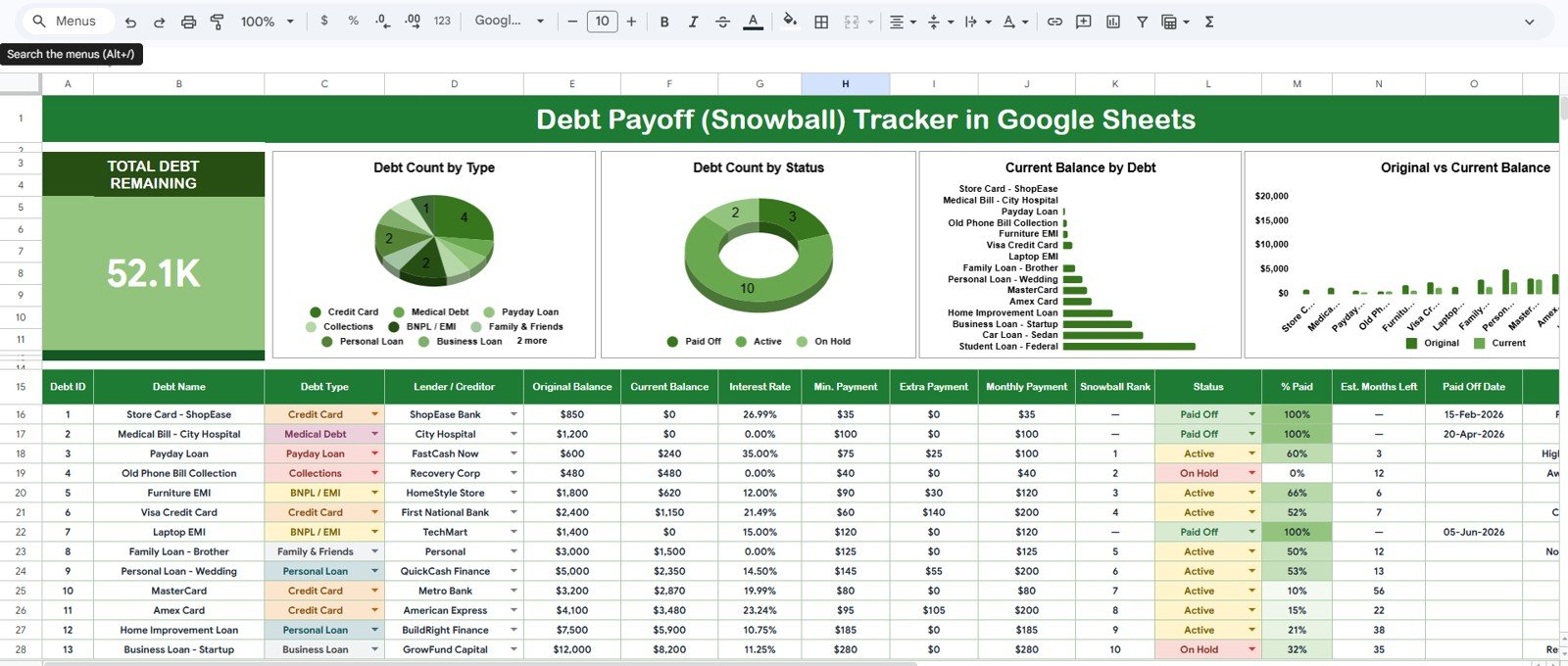
- One-page snowball layout — the tracker lists every debt with Debt ID, Debt Name, Debt Type, Lender / Creditor, Original Balance, Current Balance, Interest Rate, Min. Payment, Extra Payment, Monthly Payment, Snowball Rank, Status, % Paid, Est. Months Left and Paid Off Date, so the next target is always visible.
- Total Debt Remaining KPI card — a single headline figure recalculates the moment you log a payment, giving you instant feedback on every extra dollar.
- 4 charts wired directly to your data — the template plots Debt Count by Type, Debt Count by Status, Current Balance by Debt, and Original vs Current Balance with no helper tables to maintain.
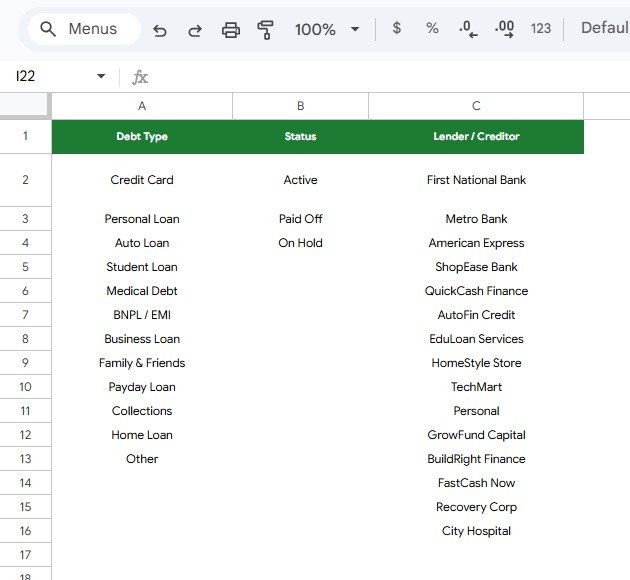
- Lookup Lists tab — Debt Type, Status, and Lender/Creditor lists feed auto-expanding dropdowns, so entries stay consistent and charts stay accurate.
- Zero dependencies — no add-ons, no scripts to authorize, no paid extensions; it runs on any free Google account and in the Sheets mobile app.
The Debt Payoff (Snowball) Tracker in Google Sheets tracks each debt’s balances, rate, payments and progress and summarizes them in one KPI card and four charts. Everything updates automatically — the only manual work is entering payments. If you already use our Weekly Expense Tracker Template in Google Sheets, this tracker is the natural next step for the debt side of your finances.
Sheets Explanation
Sheet 1: Overview Page
The Overview page opens with the Total Debt Remaining card at the top — the one number that answers “how much do I still owe?” at a glance. Next to the card, four charts summarize your debts, and the debt table below calculates % Paid, Snowball Rank and Est. Months Left for each row. In the sample data the card shows 52.1K still owed.
- Debt Count by Type — shows how many of your debts fall into each type (Credit Card, Personal Loan, Auto Loan, Student Loan, Medical Debt, BNPL / EMI, Business Loan, Family & Friends, Payday Loan, Collections, Home Loan or Other), revealing where your obligations cluster.
- Debt Count by Status — splits your list into Active, Paid Off and On Hold; watching the Paid Off segment grow is the built-in motivation meter of the snowball method.
- Current Balance by Debt — ranks each individual debt by what is left today, making your next snowball target obvious.
- Original vs Current Balance — plots what every debt started at next to what is left, so you can see exactly how far you have come.
Sheet 2: Lookup Lists
The Lookup Lists tab is the control panel behind the tracker’s dropdowns. It manages three lists — Debt Type (12 types, from Credit Card to Other), Status (Active, Paid Off, On Hold) and Lender / Creditor — and any value you add here flows into the tracker’s data-entry dropdowns automatically. That keeps your entries consistent, which in turn keeps every chart accurate.
Debt Payoff (Snowball) Tracker vs. Excel Debt Tracker vs. YNAB / Quicken Simplifi — Feature Comparison
| Feature | Debt Payoff (Snowball) Tracker | Microsoft Excel Debt Tracker | YNAB / Quicken Simplifi |
|---|---|---|---|
| Cost | $6.99 one-time ✅ | $9.99–$24.99 + Office license | $6–$15 / month, forever |
| Platform | Google Sheets (free account) ✅ | Desktop Excel | Web + mobile app |
| Setup time | Under 10 minutes ✅ | 15–30 minutes | 1–2 hours (bank linking) |
| Real-time collaboration | Yes, share with a partner ✅ | Limited (file versions) | Yes |
| Mobile access | Free Sheets app ✅ | Excel mobile (limited) | Yes |
| Customizable fields & lists | Fully editable ✅ | Fully editable | Locked to app structure |
| Snowball charts included | 4 pre-built ✅ | Build your own | Partial (debt view only) |
| Share with a link | Yes ✅ | No (file attachment) | Account invite only |
| Year-1 cost (household) | $6.99 ✅ | $9.99+ plus Office | $72–$180 |
For anyone who wants a visual snowball plan without a monthly budgeting-app fee, the Debt Payoff (Snowball) Tracker sits in the sweet spot.
Who Should Use This Template
Perfect for:
- Individuals and couples paying off 2–15 debts with the snowball method
- Households that want one shared Google Sheet instead of a subscription budgeting app
- Financial coaches and counselors who duplicate a clean tracker for each client
- Dave Ramsey-style debt payoff followers who want charts, not just a list
Not a fit if:
- You want automatic bank syncing and transaction imports — that requires a connected app like YNAB or Simplifi
- You are managing corporate debt schedules or receivables — the Accounts Receivable KPI Dashboard in Google Sheets is built for that job
Real-World Use Cases
Priya is paying off three credit cards and a personal loan. She lists them smallest to largest in the tracker, throws every spare rupee at the smallest card, and watches the Debt Count by Status chart shift toward Paid Off — the kind of visible progress a bank statement never shows. She pairs it with the Budget Calculator in Google Sheets to find extra money each month.
Marcus and Elena run one tracker for their household. The sheet lives in a shared Drive folder; both partners update balances after payday, and the Total Debt Remaining card keeps their $38,000 payoff goal front and center — without a $99-per-year app subscription.
Dana is a financial coach with 12 clients. She duplicates the tracker per client, customizes each Lender/Creditor list on the Lookup Lists tab, and opens the Current Balance by Debt chart in every monthly session to pick the next snowball target together with the client.
Advantages of the Debt Payoff (Snowball) Tracker
The biggest advantage is cost certainty: a one-time $6.99 replaces $72–$180 per year of budgeting-app subscriptions, and there is nothing to renew. The second is speed — because the charts read directly from the data columns, there are no pivot tables or helper ranges to rebuild when your debt list changes. Third, ownership: the file lives in your Google Drive, so your financial data never sits inside a third-party app. Finally, the Snowball Rank and Est. Months Left columns turn a static list into a plan, which matters when you are juggling debts across several lenders and types. If you like this format, the Credit Card KPI Dashboard in Google Sheets applies the same philosophy to card-level metrics.
Limitations to Know
Honest limitations: the tracker estimates months left from the balances and payments you enter, but it does not build a full month-by-month amortization schedule with interest accrual, so pair it with a payoff calculator if you want detailed date and interest projections. Balance updates are manual; there is no bank feed. And because it is a one-page tracker, users with 30+ debts or complex amortization schedules will outgrow it. For most households with a handful of consumer debts, none of these are blockers — they are the trade-offs that keep the tool simple and fast.
Best Practices
- Update current balances on a fixed schedule — right after payday works best — so the KPI card stays trustworthy.
- Keep debts sorted smallest to largest by current balance; the snowball method’s momentum depends on quick early wins.
- Mark a debt Paid Off instead of deleting the row — the growing Paid Off segment in the status chart is your motivation record.
- Add every lender to the Lookup Lists tab before entering data, so dropdown values stay consistent and the charts group correctly. Google’s own documentation on adding and editing charts in Sheets is a useful reference if you want to restyle any chart.
- Share the sheet with your partner or coach using view or edit access rather than emailing copies.
Explore Relevant Templates
- Debt Payoff Calculator Template in Google Sheets — model payoff dates and interest savings alongside the tracker.
- Personal Monthly Budget Tracker in Google Sheets — find the extra money that feeds your snowball.
- Credit Card KPI Dashboard in Google Sheets — monitor utilization and card metrics next to your payoff plan.
- Pricing Calculator in Google Sheets — for freelancers boosting income to accelerate payoff.
💎 Save more: the Google Sheets Starter Pack bundles 12 premium templates — including finance and budgeting tools — for $39.99 instead of $90.88 if bought one by one.
Curious how trackers like this are built from scratch? The NextGenTemplates Academy learning paths teach the spreadsheet skills behind them, with practice files to work through.
Frequently Asked Questions
What does the Debt Payoff (Snowball) Tracker in Google Sheets track?
The Debt Payoff (Snowball) Tracker tracks each debt’s type, lender, original and current balance, interest rate, minimum, extra and monthly payment, snowball rank, status, % paid and estimated months left, and summarizes everything in a Total Debt Remaining card plus four charts.
How do I set it up?
Download the PDF guide after purchase, click the copy link to add the Debt Payoff (Snowball) Tracker to your Google Drive, adjust the Lookup Lists tab, and enter your debts. Setup takes under 10 minutes with no scripts or add-ons to install.
How does this compare to YNAB or Quicken Simplifi?
YNAB and Simplifi cost $72–$180 per year and require linking your bank accounts. The Debt Payoff (Snowball) Tracker is a one-time $6.99 Google Sheet you fully own and customize — the trade-off is manual balance entry instead of automatic syncing.
Does it support the debt avalanche method too?
Partly. The Snowball Rank column ranks unpaid debts by smallest current balance (in the sample, the $240 Payday Loan is rank 1 and the $480 Old Phone Bill Collection is rank 2), which is the snowball order. If you prefer the avalanche method, sort the table by the Interest Rate column and work from the top; the Total Debt Remaining card and charts still update the same way, but the Snowball Rank column itself stays balance-based.
Can I add my own debt types, statuses, or lenders?
Yes. Add any value to the Debt Type, Status, or Lender/Creditor lists on the Lookup Lists tab, and the Debt Payoff (Snowball) Tracker’s dropdowns expand automatically — new options appear in the data table immediately.
Does it work on mobile?
Yes. Because the Debt Payoff (Snowball) Tracker is a native Google Sheet, you can log payments and view all four charts in the free Google Sheets app on Android and iOS, with changes syncing across devices.
About the Author
Built by PK — Microsoft Certified Professional with 15+ years of Excel, Google Sheets, and Power BI experience. Founder of NextGenTemplates, reaching 300K+ subscribers across YouTube channels. Every template is hand-built and tested before release.
Wrapping Up
Paying off debt is a numbers game won by momentum, and momentum needs visibility. The Debt Payoff (Snowball) Tracker in Google Sheets gives you that visibility on a single page — one KPI card, four live charts, a full debt table and clean dropdowns — for less than the cost of one month of a budgeting app.
Get the Debt Payoff (Snowball) Tracker
Instant download · One-time payment · No subscription
📅 Last updated: October 2026