Pricing Calculator in Google Sheets is a 6-tab interactive spreadsheet template that models product pricing across multiple margin targets, benchmarks your prices against competitors, simulates discount impact on profitability, calculates bundle pricing margins, and visualises your entire pricing structure through 14+ charts and 9 KPI cards. According to a 2025 McKinsey study, businesses that use structured pricing analytics increase margins by 2–7% within the first year — yet most small businesses still set prices using guesswork. This Google Sheets Financial Tool replaces that guesswork with formula-driven pricing decisions in under 10 minutes.
Whether you are a product manager modeling margin scenarios across a 50-product catalog, an e-commerce store owner testing discount strategies before a seasonal sale, or a startup founder setting prices for your first product, this Pricing Calculator in Google Sheets gives you the same pricing intelligence that enterprise teams get from $500+/month SaaS tools — for a one-time $6.99 purchase. If you prefer working in Excel, explore the Excel Financial Tools catalog. For a broader personal finance view, see the Personal Finance Dashboard in Google Sheets.
Get the Pricing Calculator in Google Sheets
Key Features of Pricing Calculator in Google Sheets
The Pricing Calculator in Google Sheets includes 6 sheet tabs and tracks 9 KPIs with 14+ interactive charts. Here are the features that make this template essential for any business that sells products or services:
- 6 Purpose-Built Sheet Tabs — Overview, Product Catalog Pricing at Multiple Margins, Competitive Analysis, Discount Simulator, Bundle Pricing Calculator, and Pricing Dashboard provide end-to-end pricing visibility from cost modelling to visual reporting.
- 9 KPI Cards on the Overview Page — Total Fixed Costs, Variable Cost Rate, Total Cost (at Target Price), Recommended Selling Price, Gross Profit per Unit, Net Profit per Unit, Markup Percentage, Breakeven Units/Month, and Profit if 100 Units Sold update automatically when you change any input.
- Multi-Margin Catalog Pricing — The Product Catalog tab calculates selling prices at 20%, 30%, and 40% margins for every product, with category-level cost summaries and profit/markup analysis at 30% margin.
- Built-in Competitive Analysis — Enter competitor names, prices, and ratings to instantly see Price Diff, Price Diff %, Positioning, and recommended Action for each competitor — data you can take directly into sales meetings.
- Discount Simulator with Viability Verdict — Test any discount percentage and see Discounted Price, remaining Margin, Revenue Loss, New Profit, Profit Change %, and a color-coded Verdict (viable, marginal, or destructive).
- Bundle Pricing Calculator — Add products to a bundle and monitor Individual Price, Cost, Extended Price, Extended Cost, Individual Margin, and Individual Margin % per item to ensure every bundle stays profitable.
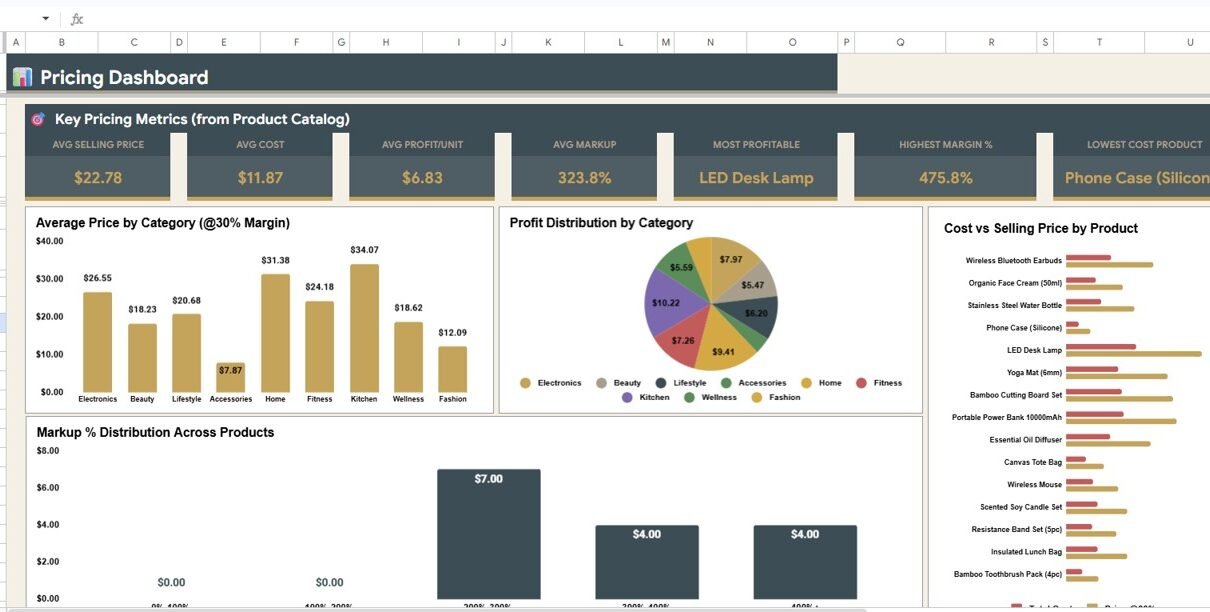
- Pricing Dashboard with 8 Charts — Average Selling Price, Average Cost, Average Profit per Unit, Average Markup by Catalog, Average Price by Category, Profit Distribution by Category, Cost vs Selling Price by Product, and Markup % by Product.
- Slicer Filters — Apply quick filters on the Overview page to drill down by product, category, or margin target without editing formulas.
- Google Sheets Native — Browser-based, real-time collaboration, mobile-accessible, and runs on any device with a free Google account.
Sheet Tabs Explanation
The Pricing Calculator in Google Sheets includes 6 interactive sheet tabs, each dedicated to a different pricing decision. Below is a detailed walkthrough of every tab.
1. Overview Page
The Overview page is your pricing command center. At the top, 9 KPI cards display Total Fixed Costs, Variable Cost Rate, Total Cost at Target Price, Recommended Selling Price, Gross Profit per Unit, Net Profit per Unit, Markup Percentage, Breakeven Units/Month, and Profit if 100 Units Sold for an instant snapshot of your pricing health. Below the cards, 6 interactive charts show Selling Price by Margin Target breaking down how your recommended price changes at different margin levels, Gross Profit by Margin Target showing absolute profit at each margin, Net Profit by Margin Target factoring in fixed costs, Markup % by Margin Target tracking the percentage uplift over cost, Profit per 100 Units by Margin Target projecting batch profitability, and Revenue per 100 Units by Margin Target showing top-line revenue at each scenario. Multiple slicer filters let you drill into any product or margin scenario instantly.
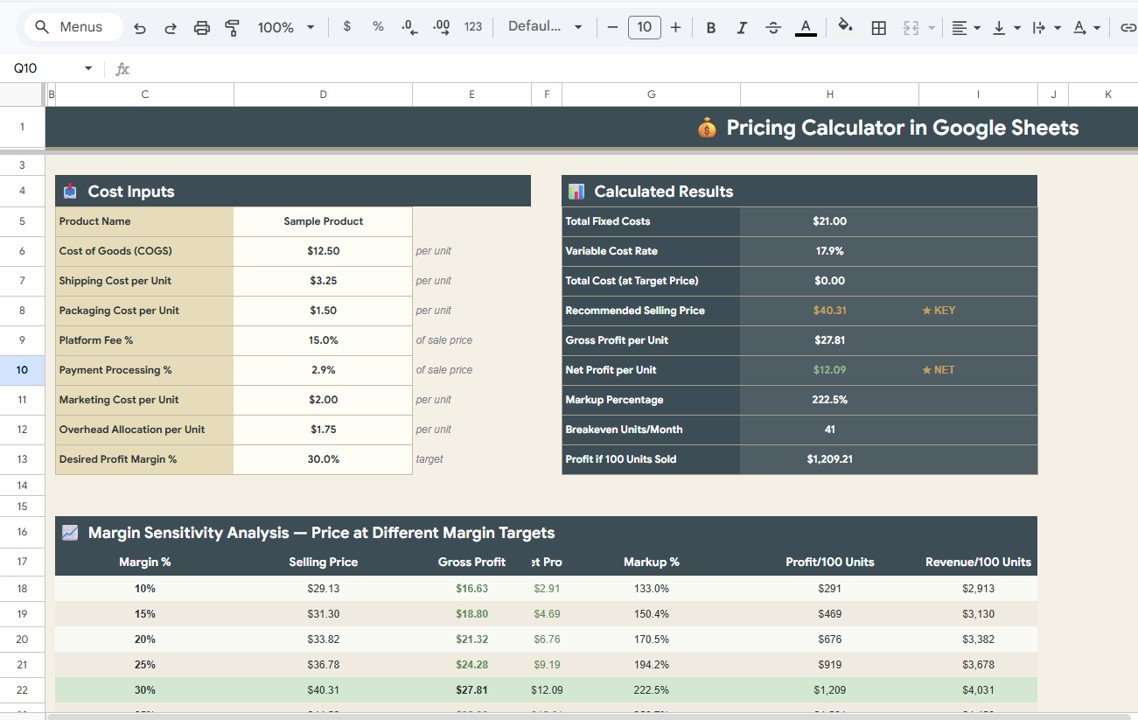
Pricing Calculator — Overview Page
2. Product Catalog Pricing at Multiple Margins
This tab is where you build out your full product catalog pricing. It displays Total Cost by Product showing the full cost of each item, Price @20% by Product calculating the selling price needed for a 20% margin, Price @30% by Product for the 30% target, Price @40% by Product for the 40% target, Profit @30% by Product showing the dollar profit at 30% margin, Markup @30% by Product showing the markup percentage, and Total Cost by Category summarizing costs at the category level. This side-by-side comparison lets you pick the right margin target for each product line before setting your prices.
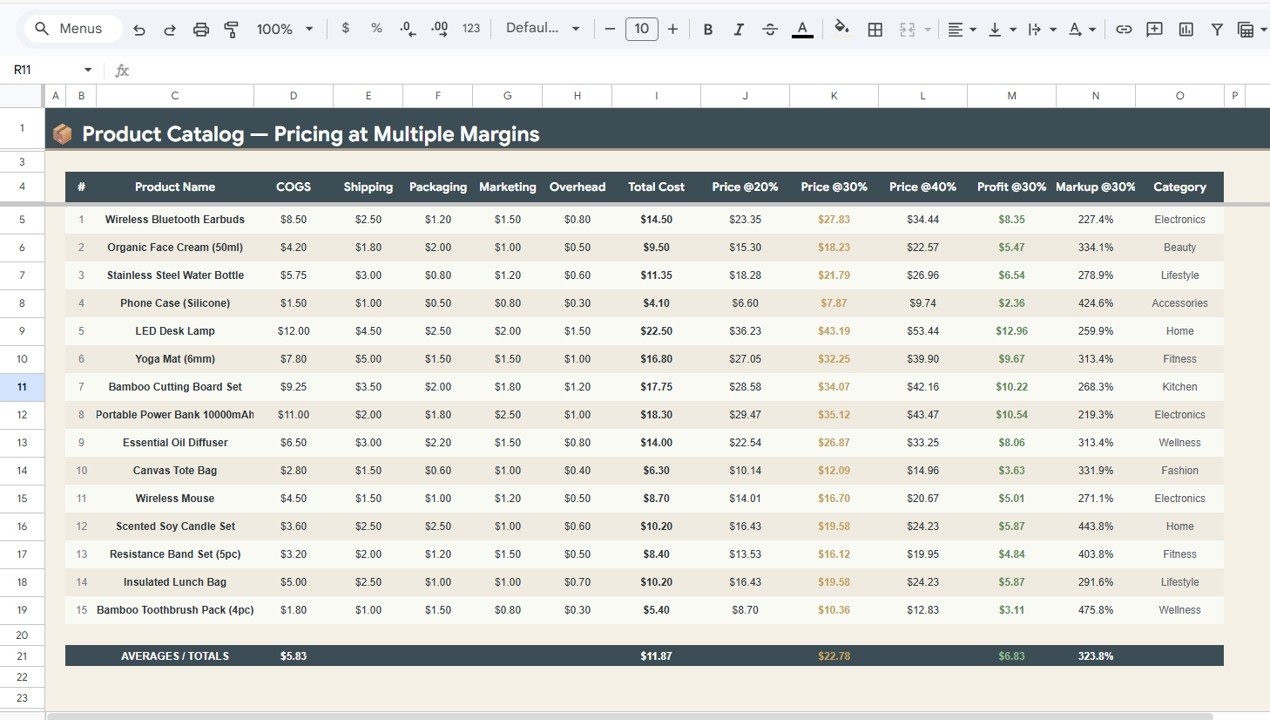
Product Catalog Pricing at Multiple Margins
3. Competitive Analysis
The Competitive Analysis tab turns raw competitor intelligence into actionable pricing decisions. It charts Their Price by Competitor showing what each rival charges, Price Diff by Competitor showing the dollar gap between your price and theirs, Price Diff % by Competitor expressing that gap as a percentage, Rating by Competitor tracking each competitor’s quality score, Positioning by Competitor categorising each rival as budget, mid-range, or premium, and Action by Competitor recommending whether to match, undercut, or hold your current price. This tab is particularly useful before launching a new product or adjusting prices in a competitive market.
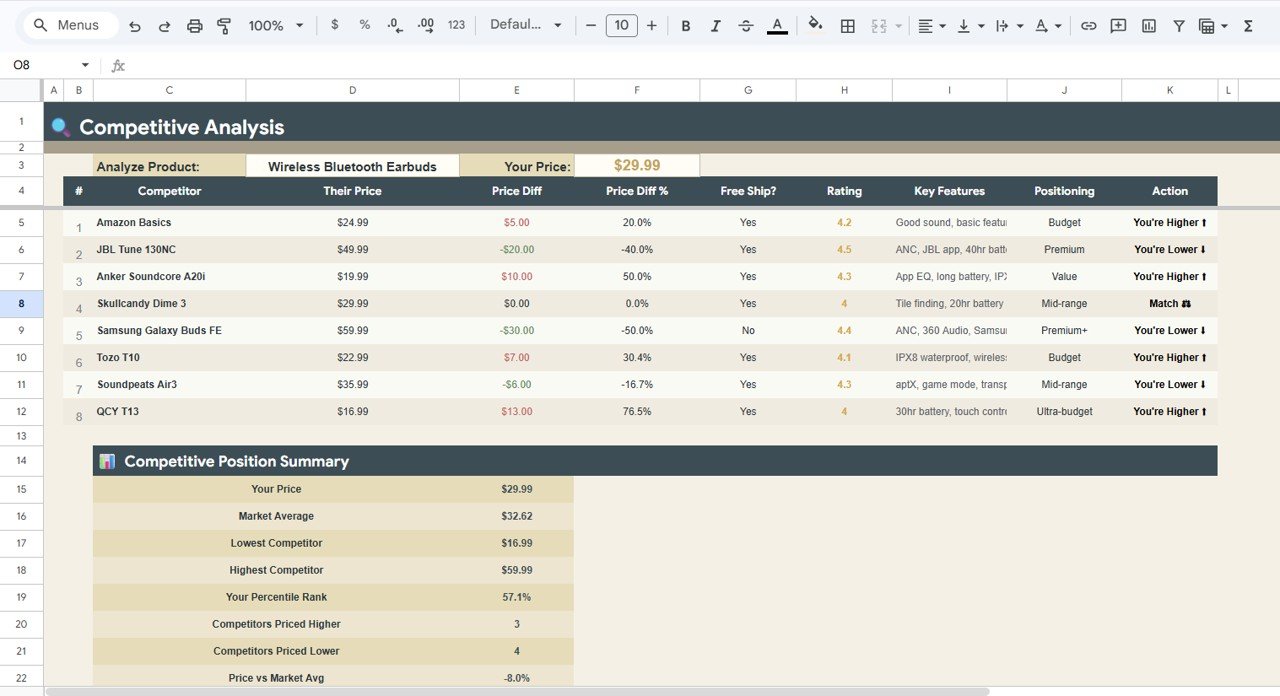
Competitive Analysis
4. Discount Simulator
The Discount Simulator tab lets you stress-test any promotional discount before committing. It shows Discounted Price by Discount % displaying the final price after discount, Margin by Discount % showing the remaining margin at each level, Revenue Loss by Discount % quantifying how much top-line revenue you give up, New Profit by Discount % showing absolute profit after the discount, Profit Change by Discount % expressing the impact as a percentage change, and Verdict by Discount % flagging each scenario as viable, marginal, or destructive with color coding. This tab eliminates the guesswork from promotional pricing.
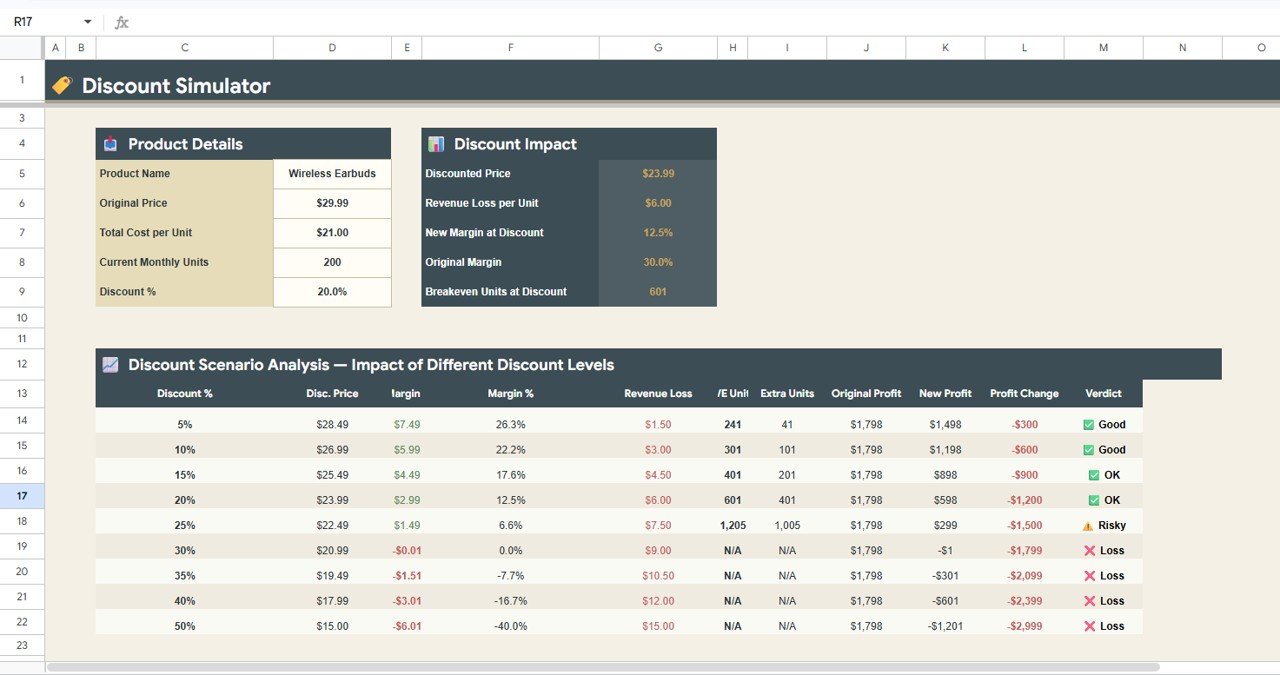
Discount Simulator
5. Bundle Pricing Calculator
The Bundle Pricing Calculator tab helps you design profitable product bundles. It tracks Individual Price by Product showing each item’s standalone price, Cost by Product showing the unit cost, Extended Price by Product multiplying price by quantity in the bundle, Extended Cost by Product multiplying cost by quantity, Ind. Margin by Product showing the dollar margin on each item, and Ind. Margin % by Product showing the percentage margin. The totals at the bottom show bundle-level price, cost, and margin so you can set a bundle discount that still protects your overall profit floor.
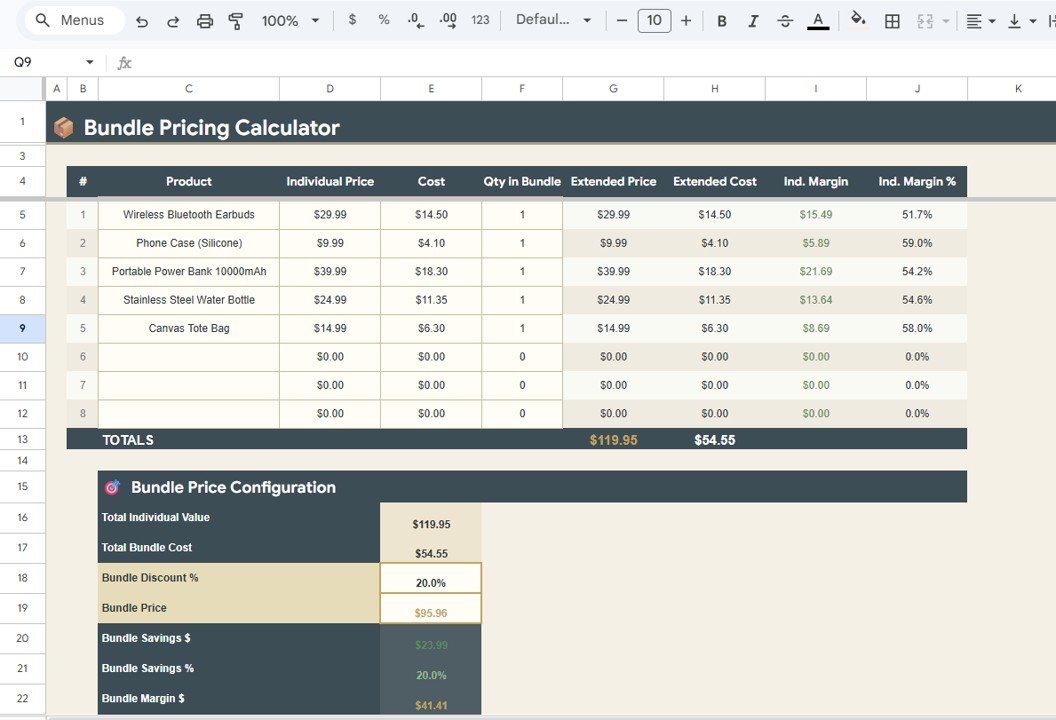
Bundle Pricing Calculator
6. Pricing Dashboard
The Pricing Dashboard tab provides a bird’s-eye visual summary of your entire pricing structure. It includes 8 charts: Average Selling Price by Catalog comparing prices across product lines, Average Cost by Catalog comparing costs, Average Profit per Unit by Catalog showing profit distribution, Average Markup by Catalog comparing markup percentages, Average Price by Category breaking prices down by product category, Profit Distribution by Category showing where profits concentrate, Cost vs Selling Price by Product highlighting the spread between cost and price for every individual product, and Markup % by Product ranking products by markup. This page is ideal for monthly pricing reviews and executive presentations.
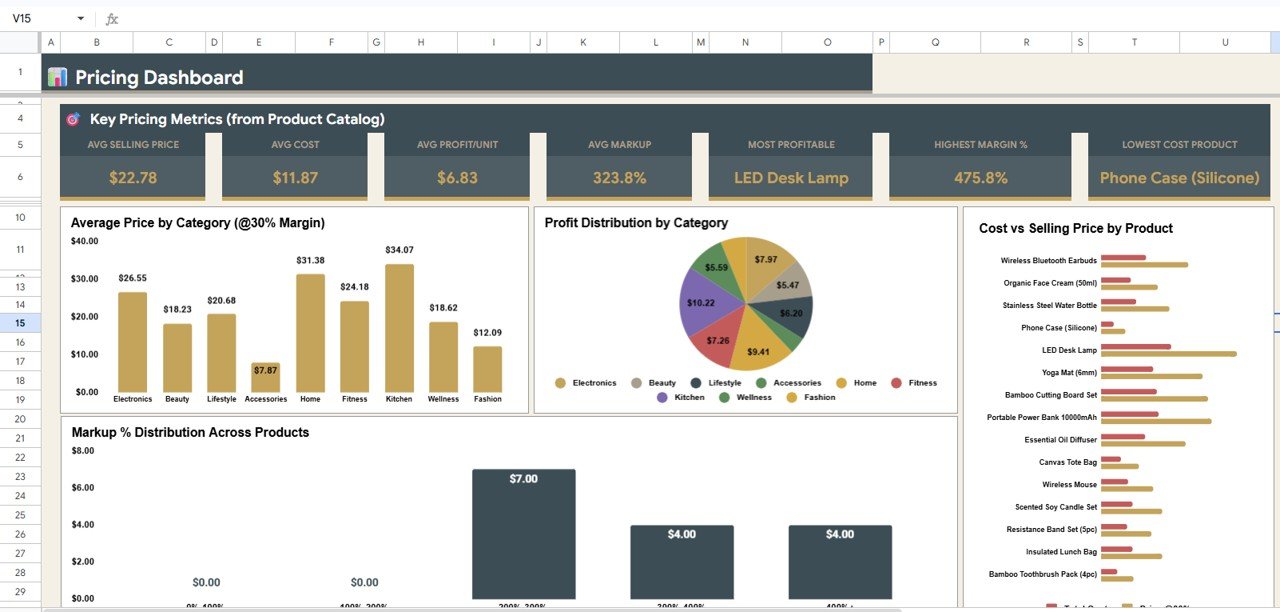
Pricing Dashboard
Pricing Calculator in Google Sheets vs. Microsoft Excel Pricing Template vs. Paid SaaS Pricing Tools — Feature Comparison
| Feature | Pricing Calculator in Google Sheets | Microsoft Excel Pricing Template | Paid SaaS (e.g., ProfitWell / Pricefx / PROS) |
|---|---|---|---|
| Cost | $6.99 one-time ✅ | $10–$30 one-time | $500–$5,000+ per month |
| Platform | Google Sheets (browser, mobile, any OS) ✅ | Microsoft Excel (desktop license required) | Cloud SaaS — vendor lock-in |
| Setup time | Under 10 minutes ✅ | Under 10 minutes | 4–12 weeks (onboarding + integrations) |
| Real-time team collaboration | Yes — built into Google Sheets ✅ | Limited (OneDrive co-authoring) | Yes |
| Mobile access | Yes — Google Sheets mobile app ✅ | Limited on mobile | Yes (native app) |
| Multi-margin catalog pricing | Yes — 20%, 30%, 40% margins side-by-side ✅ | Manual formula setup | Yes (automated) |
| Competitive analysis tab | Yes — built-in with price diff and positioning ✅ | Not included | Yes (advanced) |
| Discount simulation | Yes — with viability verdict ✅ | Manual | Yes (AI-driven) |
| Year-1 cost at 5 users | $6.99 ✅ | $10–$30 | $6,000–$60,000+ |
For small businesses and product managers who want structured pricing analysis without paying $500+/month for enterprise SaaS, the Pricing Calculator in Google Sheets sits in the sweet spot.
Who Should Use This Template
✅ Perfect for:
- Product managers at small-to-mid businesses (10–200 products) modeling pricing at multiple margin targets
- E-commerce store owners benchmarking prices against competitors and testing discount scenarios
- Startup founders and solopreneurs setting initial product pricing with cost-plus and margin-based calculations
- Sales managers calculating bundle pricing to ensure bundled deals stay profitable
- Finance and operations teams seeking a $6.99 alternative to $500+/month pricing SaaS
❌ Not a fit if:
- You have 10,000+ SKUs needing AI-driven dynamic pricing with real-time market data feeds
- You need automated competitor price scraping — this template uses manual competitor data entry
- You require multi-currency pricing with live exchange rate integrations
Real-World Use Cases
Ravi runs a 45-product skincare brand on Shopify. He uses the Pricing Calculator in Google Sheets to model prices at 20%, 30%, and 40% margins across his product line, runs the Discount Simulator before every seasonal sale to ensure promotions stay above his profit floor, and reviews the Pricing Dashboard monthly to spot products where markup has drifted below 25%. The template replaced a $200/month pricing analytics subscription he was paying for.
Elena manages pricing for a 120-SKU industrial parts distributor in Chicago. She uses the Competitive Analysis tab to benchmark against three key competitors weekly, the Bundle Pricing Calculator to structure volume-discount packages for large customers, and the Overview KPIs to present breakeven analysis to her operations director — all from a shared Google Sheet that her team of five accesses simultaneously without any extra per-user fees.
Tomás is a solo SaaS founder in Lisbon building his first product. He uses the Overview page to test different price points and instantly see how each one affects gross profit, net profit, and breakeven volume. The Discount Simulator helps him decide whether to offer a launch discount, and the Competitive Analysis tab keeps his pricing positioned correctly against two established competitors — without needing Pricefx or PROS.
Advantages of Pricing Calculator in Google Sheets
- All-in-One Pricing Toolkit — Six dedicated tabs cover every pricing decision from cost modeling to competitive benchmarking to discount testing, eliminating the need for multiple separate spreadsheets.
- Instant Margin Comparisons — See your entire product catalog priced at 20%, 30%, and 40% margins side by side in one view, making margin target selection data-driven rather than intuitive.
- Risk-Free Promotion Planning — The Discount Simulator with its viability verdict prevents margin-destructive promotions before they go live, saving real revenue.
- Collaborative by Default — Google Sheets enables real-time multi-user editing, so pricing teams, sales leads, and finance can work in the same sheet simultaneously.
- One-Time $6.99 — No recurring SaaS fees, no per-user pricing, no annual renewals. Full ownership of your pricing model and data.
Opportunities for Improvement
- No Automated Competitor Data — Competitor prices are entered manually. Integrating with a price monitoring API like Prisync or Competera would automate this step.
- Single Currency — The template works in one currency at a time. Adding a currency conversion layer with live exchange rates would benefit international sellers.
- Historical Price Tracking — Currently shows current pricing snapshots. Adding a historical price log with trend charts would enable longitudinal pricing analysis.
- Demand Elasticity — The Discount Simulator assumes constant demand. Incorporating price-elasticity curves would make discount projections more realistic for volume-sensitive products.
Best Practices
- Start with Accurate Costs — The accuracy of every KPI and margin calculation depends on entering correct fixed costs, variable costs, and overhead allocations on the Overview page.
- Update Competitor Data Monthly — Refresh the Competitive Analysis tab at least monthly to ensure your positioning and recommended actions reflect current market conditions.
- Review the Pricing Dashboard Before Board Meetings — The 8-chart dashboard provides a presentation-ready overview of average prices, costs, profits, and markups — ideal for executive reviews.
- Test Discounts Before Launching Promotions — Always run proposed discounts through the Discount Simulator and check the Verdict column before committing to any sale.
- Use Category Summaries for Strategic Decisions — The category-level views on both the Product Catalog and Pricing Dashboard tabs help identify which product categories deserve investment and which need pruning.
Explore Relevant Templates
- Personal Finance Dashboard in Google Sheets — Track income, expenses, savings, and budgets with an interactive Google Sheets dashboard.
- Personal Monthly Budget Tracker in Google Sheets — Monthly budget tracker with category-level expense analysis and savings tracking.
- Debt Payoff Calculator Template in Google Sheets — Snowball and avalanche debt payoff strategies with timeline projections.
- Credit Card KPI Dashboard in Google Sheets — Monitor credit card spending, limits, utilization, and payment tracking.
- Browse all Google Sheets Financial Tools and Google Sheets Dashboards on NextGenTemplates.
If you would like to go deeper on the formulas behind pricing models like this one, the Excel AI Mastery: 100 Formulas course on NextGenTemplates Academy covers them with downloadable practice files.
Get the Pricing Calculator in Google Sheets
Frequently Asked Questions
What sheets are included in the Pricing Calculator in Google Sheets?
The Pricing Calculator in Google Sheets includes 6 sheet tabs: Overview with 9 KPI cards and 6 charts, Product Catalog Pricing at Multiple Margins, Competitive Analysis, Discount Simulator, Bundle Pricing Calculator, and a Pricing Dashboard with 8 visual charts covering your entire pricing structure.
How does the multi-margin pricing work in this template?
The Product Catalog Pricing tab takes each product’s total cost and calculates the selling price needed to achieve 20%, 30%, and 40% profit margins side by side. It also shows profit and markup at the 30% margin level with category-level cost summaries for portfolio-wide comparisons.
Can I add my own competitors to the Competitive Analysis tab?
Yes. Enter competitor names, their prices, and ratings directly in the Competitive Analysis sheet. The template automatically calculates price differences, price diff percentages, market positioning, and recommended pricing actions for each competitor you add.
How does the Discount Simulator help with pricing decisions?
The Discount Simulator in the Pricing Calculator in Google Sheets lets you enter any discount percentage and instantly shows the discounted price, remaining margin, revenue loss, new profit amount, profit change percentage, and a color-coded verdict — viable, marginal, or destructive — so you know the impact before running a promotion.
How long does setup take?
Setup of the Pricing Calculator in Google Sheets takes under 10 minutes. Click the copy link in the PDF guide to create your own Google Drive copy, replace the sample product data with your own costs and prices, and every KPI, chart, and calculation updates automatically.
How does this compare to paid pricing SaaS like Pricefx or ProfitWell?
Paid pricing SaaS tools typically cost $500 to $5,000+ per month with 4–12 weeks of onboarding. The Pricing Calculator in Google Sheets is $6.99 one-time with no recurring fees and covers margin modeling, competitive benchmarking, discount simulation, and bundle pricing — with full customization since you own the spreadsheet.
Is the Pricing Calculator in Google Sheets a one-time purchase?
Yes. The Pricing Calculator in Google Sheets is $6.99 one-time, instant download, no subscription, no per-user fees, and lifetime access. You also receive free updates whenever the template is revised.
About the Author
Built by PK — Microsoft Certified Professional with 15+ years of Excel, Google Sheets, and Power BI experience. Founder of NextGenTemplates, reaching 300K+ subscribers across YouTube channels. Every template is hand-built and tested before release.
Conclusion
The Pricing Calculator in Google Sheets gives you 6 dedicated sheet tabs, 9 KPI cards, and 14+ charts to model product pricing at multiple margins, benchmark against competitors, simulate discount impact, calculate bundle margins, and visualise your pricing structure — all from a single, collaborative Google Sheet. For product managers, e-commerce owners, startup founders, and finance teams who want structured pricing analytics without paying $500+/month for enterprise SaaS, this template delivers the same intelligence at a fraction of the cost.
✅ Instant download · One-time payment · No subscription · Lifetime access
For more Google Sheets pricing and finance guidance, refer to Google’s official Sheets help documentation.