The Employee Attendance Payroll Management System is built for HR teams that need one connected workspace for employee records, daily attendance, leave approvals, shift rules, payroll processing, salary slips, performance reviews, branches and user access. Instead of managing 8 to 12 separate spreadsheets, this template brings 15 operational pages into one management system, with dashboard cards, charts, filters, forms and tables designed for daily HR work. The launch sale price is $39.99, with no monthly SaaS subscription and no per-user software fee.Employee Attendance Payroll Management System
This template is ideal for small businesses, agencies, schools, clinics, factories, local service companies and growing teams that need more control than a basic attendance sheet but are not ready for expensive enterprise HR software.Employee Attendance Payroll Management System
Get the Employee Attendance Payroll Management System
Key Features of Employee Attendance Payroll Management System
- 15-page HR workspace: Sign in, dashboard, employees, attendance, leave, payroll, salary slips, performance, branches and usersEmployee Attendance Payroll Management System
- Workforce dashboard: Track employees, present staff, absences, late arrivals, leave status, payroll status, pending slips, holidays and appraisals.Employee Attendance Payroll Management System
- Attendance and leave tracking: Capture check-in, check-out, shift, late minutes, early leave, overtime and leave approvals.Employee Attendance Payroll Management System
- Payroll-ready structure: Connect salary setup, paid days, deductions, overtime and net salary in one monthly payroll flow.Employee Attendance Payroll Management System
- Role-based user planning: Manage login accounts, roles, departments, branches and employee links from a dedicated users page.Employee Attendance Payroll Management System
- Branch and shift controls: Maintain locations, weekly off days, grace periods, full-day rules and half-day rules.Employee Attendance Payroll Management System
Dashboard Pages Explanation
1. Sign In Page
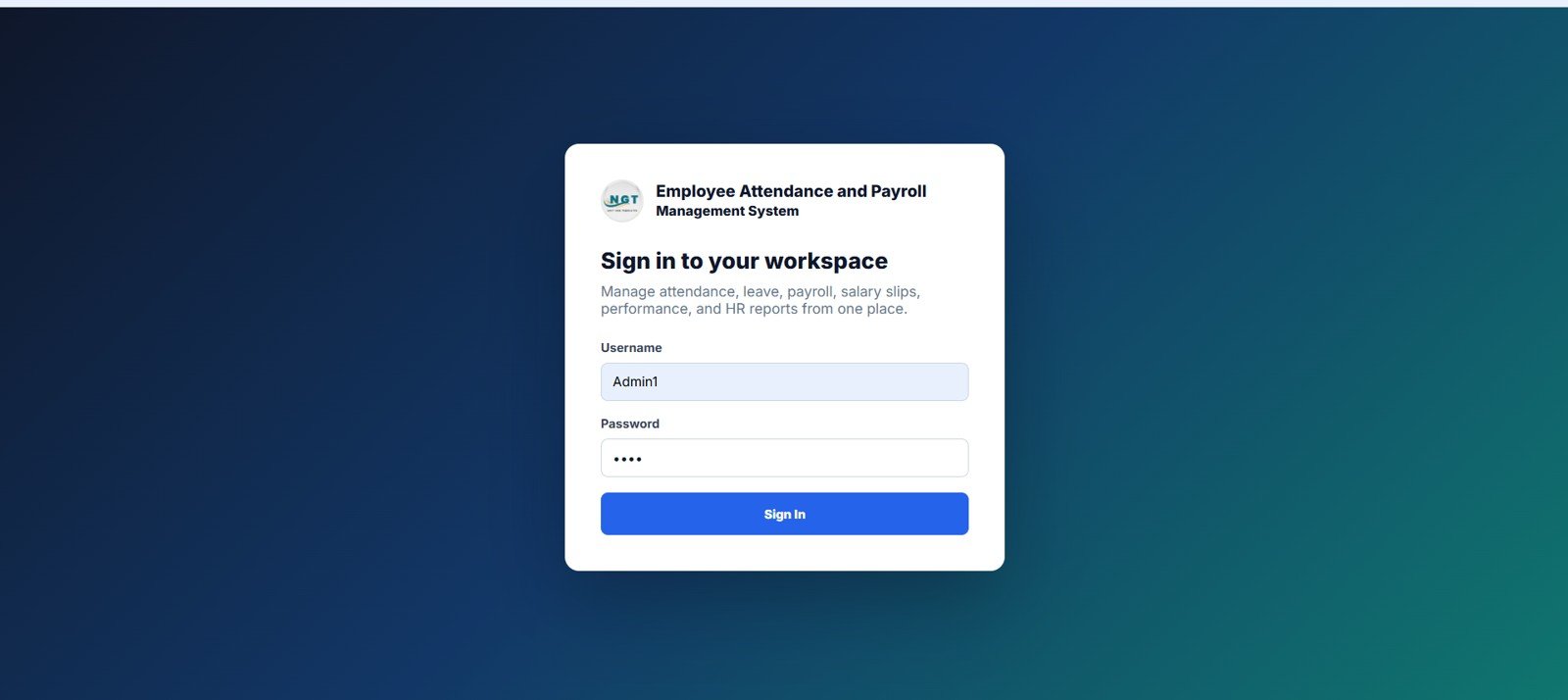
The sign in page creates a clean entry point for authorized users. HR admins enter a username and password, then click Sign In to access the workspace.
- Username
- Password
- Sign In Button
Try the Live Demo Before You Buy
We have deployed this web app in our own Google account so you can test every page and every role with real sample HR and payroll data before purchasing. No signup, no email required.
Test Login Credentials
Sign in with any of the seeded roles below to review the system from admin setup, HR operations, and employee self-service perspectives. All demo passwords are abcd.
What you get after purchase: The full source code (Code.gs + Index.html) plus a step-by-step deployment guide so you can deploy your own private instance in your own Google account in under 15 minutes.
2. Dashboard Overview
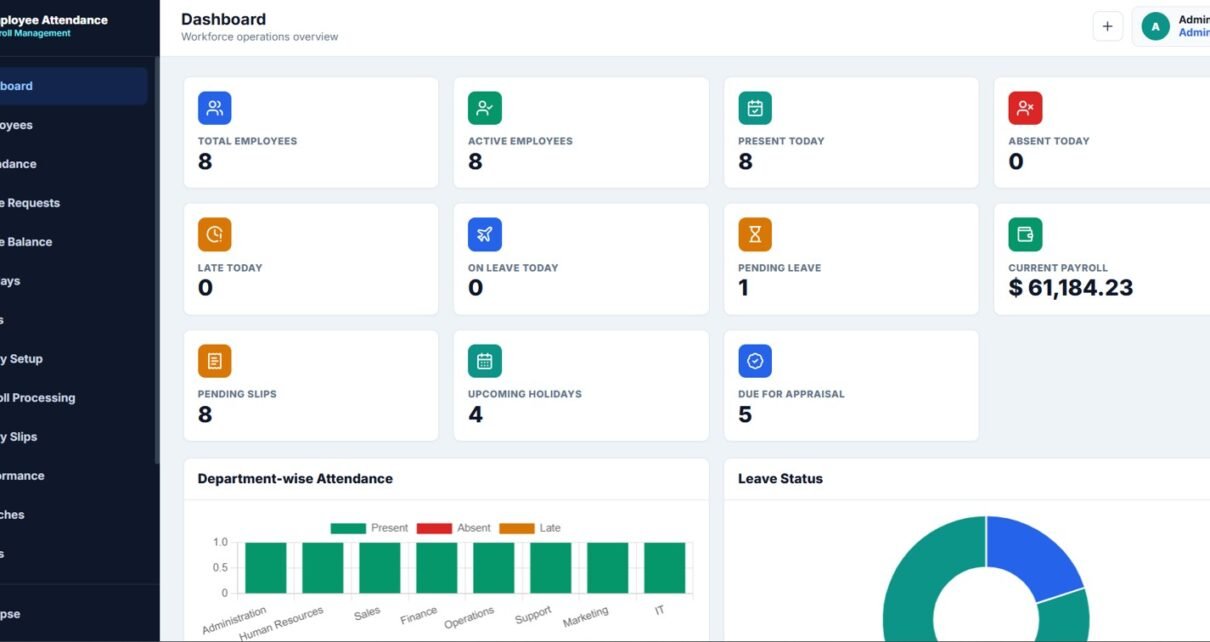
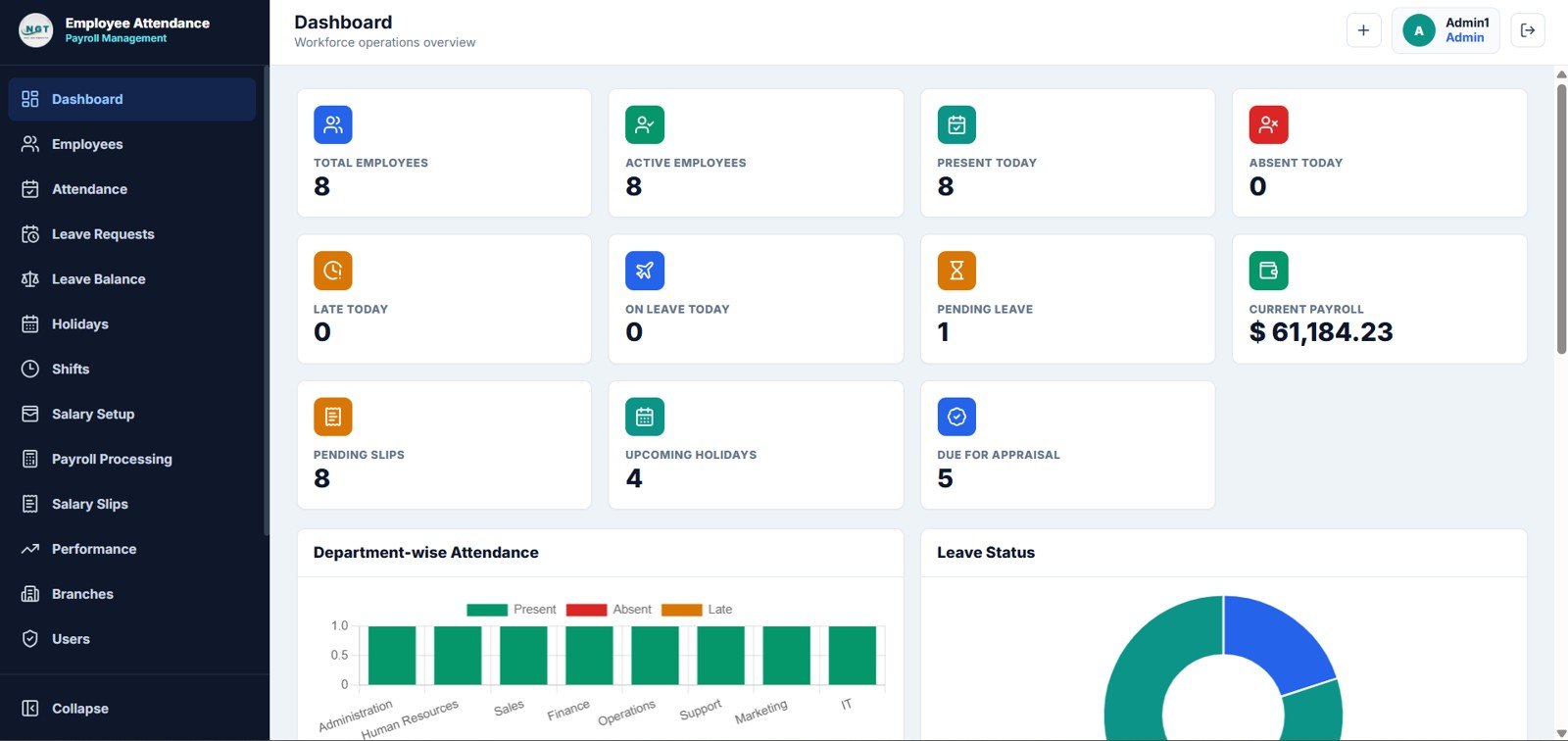
The dashboard overview gives leadership a fast snapshot of daily workforce operations. It includes high-level cards for employee status, payroll progress, leave activity and upcoming HR actions.
The Attendance by Department chart helps compare present, absent and late records across teams. The Leave Status by Leave Type chart shows which leave categories are pending, approved or rejected so HR can act quickly.
- Total Employees
- Active Employees
- Present Today
- Absent Today
- Late Today
- On Leave Today
- Pending Leave
- Current Payroll
- Pending Slips
- Upcoming Holidays
- Due for Appraisal
3. Dashboard Trends and Recent Activity
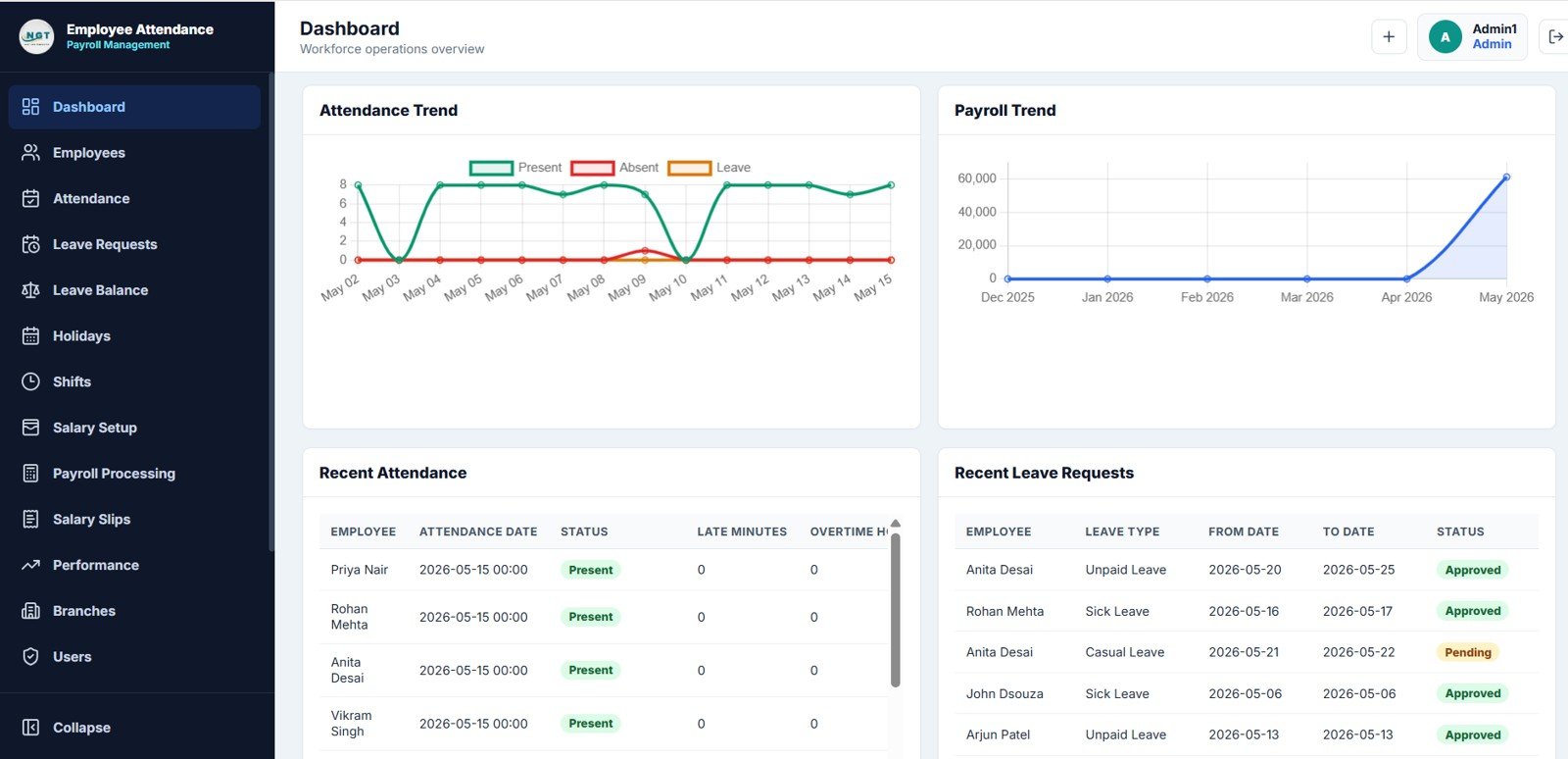
This dashboard section focuses on time-based insights and recent employee activity. HR teams can review attendance trends by date, payroll changes by month, recent attendance records and recent leave requests.Employee Attendance Payroll Management System
- Attendance Trend by Date
- Payroll Trend by Month
- Recent Attendance by Employee
- Recent Leave Requests by Employee
4. Employees Page
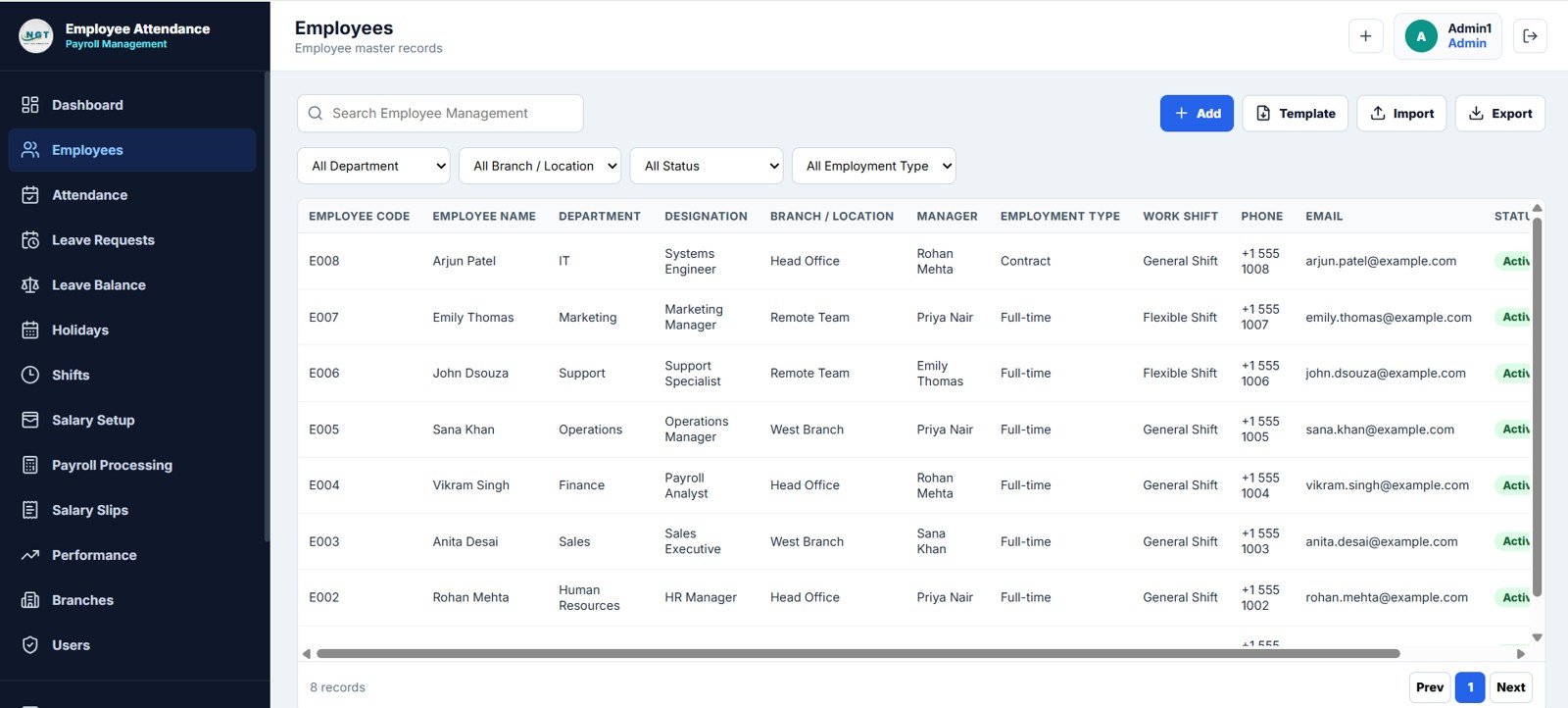
The employees page is the master employee database. It supports add, edit, import, export, search and filtering so HR can keep the employee list organized.
- Employee Code
- Employee Name
- Department
- Designation
- Branch / Location
- Manager
- Employment Type
- Work Shift
- Phone
- Status
5. Attendance Page
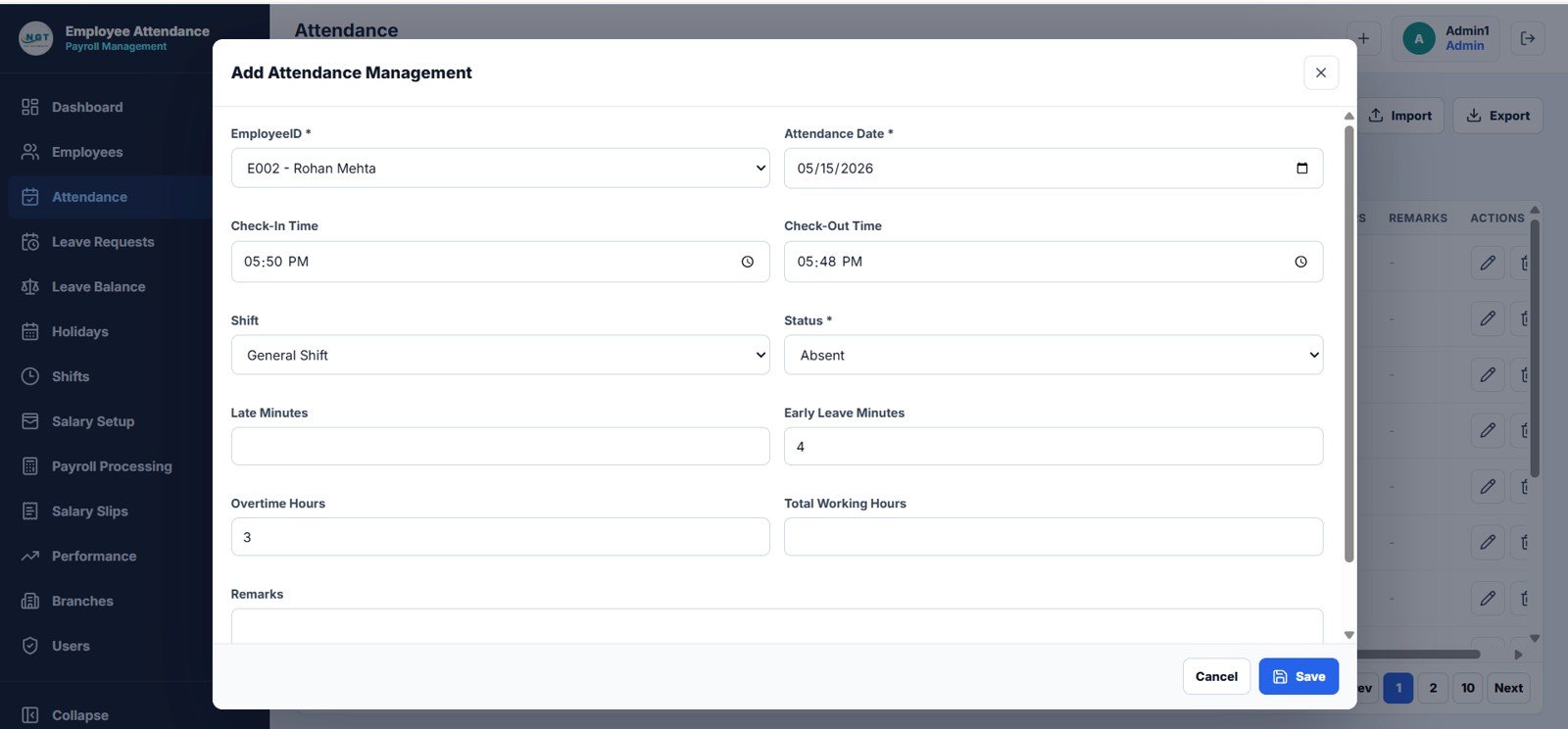
The attendance page captures daily work records for each employee. It stores check-in, check-out, shift, status, late time, early leave, overtime, total hours and remarks.
- EmployeeID
- Attendance Date
- Check-In Time
- Check-Out Time
- Shift
- Status
- Late Minutes
- Early Leave Minutes
- Overtime Hours
- Total Working Hours
- Remarks
6. Leave Requests Page
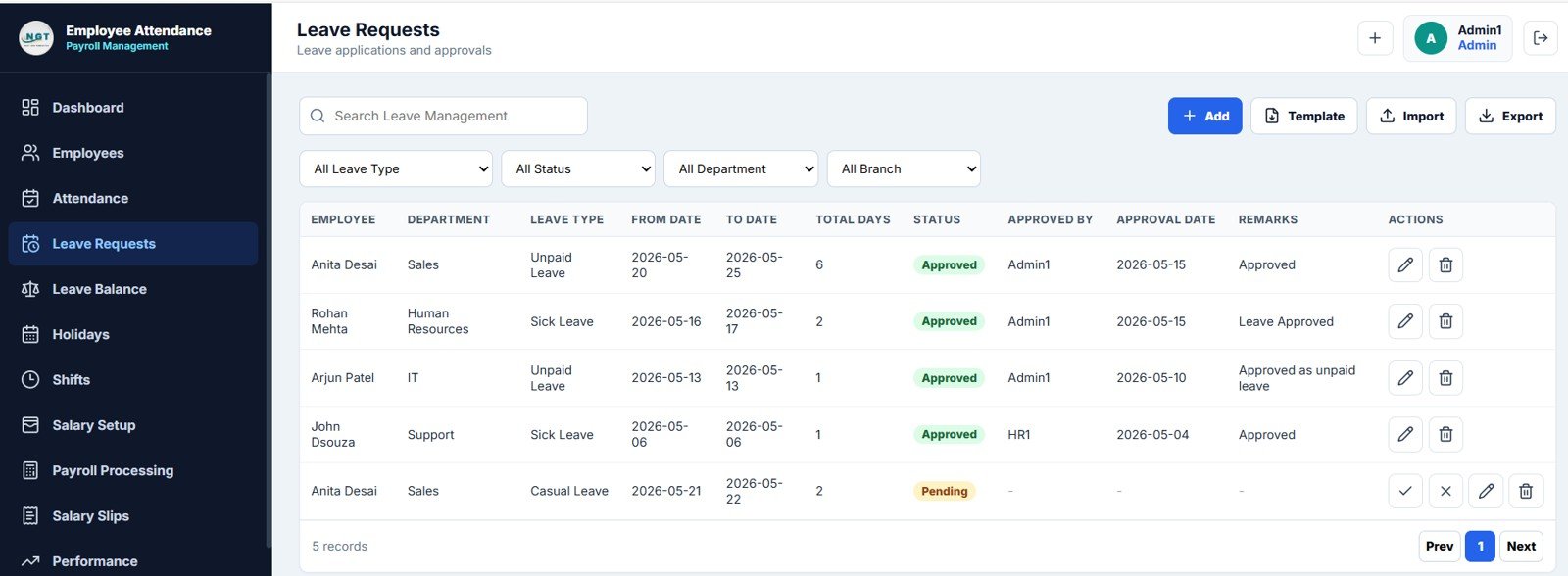
The leave requests page manages applications and approval decisions. HR can filter requests by leave type, status, department and branch, then approve or reject pending rows.Employee Attendance Payroll Management System
- Employee
- Department
- Leave Type
- From Date
- To Date
- Total Days
- Status
- Approved By
- Approval Date
- Remarks
7. Leave Balance Page
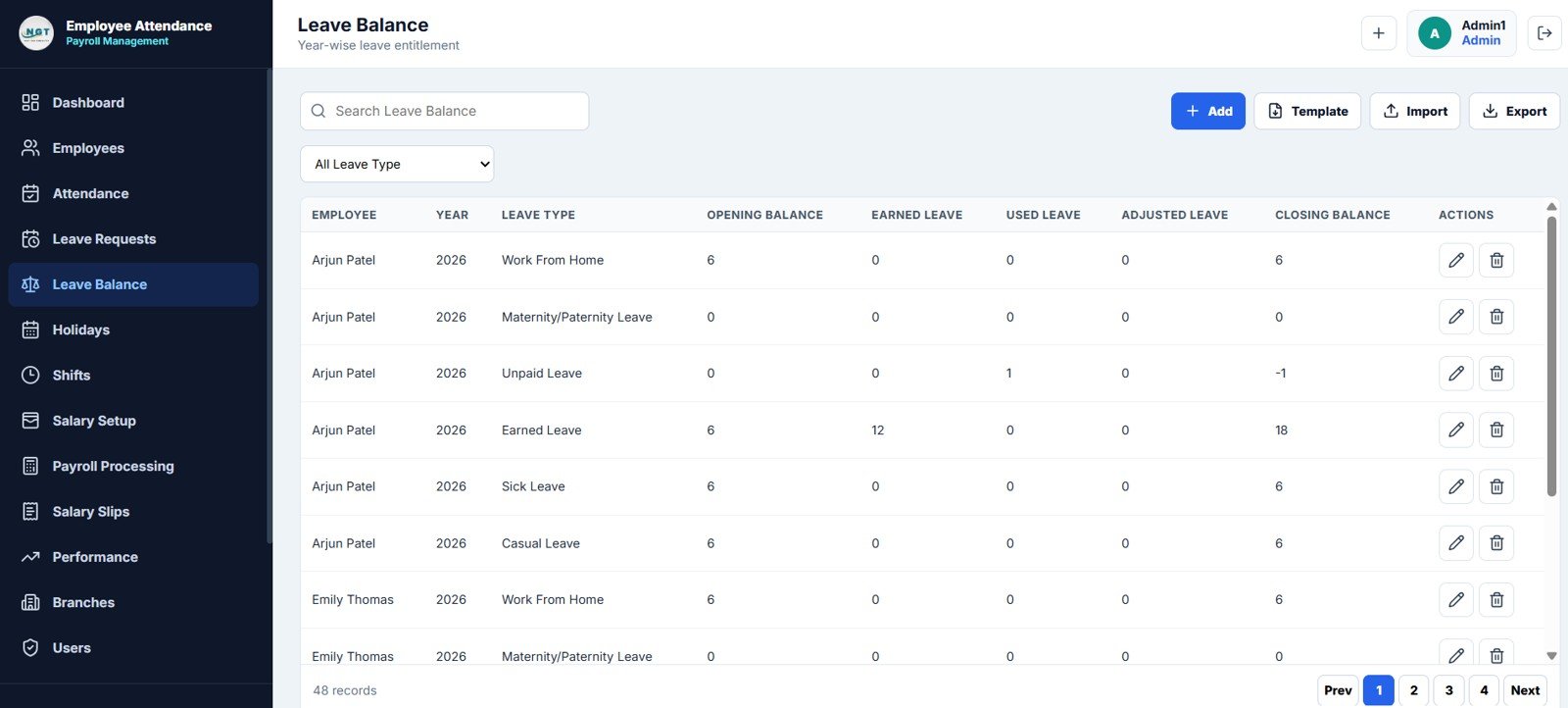
The leave balance page tracks entitlement by employee, year and leave type. It shows opening balance, earned leave, used leave, adjustments and closing balance.
- Employee
- Year
- Leave Type
- Opening Balance
- Earned Leave
- Used Leave
- Adjusted Leave
- Closing Balance
8. Holidays Page
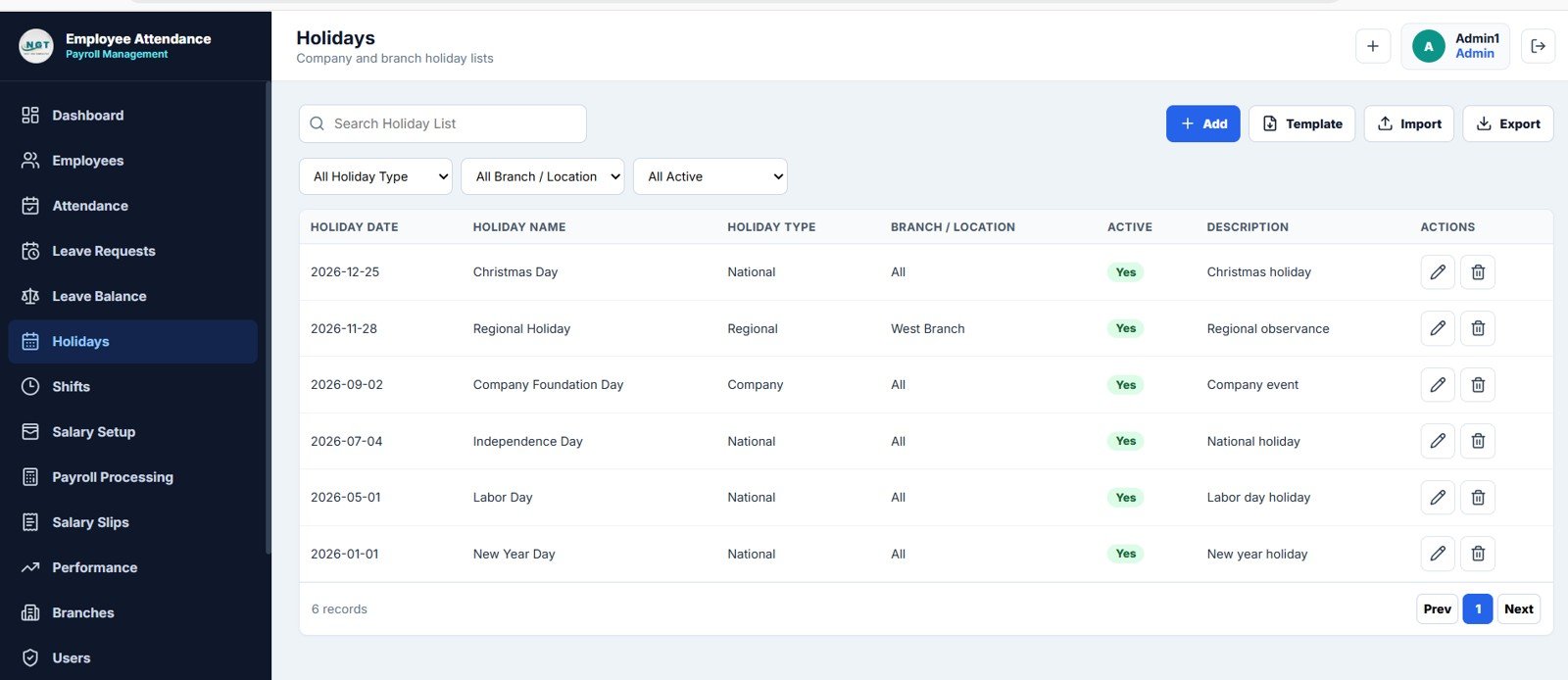
The holidays page stores company, national and regional holidays. Each holiday can be assigned to all locations or a specific branch.
- Holiday Date
- Holiday Name
- Holiday Type
- Branch / Location
- Active
- Description
9. Shifts Page
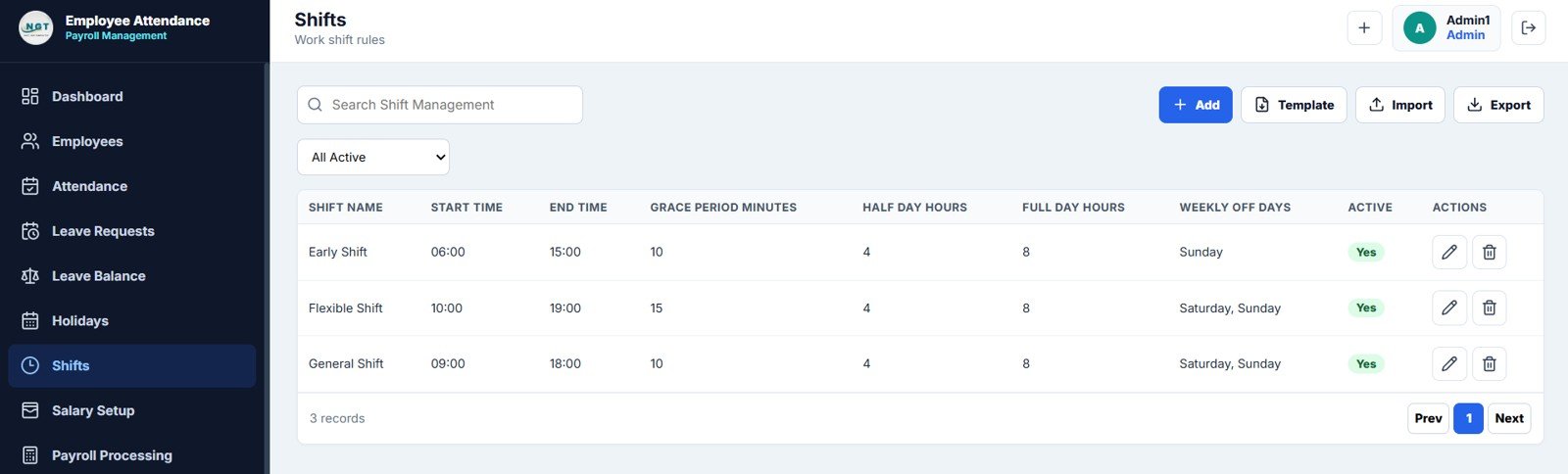
The shifts page defines the rules that power attendance and payroll calculations. Multiple shifts can use different start times, end times, grace periods, hour rules and weekly off days.Employee Attendance Payroll Management System
- Shift Name
- Start Time
- End Time
- Grace Period Minutes
- Half Day Hours
- Full Day Hours
- Weekly Off Days
- Active
10. Salary Setup Page
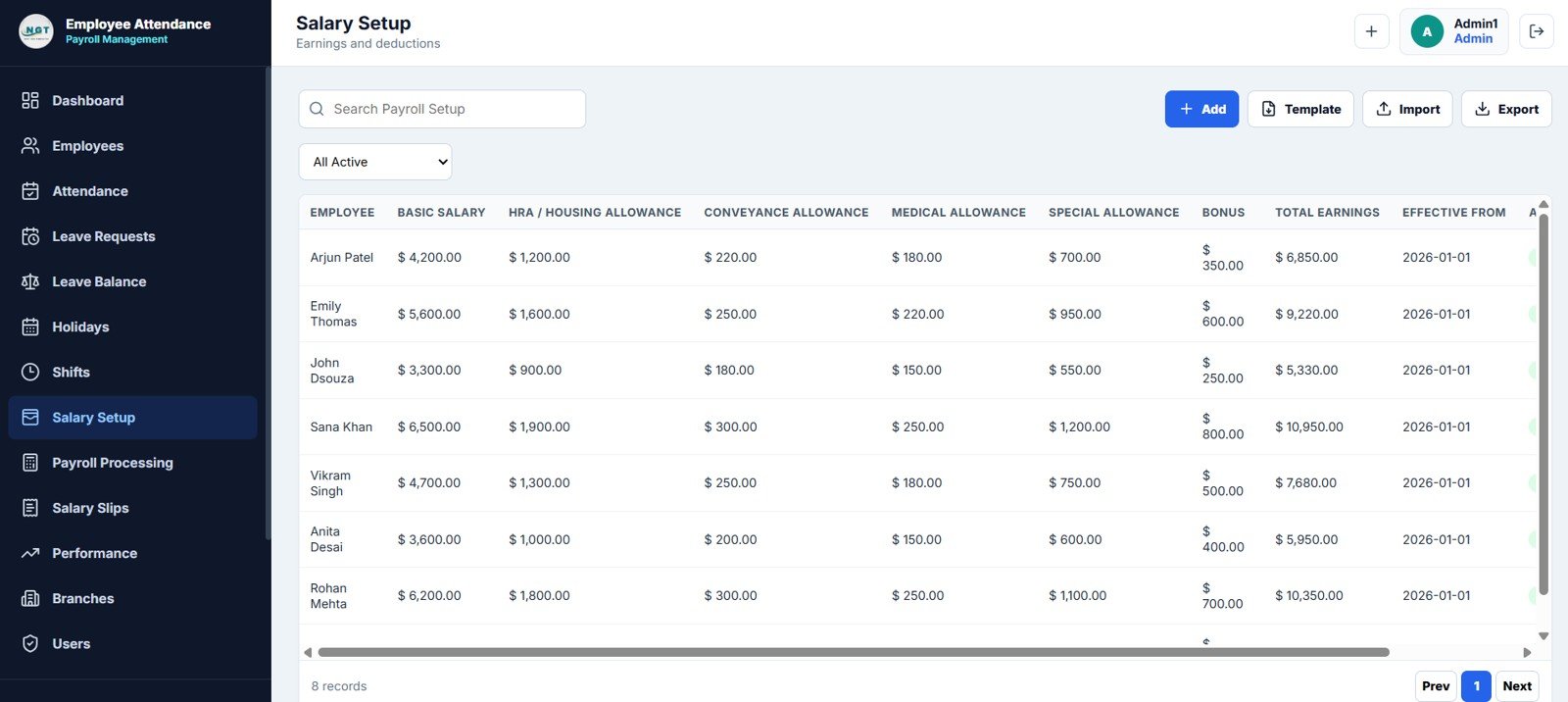
The salary setup page stores employee earnings and allowance structures. It becomes the foundation for monthly payroll calculations.
- Employee
- Basic Salary
- HRA / Housing Allowance
- Conveyance Allowance
- Medical Allowance
- Special Allowance
- Bonus
- Total Earnings
- Effective From
11. Payroll Processing Page
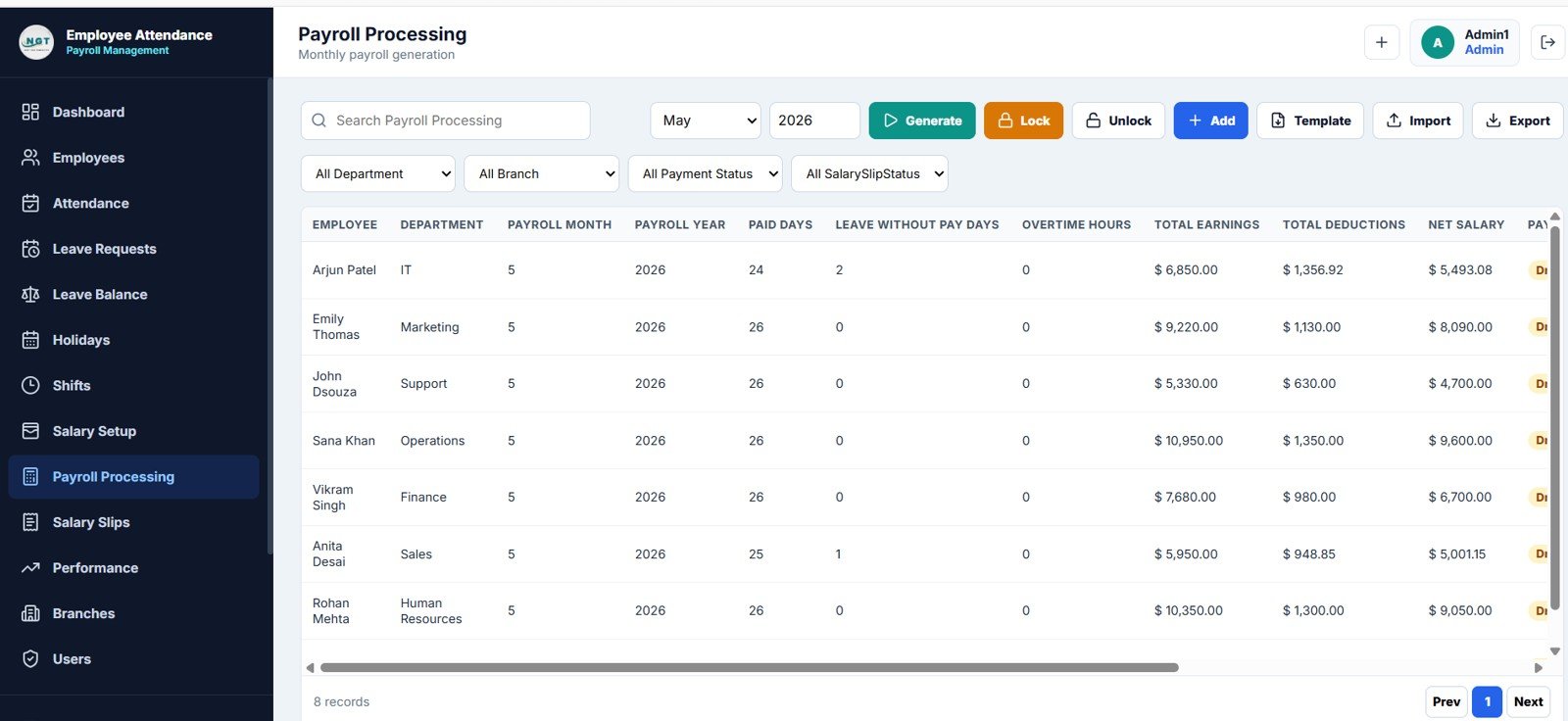
The payroll processing page generates monthly payroll by month and year. HR can generate, lock or unlock payroll periods to reduce accidental changes after review.
- Employee
- Department
- Payroll Month
- Payroll Year
- Paid Days
- Leave Without Pay Days
- Overtime Hours
- Total Earnings
- Total Deductions
- Net Salary
12. Salary Slips Page
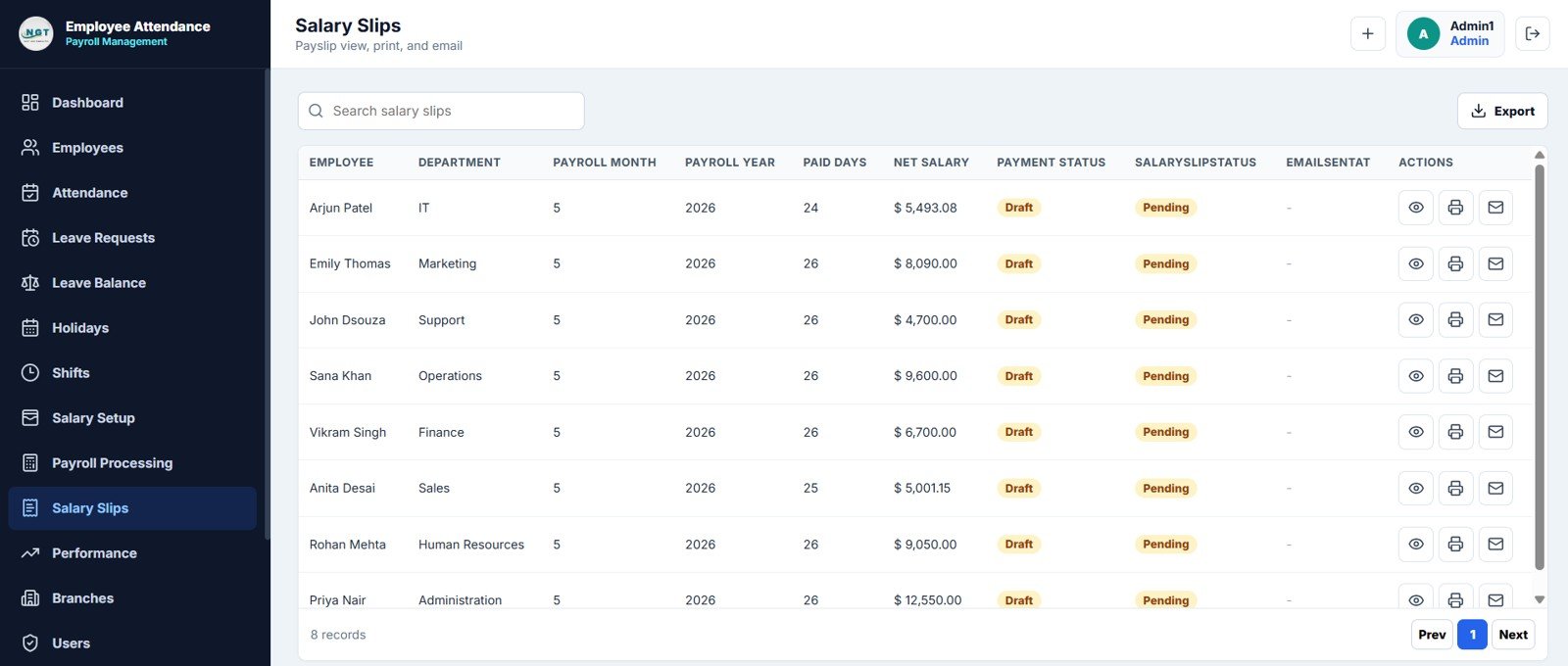
The salary slips page helps HR view, print and email payslips. Payment status and salary slip status make it easier to track pending payroll communication.
- Employee
- Department
- Payroll Month
- Payroll Year
- Paid Days
- Net Salary
- Payment Status
- Salary Slip Status
- Email Sent At
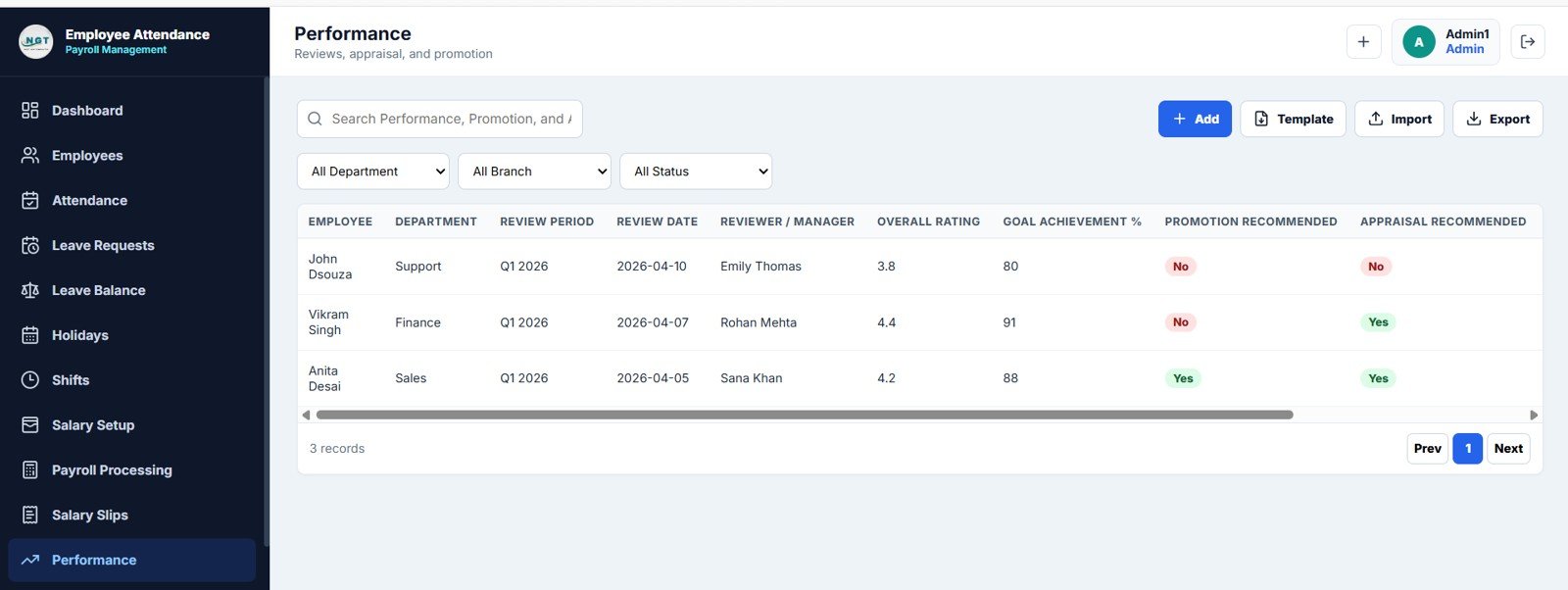
13. Performance Page
The performance page tracks reviews, appraisal recommendations and promotion recommendations. Managers can store ratings, goal achievement and reviewer details.
- Employee
- Department
- Review Period
- Review Date
- Reviewer / Manager
- Overall Rating
- Goal Achievement %
- Promotion Recommended
- Appraisal Recommended
14. Branches Page
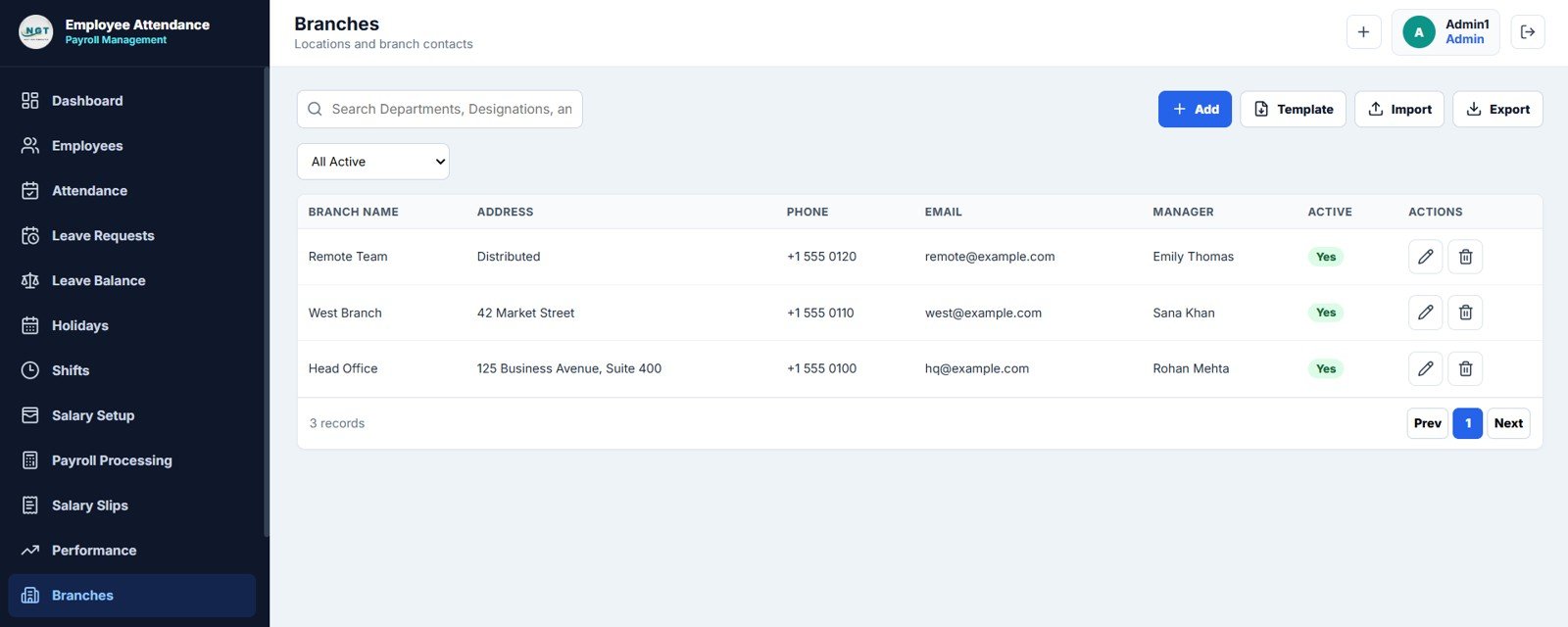
The branches page keeps company locations organized. Each branch can store address, contact details, manager assignment and active status.
- Branch Name
- Address
- Phone
- Manager
- Active
15. Users Page
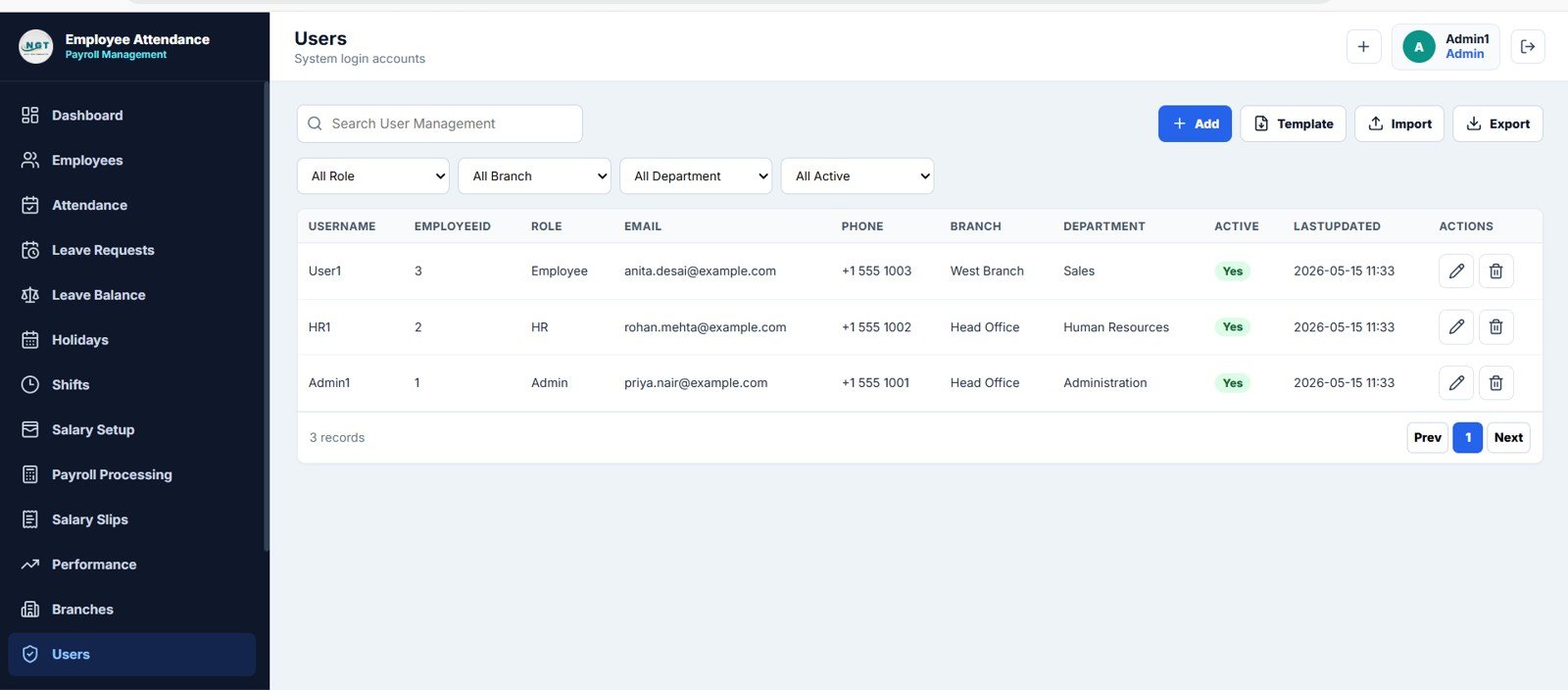
The users page manages system login accounts. Admins can create users, assign roles, link employees, set branches and departments, and control active status.
- Username
- EmployeeID
- Role
- Phone
- Branch
- Department
- Active
- Last Updated
Employee Attendance Payroll Management System vs. Spreadsheet Tracker vs. Paid HR SaaS – Feature Comparison
| Feature | This Template | Spreadsheet Tracker | Paid HR SaaS |
|---|---|---|---|
| Cost | One-time $39.99 sale price | Low cost, but often manual | Monthly subscription |
| Platform | Web app style management system | Excel or Google Sheets file | Hosted SaaS platform |
| Setup time | Fast setup with sample data replacement | Fast, but requires more formulas | Longer setup and onboarding |
| Real-time collaboration | Designed for shared HR workspace use | Possible, depending on file platform | Usually included |
| Customizable fields | Editable structure and page logic | Editable, but easier to break | Limited by plan and admin settings |
| Year-1 cost at 5 users | $39.99 one-time | Low, but more manual work | Often hundreds or thousands per year |
| Payroll workflow | Salary setup, payroll processing and slips | Usually separate sheets | Plan-dependent |
Who Should Use This Template
Use this template if you manage employee records, daily attendance, leave requests and payroll in a growing organization. It works well for HR managers, founders, office admins, payroll coordinators, branch managers and consultants building an HR operations system for a client.
It is not the best fit for companies that require country-specific tax filing, biometric device integration, statutory payroll submissions or deeply customized enterprise approval workflows from day one.
Real-World Use Cases
Small Business HR Manager
A 40-person services business can use the system to track employees, attendance, leave and monthly payroll without subscribing to a full HR SaaS suite.
Multi-Branch Operations Team
A company with multiple locations can maintain branch contacts, holidays, shifts and employees in one structured workspace.
Consultant Delivery Template
A consultant can adapt the system for client HR projects, replacing sample fields, branding and workflows based on the client’s process.
Advantages of Employee Attendance Payroll Management System
- Reduces manual switching between attendance, leave, salary and employee spreadsheets.
- Creates a cleaner HR audit trail with dedicated pages for each business process.
- Supports faster decisions through dashboard cards, charts and recent activity views.
- Helps standardize HR records across employees, departments, branches and managers.
Opportunities for Improvement
Every HR team has different payroll rules, leave policies and approval flows. Before using this template in production, review overtime logic, leave deductions, salary components, user roles and branch-specific holiday rules. If your organization has statutory payroll requirements, use this system as an internal management layer and confirm final compliance calculations with your accountant or payroll professional.
Best Practices
- Clean employee master records before importing data.
- Standardize department, designation, branch and shift names.
- Lock payroll periods after monthly review to avoid accidental changes.
- Review leave balances monthly instead of waiting until payroll closing.
- Follow the official Google Apps Script web app guide when deploying or adapting a web app version.
Explore Relevant Templates
- Employee Attendance Payroll Management System
- Attendance Tracker in Google Sheets
- Leave Application Management System V1.0
- Payroll Calculator and Payslip Generator in Excel
- Employee Appraisal and Performance Dashboard in Google Sheets
If you would like to sharpen the spreadsheet skills behind HR systems like this, the NextGenTemplates Academy learning paths are a good place to start, with practice files to work through.
Get the Employee Attendance Payroll Management System
Frequently Asked Questions
Is this a monthly subscription?
No. The template is sold as a one-time digital product.
Can I customize the pages?
Yes. The structure is designed so you can adapt fields, labels and workflow details to your HR process.
Does it include payroll and attendance together?
Yes. It connects attendance, leave, salary setup, payroll processing and salary slips in one management system.
Can I use it for multiple branches?
Yes. The template includes branches, location-based holidays, departments and managers.
Does it replace legal payroll compliance software?
No. It helps organize internal HR and payroll workflows. For statutory filing and tax compliance, confirm the final process with a payroll professional.
About the Author
Built by PK – Microsoft Certified Professional with 15+ years of Excel, Google Sheets, and Power BI experience. Founder of NextGenTemplates, reaching 300K+ subscribers across YouTube channels. Every template is hand-built and tested before release.
Conclusion
The Employee Attendance Payroll Management System gives HR teams a structured way to manage employee data, attendance, leave, payroll, salary slips, performance reviews, branches and users from one workspace. If your current process depends on scattered files and repeated manual updates, this template gives you a cleaner operating base at a one-time price.