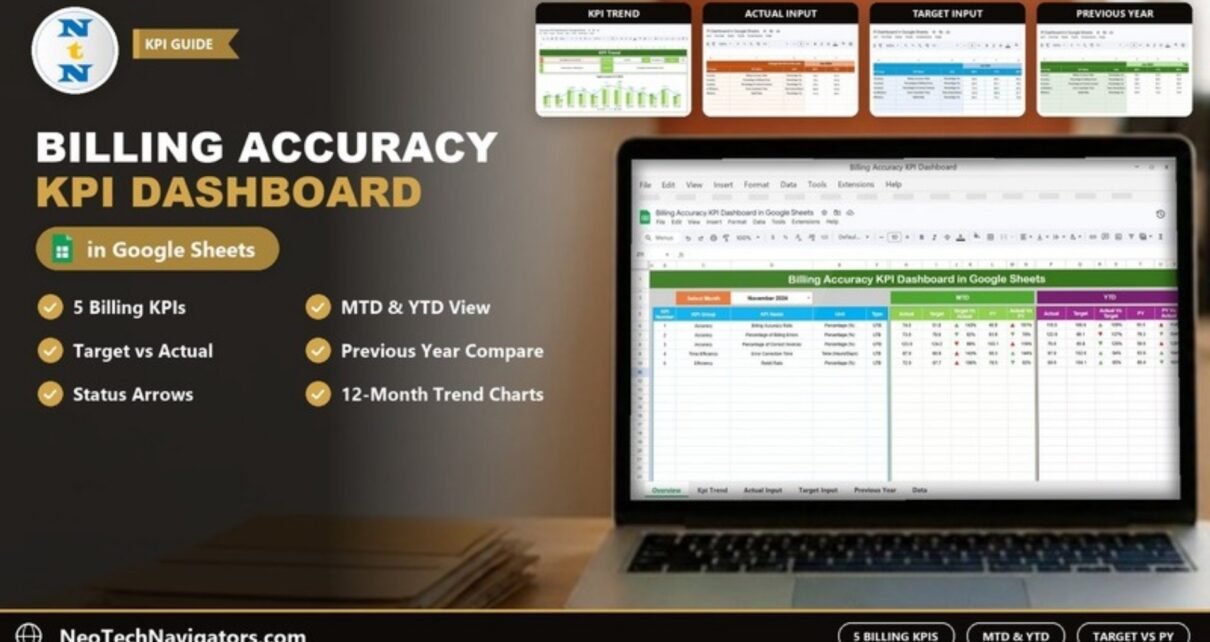
The Billing Accuracy KPI Dashboard in Google Sheets gives a billing or finance team one place to track how accurate its invoices are, month by month and year to date. You enter monthly actuals, targets and last year’s numbers, pick a month from a dropdown, and the dashboard shows each KPI against target and against the previous year with green and red arrows.
It is designed for billing supervisors, accounts receivable leads and finance managers who report on invoice quality every month and want something lighter than a BI tool. The template has six worksheets: Dashboard, KPI Trend, Actual Numbers Input, Target Number Input, Previous Year Number input and KPI Definition. It comes set up with five billing KPIs, which you can edit or extend.
Get the Billing Accuracy KPI Dashboard
Why Track Billing Accuracy KPIs?
Every incorrect invoice creates work twice: someone has to find the error, then someone has to issue a corrected bill and chase the payment again. Billing mistakes also delay cash collection and damage customer trust. Most teams know this, but few measure it consistently. Instead, numbers sit in separate monthly files and nobody can say whether accuracy is better than last year.
This dashboard puts a simple structure around the problem. You define the KPIs once, then add three numbers per KPI each month (actual, target and previous year). The comparisons, arrows and trend charts are built for you.
The Five Billing KPIs in the Template
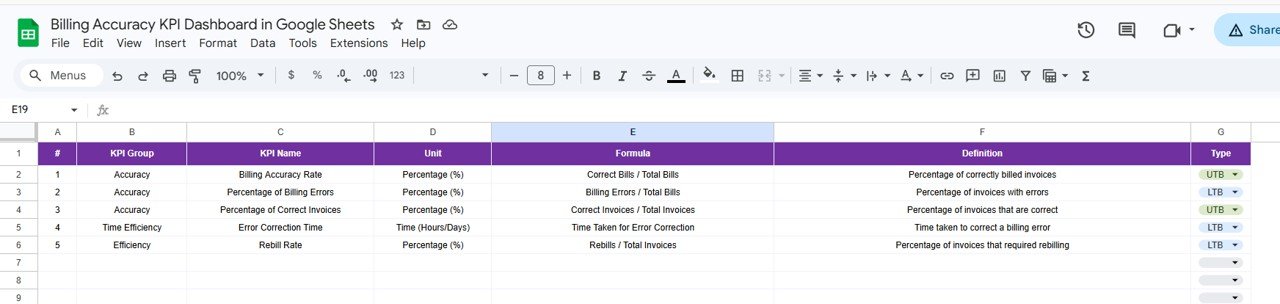
These are the KPIs exactly as they appear on the KPI Definition sheet. UTB means Upper the Better and LTB means Lower the Better.
| # | KPI | Group | Unit | Formula | What it measures | Better when |
|---|---|---|---|---|---|---|
| 1 | Billing Accuracy Rate | Accuracy | Percentage (%) | Correct Bills / Total Bills | Percentage of correctly billed invoices | Higher (UTB) |
| 2 | Percentage of Billing Errors | Accuracy | Percentage (%) | Billing Errors / Total Bills | Percentage of invoices with errors | Lower (LTB) |
| 3 | Percentage of Correct Invoices | Accuracy | Percentage (%) | Correct Invoices / Total Invoices | Percentage of invoices that are correct | Higher (UTB) |
| 4 | Error Correction Time | Time Efficiency | Time (Hours/Days) | Time Taken for Error Correction | Time taken to correct a billing error | Lower (LTB) |
| 5 | Rebill Rate | Efficiency | Percentage (%) | Rebills / Total Invoices | Percentage of invoices that required rebilling | Lower (LTB) |
The sample numbers in the template are placeholders that show how the sheets behave. Some sample values, for example, go above 100% for a percentage KPI. Replace them with your own figures before you read anything into the results.
The Six Worksheets Explained
1. Dashboard
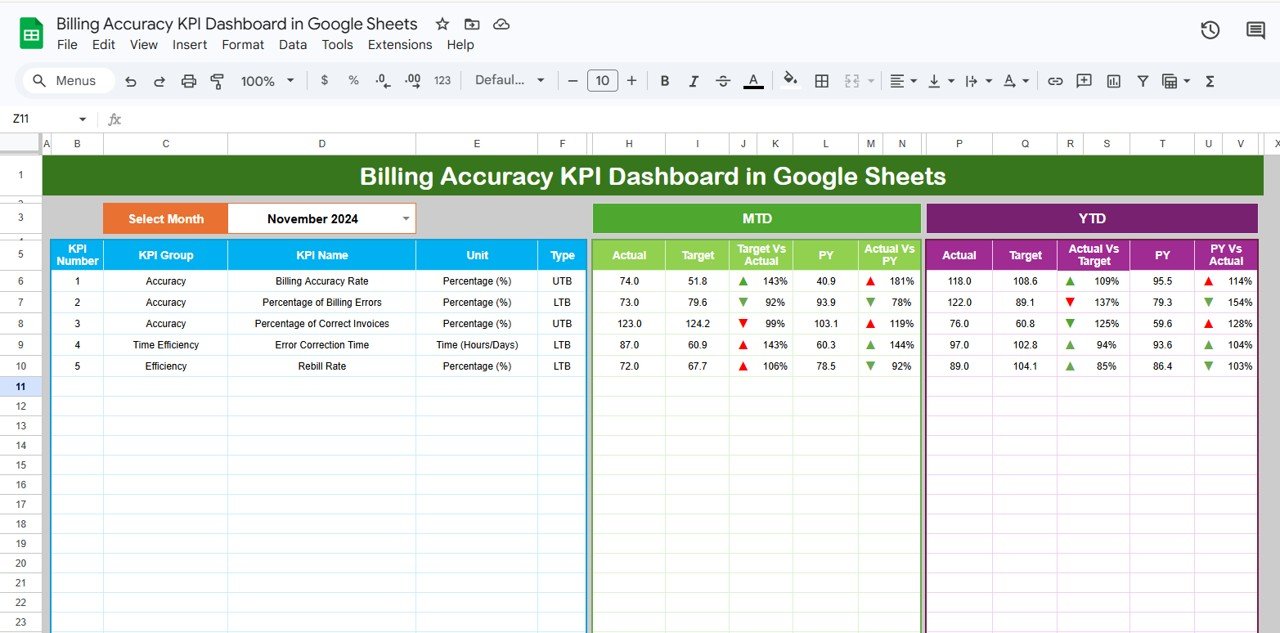
Choose a month in the Select Month dropdown (the sample shows November 2024) and the table refreshes. For every KPI you see its number, group, name, unit and type, followed by two blocks:
- MTD: Actual, Target, Target Vs Actual, PY and Actual Vs PY.
- YTD: Actual, Target, Actual Vs Target, PY and PY Vs Actual.
Each percentage comes with an up or down arrow. In the Target Vs Actual column, green means the KPI is on the right side of its target for its type (UTB or LTB), and red means it is not. For example, in November 2024 the Billing Accuracy Rate MTD Actual is 74.0 against a Target of 51.8. That gives 74.0 ÷ 51.8 = 143% with a green arrow, because a higher accuracy rate is better. Against last year’s 40.9, Actual Vs PY is 74.0 ÷ 40.9 = 181%. For Percentage of Billing Errors (LTB), the actual of 73.0 against a target of 79.6 gives 92%. The arrow is green there too, because a lower error rate is good.
2. KPI Trend
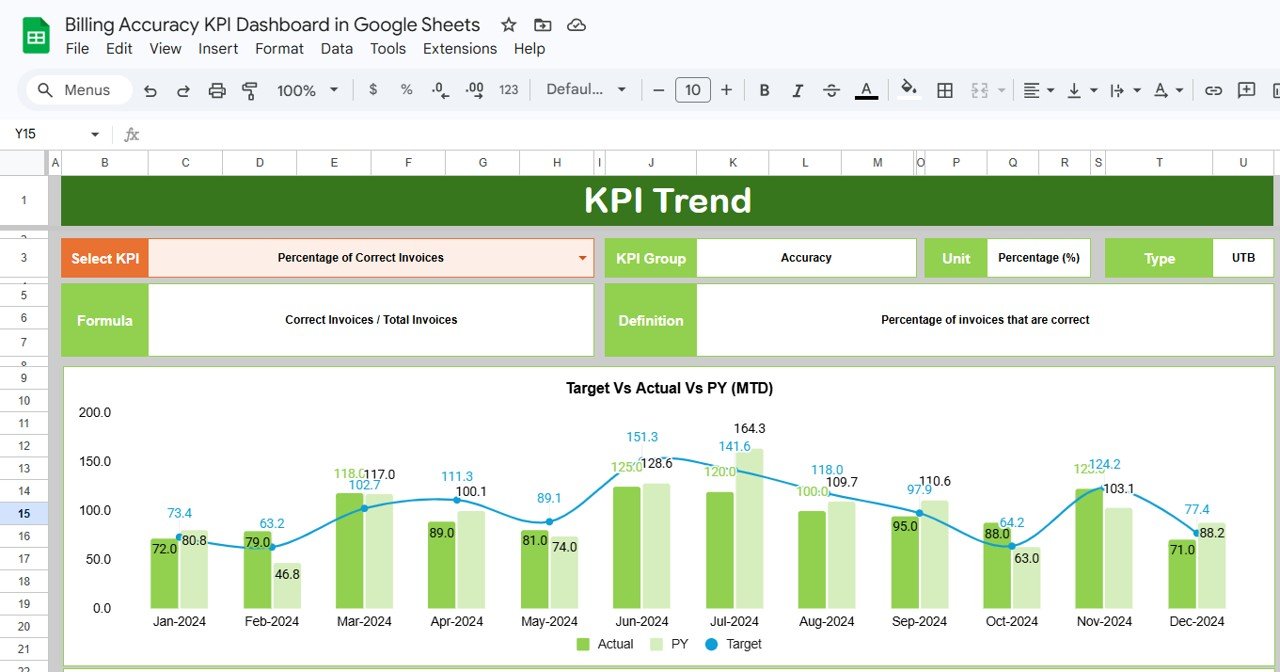
Pick any KPI in the Select KPI dropdown (cell C3). The header shows its KPI Group, Unit, Type, Formula and Definition. Below that, the Target Vs Actual Vs PY (MTD) chart plots twelve months of Actual and PY as columns with Target as a line, and a matching chart covers YTD. In the screenshot, Percentage of Correct Invoices is selected, with the formula Correct Invoices / Total Invoices.
3. Actual Numbers Input
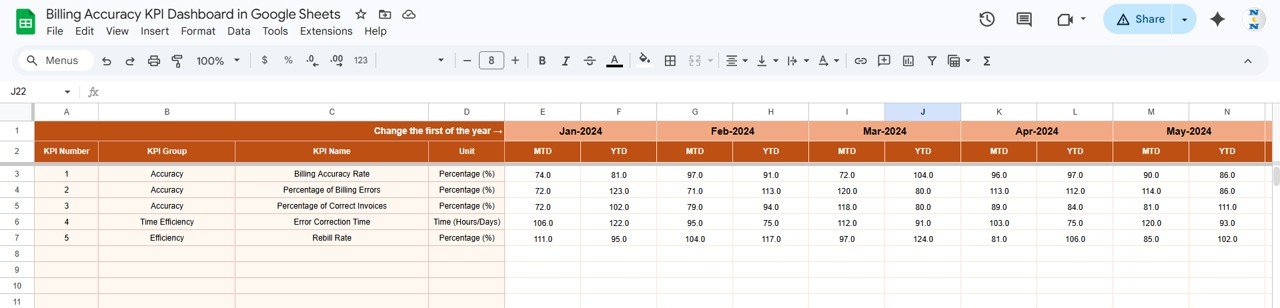
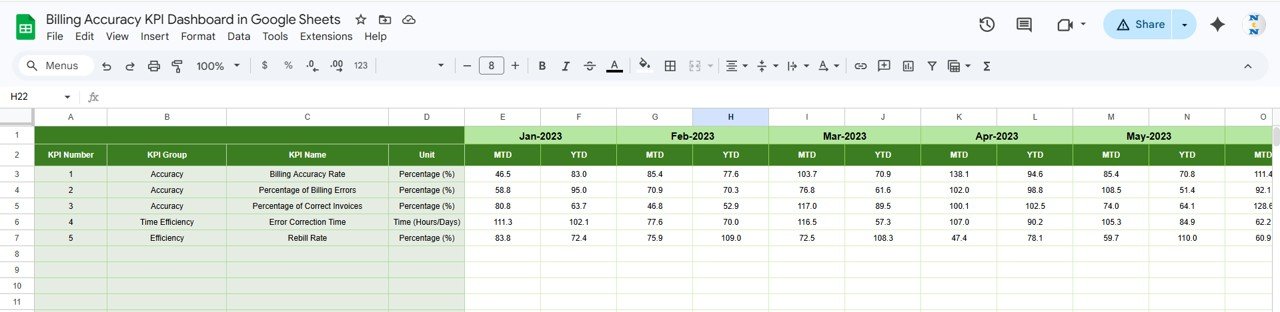
This is where you type the actual MTD and YTD values for each KPI, one pair of columns per month. The first month of the year is set at the top of the sheet (the “Change the first of the year” cell), so a financial year that starts in April works as well as a calendar year.
4. Target Number Input
Same layout, but holding the monthly MTD and YTD targets. The Dashboard reads these values to calculate Target Vs Actual and to decide the arrow colour.
5. Previous Year Number
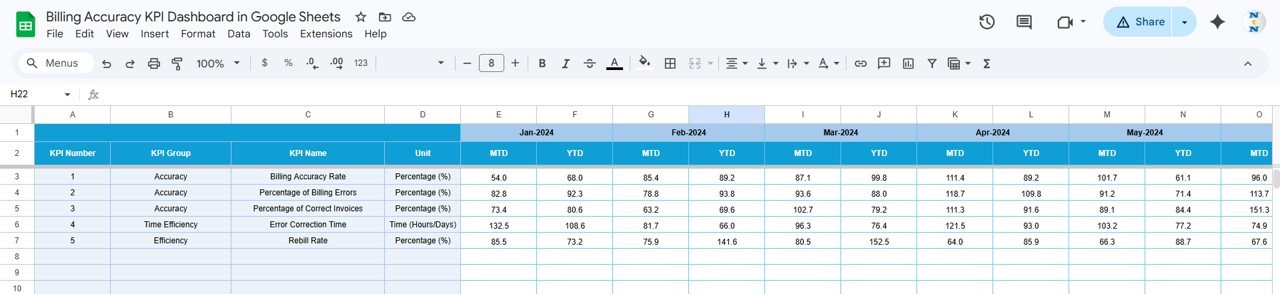
Enter last year’s MTD and YTD values here (the sample uses Jan-2023 onward). They power the PY columns on the Dashboard and the PY series on the trend charts.
6. KPI Definition
The master list of KPIs: number, KPI Group, KPI Name, Unit, Formula, Definition and Type. The Type column has a UTB/LTB dropdown, and that choice controls how the Dashboard colours each arrow. Get it right before you share the file.
How to Use It with Your Own Billing Data
- Make your own copy using the link in the PDF guide.
- On KPI Definition, review the five KPIs. Rename, edit or add rows so the list matches what your team actually measures, and set each Type to UTB or LTB.
- On Actual Numbers Input, set the first month of your year, then clear the sample values.
- Each month, count your inputs from the billing system: total bills, bills with errors, rebills and correction hours. Calculate each KPI (for example, Rebill Rate = Rebills ÷ Total Invoices) and enter the MTD value. Enter the YTD value as defined for your team, for example the year-to-date totals put through the same formula.
- Enter targets on Target Number Input and last year’s figures on Previous Year Number.
- On the Dashboard, pick the month. Check that the arrows make sense, then open KPI Trend for any KPI that turned red.
A quick worked example: if you issued 1,200 invoices in a month and 30 needed rebilling, Rebill Rate = 30 ÷ 1,200 = 2.5%. With a target of 3.0%, Target Vs Actual is 2.5 ÷ 3.0 = 83%. Because Rebill Rate is LTB, that result shows as on track.
Real-World Use Cases
- Monthly finance review: a billing supervisor exports last month’s invoice and correction counts, updates the three input sheets in about fifteen minutes, and presents the Dashboard in the month-end meeting.
- Medical or service billing teams: a team that resubmits rejected claims or invoices tracks Rebill Rate and Error Correction Time together. That shows whether fixing errors faster is also reducing how many happen.
- Process-improvement projects: after introducing an invoice checklist, a team uses the KPI Trend chart to compare Percentage of Billing Errors with the previous year, month by month, to see whether the change worked.
Best Practices
- Agree definitions first. Decide what counts as a “billing error” and a “rebill” before anyone enters numbers. The KPI Definition sheet is the place to write that down.
- Use one data owner. One person updates the input sheets by a fixed date each month, for example the fifth working day.
- Set realistic targets. Base them on recent actuals, not on wishful numbers, so red really means something needs attention.
- Protect formula sheets. Use Data → Protect sheets and ranges on the Dashboard and KPI Trend sheets.
- Watch three-month runs. A single red month is noise. Three in a row on the trend chart deserves a root-cause review.
If you want to build KPI reports like this from scratch, the Excel Pivot Tables & Dashboards course on NextGenTemplates Academy teaches the summary and charting techniques behind them.
Limitations
- It does not connect to your billing or accounting software. You enter monthly numbers yourself.
- It tracks KPIs monthly. It does not track individual invoices, so it will not tell you which customer’s bill was wrong.
- MTD and YTD values are entered, not calculated from raw transactions, so their quality depends on your inputs.
- Anyone with edit access can change any cell. Use protected ranges if several people share the file.
Related Finance Dashboards
Billing accuracy pairs naturally with collections. See the Accounts Receivable KPI Dashboard in Google Sheets for receivables and the Accounts Payable KPI Dashboard for the supplier side. If you need invoice-level tracking rather than KPIs, the Client Billing Dashboard and the Client Billing & Invoice Management Dashboard are a better match. For a wider finance view, try the Finance KPI Scorecard.
Related template: prefer Excel? There is also a Billing Accuracy KPI Dashboard in Excel.
Frequently Asked Questions
Which KPIs come with the Billing Accuracy KPI Dashboard?
Five: Billing Accuracy Rate, Percentage of Billing Errors, Percentage of Correct Invoices, Error Correction Time and Rebill Rate. You can rename them or add more on the KPI Definition sheet.
What do UTB and LTB mean?
UTB (Upper the Better) is for KPIs where a higher number is good, such as Billing Accuracy Rate. LTB (Lower the Better) is for KPIs where a lower number is good, such as Rebill Rate. The dashboard uses this setting to colour the arrows.
How is Target Vs Actual calculated?
Actual divided by Target. In the sample, the Billing Accuracy Rate for November 2024 is 74.0 ÷ 51.8 = 143%. Actual Vs PY works the same way using the previous year’s value.
Can I start the year in April instead of January?
Yes. Change the first month at the top of the Actual Numbers Input sheet and the month headers follow it.
Does it pull data from QuickBooks or my billing system?
No. It is a manual-entry Google Sheets template. Most teams export monthly counts from their system and type or paste the KPI values in.
Can my team use it at the same time?
Yes. It is a Google Sheets file, so several people can view or edit it at once. Share it view-only with managers and give edit access to whoever enters the numbers.
Wrapping Up
The Billing Accuracy KPI Dashboard in Google Sheets gives you a disciplined monthly view of invoice quality: five ready-made billing KPIs, MTD and YTD comparisons against target and last year, and a trend chart for each one. Copy it, align the KPI definitions with your process, and load the last three months of numbers to see your starting point.
Get the Billing Accuracy KPI Dashboard
📅 Last updated: October 2026