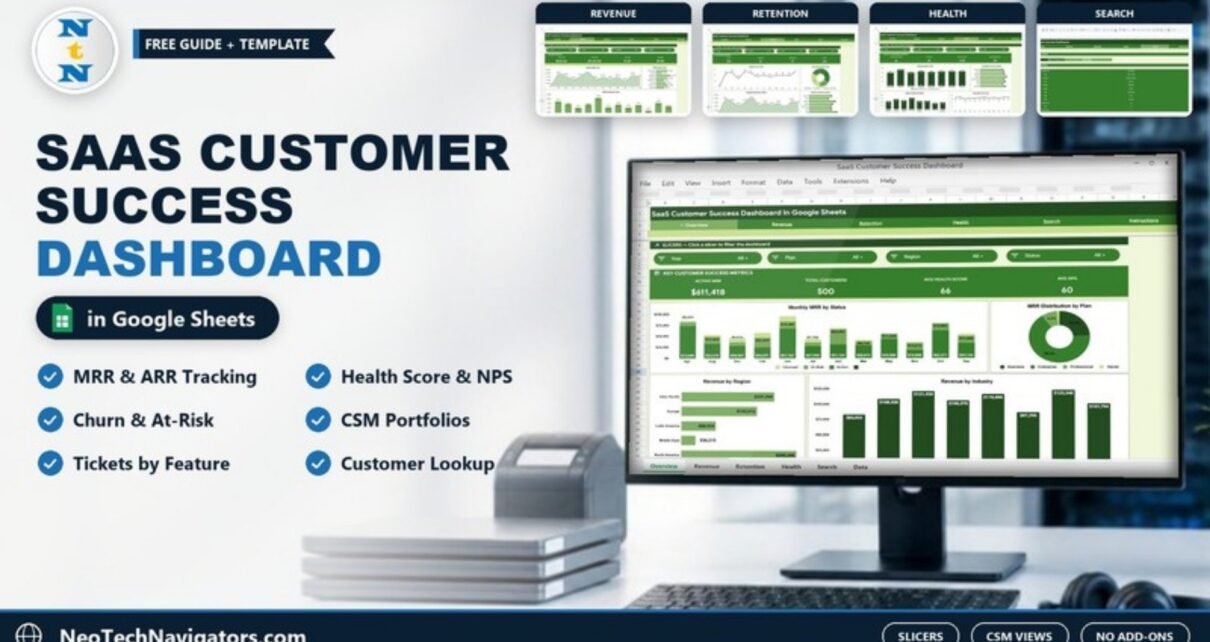
The SaaS Customer Success Dashboard in Google Sheets brings together the numbers a customer success team lives by: MRR and ARR, account health scores, NPS, support tickets, churned and at-risk accounts, and each CSM’s portfolio. It is built for customer success managers, SaaS founders and revenue operations teams who manage a few hundred accounts and want one shared view without buying a dedicated CS platform.
The workbook has Overview, Revenue, Retention, Health and Search tabs plus an Instructions link, all on a navigation bar, and a Data sheet with one row per customer. Each analysis tab has four slicers and a band of KPI cards. Everything uses native Google Sheets formulas, charts and slicers – no add-ons or scripts.
This guide walks through every tab using the sample data, explains how the main metrics are calculated, and shows how to load your own account list.
🎥 Watch the Video Tutorial
Get the SaaS Customer Success Dashboard
What the SaaS Customer Success Dashboard in Google Sheets Solves
Customer success data tends to be scattered: MRR in billing, health scores in a spreadsheet, NPS in a survey tool and tickets in the help desk. Before a quarterly review or renewal call, someone has to pull it together by hand. Questions such as “which industry has the most at-risk accounts?” or “how is each CSM’s book of business doing?” end up unanswered.
With one row per customer that holds plan, region, industry, CSM, MRR, ARR, health score, NPS, open tickets, top feature and status, this dashboard answers those questions from a single sheet and updates whenever the data does.
The Dashboard Tabs Explained
1. Overview
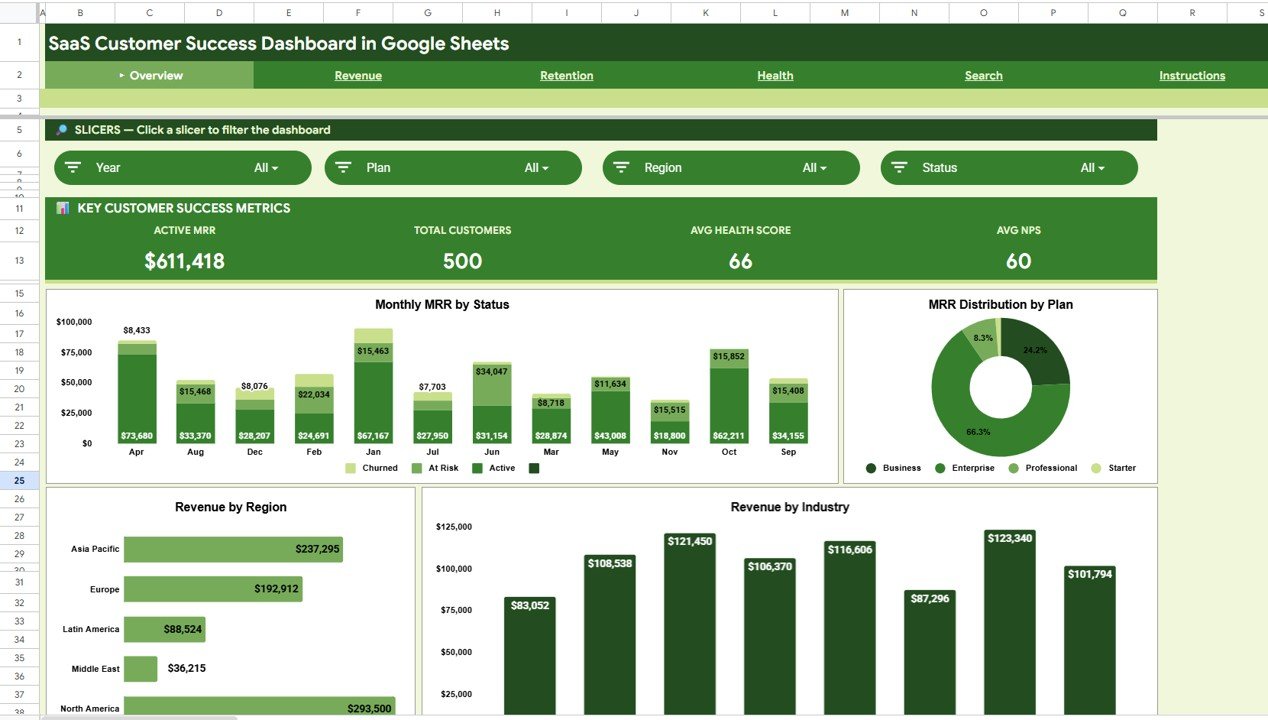
Slicers: Year, Plan, Region and Status. The Key Customer Success Metrics band shows Active MRR ($611,418), Total Customers (500), Avg Health Score (66) and Avg NPS (60) in the sample.
- Monthly MRR by Status – stacked monthly columns split by account status (the legend shows Active, At Risk and Churned).
- MRR Distribution by Plan – a donut across the Starter, Professional, Business and Enterprise plans, with Enterprise holding the largest share (66.3%).
- Revenue by Region – North America ($293,500) and Asia Pacific ($237,295) lead, followed by Europe, Latin America and Middle East.
- Revenue by Industry – columns for the eight industries in the data.
2. Revenue
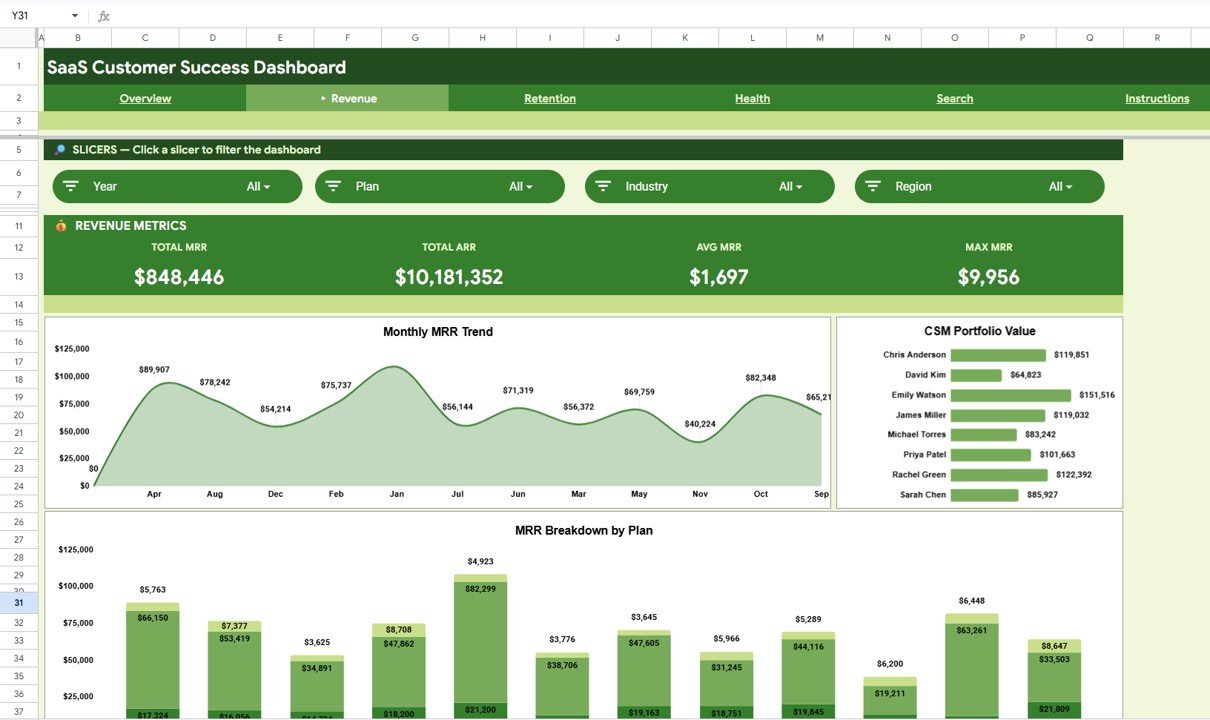
Slicers: Year, Plan, Industry and Region. The Revenue Metrics band shows Total MRR ($848,446), Total ARR ($10,181,352), Avg MRR ($1,697) and Max MRR ($9,956).
Monthly MRR Trend is an area chart of MRR by month (in the sample the months are listed alphabetically – Apr, Aug, Dec and so on – rather than in calendar order). CSM Portfolio Value compares the MRR managed by each of the eight CSMs – Emily Watson has the largest book in the sample at $151,516 – and MRR Breakdown by Plan stacks each month’s MRR by plan.
3. Retention
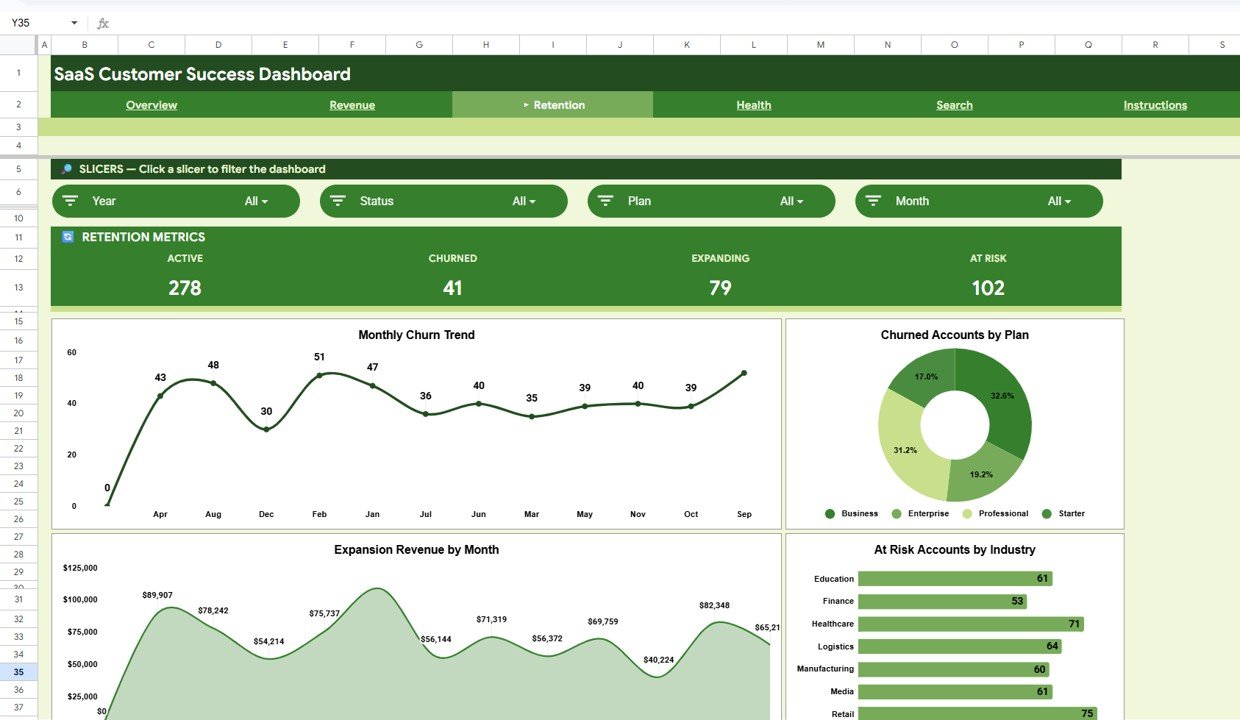
Slicers: Year, Status, Plan and Month. The Retention Metrics band counts accounts by status: Active 278, Churned 41, Expanding 79 and At Risk 102 – together the 500 customers.
Below the cards are four charts: Monthly Churn Trend, Churned Accounts by Plan, Expansion Revenue by Month and At Risk Accounts by Industry. Read them with care in the version shown in the screenshots: the Monthly Churn Trend points add up to roughly the full 500 customers rather than the 41 churned accounts, Expansion Revenue by Month shows the same values as the Monthly MRR Trend on the Revenue tab, and the industry bars (Retail 75, Healthcare 71 and so on) add up to far more than the 102 at-risk accounts. The four status cards are the figures to rely on here; for an account-level at-risk list, filter the Status column of the Data sheet.
4. Health
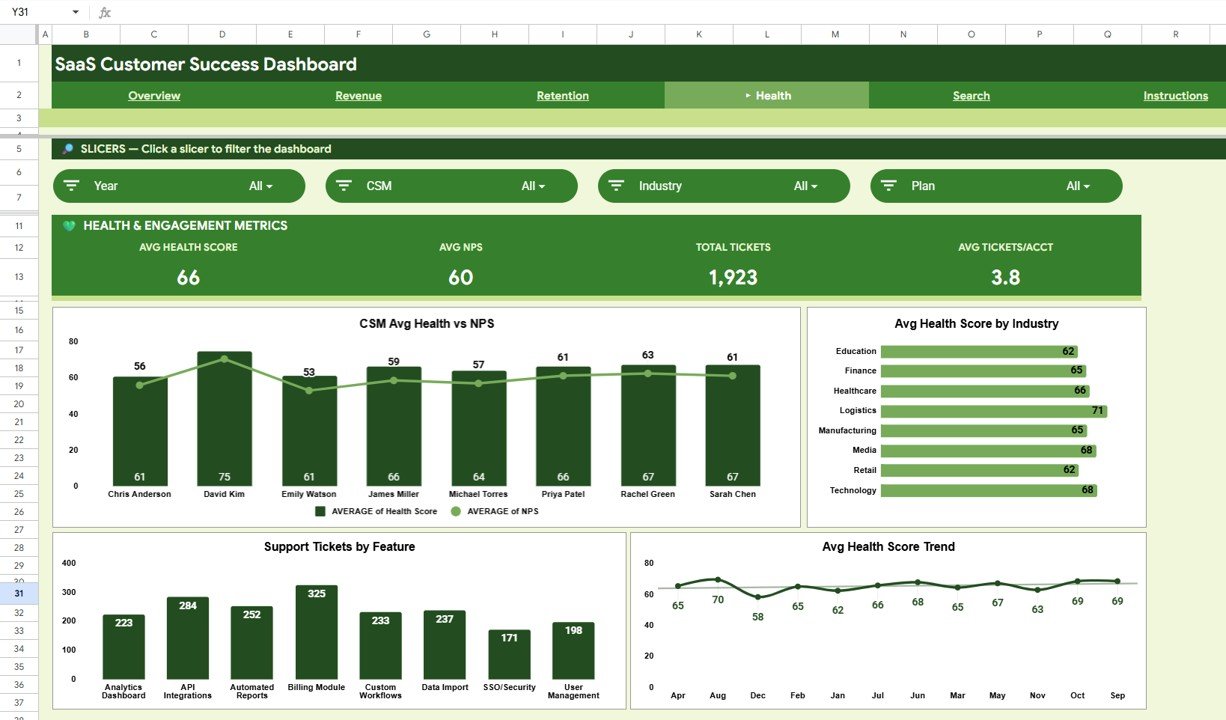
Slicers: Year, CSM, Industry and Plan. The Health & Engagement Metrics band shows Avg Health Score (66), Avg NPS (60), Total Tickets (1,923) and Avg Tickets/Acct (3.8).
- CSM Avg Health vs NPS – each CSM’s average health score as a column and average NPS as a line; David Kim’s accounts show the highest average health score (75).
- Avg Health Score by Industry – Logistics is highest at 71; Education and Retail are lowest at 62.
- Support Tickets by Feature – Billing Module generates the most tickets (325), then API Integrations (284) and Automated Reports (252).
- Avg Health Score Trend – the monthly average health score, which stays between 58 and 70 in the sample.
5. Search
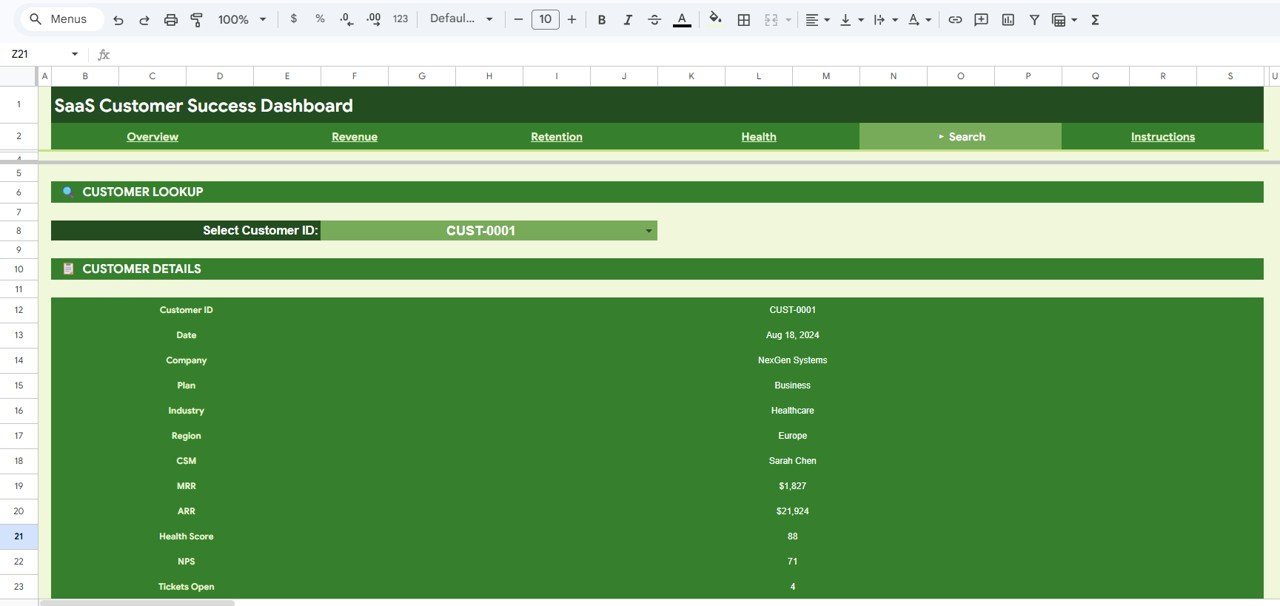
The Customer Lookup lets you pick an ID in the Select Customer ID drop-down and see Customer ID, Date, Company, Plan, Industry, Region, CSM, MRR, ARR, Health Score, NPS and Tickets Open. In the screenshot, CUST-0001 is NexGen Systems, a Business-plan healthcare customer in Europe managed by Sarah Chen, with $1,827 MRR, a health score of 88 and 4 open tickets.
6. Data
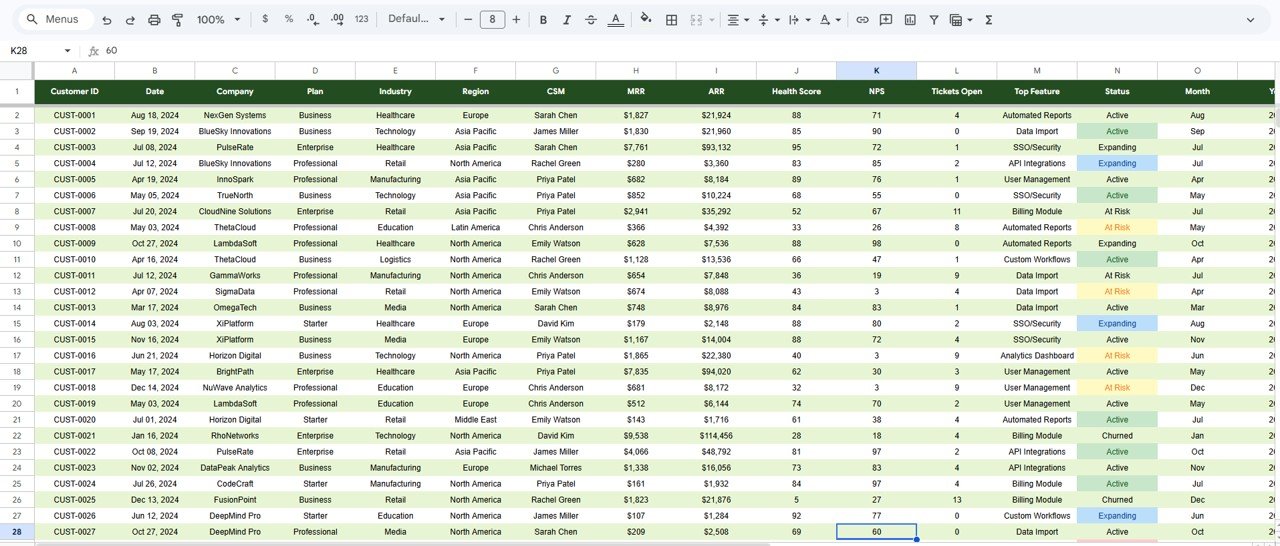
The Data sheet holds one row per customer with these columns: Customer ID, Date, Company, Plan, Industry, Region, CSM, MRR, ARR, Health Score, NPS, Tickets Open, Top Feature, Status (Active, Expanding, At Risk or Churned), Month and Year. In the sample, ARR is always MRR × 12 (for example $1,827 × 12 = $21,924).
Customer Success KPIs in the Dashboard
| KPI | What it measures | Calculation (sample) | Better when |
|---|---|---|---|
| Total MRR | Monthly recurring revenue across all accounts | Sum of MRR = $848,446 | Higher |
| Total ARR | Annualised recurring revenue | Total MRR × 12 = $10,181,352 | Higher |
| Avg MRR | Average revenue per account | $848,446 ÷ 500 = $1,697 | Higher |
| Active MRR | MRR shown on the Overview card | $611,418 – a subset of Total MRR | Higher |
| Avg Health Score | Overall account health | Average of Health Score = 66 | Higher |
| Avg NPS | Average customer sentiment score | Average of the NPS column = 60 | Higher |
| Churned / At Risk | Accounts lost or in danger | Count by Status = 41 / 102 | Lower |
| Avg Tickets/Acct | Support load per customer | 1,923 tickets ÷ 500 = 3.8 | Lower |
Two notes on reading these. First, Active MRR ($611,418) is smaller than Total MRR ($848,446) because it does not cover every account; treat Total MRR as the full book. Second, Avg NPS here is the average of a per-account score column, not a survey NPS calculated as % promoters minus % detractors.
To check the at-risk count or the ARR after loading your own data, these formulas match the Data sheet layout (column H is MRR, column N is Status):
At Risk accounts = COUNTIF(Data!N:N, "At Risk")
Total ARR        = SUM(Data!H2:H) * 12
How to Use It With Your Own Accounts
- Make your own copy of the Google Sheet from the link included with the download, and read the Instructions tab.
- Export your customer list from your CRM or billing tool with one row per account.
- Arrange the columns to match the Data sheet: Customer ID, Date, Company, Plan, Industry, Region, CSM, MRR, ARR, Health Score, NPS, Tickets Open, Top Feature, Status, Month and Year.
- Use the same four status values – Active, Expanding, At Risk, Churned – so the retention cards count correctly.
- Keep health score and NPS on consistent scales across all accounts.
- Paste your rows over the sample data, then check Total MRR on the Revenue tab against your billing total.
- Use the CSM slicer on the Health tab to give each manager a filtered view of their own book.
If you want to build these breakdowns yourself, the Excel Pivot Tables and Dashboards course on NextGenTemplates Academy teaches the summarising and charting techniques behind dashboards like this.
Real-World Use Cases
- Weekly CS stand-up – filter the Data sheet to Status = At Risk, sort by health score and agree who contacts which accounts this week.
- Balancing CSM workloads – compare CSM Portfolio Value with CSM Avg Health vs NPS to see whether a manager with a large book is also keeping accounts healthy.
- Product feedback loop – share Support Tickets by Feature with the product team; a feature such as the Billing Module that drives the most tickets is a clear candidate for improvement.
Best Practices
- Refresh the data weekly or at least monthly so health and status reflect reality.
- Agree a written definition of each status, especially At Risk and Expanding, so CSMs classify accounts the same way.
- Keep plan, industry, region and CSM names consistent; slicers treat spelling variations as separate values.
- Review accounts where health is low and tickets are high together – that combination often comes before churn.
- Share view-only links with leadership and keep edit access with the person who maintains the data.
Limitations
The dashboard works from a snapshot you paste in; it does not sync with Salesforce, HubSpot or your billing system, and it has no automated playbooks, alerts or predictive churn scoring. The health score comes from your own data, so its quality depends on how your team calculates it. Large teams that need real-time integrations and workflows will be better served by a dedicated customer success platform.
Related Templates and Guides
For Excel users, the SaaS Customer Success Dashboard in Excel covers the same topic. On this blog, the Subscription Business Dashboard in Google Sheets focuses on subscriber-level MRR and churn, the SaaS Metrics Dashboard in Google Sheets covers company-wide SaaS metrics, and the SaaS Renewal KPI Dashboard and SaaS Onboarding Dashboard cover the two ends of the customer journey.
Frequently Asked Questions
What does the SaaS Customer Success Dashboard in Google Sheets track?
It tracks Active MRR, Total Customers, Avg Health Score and Avg NPS on the Overview, plus Total MRR, ARR, Avg and Max MRR, account counts by status, total tickets and tickets per account on the other tabs.
How is ARR calculated?
ARR is MRR multiplied by 12. In the sample, Total MRR of $848,446 gives Total ARR of $10,181,352.
Can each CSM see only their own accounts?
The Health tab has a CSM slicer, and the Revenue tab shows CSM Portfolio Value. For strict separation, give each CSM a filtered copy or a filtered view rather than edit access to the master file.
What statuses does the template use?
Active, Expanding, At Risk and Churned. The Retention tab shows a count card for each one – 278, 79, 102 and 41 in the sample.
Does it connect to my CRM automatically?
No. You export your account data and paste it into the Data sheet. This keeps the file simple and free of scripts.
Can several people use it at once?
Yes. It is a Google Sheet, so your team can open it together and see the same figures in real time.
Wrapping Up
The SaaS Customer Success Dashboard in Google Sheets gives a CS team one place to see revenue, retention and account health, broken down by plan, region, industry and CSM. Start by loading your current account list, agree the four status definitions with your team, and use the Retention and Health tabs as the agenda for your next weekly review.
Get the SaaS Customer Success Dashboard
📅 Last updated: October 2026