Crypto Portfolio Dashboard in HTML is a professionally designed, browser-based cryptocurrency analytics template that lets crypto investors, traders, and portfolio managers monitor Total Investment, Current Portfolio Value, Total Gain/Loss, Total Transactions, Avg Transaction Fee, and Profitable Trades % from a single interactive dashboard. This HTML dashboard includes 5 interactive pages covering Overview, Portfolio Analysis, Performance Tracking, Exchange & Risk Analysis, and a full Data View with CSV export — all running directly in any modern web browser with zero software installation.
Whether you manage a diversified crypto portfolio spanning Bitcoin, Ethereum, and altcoins, or track daily trading performance across exchanges like Binance, Coinbase, and Kraken, this dashboard transforms raw transaction data into clear, actionable visual insights. With over 15 interactive charts, dynamic slicers, and a professional design, the Crypto Portfolio Dashboard in HTML gives you complete visibility into your cryptocurrency investments without needing Excel, Power BI, or any specialized software.
Key Features of Crypto Portfolio Dashboard in HTML
The Crypto Portfolio Dashboard in HTML delivers everything a crypto investor needs to manage their portfolio effectively. This template includes 5 interactive dashboard pages, 6 high-level KPI cards, and over 15 charts covering every dimension of crypto portfolio management. The dashboard features dynamic slicers for instant filtering by cryptocurrency, exchange, wallet type, risk level, and transaction status. All data can be exported to CSV from the Data View page for offline analysis and tax reporting.
Built entirely with HTML, CSS, and JavaScript, this dashboard requires no installation, no plugins, and no subscriptions. Simply unzip the file, open index.html in your browser, replace the sample data with your own crypto transaction records, and the entire dashboard updates automatically. The professional modern design with consistent color coding makes it suitable for both personal portfolio tracking and executive-level presentations.
Dashboard Pages Explained
1. Overview Page
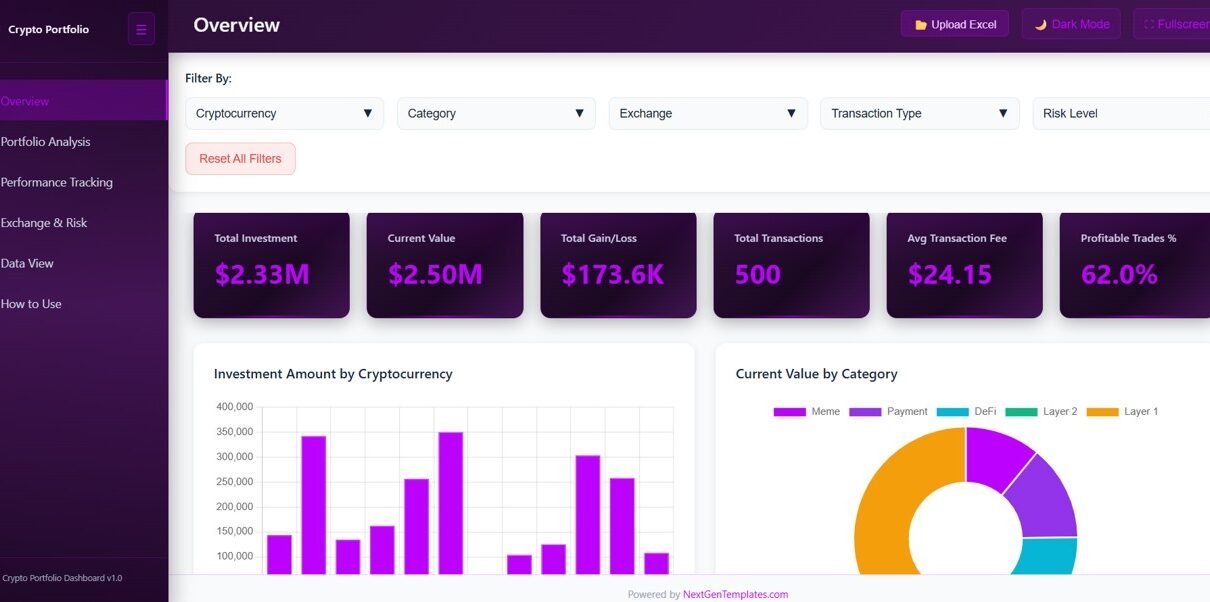
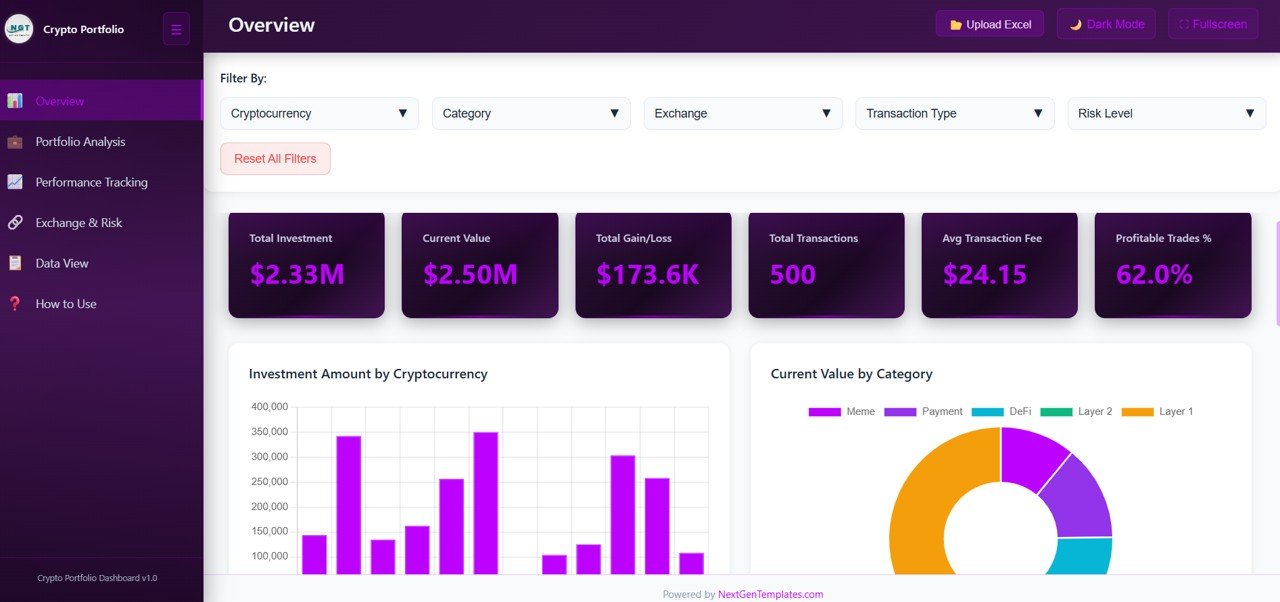
The Overview page serves as the command center for your crypto portfolio. At the top, 6 KPI cards display Total Investment, Current Portfolio Value, Total Gain/Loss, Total Transactions, Avg Transaction Fee, and Profitable Trades % for an instant snapshot of portfolio health. Below the cards, interactive charts provide deeper analysis including Investment Amount by Cryptocurrency showing capital distribution across different coins, Current Value by Category displaying portfolio allocation, Transaction Count by Exchange comparing activity across platforms, Gain/Loss by Month tracking monthly profitability, and Transaction Status Distribution showing the breakdown of completed, pending, and failed transactions. Multiple slicers allow instant filtering across all visuals.
Crypto Portfolio Dashboard in HTML
2. Portfolio Analysis
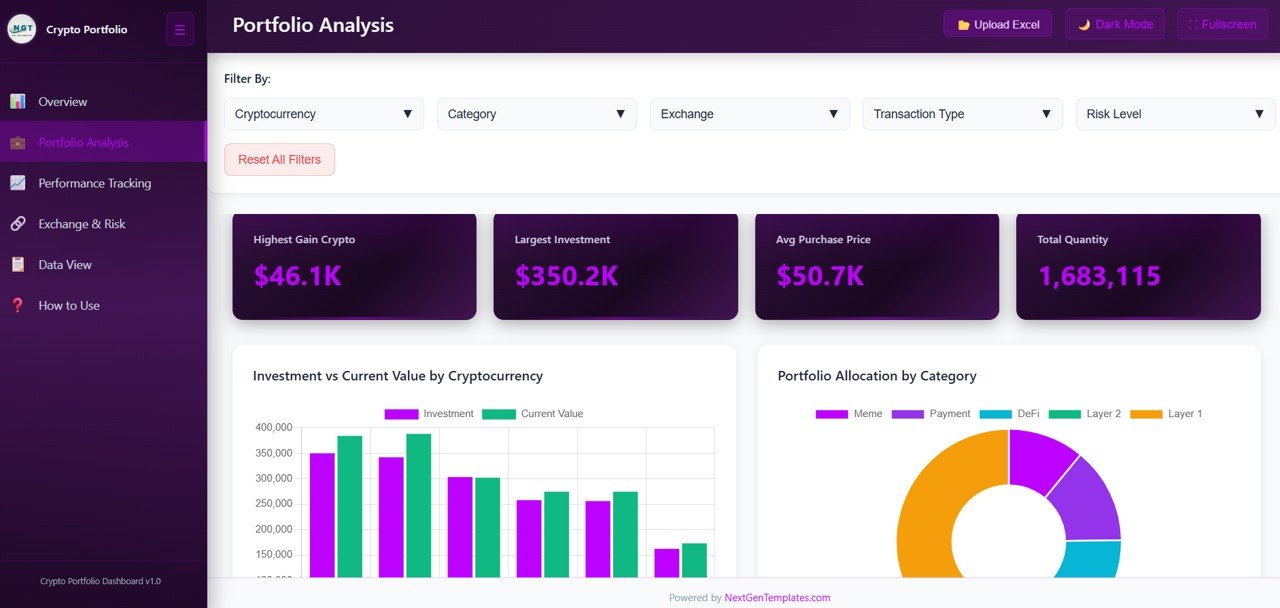
The Portfolio Analysis page delivers deeper insight into your cryptocurrency holdings. It features Investment vs Current Value by Cryptocurrency comparing what you invested versus current market worth for each coin, Portfolio Allocation by Category showing distribution across DeFi, Layer 1, Layer 2, stablecoins, and other categories, Average Purchase Price vs Current Price by Top Cryptos helping identify undervalued or overvalued positions, and Investment Amount by Wallet Type revealing how your capital is spread across hot wallets, cold wallets, and exchange wallets.
Portfolio Analysis
3. Performance Tracking
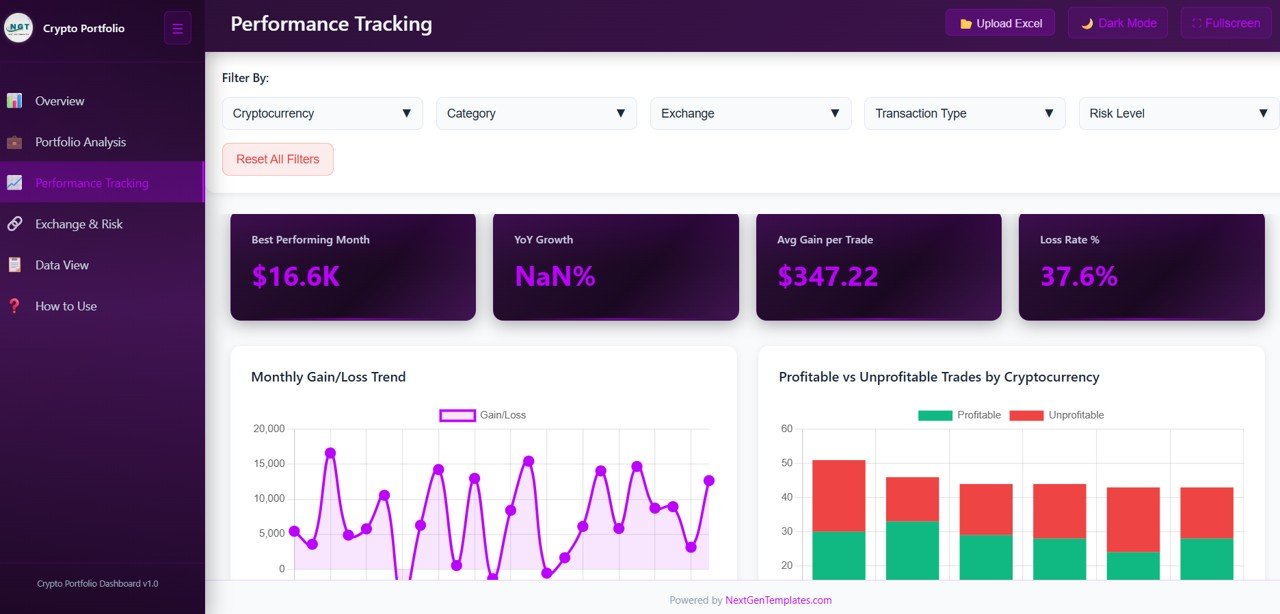
The Performance Tracking page helps you monitor profitability and cost trends over time. It includes Monthly Gain/Loss Trend visualizing your portfolio performance month by month, Profitable vs Unprofitable Trades by Cryptocurrency highlighting which coins deliver consistent returns, Cumulative Investment by Month showing how your total invested capital accumulates, and Gain/Loss by Transaction Type comparing performance across buy, sell, and swap transactions.
Performance Tracking
4. Exchange & Risk Analysis
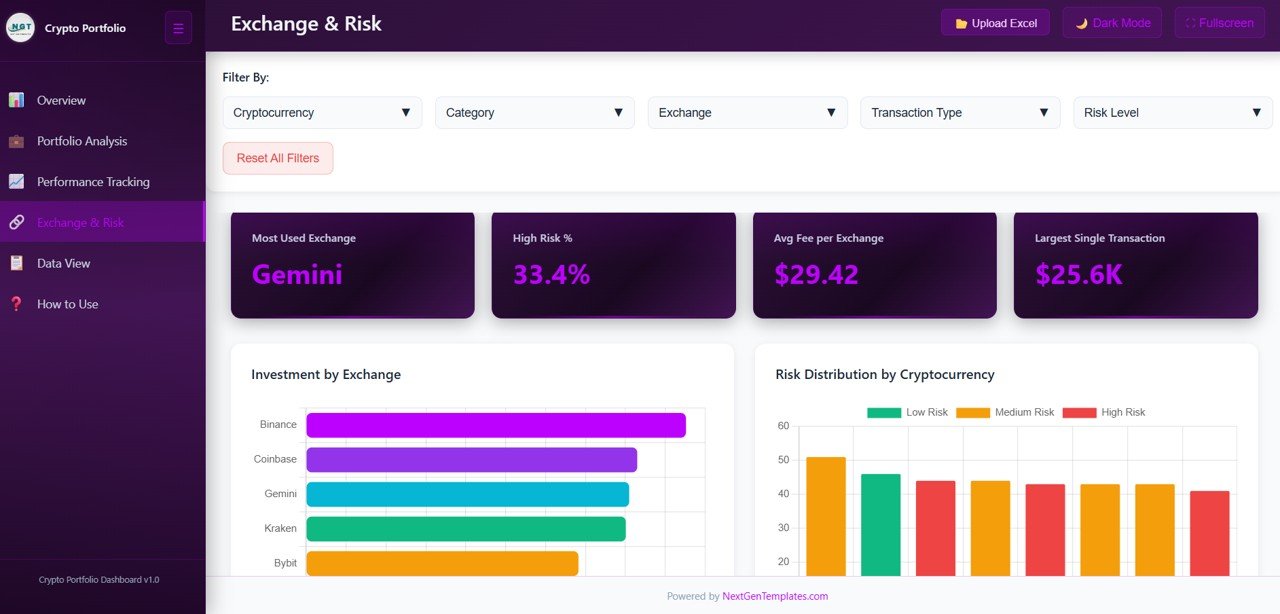
The Exchange & Risk Analysis page provides exchange-level metrics and risk exposure assessment. It features Investment by Exchange showing capital allocation across trading platforms, Risk Distribution by Cryptocurrency revealing the risk profile of each coin, Transaction Fee by Exchange helping identify the most cost-effective platforms, and Transaction Volume by Network tracking activity across different blockchain networks like Ethereum, Solana, Polygon, and BSC.
Exchange & Risk Analysis
5. Data View
The Data View page is a detailed data table showing all crypto transaction records with powerful search, sort, and pagination features. You can filter specific records, sort by any column, and export the filtered data to CSV for further offline analysis, tax reporting, or sharing with financial advisors.
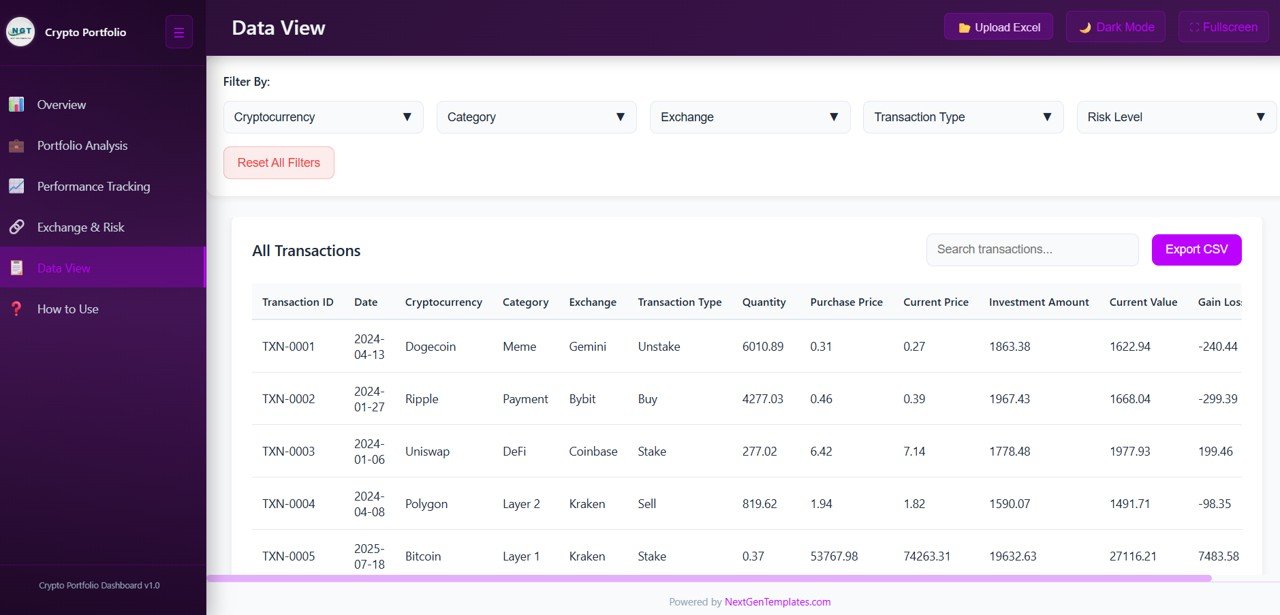
Data View
Advantages of Crypto Portfolio Dashboard in HTML
The biggest advantage of this HTML-based dashboard is its universal accessibility. Unlike Excel or Power BI dashboards that require specific software, this template runs in any web browser on any device. It provides centralized monitoring of 6 key crypto metrics across 5 analytical pages, eliminating the need to check multiple platforms or exchanges individually. The dynamic slicers enable instant drill-down analysis, and the CSV export feature makes it easy to share data with accountants for tax filing. The professional design ensures your portfolio data always looks clean and presentable, whether for personal use or investor reporting.
Opportunities for Improvement
While the dashboard covers comprehensive crypto analytics, users working with very large datasets of over 10,000 records may experience slightly slower browser performance depending on their device. Adding real-time API integration with exchanges like Binance or Coinbase could automate data updates. Users who need advanced statistical analysis or predictive modeling may want to complement this dashboard with the Crypto Portfolio Dashboard in Power BI for more sophisticated analytics capabilities.
Best Practices
To get the most out of your Crypto Portfolio Dashboard in HTML, update your transaction data regularly — ideally weekly or after every significant trade. Use the slicers on the Overview page to focus on specific exchanges or cryptocurrencies when analyzing performance. Review the Performance Tracking page monthly to identify which coins are consistently profitable and which are underperforming. Use the CSV export from the Data View page to maintain backup records and for annual tax reporting. Keep the original sample data file as a reference for the correct column structure when formatting your own data.
Explore Relevant Templates
🔹 Crypto Portfolio Dashboard in Power BI — Advanced Power BI crypto analytics with interactive filtering and 5 dashboard pages.
🔹 Crypto Portfolio Dashboard in Excel — Pivot-table-powered crypto portfolio tracking in Microsoft Excel.
🔹 Blockchain Finance Dashboard in Power BI — Comprehensive blockchain financial analytics with risk assessment.
🔹 Net Worth Tracker in Excel — Track your complete financial net worth including crypto, real estate, and stocks.
Frequently Asked Questions
What KPIs does the Crypto Portfolio Dashboard in HTML track?
The Crypto Portfolio Dashboard in HTML tracks 6 key metrics: Total Investment, Current Portfolio Value, Total Gain/Loss, Total Transactions, Avg Transaction Fee, and Profitable Trades %. It also includes 15+ charts across 5 interactive pages covering investment breakdown, portfolio allocation, performance trends, exchange analysis, and risk distribution.
Do I need coding skills or special software to use this dashboard?
No. Simply unzip the downloaded file and open index.html in any modern web browser like Chrome, Edge, or Firefox. No installations, plugins, subscriptions, or coding skills are required. Replace the sample data with your own and the dashboard updates automatically.
What is the best HTML dashboard template for tracking cryptocurrency investments?
The Crypto Portfolio Dashboard in HTML from NextGenTemplates is one of the most comprehensive browser-based crypto analytics solutions available. It includes 5 dedicated analysis pages covering overview, portfolio analysis, performance tracking, exchange & risk analysis, and data export — all running directly in a web browser with zero installation.
Can I use this dashboard on mobile devices?
The dashboard is optimized for desktop and laptop browsers for the best experience. While it will open on mobile browsers, the charts and data tables are designed for larger screens. For mobile crypto tracking, consider using the dashboard on a tablet or laptop.
How do I export my crypto data from this dashboard?
Navigate to the Data View page, apply any filters you need, and click the CSV export button. This downloads your filtered transaction records as a CSV file that you can open in Excel, Google Sheets, or any spreadsheet application for further analysis or tax reporting.
Is this dashboard available in Excel or Power BI as well?
Yes. NextGenTemplates offers the same Crypto Portfolio Dashboard in three formats: HTML (browser-based), Excel (pivot-table-powered), and Power BI (advanced analytics). Choose the platform that best fits your workflow.
Conclusion
The Crypto Portfolio Dashboard in HTML is a powerful, browser-based analytics solution for anyone serious about tracking cryptocurrency investments. With 5 interactive pages, 6 KPI cards, 15+ charts, dynamic slicers, and CSV export capability, it delivers institutional-grade portfolio analytics without requiring any specialized software. Whether you are a retail investor tracking a few coins or a portfolio manager overseeing diversified crypto holdings, this dashboard gives you the clarity and control you need to make smarter investment decisions.
👉 Click here to Purchase Crypto Portfolio Dashboard in HTML
👉 Visit our YouTube channel for step-by-step tutorials: Youtube.com/@NeoTechNavigators