Introduction
Customer satisfaction is the cornerstone of any successful business. To continuously improve it, monitoring key performance indicators (KPIs) is essential. In this article, we present a Customer Satisfaction Improvement KPI Dashboard in Google Sheets-a ready-to-use template designed to simplify tracking, analysis, and decision-making for improving customer satisfaction.Customer Satisfaction Improvement KPI Dashboard in Google Sheets
Key Features of Customer Satisfaction Improvement KPI Dashboard in Google Sheets
- Six well-structured worksheets for comprehensive data management and visualization.
- Dynamic month selection to analyze monthly and year-to-date (YTD) performance.
- Comparison between actuals, targets, and previous year (PY) data with conditional formatting for quick insights.
- M&T (Month-To-Date) and YTD performance indicators with intuitive up/down arrows.
- Trend charts to visualize KPI progress over time for better decision support.
- Clear definitions and formulas of each KPI to ensure understanding and accurate interpretation.
Dashboard Pages Explanation
1. Dashboard Sheet Tab
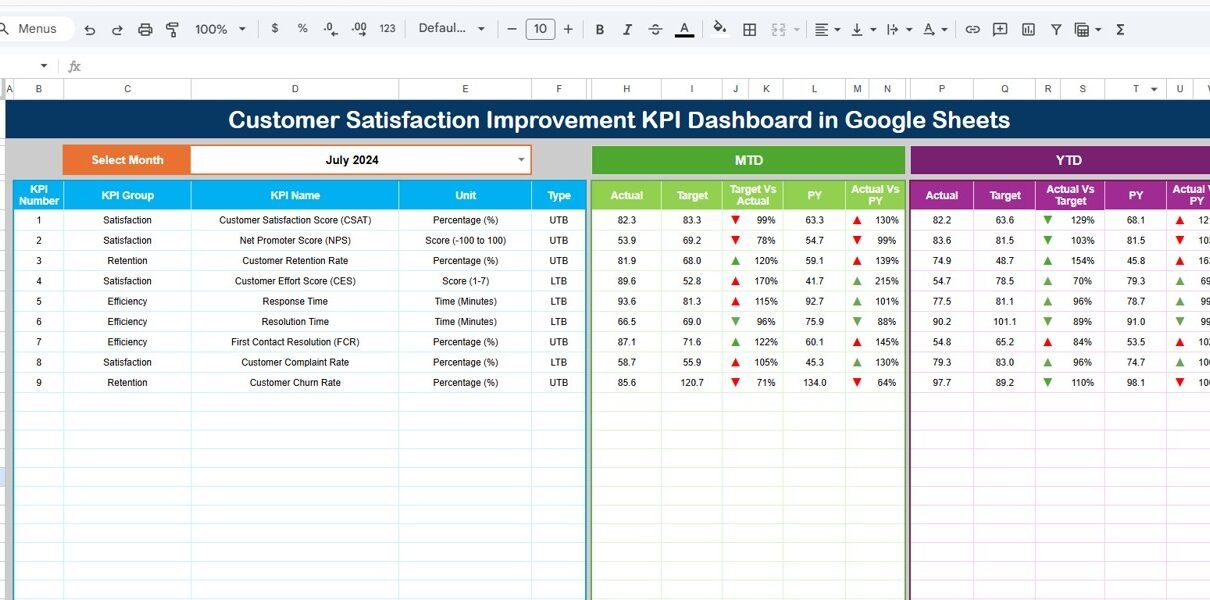
This is the main sheet showing key KPI metrics at a glance.
- Month selector on cell D3 allows you to choose the reporting month.
- Displays MTD Actual, Target, and Previous Year numbers.
- Shows Target vs Actual and PY vs Actual comparisons with conditional formatting arrows indicating performance trends.
- Includes YTD Actual, Target, Previous Year data and performance comparisons.

Click to Buy Customer Satisfaction Improvement KPI Dashboard in Google Sheets
2. KPI Trend Sheet Tab
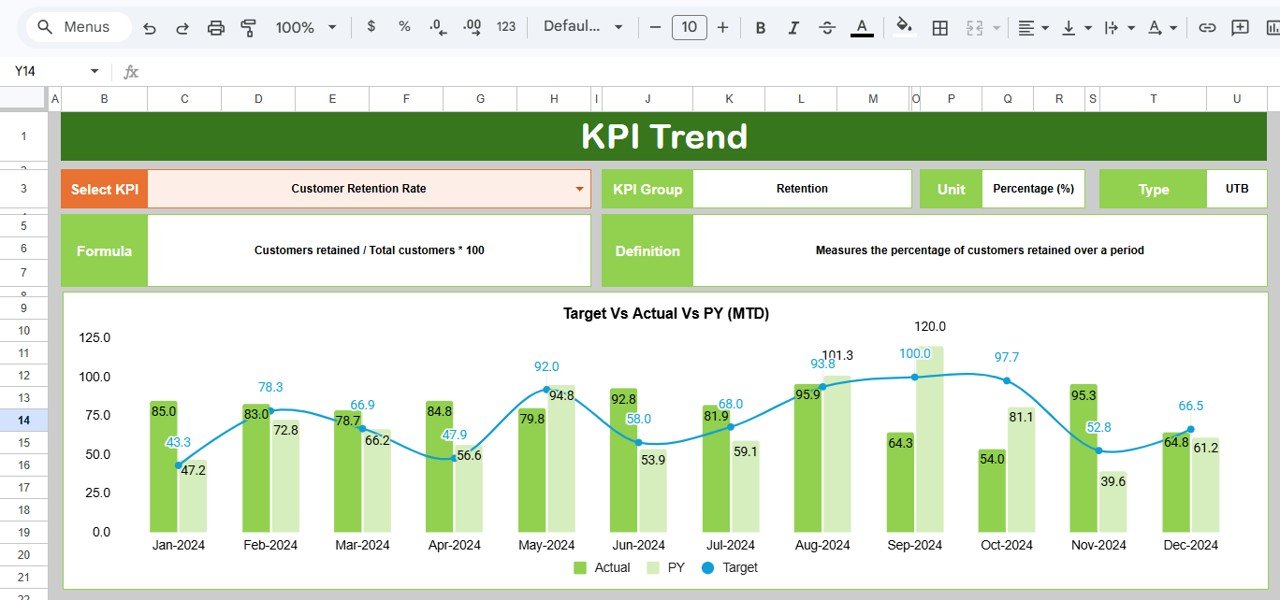
This sheet provides detailed KPI insights and trend analysis.
- Select the KPI name from the drop-down at cell C3.
- Displays KPI Group, Unit, Type (Lower the Better or Upper the Better), Formula, and Definition.
- Features MTD and YTD trend charts illustrating Actual, Target, and PY metrics for visual analysis.
Click to Buy Customer Satisfaction Improvement KPI Dashboard in Google Sheets
3. Actual Numbers Input Sheet
Enter the actual metrics here for each KPI.
- Input monthly actual numbers for both MTD and YTD periods.
- The month can be adjusted by changing the starting month in cell E1.

4. Target Number Input Sheet
Set your goals by entering target numbers for KPIs here.
- Specify monthly targets for MTD and YTD periods for each KPI.

Click to Buy Customer Satisfaction Improvement KPI Dashboard in Google Sheets
5. Previous Year Number Input Sheet
To benchmark progress, input the previous year’s corresponding figures here.
- Records PY numbers to facilitate year-over-year comparisons.

6. KPI Definition Sheet
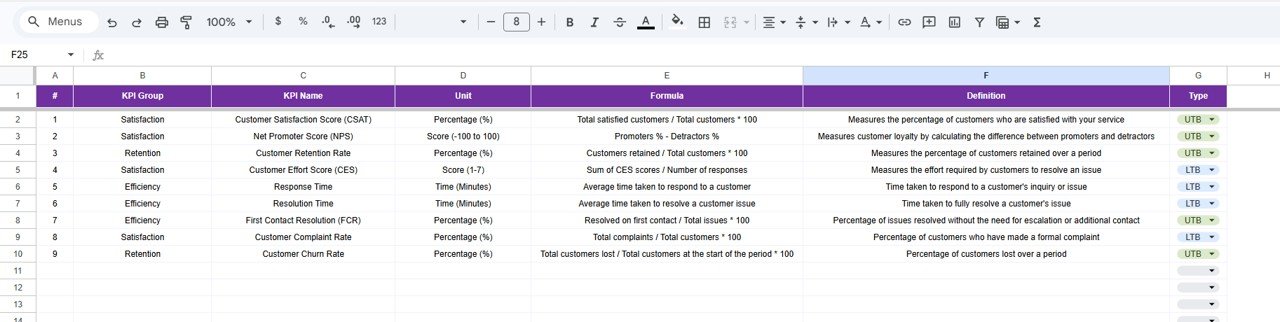
Manage detailed KPI metadata here.
- Enter KPI Name, Group, Unit, Formula, and clear definitions.
- Specify KPI type as LTB (Lower The Better) or UTB (Upper The Better).
Click to Buy Customer Satisfaction Improvement KPI Dashboard in Google Sheets
Advantages of Customer Satisfaction Improvement KPI Dashboard in Google Sheets
- Cloud-based Accessibility: Accessible from anywhere, allowing real-time collaboration.
- User-Friendly Interface: Easy dropdown menus and input cells.
- Dynamic Reporting: Automatic data filtering by month for timely insights.
- Visual Analytics: Trend charts and conditional formatting provide clear visual cues.
- Consolidated Data: All relevant information consolidated into one file, simplifying data management.
- Cost-Effective: Utilizes Google Sheets without costly BI tools.
Opportunities for Improvement
- Integrate automated data import from CRM or survey platforms to reduce manual input.
- Add predictive analytics to forecast future customer satisfaction trends.
- Implement mobile-friendly views for on-the-go access.
- Expand dashboard to incorporate qualitative feedback alongside quantitative KPIs.
Best Practices
Click to Buy Customer Satisfaction Improvement KPI Dashboard in Google Sheets
- Regularly update actual, target, and PY data to keep dashboard accurate.
- Use the KPI Definition tab to ensure all stakeholders understand metric calculations.
- Leverage trend chart insights to proactively address performance dips.
- Encourage team collaboration by sharing and reviewing dashboard findings frequently.
- Maintain clean and consistent data input to avoid dashboard errors.
FAQs
Click to Buy Customer Satisfaction Improvement KPI Dashboard in Google Sheets
Can I customize the KPIs in this dashboard?
Yes, the KPI Definition sheet allows you to add and modify KPIs, their units, formulas, and performance types.
Is the dashboard compatible with other spreadsheet software?
While designed for Google Sheets, the template can be opened in Excel but some Google Sheets-specific functionalities might not work perfectly.
Does this dashboard support multiple users simultaneously?
Yes, since it’s a Google Sheets file, multiple users can collaborate in real-time.
How often should I update the dashboard?
Update monthly at a minimum for accurate trend visibility, but more frequent updates can provide timely insights.
Conclusion
Click to Buy Customer Satisfaction Improvement KPI Dashboard in Google Sheets
The Customer Satisfaction Improvement KPI Dashboard in Google Sheets is a powerful yet simple tool to track, analyze, and improve your organization’s customer satisfaction metrics. It consolidates essential data into an interactive dashboard, empowering decision-makers to visualize progress, compare against targets, and implement strategies that elevate customer experience.
By adopting this dashboard, companies can streamline their performance monitoring process and foster a customer-centric culture that drives growth and loyalty.
For more tips and video guides on using this dashboard effectively, visit our YouTube channel today.
External Resources
Visit our YouTube channel to watch the demo: Youtube.com/@NextGenTemplates
Click to Buy Customer Satisfaction Improvement KPI Dashboard in Google Sheets