Introduction
The Gym Fitness Business Dashboard in Google Sheets is a comprehensive, ready-to-use analytics template designed specifically for gym owners, fitness center managers, and personal training studios. This dashboard provides complete visibility into your gym’s performance through 6 interactive sheet tabs that cover everything from membership tracking and revenue analysis to class attendance, trainer performance, and individual member search. All charts and KPI cards update automatically when you enter your data, making it one of the most powerful Google Sheets fitness dashboards available for the fitness industry.Gym Fitness Business Dashboard in Google Sheets
Whether you operate a single-location gym or manage a multi-branch fitness franchise, this template delivers the data-driven insights you need to optimize membership growth, maximize revenue, and improve member retention — all without any advanced spreadsheet skills.
Key Features of Gym Fitness Business Dashboard in Google Sheets
Click here to Purchase Gym Fitness Business Dashboard in Google Sheets
- 6 Interactive Dashboard Pages: Overview, Membership Analysis, Revenue Analysis, Classes Analysis, Search Sheet, and Data Sheet for a 360-degree view of your fitness business.
- 5 High-Level KPI Cards: Instantly view Total Members, Total Revenue, Avg Monthly Fee, Avg Visits/Month, and Active Rate on the Overview page.
- Multiple Slicers and Filters: Apply filters across the Overview page to slice data by branch, membership type, status, and more for focused analysis.Gym Fitness Business Dashboard in Google Sheets
- Deep Membership Analytics: Track new members, male/female ratio, average age, retention rate, age group distribution, gender split by membership type, and referral sources.
- Revenue Intelligence: Analyze total revenue, average revenue per member, premium membership share, actual vs target revenue, payment method distribution, cumulative trends, and branch-level quarterly comparisons.
- Class and Trainer Performance: Monitor total classes attended, identify top classes and trainers, view class popularity, members per trainer, average monthly fee by class, and gender-based attendance.
- Instant Member Search: Select any Member ID from a dropdown to instantly view their complete profile.
- Structured Data Sheet: Enter your raw member data in a clean format and watch all dashboard pages update automatically.
Dashboard Pages Explanation
Click here to Purchase Gym Fitness Business Dashboard in Google Sheets
1. Overview Page
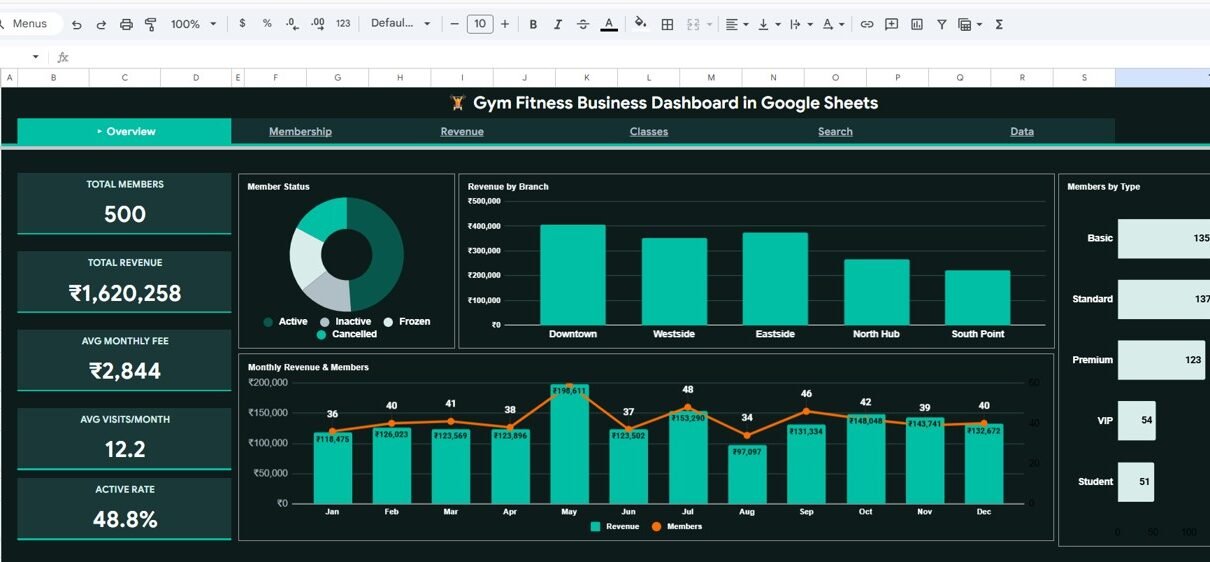
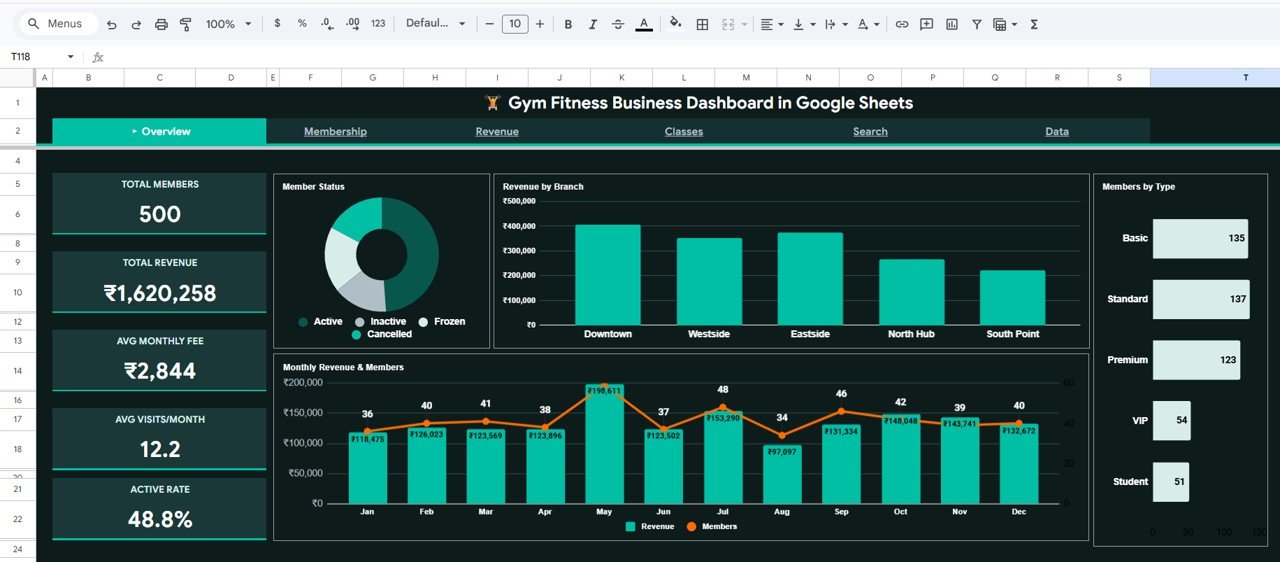
The Overview page serves as your command center for gym business performance. At the top, you will find 5 high-level KPI cards displaying Total Members, Total Revenue, Avg Monthly Fee, Avg Visits/Month, and Active Rate. These cards give you an instant snapshot of your gym’s health.
Below the KPI cards, the dashboard features several interactive charts for deeper analysis. The Member Status by Category chart breaks down your membership base by their current status. The Revenue by Branch chart shows how each of your gym locations is performing financially. The Monthly Revenue and Members by Month chart tracks both revenue and membership growth trends over time. The Members by Type chart segments your membership base by plan type such as basic, premium, or VIP.
Multiple slicers are provided on this page so you can quickly filter the entire dashboard by branch, membership type, member status, and other dimensions to see exactly the data you need.
Gym Fitness Business Dashboard in Google Sheets
Click here to Purchase Gym Fitness Business Dashboard in Google Sheets
2. Membership Analysis
The Membership Analysis page provides a deep dive into your gym’s member demographics and engagement patterns. This sheet tracks several critical metrics including New Members (Q4) showing recent acquisition trends, Male/Female Ratio for gender diversity insights, Avg Age of your member base, and Retention Rate to measure how well you keep members engaged.
The charts on this page include Age Group Distribution by Age Bucket which segments members into age ranges for targeted marketing. The Gender Split by Membership Type chart reveals which plans are more popular with different genders. Age vs Monthly Visits by Member shows the correlation between member age and gym visit frequency. Finally, Members by Referral Source helps you identify which acquisition channels bring in the most members.

Membership Analysis
3. Revenue Analysis
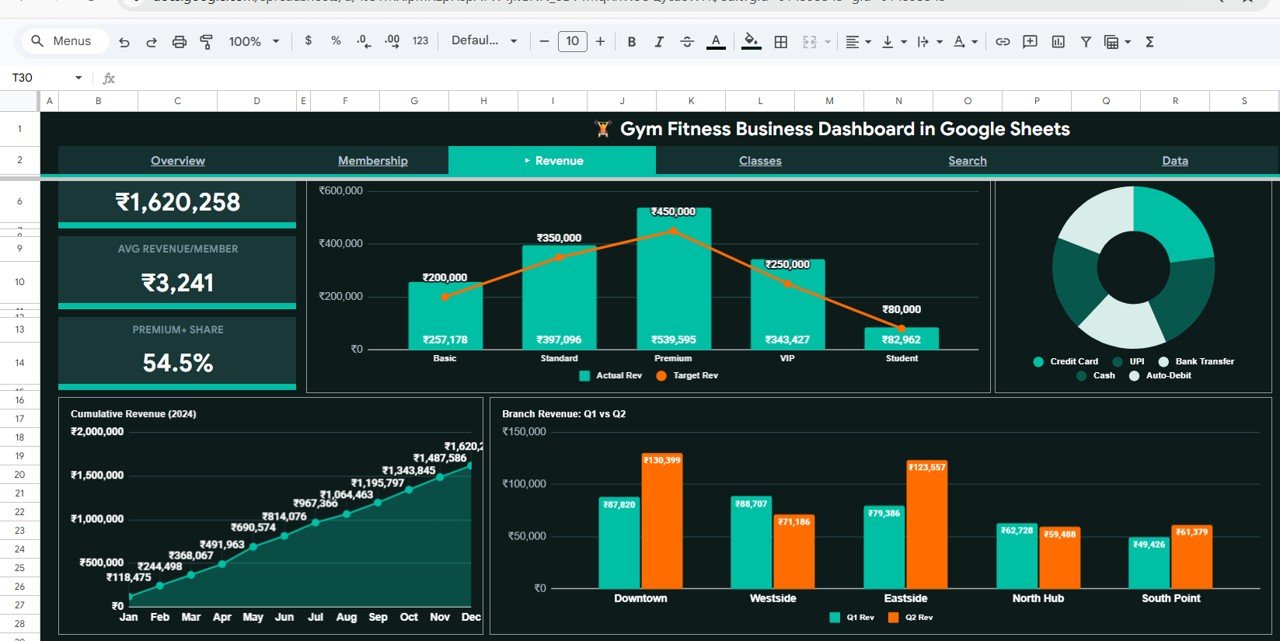
The Revenue Analysis page gives you full financial visibility into your gym business. At the top, KPI cards display Total Revenue, Avg Revenue/Member, and Premium % Share to show the financial health of your operation.
The charts include Actual vs Target Revenue by Membership Type so you can see which membership plans are meeting or exceeding their revenue goals. The Payment Method Distribution by Type chart shows how members prefer to pay. Cumulative Revenue by Month tracks your revenue growth trajectory throughout the year. The Branch Revenue Q1 vs Q2 by Branch chart enables quarterly comparisons across different gym locations to identify growth trends and underperforming branches.
Revenue Analysis
Click here to Purchase Gym Fitness Business Dashboard in Google Sheets
4. Classes Analysis
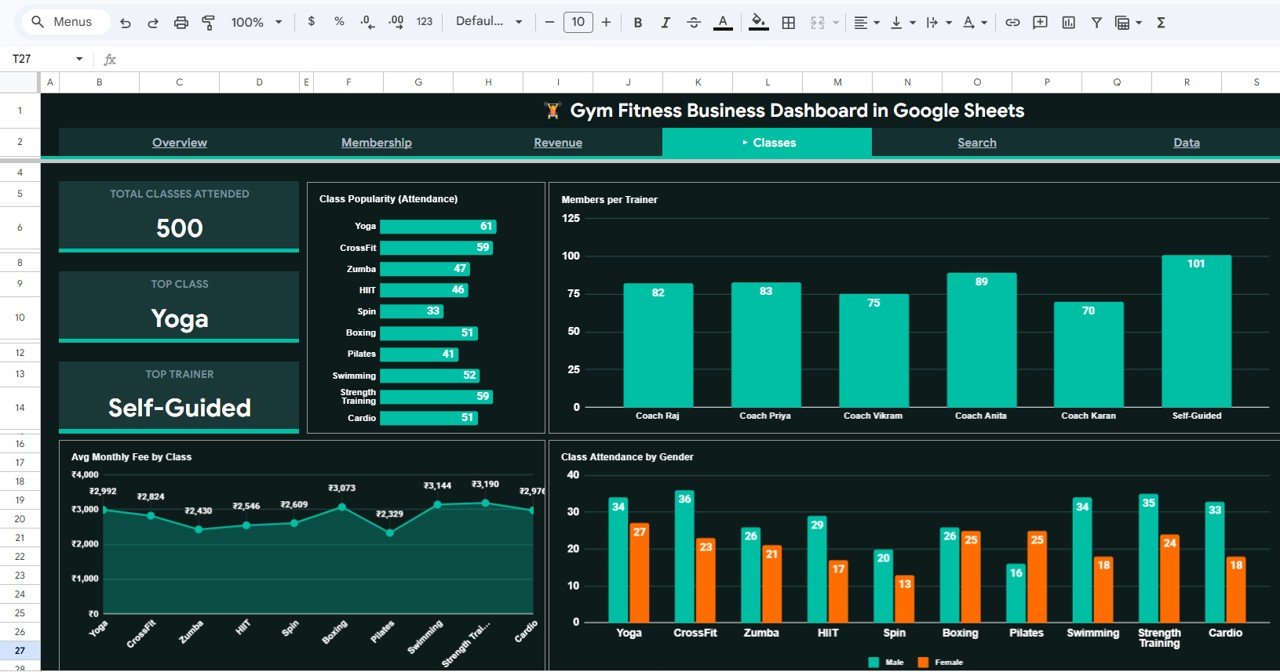
The Classes Analysis page focuses on your gym’s group fitness offerings and trainer effectiveness. KPI cards at the top show Total Classes Attended, Top Class (the most popular class type), and Top Trainer (the trainer with the highest attendance).
The charts provide detailed breakdowns: Class Popularity by Class Type ranks all your class offerings by attendance. Members per Trainer helps you balance workload across your training staff. Avg Monthly Fee by Class shows the revenue potential of each class type. Class Attendance by Gender reveals which classes attract more male or female members, helping you optimize your class scheduling and marketing.
Classes Analysis
5. Search Sheet
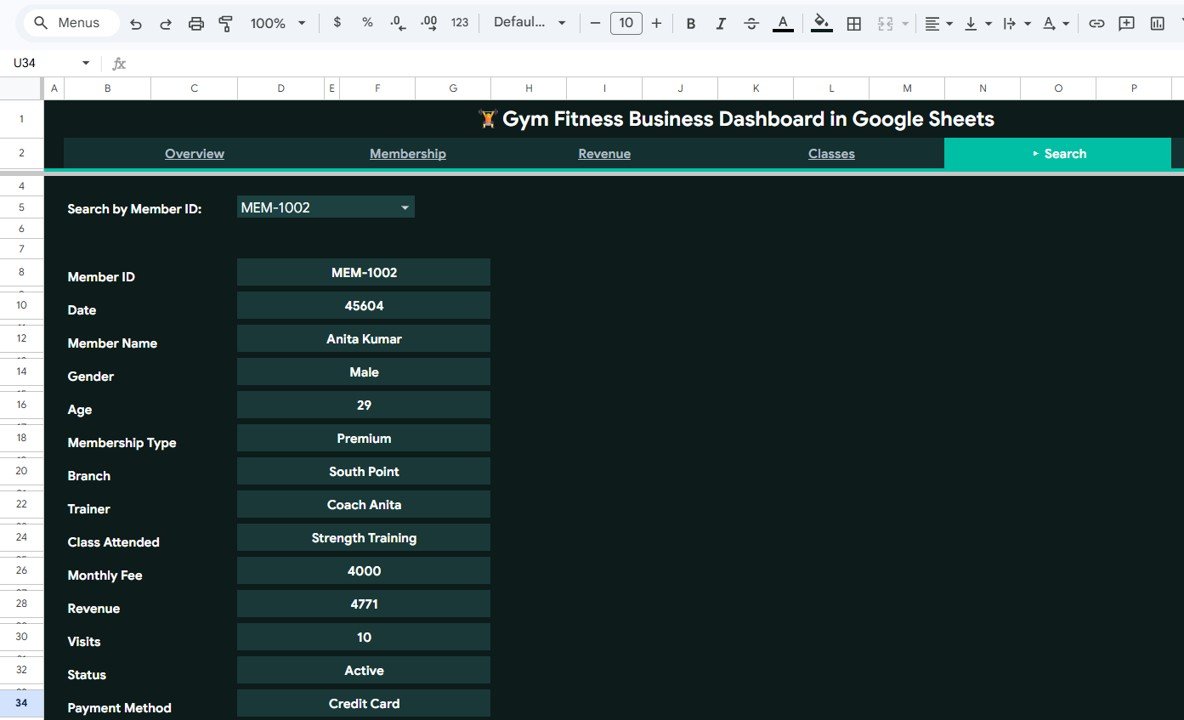
The Search Sheet tab allows you to quickly search and view complete details of any member by selecting their Member ID from the dropdown. It instantly displays the member name, gender, age, membership type, branch, trainer, class attended, monthly fee, revenue, visits, status, and payment method. This is incredibly useful for front desk staff, trainers, and managers who need quick access to individual member information without scrolling through large datasets.
Search Sheet tab
6. Data Sheet
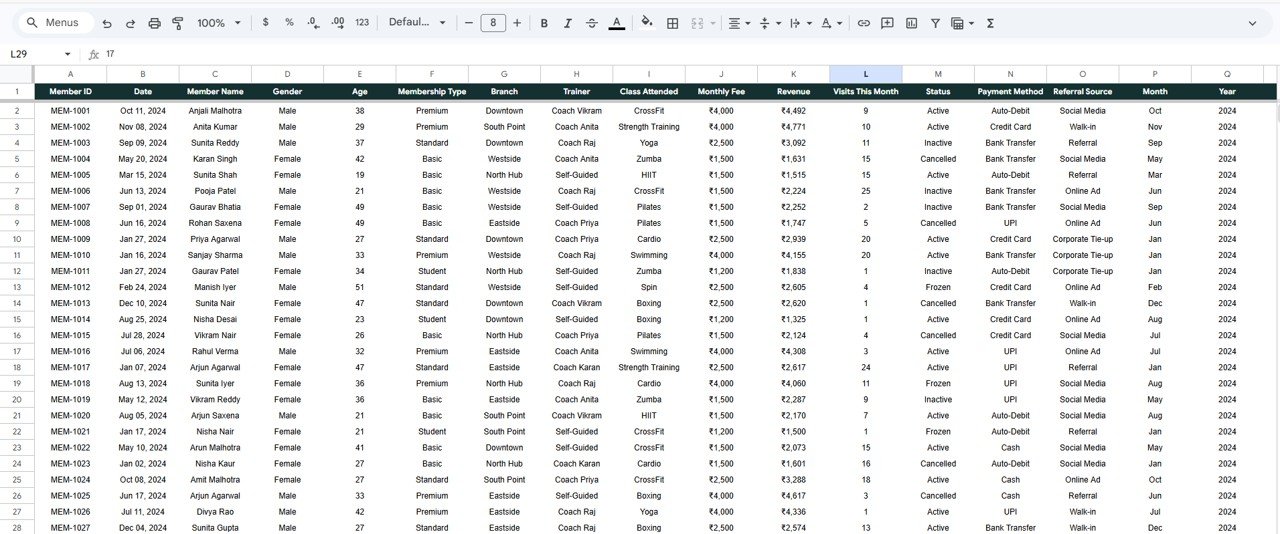
The Data Sheet is where you enter and manage all your raw member data. Simply add your gym member records in the same format as the sample data provided, and all dashboard pages, charts, and KPI cards will update automatically. This sheet serves as the single source of truth for the entire dashboard.
Data Sheet tab
Click here to Purchase Gym Fitness Business Dashboard in Google Sheets
Advantages of Gym Fitness Business Dashboard in Google Sheets
- Complete Business Visibility: Six dedicated analysis pages ensure you never miss a critical metric — from high-level KPIs to individual member details.
- Zero Setup Required: The dashboard comes pre-built with formulas, charts, and conditional formatting. Just replace the sample data and you are ready to go.
- Real-Time Collaboration: Since it runs on Google Sheets, multiple team members can view and update the dashboard simultaneously from any location.
- Branch-Level Comparisons: Multi-branch gym operators can compare revenue, membership, and performance across locations to identify growth opportunities.
- Cost-Effective Solution: No expensive BI software needed — everything runs inside Google Sheets with your free Google account.
- Mobile Accessible: Check your gym’s performance on the go using the Google Sheets mobile app on any smartphone or tablet.
Opportunities for Improvement
Click here to Purchase Gym Fitness Business Dashboard in Google Sheets
- Integrate with gym management software like Mindbody or Zen Planner via Google Sheets API connectors for automated data updates.
- Add predictive analytics using Google Sheets trending functions to forecast membership growth and revenue for the next quarter.
- Create automated email alerts using Google Apps Script when key metrics like retention rate or active rate drop below threshold values.
- Expand the dashboard with a dedicated Trainer Performance scorecard page that tracks individual trainer ratings and class fill rates.
Best Practices
- Update Data Weekly: Enter new member records and update visit counts at least once a week to keep the dashboard current and actionable.
- Use Slicers Strategically: Leverage the Overview page slicers to drill down into specific branches, membership types, or time periods before making business decisions.
- Monitor Retention Rate Closely: Retention is the lifeblood of any gym business. If the Membership Analysis page shows declining retention, investigate immediately.
- Compare Branches Quarterly: Use the Revenue Analysis page’s Q1 vs Q2 branch comparison to identify underperforming locations and allocate marketing budgets accordingly.
- Share with Your Team: Give view access to trainers and front desk managers so everyone stays aligned on business goals and member engagement.
Explore Relevant Templates
If you are looking for more fitness and gym analytics templates, check out these related products on NextGenTemplates:
- Gym Fitness Business Dashboard in Power BI – Advanced interactive visuals and drill-through capabilities using Power BI Desktop.
- Gym Fitness Business Dashboard in Excel – Full-featured Excel version with pivot tables, slicers, and automated charts.
- Fitness Industry KPI Scorecard in Google Sheets – MTD/YTD KPI tracking with trend analysis and target comparisons.
- Fitness Studios Dashboard in Excel – Comprehensive fitness studio tracking with scheduling and revenue metrics.
You can also explore our full collection of Google Sheets Dashboard Templates for more business analytics solutions.
For more tips on working with Google Sheets dashboards, visit the official Google Sheets functions reference.
FAQs
Click here to Purchase Gym Fitness Business Dashboard in Google Sheets
What is the best Google Sheets dashboard for tracking gym business performance?
The Gym Fitness Business Dashboard in Google Sheets is one of the most comprehensive options available. It includes 6 interactive pages covering membership analysis, revenue tracking, class analytics, trainer performance, and individual member search — all updating automatically from a single data sheet.
How do I set up the Gym Fitness Business Dashboard in Google Sheets?
Setup is simple. Open the PDF guide included in your download, click the Google Sheets copy link to create your own editable copy in Google Drive, then navigate to the Data Sheet tab and replace the sample data with your own gym member records. All charts and KPIs update automatically.
Can I track multiple gym branches with this dashboard?
Yes. The dashboard includes branch-level analysis across multiple pages. The Overview shows Revenue by Branch, while the Revenue Analysis page provides Branch Revenue Q1 vs Q2 comparisons. Simply include branch information in your Data Sheet and all branch-level charts populate automatically.
What KPIs does the Gym Fitness Business Dashboard track?
The dashboard tracks over 20 KPIs across 4 analysis pages including Total Members, Total Revenue, Avg Monthly Fee, Avg Visits/Month, Active Rate, Retention Rate, New Members, Male/Female Ratio, Avg Age, Avg Revenue/Member, Premium % Share, Total Classes Attended, and many more.
Do I need coding or advanced Google Sheets skills?
No. The dashboard is completely pre-built with all formulas, charts, and formatting in place. You only need to enter your data in the Data Sheet tab. No formulas, scripts, or coding knowledge required.
Is there an Excel or Power BI version of this gym dashboard?
Yes. NextGenTemplates offers the same Gym Fitness Business Dashboard in Excel and Power BI formats as well, so you can choose the platform that best fits your workflow.
Conclusion
The Gym Fitness Business Dashboard in Google Sheets is an essential tool for any fitness business owner who wants to make data-driven decisions. With 6 interactive dashboard pages, 5 KPI cards, deep membership analytics, comprehensive revenue tracking, class and trainer performance analysis, and an instant member search feature, this template delivers everything you need to run a more profitable and efficient gym.
Stop guessing and start tracking. Replace the sample data with your own, apply the slicers to focus on what matters most, and let the dashboard do the heavy lifting for your fitness business analytics.
Click here to Purchase Gym Fitness Business Dashboard in Google Sheets
Visit our YouTube channel to learn step-by-step video tutorials.
Youtube.com/@NeoTechNavigators