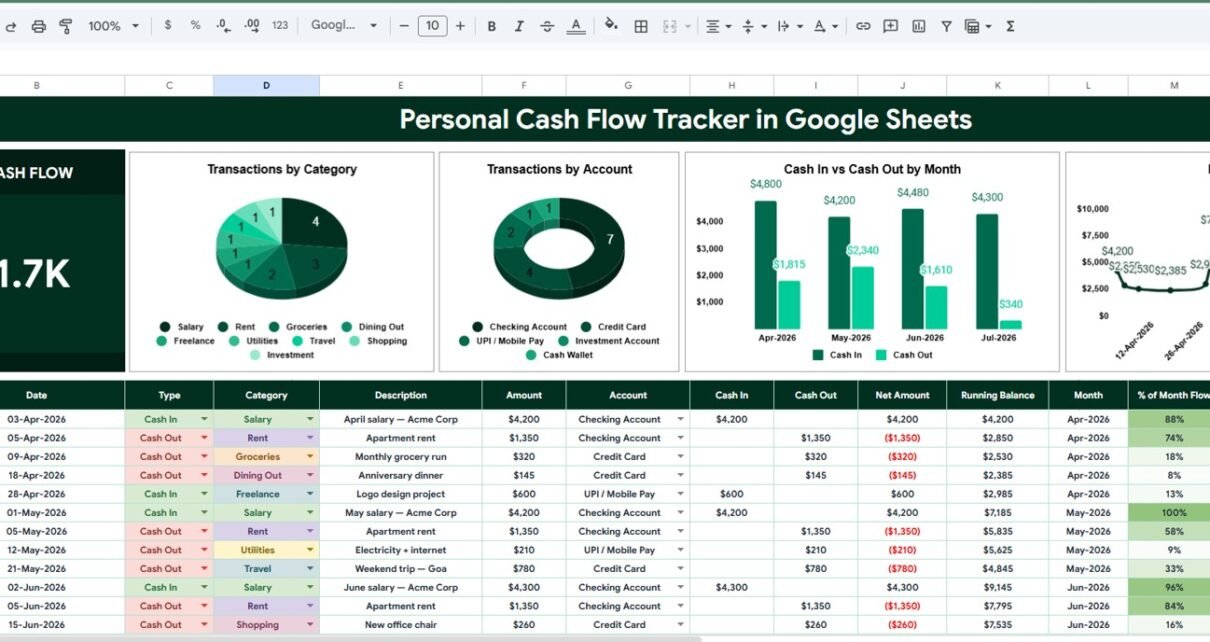
Managing money gets easier when cash movement is visible. The Personal Cash Flow Tracker in Google Sheets is designed for people who want a simple way to review cash in, cash out, net cash flow, accounts, categories, and dates without signing up for a budgeting app or connecting bank credentials.Personal Cash Flow Tracker in Google Sheets
The need is real. The FINRA Foundation’s 2024 National Financial Capability Study reported that 26% of U.S. adults were spending more than their income, while only 38% were spending less than their income. A tracker does not solve every money problem by itself, but it gives you the clean visibility needed to make better weekly and monthly decisions.
This Google Sheets tracker is built around a practical dashboard workflow: enter transactions, use setup lists to keep labels consistent, then review the Overview Page with cards, charts, and slicers. Because it lives in Google Sheets, you can copy it to Drive, customize it, and share it with a partner, coach, or advisor. Google also provides built-in sharing and collaboration features for Sheets through Google Docs Editors sharing controls.
Get the Personal Cash Flow Tracker in Google Sheets
Key Features of Personal Cash Flow Tracker in Google Sheets
- Net Cash Flow card: See the high-level difference between cash in and cash out at the top of the dashboard.
- Transactions by Category: Understand which categories create the most financial activity.
- Transactions by Account: Compare movement across checking, savings, card, cash, wallet, or custom accounts.
- Cash In and Cash Out by Month: Review monthly inflows and outflows in one visual view.
- Net Cash Flow by Date: Track whether daily or weekly cash flow is moving in the right direction.
- Multiple slicers: Filter the dashboard quickly by date, category, account, or transaction type.
- Setup List tab: Keep transaction types, categories, and accounts standardized.
- Editable Google Sheets file: Customize labels and use it in your own Drive workspace.
- One-time purchase: Use the tracker without a monthly subscription for the template.
Dashboard Pages Explanation
1 – Overview Page
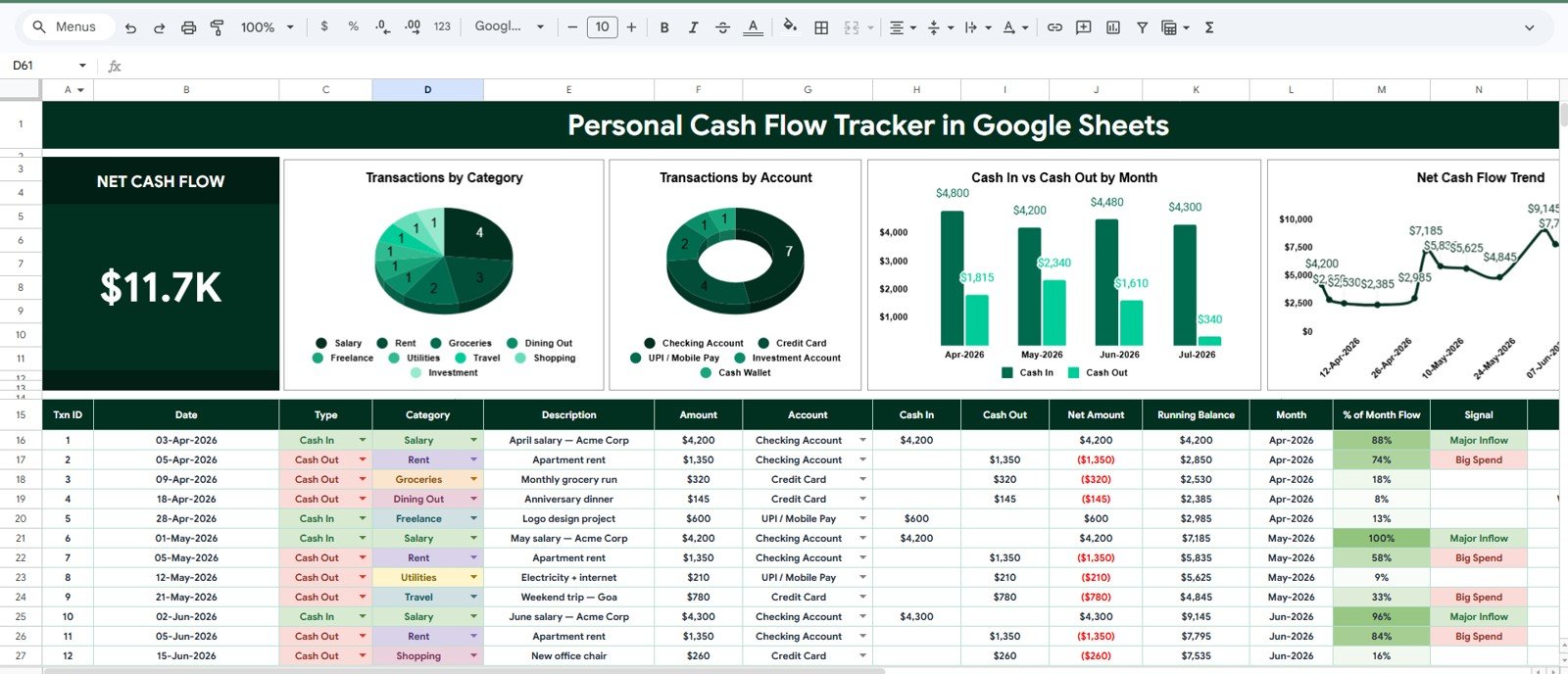
The Overview Page is the main dashboard for reviewing personal cash flow. At the top, the Net Cash Flow card gives a quick summary of whether inflows are ahead of outflows for the selected period.
Transactions by Category: This chart groups transaction activity by category, such as income, rent, groceries, utilities, subscriptions, savings, or custom labels. It helps you spot the categories that deserve the most attention during a money review.
Transactions by Account: This chart organizes cash flow activity by account. It is useful when you want to see whether most activity is happening in checking, savings, credit card, cash wallet, business account, or another account type.
Cash In and Cash Out by Month: This chart compares inflows and outflows month by month. It makes high-expense months and stronger savings months easier to identify without manually scanning every row.
Net Cash Flow by Date: This trend chart shows how net cash flow changes over time. It can help you recognize whether recent financial habits are strengthening or weakening your cash position.
2 – Setup List
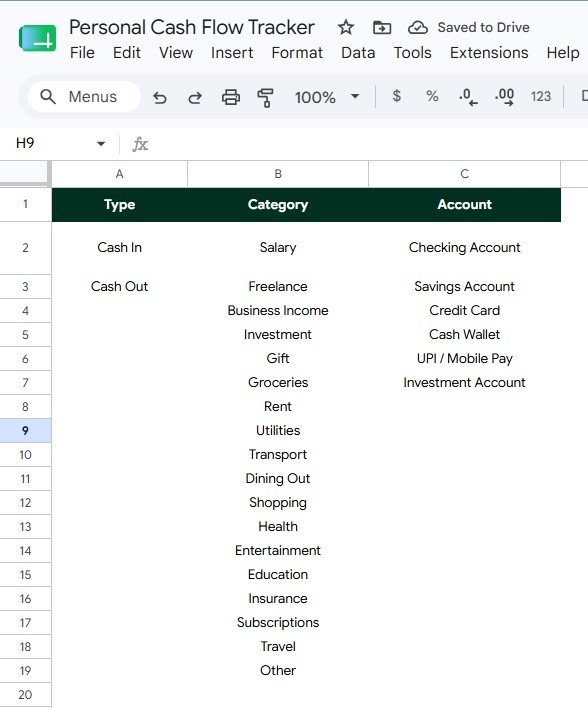
The Setup List tab keeps the tracker organized behind the scenes. It stores the values used for dropdowns and analysis so your dashboard stays consistent as more transactions are added.
Transaction Options by Type: This setup area controls transaction types such as cash in, cash out, transfer, adjustment, or any label you prefer. Consistent types help the tracker separate inflows from outflows correctly.
Cash Flow Categories by Category: This list stores your cash flow categories. You can customize it for salary, freelance income, rent, groceries, debt payments, subscriptions, savings, business expenses, or any other personal finance group.
Account Options by Account: This list keeps account names consistent across transaction records. It is helpful when you track cash movement across multiple accounts and want cleaner chart results.
Personal Cash Flow Tracker in Google Sheets vs. Microsoft Excel vs. Paid Budgeting SaaS – Feature Comparison
| Feature | Google Sheets tracker | Microsoft Excel tracker | Paid budgeting SaaS |
|---|---|---|---|
| Cost | One-time template purchase | Template cost plus any Microsoft license | Usually monthly or annual |
| Platform | Google Sheets in Drive | Excel desktop, web, or OneDrive | Vendor-hosted app |
| Bank login required | No | No | Often optional or encouraged |
| Customization | Edit categories, accounts, and labels | Editable when workbook is open | Limited by app settings |
| Collaboration | Share with Google Drive permissions | Share through Microsoft tools | Depends on plan |
| Dashboard views | Cards, charts, slicers, and setup lists included | Depends on workbook design | Depends on app features |
| Best fit | Manual, flexible cash flow review | Desktop-heavy spreadsheet users | People who want automation and recurring software |
Who Should Use This Template
This template is useful for individuals who want to understand where money is going, couples who review household spending together, students who need a simple finance habit, freelancers with uneven income, finance coaches who want a visual review tool, and small business owners who want a lightweight cash flow snapshot.
It works best when you are willing to enter or paste transactions regularly. It is not built for automatic bank syncing, bill payment, investment tracking, tax filing, or regulated financial planning. For those workflows, use a specialist app or professional advisor alongside this spreadsheet.
Real-World Use Cases
Household monthly review: A couple enters weekly transactions and uses the Overview Page to decide how much can go toward savings, debt, or upcoming expenses.
Freelancer cash planning: A freelancer records client payments and business expenses, then checks whether the current month is building enough cushion for taxes and slow weeks.
Finance coaching session: A coach asks a client to maintain a copy of the tracker, then reviews categories and accounts during a session to identify patterns and next actions.
Student budget habit: A student tracks allowance, part-time income, subscriptions, food, transportation, and savings to build awareness before expenses pile up.
Advantages of Personal Cash Flow Tracker in Google Sheets
- Simple structure: The tracker focuses on cash movement instead of trying to become a full finance suite.
- Clear visual feedback: Cards and charts turn transaction rows into a reviewable dashboard.
- Flexible labels: Setup lists let you adapt categories and accounts to your real life.
- Accessible anywhere: Use it from Google Sheets on desktop or mobile after copying it to Drive.
- No bank credentials: Manual entry keeps the workflow lightweight and private.
Opportunities for Improvement
No template is perfect for every workflow. If you need automated bank feeds, receipt scanning, payment reminders, investment performance, or tax reports, this tracker will not replace dedicated personal finance software. Some users may also prefer a Microsoft Excel version if their household already works mainly in Excel.
The best way to use this template is to treat it as a focused cash flow review system. Keep categories clean, enter transactions consistently, and review the dashboard at a regular cadence.
Best Practices
- Update transactions at least once per week so the dashboard stays useful.
- Keep category names short and consistent.
- Separate true income, expenses, transfers, and adjustments using transaction type.
- Use notes for unusual transactions so you remember the reason later.
- Review cash in and cash out by month before setting the next month’s budget.
- Protect formula or dashboard areas if you share the file with another editor.
Explore Relevant Templates
- Tracker Toolkit for a larger bundle of Excel and Google Sheets trackers.
- Emergency Fund Savings Tracker in Google Sheets for building a safety net.
- Savings Goal Tracker in Google Sheets for goal-based saving.
- Sinking Funds Tracker in Google Sheets for planned irregular expenses.
- Personal Finance Net Worth Tracker in Google Sheets for assets, liabilities, and net worth.
If you would like to go beyond one tracker, the NextGenTemplates Academy learning paths teach the spreadsheet skills behind templates like this, with practice files.
Get the Personal Cash Flow Tracker in Google Sheets
Frequently Asked Questions
What is the Personal Cash Flow Tracker in Google Sheets?
It is a Google Sheets template for tracking cash in, cash out, net cash flow, categories, accounts, and transaction dates with dashboard charts and slicers.
Does it connect to my bank?
No. This is a manual-entry Google Sheets tracker, so it does not require bank login credentials.
Can I customize categories and accounts?
Yes. The Setup List tab lets you edit transaction types, cash flow categories, and account options.
Can I use it for freelance income?
Yes. You can customize accounts and categories for freelance income, business expenses, household spending, and personal savings.
Can two people collaborate in the same tracker?
Yes. After copying the file to Google Drive, you can share it using Google Sheets sharing permissions.
Is it a subscription?
No. The template is sold as a one-time purchase on NextGenTemplates.
About the Author
This template was built by PK, a Microsoft Certified Professional with 15+ years of experience in Excel, Google Sheets, Power BI, dashboards, and automation. PK’s training and templates support a 300K+ subscriber learning audience across YouTube channels.
Conclusion
The Personal Cash Flow Tracker in Google Sheets gives you a focused way to review cash in, cash out, net cash flow, categories, accounts, and dates from one editable dashboard. It is simple enough for weekly use, flexible enough for household or freelance workflows, and visual enough to make cash flow conversations easier.
Last updated: July 13, 2026.